


 Video Converter Ultimate
 Bildschirm recorder
 Videoreparatur
 Sicherer Download
Bearbeiten Sie MP3 mit den besten Tools unter Windows, Mac, online und auf dem Mobiltelefon
MP3 steht für MPEG-1 Audio Layer III und ist ein Dateityp, der Musik in einem komprimierten Format speichert. Diese Art von Datei ist deutlich kleiner als unkomprimierte Audiodateien, was das Speichern und Übertragen erleichtert. Da immer mehr Musik produziert wird, suchen viele nach einfachen Wegen, MP3s zu bearbeiten, um sie besser klingen zu lassen. Denn MP3 kann durchaus besser klingen als die ursprüngliche unkomprimierte Aufnahme. Das Problem ist, dass Bearbeitungssoftware teuer sein und einen leistungsstarken Computer erfordern kann. Glücklicherweise zeigt dir dieser Leitfaden, wie du die meistempfohlenen MP3-Editoren nutzt, damit du deine Musik auf allen von dir verwendeten Plattformen bearbeiten kannst. Was auch immer du brauchst – hier ist der beste Einstiegspunkt!

Teil 1. Beste Wahl zum Bearbeiten von MP3 mit dem All-in-One-MP3-Editor
Die erste Software zum Bearbeiten einer MP3-Datei ist das handverlesene FVC-Programm Video Converter Ultimate. Ja, es ist ein Medienkonverter, der nicht nur auf Videos, sondern auch auf Audiodateien ausgerichtet ist. Damit kannst du die Lautstärke ganz einfach auf das Doppelte erhöhen oder bis auf ein Flüstern verringern. Außerdem kannst du die Wiedergabegeschwindigkeit erhöhen oder verlangsamen, ohne dich in technische Einstellungen vertiefen zu müssen.
Darüber hinaus kann es Hintergrundgeräusche entfernen, unerwünschte Teile ausschneiden, Dateien in Abschnitte aufteilen und sogar Sprachaufnahmen bearbeiten. Darüber hinaus bietet es eine benutzerfreundliche Oberfläche, mit der dieses Programm selbst Anfängern in der Audiobearbeitung all diese Dinge in nur wenigen Schritten leicht macht. Sie werden auch die fortschrittliche Technologie lieben, die es bietet, wie Hardwarebeschleunigung, NVIDIA, Intel, AMD und die KI-gestützten Bearbeitungstools, die Sie verwenden können.
Hauptfunktionen:
• Audiokonvertierung, die bis zu 120-mal schneller konvertiert.
• Unterstützung für mehr als 1000 verschiedene Formate.
• Audiodateien nahtlos teilen, schneiden und zusammenführen.
• Bearbeiten Sie die MP3-Länge ohne jegliche Einschränkungen.
• Komprimieren Sie Audiodateien auf die gewünschte Größe.
• Ändern Sie Encoder, Abtastrate, Kanal und Bitrate der MP3-Datei.
Gratis DownloadFür Windows 7 oder neuerSicherer Download
Gratis DownloadFür MacOS 10.7 oder neuerSicherer Download
Wie man Audiodateien mit FVC bearbeitet
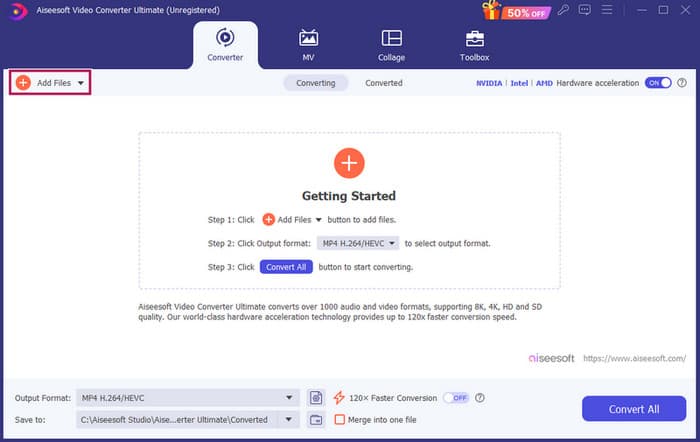
Schritt 1. Nach dem Start der Software kannst du MP3-Dateien hinzufügen, indem du auf die Schaltfläche Dateien hinzufügen klickst. Alternativ kannst du die Dateien aus ihrem Speicherort herausziehen und in die Bearbeitungssoftware hineinziehen.
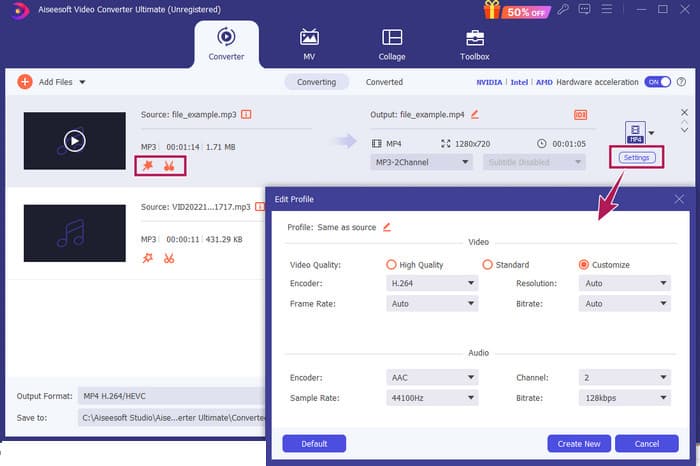
Schritt 2. Sobald die Dateien geladen sind, kannst du über die Stern-Schaltfläche auf der Miniaturansicht die Lautstärke- und Verzögerungseinstellungen aufrufen. Die Scheren-Schaltfläche wird verwendet, um auf das Zusammenführen, Aufteilen und Schneiden zuzugreifen. Und natürlich gibt es die Schaltfläche Einstellungen, um den Profil-Editor zu öffnen.
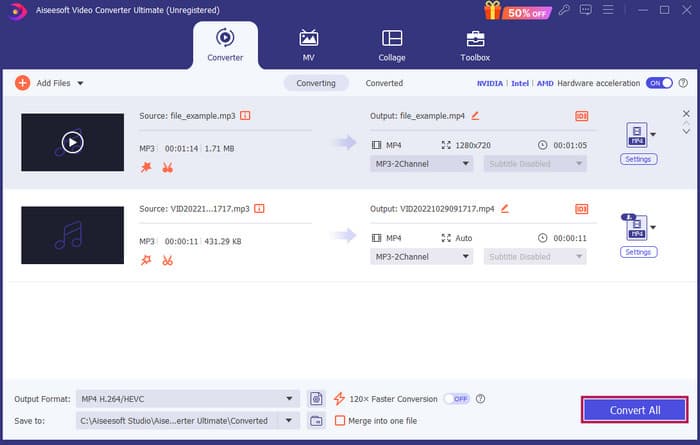
Schritt 3. Nach der Bearbeitung der Dateien musst du auf die Schaltfläche Alles konvertieren klicken. So bearbeitest du MP3s unter Windows 10 mit FVC.
Fazit: FVC Video Converter Ultimate kann deine All-in-one-Lösung sein, nicht nur zum Verbessern oder Anpassen von MP3s, sondern auch als großartiges Tool zur Konvertierung. Uns gefällt, wie einfach und schnell die Audiobearbeitung ist. Auch wenn sich die meisten Werkzeuge im Werkzeugkasten auf Videodateien beziehen, verbergen sich dort dennoch leistungsstarke Audioeditoren. Daher ist es unsere persönliche Empfehlung für eine effiziente und einfache Dateibearbeitung, die besonders für Einsteiger ideal ist.
Teil 2. MP3 mit Adobe Audition unter Windows bearbeiten
Adobe Audition ist eine der bekanntesten Optionen für professionelle Audiobearbeitung und wird gleichermaßen von Musikern, Podcastern und Tontechnikern verwendet. Das Programm ist dafür bekannt, leistungsstark und dennoch leicht zu bedienen zu sein. Außerdem bietet es Funktionen wie das gleichzeitige Aufzeichnen und Bearbeiten mehrerer Tonspuren, das Hinzufügen von Spezialeffekten, die du sofort beim Erstellen hören kannst, sowie eine Bibliothek mit Sounds, die du in deinen Projekten einsetzen kannst. Du kannst es dir auch als gut gestaltetes Upgrade eines älteren Programms namens Cool Edit Pro vorstellen. Darüber hinaus kannst du MP3s bearbeiten, das Layout an deine Vorlieben anpassen und mit bis zu 40 separaten Tonspuren gleichzeitig arbeiten. Es gibt außerdem ein Mischpult, Bearbeitungswerkzeuge und sogar ein Tool, um Musikinstrumente zu deinem Projekt hinzuzufügen.
Hauptfunktionen:
• Bearbeiten Sie eine ganze Reihe von Audiodateien mit nur einem Klick.
• Fügen Sie coole Filter und Effekte hinzu, um Ihrem Audio einen fantastischen Klang zu verleihen.
• Kombinieren Sie verschiedene Audiospuren, um einen raffinierten Sound zu erzeugen.
• Korrigieren und verbessern Sie Ihren Gesang mit leistungsstarken Tools.
Wie man Audiodateien mit Adobe Audition bearbeitet
Schritt 1. Öffne das Programm und importiere die MP3-Dateien, indem du zu Datei–Öffnen navigierst.
Schritt 2. Zur Bearbeitung kannst du den Wellenform-Editor verwenden, um eine einzelne Spur im Detail zu bearbeiten. Für mehrere Audiospuren nutzt du den Multitrack-Editor.
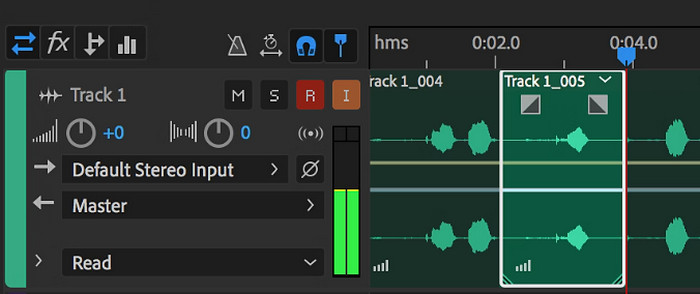
Schritt 3. Wenn du mit der Bearbeitung fertig bist, kannst du weitere Werkzeuge des Programms wie Effekte erkunden. Sobald du alles Notwendige erledigt hast, kannst du das Audioprojekt speichern. So bearbeitest du MP3s unter Windows mit Adobe Audition.
Fazit: Adobe Audition ist in der Tat ein herausragender, wenn auch klassischer Audioeditor. Kein Wunder, dass viele Cutter weiterhin daran festhalten. Für Einsteiger, die keine komplizierte Navigation möchten, ist Adobe Audition jedoch möglicherweise nicht die beste Wahl.
Teil 3. MP3 mit iTunes auf dem Mac bearbeiten
iTunes ist wie Ihr Musikmanager, der alle Ihre Lieblingssongs auf Ihrem Computer organisiert. Stellen Sie es sich als eine digitale Box vor, in der Sie Ihre Musiksammlung einfach nach Künstler, Album oder sogar Genre sortieren können. Außerdem können Sie fehlende Informationen wie Songtitel oder Künstlernamen korrigieren, sodass Sie immer finden, wonach Sie suchen. Mit diesem Media Player bzw. Editor können Sie benutzerdefinierte Soundtracks oder Wiedergabelisten für unterschiedliche Stimmungen oder Aktivitäten erstellen, beispielsweise einen Workout-Mix oder eine Wiedergabeliste zum Entspannen.
Und das Beste daran? iTunes ist super benutzerfreundlich. Selbst wenn Sie kein Technikfreak sind, können Sie Ihrer Bibliothek schnell und einfach Songs hinzufügen, sie ordentlich organisieren und sie problemlos wiedergeben. Zwar kann es nicht so ausgefallene Bearbeitungen durchführen wie die anderen Programme, aber es ist eine großartige Wahl für grundlegende Aufgaben wie das Entfernen unerwünschter Stille am Anfang oder Ende Ihrer MP3-Dateien. Wir zeigen Ihnen, wie Sie MP3s auf Mac und Windows in wenigen einfachen Schritten bearbeiten können!
Hauptfunktionen:
• Verwaltet und erstellt eine digitale Bibliothek mit Audiodateien.
• Neben MP3 unterstützt es auch verschiedene Audioformate, darunter WAV, AIFF, Apple Lossless und AAC.
• Es ermöglicht die Bearbeitung von MP3-Dateiinformationen wie Künstler, Album, Genre und Erscheinungsjahr.
Wie man Audiodateien mit iTunes bearbeitet
Schritt 1. Starte das Programm und lade die MP3-Datei. Gehe zum Bereich Datei und wähle die Option Datei zur Mediathek hinzufügen oder eine ähnliche Option. Wähle dann die MP3-Datei von deinem Gerät aus, die du zuschneiden möchtest.
Schritt 2. Gehe nun erneut zu Datei und wähle Mediathek. Stelle sicher, dass die MP3-Datei dort aufgeführt ist. Klicke dann mit der rechten Maustaste darauf und wähle Informationen abrufen.
Schritt 3. Jetzt kannst du die Schnittpunkte festlegen. Gehe dazu im Fenster Informationen abrufen zum Reiter Optionen und suche nach Start- und Stoppzeit. Lege nun den Anfangs- und Endpunkt des Abschnitts fest, den du behalten möchtest. Wenn du fertig bist, kannst du die Änderungen speichern, indem du auf die OK-Schaltfläche klickst.
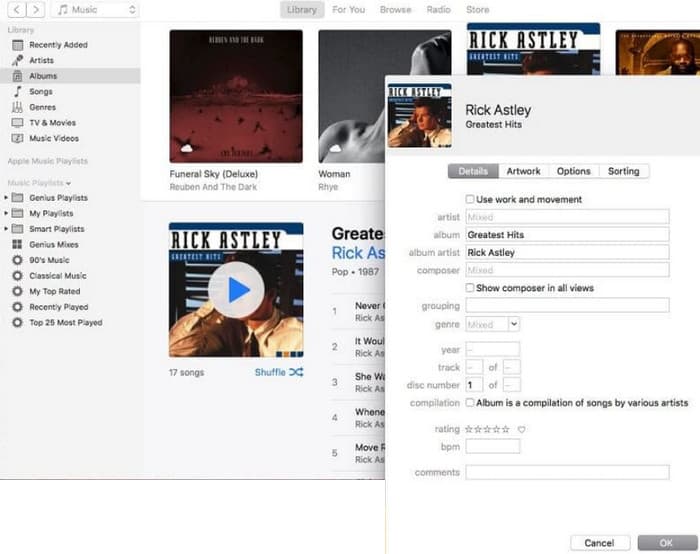
Fazit: iTunes bietet bei Bedarf grundlegende MP3-Bearbeitung und -Verbesserung. Da es jedoch kein dedizierter Audioeditor ist, der eine MP3 umfassend bearbeitet, könntest du von den eingeschränkten Funktionen enttäuscht sein.
Teil 4. MP3 mit einem Online-MP3-Editor bearbeiten
Clideo ist ein vielversprechender MP3-Cutter und -Editor für alle, die ein Online-Audiotool zum Zuschneiden ihrer MP3-Dateien nutzen möchten. Es ist ein Webtool, das auf jedem Gerät funktioniert, sodass du keine Software herunterladen musst. Clideo ermöglicht es dir, bestimmte Teile deiner Audiodatei auszuschneiden, indem du die exakten Start- und Endzeiten festlegst oder einfach Markierungen auf dem Bildschirm verschiebst.
Darüber hinaus werden verschiedene Dateitypen unterstützt, sodass Sie praktisch jede Musikdatei bearbeiten können, die Sie haben. Darüber hinaus können Sie mit Clideo Effekte wie Ein- und Ausblenden hinzufügen, um einen sanfteren Klangübergang am Anfang und Ende Ihres Clips zu erzielen. Insgesamt ist Clideo ein benutzerfreundliches und vielseitiges Tool, mit dem das Bearbeiten Ihrer Audiodateien zum Kinderspiel wird.
Hauptfunktionen:
• Schneiden Sie unerwünschte Teile Ihrer Audiodateien mühelos heraus.
• Ein- und Ausblendeffekte hinzufügen.
• Es unterstützt verschiedene Audioformate.
Wie man Audiodateien mit Clideo bearbeitet
Schritt 1. Sobald du die offizielle Seite von Clideo aufgerufen hast, wechsle zu seinem Audio-Cutter.
Schritt 2. Um MP3-Dateien hochzuladen, klicke auf die Schaltfläche Datei wählen. Sobald der Import der Datei erfolgreich war, kannst du mit der Bearbeitung beginnen.
Schritt 3. Stelle den Ziehregler auf die gewünschte Länge ein und klicke dann auf Exportieren, um die Änderungen zu speichern.
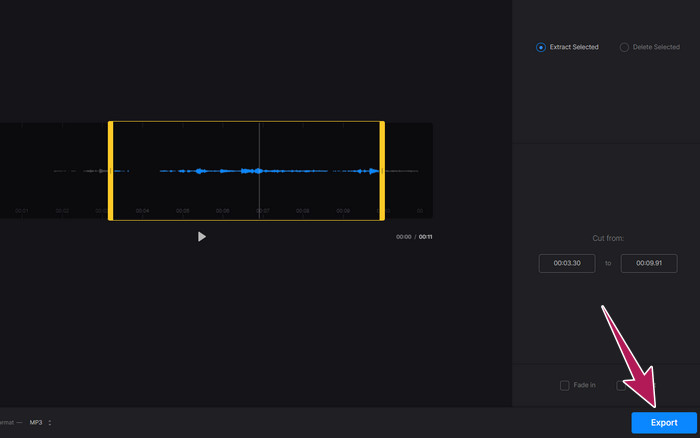
Fazit: Clideo ist ein Online-Tool, das mehrere Werkzeuge zur Bearbeitung von MP3s und anderen Dateitypen, einschließlich Videos, bereitstellt. Du solltest jedoch im Hinterkopf behalten, dass Online-Tools wie Clideo in puncto Sicherheit unsicher sein können, da sie anfälliger sind als Offline-Programme.
Teil 5. MP3 mit einer mobilen App auf iPhone/Android bearbeiten
Der letzte MP3-Editor, den ich empfehle, ist eine App, die du auf Android und iOS installieren kannst. Sie heißt WavePad und bietet viele Funktionen, wodurch sie anfangs etwas kompliziert wirken mag. Mit dieser App kannst du Clips schneiden und trimmen, die Tonhöhe deiner Stimme verändern und sogar Hintergrundgeräusche entfernen. Außerdem bearbeitet sie MP3s auf iPhone und Android mit einer Menge Soundeffekten und Musik, die du kostenlos zu deinen Aufnahmen hinzufügen kannst. Sie verfügt über einen integrierten Equalizer, mit dem du deinen Sound optimal abstimmen kannst. Neben MP3 arbeitet WavePad auch mit den gängigsten Audioformaten.
Hauptfunktionen:
• Ausschneiden, kopieren, einfügen und Sounds mit Effekten versehen.
• Unterstützung für verschiedene Audioformate wie MP3, WAV und AIFF.
• Verfügt über verschiedene Einstellungen für die Tonqualität.
Wie man Audiodateien mit WavePad bearbeitet
Schritt 1. Starte die App, tippe auf die drei Linien und wähle im Reiter Datei–Import aus Audio. Dadurch kannst du die MP3-Datei hochladen, die du bearbeiten möchtest.
Schritt 2. Rufe die Bearbeitungstools auf, indem du oben auf dem Bildschirm in den Werkzeugoptionen nach rechts wischst.
Schritt 3. Sobald du dies getan hast, kannst du auf die REC-Taste tippen, um den Teil aufzunehmen, den du aus der Datei behalten möchtest. Anschließend speicherst und exportierst du sie auf dein Gerät.
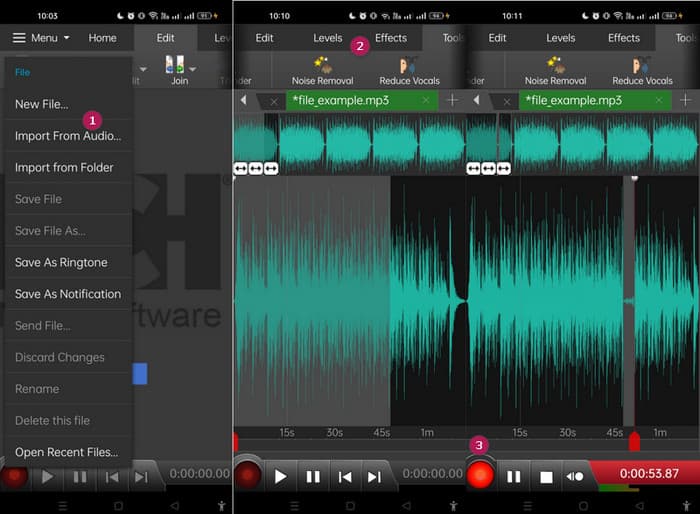
Fazit: Die kostenlose Version von WavePad enthält die meisten Funktionen, aber es gibt eine kostenpflichtige Option für $3 pro Monat, die außerdem Werbung entfernt und dir alle Funktionen freischaltet, wie sämtliche Soundeffekte und die Möglichkeit, deine Dateien in verschiedenen Formaten zu speichern. Damit kannst du MP3s auf Android oder iPhone noch umfangreicher bearbeiten.
Teil 6. Häufig gestellte Fragen zum Bearbeiten einer MP3
Kann ich einen Song in Apple Music zuschneiden?
Nein. Leider können Sie Songs nicht direkt in Apple Music zuschneiden.
Verfügt Microsoft über einen Audio-Editor?
Es stehen zahlreiche Audio-Editoren zur Verfügung, beispielsweise Audacity zum Bearbeiten von MP3, die Sie im Microsoft Store herunterladen können.
Wie schneide ich eine MP3-Datei im Windows Media Player?
Leider verfügt der Windows Media Player selbst nicht über integrierte Bearbeitungsfunktionen zum Zuschneiden von MP3-Dateien.
Fazit
Zumindest kennst du jetzt die besten Wege, um MP3s zu bearbeiten wie nie zuvor. Mit den oben empfohlenen Audioeditoren wirst du deine gewünschte Audioqualität sicher erreichen! Diese Tools bieten umfassende Lösungen für verschiedene Plattformen und sorgen für Flexibilität und Komfort, unabhängig von deinem Gerät oder Betriebssystem. Ob du eine Desktop-Anwendung, ein Online-Tool oder eine mobile App bevorzugst – du kannst mühelos Bearbeitungen in Profi-Qualität vornehmen. Vom einfachen Schneiden und Zusammenführen bis hin zu fortgeschrittenen Effekten und Verbesserungen: Der richtige Editor kann deine MP3-Dateien effizient verwandeln. Probiere die Optionen aus und beginne noch heute damit, deine Audiotracks bis zur Perfektion zu verfeinern.
-
 Top 10 FLV-Player für Windows, Mac, iOS und Android im Jahr 2024
 Mit dem FLV-Player können Sie problemlos auf Ihre FLV-Dateien auf Ihrem Windows-, Mac-, Android- und iOS-Gerät zugreifen. Schauen Sie sich die besten FLV-Datei-Player an, die Sie jetzt herunterladen können.
-
 8 besten MOV-Spieler zum Abspielen von QuickTime-MOV-Dateien in Originalqualität
 Erfahren Sie mehr über die 8 besten MOV-Player für Windows und Mac. Sie können die gewünschte und geeignete auswählen, um MOV-Dateien mit der Originalqualität abzuspielen.
-
 Holen Sie sich Ihren besten MP4-Player zum Abspielen von MP4-Dateien mit hoher visueller Qualität
 Lesen und holen Sie sich Ihren besten MP4-Player anhand der Empfehlungen der 10 neuesten MP4-Video-Player-Software. Sie können MP4-Videodateien unter Windows und Mac reibungslos und ohne Verzögerung abspielen.
