


 Video Converter Ultimate
 Bildschirm recorder
 Videoreparatur
 Sicherer Download
Konvertieren von M2TS in WMV unter Windows / Mac / Online (völlig kostenlos)
Einige Canon- und Sony-Kameras verwenden M2TS als Standardausgabeformat. Die M2TS-Videos haben eine große Dateigröße. Die Kompatibilität des M2TS-Formats ist ebenfalls nicht gut. Wenn Sie M2TS-Dateien zur weiteren Bearbeitung in Windows Movie Maker importieren möchten, müssen Sie zuerst M2TS in WMV-Video konvertieren.
Dieser Artikel zeigt Ihnen Schritt für Schritt Online- und Offline‑Möglichkeiten, um Videos vom M2TS‑ in das WMV‑Format zu konvertieren. So können Sie das M2TS‑Videoformat auf Ihrem Telefon oder Computer mühelos in WMV umwandeln.

Teil 1: Konvertieren von M2TS in WMV unter Windows und Mac
Wenn Sie nur das Videoformat ändern möchten, reicht ein kostenloser M2TS-WMV-Videokonverter aus. Sie müssen nicht für zusätzliche Funktionen bezahlen, die Sie nicht benötigen. Hier sind 2 Freeware für M2TS zu WMV-Konverter, die Sie auswählen können.
Konvertieren Sie M2TS unter Windows kostenlos in WMV
Um M2TS‑Dateien auf Ihrem Windows‑Computer in WMV zu konvertieren, können Sie FVC Free M2TS Converter verwenden. Es handelt sich um einen M2TS‑Batch‑Konverter, der M2TS‑Dateien stapelweise in WMV, MOV, MP4 und andere Video‑ und Audioformate umwandeln kann. Die integrierten Videobearbeitungstools können ebenfalls kostenlos genutzt werden. Sie können M2TS‑Videodateien bearbeiten und anpassen, bevor Sie sie konvertieren. Hier sind die Hauptfunktionen der kostenlosen M2TS‑zu‑WMV‑Konvertersoftware.

Free M2TS Converter
112,356+ Downloads- Konvertieren Sie M2TS kostenlos in WMV unter Windows 10/8/7 / Vista / XP.
- Unterstützt die Stapelkonvertierung von M2TS zu WMV.
- 50x schnellere Konvertierungsgeschwindigkeit.
- Komprimieren, Zusammenführen und Anwenden anderer Videoeffekte auf M2TS-Dateien.
- Fügen Sie Ihren M2TS-Dateien spezielle Themen hinzu, z. B. Familie, Geburtstag, Feiertage usw.
Kostenloser DownloadFür Windows 7 oder neuerSicherer Download
Kostenloser DownloadFür MacOS 10.7 oder neuerSicherer Download
Schritt 1: Laden Sie FVC Free M2TS Converter kostenlos herunter, installieren und starten Sie das Programm. Klicken Sie auf Add File(s), um mehr als eine M2TS‑Videodatei zu importieren.

Schritt 2: Wählen Sie in der Liste output format WMV als Ausgabevideoformat aus.

Schritt 3: Wenn Sie ein M2TS‑Video bearbeiten möchten, klicken Sie oben auf Edit. Anschließend können Sie innerhalb von FVC Free M2TS Converter den M2TS‑Titel, den Autor und die Zeit im Anfangs‑ und Endteil bearbeiten.

Schritt 4: Klicken Sie auf Convert, um M2TS kostenlos unter Windows in WMV umzuwandeln.
Konvertieren Sie M2TS kostenlos in WMV auf dem Mac
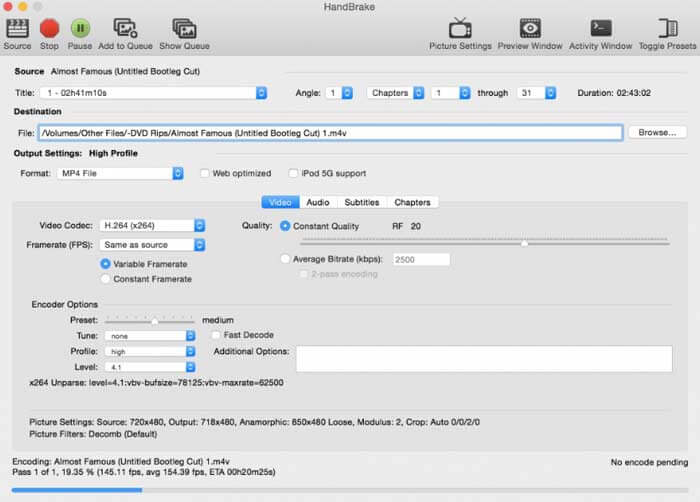
Für Mac-Benutzer können Sie HandBrake als kostenlosen Konverter von M2TS zu WMV verwenden. Hier sind die detaillierten Schritte zum kostenlosen Konvertieren von M2TS in WMV auf einem Mac mit HandBrake.
Schritt 1: Starten Sie HandBrake. Wählen Sie im Quell‑Popupfenster Ihre M2TS‑Datei aus und klicken Sie anschließend auf Open.
Schritt 2: Klappen Sie die Liste Format auf. Wählen Sie als Videoformat WMV aus.
Schritt 3: Klicken Sie auf Browse, um den Zielordner zu ändern.
Schritt 4: Klicken Sie auf Start, um die M2TS‑zu‑WMV‑Videokonvertierung auf dem Mac abzuschließen.
Teil 2: So konvertieren Sie M2TS in WMV Online
Wenn Sie nichts auf Ihrem Computer installieren möchten, können Sie auch einen Online‑Videokonverter verwenden. In diesem Abschnitt wird FVC Free Online Video Converter als Beispiel verwendet.
Schritt 1: Rufen Sie FVC Free Online Video Converter in Ihrem Browser auf.

Schritt 2: Wenn Sie den FVC launcher noch nicht heruntergeladen haben, klicken Sie zunächst auf Add Files to Convert, um ihn herunterzuladen. Installieren und aktualisieren Sie anschließend das Startprogramm.

Schritt 3: Öffnen und fügen Sie die M2TS‑Datei hinzu. Wählen Sie dann das Format WMV, bevor Sie auf Convert klicken.

Schritt 4: Nachdem Sie den Speicherordner bestätigt haben, warten Sie geduldig auf Ihre WMV‑Datei.
Teil 3: FAQs zur Konvertierung von M2TS in WMV
Kann Android M2TS-Dateien abspielen?
Nein. Sie können VLC Media Player als M2TS-Player-App verwenden. Oder Sie können M2TS in das WMV-Format konvertieren, um die Wiedergabe auf Android und iPhone zu vereinfachen.
Gibt es einen Unterschied zwischen MTS und M2TS?
Tatsächlich lautet die Antwort nein. Es gibt keine funktionalen Unterschiede zwischen MTS und M2TS. Beides sind hochauflösende Videodateien, die mit AVCHD verbunden sind.
Ist M2TS besser als WMV?
M2TS wurde speziell für Camcorder entwickelt. M2TS-Dateien sind also in High Definition und großer Dateigröße. Sie können das Video verkleinern, indem Sie M2TS in WMV konvertieren. Im Vergleich zu M2TS ist WMV ein weit verbreitetes und weit verbreitetes Videoformat. Wenn Sie M2TS komprimieren und in ein beliebtes Videoformat wechseln möchten, ist dies eine gute Möglichkeit, M2TS in das WMV-Format zu konvertieren.
Das ist alles, um Videos von M2TS in das WMV‑Format zu konvertieren. Sie können das Videoformat ändern und grundlegende Videoeffekte unter Windows, Mac und online kostenlos anwenden. Die Nutzung ist völlig kostenlos und sicher. Es gibt kein potenzielles Risiko und keine In‑App‑Käufe. Sie können M2TS‑Dateien also ganz unbesorgt in das WMV‑Format umwandeln.
-
 So konvertieren Sie M2TS in MOV unter Windows / Mac
 Müssen Sie M2TS in MOV konvertieren, um Videodateien auf einer Reihe von Playern und Plattformen abzuspielen? Dieser Artikel hilft Ihnen dabei, die beste Online- / Offline-Methode zum Konvertieren von M2TS in MOV unter Windows / Mac zu finden.
-
 So konvertieren Sie M2TS-Dateien kostenlos in MP3
 Kann eine M2TS-Datei in MP3 konvertiert werden? In diesem Beitrag haben wir die sechs besten kostenlosen und Online-Möglichkeiten aufgelistet, mit denen Sie M2TS in MP3-, AAC-, AIFF- und weitere Audioformate konvertieren können.
-
 5 einfache Möglichkeiten zum Konvertieren von TS in AVI / MKV / MOV / WMV unter Windows / Mac
 Möchten Sie TS-Dateien schnell in AVI / MKV / MOV / WMV konvertieren? Dieser Artikel zeigt Online- und Offline-Videokonverter mit vollständiger Anleitung. Vielleicht können Sie hier den besten kostenlosen TS-Konverter bekommen.
