


 Video Converter Ultimate
 Bildschirm recorder
 Videoreparatur
 Sicherer Download
Konvertieren von M2TS in iPad-kompatible Formate unter Windows / Mac / Online
Kann man M2TS direkt auf dem iPad abspielen? Leider lautet die Antwort Nein. M2TS ist mit dem iPad nicht kompatibel. Wenn Sie M2TS‑Videos auf dem iPad wiedergeben möchten, müssen Sie entweder eine M2TS‑Player‑App auf dem iPad installieren oder Sie können das Format M2TS in iPad umwandeln. In diesem Artikel wird offensichtlich die zweite Lösung gewählt. Lesen Sie einfach weiter und erfahren Sie, wie Sie das Videoformat auf dem iPad von M2TS aus ändern können.

Teil 1: Konvertieren von M2TS auf iPad unter Windows und Mac
Welche Formate unterstützt das iPad? Tatsächlich akzeptiert das iPad die gängigen Videoformate H.264, MP4, M4V, MOV, MPEG-4 und M-JPEG. Um M2TS auf das iPad zu bringen, müssen Sie zuerst M2TS in das iPad-Videoformat konvertieren.
So konvertieren Sie M2TS kostenlos auf ein iPad unter Windows
FVC Free M2TS Converter ist ein vollständig kostenloser M2TS‑zu‑iPad‑Batch‑Konverter. Sie können M2TS‑Dateien stapelweise mit bis zu 50‑facher Geschwindigkeit im Vergleich zu gewöhnlichen M2TS‑Konvertern in ein iPad‑Format umwandeln. Daher spielt es keine Rolle, wenn Sie große M2TS‑Videodateien in großen Mengen für das iPad konvertieren müssen. Der kostenlose M2TS‑zu‑iPad‑Konverter bewältigt das problemlos.
Außerdem können Sie M2TS‑Dateien zusammenführen und vor der M2TS‑zu‑iPad‑Konvertierung Themes hinzufügen. Im Vorschaufenster in Echtzeit sehen Sie die Videoeffekte sofort. Kurz gesagt, Sie können AVCHD‑M2TS‑Dateien unter Windows kostenlos in einem Durchgang bearbeiten und in ein iPad‑Format umwandeln.

Free M2TS Converter
113.456+ Downloads- Konvertieren Sie M2TS in iPad H.264, MP4, MOV, MPEG-4 und andere kompatible Formate.
- 50x schnellere Geschwindigkeit mit Unterstützung für die Stapelkonvertierung.
- Behalten Sie das hohe Qualitätsniveau bei, während Sie von allen HD-Camcordern auf das iPad konvertieren.
- Der Konverter von M2TS zu iPad funktioniert mit Windows 10/8/7 Computern.
Kostenloser DownloadFür Windows 7 oder neuerSicherer Download
Kostenloser DownloadFür MacOS 10.7 oder neuerSicherer Download
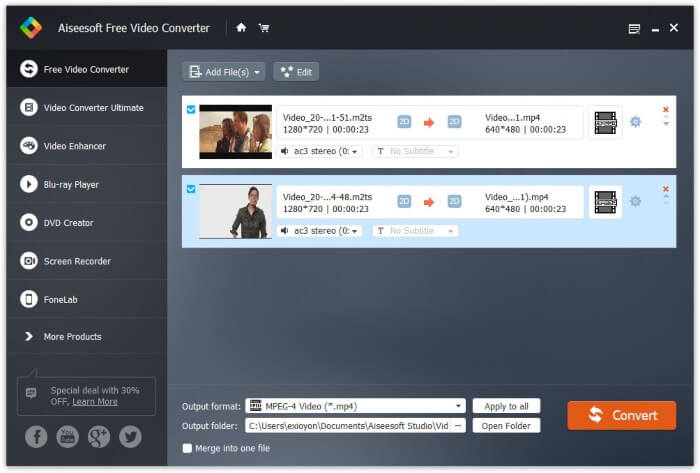
Schritt 1: Laden Sie FVC Free M2TS Converter kostenlos herunter, installieren und starten Sie das Programm. Ziehen Sie die M2TS‑Dateien per Drag & Drop in die Hauptoberfläche.

Schritt 2: Klappen Sie unten in der Nähe die Liste Ausgabeformat auf. Um M2TS unter Windows in ein iPad‑Format zu konvertieren, können Sie das Ausgabeformat direkt aus der Kategorie Apple iPad wählen.

Schritt 3: Klicken Sie auf das Zahnrad‑Symbol Einstellungen, um Video‑Encoder, Bildrate und mehr anzupassen. Klicken Sie abschließend auf Konvertieren, um das Video vom M2TS‑ ins iPad‑Format umzuwandeln.
So konvertieren Sie M2TS kostenlos auf ein iPad auf dem Mac
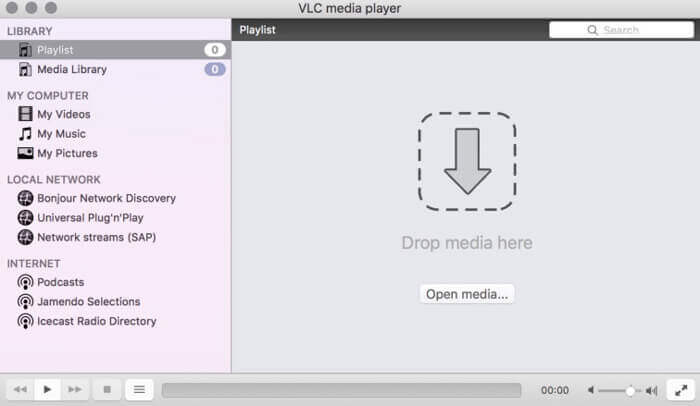
Wenn Sie M2TS-Videos kostenlos auf dem Mac auf ein iPad konvertieren möchten, ist VLC Media Player Ihre gute Wahl. Es ist ein kostenloser und Open-Source-M2TS-Player und -Konverter für Multiplattform.
Schritt 1: Öffnen Sie VLC Media Player auf dem Mac. Wählen Sie Konvertieren/Speichern aus der Medien-Dropdown‑Liste.
Schritt 2: Klicken Sie auf Hinzufügen, um eine M2TS‑Datei zu importieren. Wählen Sie dann die Datei aus und klicken Sie unten auf Öffnen, um fortzufahren.
Schritt 3: Klicken Sie unten auf Konvertieren/Speichern, um zum nächsten Fenster zu gelangen.
Schritt 4: Wählen Sie das iPad‑Format aus der Profil-Dropdown‑Liste. Sie können auf das Werkzeuge-Symbol daneben klicken, um die Videoeinstellungen anzupassen.
Schritt 5: Klicken Sie auf Start, um die M2TS‑Datei auf dem Mac mit VLC in ein iPad‑Format zu konvertieren.
Teil 2: So konvertieren Sie M2TS in iPad Online
Für mobile Benutzer ist die Verwendung eines Online-Konverters von M2TS zu iPad ebenfalls eine gute Wahl. Sie können eine M2TS-Datei kostenlos auf das iPad konvertieren, ohne sie herunterladen, installieren oder registrieren zu müssen.
Schritt 1: Öffnen Sie einen Online‑Konverter von M2TS zu iPad, zum Beispiel FVC Free Online Video Converter.

Schritt 2: Laden Sie den FVC Launcher herunter, indem Sie auf Add Files to Convert klicken, und installieren Sie ihn.

Schritt 3: Suchen Sie die M2TS‑Datei auf Ihrem Computer, die Sie konvertieren möchten. Und vergessen Sie nicht, das Ausgabeformat auszuwählen.

Schritt 4: Klicken Sie auf Start Converting, um M2TS kostenlos online in ein iPad‑Format zu konvertieren.
Teil 3: FAQs zur Konvertierung von M2TS in iPad
Was passiert, dass plötzlich kein Audio in M2TS-Dateien in iMovie mehr vorhanden ist?
M2TS wird von Apple-Geräten nicht nativ unterstützt. Sie müssen M2TS in das Mac-Format konvertieren, um das Problem zu lösen.
Wie öffne ich M2TS-Dateien auf iPhone und iPad?
AVCHD M2TS ist nicht mit iOS-Geräten kompatibel. Wenn Sie darauf bestehen, M2TS-Videos auf dem iPad abzuspielen, können Sie die VLC Media Player-App verwenden, um die Videowiedergabe zu erhalten.
Irgendeine gute Video-Player-App für das iPad?
Sie können auf dem iPad einen größeren Bildschirm als auf dem iPhone erhalten. Das Videoerlebnis wird also auch besser. Zu den empfohlenen Videoplayern gehören PlayerXtreme Media Player, KMPlayer, VLC, AirPlayer und mehr. Sie können eine beliebige auswählen, um die Videosteuerung flexibel zu gestalten.
Damit ist alles gesagt, wie man M2TS in iPad umwandelt – mit Online‑ und Offline‑Tools. Diese M2TS‑Videokonverter sind kostenlos und sicher in der Anwendung. Ganz gleich, wie viele M2TS‑Dateien Sie in iPad‑kompatible Formate konvertieren möchten, hier erhalten Sie die höchste Geschwindigkeit.
-
 So konvertieren Sie M2TS in MP4, ohne die Qualität zu beeinträchtigen
 Möchten Sie das Video vom HD-Camcorder in gängiges MP4 konvertieren? Hier sind 4 einfache und kostenlose Möglichkeiten, um die M2TS-Datei unter Windows und Mac in MP4 zu ändern.
-
 So konvertieren Sie M2TS in MKV, ohne an Qualität zu verlieren
 Möchten Sie M2TS in MKV konvertieren und dabei die ursprüngliche Qualität beibehalten? Dieser Beitrag zeigt Ihnen kostenlose und Online-Methoden, um M2TS verlustfrei auf MKV umzustellen.
-
 Was ist der Unterschied zwischen MTS und M2TS?
 Was ist eine MTS- oder M2TS-Datei? Was ist der Unterschied zwischen M2TS und MTS? Wie kann ich die vom Camcorder aufgezeichnete MTS- oder M2TS-Datei ansehen? Hier finden Sie alle Antworten in diesem Beitrag.
