


 Video Converter Ultimate
 Bildschirm recorder
 Videoreparatur
So konvertieren Sie MTS schnell und kostenlos in MKV
Kurz gesagt: Beim MPEG-Transportstream ist die MTS‑Datei ein Standard-Dateiformat, das 720p- und 1080i‑Videos unterstützt. Allerdings kann die Ausgabedatei bei diesem Format sehr groß werden. Daher sollten Sie es in ein Format umwandeln, das weit verbreitet ist und eine kleinere Dateigröße hat, wie z. B. das MKV‑Format. In diesem Artikel stellen wir Ihnen die besten Methoden vor, um MTS kostenlos in MKV zu konvertieren.

Teil 1. Die 2 besten kostenlosen Online-Tools, die MTS in MKV konvertieren
FVC Free Video Converter Online
Heutzutage ziehen es viele Nutzer vor, einen Online-Konverter zu verwenden, anstatt eine Konverter-Software zu installieren. FVC Free Online Video Converter ist ein Online-Konverter, mit dem Sie Dateien wie MTS in MKV, MP4, WMV, AVI, FLV und mehr umwandeln können. Obwohl es sich um einen kostenlosen Online-Konverter handelt, beeinträchtigt er die Qualität Ihrer Datei während der Konvertierung nicht. Dennoch verfügt er über Funktionen, mit denen Sie die Auflösung sowie die Video- oder Audio‑Bitrate bearbeiten können.
Hier sind die Schritte, wie Sie Ihre Datei MTS mit diesem kostenlosen Online-Tool in MKV konvertieren:
Schritt 1. Um diesen Konverter zu verwenden, klicken Sie auf diesen Link, um auf die Webseite weitergeleitet zu werden.
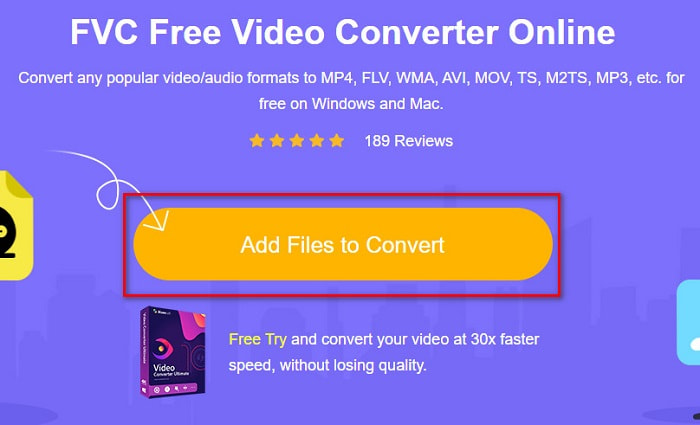
Schritt 2. Klicken Sie anschließend auf die Schaltfläche Add Files to Convert, um das Startprogramm herunterzuladen. Nachdem das Startprogramm heruntergeladen wurde, werden Ihre Computerdateien angezeigt; wählen Sie dann Ihre MTS-Datei zum Hochladen aus.
Schritt 3. Nachdem Sie Ihre MTS-Datei ausgewählt haben, klicken Sie unter der Oberfläche der Software auf die MKV-Datei.
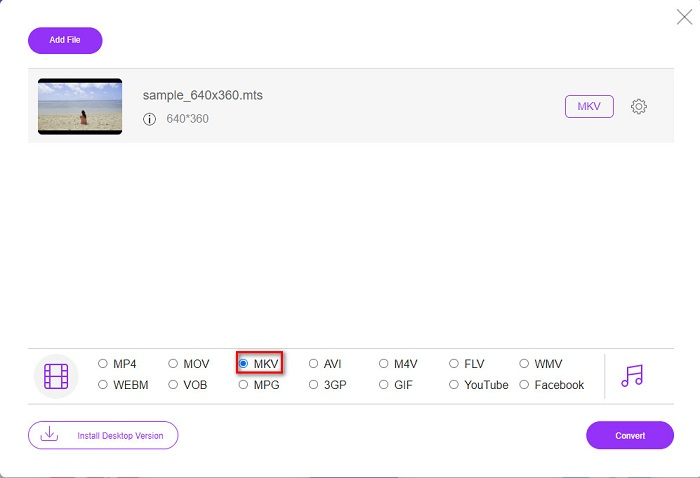
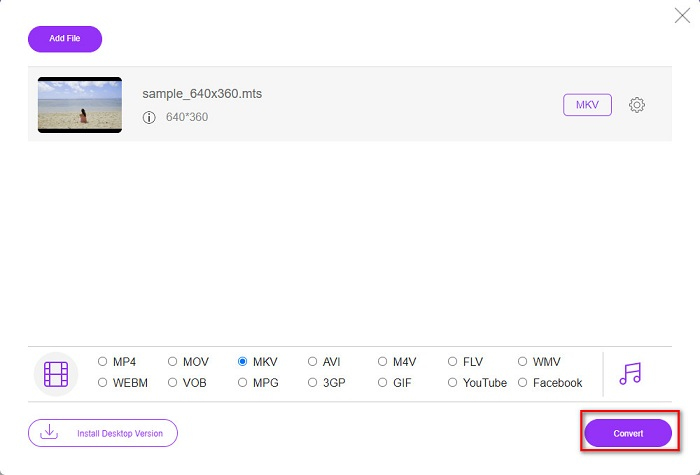
Schritt 4. Klicken Sie zum Schluss auf die Schaltfläche Convert, um Ihre MTS-Datei in eine MKV-Datei zu konvertieren. Warten Sie anschließend, bis Ihre Datei konvertiert ist.
Indem Sie diesen einfachen Schritten folgen, können Sie MTS kostenlos und online in MKV konvertieren.
AnyConv
Ein weiterer Online-Konverter, mit dem Sie Dateien ohne Qualitätsverlust umwandeln können, ist der AnyConv File Converter. Dieser Konverter unterstützt ebenfalls zahlreiche Dateiformate, darunter MTS in MKV, AVI, MP4, MOV, MPEG usw. Allerdings bietet er nur eingeschränkte Funktionen. Sie können weder die Auflösung Ihrer Datei bearbeiten noch ändern. Außerdem ist er webbasiert, sodass es zu langsamen Konvertierungen kommen kann. Nichtsdestotrotz wird er von vielen Menschen wegen seiner Benutzerfreundlichkeit genutzt.
Schritte zur Verwendung von AnyConv File Converter:
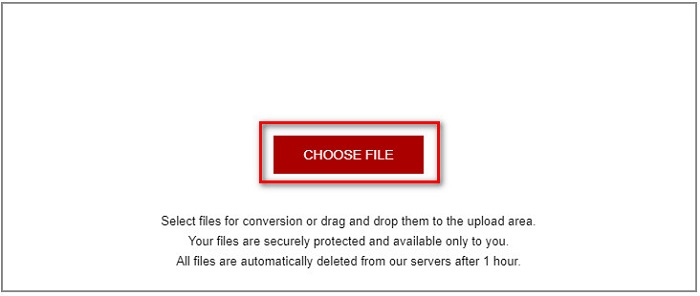
Schritt 1. Suchen Sie in Ihrem Browser nach AnyConv File Converter. Nachdem Sie auf die Webseite gelangt sind, klicken Sie auf die Schaltfläche Choose Files, um Ihre MTS-Datei aus den Computerdateien auszuwählen.
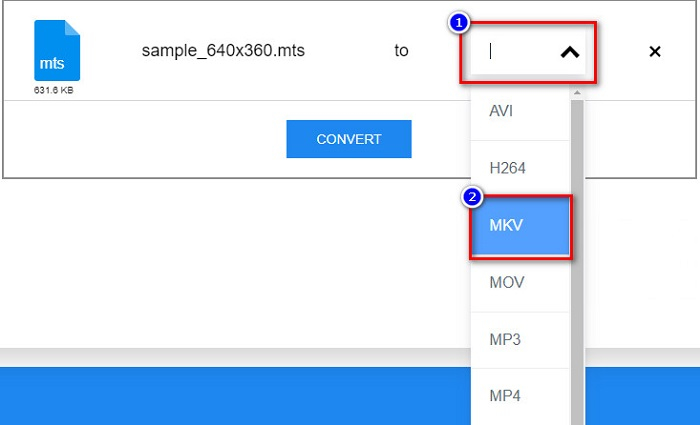
Schritt 2. Nachdem Sie Ihre MTS-Datei ausgewählt haben, klicken Sie auf die Drop-down-Schaltfläche und wählen Sie das MKV-Dateiformat aus.
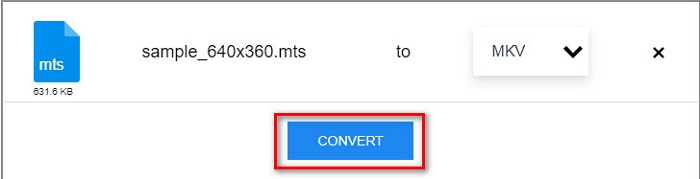
Schritt 3. Klicken Sie abschließend auf die Schaltfläche Convert, um die Konvertierung Ihrer MTS- in eine MKV-Datei zu starten.
Teil 2. Konvertieren Sie MTS verlustfrei in MKV unter Windows 10/11
Wenn Sie nach einem Konverter für Ihr Windows 10/11 suchen, ist FVC Video Converter Ultimate das beste Tool für Sie. Es unterstützt verschiedene Dateiformate und kann MTS in MKV, MP4, WebM, VOB, MPG, AVI und viele mehr konvertieren. Darüber hinaus verfügt dieser Konverter über eine Funktion, mit der Sie GIFs und sogar ein 3D-Video erstellen können. Sie können MTS auch schnell und mühelos in MKV konvertieren, ohne die Qualität Ihrer Datei zu verlieren.

FVC Video Converter Ultimate
Über 5.689.200 Downloads- Sie können Ihre Dateien mit diesem Konverter stapelweise konvertieren.
- Ermöglicht die Konvertierung verschiedener Dateiformate wie MTS, MKV, MP4, WMV usw.
- Verfügt über eine Funktion, mit der Sie eine ultraschnelle Konvertierung durchführen können.
Gratis DownloadFür Windows 7 oder neuerSicherer Download
Gratis DownloadFür MacOS 10.7 oder neuerSicherer Download
So können Sie FVC Video Converter Ultimate mit diesen einfachen Schritten verwenden:
Schritt 1. Laden Sie zunächst die App herunter, indem Sie unten für Windows auf die Schaltfläche Download klicken. Führen Sie dann die Software aus, um mit dem nächsten Schritt fortzufahren.
Gratis DownloadFür Windows 7 oder neuerSicherer Download
Gratis DownloadFür MacOS 10.7 oder neuerSicherer Download
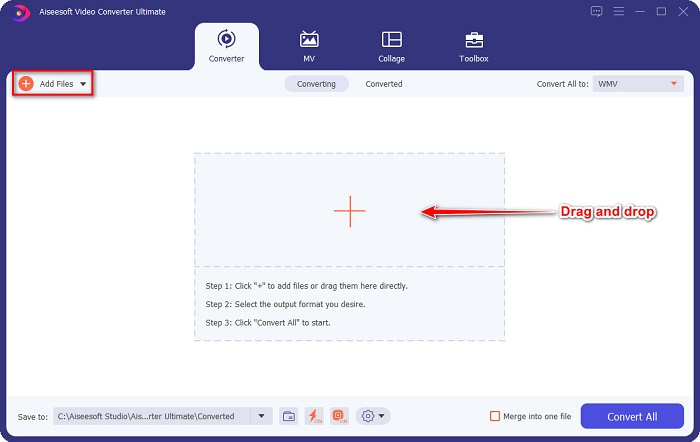
Schritt 2. Klicken Sie nach dem Öffnen des Konverters auf die Schaltfläche Add Files, oder Sie können Ihre Datei per Drag and Drop auf die Schaltfläche mit dem +-Symbol ziehen, um Ihre MTS-Datei hochzuladen. Anschließend wird Ihre Datei in die Liste aufgenommen.
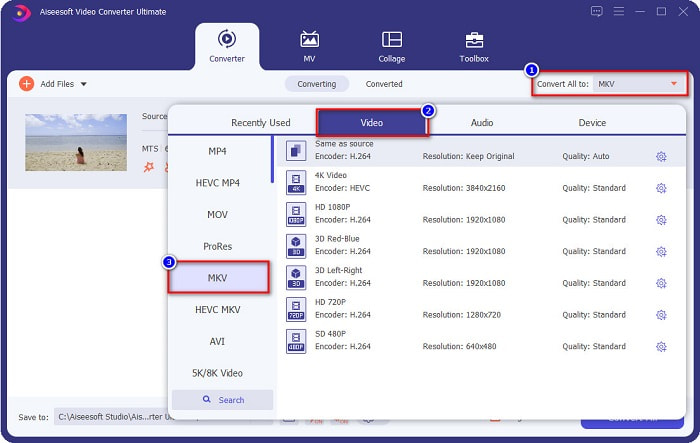
Schritt 3. Um das Dateiformat auszuwählen, in das Sie Ihre MTS-Datei umwandeln möchten, klicken Sie auf die Schaltfläche Convert All to und wählen Sie die MKV-Datei.
Schritt 4. Um abzuschließen, klicken Sie auf die Schaltfläche Convert All, um mit der Konvertierung Ihrer MTS-Datei in eine MKV-Datei zu beginnen. Und voilà! Schon nach wenigen Sekunden ist Ihre konvertierte Datei fertig.
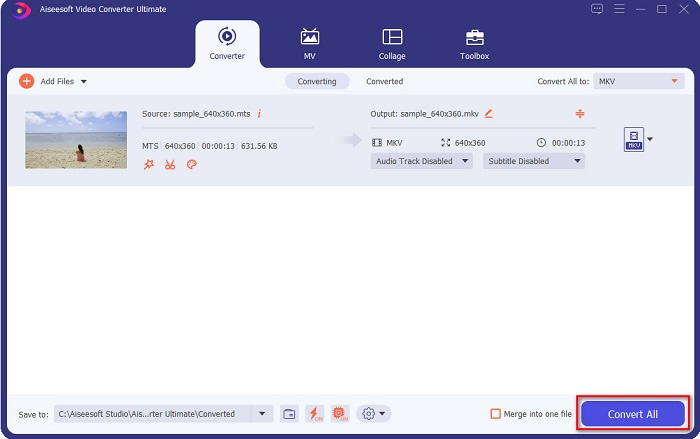
Indem Sie diesen einfachen Schritten folgen, können Sie MTS so schnell wie 1-2-3 in MKV konvertieren!
Teil 3. Warum die MTS-Datei in das MKV-Dateiformat konvertieren
MTS-Datei, kurz für MPEG Transport System, ist ein Standarddateiformat, das hauptsächlich von HD-Camcordern von SONY und Panasonic verwendet wird. Es ist eine Datei, die MPEG4/H.264-Videokomprimierung verwendet. Darüber hinaus unterstützt es 720p- und 1080i-Videos, die andere Dateiformate nicht unterstützen. Da Panasonic und Sony diese Datei entwickelt haben, verwendet sie eine Advanced Audio Coding File, die mit dem AVCHD-Dateiformat verwandt ist. Andererseits ist MKV-Datei oder Matroska ein Standarddateiformat, das viele Audio- und Video-Codecs unterstützt. Es wird normalerweise verwendet, um kurze Videoclips und Filme zu speichern.
Darüber hinaus unterstützt es auch Untertitelspuren. Aus diesem Grund verwenden zahlreiche Fan-Abonnenten dieses Dateiformat. Warum also MTS in MKV konvertieren? Ganz einfach, weil die Dateigröße von MKV kleiner ist als das MTS-Dateiformat enthält.
Teil 4. Vergleichstabelle über die Online- und Offline-Konverter
| MERKMALE | Kostenloser FVC-Online-Konverter | AnyConv-Dateikonverter | FVC Video Converter Ultimate |
| Conversion-Geschwindigkeit | Normal | Normal | Sehr schnell |
| Zu konvertierende Dateiformate | MKV, MP4, MTS, MPG, MOV, AVI, WMV, FLV und andere Dateiformate | MTS, MKV, AVI, MOV, MP4, MPEG und andere Formate | Unterstützt über 1000 Dateiformate |
| Bearbeitungsfunktionen | – | – |  |
| Stapelkonvertierung | – | – | |
| Internetverbindung | Erforderlich | Erforderlich | Nicht benötigt |
Teil 5. Häufig gestellte Fragen zum Konvertieren von MTS in MKV
Können Sie die Dateigröße einer MTS-Datei verringern?
Ja. Sie können die Dateigröße einer MTS-Datei mit einem Komprimierungstool verkleinern, das online und offline verfügbar ist, wie z. B. der Free Video Compressor.
Wo können Sie MKV-Dateiformate abspielen?
Sie können MKV-Dateien im Windows Media Player abspielen, ebenso im VLC Media Player, DivX Player, MX Player und anderen. Sie können auch Media-Codecs verwenden, um Mediendateien zu kodieren und zu dekodieren. Oder Sie können Ihre MKV-Datei in das MP4-Dateiformat konvertieren, das weit verbreitet ist.
Können Sie MTS in MKV in Handbrake konvertieren?
Jawohl. Mit diesem Konverter können Sie auch Ihre MTS-Datei in das MKV-Dateiformat konvertieren. Es unterstützt jedoch nicht mehrere Dateien und kann sie nicht zu einer kombinieren.
Fazit
Es gibt heutzutage viele Online- und Offline-Konverter auf dem Markt. Die Konverter, die wir oben aufgelistet haben, gehören zu den Programmen, die von vielen Nutzern verwendet werden und sich als hervorragende Konverter erwiesen haben. Außerdem verfügen diese Konverter über unterschiedliche Funktionen und Möglichkeiten, MTS kostenlos online in MKV zu konvertieren. Wenn Sie jedoch nach einem praktischen und effizienten Konverter suchen, empfehlen wir die Verwendung von FVC Video Converter Ultimate. Dieser blitzschnelle Konverter wird Ihre Erwartungen nicht enttäuschen. Wenn Sie also bereit sind, Dateien zu konvertieren, laden Sie ihn jetzt herunter!
-
 [Kostenlos & Online] 6 Möglichkeiten, MTS in hoher Qualität in MP4 zu konvertieren
 Sie wissen nicht, wie Sie eine MTS-Datei in MP4 konvertieren sollen? In diesem Handbuch finden Sie 6 kostenlose und einfache Möglichkeiten, das MTS-Format unter Windows oder Mac ohne Qualitätsverlust in MP4 zu ändern.
-
 So konvertieren Sie MTS in WMV, ohne die Qualität zu verlieren
 Haben Sie Schwierigkeiten, Ihre Lieblingssendung anzusehen, weil Ihr Mediaplayer das MTS-Videoformat nicht unterstützt? Versuchen Sie, es mit diesen neuen und besten Konvertern, die in diesem Artikel vorgestellt werden, in WMV zu konvertieren.
-
 So konvertieren Sie MTS in MP3 ohne Qualitätsverlust (AVCHD in MP3)
 Müssen Sie MP3-Audio aus der MTS-Datei extrahieren, wissen aber nicht wie? Was ist der beste MTS zu MP3 Konverter? Dieser Beitrag bietet zwei einfache Möglichkeiten, wie Sie MTS / M2TS in MP3 mit hoher Audioqualität konvertieren können.
