


 Video Converter Ultimate
 Bildschirm recorder
 Videoreparatur
Prominente und hilfreiche Möglichkeiten zum Konvertieren von 3GP in FLV [Bewährt]
Audio- und Videodateien können im 3GP-Format gespeichert werden, das häufig in 3G‑Handys verwendet wird. Es funktioniert jedoch auch auf 2G- und 4G‑Mobiltelefonen. Über das Internet sendet und empfängt dieses auf MP4 basierende Containerformat Multimedia-Dateien. Viele Online-Videos und Audio-Streaming-Dienste nutzen allerdings FLV, ein Flash-kompatibles Video-Containerformat. Neben dem Adobe Flash Player können viele andere Videoplayer FLV-Dateien abspielen. Um 3GP-Dateien zugänglicher zu machen und ihre Dateigröße zu verringern, gibt es mehrere einfache Möglichkeiten, sie in FLV umzuwandeln. Im Folgenden finden Sie die Konverter, die Sie verwenden sollten, um 3GP in FLV zu konvertieren.

Teil 1. Ausgezeichnete Methoden zum Konvertieren von 3GP in FLV [Offline]
Video Converter Ultimate ist ein perfektes Tool zum Konvertieren von 3GP-Dateien in FLV ohne Qualitätseinbußen. Mit der SuperSpeed-Technologie des Programms können Benutzer selbst große Dateien innerhalb von Minuten konvertieren. Darüber hinaus können Sie mit der App Ihre Dateien nach Belieben bearbeiten: Ihre Videos zuschneiden, drehen und zuschneiden; Farbparameter anpassen; Videoauflösung und Bitrate ändern; oder Untertitel hinzufügen. Alle gängigen Geräte, einschließlich iPhone, iPad, Android-basierte Geräte, Xbox und PlayStation, können von dieser Software unterstützt werden. Nachdem Sie nun eine kurze Einführung in diese Software kennen, ist es an der Zeit, dass Sie verstehen, wie Sie mit dieser Software 3GP in FLV konvertieren.
Schritt 1: Laden Sie zunächst die Software herunter, indem Sie auf die unten befindliche Schaltfläche Free Download klicken. Sie können sie für Windows oder Mac herunterladen. Nachdem Sie sie heruntergeladen haben, installieren Sie die Software auf Ihrem Computer und starten Sie sie, indem Sie auf Start Now klicken, sobald nach der Installation ein Fenster auf Ihrem Bildschirm erscheint.
Gratis DownloadFür Windows 7 oder neuerSicherer Download
Gratis DownloadFür MacOS 10.7 oder neuerSicherer Download
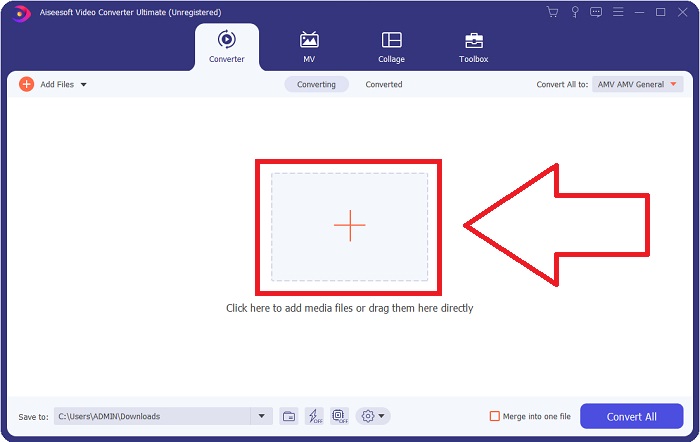
Schritt 2: Um mit der Konvertierung zu beginnen, müssen Sie zuerst eine Datei hochladen. Klicken Sie dazu auf die Schaltfläche + in der Mitte der Benutzeroberfläche der Software, oder Sie ziehen Ihre Videodateien einfach direkt von Ihrem Computer in das Programmfenster.
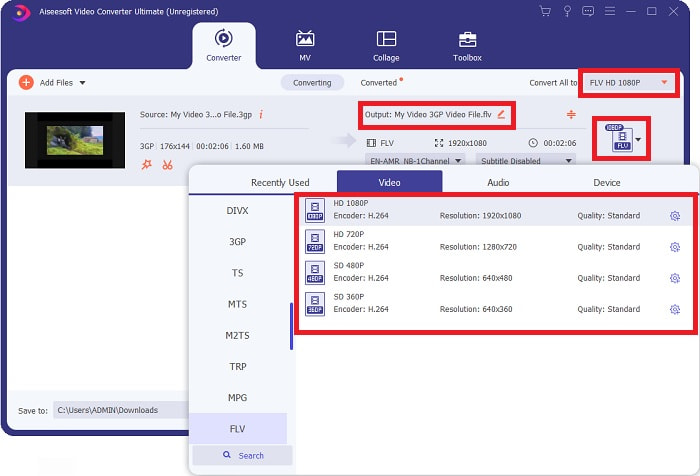
Schritt 3: Nachdem Sie mit dem Hochladen einer Datei fortgefahren sind, können Sie nun das Format FLV in der Formatauswahl wählen, die sich in der rechten Ecke Ihres Bildschirms befindet. Sie können die gewünschte Qualität auswählen, da alle möglichen Parameter angezeigt werden, die Sie verwenden könnten.
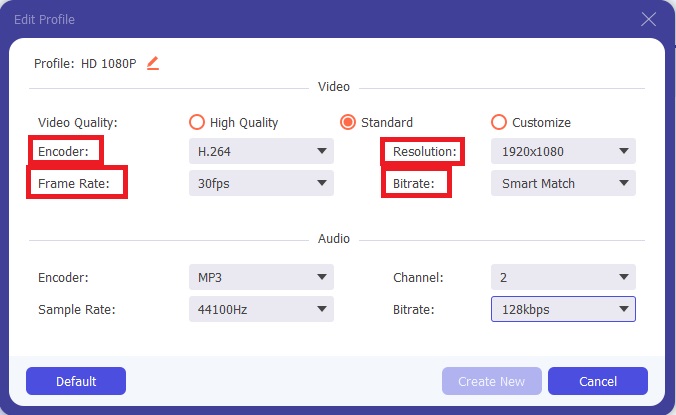
Schritt 4: Trotz der angebotenen Qualitätsstufen können Sie Ihre eigene Qualität erstellen, falls Ihre bevorzugte Einstellung nicht vorhanden ist. Klicken Sie auf das Zahnradsymbol und passen Sie alle Inhalte an, die in dem Fenster erscheinen, das sich öffnet. Die Auflösung betrifft die Qualität der Bildschirmanzeige, die Bildrate die Wiedergabefrequenz des Videos; die Bitrate steht für die Datenmenge, die pro Zeiteinheit codiert wird. Schließlich ist der Encoder für die Auslieferung bzw. das Format des Videos zuständig.
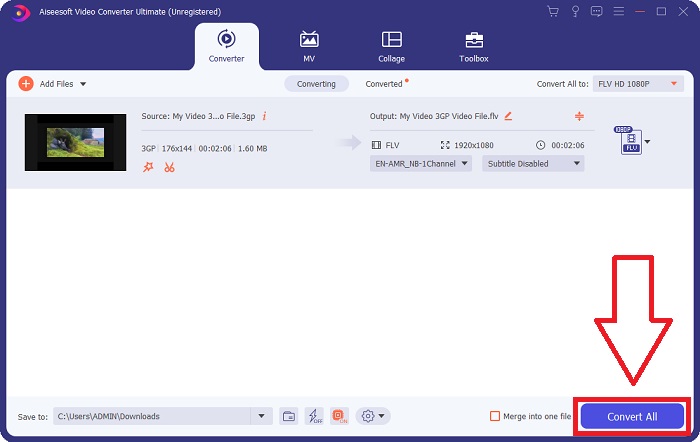
Schritt 5: Sobald Sie alle erforderlichen Anpassungen für Ihr Video-Output vorgenommen haben, können Sie die Datei nun konvertieren, indem Sie auf Convert All klicken.
Teil 2. Eine weitere interessante Methode zum Konvertieren von 3GP in FLV [Online]
Genug zur Software selbst – kommen wir zu diesem Online-Tool, das Ihnen beim Konvertieren von 3GP in FLV ebenfalls zuverlässig helfen kann. Darf ich vorstellen: der Free Video Converter Online, ein Online-Konverter, der viele Formate unterstützt, darunter 3GP und FLV. Sie können eine Datei direkt von Ihrem Computer hochladen und konvertieren. Um eine Datei mit einer Größe von mehr als 500 MB hochzuladen, können Sie dieses Online-Tool verwenden, um 3GP in FLV zu konvertieren. Benutzer können zahlreiche Einstellungen vor Beginn der Konvertierung anpassen. Sie können zum Beispiel den Audiocodec und die Lautstärke des Audios ändern. Außerdem lässt sich auch die Videoauflösung anpassen. Nachdem nun alle Informationen vermittelt wurden, sehen wir uns die nötigen Schritte im Detail an.
Schritt 1: Hier ist der Link zu dem Online-Tool. Klicken Sie darauf, damit sich die Hauptwebseite in Ihrem Browser öffnet. Klicken Sie auf Add Files to Convert, um das Startprogramm herunterzuladen, mit dem Sie das Online-Tool bedienen. Installieren Sie das Startprogramm und beginnen Sie damit, eine Datei hochzuladen.
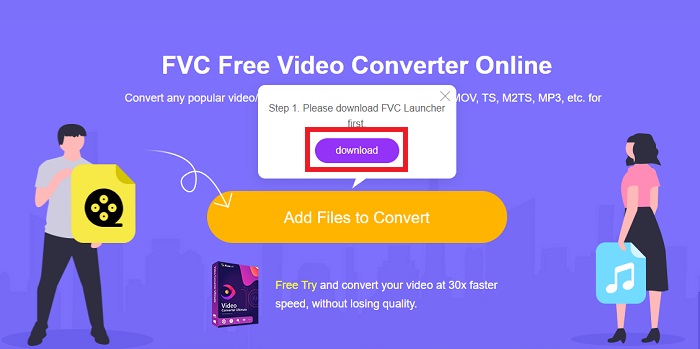
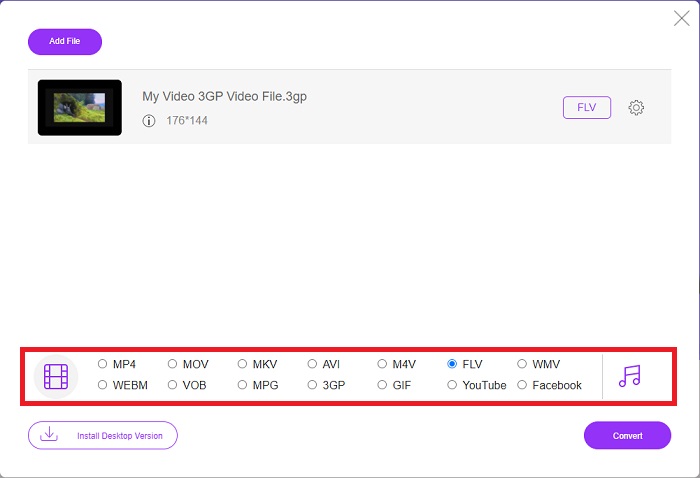
Schritt 2: Um eine Datei hochzuladen, klicken Sie erneut auf Add Files to Convert. Nachdem Sie eine Datei hochgeladen haben, können Sie nun das Videoformat FLV aus der Auswahl der Videoformate wählen, die sich in der unteren Ecke des Fensters befindet.
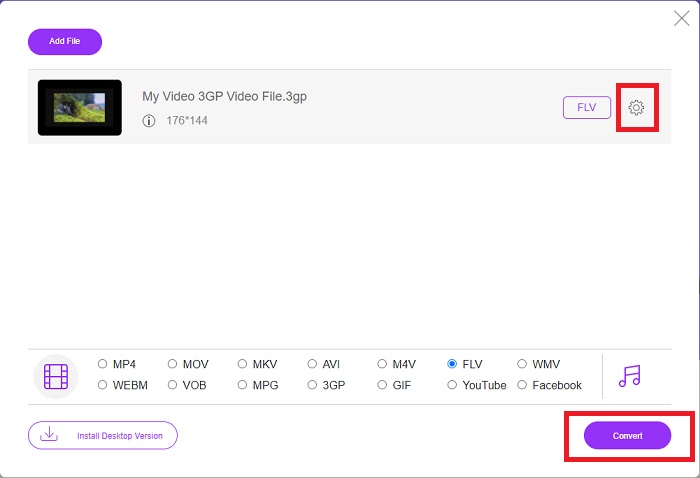
Schritt 3: Sie können auch die Qualität Ihres Videos oder andere Spezifikationen wie Auflösung, Bildrate oder Bitrate bearbeiten, indem Sie auf das Zahnradsymbol direkt neben dem von Ihnen gewählten Videoformat in der rechten Ecke des Fensters klicken. Nachdem Sie alle gewünschten Einstellungen für Ihr Ausgabeformat vorgenommen haben, können Sie die Datei konvertieren, indem Sie auf Convert klicken.
Teil 3. Ein Überblick: 3GP vs. FLV
Wenn Sie schon immer einen Audio- und Videoclip im 3GP-Format speichern wollten, sind Sie hier richtig! (3GPP). Das ISO-Mediendateiformat dient als Grundlage für 3GPP, ein Multimedia-Containerformat. H.263- oder H.264-Videostreams und AMR-WB, AMR-WB+, AMR-NB, HE-AAC v1, AAC-LC oder Enhanced aacPlus Audiostreams werden alle unterstützt. Normalerweise verwenden 3GP-Dateien 3G-Mobiltelefone, um Videos aufzunehmen, aber Benutzer können sie auch auf einigen 2G- und 4G-Telefonen wiedergeben. Obwohl 3GP-Dateien immer noch verwendet werden, hat ihre Popularität abgenommen, da effizientere Videoformate das 3GPP-Format verdrängt haben.
Im Adobe Flash Video (FLV)-Containerformat gespeicherte Videodateien sind jedoch FLV-Dokumente. Audio- und Videostreams können genauso kodiert werden wie Standard-Flash. SWF-Format- und Metadatenpakete enthalten einen kurzen Header. Das Flash Video Exporter-Plug-In (verfügbar mit Adobe Animate) oder eine Anwendung, die FLV-Dateien unterstützt, kann Flash-Video-Inhalte erstellen und als FLV-Dateien exportieren. Adobe Media Encoder kann Videos auch in QuickTime- oder Windows Media-Formaten codieren. Da Sie nun eine Vorstellung von 3GP und FLV haben, stellen wir Ihnen eine Vergleichstabelle zur Verfügung, um die Details in bestimmten Angelegenheiten zu erfahren.
| Dateierweiterung | 3GP | FLV |
| Dateityp | ISO-Mediendatei | Flash-Videodatei |
| Entwickelt von | Partnerschaftsprojekt der dritten Generation | Adobe-System |
| Vorteile | Für mobile Benutzer ist es einfacher, Videodateien zu teilen und zu speichern, da das 3GP-Dateiformat die Videogröße und die Audiokomponenten reduziert. Obwohl das von 3GP entwickelte Dateiformat 3G-fähige Geräte verwendet, können viele 2G- und 4G-Geräte dieses Format wiedergeben. | Für Websites, die Animationen und interaktive Elemente enthalten möchten, ist Adobe Flash eine ausgezeichnete Wahl. Langfristig kann dies erhebliche Auswirkungen haben. Während seiner Blütezeit verwendete Flash einfache Spiele. |
| Nachteile | Obwohl die Video- und Audiostreams in einer einzigen Datei komprimiert werden können, können die Qualität und die reduzierte Auflösung die Benutzererfahrung im Vergleich zu anderen Formaten erheblich verbessern, z. B. Audioqualität, Bildschirmauflösung, Wiedergabegeschwindigkeit usw. | Nachteilig ist natürlich, dass die Popularität von FLV in den letzten Jahren zurückgegangen ist. Es kostet viel Zeit und Geld, FLV-Inhalte zu erstellen. Ein weiterer Nachteil von Flash ist, dass es nicht auf iOS-Geräten angezeigt werden kann, was seine Fähigkeit, neue Fans zu gewinnen, stark einschränkt. |
| Programme öffnen das Videoformat | ◆QuickTime-Player ◆Windows Media-Player | ◆VLC-Mediaplayer ◆Adobe-Flash-Player |
Teil 4. Häufig gestellte Fragen zur Konvertierung von 3GP in FLV
Ist 3GP von guter Qualität?
Variable Bitrate und Bildrate unterstützen 3GP, genau wie in MP4. 3GP war ein beliebtes Format für Feature-Phones, als sie noch die gebräuchlichste Kommunikationsform waren. Wir brauchen ein kleines Video, weil Platz früher ein Luxus war. Die Qualität ist vergleichbar mit den Kameras in Kartoffelqualität, die wir damals in Telefonen hatten, also ist es nicht schockierend.
Warum spielt 3GP nicht?
Versuchen Sie, die 3GP-Datei mit VLC Media Player abzuspielen, anstatt mit Ihrem Standardmediaplayer, falls dieser keine 3GP-Codecs unterstützt. VLC ist ein hervorragender Open-Source-Videoplayer, da er nahezu jede Videodatei wiedergeben kann. Neben Windows und iOS ist VLC auch für Linux und Android verfügbar.
Ist FLV ein geeignetes Aufnahmeformat?
Adobe Flash Player verwendet das FLV-Dateiformat. Als universell unterstütztes Videoformat gehört es zu den am weitesten verbreiteten Formaten. Online-Videostreaming-Plattformen wie YouTube profitieren von der Nutzung des FLV-Formats. Es ist sehr praktisch, weil die Dateien eine geringe Größe haben. Hier sind die besten FLV-Rekorder, die Sie ausprobieren können.
Fazit
Im Allgemeinen sind alle für Sie bereitgestellten Konverter die beste und am meisten empfohlene Software und Online-Konverter, die Sie verwenden sollten. Da sie über diese professionellen und benutzerfreundlichen Funktionen verfügen, können Sie diese beiden nicht mit anderer Software und Online-Tools vergleichen. Genießen Sie es, es zu verwenden, und vergessen Sie nicht, eine Bewertung abzugeben, nachdem Sie es verwendet haben.
-
 Die 4 effektivsten Methoden zum Konvertieren von 3GP in das AVI-Format [2025]
 Kann ich meine 3GP-Dateien in AVI konvertieren? Nun, Sie können es leicht konvertieren, wenn Sie diese verfügbaren Tools ausprobieren, da wir alle möglichen Lösungen für Ihr 3GP-zu-AVI-Konvertierungsproblem zusammengestellt haben.
-
 Die besten Möglichkeiten, VOB in FLV umzuwandeln [Kostenlos & Online inklusive]
 Möchten Sie eine VOB-Datei in eine FLV-Datei konvertieren? Sie können die Aufgabe einfach mit Desktop- oder Online-Konvertern erledigen. Lesen Sie diese Anleitung und erfahren Sie, wie Sie VOB einfach und schnell in FLV umwandeln.
-
 Top 3 Möglichkeiten zum Konvertieren von DAT in FLV auf dem Desktop und online
 Möchten Sie DAT in FLV konvertieren, wissen aber nicht wie? Sehen Sie sich unsere empfohlenen DAT-zu-FLV-Videokonverter an und befolgen Sie unsere konkrete Anleitung, um den Job einfach abzuschließen.
