


 Video Converter Ultimate
 Bildschirm recorder
 Videoreparatur
2 empfohlene Konverter zum Umwandeln von F4V in FLV mit Tutorials
Adobe Flash Player unterstützt F4V und FLV als Container für die Wiedergabe von Medien, um Inhalte aus dem Internet zu streamen. Obwohl das Format auf Adobe basiert, unterscheiden sich diese beiden dennoch in vielerlei Hinsicht. Beispielsweise sind die in FLV codierten Daten nicht dieselben wie in F4V, da FLV eine Ähnlichkeit mit SWF aufweist. Möchten Sie zudem F4V in FLV konvertieren und dabei eine Kodierung wie bei SWF erhalten, dann lesen Sie diesen Artikel, um mehr zu erfahren.

Teil 1. 2 des Most Pick Converter zum Konvertieren von F4V in FLV
1. Wahl. FVC Videokonverter Ultimate
FVC Video Converter Ultimate ist der besonders empfohlene F4V-zu-FLV-Konverter, den Sie für Windows oder Mac herunterladen können. Dieses Tool bietet den schnellsten und zuverlässigsten Konvertierungsprozess, dem bereits Millionen Nutzer vertrauen. Darüber hinaus ist die Formatkonvertierung nicht die einzige Stärke dieses Programms. Wissen Sie was? Sie können hier auch bearbeiten, z. B. das Video schneiden, zusammenfügen, die Lautstärke anheben, zuschneiden und vieles mehr. Wenn Sie einen vielseitigen Konverter haben möchten, der Ihre Anforderungen erfüllt, ist dies das richtige Programm. Die folgenden Details beschreiben die Schritte, um Ihre F4V-Dateien innerhalb weniger Minuten in das FLV-Format zu konvertieren.
Wie man F4V mit Hilfe von FVC Video Converter Ultimate in FLV konvertiert:
Schritt 1. Klicken Sie auf die Download-Schaltfläche, um die Software auf Ihre Festplatte herunterzuladen.
Gratis DownloadFür Windows 7 oder neuerSicherer Download
Gratis DownloadFür MacOS 10.7 oder neuerSicherer Download
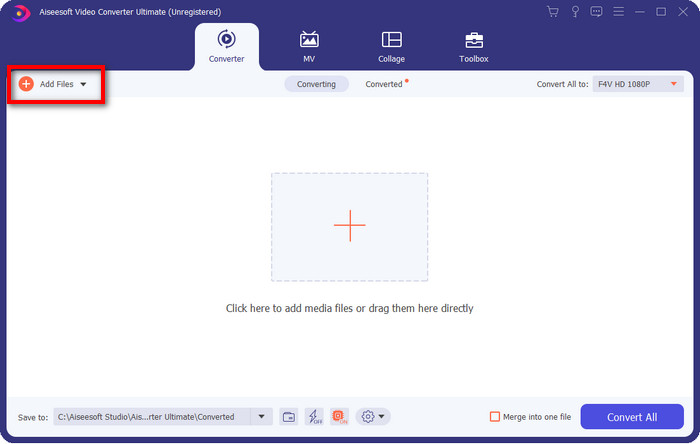
Schritt 2. Klicken Sie auf die Software, um sie zu öffnen, fügen Sie die Datei hinzu, indem Sie oben rechts in der Oberfläche auf Dateien hinzufügen klicken, und klicken Sie auf Öffnen, sobald Sie die F4V-Datei ausgewählt haben, die Sie konvertieren möchten.
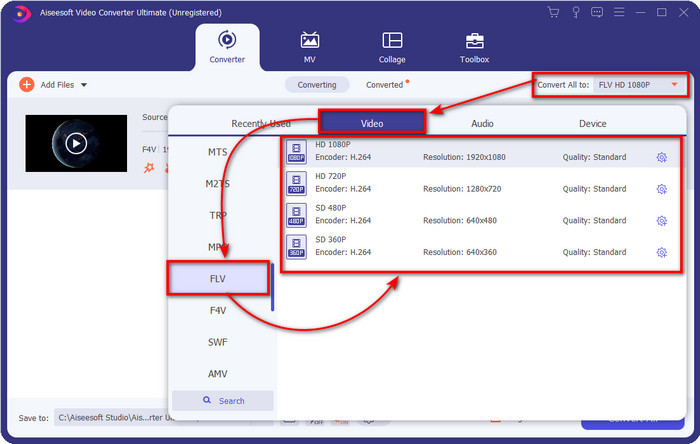
Schritt 3. Klicken Sie auf die Schaltfläche Alles konvertieren in und ändern Sie das Format in FLV.
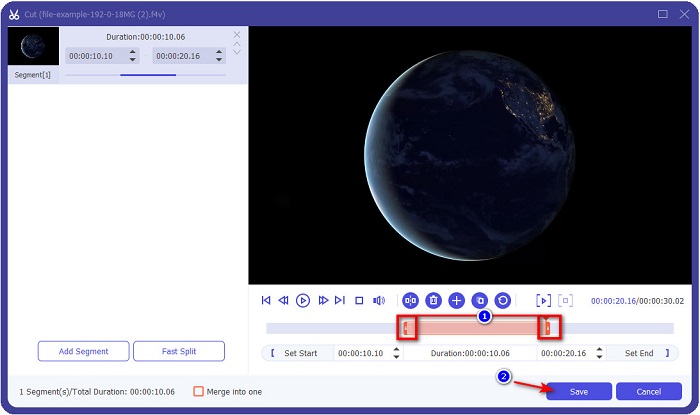
Möchten Sie das Video kürzen? Dann klicken Sie auf das Scheren-Symbol. Passen Sie den Schieberegler an die gewünschte Länge an und klicken Sie anschließend auf Speichern, um die Änderungen zu sichern.
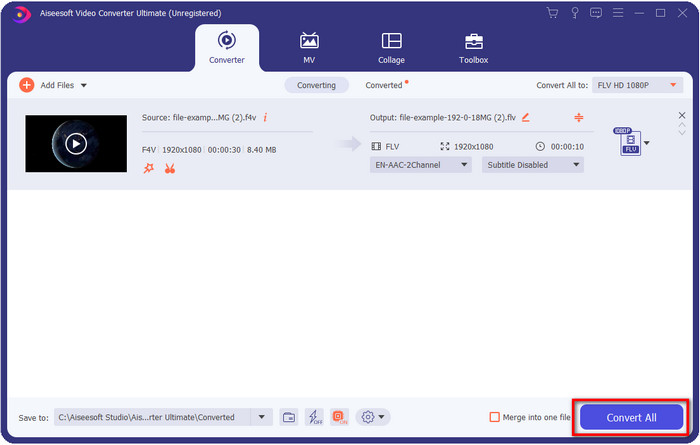
Schritt 4. Um F4V in FLV zu ändern, klicken Sie auf Alles konvertieren, und der Vorgang startet sofort. Ein Ordnerfenster Ihres Computers wird geöffnet, in dem Ihre Datei angezeigt wird.
Vorteile
- Es konvertiert mühelos mehrere F4V-Dateien in FLV-, AVI-, MOV-, MKV- und über 200 weitere Formate.
- Hardwarebeschleunigung und schnelle Konvertierung sind hier verfügbar, um die Konvertierung zu beschleunigen.
- Es ist in allen Windows- und MacOS-Versionen verfügbar.
- Außergewöhnliche Videobearbeitungsfunktionen, mit denen Ihr Video phänomenal aussieht, finden Sie unter Toolbox.
Nachteile
- Muss gekauft werden, bevor Sie es verwenden können.
- Das Herunterladen des Konverters auf Ihren Desktop ist erforderlich.
2. Wahl. Kostenloser FVC-Videokonverter online
FVC Free Video Converter Online hilft Ihnen, den Konvertierungsvorgang online durchzuführen. Dieses Tool ist in allen Browsern verfügbar, um F4V online ohne Einschränkungen in FLV zu konvertieren. Allerdings können Sie hier keine Stapelkonvertierung durchführen, da dies nicht unterstützt wird. Dennoch können Sie mit diesem Online-Konverter das gewünschte Zielformat erreichen. Möchten Sie wissen, wie? Dann folgen Sie den untenstehenden Schritten.
Wie man F4V mit Hilfe von FVC Free Video Converter Online in FLV konvertiert:
Schritt 1. Um das Webtool zu öffnen, müssen Sie auf diesen Link klicken.
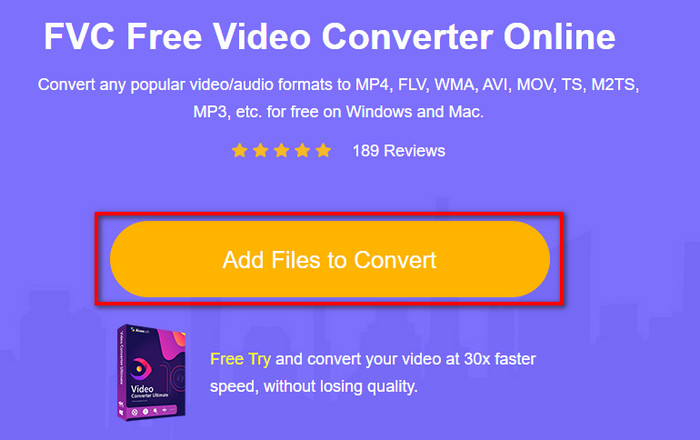
Schritt 2. Klicken Sie in der Hauptoberfläche des Webkonverters auf die Schaltfläche Dateien zum Konvertieren hinzufügen. Suchen Sie im angezeigten Ordner die F4V-Datei und drücken Sie Öffnen.
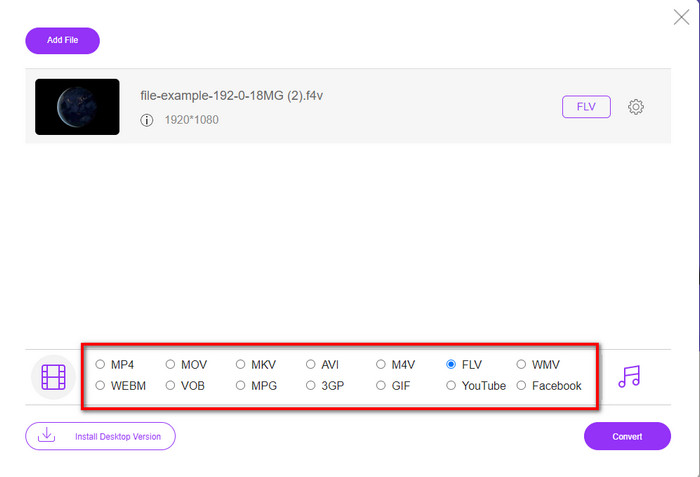
Schritt 3. Unten stehen Ihnen viele Formate zur Auswahl; klicken Sie auf FLV.
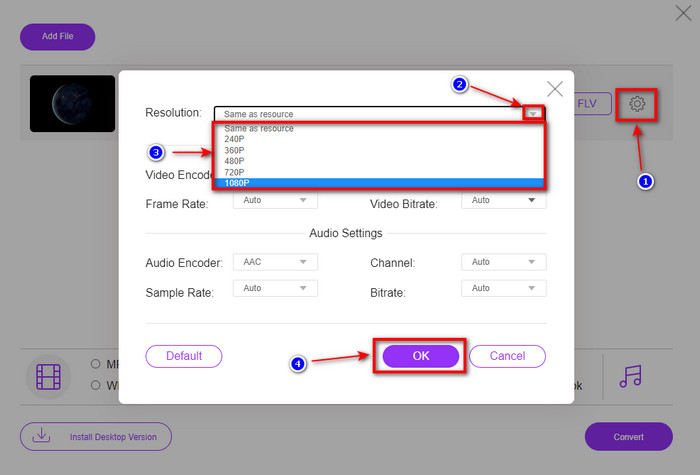
Möchten Sie die Auflösung des Videos ändern? Klicken Sie dann auf das Zahnrad-Symbol, öffnen Sie das Drop-down-Menü und wählen Sie die gewünschte Videoqualität.
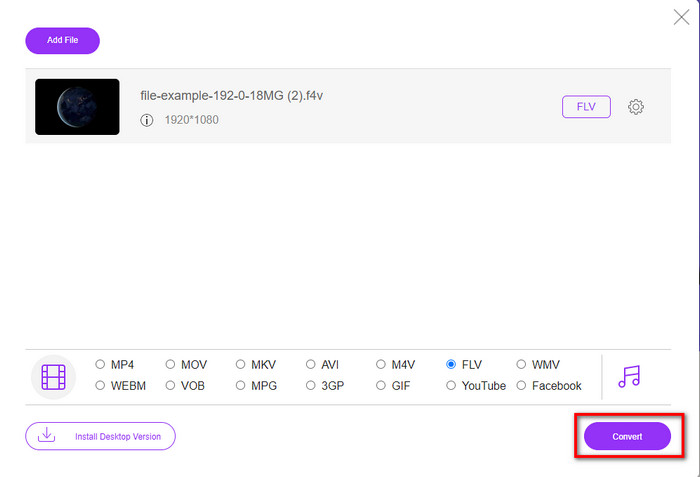
Schritt 4. Starten Sie den Konvertierungsvorgang von F4V zu FLV, indem Sie auf Konvertieren klicken.
Vorteile
- Verfügbar in allen Webbrowsern, die Sie haben.
- Kostenloser und benutzerfreundlicher Online-Konverter.
- Malware-frei und keine Werbung auf der Hauptwebsite.
Nachteile
- Internetverbindung ist ein Muss.
- Es unterstützt keine Videobearbeitungsfunktionen wie den FVC Video Converter Ultimate.
Teil 2. F4V vs. FLV: Welches Format ist das Beste
Wie eingangs erwähnt, handelt es sich bei diesen beiden Formaten um Adobe-Container, mit denen Sie sie im Web verteilen können. Aber lassen Sie uns nun die Unterschiede zwischen den beiden Formaten vergleichen, indem Sie die folgenden Details lesen.
Das F4V-Format ist ein Quicktime-Container wie das MP4-Format. Es ist ein ISO-Basismediendateiformat zum Streamen von Videos über das Internet. Außerdem ist dieses Format eine aktualisierte Version von FLV. Dennoch gibt es viele Probleme beim Codieren von Video und Audio, die sich auf FLV befinden. Außerdem können Sie keine HTML-Webseite generieren, wie es FLV für Sie tun kann.
FLV sind Dateien, die fast die gleiche Struktur wie die SWF-Datei haben. Dieses Format wird in Adobe Flash Player und den meisten HTML 5-Versionen besser unterstützt. Es unterstützt Video- und Audiokomprimierung wie die Sorenson Spark- oder VP6-Codecs. Wenn Sie darüber hinaus ein Video aus dem Internet herunterladen möchten, ist dieses Format die beste Wahl. Im Gegensatz zu F4V ist dies das Format für Sie, wenn Sie HTML auf Ihrer Webseite generieren möchten.
Es wäre am besten, F4V in FLV umzuwandeln, da die Vorteile, die Sie mit FLV erhalten würden, nicht mit F4V verfügbar sind. Obwohl gesagt wird, dass F4V die neue Version von FLV ist, ist die Einzigartigkeit von FLV dennoch einzigartig, die das F4V in vielen Aspekten nicht kopieren kann.
Teil 3. Häufig gestellte Fragen zur Konvertierung von F4V in FLV
Wie kann ich F4V-Videos abspielen?
Mit Hilfe eines leistungsstarken Media Players können Sie dies mühelos erledigen – ein hervorragendes Beispiel ist der Aiseesoft Blu-ray Player. Folgen Sie diesen einfachen Schritten, um zu erfahren, wie Sie F4V-Dateien abspielen. Laden Sie zunächst die Software auf Ihren Desktop herunter und starten Sie sie. Laden Sie die Datei in das Tool, indem Sie auf „Datei öffnen“ klicken. Nach dem Laden wird die Datei automatisch wiedergegeben.
Welches ist besser? F4V oder MOV?
Nun, es hängt davon ab, wofür Sie es verwenden möchten. F4V eignet sich beispielsweise hervorragend zur Verteilung von Mediendateien im Web ohne Qualitätsverlust. Wenn Sie jedoch Videos auf dem Mac bearbeiten möchten, sollten Sie MOV verwenden. Wenn Sie Ihre F4V-Videos also auf dem Mac bearbeiten wollen, müssen Sie lernen, wie man F4V in MOV konvertiert.
Enthält F4V qualitativ hochwertige Ausgabe?
F4V-Dateien können eine Videoqualität von 1080 oder 720 enthalten, die Dateigröße bleibt jedoch minimal.
Fazit
Nachdem wir nun gelernt haben, wie man F4V mithilfe der Konverter in FLV umwandelt, ist es an der Zeit, anhand der Bewertungen Ihren zuverlässigen Konverter auszuwählen. Wenn Sie eine kostenlose Online-Konvertierung erleben möchten, sollten Sie den FVC Free Video Converter Online verwenden. Doch dieses Webtool kann mit dem ultimativen Konverter an der Spitze nicht mithalten. Ohne weitere Vorstellung bevorzugen wir den FVC Video Converter Ultimate, da er Ihre Konvertierungsaufgaben mühelos und schneller erledigt. Dieser außergewöhnliche Konverter ist einzigartig und beeindruckt viele Nutzer mit seinen besonderen Funktionen. So können wir nun sagen, dass wir dank dieser Tools dem Erfolg einen Schritt näher gekommen sind.
-
 4 neueste Online- und Offline-Konverter zum Konvertieren von F4V in das AVI-Format
 Haben Sie keine Ahnung, welchen Konverter Sie verwenden sollten, um F4V in AVI oder ein anderes Videoformat zu konvertieren? Dann lesen Sie diesen Artikel, während wir erfahren, wie Sie mit dem verfügbaren Tool konvertieren.
-
 So konvertieren Sie F4V in MOV ohne Qualitätsverlust [Gelöst]
 Wenn Sie Schwierigkeiten haben, einige Videoformate wie F4V zu erkennen. Lesen Sie diesen Artikel, um mehr über das F4V- und MOV-Videoformat zu erfahren und zu erfahren, wie Sie F4V mit verschiedenen Methoden in MOV konvertieren.
-
 Konvertieren Sie TRP in FLV mit den einfachsten Offline- und Online-Methoden
 Möchten Sie Ihre TRP-Videodatei schnell und problemlos in FLV konvertieren? Lesen Sie diesen Artikel, um Ihnen die beste Software und den besten Online-Service bereitzustellen, die der jeweiligen Situation am besten entsprechen.
