


 Video Converter Ultimate
 Bildschirm recorder
 Videoreparatur
 Sicherer Download
So konvertieren Sie Ihre FLV-Videodateien auf einem PC / Mac in das AVI-Format
Diese Anleitung konzentriert sich darauf, wie man mit Desktop‑Software und Online‑Apps FLV in AVI umwandelt. Es gibt viele Gründe, warum Sie Ihre FLV‑Videos konvertieren müssen. FLV wurde für die Verbreitung von Videoinhalten im Internet entwickelt, jedoch nicht für die Wiedergabe auf digitalen Geräten. Wenn Sie FLV auf dem Computer ansehen möchten, müssen Sie es in ein anderes Videoformat umwandeln. Außerdem ist es eine gute Idee, FLV in ein unkomprimiertes Videoformat zu konvertieren, wenn Sie Ihre Videodateien bearbeiten möchten.

Teil 1: Die 2 besten kostenlosen Möglichkeiten zum Konvertieren von FLV in AVI
Methode 1: Konvertieren Sie FLV in AVI mit Free FLV Converter
Wenn Sie FLV in AVI konvertieren, machen Sie sich möglicherweise Gedanken über verschiedene Faktoren wie Ausgabequalität, einfache Bedienung und mehr. FVC Free FLV Converter ist die beste Wahl. Obwohl das Programm kostenlos ist, erhalten Sie viele Funktionen auf Profiniveau, ohne dass Sie umfangreiche technische Kenntnisse benötigen. Zudem stellt es zahlreiche Zusatzwerkzeuge wie Videobearbeitung zur Verfügung.
Hauptmerkmale des besten FLV-Konverters
- 1. Konvertieren Sie FLV-Videos einfach in andere Multimedia-Formate.
- 2. Unterstützt fast alle Videoformate wie AVI, MP4, MKV usw.
- 3. Stapelverarbeitung von Hunderten von FLV-Dateien pro Konvertierung.
Kostenloser DownloadFür Windows 7 oder neuerSicherer Download
Kostenloser DownloadFür macOS 10.7 oder neuerSicherer Download
So konvertieren Sie FLV in AVI auf dem Desktop kostenlos
Schritt 1: FLV‑Dateien hinzufügen
Sobald Sie den besten kostenlosen FLV‑Converter auf Ihrem Computer installiert haben, starten Sie ihn. Er ist sowohl mit PC als auch mit Mac kompatibel. Klicken Sie oben links im Fenster auf das Menü Datei(en) hinzufügen, um den Dateidialog zu öffnen. Suchen und wählen Sie dann die FLV‑Videos auf Ihrem Computer aus und klicken Sie auf die Schaltfläche Öffnen, um sie hinzuzufügen.

Schritt 2: Video bearbeiten und Format festlegen
Wenn Sie Ihre Videodateien verändern möchten, wählen Sie die FLV‑Datei aus und klicken Sie auf das Menü Bearbeiten. Anschließend gelangen Sie in das Fenster des Videoeditors. Befolgen Sie die Anweisungen auf dem Bildschirm, um das Video zu bearbeiten, und kehren Sie danach zur Hauptoberfläche zurück.
Klicken Sie unten in der Hauptoberfläche auf das Dropdown-Menü Ausgabeformat, um den Profildialog zu öffnen. Suchen Sie dann nach AVI und wählen Sie es auf der Registerkarte Allgemeines Video aus.

Schritt 3: FLV in AVI konvertieren
Klicken Sie auf das Drei‑Punkte‑Symbol neben dem Feld Ausgabeordner und wählen Sie ein bestimmtes Verzeichnis zum Speichern der AVI‑Dateien. Klicken Sie abschließend auf die Schaltfläche Konvertieren, um FLV sofort in AVI umzuwandeln.

Methode 2: So konvertieren Sie FLV in AVI mit VLC
VLC ist weit mehr als ein einfacher Mediaplayer. Sie finden viele nützliche Funktionen, einschließlich der Videokonvertierung. Als Open-Source-Projekt ermöglicht Ihnen VLC die kostenlose Konvertierung von FLV in AVI. Darüber hinaus ist VLC in der Lage, beschädigte AVI-Videos zu reparieren.
Schritt 1: Öffnen Sie den kostenlosen FLV‑Converter. Wenn Sie VLC nicht installiert haben, laden Sie ihn kostenlos von der offiziellen Website herunter.
Schritt 2: Gehen Sie im oberen Menüband zum Menü Medien und wählen Sie Konvertieren/Speichern. Wählen Sie auf dem Mac Konvertieren/Streamen im Menü Datei.
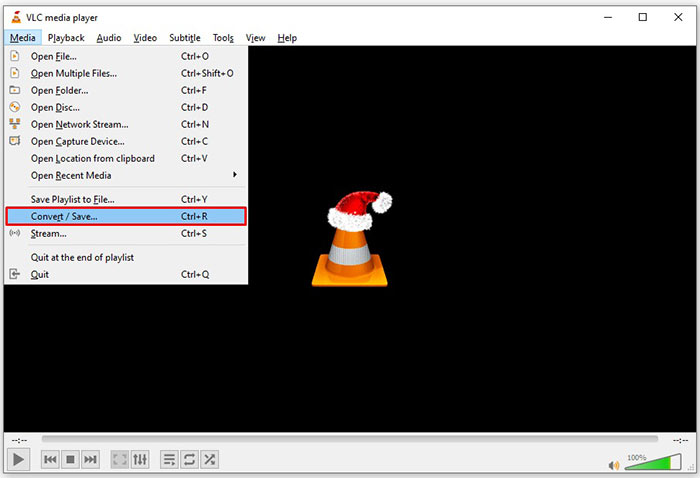
Schritt 3: Klicken Sie im Dialog 'Medien öffnen' auf die Schaltfläche Hinzufügen und fügen Sie die FLV‑Datei hinzu, die Sie konvertieren möchten.
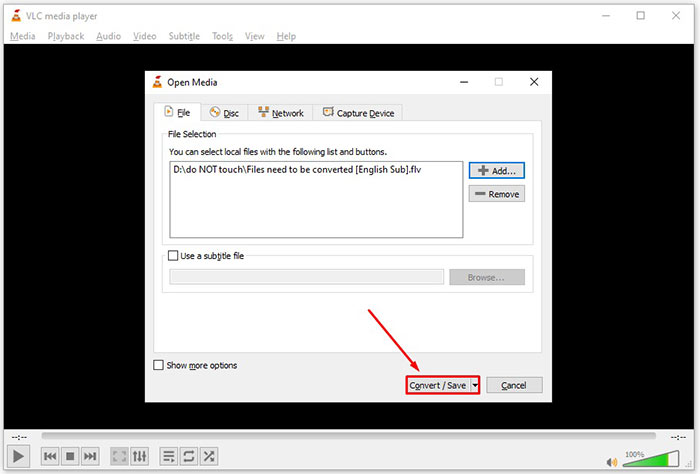
Schritt 4: Klicken Sie dann auf die Schaltfläche Konvertieren/Speichern, um zum nächsten Dialog zu wechseln.
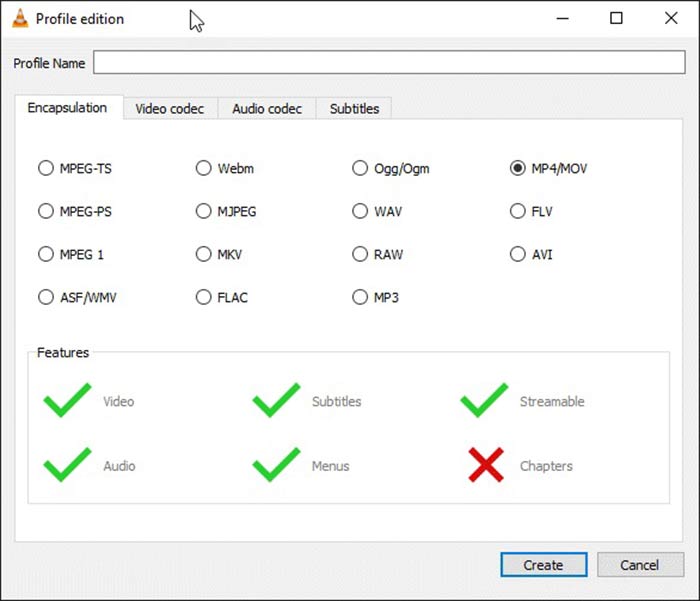
Schritt 5: Öffnen Sie die Dropdown‑Liste Profil und wählen Sie AVI aus. Wenn Sie es nicht finden, klicken Sie auf die dritte Schaltfläche neben Profil. Daraufhin öffnet sich der Dialog Profil bearbeiten. Wählen Sie AVI aus und vergeben Sie einen Profilnamen. Klicken Sie auf Erstellen, um zu bestätigen. Wählen Sie anschließend das neue Element unter Profil aus.
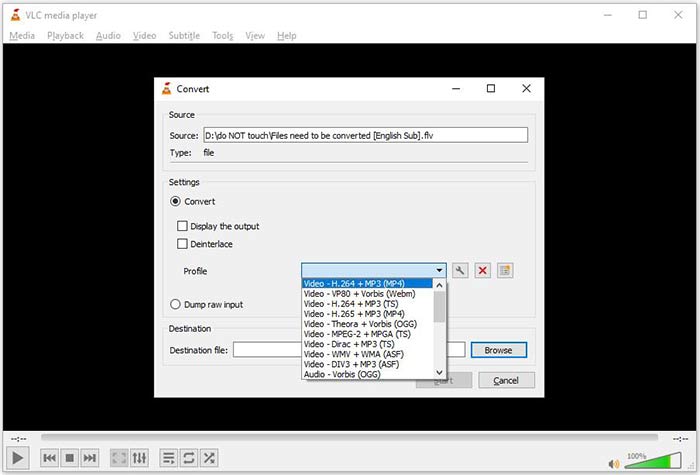
Schritt 6: Legen Sie den Ausgabeordner fest, indem Sie auf die Schaltfläche Durchsuchen klicken. Klicken Sie dann auf die Schaltfläche Start, und VLC wird FLV in AVI umwandeln.
Nicht verpassen:
- • • Top 3 Möglichkeiten, FLV in MOV umzuwandeln
- • • So konvertieren Sie Ihre FLV-Videos in MP3-Audiodateien auf dem Desktop und online
Teil 2: So konvertieren Sie FLV in AVI Online
Manchmal müssen Sie FLV nur gelegentlich online in AVI umwandeln. Außerdem möchten einige Nutzer keine Software installieren. FVC Free Online Video Converter kann Ihren Bedarf decken. Er funktioniert online und reicht völlig aus, um mehrere FLV‑Dateien in AVI zu konvertieren. Anders als andere Web‑Apps hat er keine Beschränkungen hinsichtlich Dateigröße, Wasserzeichen und mehr.
Schritt 1: Besuchen Sie https://www.free-videoconverter.net/free-online-video-converter/ in einem Browser, wenn Sie Videos konvertieren müssen. Klicken Sie auf die Schaltfläche Dateien zum Konvertieren hinzufügen und laden Sie das Startprogramm herunter.
Laden Sie die Desktop‑Version herunter, um Dateien stapelweise zu konvertieren.
Schritt 2: Nach dem Herunterladen wird das Startprogramm automatisch eingeblendet. Klicken Sie oben links auf die Schaltfläche Datei hinzufügen und laden Sie die FLV‑Dateien hoch, die Sie konvertieren möchten. Wählen Sie dann unten AVI aus.
Um Auflösung, Bildrate und andere Parameter zu ändern, klicken Sie auf das Zahnrad-Symbol, um den Profil‑Dialog zu öffnen.
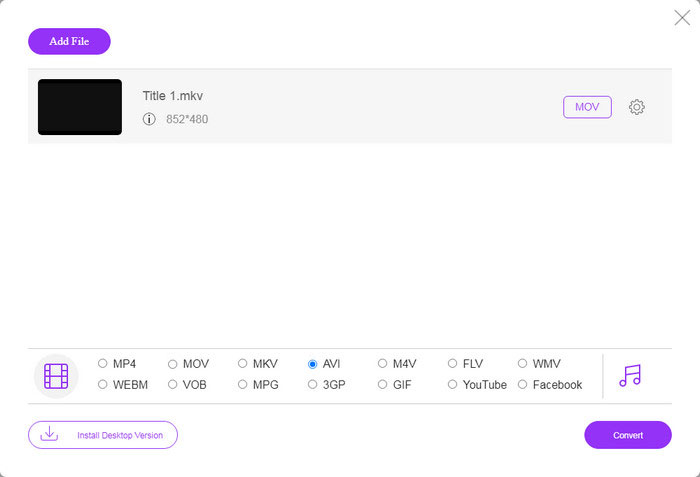
Schritt 3: Sobald Sie auf die Schaltfläche Konvertieren klicken, arbeitet die Web‑App wie gewünscht. Wenn Sie dazu aufgefordert werden, laden Sie die AVI‑Videodateien auf Ihre Festplatte herunter.
Im Vergleich zu anderen Web-Videokonvertern arbeitet Free Online Video Converter schnell, aber Sie benötigen auch eine gute Internetverbindung.
FLV im Vergleich zu AVI
Adobe Flash Player verwendete FLV, um Videoinhalte wie Filme und Fernsehsendungen bereitzustellen. Heutzutage entwickelt Adobe den Player nicht mehr weiter und empfiehlt Benutzern, ihn aus Sicherheitsgründen zu deinstallieren. Sie können das FLV-Format jedoch weiterhin in vielen Nicht-Adobe/Macromedia-Programmen verwenden.
Basierend auf dem Resource Interchange File Format (RIFF) wurde das AVI-Format 1992 von Microsoft eingeführt. Es kann Video/Audio in hoher Qualität speichern, da es weniger Komprimierung verwendet. Aber das verursacht auch die große Dateigröße einer AVI-Datei, was bei begrenztem Speicherplatz ein Problem sein kann.
Teil 3: Häufig gestellte Fragen zu FLV zu AVI
Wie lange sollte ich warten, um FLV in AVI zu konvertieren?
Es hängt von Ihrer Situation ab. Im Allgemeinen ist es sehr schnell, Videos auf dem Desktop zu konvertieren. Bei Online-Tools bestimmt Ihre Internetverbindung die Effizienz.
Ist es sicher, FLV online in AVI zu konvertieren?
Die meisten Online-FLV-Konverter-Apps versprechen, Ihre Videos nach der Konvertierung zu löschen. Sie sollten jedoch keine privaten Videos online hochladen, es sei denn, Sie sind sicher, dass die Web-App 100% sicher ist.
Ist AVI besser als FLV?
FLV ist ein verlustbehaftetes Videoformat, während AVI ein unkomprimiertes Videoformat ist. Dies bedeutet, dass die FLV-Datei im gleichen Zustand kleiner als AVI ist. AVI bietet jedoch eine bessere Videoqualität. FLV wird verwendet, um Videos online zu teilen, während AVI eine gute Wahl ist, um Videos zu bearbeiten.
Fazit
In diesem Handbuch wurden drei Möglichkeiten zum Konvertieren von FLV-Videodateien in das AVI-Format mit Desktop-Software und Web-App beschrieben. VLC ist sowohl ein kostenloser Mediaplayer als auch ein Videokonverter, obwohl die Verwendung schwierig ist. Darüber hinaus können Sie die Arbeit online erledigen, ohne eine Software installieren zu müssen. Wir empfehlen Ihnen jedoch, FVC Free FLV Converter auszuprobieren, da die Ausgabequalität erstaunlich ist. Außerdem ist es ziemlich einfach zu bedienen und zu navigieren. Wenn Sie weitere Fragen zur Konvertierung von FLV in AVI haben, hinterlassen Sie bitte eine Nachricht unter diesem Beitrag.
-
 3 freie Möglichkeiten, FLV in WAV umzuwandeln
 Wie konvertiere ich eine FLV-Datei? Kann VLC FLV in WAV konvertieren? In diesem Beitrag werden 3 kostenlose Möglichkeiten zum Konvertieren von FLV in WAV ohne Qualitätsverlust beschrieben.
-
 3 freie Möglichkeiten zur Konvertierung von FLV in MPG
 Wie konvertiert man FLV in MPEG? Kann ich FLV kostenlos in MPG konvertieren? In diesem Beitrag werden 3 kostenlose Videokonverter geteilt, mit denen Sie FLV in MPG ohne Qualitätsverlust konvertieren können.
-
 3 kostenlose Möglichkeiten zum Konvertieren von FLV für das Spielen auf der Xbox
 Können FLV-Dateien auf Xbox One oder Xbox 360 nicht wiedergegeben werden? Müssen Sie FLV in ein von Xbox unterstütztes Format wie MP4, AVI, MOV oder WMV konvertieren? Dieser Beitrag listet 3 kostenlose FLV-zu-Xbox-Konverter auf, mit denen Sie FLV auf Xbox spielen können.

