


 Video Converter Ultimate
 Bildschirm recorder
 Videoreparatur
 Sicherer Download
3 effiziente Methoden zum kostenlosen Konvertieren von FLV in VOB
Wenn Sie ein Video von YouTube herunterladen und es auf einer DVD speichern möchten, werden Sie feststellen, dass das Video aus dem Internet im FLV-Format vorliegt. Um es auf eine DVD zu brennen, müssen Sie FLV-Dateien in VOB konvertieren. In diesem Artikel werden Ihnen daher 3 Methoden vorgestellt, mit denen Sie FLV kostenlos in VOB umwandeln können – ganz einfach auf Desktop-Geräten.

Teil 1. So exportieren Sie VOB kostenlos aus FLV
FVC Free FLV Converter ist ein ideales Tool, um FLV in VOB umzuwandeln. Als All-in-One-Videokonverter ermöglicht er Ihnen, FLV-Dateien in hoher Qualität und Geschwindigkeit zu konvertieren, zusammenzuführen und anzupassen. Sie können außerdem Themen hinzufügen, um Ihre Videos zu gestalten, und sie auf verschiedenen Geräten wie iPhone und iPad teilen.

- Konvertieren Sie FLV in VOB und andere Formate kostenlos mit einem Klick.
- Ermöglicht Ihnen, Audiospuren selektiv zu deaktivieren oder zu bearbeiten.
- Fügen Sie vor der Konvertierung ein Thema für Ihr FLV-Video hinzu.
- Bieten Sie eine kostenlose, schnelle und einfache Möglichkeit zur Stapelkonvertierung von FLV-Dateien an.
Kostenloser DownloadFür Windows 7 oder neuerSicherer Download
Kostenloser DownloadFür macOS 10.7 oder neuerSicherer Download
Schritt 1. Nachdem Sie Free FLV Converter heruntergeladen und gestartet haben, können Sie einen Ordner zum Speichern der VOB-Datei auswählen. Klicken Sie oben in der Oberfläche auf die Option Menü und gehen Sie zu Einstellungen (Preference). Unter Allgemeine Einstellungen (General Settings) können Sie den Ausgabeordner wählen.
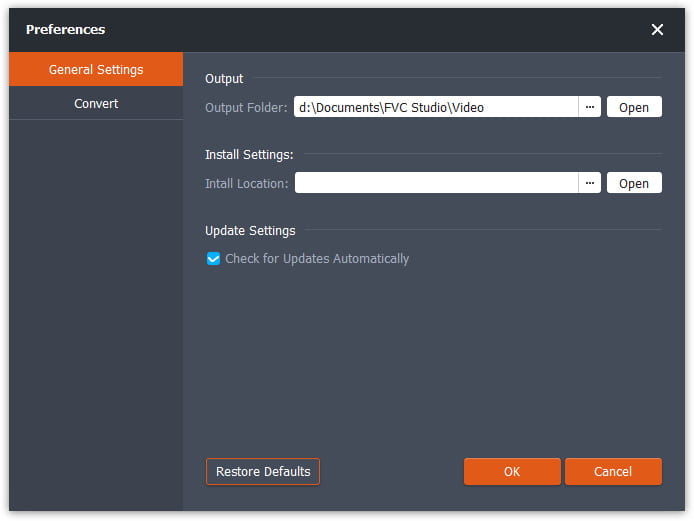
Schritt 2. Um FLV-Dateien hinzuzufügen, klicken Sie auf die Schaltfläche Dateien hinzufügen (Add Files) in der Oberfläche. Danach können Sie die Dateien im Browserfenster auswählen. Klicken Sie anschließend auf das Feld Ausgabeformat (Output Format) und wählen Sie das VOB-Format.

Schritt 3. Vor der Konvertierung können Sie Themen für Ihre Videodatei hinzufügen. Klicken Sie auf die Schaltfläche Bearbeiten (Edit) in der Oberfläche und gehen Sie zu Thema auswählen (Select Theme). Sie können ein Thema wie Geburtstag, Familie oder Landschaft für Ihr FLV-Video wählen. Anschließend können Sie die Effekte des Videos in der Vorschau ansehen und speichern.
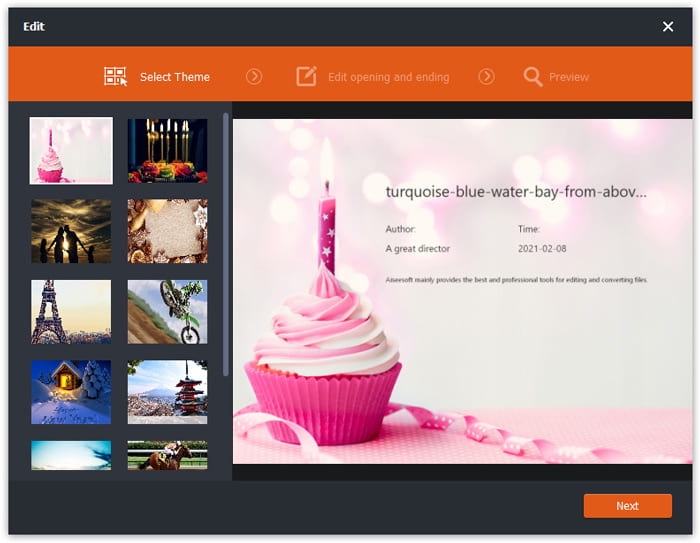
Schritt 4. Um die Konvertierung zu starten, klicken Sie auf die Schaltfläche Konvertieren (Convert) in der Hauptoberfläche. Der Ordner wird automatisch geöffnet und Sie finden darin die VOB-Datei.
Free FLV Converter ist eine vielseitige Software zum Umwandeln von FLV-Videos und Sie können Ihre Videos mit erweiterten Bearbeitungsfunktionen aufrüsten.
Teil 2. So ändern Sie FLV zu VOB Online
FVC Free Online Video Converter ist ein kostenloses Online-Tool, um FLV in VOB zu konvertieren. Es verfügt über eine übersichtliche und klar strukturierte Oberfläche, die für alle Benutzer leicht verständlich ist. Da es sich um ein Online-Tool handelt, müssen Sie nichts herunterladen oder installieren.
- 1. Ein Klick, um FLV in VOB in Sekunden ohne Qualitätsverlust zu konvertieren.
- 2. Passen Sie die FLV-Datei vor der Konvertierung an.
- 3. Sicher und stabil zu bedienen.
Schritt 1. Gehen Sie auf die Website des Free Online Video Converter. Klicken Sie auf die Schaltfläche Add Files to Convert. Es öffnet sich ein Browserfenster, in dem Sie FLV-Dateien hinzufügen können.
Laden Sie die Desktop‑Version herunter, um Dateien stapelweise zu konvertieren.
Schritt 2. Nachdem Sie die Dateien hinzugefügt haben, müssen Sie das Format für den Export auswählen. Unten im Fenster sind mehrere Formate aufgelistet. Suchen Sie VOB und klicken Sie auf den Kreis daneben.
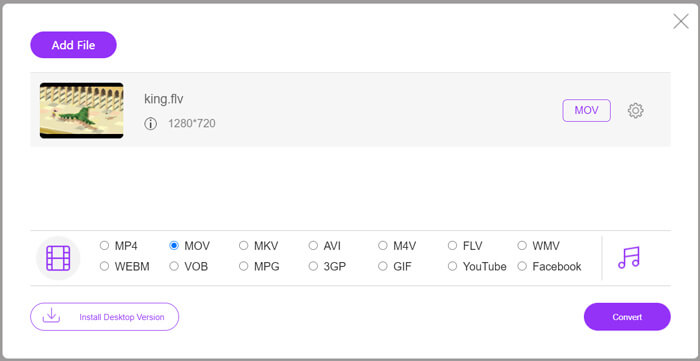
Schritt 3. Vor der Konvertierung können Sie auf das Zahnrad-Symbol klicken, um Parameter wie Videoauflösung, Encoder, Audiolautstärke und Kanal der FLV-Datei anzupassen.
Schritt 4. Klicken Sie auf die Schaltfläche Convert, um die Konvertierung zu starten. Sie finden die VOB-Datei in dem Ordner, den Sie zuvor festgelegt haben, sobald die Umwandlung beendet ist.
Zusammenfassend ist Free Online Video Converter ein praktisches und effizientes Tool, um FLV online kostenlos in VOB umzuwandeln. Außerdem können Sie hier auch FLV-Dateien komprimieren.
Teil 3. Wie man Handbrake verwendet, um FLV in VOB umzucodieren
Handbrake ist ein kostenloser Open-Source-Transcoder, mit dem Sie FLV in VOB konvertieren können. Es unterstützt Windows- und Mac-Systeme. Hier sind die Schritte zum Konvertieren von FLV in VOB mit Handbrake.
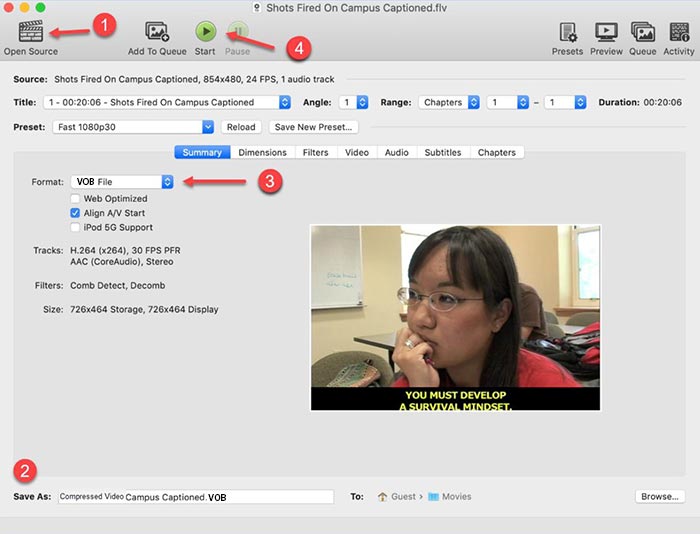
Schritt 1. Laden Sie HandBrake herunter und starten Sie es. Um FLV-Dateien hinzuzufügen, klicken Sie auf die Schaltfläche Open Source. Im Browserfenster können Sie die FLV-Datei finden.
Schritt 2. Legen Sie dann den Ordner zum Speichern der ausgegebenen VOB-Datei fest, indem Sie unten in der Oberfläche auf das Feld Save As klicken.
Schritt 3. Wählen Sie anschließend im Feld Format das VOB-Format aus.
Schritt 4. Klicken Sie auf die Schaltfläche Start, um die Konvertierung zu beginnen.
FLV vs. VOB
Adobe Flash Player verwendete FLV, um Videoinhalte wie Filme und Fernsehsendungen bereitzustellen. Heutzutage entwickelt Adobe den Player nicht mehr weiter und empfiehlt Benutzern, ihn aus Sicherheitsgründen zu deinstallieren. Sie können das FLV-Format jedoch weiterhin in vielen Nicht-Adobe/Macromedia-Programmen verwenden.
Das VOB-Format wird häufig zum Speichern der Filmdaten einer DVD-Disc verwendet, die Video, Audio, Untertitel, DVD-Menüs und einige andere Inhalte enthält. Es ist normalerweise als MPEG-2-Systemstreams formatiert. Sie können VOB-Dateien mit verschiedenen Videowiedergabe-Tools öffnen.
Teil 4. Häufig gestellte Fragen zum Konvertieren von FLV in VOB
1. Was ist das FLV-Format?
FLV (Flash Video) ist ein Dateiformat, das Adobe Flash Player nutzt, um Video oder Audio über das Internet zu übertragen. Es ist das Standardformat für Videos auf Plattformen und Websites wie YouTube und Hulu. (Hier finden Sie einen FLV-Player)
2. Warum sollte ich FLV in VOB konvertieren?
Wenn Sie Videos aus dem Internet auf einer DVD speichern möchten, müssen Sie FLV in VOB konvertieren. VOB ist ein Format, das Videostreaming im MPEG-2-Format und Audiostreaming in mehreren Formaten in DVD enthält.
3. Wie kann ich die FLV-Datei vor der Konvertierung schneiden?
Sie können professionelle Videobearbeitungssoftware verwenden, um FLV-Dateien wie Video Converter Ultimate zu schneiden. Es ermöglicht Ihnen, den Start- und Endpunkt auf der Timeline festzulegen, um das Video zu schneiden.
Fazit
In diesem Artikel wurden Ihnen 3 verifizierte Methoden vorgestellt, um FLV in VOB zu konvertieren. Sie können FVC Free FLV Converter und Free Online Video Converter verwenden, um ganz einfach und kostenlos zu konvertieren. Außerdem gibt es einige Freeware wie HandBrake oder VLC Media Player, mit denen Sie ebenfalls konvertieren können. Laden Sie sie herunter und probieren Sie aus, ob sie Ihr Problem lösen. Wenn Sie Fragen zur Umwandlung von FLV in VOB haben oder mehr darüber erfahren möchten, hinterlassen Sie bitte unten Ihren Kommentar.
Kostenloser DownloadFür Windows 7 oder neuerSicherer Download
Kostenloser DownloadFür macOS 10.7 oder neuerSicherer Download
-
 VLC spielt keine DVD ab, wie man es repariert
 Kann VLC eine DVD abspielen? Warum spielt VLC meine DVD nicht ab? Wie bringe ich VLC dazu, eine DVD unter Windows 10 abzuspielen? Dieser Beitrag gibt 3 Tipps zur Behebung des Problems, dass VLC keine DVD abspielt.
-
 Top 3 kostenlose Möglichkeiten, MP4 schnell in VOB zu konvertieren
 Wie konvertiere ich MP4 in VOB auf Windows PC und Mac? Um dieses Problem zu lösen, werden in diesem Beitrag drei Möglichkeiten vorgestellt, wie Sie MP4 kostenlos in VOB konvertieren können.
-
 Die besten Möglichkeiten zum Konvertieren von VOB in FLV
 Möchten Sie eine VOB-Datei in eine FLV-Datei konvertieren? Sie können die Aufgabe einfach mit Desktop- oder Online-Konvertern erledigen. Lesen Sie diese Anleitung und erfahren Sie, wie Sie VOB einfach und schnell in FLV umwandeln.

