


 Video Converter Ultimate
 Bildschirm recorder
 Videoreparatur
5 schnelle und mühelose Möglichkeiten, MKV kostenlos in FLV umzuwandeln [Online & Offline]
Sie können Ihre MKV-Dateien nicht über das Internet teilen, weil die Dateigröße zu groß ist? Warum konvertieren Sie sie nicht, anstatt die Datei stark zu komprimieren und dadurch Qualität zu verlieren? Dieses Problem lässt sich lösen, wenn Sie die folgenden Details lesen, bevor Sie die Datei verschicken. Sie müssen keine Stunde mit diesem Artikel verbringen – lassen Sie uns also ohne Umschweife die sechs Konverter entdecken, mit denen Sie MKV in FLV konvertieren können.

Teil 1. Erstklassiger bester MKV-zu-FLV-Konverter zum Herunterladen
FVC Video Converter Ultimate kann Ihnen helfen, MKV mühelos und effektiv in FLV zu ändern, ohne ins Schwitzen zu kommen. Dieser außergewöhnliche Konverter unterscheidet sich deutlich von den anderen Konvertern in dieser Liste oder denen, die Sie bereits verwenden oder auch nicht. Er ist ein erstklassiger Coder und Decoder, den Sie auf Ihren PC oder Mac herunterladen können, und er funktioniert offline einwandfrei, selbst wenn Sie keinen High-End-Desktop besitzen.

FVC Video Converter Ultimate
4.987.355+ Downloads- Konvertieren Sie MKV in FLV, AVI, MP4, MOV oder in über 200 Formate, die für Windows und Mac verfügbar sind.
- Machen Sie Ihr MKV-Format mit allen Desktops und Geräten kompatibel.
- Es kann eine Stapelkonvertierung für Ihre MKV-Formate oder andere Formate durchführen.
- Narrensicherer Konverter, der von jedermann verwendet werden kann.
- Unterstützt High-Definition-Ausgabe und sogar bis zu 4k-Videoqualität.
Gratis DownloadFür Windows 7 oder neuerSicherer Download
Gratis DownloadFür MacOS 10.7 oder neuerSicherer Download
Schritte zum Konvertieren von MKV in FLV mit FVC Video Converter Ultimate
Schritt 1. Laden Sie die Anwendung auf Ihr Laufwerk herunter und folgen Sie dann dem Installationsprozess.
Gratis DownloadFür Windows 7 oder neuerSicherer Download
Gratis DownloadFür MacOS 10.7 oder neuerSicherer Download
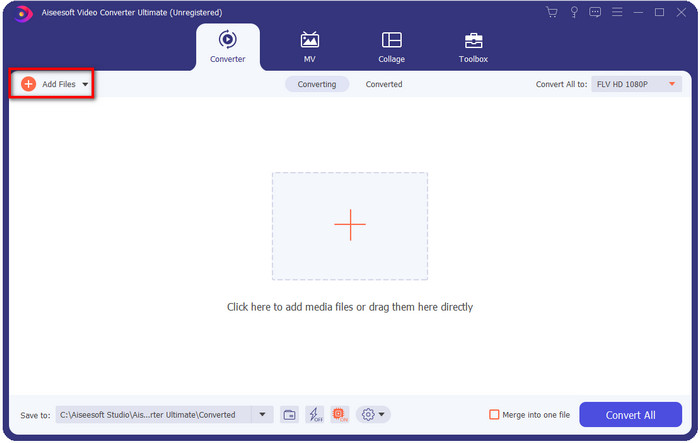
Schritt 2. Öffnen Sie nach der Installation die Anwendung, um die MKV-Dateien hinzuzufügen; Sie können die Datei per Drag & Drop in die Oberfläche ziehen oder auf die Schaltfläche Dateien hinzufügen klicken.
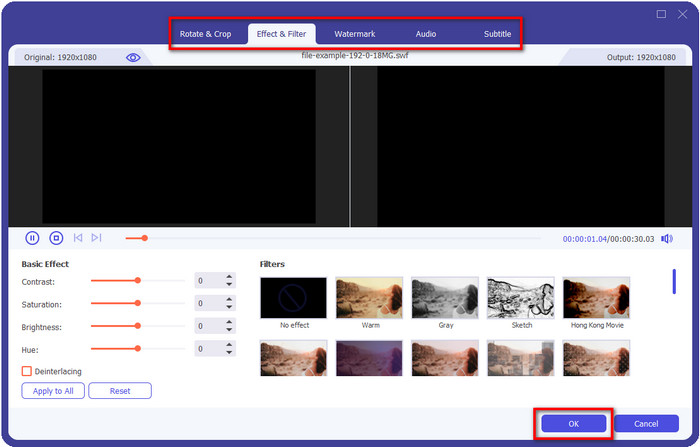
Wenn Sie Ihre MKV-Dateien vor der Konvertierung bearbeiten möchten, können Sie auf die Zauberstab-Schaltfläche klicken, um Ihrem Ergebnis magische Effekte hinzuzufügen, wie z. B. Effekte, Zuschneiden, Untertitel hinzufügen und mehr. Um die von Ihnen hinzugefügten Änderungen am Video zu speichern, klicken Sie auf OK.
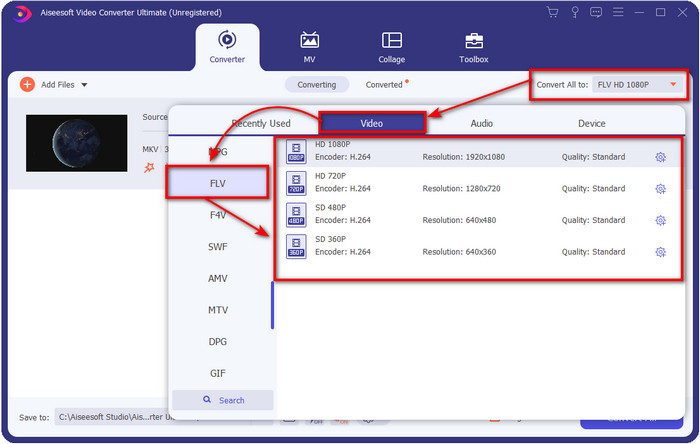
Schritt 3. Klicken Sie auf die Dropdown-Schaltfläche und wählen Sie das Format FLV in der Liste aus.
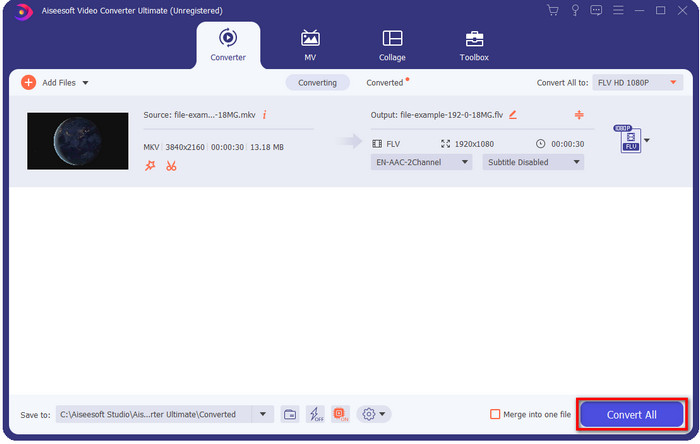
Schritt 4. Klicken Sie auf die Schaltfläche Alles konvertieren, um damit zu beginnen, MKV kostenlos in FLV zu konvertieren. Nach dem Vorgang wird ein Ordner mit der neuen FLV-Datei angezeigt.
Teil 2. Die 4 besten webbasierten MKV-zu-FLV-Konverter
1. Kostenloser FVC-Videokonverter online
FVC Free Video Converter Online bietet einen einfachen, aber beeindruckenden kostenlosen Online-MKV-zu-FLV-Konverter, der in allen Browsern verfügbar ist. Er unterstützt außerdem eine mittlere Bandbreite an Formaten, in die Sie konvertieren und die Sie hochladen können. Obwohl das Tool von einer Internetverbindung abhängt, ist das Konvertieren und Hochladen der Datei hier einfacher und schneller. Möchten Sie wissen, wie man es benutzt? Dann folgen Sie den untenstehenden Schritten.
Vorteile
- Es kann von jedem mit dem Internet verwendet werden.
- Benutzerfreundliche und leicht verständliche Oberfläche.
- Keine Begrenzung der Dateigröße.
- Erweiterte Einstellungen für Video und Audio.
Nachteile
- Mittelformat.
Schritt 1. Um den Online-Konverter zu öffnen, klicken Sie auf diesen Link.
Schritt 2. Drücken Sie die Schaltfläche Dateien zum Konvertieren hinzufügen, um die Datei aus dem Ordner Ihres Computers hinzuzufügen, und klicken Sie dann auf Öffnen.
Laden Sie die Desktop‑Version herunter, um Dateien stapelweise zu konvertieren.
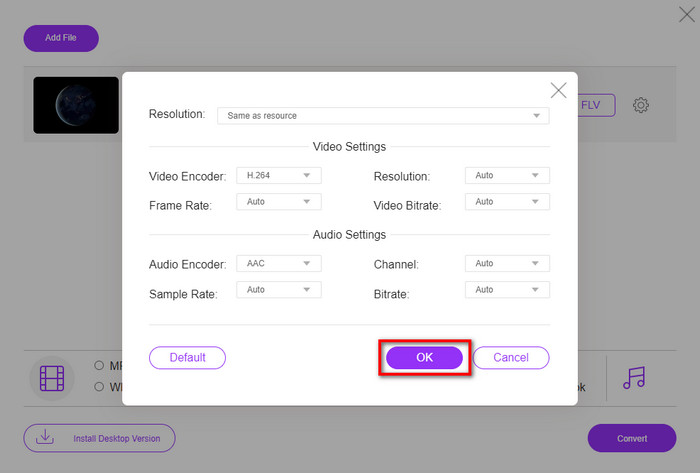
Auch wenn Sie hier keine Videos bearbeiten können, können Sie die Video- und Audioeinstellungen ändern, indem Sie auf die Zahnrad-Schaltfläche klicken.
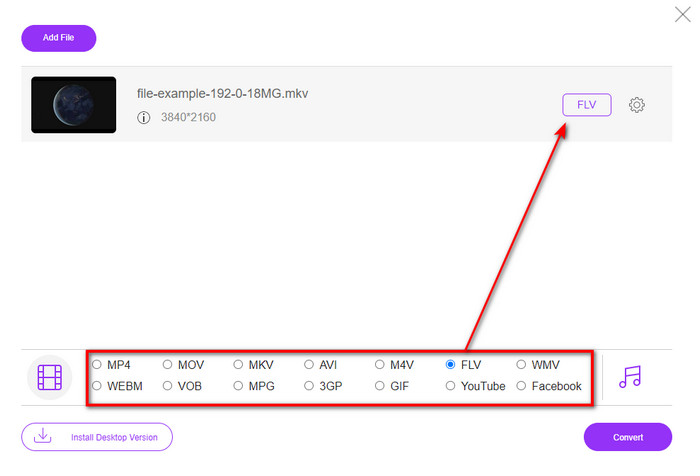
Schritt 3. Wählen Sie das FLV-Format in der Liste aus.
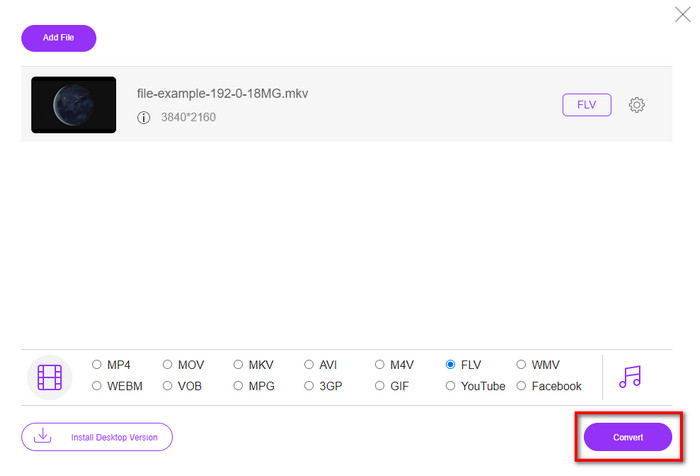
Schritt 4. Klicken Sie auf Konvertieren, um den Konvertierungsvorgang zu starten.
2. MKonverter
Einer der sichersten Online-MKV-zu-FLV-Konverter, die Sie verwenden können, ist Mconverter. Neben der Umwandlung von Video- und Audioformaten können Sie hier auch Ihre Bilder, Archive, Dokumente und viele weitere Medienformate konvertieren. Obwohl dieser Konverter kostenlos ist, gibt es eine Größenbeschränkung für jede Datei, die Sie einfügen können.
Vorteile
- Konvertieren Sie Videos, Audio, Dokumente und mehr online.
- Es unterstützt mehrere Konvertierungen.
- Einfach zu verwenden.
Nachteile
- Die Dateigröße darf 200 MB nicht überschreiten.
- Einige Anzeigen beim Konvertieren der Datei.
Schritt 1. Öffnen Sie Mconverter in Ihrem Browser, ziehen Sie die .mkv-Datei und legen Sie sie in dem dafür vorgesehenen Feld ab.
Schritt 2. Klicken Sie auf das FLV-Format, und der Vorgang beginnt automatisch.
Schritt 3. Sobald der Vorgang abgeschlossen ist, wird die Datei automatisch auf Ihr Laufwerk heruntergeladen.
3. Freeconvert.com
Freeconvert.com hilft Ihnen, MKV online kostenlos in FLV zu konvertieren. Dieser Web-Konverter bietet eine leicht verständliche Oberfläche, die jeder nutzen kann. Allerdings unterstützt dieser Online-Konverter nur eine kleine Auswahl an Formaten, und es gibt viele Werbeanzeigen auf der Webseite.
Schritt 1. Suchen Sie in Ihrer Suchmaschine nach Freeconvert.com.
Schritt 2. Klicken Sie auf Datei auswählen, um die .mkv-Datei aus dem Ordner Ihres Computers hochzuladen, drücken Sie die Dropdown-Schaltfläche und wählen Sie das FLV-Format.
Schritt 3. Klicken Sie auf In FLV konvertieren, um mit der Konvertierung zu beginnen, und klicken Sie zum Herunterladen auf FLV herunterladen.
Vorteile
- Ein kostenloser Online-Konverter, den Sie verwenden können.
- Sicherer und einfacher Webkonverter.
- Es unterstützt eine 1-GB-Datei zum Konvertieren.
Nachteile
- Es unterstützt ein kleines Format.
- Der Prozess des Konvertierens und Herunterladens wird viel Zeit in Anspruch nehmen.
4. Movavi Online-Videokonverter
Movavi Online Video Converter ist einer der empfohlenen Konverter, mit denen Sie MKV online in FLV umwandeln sollten. Es ist die kostenlose Webversion des Movavi Video Converter, der von vielen Nutzern im ganzen Web verwendet wird – aufgrund der Effizienz dieses Tools und seines professionellen Erscheinungsbilds.
Schritt 1. Öffnen Sie Ihren bevorzugten Browser und suchen Sie nach der Webseite von Movavi.
Schritt 2. Klicken Sie auf +Ihr Medium hinzufügen, um die Datei hinzuzufügen, die Sie konvertieren möchten. Klicken Sie auf die Dropdown-Schaltfläche und dann auf Video; suchen Sie das Format FLV und klicken Sie darauf.
Schritt 3. Drücken Sie Konvertieren, um den Konvertierungsvorgang zu starten.
Vorteile
- Webinterface ohne Werbung.
- Einfacher Konverter, den jeder verwenden kann.
- Es unterstützt ein Medium-Scale-Format.
Nachteile
- Der Prozess der Formatkonvertierung nimmt mehr Zeit in Anspruch.
- Internetabhängig wie die anderen Webkonverter.
Teil 3. Vergleichstabelle
| Merkmale | FVC Video Converter Ultimate | FVC Free Video Converter Online | MKonverter | Freeconvert.com | Movavi Online-Videokonverter |
| Fähigkeiten zum Konvertieren von Formaten |  | | | | |
| Internetabhängig |  | | | | |
| Stapelkonvertierung | | | | | |
| Erweiterte Bearbeitungsfunktionen | | | | | |
| Verfügbare Plattformen | Desktop-basiertes Tool | Webbasiertes Tool | Webbasiertes Tool | Webbasiertes Tool | Webbasiertes Tool |
MKV vs. FLV
Das 2002 veröffentlichte Multimedia-Containerformat Matroska ist ein Open-Source-Format, das eine Reihe von Video-, Audio-, Bild- und Untertitelspuren enthalten kann. So können Sie damit ganz einfach kurze Videoclips, Fernsehsendungen und Filme speichern. Es ist sehr beliebt für Anime-Fans.
Adobe Flash Player verwendete FLV, um Videoinhalte wie Filme und Fernsehsendungen bereitzustellen. Heutzutage entwickelt Adobe den Player nicht mehr weiter und empfiehlt Benutzern, ihn aus Sicherheitsgründen zu deinstallieren. Sie können das FLV-Format jedoch weiterhin in vielen Nicht-Adobe/Macromedia-Programmen verwenden.
Teil 4. Häufig gestellte Fragen zur MKV-zu-FLV-Konvertierung
Warum sind MKV-Dateien zu groß?
Es gibt zwei Hauptgründe, warum MKV-Dateien so groß sind. Der erste Grund ist, dass dieses Format unbegrenzt viele Inhalte und Elemente wie Video, Audio und Metadaten in einer einzigen Datei speichern kann. Der zweite Grund ist: Wenn Ihr Video sehr lang ist, dann ist zu erwarten, dass die Dateigröße entsprechend zunimmt. Sie können die MKV-Datei jedoch mit Hilfe dieses MKV-Kompressors verkleinern. Wenn Sie jedoch einen einfacheren Weg bevorzugen, sollten Sie in Erwägung ziehen, MKV-Dateien in MP4, AVI, MOV, FLV usw. zu konvertieren.
Ist MKV besser als AVI?
MKV und AVI sind fast gleichartige Formate, da sie hochauflösende Videos und große Dateigrößen enthalten können. Dennoch haben diese Container unterschiedliche Zwecke und Strukturen, die sie einzigartig machen. Das AVI-Format ist zum Beispiel ein unkomprimiertes Format, das Rohvideoinhalte aufnehmen kann und sich hervorragend für die reine Wiedergabe eignet. Es diente auch als Grundlage für die Entwicklung der MKV-Datei. Obwohl MKV-Dateien einen Kompressor verwenden, sind ihre Inhalte und Elemente umfangreicher, als es AVI speichern kann. Wenn Sie also die hohe Qualität Ihrer Videos beibehalten möchten, sollten Sie das MKV-Format wählen. Wenn Sie hingegen mehr Kompatibilität wünschen, ist AVI die richtige Wahl. Wenn Sie wissen möchten, wie man MKV in AVI konvertiert, klicken Sie auf diesen Link.
Bewältigt Handbrake die Konvertierung von MKV in FLV?
Handbrake kann diesen Job erledigen, aber dieser Konverter unterstützt keine macOS- und Windows-Programme, die nicht 10 oder höher sind.
Fazit
Abschließend wissen Sie nun, wie Sie MKV online und offline in FLV konvertieren. Diese Tools oben wurden nicht zufällig ausgewählt, sondern nach den Vorlieben der Nutzer. Während unserer Recherche und Prüfung haben wir festgestellt, dass diese sechs Tools ihre Aufgabe als Konverter am besten erfüllen. Doch der FVC Video Converter Ultimate übertrifft unsere Erwartungen an einen Konverter sogar noch. Möchten Sie die weiteren Fähigkeiten dieses außergewöhnlichen Konverters kennenlernen? Worauf warten Sie dann noch? Sie sollten ihn jetzt herunterladen.
-
 MKV in MOV - So konvertieren Sie MKV in MOV
 Wie konvertiere ich MKV in MOV auf einem Mac? Kann iMovie MKV lesen? Was bedeutet MOV-Format? In diesem Beitrag werden zwei einfache Möglichkeiten beschrieben, wie Sie MKV mit kostenlosen Online- und professionellen Videokonvertern in MOV konvertieren können.
-
 So konvertieren Sie MKV-Videos in animierte GIFs ohne Photoshop/FFmpeg
 Nachdem Sie MKV-Filme auf Ihren Computer heruntergeladen und angesehen haben, möchten Sie vielleicht einige wundervolle Momente mit Freunden oder im Internet als GIFs teilen. In diesem Artikel erfahren Sie mehr über die 2 einfachsten Möglichkeiten zum Konvertieren von MKV in GIF.
-
 Tipps und Tricks zum Konvertieren von MKV-Dateien in MP3 [2025]
 Haben Sie Probleme bei der Auswahl des richtigen Konverters für MKV zu MP3? Dann lesen Sie diesen Beitrag weiter, während wir verschiedene Lösungen für ein Problem vorgestellt haben.

