


 Video Converter Ultimate
 Bildschirm recorder
 Videoreparatur
Bester MPG-zu-GIF-Konverter zum Konvertieren von MPG in GIF [Kostenlose und Premium-Version]
Der beste Weg, Ihre Gefühle gegenüber Ihren Lieben auszudrücken, besteht darin, eine bedeutungsvolle Nachricht zu verfassen. Aber möchten Sie wissen, was man besser anders ausdrücken kann? Sie können ein GIF verwenden. Auch als Graphics Interchange Format bekannt. Dies sind die Bilder, die Sie senden, die jedoch aktualisiert wurden. Diese bewegten Bilder werden erstellt, um einfach Ihre Gefühle gegenüber jemandem direkt oder indirekt auszudrücken. Wussten Sie, dass die meisten Messaging-Apps GIF sowie unseren integrierten Messenger unterstützen? In einigen alten Versionen des Telefons wird dieses Format jedoch nicht bereitgestellt. Obwohl GIF Spaß macht, bietet Ihnen nicht immer die Emotion, die Sie ausdrücken möchten.
Also, Sie sind also hier, um herauszufinden, wie Sie am besten Ihr MPG- in GIF-Format umwandeln können. Ist es nicht spannend, Ihr eigenes GIF zu erstellen? Anstatt lange zu suchen, was Sie verwenden sollten, warum versuchen Sie nicht, Ihr eigenes GIF mit Ihrer ganz persönlichen Note zu erstellen? Am besten finden Sie heraus, wie das geht, indem Sie diesen Artikel lesen. Er bietet genügend Informationen, Schritte und Werkzeuge für diese Aufgabe. Also, ohne weiter um den heißen Brei herumzureden, kommen wir zu den wichtigen Details dieses Artikels. Lesen Sie weiter, um mehr über diese Liste von Konvertern zu erfahren.

Teil 1. 4 Bestes Tool zum Konvertieren von MPG in das GIF-Format PC oder Mac
1. FVC Video Converter Ultimate
Wenn Sie eine humorvolle Botschaft teilen möchten, ohne viel tippen zu müssen, dann hilft Ihnen dieses Tool. Mit diesem Tool können Sie MPG in animiertes GIF umwandeln; entwickelt wurde es von FVC. FVC Video Converter Ultimate ermöglicht es den Nutzern, jedes beliebige Format in ein abspielbares Format zu konvertieren, das Sie verwenden möchten. Vielleicht fragen Sie sich, warum Sie sich für dieses Tool entscheiden sollten. Gibt es etwas Besonderes daran? Ja, dieses Tool ist multifunktional. Es kann Ihr zuverlässigster Ripper, MV-Maker, Collage-Ersteller und vieles mehr sein. Das bedeutet, dass dieses Tool mehr leisten kann als viele andere Werkzeuge. Ein weiteres beeindruckendes Merkmal ist seine Ultrafast-Konvertierung, mit der Sie Ihre Videos in kürzester Zeit umwandeln können. Um zu erfahren, wie Sie dieses Tool nutzen, folgen Sie sorgfältig den folgenden Schritten, damit Ihre Konvertierung mit der gewünschten Formatqualität erfolgreich ist.
Schritt 1. Installieren Sie das Tool auf Ihrem PC oder Mac. Folgen Sie den Anweisungen nach der Installation und klicken Sie auf „Fertig stellen“, um das Tool zu starten.
Gratis DownloadFür Windows 7 oder neuerSicherer Download
Gratis DownloadFür MacOS 10.7 oder neuerSicherer Download
Schritt 2. Nach Abschluss des gesamten Installationsprozesses erscheint ein Mini-Interface wie dieses auf Ihrem Bildschirm.
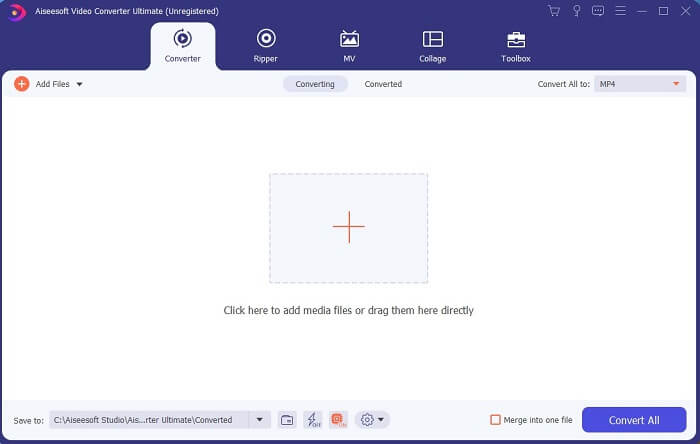
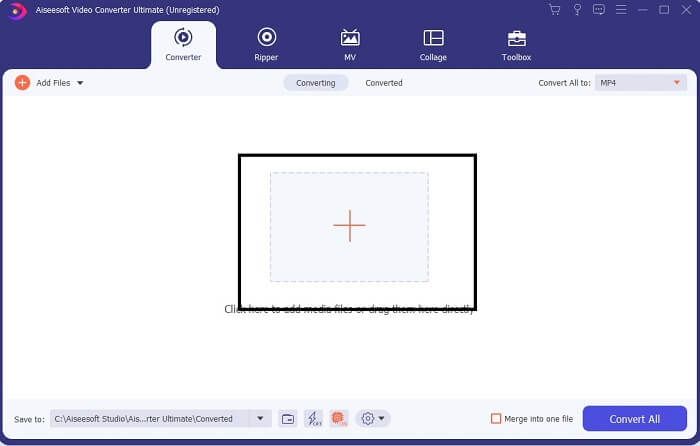
Schritt 3. Klicken Sie auf das Plus-Symbol, um die Datei hinzuzufügen, und klicken Sie auf „Öffnen“, um die Konvertierung zu starten. Oder Sie können die Videodatei einfach per Drag-and-drop in das Tool ziehen. Die Länge des Videos spielt dabei keine Rolle.
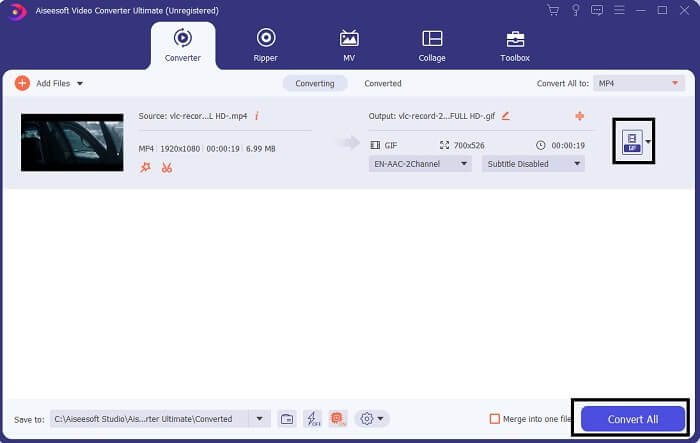
Schritt 4. Klicken Sie auf die Drop-down-Schaltfläche oben rechts in der Oberfläche, scrollen Sie nach unten und wählen Sie das GIF-Format. Wählen Sie die gewünschte Auflösung: Groß, Mittel oder Klein. Wenn alles bereit ist, klicken Sie auf Alle konvertieren, um die Konvertierung zu starten.
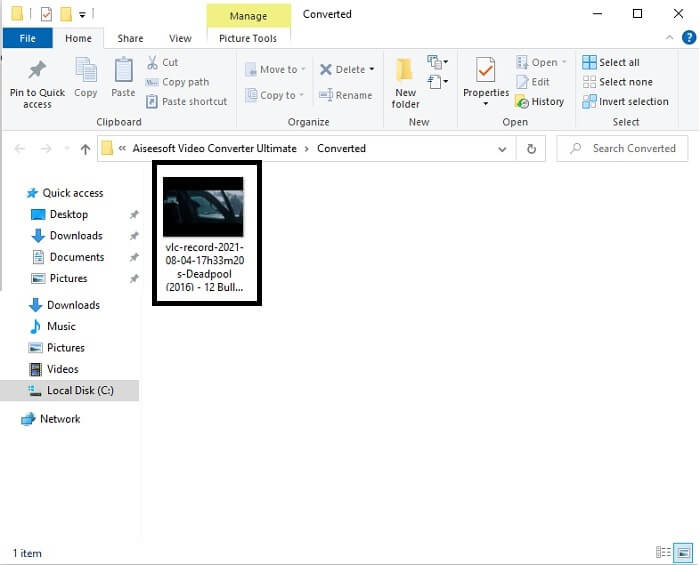
Schritt 5. Nach der Konvertierung öffnet sich ein Dateimanager-Fenster und zeigt Ihnen Ihr Endergebnis. Jetzt können Sie Ihr GIF-Format genießen. Sie können aber auch eine .gif-Datei in das .mpg-Format umwandeln, indem Sie dieselben Schritte befolgen und lediglich das Ausgabeformat ändern.
2. Kostenloser FVC-Online-Videokonverter
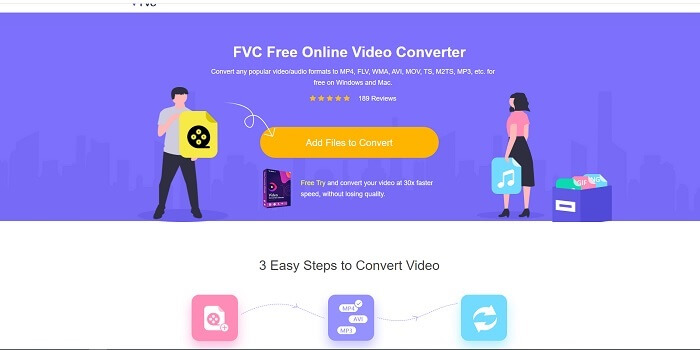
Vielleicht denkst du, was, wenn du kein Geld hast, kann ich trotzdem die gleiche Umwandlung wie die erste erleben? Die Antwort ist ein dickes JA. FVC bietet immer die beste Erfahrung für seine Kunden, die kein Geld haben, und auch für diejenigen, die ihr Tool ausprobieren möchten. Obwohl dieses Tool nur eine einfache Konvertierung durchführt, erwarten Sie nicht zu viel, da die Premium-Version bieten kann. Und es kann mehrere Video- und Audioformate nicht schneller konvertieren.
Aber der von diesem Tool gebotene Konvertierungsprozess ist wesentlich besser als bei vielen anderen kostenpflichtigen und kostenlosen Konvertern. Der FVC Free Online Video Converter ist da, um Ihren Tag zu retten. Wie der Name schon sagt, handelt es sich um ein kostenloses Online-Tool, mit dem Sie auf höchstem Niveau konvertieren können. Anders als viele andere Konverter kommt dieses Tool ohne Werbung oder Malware aus, erfordert keine Registrierung, kein Login und keine Angabe persönlicher Daten, bevor Sie es nutzen. Wenn Sie einen einfachen Konverter suchen, ist dies das richtige Tool für Sie. Folgen Sie diesen Schritten, um zu erfahren, wie dieses Tool als Konverter funktioniert.
Schritt 1. Gehen Sie zur offiziellen Website, indem Sie auf diesen Link klicken.
Schritt 2. Die Webseite sollte so aussehen. Klicken Sie dann auf Dateien zum Konvertieren hinzufügen, um dieses Online-Tool zu starten.
Laden Sie die Desktop‑Version herunter, um Dateien stapelweise zu konvertieren.
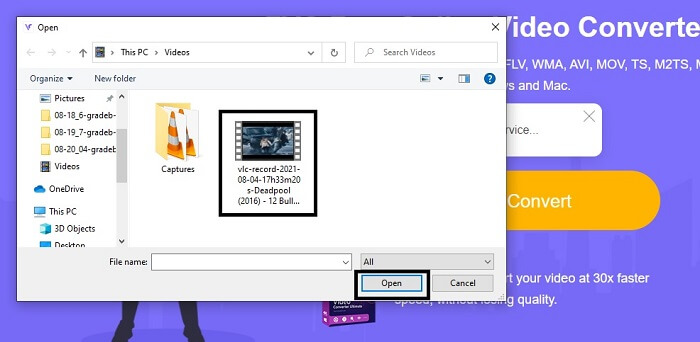
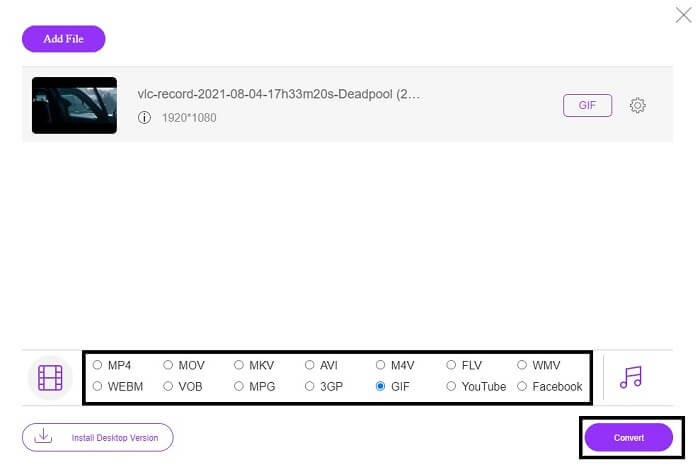
Schritt 3. Wählen Sie das Video aus, das Sie konvertieren möchten. Nachdem Sie das Video ausgewählt haben, wählen Sie das GIF-Dateiformat. Zusätzlich können Sie auch andere Video- und Audioformate auswählen; Sie können sie sich später bei Bedarf ansehen.
Schritt 4. Wählen Sie aus, wo Sie das Endergebnis speichern möchten. Wenn alles eingestellt ist, klicken Sie auf Konvertieren, um die Konvertierung zu starten. Der Vorgang dauert nur wenige Sekunden.
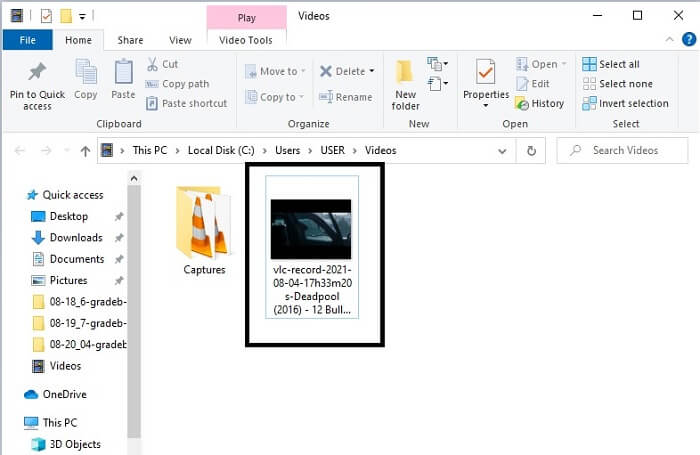
Schritt 5. Um Ihre erfolgreiche Konvertierung zu überprüfen, können Sie Ihre konvertierte GIF-Datei im Datei-Manager oder Explorer finden. Klicken Sie darauf und genießen Sie sie.
3. VLC Media Player
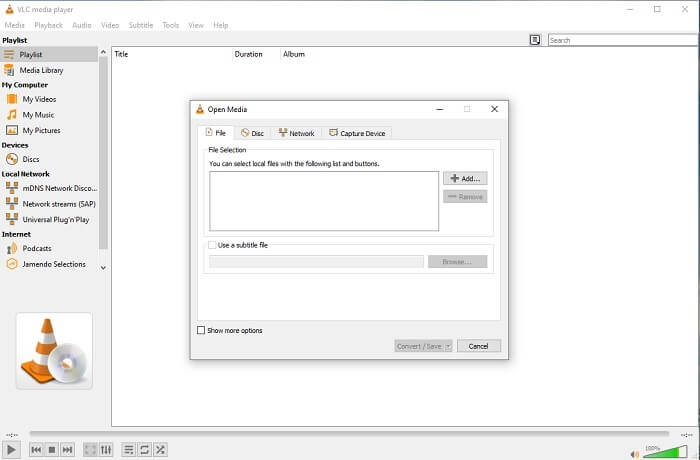
Dieses Tool ist als einer der leistungsstärksten Media-Player bekannt. Aber wussten Sie, dass VLC-Player auch MPG in GIF konvertieren können? Allerdings ist die Auswahl der unterstützten Ausgabeformate sehr begrenzt und umfasst nur gängige Formate. Obwohl VLC als hervorragender Media-Player gilt, ist seine Konvertierungsfunktion nicht unbedingt die beste Wahl für Sie. Wenn Sie also einen besseren Konverter möchten, sollten Sie lieber das oben erwähnte Online-Tool verwenden. Wenn Sie hingegen Videos hauptsächlich abspielen möchten, ist der VLC Media Player die richtige Wahl, denn das andere Tool bietet keinen integrierten Videoplayer, da sein Hauptzweck die Konvertierung ist.
4. Zamzar
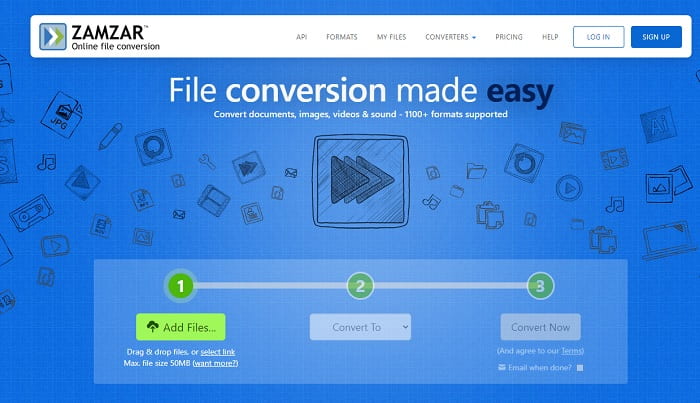
Ein weiteres Online-Tool, das eine großartige Konvertierung bietet, ist Zamzar. Wie jeder andere Online-Konverter teilen sie sich die gleiche Schnittstelle und bieten auch eine punktgenaue Anleitung zur Konvertierung. Aber der Prozess des Konvertierens und Herunterladens ist anders. Obwohl die kostenlose Version, können Sie nur maximal 50 MB Dateigröße konvertieren. Denn nachdem Sie das Video konvertiert haben, müssen Sie es herunterladen. Es ist eine Menge Ärger für diejenigen, die ihre Konvertierung verlassen und einfach darauf warten, dass das Produkt gespielt wird.
Teil 2. Vergleichstabelle
| Werkzeugfunktion/e | FVC Video Converter Ultimate | Kostenloser FVC-Online-Konverter | VLC Media Player | Zamzar |
| Converter |  | | | |
| Bearbeitungswerkzeug | |  | | |
| Leistungsstarker Konverter | | | | |
| Registrierung erforderlich | | | | |
| Plattformen | Desktop-basierte App | Webbasierte App | Desktop-basierte App | Webbasierte App |
| Preisklasse | $25.00 1 Monat/1 PC $55.20 Einmaliger Kauf für 1 PC $119.00 Lebensdauer 5 PC | Es ist ein kostenloses Online-Tool | Es ist ein kostenloses Online-Tool | Kostenloses Online-Tool Es bietet aber auch eine monatliche Prämie. Für die Basis: $9 Für den Profi: $16 Für Unternehmen: $25 |
MPG vs. GIF
MPG wurde von der Moving Picture Experts Group (MPEG) entwickelt und ist ein gängiges digitales Videoformat zum Speichern von Video-, Audio- und Metadateninformationen. Es ist sehr nützlich, wenn Sie Filme erstellen, die im Internet geteilt werden sollen. Diese Dateien in MPG enthalten normalerweise MPEG-1- oder MPEG-2-Video-/Audiokomprimierung.
GIF ist ein gängiges Bildformat für Webgrafiken. Neben dem Speichern kleiner Bilder und Bilder, die Text enthalten, kann GIF auch einfache Animationen auf Websites enthalten und anzeigen. Es ist ein verlustfreies Format und die GIF-Komprimierung beeinträchtigt nicht die Bildschärfe.
Teil 3. Häufig gestellte Fragen zu MPG zu GIF
Gibt es eine Möglichkeit, Photoshop zu verwenden und Videos in ein GIF zu konvertieren?
Ja, Sie können MPG mit Photoshop in GIF umwandeln. Und nicht nur das MPG-Dateiformat – Sie können auch andere Formate auswählen und sie in GIF konvertieren. Ein weiteres besonderes Merkmal ist, dass Sie Ihr GIF zusätzlich verbessern können. Klicken Sie hier, um zu erfahren, wie Sie MP4 in GIF konvertieren.
Was ist das beste Bildschirmaufnahme-Tool zum Aufzeichnen von GIFs?
Das beste Bildschirmaufnahme-Tool für diese Aufgabe ist der FVC Screen Recorder. Dieses Tool eignet sich nicht nur hervorragend zum Aufzeichnen von Videos, sondern verfügt auch über einen integrierten Audio-Recorder und einen Gameplay-Recorder für ein noch besseres Gaming-Erlebnis. Allerdings ist dieses Tool kostenpflichtig. Keine Sorge: Es gibt auch ein Online-Tool, mit dem Sie Aufnahmen machen können.
Warum wurde das GIF erstellt?
GIF wurde entwickelt, um Bilder anzuzeigen und gleichzeitig Speicherplatz zu sparen. Der Erfinder des GIF-Formats ist Steve Wilhite, ein US-amerikanischer Informatiker, der es Ende 1987 gemeinsam mit dem Technologiekonzern CompuServe entwickelte. Klicken Sie hier, um weitere Informationen über GIFs zu erhalten.
Fazit
Endlich, jetzt, da Sie wissen, wie Sie ein GIF für sich selbst erstellen, versuchen Sie es besser und genießen Sie es. Nur mit diesem einfachen Tool können Sie einen Unterschied machen. Anstatt im Internet zu suchen, sind Sie jetzt ein zertifizierter GIF-Hersteller. Außerdem können Sie Ihre Gefühle jetzt auf Ihre eigene Weise mit Ihrer persönlichen Note und Ihrem Fachwissen ausdrücken, das Sie allein durch das Lesen dieses Artikels entwickelt haben. Ich hoffe, Sie können das Leben eines besseren GIFs genießen, das Sie erstellen, und Ihr bestes GIF mit der Welt teilen.
-
 [Anleitung] So konvertieren Sie M4V-Videos in animierte GIFs unter Windows/Mac
 Wenn Sie aus Ihren Lieblings-M4V-Videos animierte GIF-Dateien erstellen möchten, erfahren Sie mehr über 2 einfache und effiziente Möglichkeiten zum Konvertieren von M4V-Videos in GIFs mit benutzerdefinierten Einstellungen.
-
 WebM zu GIF – 3 kostenlose WebM zu GIF-Konverter zum Erstellen eigener GIFs
 Ist WebM ein GIF? Wie verwandelt man ein Video in ein GIF? Gibt es einen kostenlosen WebM-zu-GIF-Konverter? In diesem Beitrag werden 3 kostenlose Möglichkeiten beschrieben, mit denen Sie WebM in GIF konvertieren können.
-
 So konvertieren Sie MKV-Videos in animierte GIFs ohne Photoshop/FFmpeg
 Nachdem Sie MKV-Filme auf Ihren Computer heruntergeladen und angesehen haben, möchten Sie vielleicht einige wundervolle Momente mit Freunden oder im Internet als GIFs teilen. In diesem Artikel erfahren Sie mehr über die 2 einfachsten Möglichkeiten zum Konvertieren von MKV in GIF.

