


 Video Converter Ultimate
 Bildschirm recorder
 Videoreparatur
 Sicherer Download
So konvertieren Sie BMP in PNG und JPG mit Online- und Offline-Konvertern
Das Bitmap- oder BMP-Format ist für farbige Bilder mit Verläufen oder Übergängen nicht optimal. Heutzutage werden Sie darin nicht mehr viele Fotos sehen. Technisch gesehen ist BMP ein veraltetes Format mit nahezu keiner Kompression. Wenn Sie BMP-Bilder also ohne Einschränkungen öffnen möchten, müssen Sie BMP in gängige Bildformate umwandeln. Sie können auf zahlreiche Arten zwischen verschiedenen Bildformaten konvertieren. In diesem Beitrag stellen wir die einfachsten und direktesten Vorgehensweisen vor. Wenn Sie also wissen möchten, wie Sie das BMP-Format in JPG oder PNG umwandeln, lesen Sie diesen Beitrag. Wir stellen Ihnen hervorragende Bildkonverter vor, die Ihnen dabei helfen können.

Teil 1. BMP vs. JPG vs. PNG
| Datei Format | BMP | JPG | PNG |
| Dateinamenerweiterung | .bmp | .jpg | .png |
| Entwickelt von | Microsoft | Gemeinsame fotografische Expertengruppe | PNG-Entwicklungsgruppe |
| Beschreibung | EIN BMP Datei ist die Abkürzung für Bitmap und wird Bump ausgesprochen. Microsoft hat das BMP-Dateiformat für sein Windows-Betriebssystem entwickelt. Es soll die Auflösung digitaler Bilder auf verschiedenen Bildschirmen und Geräten beibehalten. Es können sowohl farbige als auch schwarzweiße zweidimensionale Fotografien gespeichert werden. BMP-Dateien sind heutzutage nicht mehr nur mit Windows-basierten Geräten kompatibel. Sie sind jetzt mit einer großen Anzahl von Mac- und Android-Geräten kompatibel. | Das JPG Bilddateiformat ist das effektivste für die Bildkomprimierung. Benutzer verwenden häufig JPG-Dateien. Es wird auch als JPEG- oder JPG-Datei bezeichnet. Die Joint Experts Group ist der vollständige Name von JPEG. Außerdem haben die meisten Bitmap-Bilder die Dateierweiterung .jpg. Das Hauptziel besteht darin, die Dateien kleiner zu machen. Da JPG ein verlustbehaftetes Format ist, wirkt sich eine zu starke Komprimierung auf die Qualität der Bilder aus. | Portable Network Graphics, a PNG Erweiterung für die Rasterfamilie, die eine verlustfreie Komprimierung durchführt. Es wurde entwickelt, um GIF, das Graphics Interchange Format, zu ersetzen, und ist nicht patentiert. Sie können auf einer Palette basieren und typischerweise Graustufenbilder, die Transparenz bieten. PNG ist eine verlustfreie Komprimierung. Dies impliziert, dass Informationen, Besonderheiten und Qualität gespeichert werden. |
Teil 2. Online-Methoden zum Konvertieren von BMP in JPG/PNG
Konvertieren Sie BMP in JPG/PNG mit FVC Free Image Converter
Um BMP kostenlos online in JPG umzuwandeln, können Sie den FVC Free Image Converter verwenden. Dieses Online-Tool bietet den einfachsten Ablauf, um BMP in PNG oder JPG zu konvertieren. Aufgrund der intuitiven Benutzeroberfläche können sowohl fortgeschrittene als auch unerfahrene Anwender den Konverter nutzen. Sie können Bilder in nur drei Schritten umwandeln. Zusätzlich können Sie Bilder mit verschiedenen Dateiformaten hochladen. Unterstützte Eingabeformate sind unter anderem PNG, JPG, BMP, GIF, TIFF und mehr. Außerdem unterstützt der FVC-Bilddateikonverter die Stapelkonvertierung. So können Sie zahlreiche Bilder gleichzeitig konvertieren. Das ist deutlich effizienter und praktischer als bei vielen anderen Bildkonvertern auf dem Markt. Für alle Nutzer ist es bequem, da Sie bis zu 40 Bilddateien gleichzeitig umwandeln können.
FVC Free Image Converter garantiert ein qualitativ hochwertiges Bild. Nach der Konvertierung sieht das Bild immer noch genauso aus wie das Original. Außerdem sehen Sie keine störenden Anzeigen auf Ihrem Bildschirm, selbst wenn es sich um einen Online-Bildkonverter handelt. Auf diese Weise können Sie sich mehr auf die Konvertierung Ihrer Bilder konzentrieren. Dieser Konverter ist in fast allen Browsern verfügbar. Es umfasst Chrome, Safari, Edge, Firefox und mehr. Sie können die folgenden einfachen Schritte befolgen, um BMP in das JPG- und PNG-Format zu konvertieren.
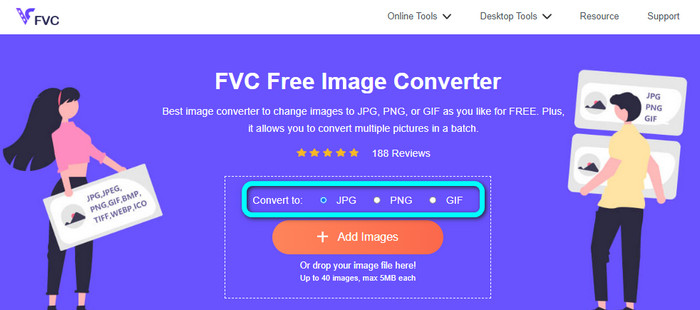
Schritt 1: Öffnen Sie Ihren Browser und rufen Sie die Website des FVC Free Image Converter auf. Suchen Sie die Option Konvertieren in und wählen Sie das gewünschte Format aus. Sie können JPG oder PNG anklicken.
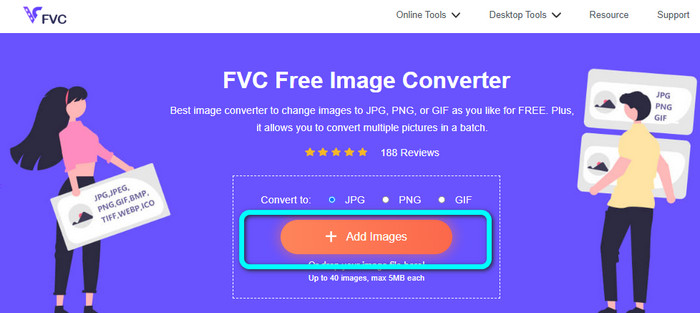
Schritt 2: Fügen Sie das BMP-Bild hinzu, indem Sie auf die Schaltfläche Bilder hinzufügen klicken. Ihr Dateimanager wird auf dem Bildschirm angezeigt. Wählen Sie die BMP-Bilddatei aus, die Sie konvertieren möchten.
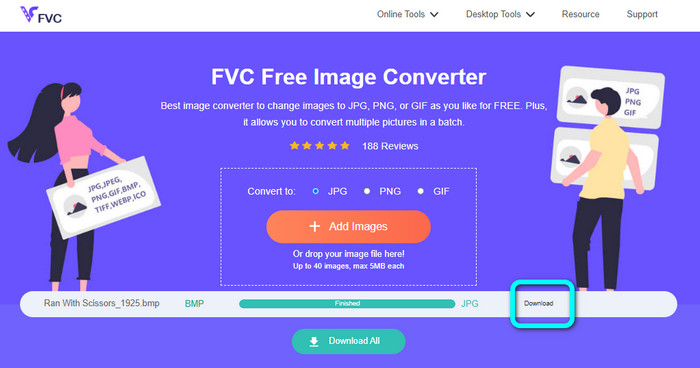
Schritt 3: Nach dem Hochladen wird das Foto automatisch konvertiert. Klicken Sie zum Abschluss auf die Schaltfläche Herunterladen, um Ihr Bild auf Ihrem Desktop zu speichern.
Konvertieren Sie BMP mit Convertio in JPG/PNG
Convertio ist ein weiteres Online-Tool, um BMP in JPG oder PNG umzuwandeln. Es handelt sich um einen Dateikonverter, mit dem Sie verschiedenste Formate konvertieren können. Dazu gehören BMP, JPG, PNG, GIF, SVG und mehr. Mit Hilfe dieses Tools ist das Konvertieren zahlreicher Bilder einfach. Es bietet ebenfalls eine Stapelkonvertierung. So können Sie BMP im Batch-Verfahren in JPG umwandeln, um Zeit zu sparen. Zudem garantiert Convertio den Schutz Ihrer Privatsphäre. Nach der Konvertierung Ihrer Bilder werden Ihre Daten nach 24 Stunden automatisch gelöscht. Außerdem können Sie diesen Konverter in verschiedenen Browsern nutzen, zum Beispiel in Google Chrome, Mozilla, Edge usw.
Convertio hat jedoch Nachteile. Sie können nur ein Bild bis zu einer Größe von 100 MB hochladen. Wenn Sie eine unbegrenzte Dateigröße zum Hochladen wünschen, erwerben Sie ein Abonnement. Sie benötigen außerdem eine Internetverbindung, um diesen Konverter zu betreiben.
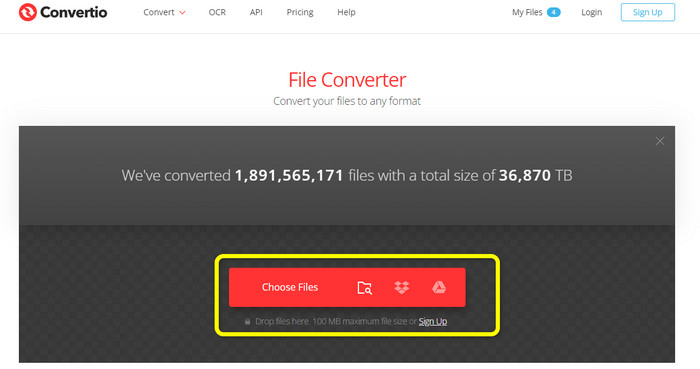
Schritt 1: Besuchen Sie die Website von Convertio. Klicken Sie auf die Schaltfläche Dateien wählen, um die BMP-Bilddatei hinzuzufügen.
Schritt 2: Wählen Sie aus den Formatoptionen das Dateiformat JPG oder PNG aus. Wenn Sie weitere Bilder hinzufügen möchten, klicken Sie auf die Schaltfläche Weitere Dateien hinzufügen.
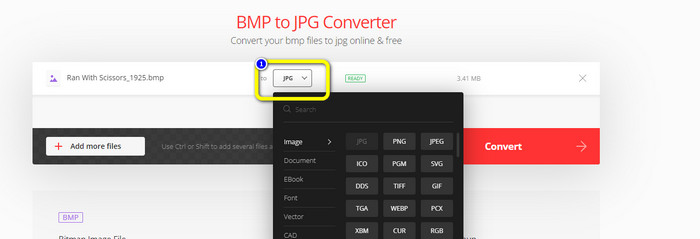
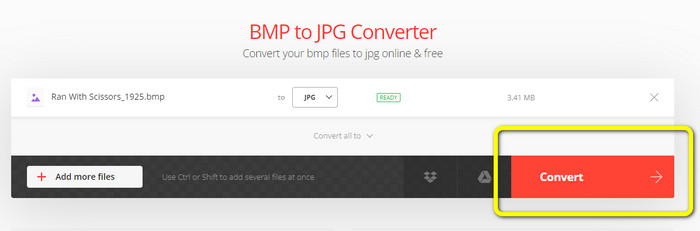
Schritt 3: Nachdem Sie das gewünschte Zielformat ausgewählt haben, klicken Sie auf die Schaltfläche Konvertieren. Warten Sie den Konvertierungsvorgang ab und laden Sie anschließend Ihre Bilder auf Ihren Computer herunter.
Teil 3. Offline-Methoden zum Konvertieren von BMP in JPG/PNG
Sie können auch den Video Converter Ultimate verwenden, um BMP in JPG zu konvertieren. Dieser Offline-Konverter bietet eine leicht verständliche Vorgehensweise. Er verfügt zudem über eine intuitive Benutzeroberfläche und ist damit für alle Anwender geeignet, insbesondere für Einsteiger. Video Converter Ultimate unterstützt eine Stapelkonvertierung. Das bedeutet, dass Sie mehrere Bilder gleichzeitig umwandeln können. Er bietet außerdem eine schnelle Konvertierung. Mit dieser Funktion können Sie viele Dateien in kurzer Zeit umwandeln. Darüber hinaus werden zahlreiche Bildformate unterstützt, darunter JPG, BMP, PNG, GIF, TIFF und mehr. Neben der Konvertierung können Sie in den Ausgabe-Einstellungen auch die Qualität Ihres Fotos ändern. So können Sie die Bildqualität ganz nach Ihren Vorlieben anpassen. Außerdem ist dieser herunterladbare Konverter sowohl auf Mac- als auch auf Windows-Computern verfügbar. Folgen Sie den nachstehenden Anweisungen, um Ihre BMP-Datei in das JPG- oder PNG-Format umzuwandeln.
Schritt 1: Laden Sie den Video Converter Ultimate auf Ihren Mac oder Windows-PC herunter. Starten Sie das Programm nach der Installation. Wir stellen Ihnen den Konverter auch über die unten stehende Schaltfläche Download zur Verfügung.
Gratis DownloadFür Windows 7 oder neuerSicherer Download
Gratis DownloadFür MacOS 10.7 oder neuerSicherer Download
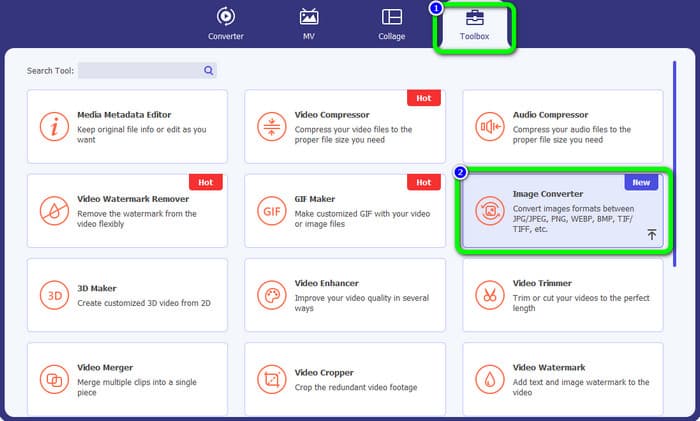
Schritt 2: Gehen Sie zum Bereich Toolbox und wählen Sie das Werkzeug Image Converter aus. Eine weitere Oberfläche wird angezeigt.
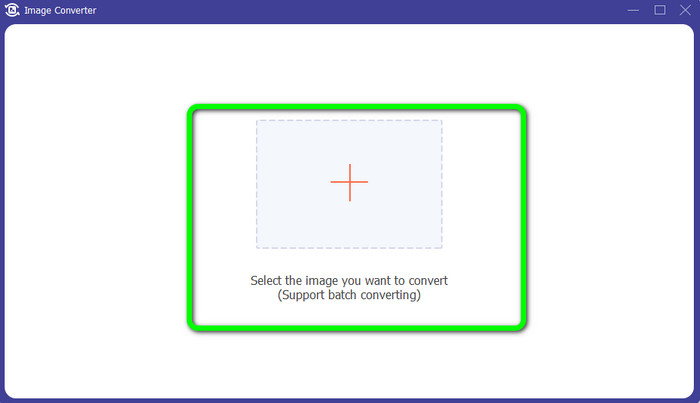
Schritt 3: Klicken Sie auf das Plus-Symbol. Wählen Sie dann aus Ihrem Dateiverzeichnis das BMP-Foto aus, das Sie konvertieren möchten.
Schritt 4: Klicken Sie auf die Schaltfläche Quelldatei hinzufügen, um weitere Dateien hinzuzufügen. Gehen Sie dann zu den Formatoptionen und wählen Sie Ihr gewünschtes Ausgabeformat. Sie können die Formate PNG und JPG wählen.
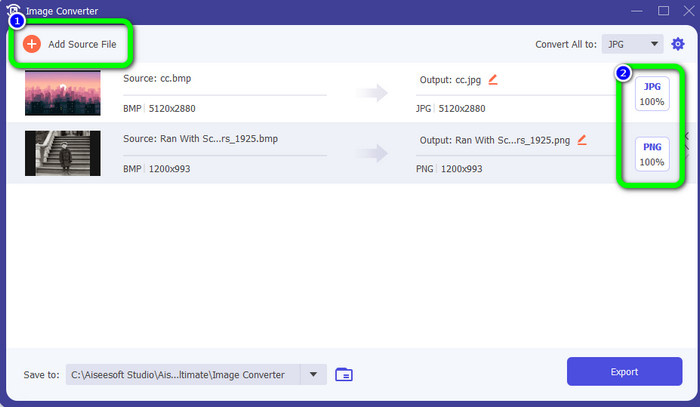
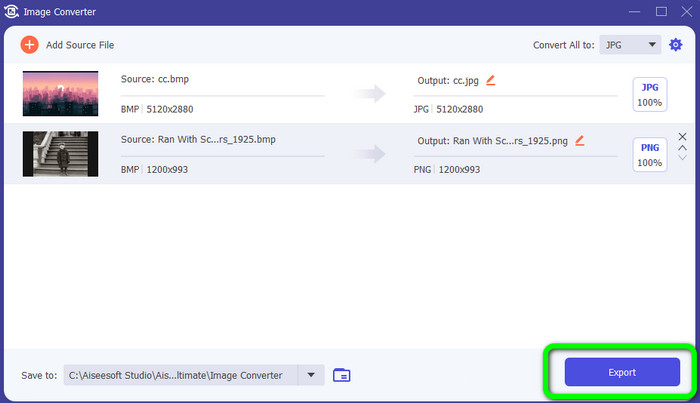
Schritt 5: Klicken Sie für den letzten Schritt auf die Schaltfläche Exportieren. Warten Sie auf den Konvertierungsvorgang. Öffnen Sie anschließend Ihre konvertierten Bilder in Ihrem Ordner.
Teil 4. Häufig gestellte Fragen zum Konvertieren von BMP in JPG/PNG
1. Wie konvertiere ich BMP stapelweise in PNG?
Wenn Sie eine Stapelkonvertierung durchführen möchten, verwenden Sie den FVC Free Image Converter. Wählen Sie zuerst im Bereich Konvertieren in das PNG-Format aus. Klicken Sie danach einfach auf die Schaltfläche Bilder hinzufügen. Sie können mehrere Bilddateien hinzufügen. Das Tool ermöglicht es Ihnen, bis zu 40 Bilder gleichzeitig hochzuladen. Nach dem Hochladen werden Ihre Bilddateien automatisch konvertiert. Um den Vorgang abzuschließen, klicken Sie anschließend auf die Schaltfläche Alle herunterladen, um sie auf Ihrem Desktop zu speichern.
2. Kann eine BMP-Datei animiert werden?
Unglücklicherweise nicht. Animationen sind oft nicht mit BMP-Dateien kompatibel. Anstatt Flash zu verwenden, sollten Sie das GIF-Dateiformat verwenden. Es kann kurze, unkomplizierte Animationen erstellen, die geteilt und gespeichert werden können.
3. Was ist größer, eine BMP-Datei oder eine JPEG-Datei?
Bei vergleichbaren Fotos wird ein BMP größer. Aufgrund von Größenbeschränkungen kann ein BMP jedoch nur bis zu 4 GB groß sein. Die Größe eines JPEG ist nicht beschränkt. Beispielsweise sind bestimmte Satellitenbilder im JPEG-Format verfügbar.
Fazit
Da eine BMP-Datei eine größere Dateigröße aufweist, ist es sinnvoll, sie in andere Formate wie JPG und PNG umzuwandeln. Zum Glück hat Ihnen dieser Artikel ausgezeichnete Methoden vorgestellt, um BMP in JPG und PNG zu konvertieren. Wenn Sie jedoch einen einfachen und kostenlosen Weg zur Bildkonvertierung bevorzugen, verwenden Sie den FVC Free Image Converter.
-
 Vollständige Möglichkeiten zum Konvertieren von JPG in PNG online und offline
 Suchen Sie nach nützlichen Methoden zum Konvertieren von JPG in das PNG-Dateiformat? Dieser Wegweiser hat die Antwort, die Sie brauchen. Um diese Methoden zu entdecken, lesen Sie den Artikel
-
 Konvertieren Sie JPEG effizient in JPG [Fünf Methoden aufgelistet]
 Holen Sie sich die einfachsten Tutorials zum Konvertieren von JPEG in das JPG-Bilddateiformat. Klicken Sie auf diesen Wegweiser und lernen Sie Ihre bevorzugten Methoden kennen
-
 Top 5 der führenden Tutorials zum schnellen Konvertieren von PNG in JPG
 Wenn Sie Ihre PNG-Datei in das JPG-Format konvertieren müssen, erfahren Sie hier, wie Sie am besten vorgehen. Sie lernen auch den Unterschied zwischen PNG- und JPG-Dateiformaten kennen
