


 Video Converter Ultimate
 Bildschirm recorder
 Videoreparatur
 Sicherer Download
Holen Sie sich die ultimativen Verfahren zum Konvertieren von NEF in JPG
Wenn wir Fotos aufnehmen, möchten wir die denkwürdigen Momente unseres Lebens immer in bestmöglicher Bildqualität festhalten. Deshalb kaufen sich viele Menschen hervorragende Kameras, die großartige Ergebnisse liefern. Allerdings kann man die beste Bildqualität erzielen, wenn man das Rohbild speichert. Das kann jedoch viele Probleme mit sich bringen. NEF steht für Nikon Electronic Format. Nikon, einer der beliebtesten Kamerahersteller, verwendet Rohbildformate. Es gibt Situationen, in denen Sie die Dateien auf einem Computer nicht anzeigen können. Dann benötigen Sie ein professionelles Programm, das oft teuer und schwierig zu bedienen ist. In diesem Fall ist die beste Lösung, die NEF‑Dateien in ein universelles Bildformat wie JPG zu konvertieren. Die Flexibilität dieses Formats ermöglicht es Ihnen, Fotos auf fast jedem Gerät anzusehen. Gleichzeitig spart es Speicherplatz. Wenn Sie Ihre Dateien in eine JPG‑Datei umwandeln möchten, lesen Sie diese Anleitung und lernen Sie die besten NEF-zu-JPG-Converter kennen, die Sie verwenden können.

Teil 1. NEF vs. JPG
| Datei Format | NEF | JPG/JPEG |
| Dateinamenerweiterung | .nef | .jpg / .jpeg |
| Vollständiger Name | Elektronisches Nikon-Format | Gemeinsame fotografische Expertengruppe |
| Entwickelt von | Nikon | Gemeinsame fotografische Expertengruppe |
| Beschreibung | Nikon Raw Image-Dateien werden als NEF Dateien. Wie andere RAW-Bilddateien speichern NEF-Dateien alle Informationen, die die Kamera vor der Verarbeitung aufgezeichnet hat. Es enthält Metadaten wie die Kamera- und Objektivmodelle. NEF-Fotos bieten eine unglaublich hohe Bildqualität. | Die Joint Photographic Experts Group hat die erstellt JPG Format Ende 1980. Es umfasst auch das Speichern von Bildern auf Digitalkameras und anderen Reproduktionswerkzeugen. Die verlustbehaftete Komprimierungsmethode, die JPEG-Dateien für bis zu 24-Bit-Farbe und mehr Bildspeicher verwenden. |
| Kompression | Verlustig | Verlustig |
| Zugehörige Programme / Browser | Adobe Lightroom IrfanView Grafikbetrachter Adobe Photoshop ViewNX 2 Pics.io | IrfanView Graphic Viewer Fotos Programm Paint Adobe Photoshop Google Chrome Internet Explorer Microsoft Edge Mozilla Firefox |
Teil 2. Konvertieren von NEF in JPG im Web
So konvertieren Sie NEF in JPG auf Safeimageconverter
Verwenden Sie Safeimageconverter, um online schnell vom JPF- in das NEF-Bildformat zu konvertieren. Mit diesem einfachen Online-Tool können Sie das Dateiformat problemlos ändern. Der Bildkonverter ist kostenlos, online und erfordert keine Installation, sodass Sie ihn so oft nutzen können, wie Sie möchten, ohne etwas zu bezahlen. Sie müssen nur die Originaldatei in dieses Tool hochladen, um eine umgewandelte Bilddatei im NEF-Format zu erhalten. Außerdem ist das Tool sehr hilfreich und spart uns wertvolle Zeit. Wir können schnell und einfach von JPG in das NEF-Format konvertieren. Sie können die Dateien direkt im Browser umwandeln. Allerdings erscheinen bei der Konvertierung der Bilddateien viele störende Werbeanzeigen auf dem Bildschirm. Zudem kommt es gelegentlich vor, dass das Online-Tool nach dem Konvertierungsvorgang Fehler anzeigt. Für die Nutzung dieses Online-Tools wird außerdem eine Internetverbindung empfohlen.
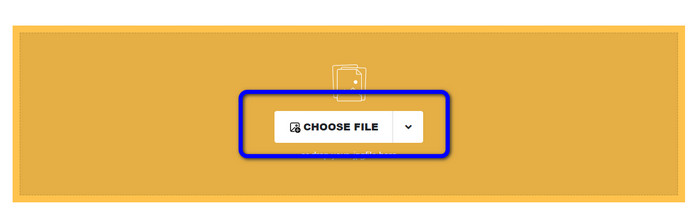
Schritt 1. Rufen Sie die Website von Safeimageconverter auf. Klicken Sie dann auf die Schaltfläche Datei auswählen, um die NEF-Datei hochzuladen, die Sie konvertieren möchten.
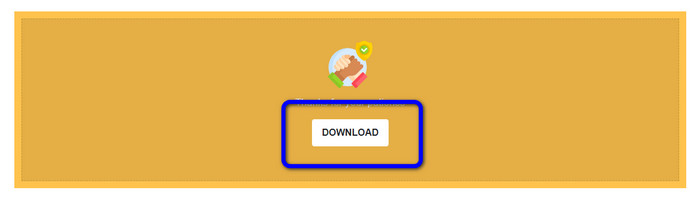
Schritt 2. Nach dem Hochladen konvertiert der Bildkonverter die Bilddatei automatisch. Nach Abschluss der Konvertierung klicken Sie auf die Schaltfläche Download. Auf diese Weise können Sie das konvertierte Bild auf Ihrem Computer speichern.
Teil 3. Praktische Methode zum Konvertieren von NEF in JPG auf Mac und Windows
Wenn Sie lieber Windows oder Mac für die Umwandlung von NEF in JPG verwenden möchten, nutzen Sie Photoshop. Adobe Photoshop ist nicht nur zum Bearbeiten von Bildern gut. Es ist auch zuverlässig, wenn es darum geht, verschiedene Dateitypen zu konvertieren, darunter NEF. Außerdem können Sie in Photoshop NEF-Dateien stapelweise in JPG umwandeln. Es verfügt zudem über einen schnellen Konvertierungsprozess und ist damit für alle Nutzer ideal. Darüber hinaus kann das Offline-Programm die Qualität Ihrer Bilder erhalten. So wird nach der Konvertierung sichergestellt, dass das Foto weiterhin eine zufriedenstellende Qualität aufweist. Allerdings ist Adobe Photoshop nicht kostenlos. Sie müssen ein Abonnement erwerben, um das Programm zu nutzen. Es bietet lediglich eine 7-tägige Testversion. Zusätzlich ist der Installationsprozess recht kompliziert.
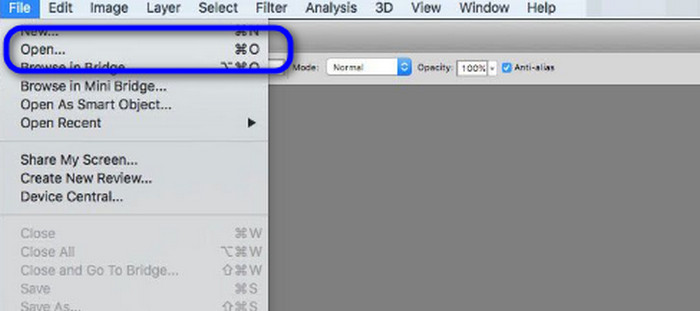
Schritt 1. Laden Sie Adobe Photoshop auf Ihren Computer herunter. Starten Sie nach der Installation das Programm, um die Benutzeroberfläche zu öffnen. Gehen Sie anschließend zum Menü Datei und wählen Sie Öffnen, um die NEF-Bilddatei einzufügen.
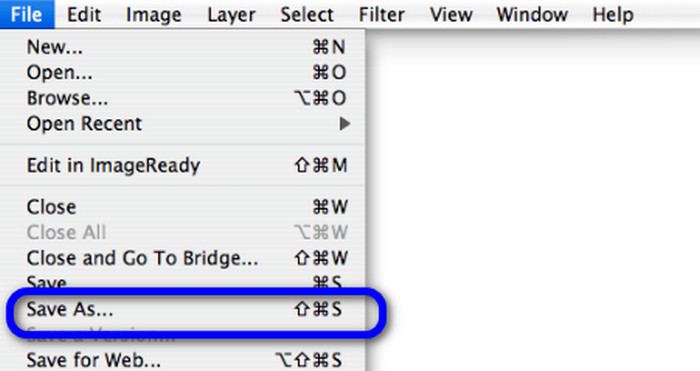
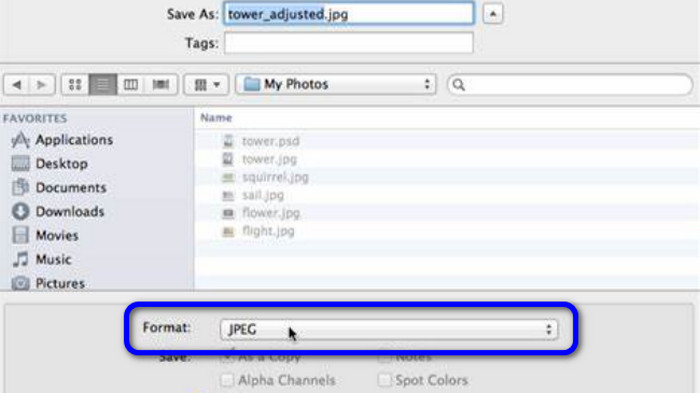
Schritt 2. Nachdem Sie das NEF-Bild in der Oberfläche eingefügt haben, gehen Sie erneut zum Menü Datei und wählen Sie die Option Speichern unter.
Schritt 3. Wählen Sie dann im Formatmenü JPG aus und klicken Sie auf Speichern.
Teil 4. Empfohlener Bildkonverter
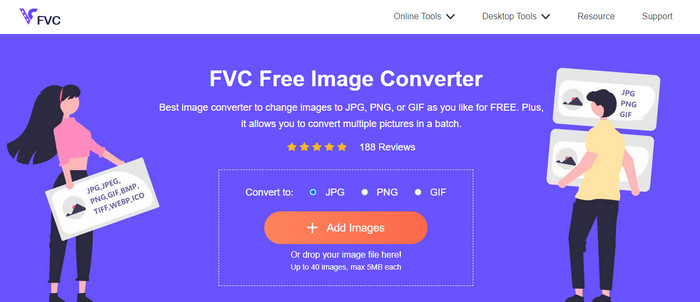
In diesem Abschnitt, falls Sie nach einem weiteren Bildkonverter suchen, um andere Bildformate online zu konvertieren, bietet FVC Free Image Converter die beste Lösung für Sie. Dieser Online-Bildkonverter kann verschiedene Formate problemlos umwandeln. FVC Free Image Converter unterstützt JPG, PNG, GIF, BMP, TIFF und mehr. Außerdem können Sie den Bildkonverter in verschiedenen Browsern nutzen, wie Google, Explorer, Edge, Firefox und anderen. Zudem können Sie den Konvertierungsvorgang in nur wenigen Sekunden abschließen, was ihn für alle Nutzer sehr bequem macht. Sie können außerdem mehrere Bilder in dieses Online-Tool hochladen. Mit seiner Stapelkonvertierungsfunktion können Sie bis zu 40 Bilder gleichzeitig hochladen. Zusätzlich können Sie beim Herunterladen der konvertierten Bilder alle mit einem einzigen Klick herunterladen.
Teil 5. Häufig gestellte Fragen zum Konvertieren von NEF in JPG
1. Ist es möglich, JPG in NEF umzuwandeln?
Leider können Sie eine JPG-Datei nicht in NEF konvertieren. Dies liegt daran, dass die NEF eine tatsächliche Aufnahme ist, die mit einer Nikon-Kamera aufgenommen wurde. Das NEF-Format wird immer dann verwendet, wenn ein Fotograf eine Nikon-Kamera verwendet und digitale Dateien hochlädt.
2. Wie öffne ich eine NEF-Datei?
Sie können die NEF-Datei einfach öffnen, wenn Sie den richtigen Codec auf Ihrem Windows haben. Wenn Sie die NEF-Datei jedoch nicht öffnen können, benötigen Sie die Hilfe von herunterladbaren Programmen. Sie können Microsoft Camera Codec Pack, Adobe Photoshop, Irfan View, GIMP und mehr verwenden.
3. Warum sollten Sie von NEF in JPG konvertieren?
Es ist wichtig, NEF in JPG zu konvertieren, da einige Programme und Bildbearbeitungsprogramme keine NEF-Dateien unterstützen. Außerdem hat NEF eine große Dateigröße, die zu viel Speicherplatz auf dem Gerät verbraucht. Die beste Wahl ist also, die NEF-Datei in JPG umzuwandeln.
Fazit
NEF-Dateien können Ihnen hochqualitative Bilder liefern. Allerdings unterstützen einige Browser und Programme dieses Format nicht, was frustrierend ist. Zum Glück hat dieser Beitrag eine hervorragende Lösung zur Konvertierung von NEF in JPG bereitgestellt. Außerdem hat der Beitrag Ihnen einen weiteren Online-Bildkonverter vorgestellt, mit dem Sie andere Bildformate umwandeln können, nämlich FVC Free Image Converter. Mit diesem Online-Konverter können Sie verschiedene Bildformate konvertieren.
-
 4 vertrauenswürdige Ansätze zur einfachen Konvertierung von JFIF in JPG
 In diesem Leitfaden erfahren Sie alles über die Online- und Offline-Konvertierung von JFIF in JPG. Wenn Sie die effektivsten Methoden lernen möchten, lesen Sie diesen Beitrag sofort!
-
 So konvertieren Sie GIF in JPG ohne Qualitätsverlust
 Lesen und erhalten Sie die effektivsten Methoden, um GIF professionell in JPG zu konvertieren. Sie werden lernen, Bilddateien mit dem Leitfaden für perfekte Bildkonverter zu konvertieren
-
 Einfach zu befolgende Verfahren zum Konvertieren von Bildern in Vektoren
 Hier sind einige der bemerkenswerten Möglichkeiten, wie man ein Bild vektorisiert. Darüber hinaus erhalten Sie genügend Wissen über den Bildkonverter, den Sie verwenden können.
