


 Video Converter Ultimate
 Bildschirm recorder
 Videoreparatur
 Sicherer Download
So konvertieren Sie SVG schnell in JPG [Super Easy Ways]
Vielleicht möchten Sie ein SVG-Bild aus mehreren Gründen in ein JPG umwandeln. Ein möglicher Grund ist, das Bearbeiten zu vereinfachen. Für SVG-Dateien ist ein vektorbasiertes Bildbearbeitungsprogramm erforderlich. Rasterbasierte Bildbearbeitungsprogramme sind jedoch bei den Nutzern weiter verbreitet. Dazu gehören zum Beispiel Microsoft Paint und Adobe Lightroom. Die Bearbeitung eines SVG in Lightroom ist möglicherweise möglich, wenn Sie es zuvor in ein JPG konvertieren. Ein weiterer Grund für die Umwandlung von SVG in JPG ist die Online‑Weitergabe. JPGs werden von fast allen Websites und Apps akzeptiert, die den Upload von Bildern erlauben. Es ist jedoch eher unwahrscheinlich, dass sie SVGs annehmen. So akzeptiert Instagram beispielsweise JPGs, aber keine SVGs. In diesem Artikel erhalten Sie praktische Methoden, um SVG in JPG zu ändern. Außerdem lernen Sie die besten Bildkonverter kennen, die Sie online und offline verwenden können.

Teil 1. Vergleichen Sie SVG und JPG
| Datei Format | SVG | JPG |
| Dateinamenerweiterung | .svg | .jng |
| Entwickelt von | World Wide Web Konsortium | Das JPEG-Komitee |
| Entwickelt von | SVG ist ein auf XML basierendes Vektorbild-Dateiformat für 2D-Grafiken. Animation und Interaktivität werden unterstützt. In XML-Textdateien werden SVG-Bilder und deren Verhalten definiert. Da SVG-Dateien nur XML-Dateien sind, können sie mit jedem Texteditor bearbeitet werden. | JPG Diese werden für Websites und E-Mails verwendet, da sie reduzierte Dateigrößen haben. Da JPG jedoch verlustbehaftet ist, wird die Bildqualität nach der Komprimierung beeinträchtigt. Die resultierende „verlustbehaftete“ Datei bedeutet, dass die Qualität verloren geht. Die Speicherkarten für Digitalkameras verwenden das JPG-Format. |
| Technische Details | SVG ist ein Format, das verwendet wird, um XML-basierte vektorbasierte Grafiken für das Web zu definieren. Diese Datei verliert auch beim Vergrößern oder Ändern der Größe nicht an Bildqualität. Alle Elemente und Attribute der SVG-Datei können animiert werden. | JPG ist ein Bilddateiformat zum Bearbeiten von Standbildern. Es bietet eine symmetrische Komprimierungstechnik, die prozessorintensiv ist. Es ist auch zeitaufwändig sowohl bei der Komprimierung als auch bei der Dekomprimierung. JPEG ist ein gemeinsamer Standard der International Telecommunications Union. Dazu gehört auch die Internationale Organisation für Normung. |
| Assoziierte Programme | Adobe Photoshop Adobe-Vorschau Corel Paint Shop Pro Corel SVG-Viewer | Microsoft Windows-Fotogalerie-Viewer Adobe Photoshop Adobe-Vorschau Corel Paint Shop Pro |
Teil 2. Der beste Weg, SVG online in JPG umzuwandeln
Das beste Werkzeug, das Sie verwenden können, ist der FVC Free Image Converter. Er kann SVG mühelos in JPG umwandeln. Außerdem ist es möglich, mehrere SVG-Dateien gleichzeitig in JPG zu konvertieren. Er bietet eine benutzerfreundliche Oberfläche und leicht nachvollziehbare Anweisungen, was ideal für Anwender ist. Dieser Bildkonverter unterstützt die Stapelverarbeitung. Zudem können Sie zahlreiche konvertierte Dateien mit nur einem Klick herunterladen. Einer der positiven Aspekte dieses Tools ist, dass es keine lästige Werbung enthält. Sie können sich ganz auf das Konvertieren Ihrer Dateien konzentrieren, ohne auf Anzeigen zu stoßen. Darüber hinaus akzeptiert es Eingabedateien in verschiedenen Formaten wie PNG, BMP, TIFF, GIF usw. Eine Installation des Konverters ist zudem nicht erforderlich. Er lässt sich direkt in Ihrem Browser bedienen. Außerdem bleibt die Bildqualität nach der Konvertierung genauso gut wie beim Original. So können Sie sicherstellen, dass Ihr Bild weiterhin hervorragend aussieht. Auch Ihre Daten sind auf dieser Website sicher. Nach dem Konvertieren und Speichern der Bilder werden sämtliche Daten automatisch gelöscht.
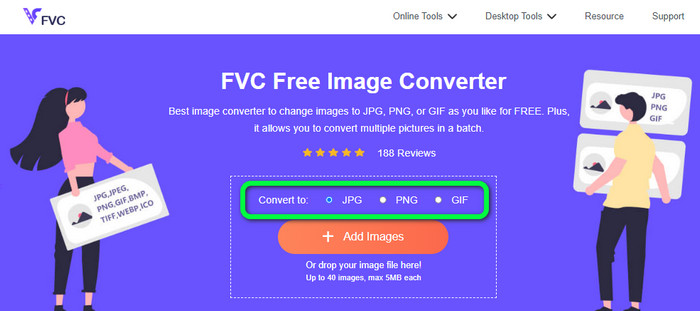
Schritt 1: Rufen Sie die Hauptseite des FVC Free Image Converter auf. Wählen Sie vor dem Hinzufügen der SVG-Bilddatei Ihr gewünschtes Ausgabeformat. Klicken Sie in den Formatoptionen auf das Format JPG.
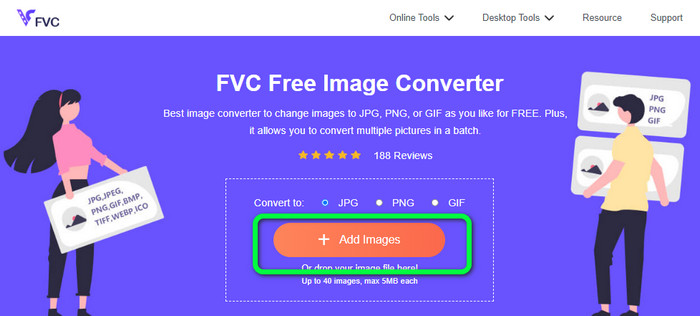
Schritt 2: Klicken Sie auf die Schaltfläche Add Images in der Mitte der Oberfläche. Danach wird Ihr Dateiexplorer auf dem Bildschirm angezeigt. Wählen Sie das SVG-Bild aus, das Sie konvertieren möchten, und öffnen Sie es. Sie können die SVG-Datei auch direkt in das Feld ziehen. Klicken Sie erneut auf die Schaltfläche Add Images, um eine Stapelkonvertierung durchzuführen.
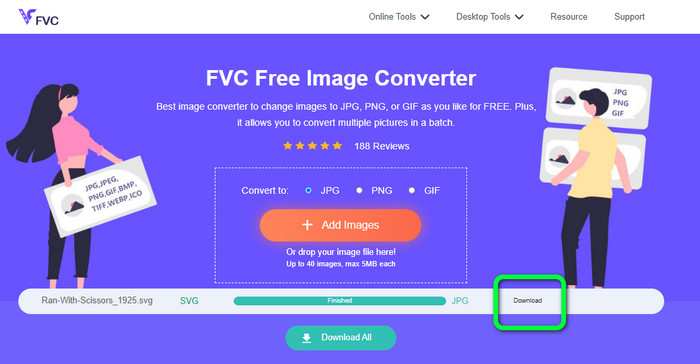
Schritt 3: Während die Datei hochgeladen wird, wird das Bild automatisch konvertiert. Klicken Sie zum Abschluss auf die Schaltfläche Download auf der rechten Seite der Oberfläche. Öffnen Sie nach dem Speichervorgang das konvertierte Bild auf Ihrem Computer.
Teil 3. Einfache Methode zum Konvertieren von SVG in JPG unter Windows
In diesem Abschnitt erfahren Sie die beste Methode, um SVG unter Windows offline in JPG zu konvertieren. Die Verwendung von HitPaw Video Converter ist eine der effizientesten Methoden. Die Funktion 'Image Convert' von HitPaw Video Converter macht die Stapelbildkonvertierung einfach. Sie können Fotos und Grafiken in verschiedenen Formaten importieren und in das gewünschte Format umwandeln. Für Massen- oder Einzelanpassungen von Bildformaten ist dies eine ausgezeichnete Wahl. Zudem werden alle gängigen Bildformate unterstützt. Dazu gehören PNG, JPG, HEIC, RAW, BMP und weitere. So können Sie mit diesem Tool auch BMP in JPG oder PNG konvertieren. Darüber hinaus bietet dieses herunterladbare Programm neben der Konvertierung noch weitere Funktionen. Mit dieser Software können Sie Musik- und Videodateien herunterladen. Ihre Videos lassen sich außerdem über Funktionen wie Drehen, Zuschneiden und Filter bearbeiten. HitPaw Video Converter ist jedoch schwer zu bedienen, insbesondere für Anfänger. Die Oberfläche ist verwirrend, was das Verständnis erschwert. Außerdem nimmt der Installationsvorgang viel Zeit in Anspruch.
Schritt 1: Installieren Sie den HitPaw Video Converter auf Ihrem Windows-PC. Führen Sie die Anwendung nach der Installation aus.
Schritt 2: Navigieren Sie zum Bereich Toolbox und wählen Sie das Werkzeug Image Converter. Wählen Sie aus Ihrem Computerordner die SVG-Bilddatei aus, die Sie konvertieren möchten.
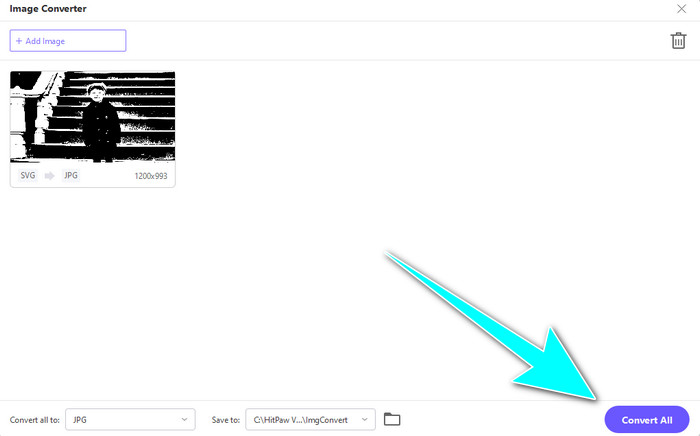
Schritt 3: Klicken Sie links unten in der Oberfläche auf die Option Convert All to. Wählen Sie anschließend JPG als Ausgabeformat aus.
Schritt 4: Klicken Sie schließlich rechts unten in der Oberfläche auf die Schaltfläche Convert All. Warten Sie auf den Konvertierungsvorgang. Danach können Sie Ihr Bild bereits im PNG-Dateiformat öffnen.
Teil 4. So konvertieren Sie SVG in JPG auf dem Mac
Wenn Sie SVG auf dem Mac in JPG umwandeln möchten, verwenden Sie BatchPhoto Pro. Es unterstützt verschiedene Bildformate. Dazu gehören JPG, PNG, ICO, SVG, EPS und mehr als 170 weitere Formate. Sie können Bilder sogar als PDF speichern. Es bietet außerdem eine Stapelkonvertierung. So können Sie mehrere Dateien gleichzeitig umwandeln. Zusätzlich zur Bildkonvertierung stellt es noch weitere Funktionen zur Verfügung. Sie können Ihr Foto durch Größenänderung, Drehen und Anpassen der Farbeinstellungen bearbeiten. Allerdings müssen Sie das Programm kaufen, wenn Sie es dauerhaft nutzen möchten. Es stellt nur eine zeitlich begrenzte Testversion zur Verfügung. Der Konvertierungsvorgang ist zudem schwer zu verstehen. Nichtprofessionelle Benutzer werden die Bildkonvertierung als kompliziert empfinden.
Schritt 1: Laden Sie BatchPhoto Pro herunter und installieren Sie es. Sie können die kostenlose Testversion verwenden. Starten Sie die Anwendung nach der Installation.
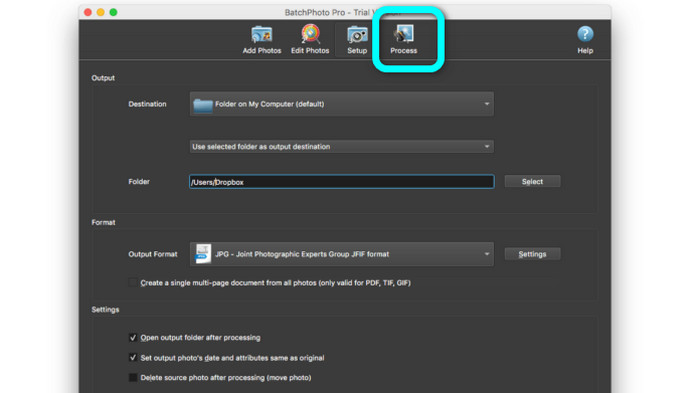
Schritt 2: Wählen Sie im oberen Bereich der Oberfläche die Option Add Photos. Fügen Sie nach dem Klicken die SVG-Bilder hinzu, die Sie in das JPG-Format umwandeln möchten. Sie können mehrere Dateien gleichzeitig hinzufügen.
Schritt 3: Gehen Sie im oberen Bereich der Oberfläche zur Option Set Up. Navigieren Sie zu den Optionen Output Format und wählen Sie das JPG-Format.
Schritt 4: Klicken Sie auf die Option Process, um den Konvertierungsvorgang zu starten. Sobald er abgeschlossen ist, gehen Sie zu Ihrem Ausgabeverzeichnis und überprüfen Ihr konvertiertes Bild.
Teil 5. Häufig gestellte Fragen zum Konvertieren von SVG in JPG
1. Warum sollten Sie SVG in JPG konvertieren?
Im Vergleich zu SVG eignet sich JPG besser für soziale Medien und andere Geräte. Es ist eines der beliebtesten Bildformate, die Sie heutzutage verwenden können. In SVG können Sie diese Datei nur in Webbrowsern öffnen. Daher ist die Konvertierung von SVG in JPG für eine bessere Kompatibilitätsnutzung erforderlich.
2. Welche Vor- und Nachteile haben SVG-Dateien?
Sie können eine SVG-Datei ohne Qualitätsverlust auf jede beliebige Größe erweitern oder verkleinern. SVGs kümmern sich nicht um den Anzeigetyp oder die Bildgröße. Die Art, wie sie erscheinen, ist konstant. SVGs geben Designern und Entwicklern auch viel Kontrolle darüber, wie sie aussehen. Es ist besser, als sie in einem Texteditor zu bearbeiten. Auch andere visuelle Elemente wie Schatten und Farbverläufe sind einstellbar. Es gibt jedoch bessere Formate als SVG für ein detailliertes, qualitativ hochwertiges Foto. Benutzer konstruieren Vektorgrafiken unter Verwendung von Punkten und Pfaden anstelle von Pixeln. Code ist ebenfalls erforderlich.
3. Wie öffne ich eine SVG-Datei?
Die beste Möglichkeit, eine SVG-Datei zu öffnen, besteht darin, Ihren Browser zu verwenden. Drücken Sie auf Ihrer Tastatur Strg+O. Wählen Sie dann die SVG-Datei aus, die Sie anzeigen möchten, und klicken Sie auf Open.
Fazit
Damit sind wir am Ende! Die obigen Informationen zeigen Ihnen verschiedene Möglichkeiten, wie Sie SVG in JPG unter Windows, auf dem Mac und online konvertieren können. Das Herunterladen eines Bildkonverters ist jedoch mit Aufwand verbunden. Wenn Sie also einen einfacheren Weg zur Bildkonvertierung suchen, verwenden Sie den FVC Free Image Converter. Mit diesem Online-Bildkonverter können Sie Bilder direkt im Browser umwandeln.
-
 Nützliche Methoden zum einfachen Konvertieren von TIFF in JPG/PNG
 Verpassen Sie nicht diese hervorragenden Möglichkeiten, TIF in JPG/PNG-Formate umzuwandeln. Dieser Beitrag enthält die notwendigen Informationen, die Sie wissen müssen. Es schließt ihre Unterschiede ein.
-
 Konvertieren Sie JPEG effizient in JPG [Fünf Methoden aufgelistet]
 Holen Sie sich die einfachsten Tutorials zum Konvertieren von JPEG in das JPG-Bilddateiformat. Klicken Sie auf diesen Wegweiser und lernen Sie Ihre bevorzugten Methoden kennen
-
 Top 5 der führenden Tutorials zum schnellen Konvertieren von PNG in JPG
 Wenn Sie Ihre PNG-Datei in das JPG-Format konvertieren müssen, erfahren Sie hier, wie Sie am besten vorgehen. Sie lernen auch den Unterschied zwischen PNG- und JPG-Dateiformaten kennen
