


 Video Converter Ultimate
 Bildschirm recorder
 Videoreparatur
 Sicherer Download
Konvertieren Sie TGA in PNG: Lernen Sie die Top 3 der außergewöhnlichen TGA in PNG-Konverter kennen
Truevision Inc. entwickelte das TGA‑Format für Bildbearbeitung und Animation. Dieses Dateiformat wurde jedoch im Vergleich zu anderen Formaten (wie PNG und JPG) nicht populär. Manche Benutzer können diese Datei auf anderen Plattformen oder in anderen Programmen nicht einmal öffnen. Daher wissen einige Anwender nicht, wie sie diese Bilddatei verwenden und öffnen sollen. Möchten Sie in diesem Fall wissen, wie Sie Ihre TGA‑Datei ins PNG‑Format umwandeln können? Glücklicherweise liefert Ihnen dieser Leitfaden die beste Antwort. Wir stellen Ihnen hervorragende Methoden vor, um TGA in PNG zu konvertieren – mit Hilfe von Bildkonvertern. Wenn Sie diese ausgezeichneten Lösungen entdecken möchten, lesen Sie den Artikel von Anfang bis Ende.

Teil 1. So konvertieren Sie TGA in PNG mit FVC Free Image Converter
Da das TGA‑Dateiformat nicht verbreitet ist, lässt es sich in vielen Programmen nur schwer öffnen. Wenn Sie das Bild dennoch verwenden wollen, ist es am besten, es in ein anderes Bildformat zu konvertieren. Falls Sie wissen möchten, wie das geht, verwenden Sie den FVC Free Image Converter. Mit Hilfe dieses Online‑Bildkonverters können Sie Ihre TGA‑Datei in ein anderes gängiges Format wie PNG umwandeln. Außerdem können Sie mehrere TGA‑Dateien in einem einzigen Vorgang in PNG konvertieren, da der Bildkonverter eine Stapelkonvertierung anbietet. So können Sie in kurzer Zeit mehr Dateien umwandeln. Zusätzlich unterstützt das Tool verschiedene Eingabeformate, darunter BMP, JPG, PNG, BMP, TIFF, SVG und mehr. Sie können also beliebige Bilder in dieses Online‑Tool hochladen. Nachdem Sie die Bilder hochgeladen haben, wandelt das Tool sie zudem automatisch in das gewünschte Ausgabeformat um.
Aber warte, es gibt noch mehr. FVC Free Image Converter erfordert keine Installation. Das bedeutet, dass Sie mit der Konvertierung von Bildern direkt in die Browser beginnen können. Sie können in allen Browsern auf das Tool zugreifen, was es für Benutzer bequemer macht. Außerdem erhalten Sie nach dem Herunterladen keine unerwünschten Objekte aus Ihren Bildern. Das Tool fügt keine Wasserzeichen, Logos, Aufkleber und mehr ein. Es wird auch Ihre Privatsphäre garantieren. Das Tool löscht Ihre Fotos automatisch nach dem Speichern der konvertierten Bilder. Verwenden Sie die einfachen Anweisungen dieses Online-Konverters unten, um TGA in PNG umzuwandeln.
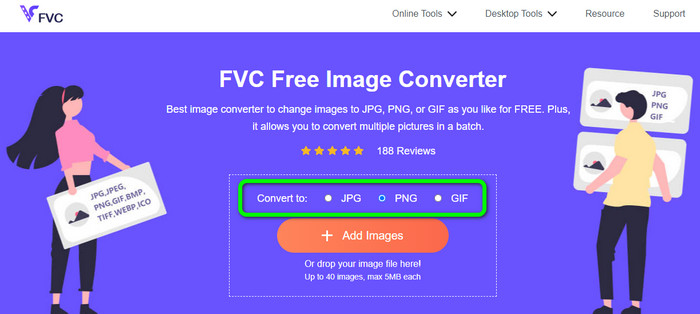
Schritt 1. Öffnen Sie einen beliebigen Browser auf Ihrem Desktop und rufen Sie die offizielle Website des FVC Free Image Converter auf. Wählen Sie anschließend das Dateiformat PNG im Bereich „Konvertieren in“ in der Mitte der Oberfläche aus.
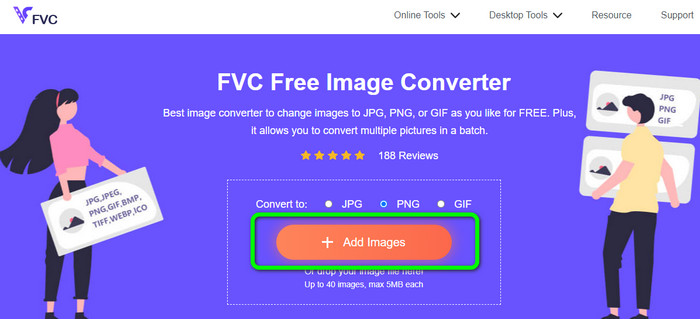
Schritt 2. Nachdem Sie das gewünschte Ausgabeformat ausgewählt haben, klicken Sie auf die Schaltfläche Add Images. Wenn der Computerordner erscheint, wählen Sie die TGA‑Datei aus, die Sie konvertieren möchten, und öffnen Sie sie. Beachten Sie, dass Sie mehr als eine Bilddatei einfügen können. Sie können die Datei auch direkt per Drag & Drop in das Feld ziehen.
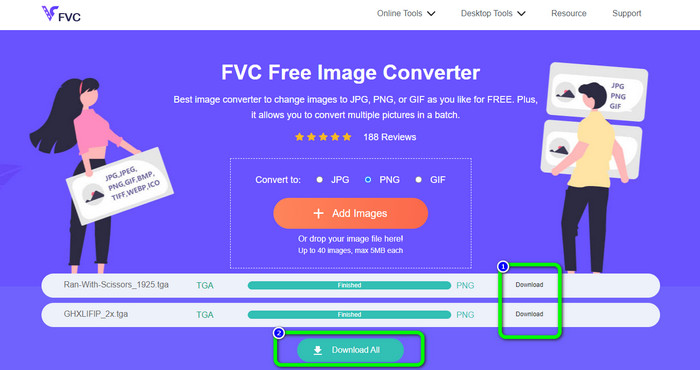
Schritt 3. Nach dem Hochladen sehen Sie, dass das Tool die Bilder automatisch konvertiert. Klicken Sie nach Abschluss des Konvertierungsvorgangs auf die Schaltfläche Download, um die Bilder einzeln zu speichern. Wenn Sie alle auf einmal herunterladen möchten, drücken Sie die Schaltfläche Download All.
Teil 2. Wie man TGA in PNG auf Zamzar umwandelt
Zamzar ist ein weiterer Online‑Konverter von TGA zu PNG, den Sie nutzen können. Alle Anwender, insbesondere Einsteiger, finden diesen webbasierten Konverter sehr zugänglich, da die Benutzeroberfläche einfach zu bedienen ist. Mit diesem Tool können Sie Fotos in CR2, ARW, PNG, 3FR, JPG, GIF, ERF, TIFF und anderen Eingabeformaten hochladen. Sie können Ihre Bilddateien außerdem in viele Formate wie BMP, EPS, PDF, PNG, JPG und WBMP umwandeln, um es allen Nutzern zu erleichtern. Sie können entweder warten, bis die Download‑Links auf der Seite erscheinen, oder die konvertierte Datei über eine E‑Mail öffnen. Besonders praktisch ist, dass Sie Bilder mit einer Größe von bis zu 50 MB hochladen können. Sie können die Datei von Ihrem Computer, aus Dropbox, Google Drive oder über eine andere Website per URL importieren. Zamzar ist in fast allen Browsern verfügbar, wie Google Chrome, Firefox, Edge und mehr. Dieses Tool kann Ihnen außerdem helfen, SVG in PNG umzuwandeln.
Es hat jedoch einige Nachteile. Der Konvertierungsprozess ist sehr langwierig. Der Prozess dauert in dieser Situation sehr lange. Darüber hinaus ist jede Sitzung auf zwei Fotokonvertierungen beschränkt. Befolgen Sie die nachstehenden Schritte, um TGA mit Zamzar in PNG zu konvertieren.
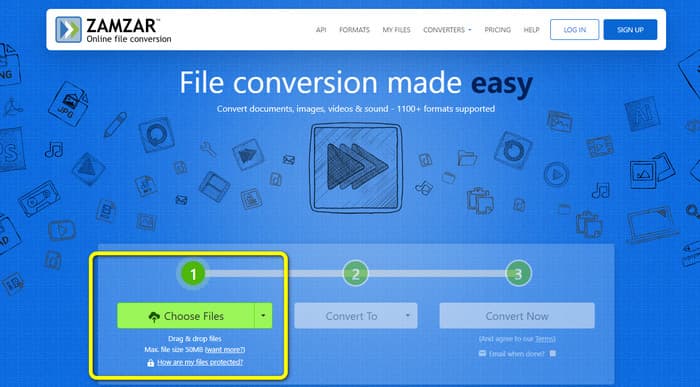
Schritt 1. Öffnen Sie Ihren Browser und rufen Sie die Hauptseite von Zamzar auf. Klicken Sie auf die Schaltfläche „Choose Files“, um die TGA‑Bilddatei hochzuladen. Eine weitere Möglichkeit ist, die Bilddatei direkt per Drag & Drop in das Tool zu ziehen.
Schritt 2. Nachdem Sie die TGA‑Bilddatei hochgeladen haben, gehen Sie zu den Optionen Convert to. Wählen Sie dort das Format PNG als Ausgabeformat, sobald die Formatoptionen angezeigt werden.
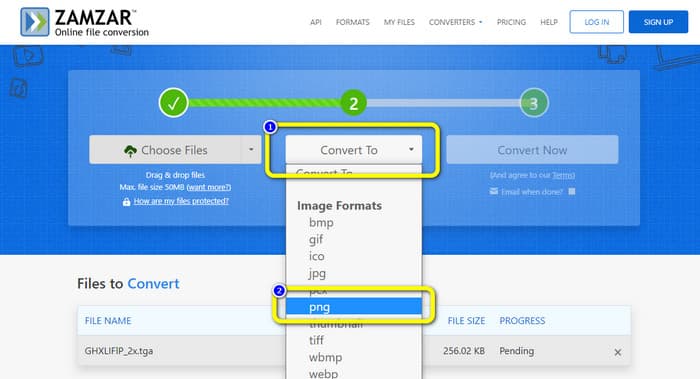
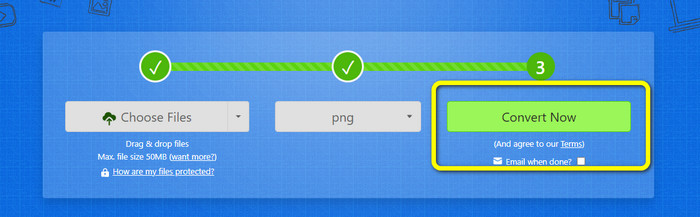
Schritt 3. Klicken Sie dann auf die Schaltfläche Convert Now, um mit dem Konvertierungsvorgang zu beginnen. Klicken Sie abschließend nach der Konvertierung auf die Schaltfläche Download, um Ihr konvertiertes Bild auf Ihrem Desktop zu speichern.
Teil 3. Konvertieren von TGA in PNG mit Convertio
Wenn Sie nach einem weiteren effektiven TGA‑zu‑PNG‑Konverter suchen, verwenden Sie Convertio. Mit diesem Online‑Bildkonverter können Sie Ihre TGA‑Datei in PNG umwandeln. Dank des übersichtlichen Layouts kommen auch Einsteiger leicht damit zurecht. Mit Convertio können Sie Bilder mühelos konvertieren. Darüber hinaus unterstützt es viele Bildformate, darunter PNG, GIF, BMP und SVG. Dieser Bildkonverter unterstützt ebenfalls eine Stapelkonvertierung. Mit diesem hervorragenden Tool können Sie mehrere Bilder gleichzeitig umwandeln. Neben Bildern können Sie auch Video‑, Audio‑ und Dokumentdateien konvertieren. So müssen Sie kein weiteres Online‑Tool suchen. Sie können dieses Tool außerdem verwenden, um WebP in PNG zu konvertieren.
Die kostenlose Version hat jedoch ein Upload-Limit von 100 MB. Um die größte Dateigröße hinzuzufügen, müssen Sie einen Mitgliedschaftsplan kaufen. In der kostenlosen Version können Sie nur zwei Dateien gleichzeitig mit einer Batch-Konvertierungsmethode konvertieren. Ein teures Paket ist auch eine Option, wenn Sie Zugriff auf alle Dienste haben möchten. Sie können die folgenden einfachen Schritte verwenden, um die TGA-Datei mit Convertio in das PNG-Format zu konvertieren.
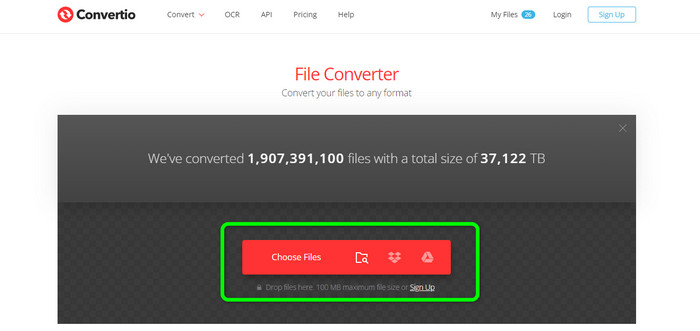
Schritt 1. Suchen Sie in Ihrem Browser nach der offiziellen Website von Convertio. Wenn Sie sich auf der Webseite befinden, klicken Sie auf die Schaltfläche Choose Files. Öffnen Sie dann die TGA‑Bilddatei aus dem Dateiexplorer Ihres Computers. In der kostenlosen Version können Sie bis zu zwei Bilder hochladen.
Schritt 2. Nachdem Sie die TGA‑Bilder hochgeladen haben, öffnen Sie die Formatoptionen. Wählen Sie anschließend das gewünschte Ausgabeformat PNG aus.
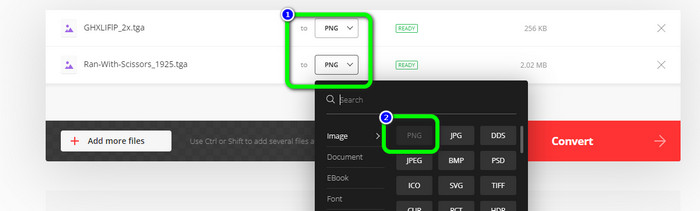
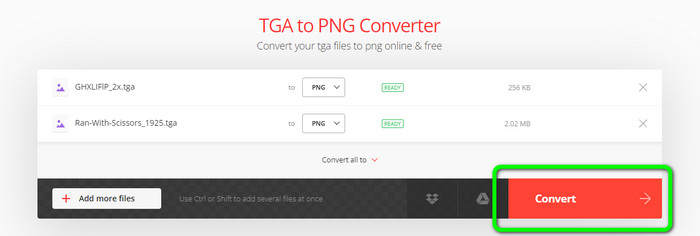
Schritt 3. Nachdem Sie das Ausgabeformat in den Formatoptionen geändert haben, klicken Sie auf die Schaltfläche Convert. Warten Sie den Konvertierungsvorgang ab; er dauert nur wenige Sekunden.
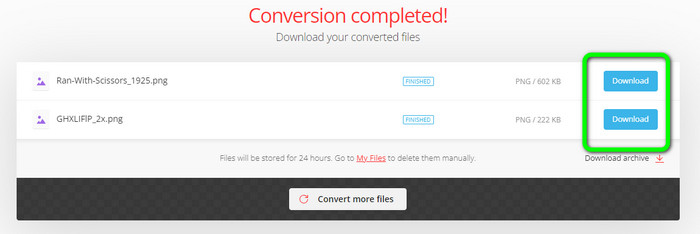
Schritt 4. Klicken Sie zum Speichern Ihrer konvertierten Bilder abschließend auf die Schaltfläche Download. Danach können Sie Ihre konvertierten Bilder im Ordner Download öffnen.
Teil 4. Häufig gestellte Fragen zum Konvertieren von TGA in PNG
1. Was ist eine TGA-Datei?
Eine Truevision-Grafikadapter-Bilddatei hat die Dateierweiterung TGA. Das Akronym TARGA steht für Truevision Advanced Raster Graphics Adapter. Das Targa-Grafikformat ermöglicht die Speicherung von komprimierten und unkomprimierten Bildern. Es kann für Symbole, Strichzeichnungen und andere einfache Grafiken gewählt werden. Es wird angenommen, dass die Bilddateien, die in Videospielen verwendet werden, mit diesem Format verwandt sind.
2. Warum sind TGA-Bilder so groß?
TGA-Bilder bestehen normalerweise aus großen Dateien, da Bits für die Pixeldarstellung verwendet werden. Die Größe der Dateien in diesem Format hängt von der Farbtiefe ab.
3. Wie kann ich TGA-Fotos anzeigen?
Sie können TGA-Bilder in Adobe Photoshop, GIMP und TGA Viewer anzeigen.
Fazit
Da das TGA‑Dateiformat nicht verbreitet ist, unterstützen es einige Programme nicht. Die beste Lösung, um es zu öffnen, besteht darin, es in ein weit verbreitetes Format wie PNG zu konvertieren. Daher hat Ihnen dieser Artikel die besten Möglichkeiten vorgestellt, TGA in PNG umzuwandeln. Allerdings erfordern einige Online‑Tools ein Abonnement, um alle herausragenden Funktionen vollständig nutzen zu können. In diesem Fall sollten Sie den FVC Free Image Converter verwenden. Mit diesem Online‑Bildkonverter können Sie alle Funktionen kostenlos nutzen.
-
 Leicht verständliche Möglichkeiten zum Konvertieren von PSD in PNG oder JPG
 Dieser Beitrag gibt Ihnen überschaubare Schritte zum Konvertieren von PSD in JPG oder PNG. Es gibt verschiedene Konverter, mit denen Sie Ihre Dateien konvertieren können. Lesen Sie mehr, um es herauszufinden.
-
 Führende Methoden zum Konvertieren von EPS in PNG und JPG
 Die bemerkenswertesten Methoden zum Konvertieren von EPS in PNG und JPG finden Sie hier. Lassen Sie uns diesen Leitfaden lesen, um die Wege mit Hilfe von Bildkonvertern zu finden.
-
 Einfachste Methoden zum Konvertieren von BMP in JPG- und PNG-Formate
 Lernen Sie die besten Methoden zum Konvertieren von BMP in JPG oder PNG mit hervorragenden Konvertern kennen. Sie werden auch den Unterschied zwischen den Dateiformaten BMP, JPG und PNG entdecken.
