


 Video Converter Ultimate
 Bildschirm recorder
 Videoreparatur
Testbericht zum Cutout Pro Image Enhancer: Faszinierende Hauptfunktionen
Bildverbesserer haben sich im Bereich der digitalen Bildverarbeitung etabliert, und das richtige Tool zu finden, um Ihre Fotos von gewöhnlich zu außergewöhnlich zu heben, ist entscheidend. Es gibt eine ganze Reihe von Tools, die Ihr Bild verbessern, aber es ist schwer, ein zuverlässiges, sicheres und effizientes zu finden. Zum Glück erweist sich der Cutout Pro Image Enhancer als genau das Werkzeug, nach dem Sie suchen. Im Kern ist der Cutout Pro Image Enhancer darauf ausgelegt, das Potenzial Ihrer Fotos freizusetzen und fehlende Aspekte aufzuwerten. Er liefert nahtlose Ergebnisse in hoher Qualität und kommt Ihren visuellen Ansprüchen entgegen. Wenn man sich durch die herausragenden Funktionen bewegt, die dieses Tool zu einer idealen Lösung für Sie machen, bietet dieser Artikel einen umfassenden Einblick in den Cutout Pro Image Enhancer – von der Ausgabequalität bis zu den unterstützten Bildformaten. Wenn Sie den Artikel weiterlesen, erhalten Sie alle Informationen, die Sie benötigen, um Fotos mit Cutout Pro zu verbessern. Außerdem wird in diesem Artikel eine empfohlene Alternative vorgestellt, die Sie im Blick behalten sollten. Schießen, bearbeiten und hochladen Sie Ihre Fotos nicht einfach nur – ergänzen Sie Ihre Schritte ab heute um eine Bildverbesserung!

Teil 1. Testbericht zum Cutout Pro Image Enhancer
Cutout Pro erstellt ein praktisches Tool, das Benutzer bei der schnellen Bildbearbeitung unterstützt, in diesem Fall einen Bildverbesserer. Die Benutzeroberfläche von Cutout Pro Image Enhancer ist sowohl für Anfänger als auch für Profis benutzerfreundlich, um verlustfreie Bildqualitätsergebnisse zu erzielen. Dieser Bildverbesserer verwendet KI, um die feinsten Details zu verfeinern, die selbst Profis möglicherweise übersehen haben. Sie sparen im Handumdrehen Zeit, indem Sie die KI die Arbeit des Identifizierens und Verbesserns von Teilen Ihres Bildes übernehmen lassen. Dieses KI-gestützte Tool bietet nicht nur Bildverbesserungen, sondern verfügt auch über Funktionen wie Hintergrundentfernung und Bildkonverter, was es zu einem flexiblen Tool für Multitasking macht. Nachfolgend sind einige der wichtigsten Funktionen aufgeführt, die Sie erwarten können.
Haupteigenschaften
◆ Foto-Optimierung. Die in das Tool integrierte KI-Technologie nutzt fortschrittliche Verarbeitung, um Ihr Bild je nach Bedarf hochzuskalieren, farblich zu korrigieren, zu schärfen und Bildrauschen zu reduzieren.
◆ Verfügbarkeit auf mehreren Geräten. Sie können die Foto-Optimierung in jedem Ihrer lokalen Webbrowser verwenden. Dieser Zugriff ermöglicht es Ihnen, die Funktionen des Tools ganz bequem auf Ihrem bevorzugten Gerät zu nutzen.
◆ Stapelverarbeitung. Der Cutout Pro Image Enhancer legt großen Wert auf Multitasking und Zeitersparnis, indem er Stapelverarbeitung ermöglicht. So können Sie mehrere Bilder nahtlos bearbeiten, ohne warten zu müssen, bis jeweils ein Bild fertig verbessert ist.
◆ KI-Ausschneidewerkzeuge. Damit können Sie unerwünschte Objekte, Personen, Unordnung und Unvollkommenheiten aus Ihren Bildern entfernen, die die Gesamtästhetik stören. Dasselbe gilt für unerwünschten Text in Bildern – wie entfernt man Text aus einem Bild?
◆ Hintergrundentfernung. Diese Funktion gehört zu den präzisesten Lösungen für die Entfernung von Hintergründen. Ein Greenscreen ist nicht erforderlich, da die KI automatisch das Hauptmotiv erkennt und es exakt freistellt, um den Hintergrund präzise zu entfernen.
◆ Foto-Kolorierer. Er kann Ihre alten Schwarz-Weiß-Fotos zum Leben erwecken, indem er ihnen Farben hinzufügt, von denen das Tool annimmt, dass sie die Fotos lebendig und ausdrucksstark repräsentieren.
Ausgabequalität
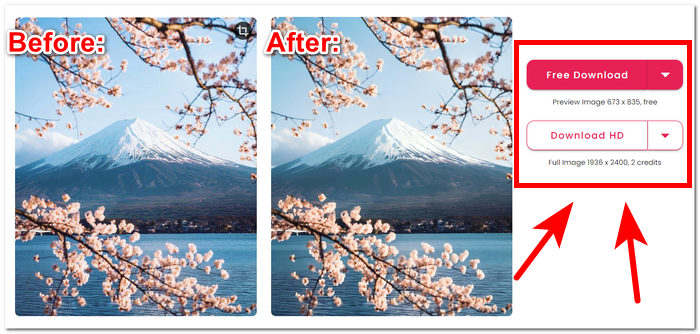
Die Ausgabequalität für Cutout Pro Image Enhancer ist auf das Zweifache begrenzt und wird mit Credits bezahlt. Nachfolgend sind die für Cutout Pro Image Enhancer verfügbaren Ausgabequalitäten aufgeführt.
Kostenloser Download: PNG und JPG – Qualität 673 x 835
HD-Download: PNG und JPG – Qualität 1936 x 2400
Unterstützte Bildformate
Cutout Pro Image Enhancer unterstützt eine Vielzahl von Bildformaten und sorgt so für Flexibilität bei der Handhabung verschiedener Dateitypen. Zu den unterstützten Bildformaten gehören PNG, JPG, JPEG, BMP und WEBP. Unabhängig davon, ob Sie mit transparenten Bildern, hochwertigen Fotos oder verschiedenen webfreundlichen Formaten arbeiten, ermöglicht Cutout Pro Benutzern die nahtlose Verbesserung und Bearbeitung von Bildern in einer Reihe häufig verwendeter Dateierweiterungen.
Mit den Funktionen von Cutout Pro Image Enhancer können Sie Ihre Probleme bei der Hochskalierung der Bildqualität ganz einfach lösen. Es ist jedoch wichtig, die spezifische Version und Updates von Cutout Pro zu überprüfen, um die genauesten und aktuellsten Informationen zu unterstützten Bildformaten, Funktionen und Ausgabequalität zu erhalten.
Teil 2. Alternative zu Cutout Pro zum Verbessern von Fotos
Suchen Sie nach einer effizienten, kostenlosen und zuverlässigen Alternative zu Cutout Pro, falls Sie einmal keinen Zugriff darauf haben? Keine Sorge, der FVC Free Image Upscaler steht bereit. Er gilt als eines der besten webbasierten Tools in der Kategorie der Bildverbesserer, mit Vergrößerungsoptionen von bis zu 8-facher Größe – deutlich mehr als viele andere webbasierte Tools – und ist damit eine legitime Alternative zum Cutout Pro Image Enhancer. FVC nutzt fortschrittliche KI-Technologie, um makellose und nahezu perfekte Ergebnisse zu erzielen – und das bei kostenloser Nutzung. Cutout Pro Image Enhancer hingegen kann für kostenlose Nutzer eine begrenzte Ausgabequalität haben und bietet bis zu 2-fache Vergrößerungseinstellungen zur Verbesserung Ihres Bildes. Um herauszufinden, was den FVC Free Image Upscaler auszeichnet, sind nachfolgend einige seiner wichtigsten Funktionen aufgeführt.
◆ KI-integrierter Bild-Upscaler. Durch den Einsatz von KI, die unscharfe Bereiche erkennt und automatisch verfeinert, wird die Aufgabe schnell und einfach erledigt, ohne dass Sie sich um Qualitätsverlust sorgen müssen. Das Tool verbessert Ihr Bild entsprechend den Bedürfnissen Ihres Fotos, indem es Pixel, Schärfe und Farben anpasst.
◆ Achtfache Vergrößerung. FVC geht weit über Standardwerte hinaus. Üblicherweise sind Bildverbesserungs-Tools auf eine zweifache Vergrößerung beschränkt, und einige bieten höhere Optionen nur im Abo an. Dieses Tool ermöglicht es Nutzern, ihr Bild bis auf das Achtfache zu verbessern.
◆ Einfache Bedienung. Die Benutzeroberfläche ist so übersichtlich wie das Ziel klar ist: Nutzern zu helfen, ihr Bild ohne Werbung und versteckte Kosten zu verbessern.
◆ Druck und Hintergrundbilder. Die Ergebnisse können für den Druck verwendet oder als Desktop- oder Mobil-Hintergrundbild eingesetzt werden, ohne dass die Qualität leidet. Die hochwertigen Bildverbesserer machen es möglich, Ihre unscharfen Fotos wiederzuverwenden, etwa für Drucke und Hintergrundbilder.
◆ Vielseitige Formatkompatibilität. Verwandeln Sie Ihr Bild in ein atemberaubendes Meisterwerk! Unabhängig vom Format – ob JPG, JPEG oder BMP – können Sie es problemlos auf unsere Plattform hochladen. Lassen Sie uns dabei helfen, Ihre Vision zum Leben zu erwecken!
◆ Blitzschnelle Verbesserung. Die Verarbeitungsgeschwindigkeit ist hoch und liefert überzeugende Ergebnisse, da die KI darauf trainiert ist, Millionen von Bildern mit höchster Qualität und perfekter Pixelgenauigkeit zu verarbeiten.
Zusammenfassend lässt sich sagen, dass beide Tools professionelle Ergebnisse in bester Qualität liefern. FVC und Cutout Pro lassen keinen Raum für verschwommene Bilder und Fehler, was sie zu zuverlässigen Tools macht. In Bezug auf die Funktionen hat Cutout Pro die Nase vorn, was die Verfügbarkeit auf mehreren Geräten und die Stapelverarbeitung betrifft. Auf der anderen Seite hat FVC Free Image Upscaler in Bezug auf die Qualität der Ergebnisse, die schnelle Verarbeitung und die Verfügbarkeit kostenloser Funktionen gewonnen.
Teil 3. FAQs zum Cutout Pro Image Enhancer
Speichert Cutout Pro Fotos?
Cutout Pro ermöglicht Benutzern das mühelose Speichern ihrer verbesserten Fotos, indem es eine Vielzahl von Speicheroptionen bietet. Dank der Flexibilität, aus verschiedenen Formaten und Auflösungen zu wählen, können Benutzer ihre gespeicherten Bilder an ihre spezifischen Vorlieben und Projektanforderungen anpassen. Diese Funktion gewährleistet ein nahtloses und anpassbares Erlebnis, bei dem die bearbeiteten Ergebnisse mit optimaler Klarheit und Detailtreue erhalten bleiben.
Bietet Cutout Pro Offline-Apps an?
Cutout Pro bietet keine Offline-Anwendungen und bietet Benutzern nicht die Möglichkeit, ihre Fotos zu bearbeiten und zu verbessern, ohne dass eine ständige Internetverbindung erforderlich ist. Um die Bildverbesserungsfunktionen von Cutout Pro nutzen zu können, müssen Sie eine Verbindung zum Internet herstellen, da es sich um ein webbasiertes Tool handelt.
Kann ich mit Cutout Pro ein 2×2-Foto erstellen?
Mit Cutout Pro können Benutzer mithilfe der vielseitigen Bearbeitungswerkzeuge ganz einfach ein 2×2-Foto erstellen. Die Software unterstützt benutzerdefinierte Abmessungen und bietet die Flexibilität, Bilder entsprechend spezifischer Anforderungen präzise zuzuschneiden und ihre Größe zu ändern, was sie ideal für die Erstellung individueller 2×2-Fotolayouts macht. Mit dieser Funktion können Benutzer mühelos die gewünschte Komposition und das gewünschte Format für ihre Bilder erreichen.
Ist Cutout Pro gut oder schlecht?
Die Wirksamkeit von Cutout Pro variiert je nach individuellen Vorlieben und spezifischen Anforderungen. Obwohl es weithin als robuster Bildverbesserer mit vielfältigen Funktionen anerkannt ist, hängt seine Eignung von Faktoren wie benutzerfreundlichen Schnittstellen, gewünschten Funktionalitäten und persönlichen Bearbeitungsvorlieben ab. Potenziellen Benutzern wird empfohlen, die Software zu erkunden, um festzustellen, ob sie mit ihren Erwartungen und ihrem Arbeitsablauf kompatibel ist.
Ist Cutout Pro kostenlos?
Cutout Pro bietet Benutzern sowohl kostenlose als auch Premium-Versionen. Bevor Sie sich für eine bestimmte Version entscheiden, sollten Sie die damit verbundenen Preisdetails und Lizenzoptionen gründlich prüfen. Bedenken Sie, dass erweiterte Funktionen oder Fähigkeiten möglicherweise nur den Premium-Versionen vorbehalten sind, was es schwierig und unwahrscheinlich macht, dass Sie sich für dieses Tool entscheiden.
Fazit
Zusammenfassend lässt sich sagen, dass sowohl der Cutout Pro Image Enhancer als auch der FVC Free Image Upscaler als professionell entwickelte Tools hervorstechen, die die Leistungsfähigkeit von KI nutzen, um die Bildverbesserung auf ein bisher unerreichtes Qualitätsniveau zu heben. Ihr Anspruch, die Grenzen visueller Exzellenz zu verschieben, macht sie zu wertvollen Werkzeugen für alle. Letztlich hängt die Wahl zwischen diesen beiden herausragenden Tools von persönlicher Bequemlichkeit und praktischen Anforderungen ab. Ob Sie sich für die erweiterten Funktionen von Cutout Pro oder den benutzerfreundlichen Ansatz des FVC Free Image Upscaler entscheiden – Nutzer können ihre Bilder mit KI-integrierter Technologie optimieren, die genau auf ihre Bedürfnisse zugeschnitten ist. Der Bereich der Bildbearbeitung wird durch diese Tools weiter bereichert und bietet eine breite Palette an Möglichkeiten für visuelle Verbesserungen.
-
 PicWish Photo Enhancer Review und alternatives Tool zum Ausprobieren
 Entdecken Sie die Magie, die der Bildverbesserer PicWish in die Welt der Fotobearbeitung bringt. Eine ausführliche Überprüfung und Erkundung praktikabler Alternativen, die Sie ausprobieren können.
-
 Fotor Review für Hintergrundentferner und Fotoverbesserer
 Alles, was Sie über Fotor Background Remover und Photo Enhancer wissen müssen. Schauen Sie sich einige seiner Funktionen an und sehen Sie sich die vorgeschlagene Alternative an, die Ihren Anforderungen entspricht.
-
 So erhöhen Sie die Bildgröße online und offline
 Entdecken Sie den einfachsten Weg, die Bildgröße zu erhöhen, ohne an Qualität zu verlieren. Sehen Sie sich unsere Tools und Software zur Größenänderung an, um eine optimale Qualität Ihrer Bilder sicherzustellen.
