


 Video Converter Ultimate
 Bildschirm recorder
 Videoreparatur
 Sicherer Download
Eine hervorragende Anwendung zum Ändern der Bildgröße - FastStone Photo Resizer
Im Internet nach einem Foto‑Resizer zu suchen, ist einfach. Besonders heute gibt es viele Bildbearbeitungsprogramme, die online verfügbar sind. Wenn es um das Ändern der Größe und das Konvertieren von Bildern geht, finden Sie viele ausgezeichnete Tools sowohl online als auch offline. Falls Sie jedoch Schwierigkeiten haben, eines auszuwählen, machen wir Ihnen die Entscheidung leicht. FastStone ist eine Bildbearbeitungsplattform, mit der Sie Ihre Bilder in der Größe anpassen können. In diesem Beitrag geben wir Ihnen alle Details zu FastStone und erklären, wie Sie den FastStone Photo Resizer verwenden.

Teil 1. FastStone Photo Resizer Review
FastStone Photo Resizer ist eine unverzichtbare Bildbearbeitungsanwendung. Sie können es auf Ihrem Windows-Desktop verwenden und einfach herunterladen. Darüber hinaus verfügt es über eine übersichtliche und benutzerfreundliche Oberfläche, was es zu einem benutzerfreundlichen Tool macht. FastStone Photo Resizer unterstützt verschiedene Bildformate wie JPEG, BMP, PNG, TIFF und GIF. Es enthält auch viele Bearbeitungsfunktionen, die Sie zum Konvertieren, Umbenennen, Zuschneiden, Hinzufügen von Text, Ändern der Farbe, Hinzufügen von Wasserzeichen und mehr verwenden können.
Darüber hinaus bietet es eine Stapelverarbeitung, bei der Sie zwei oder mehr Bilder gleichzeitig verarbeiten können. Und wenn Sie eine Vorschau der durchgeführten Konvertierung anzeigen möchten, können Sie dies mit FastStone tun. Sie können FastStone Image Resizer kostenlos auf Ihren Windows-Computer herunterladen, aber Sie müssen die App kaufen, um ihre expliziten Funktionen nutzen zu können. Befolgen Sie das folgende Tutorial, wenn Sie wissen möchten, wie Sie die Größe von Bildern mit FastStone ändern.
Vorteile
- Es bietet eine Vielzahl von Bearbeitungsfunktionen und -werkzeugen.
- Es hat einen niedrigen Preis.
- Es hat eine einfache Benutzeroberfläche.
- Es hat einen einfachen Dateifreigabeprozess.
Nachteile
- Es hat nur eine begrenzte Unterstützungs- und Hilfefunktion.
- Die Nutzung ist nicht kostenlos.
- Nur für Windows-Software verfügbar
So verwenden Sie FastStone Photo Resizer zum Ändern der Bildgröße:
Schritt 1. Laden Sie zunächst FastStone Photo Resizer auf Ihren Windows‑Desktop herunter und installieren Sie das Programm. Starten Sie die Anwendung nach der Installation. Klicken Sie dann in der Hauptoberfläche der App im Menü auf die Schaltfläche Batch Convert, um das Bild hochzuladen, dessen Größe Sie ändern möchten.
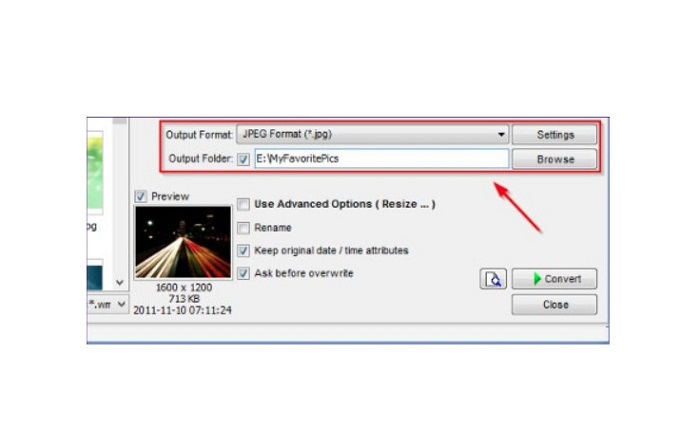
Schritt 2. Nachdem Sie Ihr(e) Bild(er) importiert haben, wird/werden es/sie in der Oberfläche angezeigt. Klicken Sie anschließend auf den Pfeil des Dropdown-Menüs Ausgabeformat, um das gewünschte Ausgabeformat der Datei zu wählen. Um den Speicherort Ihres Ausgabebildes festzulegen, klicken Sie auf die Schaltfläche Browse neben dem Feld Output Folder.
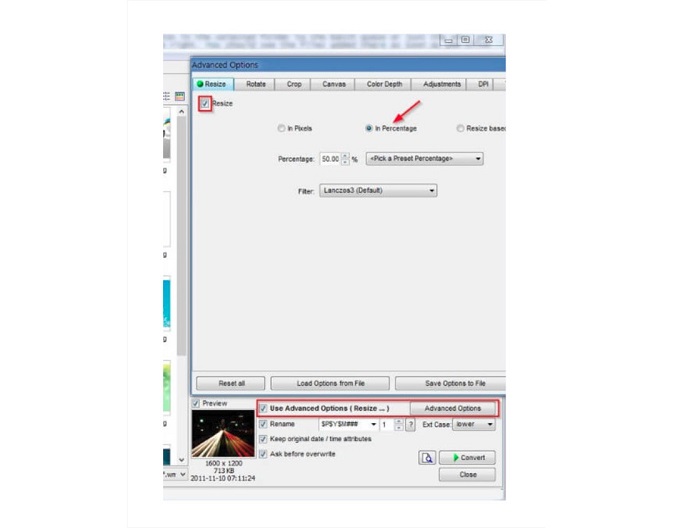
Schritt 3. Klicken Sie als Nächstes auf Advanced Options; es erscheint ein neuer Reiter. Aktivieren Sie dann im Reiter Resize die Option In Percentage, um die Bildgröße prozentual zu ändern. Sie können einen Filter auswählen, indem Sie auf den Pfeil des Dropdown-Menüs neben Filter klicken.
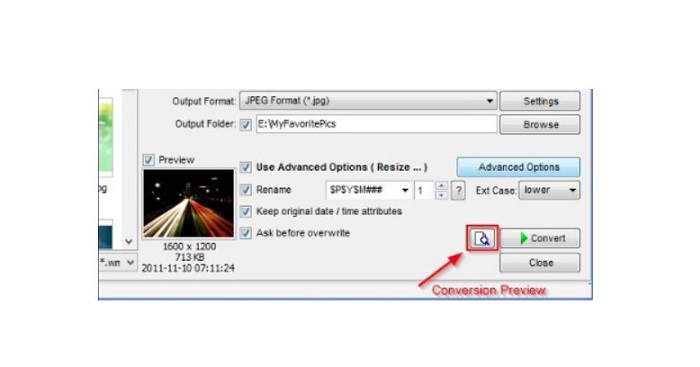
Schritt 4. Anschließend können Sie eine Vorschau Ihres Bildes anzeigen und es mit der Originaldatei vergleichen, indem Sie auf das Symbol Preview neben der Schaltfläche Convert klicken.
Schritt 5. Aktivieren Sie abschließend die Schaltfläche Convert, um den Größenänderungsvorgang zu starten. Dabei wird Ihre Bilddatei auch in das Format konvertiert, das Sie im vorherigen Schritt ausgewählt haben. Nachdem FastStone Ihr Bild in der Größe angepasst hat, erscheint ein neues Fenster, in dem Sie das Ausgabebild und dessen Größe sehen.
Und das ist das Ende des FastStone Photo Resizer-Tutorials. Wenn Sie die obigen Schritte befolgen, können Sie die Größe Ihres Bildes mit FastStone ganz einfach ändern.
Teil 2. Alternativen zu FastStone Photo Resizer
Auf FastStone Photo Resizer kann nur auf Windows-Desktops zugegriffen werden. Ein weiterer Nachteil ist, dass Sie die App kaufen müssen, bevor Sie auf die anderen Bearbeitungsfunktionen zugreifen können. Wenn Sie also lieber eine Video-Trimmer-App verwenden möchten, die auf Windows-, Mac- oder Linux-Geräten verfügbar und online verfügbar ist, lesen Sie diesen Abschnitt sorgfältig durch.
FVC Free Image Upscaler
FVC Free Image Upscaler ist eine der am häufigsten verwendeten Bildvergrößerungs‑ und ‑größenänderungs‑Anwendungen, die online und in allen Browsern wie Google, Firefox und Safari zugänglich ist. Dieses Online‑Tool kann Ihnen auch bei unscharfen Bildern helfen. Wenn Sie ein verschwommenes oder minderwertiges Foto haben, können Sie dieses Online‑Tool verwenden, um es zu schärfen und die Qualität zu verbessern. Zusätzlich können Sie Ihr Bild mit einer Vergrößerung von 2x, 4x, 6x oder 8x hochskalieren. Beeindruckend an FVC Free Image Upscaler ist, dass es einen KI‑gestützten Prozess verwendet, der automatisch die unscharfen Bereiche Ihres Bildes erkennt und sie anschließend verbessert.
Darüber hinaus unterstützt es alle Bildformate wie PNG, JPG, JPEG und BMP. Sie müssen sich auch nicht für ein Konto registrieren oder anmelden, um dieses Tool zu verwenden. Und wenn Sie die Vorschau Ihrer Ausgabe vor dem Speichern überprüfen möchten, können Sie dies tun, während Sie diese Anwendung verwenden. Darüber hinaus ist es sicher in der Anwendung und bequem zu bedienen. Und obwohl es sich um eine internetabhängige Anwendung handelt, verfügt sie über eine schnelle Verarbeitungsschnittstelle, bei der es Ihnen nicht schwer fällt, Bilder zur Größenänderung hochzuladen.
Schritt 1. Öffnen Sie Ihren Browser und geben Sie FVC Free Image Upscaler in das Suchfeld ein. Klicken Sie auf den bereitgestellten Link, um direkt zur Hauptseite zu gelangen.
Schritt 2. Starten Sie das Programm auf Ihrem Desktop, indem Sie auf die Schaltfläche Upload Photo klicken. Nachdem Sie die App gestartet haben, klicken Sie erneut auf die Schaltfläche Upload Photo, um das Bild hochzuladen, dessen Größe Sie ändern bzw. das Sie entrauschen/entschärfen möchten.
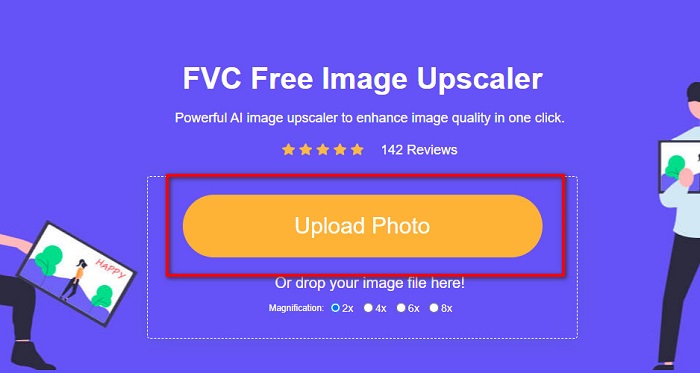
Schritt 3. Danach sehen Sie die voreingestellten Vergrößerungen, aus denen Sie wählen können. Sie können zwischen 2x, 4x, 6x oder 8x auswählen.
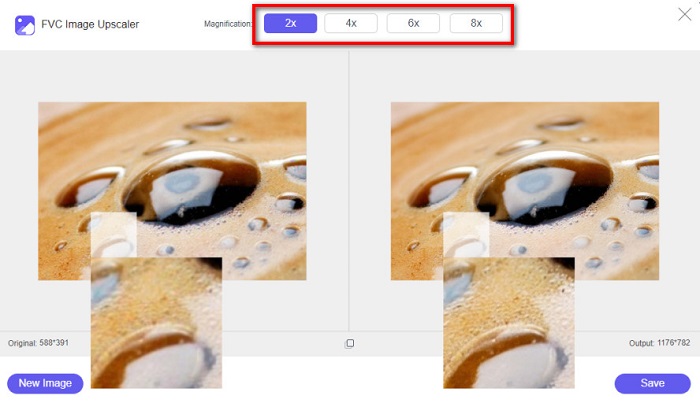
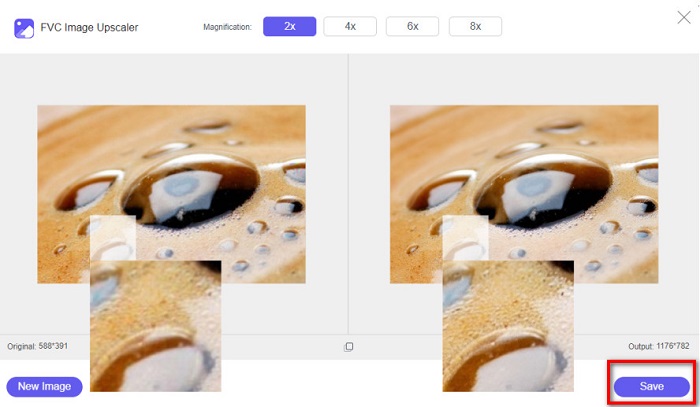
Schritt 4. Bewegen Sie Ihren Mauszeiger, um die Vorschau Ihres Bildes zu sehen. Wenn Sie mit dem Ergebnis zufrieden sind, klicken Sie auf die Schaltfläche Save in der unteren rechten Ecke der Oberfläche.
ImageResizer.com
Ein weiteres hervorragendes Online‑Tool zum Ändern der Bildgröße, das Sie verwenden können, ist Image Resizer.com. Mit Image Resizer.com können Sie Ihr Bild in der Größe anpassen, indem Sie die Abmessungen verändern. Außerdem bietet es eine Funktion zum Zuschneiden oder Drehen Ihres Fotos. Es ist auch ein anfängerfreundliches Tool, da es eine benutzerfreundliche Oberfläche hat. Allerdings enthält es viele lästige Anzeigen, die Sie ablenken können.
Schritt 1. Suchen Sie in Ihrem Browser nach Image Resizer.com. Klicken Sie in der Hauptoberfläche auf die Schaltfläche Select Image, um das Foto hochzuladen, dessen Größe Sie ändern möchten.
Schritt 2. In der folgenden Oberfläche können Sie die Abmessungen Ihres Bildes nach Maßangabe oder prozentual ändern. Geben Sie dann die gewünschte Breite und Höhe für Ihr Bild ein.
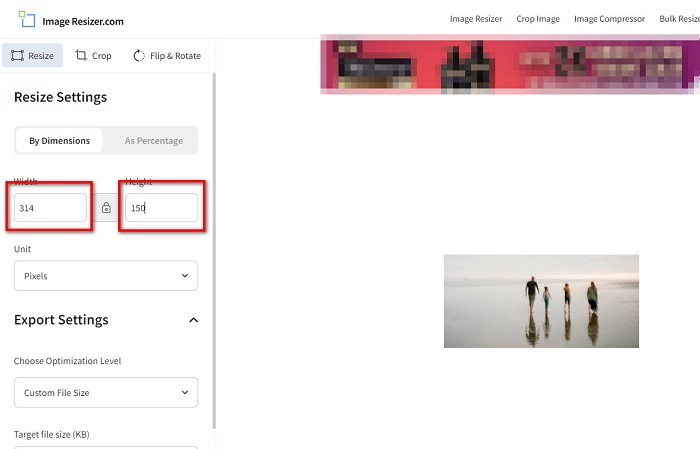
Schritt 3. Wenn Sie mit der Größenänderung Ihres Bildes fertig sind, klicken Sie auf die Schaltfläche Resize Image, um den Vorgang abzuschließen.
Teil 3. Häufig gestellte Fragen zu FastStone Photo Resizer
Wie viel kostet FastStone Photo Resizer?
Sie können die Vollversion von FastStone Photo Resizer für $19.95 (lebenslange Lizenz) erwerben.
Ist der FastStone-Viewer kostenlos?
FastStone Image Viewer ist ein Bildbetrachter, der für Microsoft Windows verwendet wird. Sie können den FastStone Image Viewer kostenlos und gebührenfrei verwenden.
Beeinträchtigt FastStone Photo Resizer die Fotoqualität?
Nein. Wenn Sie Ihr Bild mit dem FastStone Photo Resizer optimieren, verlieren Sie keine Bildqualität.
Fazit
FastStone Photo Resizer ist eine ausgezeichnete Anwendung, wenn Sie Ihr Bild auf Ihrem Windows‑Desktop in der Größe anpassen möchten. Darüber hinaus bietet es viele Bearbeitungsfunktionen und ist auch ein benutzerfreundliches Tool. Wenn Sie sich jedoch fragen, ob es einen FastStone Photo Resizer für Mac gibt, lautet die Antwort: nein. Wenn Sie also einen Foto‑Resizer verwenden möchten, der auf allen Plattformen verfügbar ist, nutzen Sie jetzt FVC Free Image Upscaler.
-
 Vollständiger Leitfaden von Imglarger – Lösung für Fotodesigner
 Imglarger ist eines der bedeutendsten Bildlösungstools. Klicken Sie auf diese Seite, um die vollständigen Beschreibungen, Vor- und Nachteile, Preise und Alternativen von Imglarger zu erfahren.
-
 Beste Foto-Resizer-App online, offline, Android und iPhone
 Was sind die besten Apps zur Größenänderung von Fotos? Klicken Sie auf die Seite, um die fünf leistungsstärksten Apps zur Größenänderung von Fotos kennenzulernen, mit denen Sie Ihre Datei verbessern oder ihre Größe ändern können.
-
 6 Möglichkeiten, ein Bild im Web und offline zu reizen [100% funktioniert]
 Mit dem Tutorial, das wir hier hinzufügen, können Sie jetzt ganz einfach die Größe eines Bildes basierend auf Ihrer bevorzugten Größe ändern. Erfahren Sie hier, wie es geht!
