


 Video Converter Ultimate
 Bildschirm recorder
 Videoreparatur
 Sicherer Download
Korrigieren Sie Bild-Denoising in weniger als einer Sekunde mit den besten Lösungen [Online & Offline]
Bildrauschen ist zu einem großen Problem für alle geworden, die Fotos aufnehmen, und Sie benötigen ein Tool zur Bildentrauschung, um es zu beheben. Diese Unvollkommenheit wird durch den Kamerasensor oder interne Faktoren verursacht; infolgedessen wirkt Ihr Bild körnig und die Qualität ist nicht optimal. Als Teil der Nachbearbeitung brauchen Sie daher einen Denoiser, der Ihnen hilft, das Rauschen im Bild zu entfernen oder zu verringern. Beginnen Sie mit diesem Artikel und springen Sie direkt zu den fünf Foto‑Denoisern, die wir im Internet gefunden haben und die Ihnen sofort helfen können, das Problem zu lösen, ohne es zu verschlimmern.

Teil 1. Was verursacht Bildrauschen in Ihrer Fotografie?
Bevor wir wissen, was Bildrauschen ist, müssen Sie zunächst wissen, dass auf Ihrem Bild zwei Arten von Rauschen auftreten. Dies sind das Eigen- und das Störgeräusch. Aber was sind diese beiden, und was sind die Ursachen dafür, dass es in jedem Bild passiert, das wir gemacht haben? Lassen Sie uns tiefer graben, während wir die wichtigen Informationen unten erklären.
Internes Rauschen
Es ist üblich, dass jedes Bild, das wir aufnehmen, entrauscht wird, insbesondere in einer Situation mit wenig Licht, in der die ISO gedrückt wird. Wenn Fotos überspannt werden, können Sie das reflektierte Ergebnis jeder Wellenschwankung sehen. Elektrizität, Hitze und Sensorbeleuchtung sind die drei Dinge, die das interne Rauschen in Bildern verursachen.
Interferenzrauschen
Solche Geräusche können als musterartige Überlagerung Ihres Bildes angesehen werden. Im Gegensatz zu internem Rauschen treten gelegentlich Störgeräusche auf, und zwar normalerweise, wenn in dem Bereich, in dem Sie das Bild sehen, eine robuste Übertragung vorhanden ist. Das zuvor erwähnte Muster ist höchstwahrscheinlich die Wellenlänge der Übertragung, die als elektronisches Rauschen bekannt ist.
Sind diese Geräusche vermeidbar? Ja, aber nicht immer. Was ist, wenn Ihr Bild Rauschen aufweist und Sie es entfernen möchten? Was tun? Die folgenden Informationen, die wir hinzufügen, sind die besten Bild-Denoiser, mit denen Sie das Rauschen auf Ihrem Bild einfach entfernen können. Sie können die Software auf der jeweiligen Webseite herunterladen oder im Internet verwenden.
Teil 2. Die 4 besten Bild-Denoiser, die Sie herunterladen oder im Web verwenden können [kostenpflichtig und kostenlos]
FVC Free Image Upscaler

FVC Free Image Upscaler ist die beliebteste Lösung der Nutzer, mit der Sie Bilder online entrauschen können. Obwohl die Software ein Online‑Tool ist, müssen Sie sich um die Leistung keine Sorgen machen, denn sie gehört zu den erstklassigen, KI‑gestützten Editoren, die Sie kostenlos verwenden können. Sie kann alle Mängel Ihres Bildes beheben – ganz gleich, ob es sich um Rauschen, Unschärfe, Kontrast, Helligkeit, fehlende Pixel usw. handelt. Dank der intuitiven Benutzeroberfläche haben alle Erstnutzer dieses Programms das Gefühl, als würden sie es schon lange verwenden. In puncto Leistung gibt es kaum Tools, die seiner KI‑Technologie und der hochwertigen Bearbeitung, die es bietet, überlegen sind.
Mit diesem Web-Tool können Sie jetzt Ihr bestes Ergebnis erzielen.
Vorteile
- Es ist ein vollständiger KI-gestützter Bildeditor, den Sie jemals brauchen werden.
- Es unterstützt die Bearbeitung vieler Fotoformate wie JPEG, PNG, BMP, SVG usw.
- Sie müssten die Optimierung nicht vornehmen, da sie die Fehler mit dem Algorithmus erkennen und sofort korrigieren kann.
- Sie erhalten ein zufriedenstellendes Ergebnis, nachdem Sie mit diesem Tool die Rauschunterdrückung auf jedem Foto entfernt haben.
- Es hat einen Vorher- und Nachher-Bereich, um die hochgeladene Bildqualität zu vergleichen.
Nachteile
- Es unterstützt keine manuelle Anpassung Ihrer Bildeinstellungen.
- Sie benötigen das Internet, um es zu verwenden.
AI-Bild-Denoiser
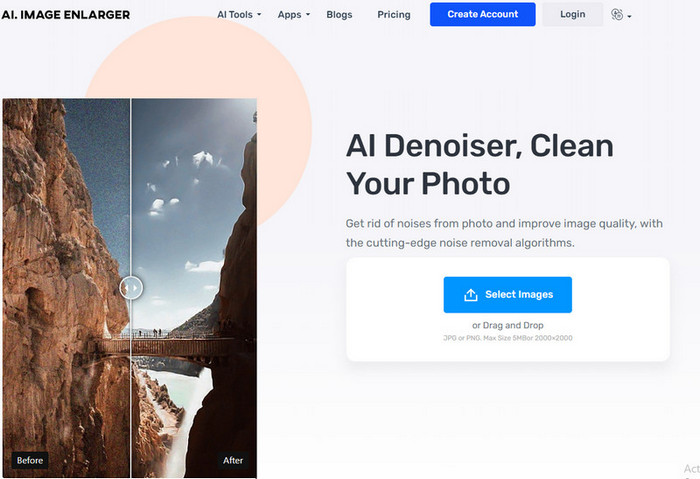
AI Image Denoiser ist ein weiteres KI‑gestütztes Tool zur Bildrauschreduzierung, das Sie im Web verwenden können. Dieses Tool bietet einen reibungslosen und einfachen Prozess zur Beseitigung von Unvollkommenheiten in Ihren Bildern, sobald Sie sie hier hochladen. Wie bei der zuerst genannten Software müssen Sie keine weiteren Einstellungen vornehmen, da dieses Tool eine automatische Bearbeitungsfunktion verwendet. Obwohl die Software leicht zu bedienen ist und die Vorteile von KI nutzt, verfügt sie dennoch nicht über zusätzliche Spezialfunktionen, die Ihnen beim Beheben des Rauschens in Ihren Bildern helfen könnten. Wenn Sie sich also entscheiden, dieses Tool zu verwenden, können Sie jederzeit die offizielle Website besuchen und Ihr Problem lösen, indem Sie Ihr Bild hier hochladen.
Vorteile
- Es unterstützt eine leicht verständliche Benutzeroberfläche.
- Neue Benutzer hätten keine Probleme, ihre Fotografie zu entrauschen.
- Das Ergebnis ist ebenso unerwartet gut.
Nachteile
- Es hat keine zusätzlichen Features und Funktionen.
- Es gibt eine Beschränkung der Bildabmessung und -größe.
- Anzeigen auf der Website.
TopazLabs Denoise AI
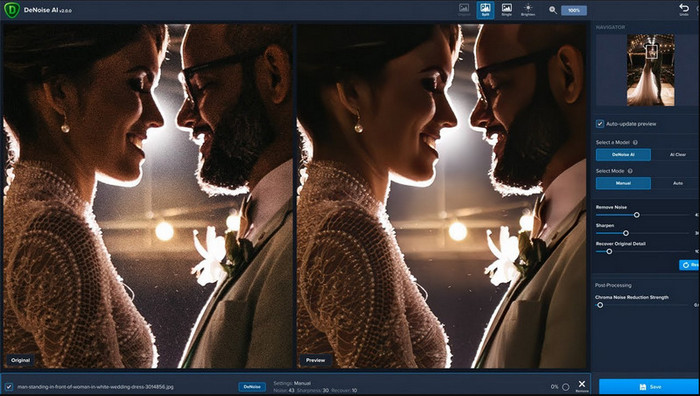
TopazLabs Denoise AI ist ein leistungsstarkes Tool zur Bildrauschreduzierung, das Sie auf Ihren Desktop herunterladen können. Wie die anderen Online‑Programme wird auch dieses Tool von KI unterstützt. Es kann präzise erkennen, was mit Ihrem Bild nicht stimmt, und es so verbessern, dass Sie die bestmögliche Bildqualität und feinste Details erhalten. Viele Nutzer haben diese Software auf ihrem Desktop installiert, weil sie sehr effektiv ist und beeindruckende Details erzeugt; die Ergebnisse sind begeisternd. Aufgrund der fortschrittlichen Bildbearbeitungsfunktionen müssen Sie die Software bei TopazLabs erwerben, um die volle Leistung dieses Denoisers auszuschöpfen.
Vorteile
- Sie können diese Software kostenlos auf Ihren Desktop herunterladen.
- Es unterstützt professionelle Bearbeitungsfunktionen und -funktionen, um ein perfektes Bild zu erhalten.
- Es verfügt über eine KI, die das Entfernen der Geräusche auf den von Ihnen hochgeladenen Fotos unterstützt.
Nachteile
- Dieses Tool kann für neue etwas unbequem sein.
- Der Preis ist höher.
SoftOrbits Easy Photo Denoise
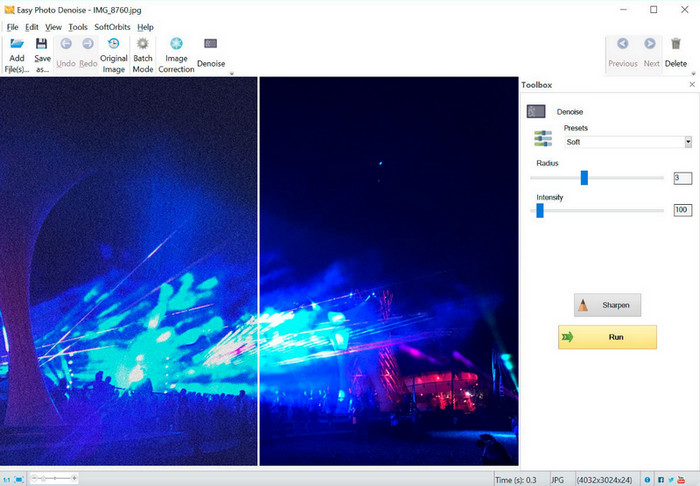
Der Name sagt alles: SoftOrbits Easy Photo Denoise ist eines der benutzerfreundlichsten Tools, mit dem jeder Einsteiger Bildrauschen entfernen kann. Auch wenn das Tool – anders als die drei zuvor vorgestellten Denoiser – keine KI unterstützt, ist es dennoch sehr einfach zu bedienen. Anders als bei komplexer Software können Sie hier nur wenige Parameter anpassen und sehen das Ergebnis sofort auf Ihrem Bild. Sie benötigen kein tiefgehendes Wissen über Bildbearbeitung, wenn Sie diese Software auf Ihrem Desktop installiert haben. Dass sie leicht zu bedienen ist, bedeutet allerdings nicht, dass sie kostenlos ist. Der Preis ist jedoch deutlich niedriger als bei TopazLabs. Ihre Funktionen sind aber nicht so umfassend wie bei anderen professionellen Editoren, die Sie herunterladen können.
Vorteile
- Es verfügt über eine übersichtliche Benutzeroberfläche, sodass Sie es in kürzester Zeit schnell beherrschen können.
- Sie können hier mehrere Bilder hochladen und bearbeiten.
- Passen Sie den Parameter frei an, um das Rauschen schneller zu entfernen.
Nachteile
- Voreinstellungen haben Fehler.
- Es hat keine Tiefenfunktionen.
Teil 3. So verwenden Sie die beste Bildrauschunterdrückungssoftware im Internet
Um Ihnen zu zeigen, wie Sie mit dem FVC Free Image Upscaler Bildrauschen reduzieren können, können Sie die folgenden Schritte übernehmen. Befolgen Sie sie der Reihe nach, um das Rauschproblem in Ihrem Foto zu beseitigen.
Schritt 1. Öffnen Sie das Web‑Tool, indem Sie auf diesen Link klicken; es wird automatisch ein neuer Tab in Ihrem Browser geöffnet.
Schritt 2. Klicken Sie auf Upload Image, um das Foto hinzuzufügen, das Sie hochskalieren und entrauschen möchten.
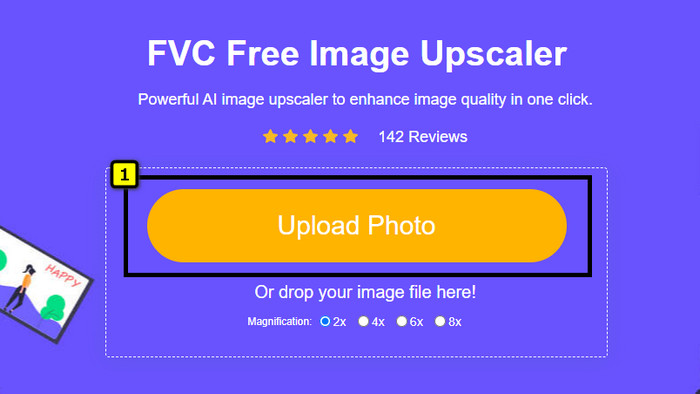
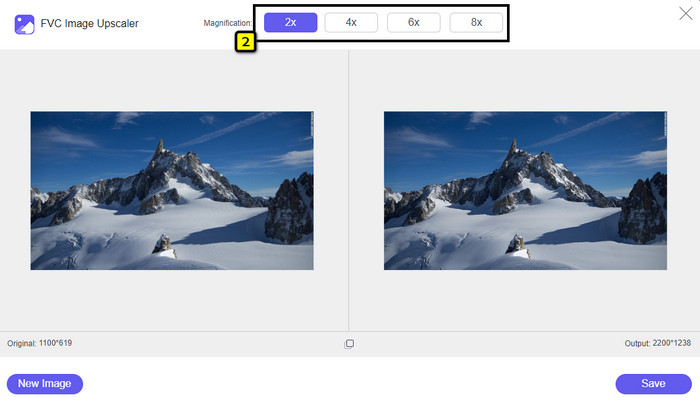
Schritt 3. Die KI skaliert das Bild automatisch hoch; Sie können oben weitere Optionen wie 2x, 4x, 6x oder 8x auswählen.
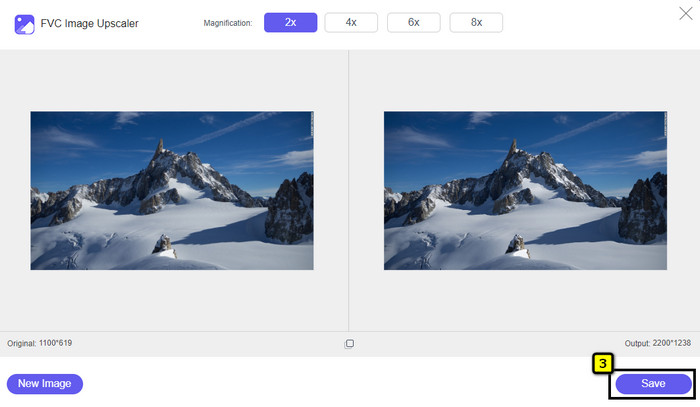
Schritt 4. Klicken Sie zum Schluss auf die Schaltfläche Save, um das Foto rauschfrei herunterzuladen.
Teil 4. FAQs zu Bild-Denoisern
Was verursacht Rauschen in meiner Fotografie?
Wenn Ihre Kamera eingestellt ist oder einen hohen ISO-Wert, einen kleinen Kamerasensor, eine kleine Verschlusszeit und mehr hat, kann dies zu Bildrauschen führen. Ist es vermeidbar? Ja, wenn Sie eine Standardoption oder -ausrüstung verwenden.
Benötige ich einen Bild-Denoiser, um das Rauschen im Bild zu entfernen?
Ja, Sie benötigen einen zuverlässigen Bildentrauscher, um das Bildrauschen zu unterdrücken. Sie können sich auf das Online-Webtool verlassen, das wir zuerst vorstellen, und dem Schritt folgen, den wir in Teil 3 hinzufügen.
Wie kann ich Bilder einfach schärfen?
Um zu erfahren, wie man Bilder online und offline schärft, können Sie auf diesen Link klicken und die dort vorgestellten Programme lesen, die Ihnen helfen, beliebige Fotos mühelos zu schärfen.
Fazit
Abschließend hoffen wir, dass Ihr Bedarf an Bildentrauschung durch das gründliche Lesen dieses Artikels gedeckt wurde, da wir Fakten darlegen und nur das Beste vom Besten für Ihre Auswahl berücksichtigt haben. Für Nutzer, die ungern Software auf ihren Desktop herunterladen, empfiehlt es sich, mit dem FVC Free Image Upscaler zu beginnen, damit dieses Tool Ihre Aufgabe übernimmt und sie umgehend erledigt.
-
 So ändern Sie die Bildgröße – Adobe Bildgröße ändern [online und offline]
 Wenn Sie nach Adobe-Bildern zur Größenänderung suchen, haben wir die Lösung für Sie. Sehen Sie sich diesen Beitrag gründlich an, um zu erfahren, wie Sie die Bildgröße mit Adobe auf Ihrem PC ändern können.
-
 So ändern Sie die Größe von Fotos für Facebook [Schnelle und einfache Schritte]
 Wenn Sie Probleme haben, ein großformatiges Bild auf Facebook hochzuladen, haben wir eine Lösung für Sie. Beenden Sie diesen Artikel, um zu erfahren, wie Sie die Größe von Fotos für Facebook ändern.
-
 Beste Online- und Offline-Foto-Resizer-Apps für Computer
 Suchen Sie nach den besten Anwendungen zur Größenänderung von Fotos für Ihren Desktop? Wir haben die leistungsstärksten Online- und Offline-Apps zur Größenanpassung von Fotos aufgelistet, die Sie ausprobieren sollten.
