


 Video Converter Ultimate
 Bildschirm recorder
 Videoreparatur
 Sicherer Download
Verbessern Sie die Bildqualität mit diesen schnellen und einfachen Methoden
Haben Sie ein Bild, das unscharf ist oder eine niedrige Qualität hat? Die beste Lösung, die Sie wählen sollten, ist, die Qualität Ihres Bildes zu erhöhen. Glücklicherweise gibt es zahlreiche Tools, mit denen Sie die Qualität Ihres Bildes verbessern können. Allerdings verfügen nicht alle Programme oder Tools auf einem Computer über die besten Funktionen. Deshalb haben wir nach den beliebtesten Foto-Verbesserern online, offline und auf dem iPhone gesucht. Um zu erfahren, wie Sie die Bildqualität verbessern, lesen Sie diesen Beitrag.

Teil 1. Wie man die Bildqualität online verbessert
Die Verwendung eines Online-Bildverbesserungsprogramms ist bequemer als das Herunterladen einer Softwareanwendung auf Ihren Computer. Der Vorteil der Verwendung eines Online-Tools besteht darin, dass Sie in Ihrem Web frei darauf zugreifen können. Dieser Teil zeigt Ihnen, wie Sie die Qualität Ihres Bildes mit dem erstaunlichsten Online-Bildverbesserungsprogramm verbessern können.
FVC Free Image Upscaler ist ein beliebter, kostenloser Online-Bildverbesserer. Diese Online-Anwendung kann die Vergrößerung auf 2x, 4x, 6x und 8x einstellen. Darüber hinaus unterstützt sie die gängigsten Bildformate, darunter PNG, JPG, JPEG und BMP. Sie können von allen Webbrowsern darauf zugreifen, einschließlich Google, Firefox und Safari. Außerdem müssen Sie sich keine Sorgen um die Sicherheit Ihrer Daten machen, da dieses Tool sicher zu verwenden ist.
Darüber hinaus verfügt es über eine leistungsstarke KI-Technologie, die automatisch die unscharfen Teile Ihres Bildes erkennt. Außerdem kann FVC Free Image Upscaler die verlorenen Pixel, Farbtexturen und weitere Details reparieren. Wenn Sie diesen hervorragenden Bild-Upscaler verwenden möchten, folgen Sie der einfachen Anleitung unten.
So verbessern Sie die Bildqualität online mit FVC Free Image Upscaler:
Schritt 1. Öffnen Sie Ihren Browser und suchen Sie im Suchfeld nach FVC Free Image Upscaler. Sie können direkt auf die Hauptseite gehen, indem Sie auf den angegebenen Link klicken.
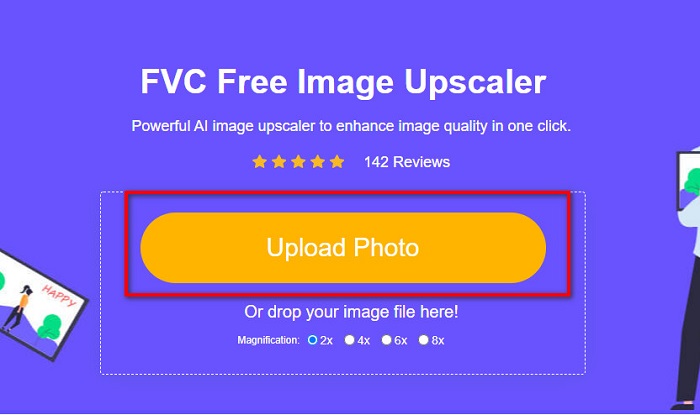
Schritt 2. Klicken Sie anschließend auf der Hauptoberfläche auf die Schaltfläche Upload Photo, um das Bild hochzuladen, das Sie hochskalieren möchten. Warten Sie, bis Ihr Bild hochgeladen ist, und fahren Sie dann mit dem nächsten Schritt fort.
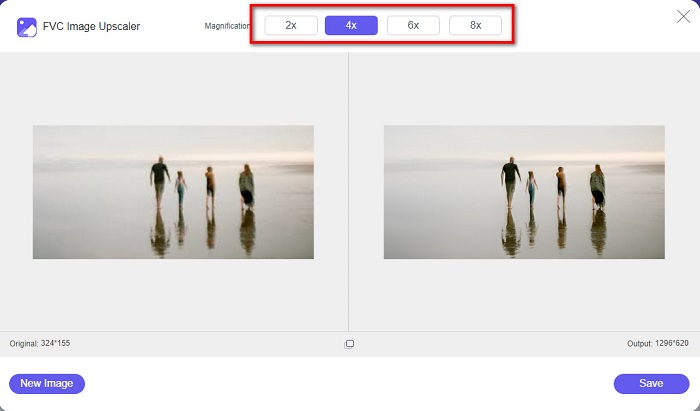
Schritt 3. Wählen Sie dann die Magnification, die Sie für Ihr Bild wünschen. Sie können zwischen 2x, 4x, 6x und 8x wählen.
Schritt 4. Sie können eine Vorschau Ihres Bildes sehen, und wenn Sie damit zufrieden sind, klicken Sie auf die Schaltfläche Save, um Ihr hochskaliertes Bild auf Ihrem Gerät zu speichern.
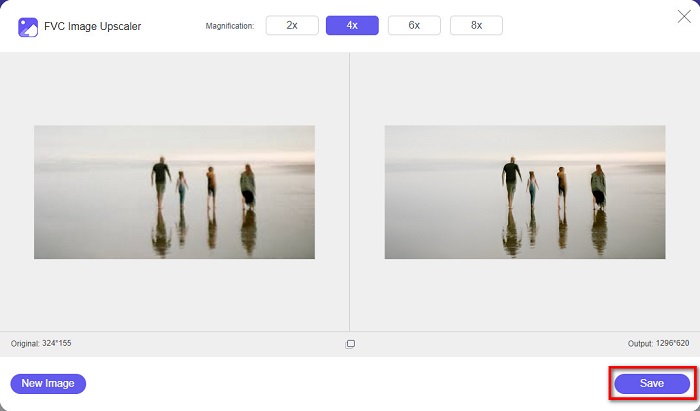
Und das ist es! Sie können Ihr Bild jetzt in hoher Qualität auf Ihrem Computer anzeigen.
Teil 2. So verbessern Sie die Bildqualität in Photoshop
Wir haben, was Sie brauchen, wenn Sie ein professionelles Tool verwenden möchten, um die Qualität Ihres Bildes zu verbessern. In diesem Teil erfahren Sie, wie Sie die Fotoqualität mit Adobe Photoshop verbessern.
Adobe Photoshop ist eine professionelle Bearbeitungs-App, mit der Sie die Qualität Ihres Bildes verbessern können. Adobe Photoshop verfügt über viele Bearbeitungswerkzeuge, mit denen Sie Bilder bearbeiten können. Außerdem verwenden viele Profis dieses Tool, weil es zahlreiche Funktionen bietet. Diese Anwendung erzeugt zudem hochwertige Ergebnisse, die Sie in sozialen Medien oder auf Websites teilen können. Darüber hinaus ist Adobe Photoshop eines der besten Produkte der Firma Adobe, das Sie auf fast allen Plattformen herunterladen können. Mit dieser Bearbeitungsanwendung können Sie Logos, Banner, Broschüren und vieles mehr gestalten. Viele Nutzer wissen jedoch nicht, dass man damit auch ein Bild verbessern kann. Allerdings haben viele Anwender Schwierigkeiten mit diesem Tool, weil die Benutzeroberfläche kompliziert zu bedienen ist und der Download ziemlich kostspielig sein kann.
Schritte zur Verbesserung der Bildqualität in Photoshop:
Schritt 1. Laden Sie zunächst Adobe Photoshop auf Ihren Computer herunter. Folgen Sie dem Installationsprozess und öffnen Sie anschließend die App.
Schritt 2. Gehen Sie in der Hauptoberfläche zu File > Open und wählen Sie das Bild aus, das Sie verbessern möchten.
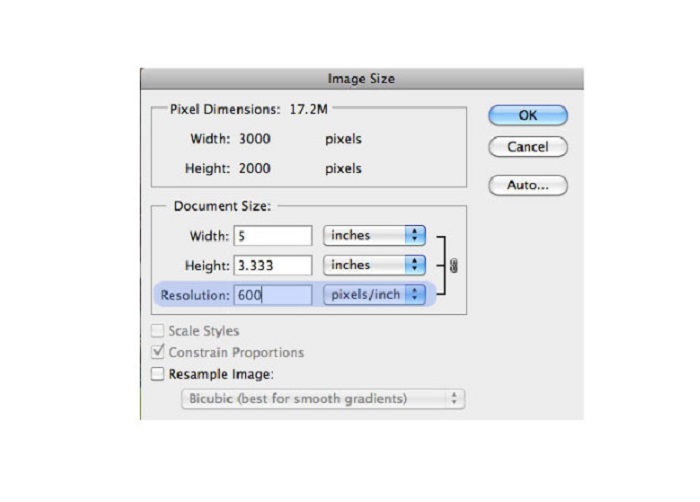
Schritt 3. Gehen Sie dann zu Image > Image Size. Anschließend erscheint ein Dialogfeld, in dem Sie das Kontrollkästchen Resample Image deaktivieren, damit nur die Auflösung Ihres Bildes geändert wird. Geben Sie dann im Feld Resolution die gewünschte Auflösung für Ihr Bild ein.
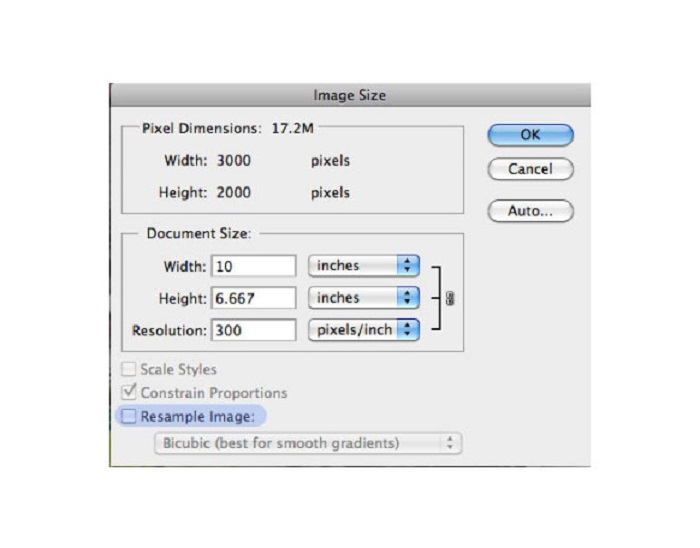
Schritt 4. Sobald Sie die Resolution ändern, ändern sich auch Width and Height Ihres Bildes. Klicken Sie dann auf die Schaltfläche OK, um die von Ihnen vorgenommene Änderung an Ihrem Bild zu speichern. Auf diese Weise können Sie Bilder mit niedriger Auflösung in hohe Auflösung umwandeln.
Teil 3. So verbessern Sie die Qualität eines Fotos auf dem iPhone
Einige Apps können Ihr Bild mit geringer Qualität verbessern, wenn Sie ein iPhone-Benutzer sind. Obwohl im AppStore viele Fotoverbesserungs-Apps verfügbar sind, haben wir die bekanntesten ausgewählt. Lesen Sie diesen Teil, um zu erfahren, wie Sie die Qualität eines Fotos auf einem iPhone verbessern können.
Remini ist eine der besten Apps, mit denen Sie ein Bild mit niedriger Qualität verbessern können. Diese erstaunliche App hat eine einfache Oberfläche und ist dadurch besonders benutzerfreundlich. Außerdem verwendet sie KI-Technologie, die automatisch die unscharfen Bereiche Ihres Bildes erkennt. Die App ist zudem sicher zu verwenden, sodass Ihre Dateien beim Gebrauch geschützt sind. Der Nachteil dieser App besteht darin, dass Sie eine Werbung ansehen müssen, um das Ergebnis anzuzeigen und herunterzuladen, oder Sie erwerben die Vollversion, um die Ergebnisse ohne Werbung herunterladen zu können.
So verbessern Sie die Bildqualität auf dem iPhone mit der Remini-App:
Schritt 1. Laden Sie die App Remini im App Store herunter. Öffnen Sie die App auf Ihrem Telefon, nachdem der Download abgeschlossen ist.
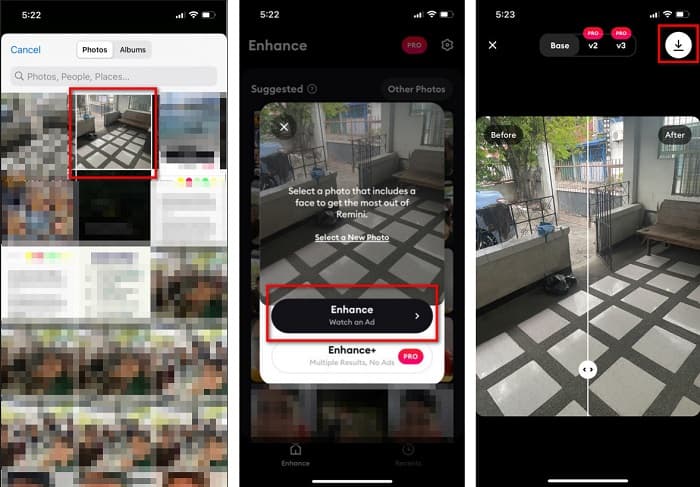
Schritt 2. Wählen Sie dann in der Hauptoberfläche der App das Bild aus, das Sie hochskalieren möchten.
Schritt 3. Tippen Sie anschließend auf die Schaltfläche Enhance, um die Qualität Ihres Bildes zu verbessern. Wenn Sie die Pro-Version der App nutzen, müssen Sie keine Werbung ansehen. Andernfalls werden Sie aufgefordert, eine Werbung anzusehen, um das Ergebnis anzuzeigen und zu speichern.
Schritt 4. Nun können Sie Ihr verbessertes Bild ansehen. Tippen Sie dann auf das Download-Symbol in der oberen rechten Ecke Ihres Bildschirms. Und voilà! Mit diesen einfachen Schritten können Sie die Qualität Ihres Bildes verbessern.
Teil 4. Häufig gestellte Fragen zur Verbesserung der Fotoqualität
Gibt es eine App, die die Bildqualität auf Android verbessern kann?
Das Tool zur Verbesserung der Fotoqualität ist eine der besten Apps zur Verbesserung der Bildqualität, um Ihre Bildqualität zu verbessern. Die Verwendung der Bildverschönerungseffekte verleiht Ihrem Bild ein professionelles Aussehen.
Wie verbessert man die Fotoqualität in Lightroom?
Adobe Lightroom ist ein weiteres Adobe-Produkt, das Sie verwenden können, um die Auflösung Ihres Bildes zu erhöhen. Lesen Sie die folgenden einfachen Schritte, um zu erfahren, wie Sie die Fotoqualität in Lightroom verbessern können. 1. Laden Sie Adobe Lightroom auf Ihren Computer herunter. 2. Öffnen Sie dann Ihr Bild in Lightroom. 3. Klicken Sie auf Choose Photo > Enhance. 4. Wählen Sie anschließend Super Resolution und klicken Sie auf Enhance. 5. Danach sehen Sie, dass Lightroom die Auflösung Ihres Bildes erhöht und es als DNG-Datei speichert.
Wirkt es sich auf die Dateigröße aus, wenn Sie Ihr Bild hochskalieren?
Das Ändern der Druckauflösung ändert nicht die Anzahl der Pixel Ihres Bildes und wirkt sich nicht auf die Größe Ihres Bildes aus.
Fazit
Es ist einfach, die Bildqualität zu verbessern, insbesondere jetzt, da Sie eine Anleitung haben, der Sie folgen können. Außerdem gibt es viele Apps auf dem Computer oder iPhone, die Ihnen helfen können, Ihr Bild hochzuskalieren. Wenn Sie jedoch einen kostenlosen Image-Upscaler verwenden möchten, der Ihr verschwommenes Bild automatisch hochskaliert, nutzen Sie jetzt FVC Free Image Upscaler.
-
 5 Möglichkeiten zum Entfernen des B612-Wasserzeichens mit den besten Tools
 Möchten Sie wissen, wie Sie B612-Wasserzeichen von Ihren Fotos entfernen können? Mit diesen herausragenden Tools können Sie das B612-Wasserzeichen mühelos aus Ihren Bildern entfernen.
-
 Einfache Schritte zum Entfernen des WOW-Slider-Wasserzeichens [Gelöst]
 WOW Slider ist eine App zum Erstellen einer fantastischen Diashow. Es bettet jedoch Wasserzeichen in seine Ausgabe ein. Lesen Sie weiter unten, um zu erfahren, wie Sie das WOW Slider-Wasserzeichen entfernen.
-
 Einfache Methoden zum Entfernen von schussfesten Wasserzeichen
 Entfernen Sie das Shootproof-Wasserzeichen, indem Sie diesen einfachen Methoden folgen. Verwenden Sie diese erstaunlichen Wasserzeichen-Entferner, um das Shootproof-Wasserzeichen einfach von Ihrem Bild zu entfernen.
