


 Video Converter Ultimate
 Bildschirm recorder
 Videoreparatur
 Sicherer Download
Online- und Offline-Fotovergrößerungsanwendungen, die Sie nicht verpassen dürfen
Die Größenänderung eines Bildes kann etwas riskant sein, denn wenn du ein Bild vergrößerst, kann es an Qualität verlieren. Manche Menschen möchten ihre Fotos vergrößern, um eine bessere Qualität zu erhalten. Ein Bild besteht aus Tausenden von Pixeln, und wenn du versuchst, es zu vergrößern, kann das die Bildqualität beeinträchtigen, weil beim Vergrößern die Pixel deines Bildes sichtbar werden. Wenn du dein Bild also vergrößern möchtest, ohne dabei Qualität zu verlieren, haben wir diese fantastischen Tools für dich. Um die besten Tools zum Vergrößern von Fotos kennenzulernen, lies diesen Beitrag aufmerksam durch.

Teil 1. Die besten Fotovergrößerer online
Es ist die beste Wahl, einen Online-Fotovergrößerer zu verwenden, da Sie dadurch Platz auf Ihrem Gerät sparen. Für ein Online-Tool müssen Sie nichts auf Ihr Gerät herunterladen, solange Sie über eine schnelle Internetgeschwindigkeit verfügen. Außerdem sind die meisten Online-Anwendungen kostenlos zugänglich. Nachdem dies gesagt wurde, sind hier die drei besten Bild-Resizer online.
FVC Free Image Upscaler
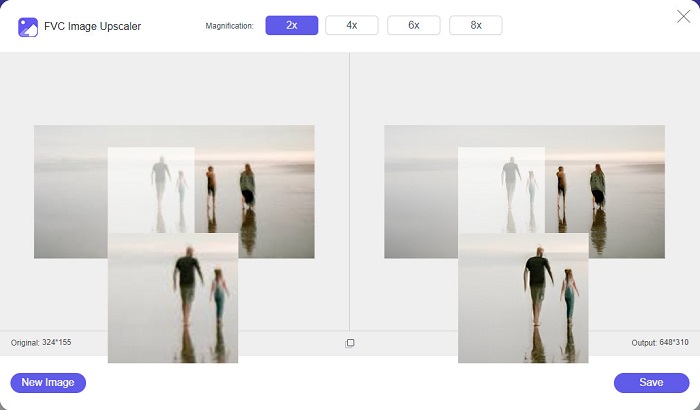
FVC Free Image Upscaler steht an erster Stelle auf der Liste der besten Online-Bildvergrößerer. Diese Online-App ist kostenlos und sicher in der Anwendung. Du kannst dein Bild um das 2‑, 4‑, 6‑ oder 8‑Fache vergrößern, ohne dass die Qualität deines Bildes leidet. Außerdem unterstützt es fast alle gängigen Bildformate wie PNG, JPG, JPEG und BMP. Besonders großartig an diesem Tool ist, dass es eine KI‑Technologie (Künstliche Intelligenz) einsetzt, die automatisch die unscharfen Bereiche deines Bildes erkennt und dann verbessert. Darüber hinaus kannst du es in allen gängigen Webbrowsern verwenden, einschließlich Google, Firefox und Safari. FVC Free Image Upscaler ist ein anfängerfreundliches Tool, daher könnte es die beste Option sein, wenn du Einsteiger bist.
Vorteile
- Es vergrößert Ihr Bild verlustfrei.
- Es hat einen schnellen Upscaling-Prozess.
- Damit können Sie verlorene Pixel, Farbtexturen und mehr reparieren.
- Sie können es auf Ihrem Windows- oder Mac-Gerät verwenden.
Nachteile
- Es ist ein internetabhängiges Tool.
Fotovergrößerer.com
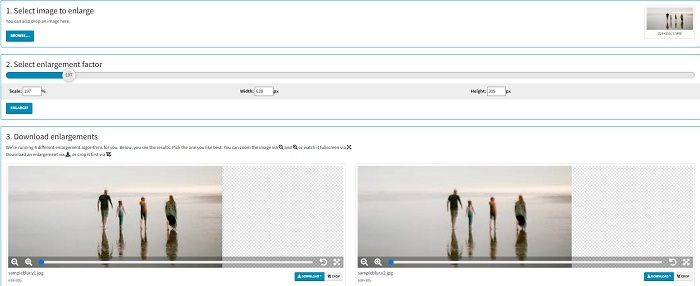
Photo Enlarger.com ist ein Online-Fotovergrößerer, den viele Einsteiger aufgrund seiner einfachen Benutzeroberfläche nutzen. Mit diesem Online-Fotovergrößerer kannst du dein Bild vergrößern, indem du den Vergrößerungsfaktor auswählst. Zusätzlich kannst du den Maßstab sowie die Breite- und Höhenprozente deines Bildes anpassen. Photo Enlarger.com liefert dir vier Ergebnisse mit unterschiedlichen Auflösungen und Vergrößerungsfaktoren. Diese Bilder kannst du anschließend ganz einfach herunterladen.
Darüber hinaus können Sie die vergrößerten Bildausgaben zuschneiden, um unnötige Teile Ihres Bildes zu entfernen. Es enthält jedoch viele lästige Anzeigen, die beim Vergrößern eines Bildes störend wirken können. Nichtsdestotrotz ist es ein effektives Werkzeug, um Ihr Bild zu vergrößern.
Vorteile
- Es unterstützt die gängigsten Bildformate wie PNG und JPG.
- Die Nutzung ist kostenlos und sicher.
- Sie können es in fast allen Webbrowsern verwenden, einschließlich Google und Firefox.
Nachteile
- Es ist internetabhängig.
- Es hat viele Anzeigen.
Bildvergrößerer.com
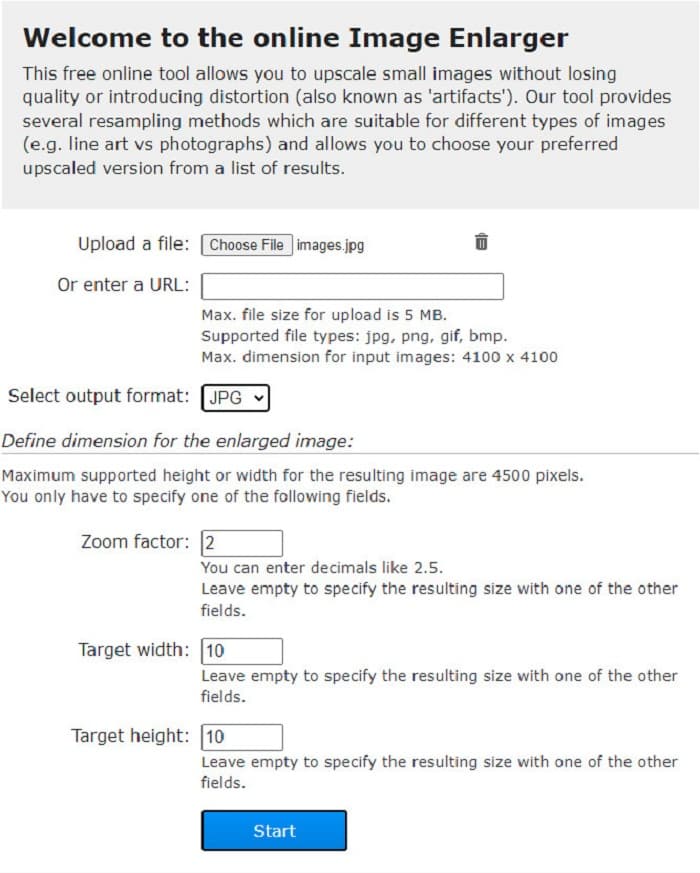
Ein weiteres kostenloses Online-Tool zur Bildvergrößerung, mit dem du dein Bild größer machen kannst, ist Image Enlarger.com. Dieser Online-Fotovergrößerer ermöglicht es dir, den Zoomfaktor, die Breite und die Höhe deines Bildes anzupassen. Zusätzlich verfügt er über eine intuitive Benutzeroberfläche, was ihn besonders benutzerfreundlich macht. Außerdem unterstützt er die gängigsten Bildformate wie PNG und JPG. Image Enlarger.com unterstützt eine maximale Breite und Höhe von bis zu 4500 Pixeln. Zudem bietet es verschiedene Resampling-Verfahren, die zu unterschiedlichen Bildtypen passen. Der Nachteil dieses Online-Tools ist, dass du Schwierigkeiten beim Vergrößern deines Bildes haben wirst, wenn deine Internetverbindung langsam ist.
Vorteile
- Es ist ein sicher zu verwendendes Werkzeug.
- Die Nutzung ist kostenlos.
Nachteile
- Es enthält Anzeigen, die Sie ablenken könnten.
- Sie können Ihre Bildausgabe nicht in der Vorschau anzeigen.
Teil 2. Die besten Fotovergrößerer offline
Die Leute ziehen es manchmal vor, eine Bildvergrößerungssoftware anstelle eines normalen Bildbearbeitungsprogramms zu verwenden, da dies die Qualität beeinträchtigen könnte, wenn Sie ein Bild mit einem Standard-Bildbearbeitungsprogramm vergrößern. Deshalb haben wir nach den besten Offline-Bildvergrößerungsgeräten auf dem Markt gesucht und die besten unter ihnen ausgewählt. Diese von uns vorgestellten Fotovergrößerer können auf Windows- oder Mac-Geräten heruntergeladen werden. Hier sind ohne weiteres die drei leistungsstärksten Offline-Foto-Resizer.
Smilla-Vergrößerer
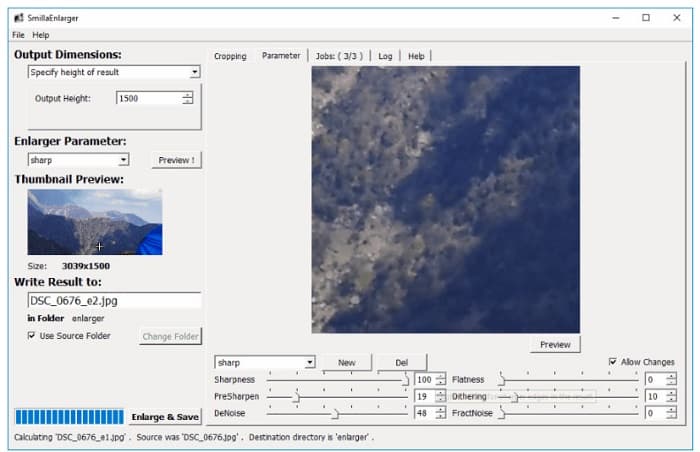
Smilla Enlarger ist ein Offline-Bildvergrößerer, mit dem du dein Bild ganz einfach in der Größe anpassen kannst. Diese Softwareanwendung ist ein kostenloses und quelloffenes Programm für deinen Windows-Computer. Außerdem kannst du die Zuschneideoptionen verwenden, um jedes von diesem Tool unterstützte Bild zu vergrößern. Du kannst auch die Bildabmessungen und Vergrößerungsparameter festlegen, um die Schärfe und das Rauschen deines Bildes zu steuern. All diese Optionen helfen dir dabei, genau die Vergrößerung für dein Bild zu wählen, die du möchtest.
Darüber hinaus unterstützt es fast alle Bildformate wie PNG-, JPEG-, JPG- und WebP-Formate. Außerdem können Sie Ihre Ausgabe mit diesem Tool anzeigen, da Sie damit eine Vorschau Ihres Bildes anzeigen können. Der Nachteil dieser App ist, dass Sie die App kaufen müssen, bevor Sie auf ihre anderen einzigartigen Funktionen zugreifen können.
Vorteile
- Es ist ein benutzerfreundliches Tool.
- Es kann kostenlos auf einen Windows-Computer heruntergeladen werden.
- Es verfügt über Verbesserungsprofile, um Ihr Image zu verbessern.
Nachteile
- Es hat manchmal einen langsamen Upload-Prozess.
Bildvergrößerer neu schattieren
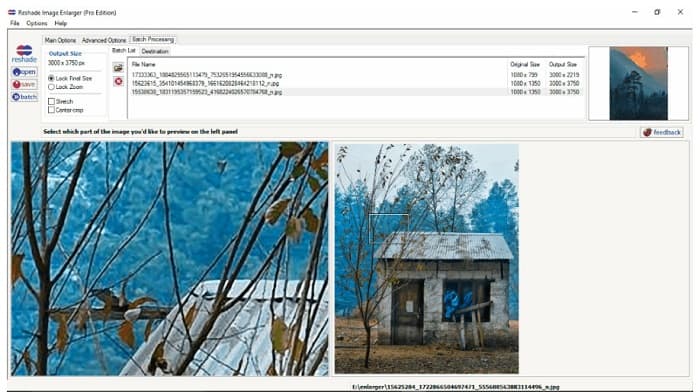
Reshade Image Enlarger ist eine Fotovergrößerungs-App, die du herunterladen kannst, wenn du dein Bild vergrößern oder verbessern möchtest. Reshade Image Enlarger ist ebenfalls ein KI‑Bildvergrößerer, da es dein Bild mithilfe seiner KI‑Technologie automatisch optimiert. Darüber hinaus vergrößert dieses Tool dein Bild, indem du die gewünschte Breite und Höhe individuell einstellst, Zuschneidefunktionen aktivierst, Rauschen reduzierst, Artefakte minimierst und mehr. Besonders beeindruckend an dieser Anwendung ist, dass ihre erweiterten Optionen es dir ermöglichen, die JPEG-Kompression, die Verarbeitungsgenauigkeit und weiche Farbverläufe des ausgegebenen Bildes zu steuern. Um die Stapelverarbeitungsfunktion zu nutzen, rufe einfach den Tab „Batch Processing“ auf.
Vorteile
- Sie können es auf allen Medienplattformen herunterladen, einschließlich Windows und Mac.
- Es hat einen Batch-Vergrößerungsprozess.
- Es verfügt über erweiterte Funktionen.
Nachteile
- Es hat eine schwer zu bedienende Benutzeroberfläche.
Eine schärfere Skalierung
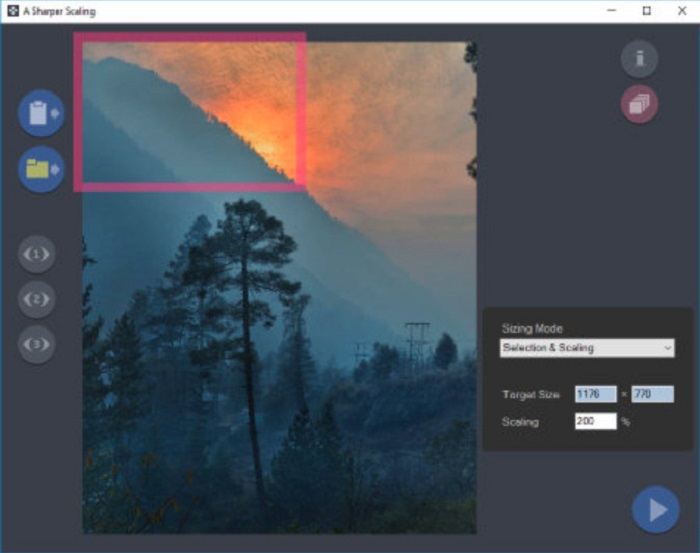
Ein weiteres Bildvergrößerungsprogramm, das sich wirklich lohnt, ist die App A Sharper Scaling. Diese Software ist ein fantastisches Tool, wenn du deine Bilder in der Größe ändern möchtest. Obwohl es etwas fortgeschrittener ist als die anderen oben vorgestellten Offline-Tools, liefert es dennoch sehr gute Ergebnisse. Außerdem vergrößert A Sharper Scaling einen Bildausschnitt und schärft ihn, ohne zusätzliches Rauschen hinzuzufügen, sodass dein Bild klar und scharf aussieht. Beeindruckend ist auch, dass dieses Tool mehrere Bilder im Stapelmodus schnell vergrößern kann, ohne dass die Bildqualität leidet. Darüber hinaus verfügt es über eine leicht zu bedienende Benutzeroberfläche, wodurch es auch für Einsteiger geeignet ist. Wenn du dein Bild also schnell vergrößern möchtest, wird dir A Sharper Scaling dabei sicher helfen.
Vorteile
- Sie können Modi auswählen, um Ihr Bild zu vergrößern.
- Es kann viele Bilder gleichzeitig vergrößern
- Es unterstützt die Standarddateiformate wie PNG, JPG und JPEG.
Nachteile
- Es hat ein paar Bearbeitungsoptionen zu verwenden.
- Es hat einen langsamen Exportprozess.
Kneson Imagener
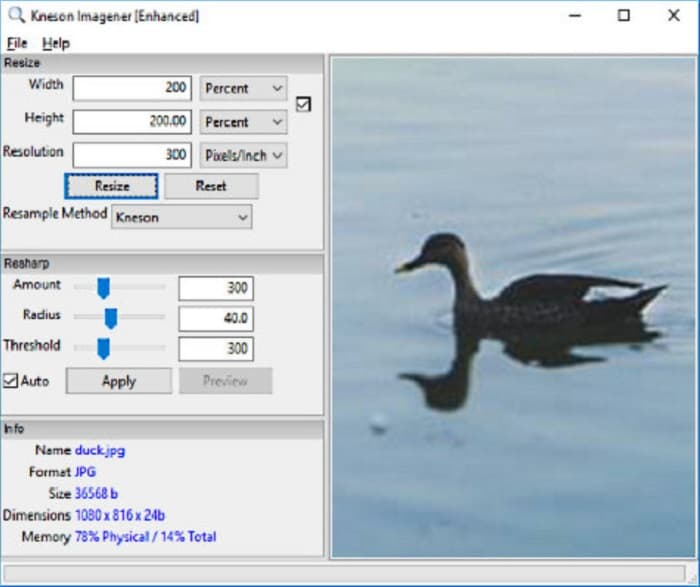
Kneson Imagener gehört ebenfalls zu den besten Bildvergrößerern für den PC. Diese ausgezeichnete App kann auf fast allen Medienplattformen kostenlos heruntergeladen werden. Außerdem kannst du dein Bild anhand von Prozentangaben, Pixeln, Zoll (Inches) und Zentimetern vergrößern. Du kannst auch die Auflösung deines Bildes ändern, um dessen Qualität zu verbessern. Zudem kannst du dieses Tool verwenden, wenn du die Dateigröße deines Bildes verringern möchtest, um Speicherplatz auf deinem Gerät zu sparen.
Darüber hinaus sind hier die verfügbaren Resampling-Methoden aufgeführt, mit denen Sie Ihr Bild vergrößern können: Normal, Bilinear, Bikubisch, Kenson und Kenson Progressiv. Beachten Sie jedoch, dass Sie, wenn Sie diese Softwareanwendung herunterladen möchten, eine funktionierende E-Mail-ID auf ihrer Website für einen Newsletter registrieren müssen. Danach erhalten Sie einen Download-Link in Ihrer E-Mail, über den Sie die App vollständig herunterladen können.
Vorteile
- Es hat eine Zuschneidefunktion.
- Sie können Resharp-Betrag, -Radius und -Schwellenwert Ihres Bildes anpassen.
- Es hat eine einfache Benutzeroberfläche.
Nachteile
- Sie müssen sich bei einer funktionierenden E-Mail-Adresse anmelden, um sie herunterzuladen.
Verwandte Themen:
Top 7 Pixel-Verbesserer für alle Webbrowser, die du nutzen solltest
Beste Foto-Resizer-App online, offline, für Android und iPhone
Teil 3. Häufig gestellte Fragen zu Fotovergrößerungs-Apps
Kann ich mein Bild verkleinern?
Ja. Indem Sie Auflösung, Pixel und Format Ihres Bildes anpassen. Die Auflösung, Pixel und das Format Ihres Bildes bestimmen seine Größe. Wenn Sie also die Größe Ihres Bildes komprimieren möchten, verwenden Sie ein Fotokomprimierungstool.
Kann ich mein Foto in Adobe Photoshop vergrößern?
Adobe Photoshop ist für viele Profis ideal, da Sie Ihr Bild verlustfrei und in hervorragender Qualität vergrößern können. Viele Menschen haben jedoch Schwierigkeiten, dieses Tool zum Vergrößern eines Fotos zu verwenden, da es eine schwer zu bedienende Oberfläche hat.
Ist Kapwing Photo Resizer eine hervorragende App zum Vergrößern von Bildern?
Kapwing Photo Resizer ist ein kostenloser Online-Bildvergrößerer, den viele Leute empfehlen. Es ist auch eine großartige App, um Ihr Bild verlustfrei zu verbessern oder zu vergrößern.
Fazit
Alle oben vorgestellten Fotovergrößerer gehören zu den herausragendsten Bildvergrößerern, die du im Internet finden wirst. Außerdem versichern wir dir, dass die genannten Anwendungen sicher zu verwenden sind und alle Beschreibungen zutreffend sind. Wenn du jedoch ein kostenloses Online-Tool bevorzugst, empfehlen wir dir den besten Online-Bildvergrößerer, FVC Free Image Upscaler.
-
 Wiederherstellung alter Fotos online und offline [einfache Schritte]
 Möchten Sie ein altes Foto wiederherstellen? Mit diesen Tools kennen Sie den alten Fotorestaurierungsprozess. Lesen Sie diesen Beitrag, um die einfachsten Methoden kennenzulernen.
-
 So beheben Sie die Bildqualität online und in Adobe Photoshop
 Wenn Sie ein Bild von geringer Qualität haben, müssen Sie die Auflösung Ihres Fotos korrigieren. Wenn Sie erfahren möchten, wie Sie die Bildqualität verbessern können, lesen Sie diesen Artikel vollständig.
-
 Top 7 Pixel Enhancer für alle Webbrowser, die Sie verwenden müssen
 Wenn Sie wissen möchten, welche Pixel-Enhancer die besten sind, sollten Sie sich diesen Beitrag ansehen. Dieser Artikel listet die sieben besten Fotopixel-Verbesserer für alle Webbrowser auf.
