


 Video Converter Ultimate
 Bildschirm recorder
 Videoreparatur
 Sicherer Download
Beste Techniken zum Entfernen von Alamy-Wasserzeichen aus Bildern online und offline
Alamy ist eine Website, die Stockfotos, Videos und andere visuelle Inhalte verkauft. Ihre Bilder werden von Freiberuflern und Agenturen aufgenommen oder aus nationalen Archiven, Museen und gemeinfreien Materialien zusammengestellt, die von Wikimedia Commons stammen. Allerdings haben einige Fotos ein Alamy‑Wasserzeichen, was die Betrachter stört. In diesem Fall zeigen wir dir die beste Methode, um Alamy‑Wasserzeichen online und offline zu entfernen. Lies den Artikel für weitere Details.

Teil 1: So entfernen Sie das Alamy-Wasserzeichen aus Fotos online
Verwendung des FVC-freien Wasserzeichenentferners
Wenn du die Alamy‑Wasserzeichen von deinen Fotos entfernen möchtest, kannst du den FVC Free Watermark Remover verwenden. Das ist die ultimative Online‑Anwendung, die du nutzen kannst. Alamy‑Wasserzeichen sind wirklich störend und über das gesamte Foto verteilt. Mit diesem Online‑Tool ist das Entfernen des Alamy‑Wasserzeichens jedoch einfach. Sogar Grundschüler können diese Anwendung bedienen, da sie ausführliche Anleitungen enthält, denen du folgen kannst. Außerdem bietet der FVC Free Watermark Remover zwei Methoden, um die Alamy‑Wasserzeichen zu entfernen. Die erste Methode ist die Verwendung der Watermark‑Remover‑Werkzeuge. Diese Werkzeuge sind Polygon, Pinsel und Lasso. Mit diesen Werkzeugen kannst du alle unerwünschten Objekte von deinen Fotos entfernen. Die zweite Methode ist die Verwendung des Zuschneide‑Werkzeugs. Wenn sich das Alamy‑Wasserzeichen in einer Ecke oder am Rand deines Fotos befindet, kannst du es einfach wegschneiden. Dieses Online‑Tool unterstützt zudem gängige Bilddateiformate wie PNG, JPG und BMP, sodass du dein Bild in dieses Tool importieren kannst. Lass uns diese Wasserzeichen mit diesem Alamy‑Wasserzeichen‑Entferner entfernen. Folge den einfachen Anleitungen unten.
Verwendung der Watermark Remover Tools
Schritt 1: Besuche zunächst die Website des FVC Free Watermark Remover. Klicke auf die Schaltfläche Upload Image. Dein Ordner öffnet sich, und du wählst das Foto mit dem Alamy‑Wasserzeichen aus, das du entfernen möchtest.

Schritt 2: Im gelben Feld kannst du verschiedene Werkzeuge verwenden, um die Alamy‑Wasserzeichen auf deinem Foto zu markieren. Du kannst die Lasso‑, Polygon‑ und Pinsel‑Werkzeuge nutzen. Mit den Symbolen + und – im roten Feld kannst du in das Foto hinein‑ und herauszoomen.
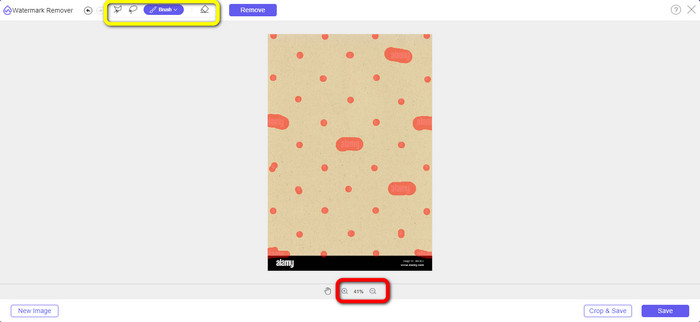
Schritt 3: Nachdem du alle Alamy‑Wasserzeichen auf deinem Foto markiert hast, klicke auf die Schaltfläche Remove. Warte, bis der Entfernungsvorgang abgeschlossen ist.
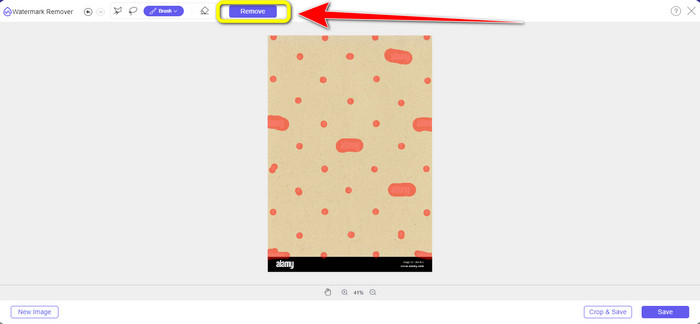
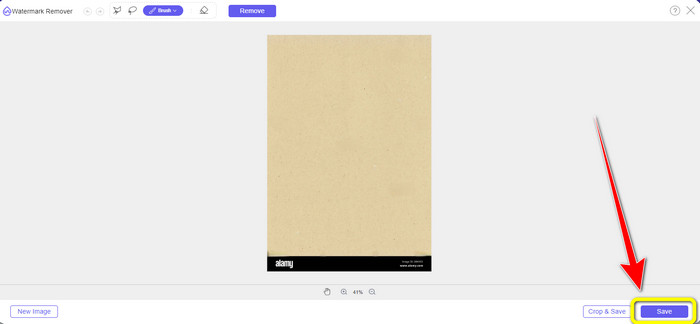
Schritt 4: Wenn alle Alamy‑Wasserzeichen verschwunden sind, klicke auf die Schaltfläche Save, um dein Foto ohne Alamy‑Wasserzeichen zu speichern und herunterzuladen.
Verwendung des Zuschneide‑Werkzeugs
In diesem Teil entfernen wir das Alamy-Wasserzeichen aus dem Foto durch Zuschneiden. Folgen Sie den einfachen Schritten unten.
Schritt 1: Füge das Foto mit einem Alamy‑Wasserzeichen ein, indem du auf die Schaltfläche Upload Image klickst.

Schritt 2: Nachdem du das Foto hinzugefügt hast, drücke die Schaltfläche Crop unten rechts in der Benutzeroberfläche.
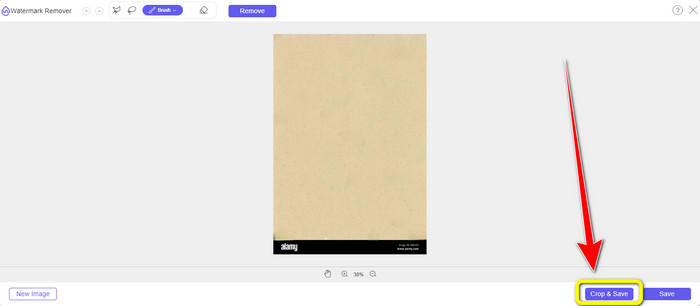
Schritt 3: Nachdem du auf die Schaltfläche Crop geklickt hast, kannst du mit der Maus den Randbereich deines Fotos zuschneiden, insbesondere den Bereich mit dem Alamy‑Wasserzeichen. Im roten Feld siehst du viele Optionen für die gewünschte Größe deines Fotos, aus denen du ebenfalls wählen kannst.
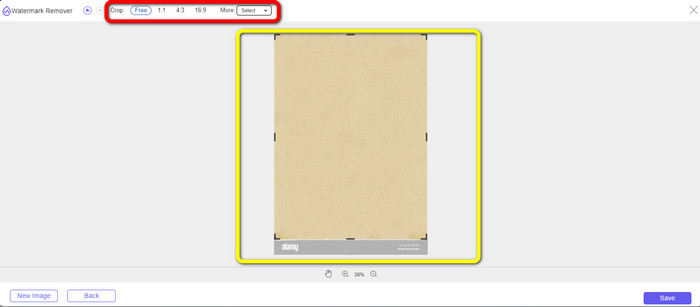
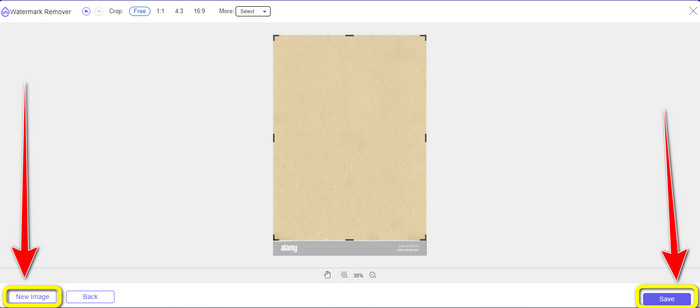
Schritt 4: Wenn du mit dem Zuschneiden des Fotos fertig bist, kannst du unten rechts in der Benutzeroberfläche auf die Schaltfläche Save klicken und es speichern. Wenn du ein weiteres Bild zuschneiden möchtest, klicke unten links in der Benutzeroberfläche auf die Schaltfläche New Image.
Verwenden von Apowersoft Online Watermark Remover
Der Apowersoft Online Watermark Remover kann das Alamy‑Wasserzeichen ebenfalls von deinem Foto entfernen. Dieses Tool kann alle störenden Objekte von deinen Fotos beseitigen, wie Wasserzeichen, Logos, Text usw. Zudem unterstützt es viele Dateiformate, darunter JPG, TIFF, PNG, BMP usw. So kannst du nahezu alle Bilder in dieses Tool hochladen. Darüber hinaus kann der Apowersoft Online Watermark Remover auch Wasserzeichen aus Videos entfernen, was ihn für alle Nutzer noch praktischer macht. Die Verwendung dieser Anwendung ist einfach. Du kannst die Alamy‑Wasserzeichen in nur wenigen Schritten entfernen. Deine Dateien sind hier sicher, da sie gelöscht werden, nachdem du die Wasserzeichen von deinen Bildern entfernt hast. Diese Anwendung garantiert also die Sicherheit deiner Dateien. Allerdings kann es bei der Nutzung dieses Online‑Tools zu einigen Schwierigkeiten kommen. Manchmal liest oder erkennt die Anwendung das Foto, das du hochlädst, nicht. Außerdem ist der Vorgang zum Entfernen der Wasserzeichen aus einem Bild zeitaufwändig. Und du benötigst eine schnelle Internetverbindung. Wenn nicht, funktioniert dieses Tool nicht besonders gut.
Um die Alamy-Wasserzeichen von Ihrem Foto zu entfernen, folgen Sie den einfachen Anleitungen unten.
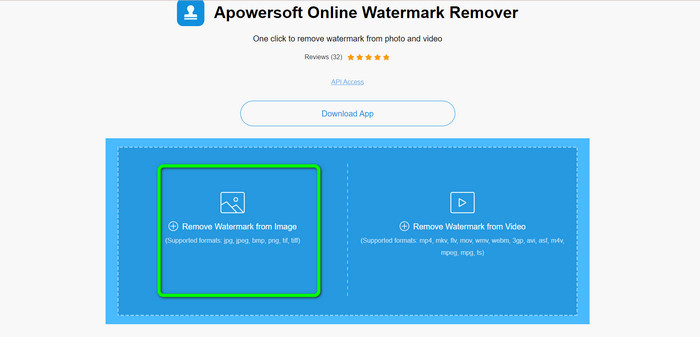
Schritt 1: Rufe die Website des Apowersoft Online Watermark Remover auf. Klicke auf das Gallery-Symbol, um deine Bilddatei mit einem Alamy‑Wasserzeichen hinzuzufügen.
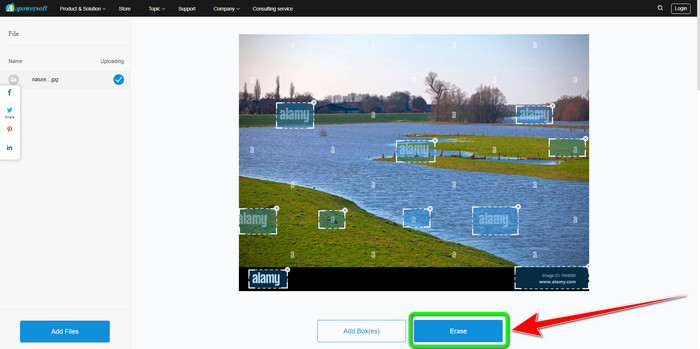
Schritt 2: Nachdem du das Foto hinzugefügt hast, klicke auf die Schaltfläche Add Boxes. Du kannst so viele Boxen hinzufügen, wie du möchtest. Decke anschließend mit diesen Boxen alle Alamy‑Wasserzeichen ab.
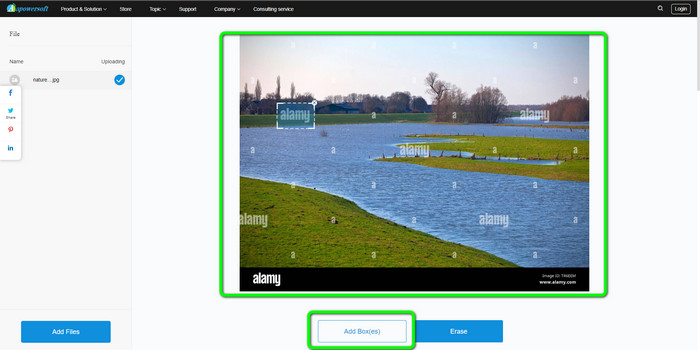
Schritt 3: Wenn du alle Alamy‑Wasserzeichen auf deinem Foto abgedeckt hast, kannst du auf die Schaltfläche Erase klicken. Warte auf den Entfernungsvorgang und lade dann dein Bild auf deinen Computer herunter.
Teil 2: So entfernen Sie Alamy-Wasserzeichen mit Photoshop
Adobe Photoshop ist eines der Tools, mit denen du Alamy‑Wasserzeichen offline von deinen Fotos entfernen kannst. Es bietet einen schnellen Entfernungsprozess und ein sauberes Endergebnis. Mit Hilfe dieser Bildbearbeitungssoftware kannst du alle unerwünschten Elemente aus deinen Bildern löschen, einschließlich der Alamy‑Wasserzeichen. Adobe Photoshop kann darüber hinaus noch viel mehr als nur Wasserzeichen zu entfernen. Du kannst es nutzen, um dein Foto zu retuschieren, etwa um dunkle Flecken, Pickel und mehr zu beseitigen. Du kannst es auch zur Verbesserung beliebiger Bilder einsetzen. Die Nutzung von Photoshop ist jedoch für Einsteiger nicht ideal. Es handelt sich um eine fortgeschrittene Bearbeitungssoftware, die sich eher für erfahrene Anwender eignet. Wenn du kein Profi bist und diese Anwendung verwenden möchtest, um Alamy‑Wasserzeichen zu entfernen, musst du dir Tutorials ansehen oder Fachleute um Hilfe bitten. Außerdem ist Adobe Photoshop teuer. Du musst die Anwendung kaufen, um sie langfristig zu nutzen. Sie bietet nur eine siebentägige kostenlose Testversion.
Führen Sie die folgenden Schritte aus, um die Alamy-Wasserzeichen von Ihrem Foto zu entfernen.
Schritt 1: Lade Adobe Photoshop herunter und führe den Installationsprozess durch. Starte dann die Anwendung auf deinem Computer.
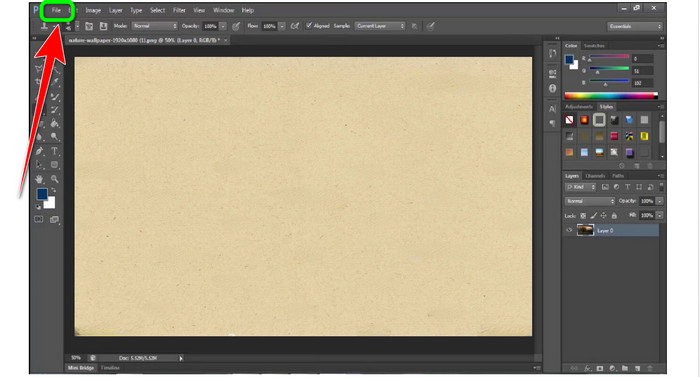
Schritt 2: Um das Foto mit einem Alamy‑Wasserzeichen hinzuzufügen, gehe zum Menü File und klicke dann auf Open.
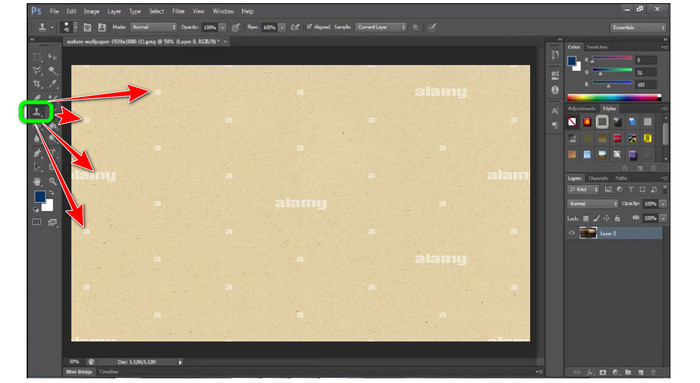
Schritt 3: Nachdem du deine Datei eingefügt hast, wähle das Clone Stamp Tool. Halte dann die Alt‑Taste gedrückt und klicke mit der Maus auf jedes Wasserzeichen auf deinen Fotos. Du wirst sehen, dass die Wasserzeichen nach und nach verschwinden.
Schritt 4: Wenn alle Alamy‑Wasserzeichen verschwunden sind, gehe zum Menü File und klicke dann auf die Schaltfläche Save as, um dein endgültiges Foto ohne Alamy‑Wasserzeichen zu speichern.
Teil 3: Häufig gestellte Fragen zum Entfernen von Alamy-Wasserzeichen
Warum gibt es ein Wasserzeichen von dem Bild, das Sie auf Alamy gespeichert haben?
Weil die Website sie schützen will und weil sie nicht patentfrei sind, haben die hochgeladenen Bildmaterialien ein Wasserzeichen. Wenn Sie also ein Bild ohne Wasserzeichen von Alamy wünschen, müssen Sie es kaufen.
Ist es sicher, meine Kartennummer anzugeben, um ein Bild von Alamy zu kaufen?
Ja, so ist es. Die Website wird Ihre Informationen nicht preisgeben, sodass Sie sich keine Sorgen um die Informationen auf Ihrer Karte machen müssen.
Ist es in Ordnung, die Zahlung von Alamy zu erstatten?
Unglücklicherweise nicht. Alamy erlaubt keine Rückerstattung. Sie müssen also zweimal überlegen, ob Sie Ihr Geld ausgeben möchten oder nicht.
Fazit
Jetzt kennst du die beste Methode, um Alamy‑Wasserzeichen mit Online‑Tools und mit Photoshop aus Bildern zu entfernen. Da Photoshop jedoch schwer zu bedienen ist, kannst du stattdessen den FVC Free Watermark Remover verwenden. Er verfügt über eine benutzerfreundliche Oberfläche und eignet sich daher gut für Anfänger.
-
 Vollständige Anleitungen zum einfachen Entfernen von iFunny-Wasserzeichen
 Entdecken Sie den außergewöhnlichsten iFunny-Wasserzeichenentferner für Sie. Lernen Sie auch diese einfachen Methoden zum Entfernen von iFunny-Wasserzeichen von Ihren Fotos kennen.
-
 So entfernen Sie Wasserzeichen in Lightroom Mobile [Gelöst]
 Möchten Sie erfahren, wie Sie Wasserzeichen aus Fotos in Lightroom entfernen? Hier sind die einfachsten Methoden, die Sie mit Ihren Mobiltelefonen und Computern ausprobieren können.
-
 Ehrliche Bewertung von Inpaint Watermark Remover und Alternative
 Möchten Sie wissen, wie Sie mit Inpaint ein Wasserzeichen entfernen? Das Lesen dieses Artikels ist die richtige Wahl. Sie lernen auch die besten Alternativen kennen, die Sie verwenden können.
