


 Video Converter Ultimate
 Bildschirm recorder
 Videoreparatur
 Sicherer Download
Einfache Schritte zur Größenänderung von Fotos für Facebook
Viele Millennials und Erwachsene nutzen Facebook als beliebteste Social-Media-Plattform. Facebook ist eine App, auf der Sie Bilder hochladen und mit Ihren Freunden teilen oder an sie senden können. Und viele Menschen möchten ein Bild in hoher Qualität haben, das sie auf Facebook hochladen können. Wenn Sie ebenfalls Fotos in hoher Auflösung und Qualität hochladen möchten, haben wir das passende Werkzeug für Sie. Glücklicherweise haben wir Apps für iPhone, Android und Online gefunden, mit denen Sie Bilder schnell und effizient skalieren können. Also schnallen Sie sich an, denn in diesem Beitrag lernen Sie im Handumdrehen, wie Sie Fotos für Facebook skalieren.

Teil 1. So ändern Sie die Größe von Fotos auf dem iPhone für Facebook
Wenn Sie ein iPhone-Gerät verwenden, können Apps in Ihrem AppStore heruntergeladen werden, die Ihnen helfen, die Größe Ihres Fotos zu ändern. Darüber hinaus gibt es kostenlose Apps, die Sie auf Ihrem iPhone-Gerät verwenden können. Allerdings erzeugen nicht alle Apps qualitativ hochwertige Ausgaben. Aus diesem Grund haben wir nach der besten App gesucht, um die Größe von Bildern sofort zu ändern.
Remini ist die beliebteste App zur Bildskalierung, die Sie auf Ihr iPhone herunterladen können. Diese App hat eine benutzerfreundliche Oberfläche mit intuitiven Funktionen. Außerdem kann Remini Ihr Bild mit seinem KI-(Künstliche Intelligenz-)Verbesserer optimieren, der Ihr Bild automatisch in der Größe anpasst und in bestmöglicher Qualität verbessert. Und nicht nur das: Mit dieser App können Sie sogar Ihre Videos mit der Video-Optimierungsfunktion verbessern. Darüber hinaus unterstützt sie alle gängigen Bildformate wie JPEG, JPG und PNG. Fantastisch ist auch, dass Sie diese App im App Store kostenlos herunterladen können. Wenn Sie diese App also verwenden möchten, um ein Foto für ein Facebook-Titelbild zu skalieren, folgen Sie den nachstehenden Schritten.
So ändern Sie die Größe eines Bildes mit der Remini-App:
Schritt 1. Öffnen Sie den App Store, suchen Sie nach der App Remini und laden Sie sie auf Ihr Gerät herunter. Öffnen Sie die App nach der Installation.
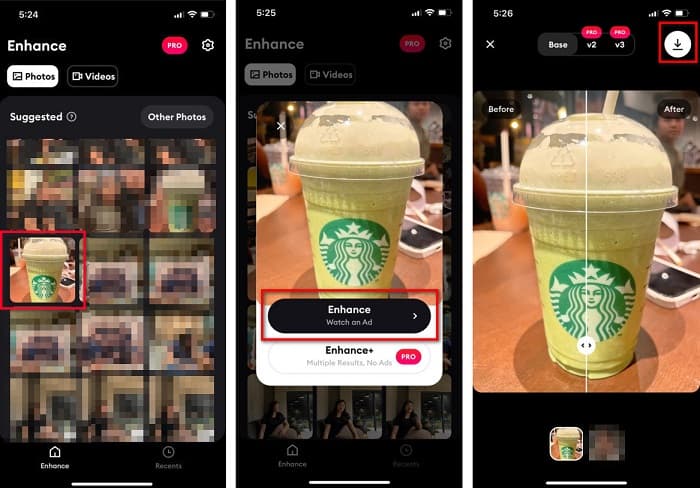
Schritt 2. Nachdem Sie die App geöffnet haben, sehen Sie Ihre Fotos und wählen das Bild aus, das Sie verbessern möchten. Tippen Sie dann auf die Schaltfläche Enhance, um zur nächsten Oberfläche zu gelangen.
Schritt 3. Bevor Sie zum nächsten Bildschirm fortfahren, müssen Sie sich zunächst eine Anzeige ansehen. Anschließend sehen Sie das Vorher und Nachher Ihres Bildes. Tippen Sie auf das Download-Symbol oben rechts auf Ihrem Bildschirm.
Teil 2. So ändern Sie die Größe von Fotos auf Android für Facebook
Sind Sie ein Android-Benutzer? Keine Sorge; Wir werden auch eine Anwendung vorstellen, mit der Sie die Größe eines Bildes ändern können. Obwohl es viele Apps gibt, die Sie aus dem PlayStore herunterladen können, haben wir die besten ausgewählt, um sie Ihnen vorzustellen. Lesen Sie unten, um zu erfahren, wie Sie die Größe von Bildern für Facebook auf Android ändern.
AI Photo Enhancer & PixelLeap ist eine weitere großartige App, die Ihnen hilft, Ihr Bild für eine bessere Qualität zu skalieren. Diese Bildskalierungs-App kann kostenlos im Play Store heruntergeladen werden und ist sicher in der Anwendung. Wenn Sie zudem ein altes Bild verbessern oder restaurieren möchten, eignet sich AI Photo Enhancer & PixelLeap ebenfalls. Dank der KI-Technologie müssen Sie nur das Bild hochladen, das Sie skalieren möchten, und die App verbessert Ihr Bild automatisch. Darüber hinaus verfügt sie über eine einfache Benutzeroberfläche und ist damit ideal für Einsteiger. Zudem bietet sie weitere Bearbeitungsfunktionen wie Korrigieren, Kolorieren, Animieren, Mimik hinzufügen und Aufhellen Ihres Bildes. Das Problem bei dieser App ist jedoch, dass sie viele Anzeigen enthält, die Zeit in Anspruch nehmen, und dass ein Wasserzeichen auf Ihrem Ergebnis zurückbleibt. Nichtsdestotrotz ist diese App eine Lösung, wenn Sie ein Foto für Facebook skalieren möchten, ohne es zuzuschneiden.
So ändern Sie die Größe eines Bildes mit AI Photo Enhancer & PixelLeap:
Schritt 1. Installieren Sie AI Photo Enhancer & PixelLeap auf Ihrem Android-Gerät.
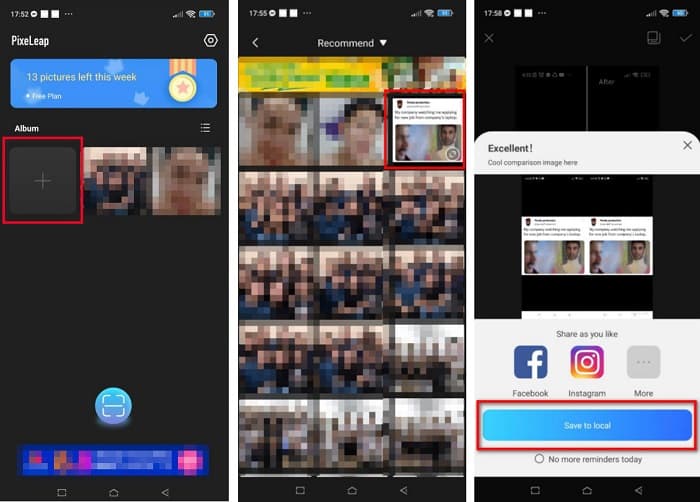
Schritt 2. Tippen Sie dann in der Hauptoberfläche der App auf das Feld mit dem +‑Symbol, um das Bild hochzuladen, das Sie skalieren möchten. Anschließend müssen Sie sich vor dem nächsten Bildschirm eine Anzeige ansehen.
Schritt 3. Suchen Sie das Bild, das Sie skalieren möchten, und tippen Sie darauf. Nachdem Sie das Bild ausgewählt haben, tippen Sie auf die Option Enhance. Die App wird Ihr Bild dann automatisch verbessern. Tippen Sie auf Save to local, um Ihr Ergebnis herunterzuladen.
Teil 3. So ändern Sie die Größe von Fotos online für Facebook
Der Vorteil der Verwendung einer Online-Anwendung besteht darin, dass Sie damit Speicherplatz auf Ihrem Gerät sparen können. Darüber hinaus gibt es viele frei zugängliche Web-Apps, die Sie in Ihrem Browser verwenden können. Wenn Sie also eine Online-Anwendung verwenden möchten, um die Größe eines Bildes zum Hochladen auf Facebook zu ändern, zeigen wir Ihnen, wie Sie die Größe eines Fotos für Facebook ändern.
FVC Free Image Upscaler ist der beste Online-Foto-Skalierer, mit dem Sie Ihr Bild auf das 2‑, 4‑, 6‑ oder 8‑Fache vergrößern können. Dank der einfachen Benutzeroberfläche können auch Anfänger ein Bild problemlos skalieren. Außerdem werden alle Bildformate unterstützt, darunter JPEG, JPG, PNG und BMP. Noch beeindruckender ist, dass diese Anwendung KI-Technologie nutzt, um automatisch die Bereiche mit niedriger Auflösung in einem Bild zu erkennen und anschließend zu verbessern. Zusätzlich können verlorene Pixel, Farbtexturen und weitere Details vollständig und perfekt wiederhergestellt werden. Das Tool ist zudem in allen Webbrowsern wie Google, Firefox und Safari verfügbar. Wenn Sie also FVC Free Image Upscaler verwenden möchten, um Ihr Bild zu skalieren oder zu verbessern, folgen Sie den einfachen Schritten unten.
So ändern Sie die Größe eines Bildes für Facebook mit FVC Free Image Upscaler:
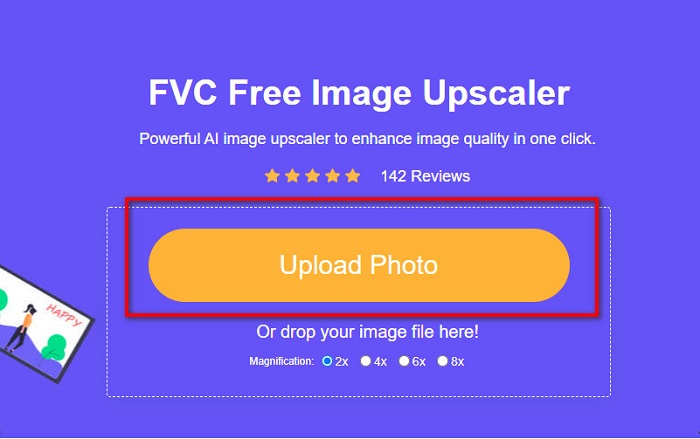
Schritt 1. Öffnen Sie Ihren Browser und geben Sie FVC Free Image Upscaler in das Suchfeld ein. Sie können auch auf den bereitgestellten Link klicken, um direkt zur Website zu gelangen. Klicken Sie auf Upload Photo, um die Anwendung zu starten.
Schritt 2. Klicken Sie in der Hauptoberfläche der Software auf Upload Photo, um das Bild zu importieren, das Sie skalieren möchten.
Schritt 3. Wählen Sie im nächsten Bildschirm die Vergrößerungsvoreinstellung für Ihr Ausgabe-Bild. Sie können zwischen einer Vergrößerung von 2x, 4x, 6x und 8x wählen. Fahren Sie dann mit dem nächsten Schritt fort.
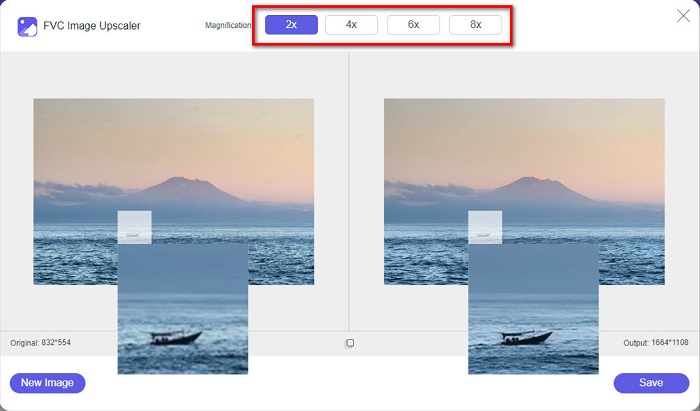
Schritt 4. Klicken Sie abschließend auf die Schaltfläche Save, um Ihr Ergebnis auf Ihrem Computer zu speichern. Sie werden den Unterschied zwischen Ihrer Originaldatei und dem skalierten Bild sehen. Innerhalb von Sekunden wird Ihr Bild gespeichert.
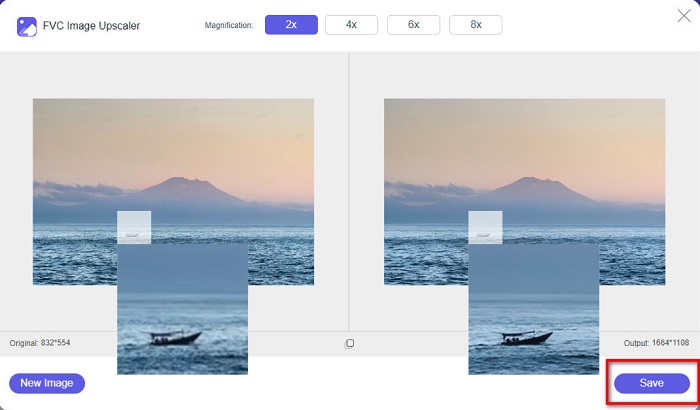
Und das ist es! So einfach wie das ABC, Ihr Bild wird jetzt verbessert und in der Größe angepasst.
Verwandte Themen:
So schärfen Sie Bilder online und offline auf 4 einfache Arten
So skalieren Sie Bilder – Adobe Bildskalierung [Online und Offline]
Teil 4. Häufig gestellte Fragen zum Ändern der Größe von Fotos für Facebook
Was ist das beste Fotoverhältnis für Facebook?
In Bezug auf das Fotoverhältnis ist die Verwendung eines vertikalen Bildes mit einem Seitenverhältnis von 4:5 und 1200 x 1500 px am besten. Und wenn Sie ein quadratisches Bild wünschen, muss die Auflösung 1080 x 1080 px betragen.
Wie groß ist ein Facebook-Post?
Die empfohlene Bildgröße für einen Facebook-Beitrag beträgt 1200 x 630 Pixel, um eine Verpixelung zu vermeiden und eine schnellere Ladezeit zu erreichen.
Was ist das beste Bildformat zum Hochladen auf Facebook?
Das beste und empfohlene Bildformat zum Hochladen auf Facebook ist das JPG-Format. Am besten laden Sie ein JPG-Format mit einer RGB-Farbe von weniger als 15 MB hoch.
Fazit
Wir haben die oben genannten Lösungen für Sie, wenn Sie ein Foto für Facebook skalieren möchten. Wenn Sie diesen Artikel vollständig gelesen haben, hoffen wir, dass Sie alles Nötige gelernt haben, was Sie tun müssen. Mit iPhone‑, Android‑ oder Online‑Apps können Sie sicher jedes gewünschte Bild skalieren. Für bessere Ergebnisse verwenden Sie jedoch FVC Free Image Upscaler, mit dem Sie außerdem Speicherplatz auf Ihrem Gerät sparen können.
-
 Beste Foto-Resizer-App online, offline, Android und iPhone
 Was sind die besten Apps zur Größenänderung von Fotos? Klicken Sie auf die Seite, um die fünf leistungsstärksten Apps zur Größenänderung von Fotos kennenzulernen, mit denen Sie Ihre Datei verbessern oder ihre Größe ändern können.
-
 So ändern Sie die Bildgröße – Adobe Bildgröße ändern [online und offline]
 Wenn Sie nach Adobe-Bildern zur Größenänderung suchen, haben wir die Lösung für Sie. Sehen Sie sich diesen Beitrag gründlich an, um zu erfahren, wie Sie die Bildgröße mit Adobe auf Ihrem PC ändern können.
-
 Top 4 Offline- und Online-GIF-Vergrößerer, die Sie nicht verpassen dürfen
 Dieser Beitrag ist für Sie, wenn Sie nach den besten GIF-Vergrößerungsprogrammen suchen. Wir haben die leistungsstärksten Online- und Offline-GIF-Vergrößerungsprogramme für Ihren Computer aufgelistet.
