


 Video Converter Ultimate
 Bildschirm recorder
 Videoreparatur
 Sicherer Download
So entpixeln Sie ein Bild schnell mit den 3 besten Lösungen
Bild entpixeln ist die Lösung, die du brauchst, um einem Bild ein Makeover zu verpassen, das verpixelt ist oder bei dem die Grafik aus kleinen quadratischen Kacheln besteht. Viele Nutzer finden es mühsam, ein Bild zu bearbeiten, anzupassen, zu verändern und zu optimieren – und ehrlich gesagt war es das früher auch. Mit der fortschrittlichen Technologie, auf die wir heute zugreifen können, lässt sich diese Aufgabe jedoch ganz einfach lösen, wenn du das richtige Tool verwendest.
Haben Sie nicht das richtige Werkzeug, um die Pixelierung auf Ihrem Foto zu entfernen? Glücklicherweise bringt Ihnen dieser Artikel die drei besten Softwares, die wir gefunden haben, die Ihnen helfen könnten, die Pixelierung des Fotos zu bearbeiten, und ein Tutorial zu jedem, um das Problem zu lösen.

Teil 1. So entpixeln Sie ein Bild online mit dem Best Choice Photo Editor [empfohlen]
FVC Free Image Upscaler ist ein vollautomatisches Online-Tool, mit dem du Bilder kostenlos online entpixeln kannst. Du kannst es in jedem Webbrowser öffnen, der dir zur Verfügung steht – ein separater Launcher muss nicht heruntergeladen werden, sodass du das Tool sofort nutzen kannst, sobald du darauf zugreifst. Obwohl diese Software webbasiert ist, steht ihre Leistung beim Entpixeln von Bildern der eines professionellen Bildbearbeitungsprogramms – ob online oder offline – in nichts nach. Vielleicht denkst du, dass die Nutzung dieses Tools kompliziert sein könnte, aber das ist sie nicht. Noch nicht überzeugt? Dann lies weiter oder folge der unten angegebenen Anleitung, um eine Schritt-für-Schritt-Einführung in die einfache Verwendung dieses Tools zu erhalten.
Schritt 1. Du kannst dieses Webtool in jedem Browser auf deinem Gerät aufrufen, indem du nach seinem Namen suchst oder auf diesen Link klickst, um die Hauptseite zu öffnen.
Schritt 2. Sobald du auf der Webseite bist, klicke auf Add Image, um das verpixelte Bild hochzuladen. Ein Dateifenster wird auf deinem Bildschirm angezeigt; suche nun das Bild, das auf deinem lokalen Laufwerk gespeichert ist, und klicke anschließend auf Open, um es hochzuladen.
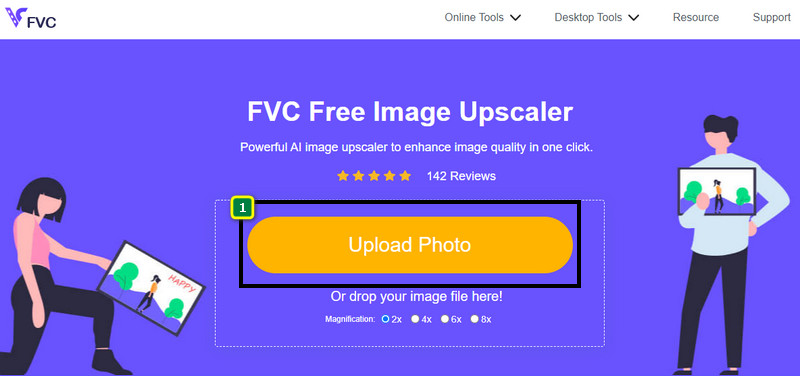
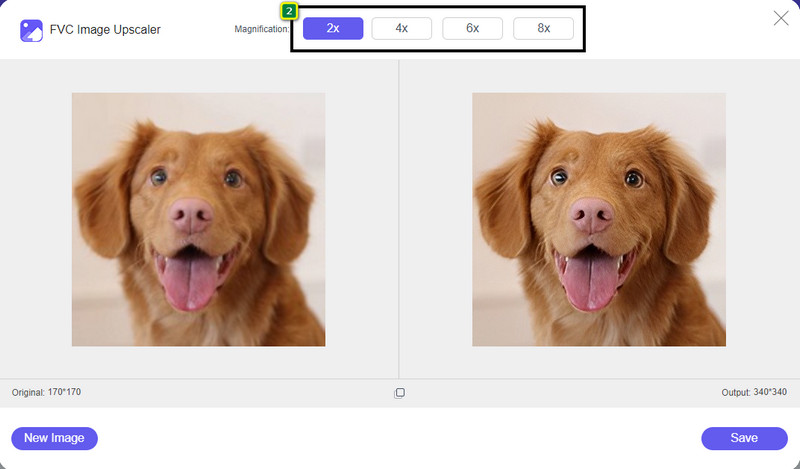
Schritt 3. Wähle als Nächstes die Vergrößerungsstufe, die du auf dein Bild anwenden möchtest, um das Erscheinungsbild zu glätten, sodass es nicht länger aus kleinen quadratischen Pixelblöcken zu bestehen scheint.
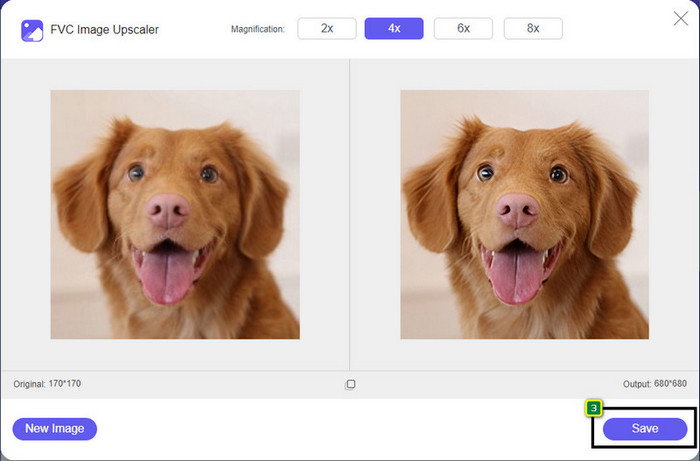
Schritt 4. So einfach ist das: Klicke auf Save, um die entpixelte Version auf deinem lokalen Laufwerk zu speichern.
Teil 2. So entpixeln Sie ein Bild offline auf zwei Arten unter Windows und Mac [Einfach]
Pixbim - Fotos unter Windows entpixeln
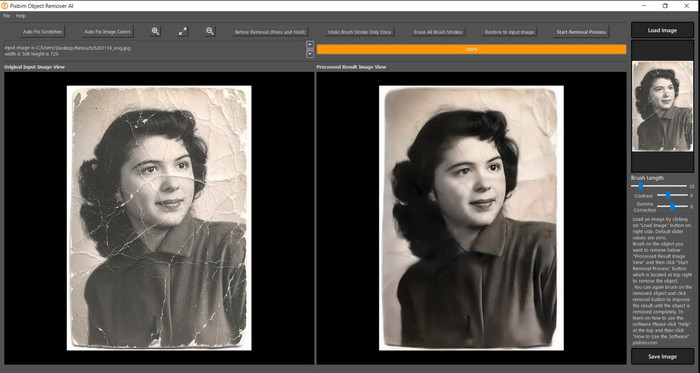
Pixbim ist eines der leistungsstärksten, KI-gestützten Programme zum Entpixeln von Bildern, die du unter Windows herunterladen kannst, um dieses Problem zu beheben. Dieser Editor verdient es, in diesem Artikel erwähnt zu werden, weil er verpixelte Bilder schnell und effizient korrigiert. Die KI passt die Parameter für dich an, sodass du bei der Nutzung der Software keine Schwierigkeiten hast. Aufgrund seiner Funktionen musst du jedoch nach der Testphase einen Lizenzschlüssel erwerben, um es weiter verwenden zu können. Für viele Nutzer, die es auf ihrem PC einsetzen möchten, kann das teuer sein.
Schritt 1. Nachdem du die Software heruntergeladen hast, musst du sie starten, damit wir mit dem nächsten Schritt fortfahren können.
Schritt 2. Klicke auf Load Image, um das verpixelte Bild hinzuzufügen, das du hier verbessern möchtest.
Schritt 3. Anschließend passt du die Parameter an, indem du die Schieberegler auf die gewünschten Werte ziehst.
Schritt 4. Wenn du mit der Anpassung des Bildes fertig bist, speichere nun das Ergebnis, um es zu exportieren.
Movavi Photo Editor [Windows & Mac]
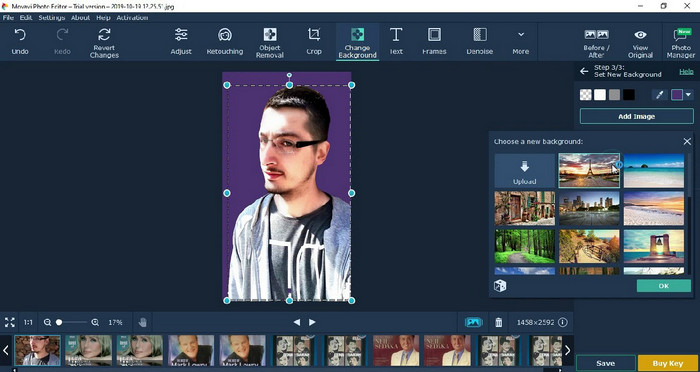
Viele Nutzer haben bereits den Movavi Photo Editor ausprobiert, weil er bei der Bildbearbeitung sehr vielseitig ist. Ähnlich wie Pixbim kann er mit Hilfe der neuronalen Netze seiner KI verlorene Bildinformationen wiederherstellen. Mit diesem Editor kannst du grundlegende und fortgeschrittene Anpassungen am Erscheinungsbild vornehmen, etwa Zuschneiden, Drehen, Filter hinzufügen, Pixel korrigieren und vieles mehr. Allerdings stehen dir diese Funktionen nur vollständig zur Verfügung, wenn du die Premium-Version für deinen Desktop erwirbst.
Es hat einen fast ähnlichen Preis wie das Pixbim, das für viele ziemlich teuer ist. Aber wenn Sie ein Budget für den Kauf eines Editors haben, ist dies möglicherweise das, was Sie brauchen. Erfahren Sie, wie Sie Bilder mit dieser App entpixeln, indem Sie die Schritte befolgen.
Schritt 1. Lade die Anwendung auf deinen Windows- oder macOS-Computer herunter.
Schritt 2. Starte die Software und lade anschließend das Foto hoch, das du hier entpixeln möchtest.
Schritt 3. Nachdem du das Bild hochgeladen hast, klicke auf Magic Enhance, damit die KI das Bild automatisch optimiert.
Schritt 4. Exportiere das Bild und freue dich über das Ergebnis.
Teil 3. Häufig gestellte Fragen zum Hochpixeln eines Bildes
Warum befindet sich auf dem exportierten unverpixelten Bild ein Wasserzeichen?
Wenn Sie eine kostenlose Testversion der Anwendung verwenden, besteht die Möglichkeit, dass sie beim Exportieren ein Wasserzeichen hinterlässt. Wenn Sie also ein Bild ohne Wasserzeichen exportieren möchten, können Sie die Lizenz der Anwendung erwerben oder den FVC Free Image Upscaler verwenden, da dieser kein Wasserzeichen auf dem exportierten Bild hinterlässt.
Was ist der Unterschied zwischen verschwommen und verpixelt?
Viele Artikel haben bewiesen, dass verschwommen und verpixelt aufgrund einiger Faktoren nicht dasselbe sind. Verschwommene Bilder sind der Grund, warum Sie eine Hochgeschwindigkeitsbewegung aufnehmen oder ein Bild mit einer wackeligen Kamera aufnehmen. Wenn Sie einen Schnappschuss verpixeln, wird beim Vergrößern eine Verpixelung gestartet, und Sie sehen eine Bitmap mit einem winzigen Quadrat.
Was ist der Faktor, der das Bild pixelig macht?
Einige Gründe verwandeln Bilder in Pixel; Eine häufige Ursache ist das Vergrößern eines Rasterbilds. Rasterformate wie PNG, JPG, GIF und mehr bestehen aus kleinen Quadraten, die das Erscheinungsbild des in diesen Containern gespeicherten Objekts bilden. Wenn Sie das Bild vergrößern, werden Sie normalerweise sehen, dass es Quadrate, bekannt als Pixel, gibt, die Farbdaten enthalten, die visuell dargestellt werden. Dies kann für viele Redakteure ein Problem darstellen, insbesondere wenn Pixelierung auftritt.
Wie kann ich das Bildrauschen beheben?
Dies ist ein weiteres häufiges Problem, das bei deinen aufgenommenen Bildern auftreten kann – und die Lösung, die du brauchst, findest du möglicherweise in diesem Artikel. Klicke auf diesen Link, um ganz einfach zu lesen, wie du Bildrauschen entfernen kannst, und lerne, es zu beheben.
Fazit
So einfach ist es: Mit Hilfe der besten Bildbearbeitungsprogramme, die du herunterladen oder im Web nutzen kannst, lässt sich ein Bild heute mühelos entpixeln. Das Problem ist gelöst! Wenn du also künftig auf Pixelbildung stößt, kannst du dich auf diesen Artikel verlassen. Das beste Tool, das du brauchst, ist hier und einsatzbereit – zum Beispiel der FVC Free Image Upscaler. Am besten ist es, die Pixelbildung im Erscheinungsbild zu korrigieren, damit sie für Betrachter nicht mehr sichtbar ist. Verabschiede dich von Pixeln, wenn du diesen Online-Bildeditor verwendest.
-
 7 Bild-Upscaler, mit denen Sie jedes Bild verbessern und verbessern können [2022]
 Benötigen Sie den Bild-Upscaler? Glücklicherweise behandelt dieser Artikel die beste Software, auf die Sie zugreifen und die Sie auf Ihrem Desktop herunterladen können.
-
 5 Bildauflösungsverstärker, die Sie dieses Jahr 2022 verwenden müssen [Neueste Auswahl]
 Sie wissen nicht, welchen Bildauflösungsverbesserer Sie verwenden sollten? Lesen Sie diesen Artikel, während wir fünf Tools zur Verwendung und Verbesserung der Auflösung von Bildern überprüfen.
-
 4 Apps zur Erhöhung der Bildauflösung auf Ihren Mobilgeräten [Beste Wahl]
 Sie benötigen Apps, um Ihre Fotoauflösung zu erhöhen, wenn Sie 1080p, 4k oder ähnliches erreichen möchten. Mit der folgenden Liste können Sie es ganz einfach tun!
