


 Video Converter Ultimate
 Bildschirm recorder
 Videoreparatur
 Sicherer Download
Skalieren Sie Bilder mit dem heißesten Upscaler auf dem Markt auf 4k
Bilder auf 4K hochskalieren ist in vielen Programmen, ob professionell oder nicht, sehr gefragt geworden. Nutzer glauben, dass eine höhere Auflösung wie 4K ihr Bild detaillierter, schärfer, klarer und insgesamt besser macht. Tatsächlich profitieren Sie besonders von 4K‑Bildern, wenn Sie sie für Außenwerbung, den Druck hochwertiger Planen, die Anzeige auf großen digitalen Bildschirmen, in den meisten digitalen Kinoproduktionen und vielem mehr verwenden. Der Zweck von PPI bzw. Bildauflösung besteht darin, je nach Breite und Höhe des Bildes eine genaue Anzahl von Pixeln darzustellen. Möchten Sie wissen, wie Sie Ihr Foto in 3840 x 2160 umwandeln? Oder bevorzugen Sie DCI‑4K mit 4069 x 2160? In diesem Artikel finden Sie alle Informationen, die Sie benötigen, um die UHD‑Auflösung zu erreichen, die als 4K bekannt ist.

Teil 1. So skalieren Sie Bilder kostenlos auf 4k mit der besten Lösung [Webdienst]
FVC Free Image Upscaler ist der einfachste 4K‑Bild‑Upscaler, den Sie verwenden können, um 4K‑Auflösung zu erzielen. Dieses Tool skaliert Ihr Bild nicht nur hoch, sondern korrigiert auch die PPI‑Angabe Ihres Fotos, damit sie zu der von Ihnen gewählten Auflösung passt. Es handelt sich um einen Upscaler, das heißt, das Bild, das Sie hier hochladen, wird nie verzerrt oder verliert an Qualität – dank der leistungsstarken KI‑Technologie, die FVC dafür einsetzt. Brauchen Sie eine Anleitung zur Verwendung? Falls ja, folgen Sie den vollständigen Schritten unten und beginnen Sie damit, das gewünschte Bild hochzuskalieren.
Schritt 1. Klicken Sie auf diesen Link, um das Tool in einem neuen Tab zu öffnen. Sie werden zum offiziellen Tool weitergeleitet, mit dem Sie das gewünschte Bild hochskalieren können.
Schritt 2. Klicken Sie auf Foto hochladen, um das JPG, JPEG, PNG, GIF, BMP oder SVG hinzuzufügen, das Sie auf 4K‑Auflösung hochskalieren möchten.
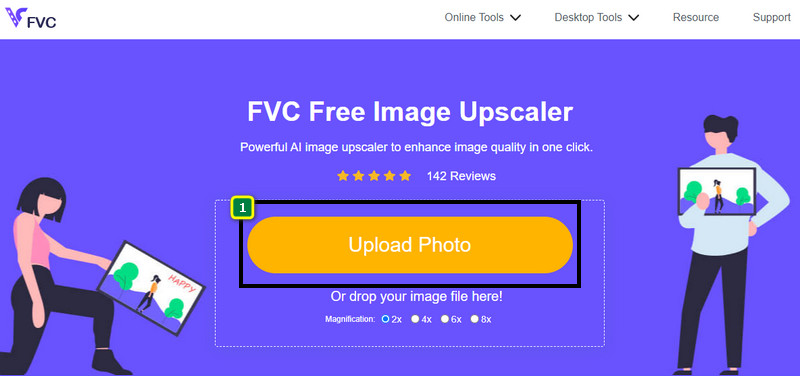
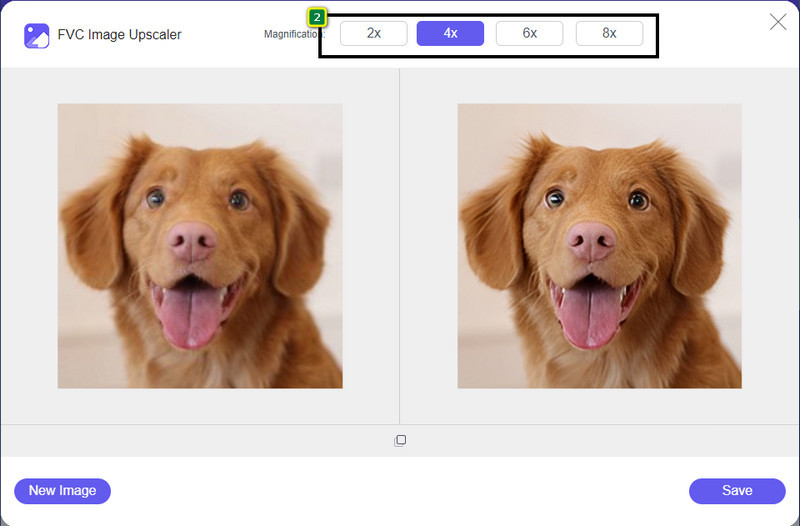
Schritt 3. Danach wird das von Ihnen hochgeladene Bild im Tool geladen. Wählen Sie dann oben eine der Optionen 2x, 4x, 6x oder 8x, um die 4K‑Auflösung zu erreichen.
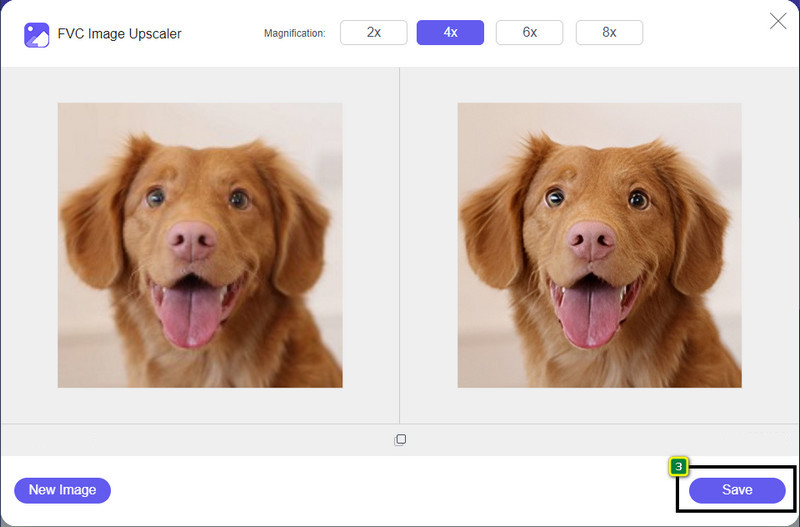
Schritt 4. Um das hier verbesserte 4K‑Bild zu exportieren, klicken Sie auf die Schaltfläche Speichern; es wird automatisch in Ihrem Dateiverzeichnis gespeichert.
Teil 2. So skalieren Sie ein Bild offline auf 4k im Windows-Standardgrafikeditor [kostenlos]
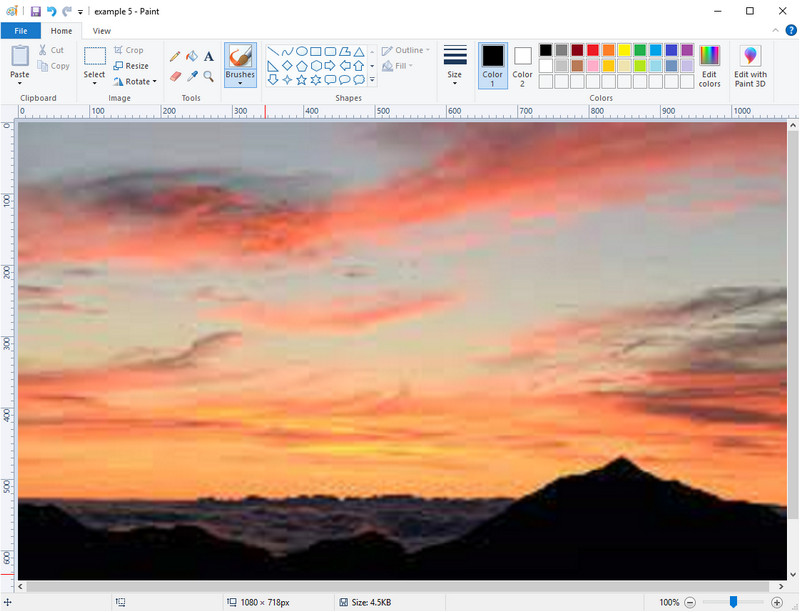
Paint ist ein standardmäßig installiertes Grafikprogramm unter Windows, mit dem Sie ein Bild auf 4K hochskalieren können, indem Sie seine Abmessungen ändern. Diese Software ist bei vielen Windows‑Nutzern beliebt geworden, weil sie damit viel umsetzen können. Sie können eine leere Leinwand öffnen und darauf zeichnen wie auf einer echten Leinwand – nur eben digital. Es gibt eine Sperrfunktion, sodass beim Anpassen der Höhe die Breite automatisch mitangepasst wird oder umgekehrt. Außerdem können Sie Prozentangaben verwenden, um die Abmessungen Ihres Bildes zu verändern.
Obwohl Sie dieses Tool als Ihren Editor verwenden können, ist es in anderen Bereichen der Bearbeitung noch unzureichend. Beispielsweise unterstützt es keinen Graustufenmodus. Wenn Sie also dieses Tool verwenden möchten, befolgen Sie die von uns hinzugefügten Schritte.
Schritt 1. Klicken Sie auf das Windows‑Symbol auf Ihrem Bildschirm und geben Sie den Namen des Programms ein: Paint.
Schritt 2. Nachdem Sie es geöffnet haben, klicken Sie auf Datei und dann auf Öffnen und fügen Sie die Bilddatei hinzu, die Sie hier hochskalieren möchten. Sie können das Bild auch per Drag & Drop in das Programm ziehen, wenn Sie möchten.
Schritt 3. Gehen Sie zur Option Größe ändern und klicken Sie auf Pixel. Ändern Sie den Wert für Höhe oder Breite auf den Standard für 4K.
Es ist besser, wenn Sie eine einzelne Messung ändern; Es spielt keine Rolle, ob es sich um eine Höhe oder Breite handelt, und kreuzen Sie immer das Hauptseitenverhältnis an, damit es passt. Einige Bilder werden gestreckt, wenn Sie sie auf 4k skalieren.
Schritt 4. Klicken Sie anschließend auf die Schaltfläche Speichern, um das Bild herunterzuladen, das Sie hier hochskaliert haben.
Teil 3. Hochskalieren von Bildern auf 4k mit professioneller Software unter Windows und Mac [Kostenpflichtig]
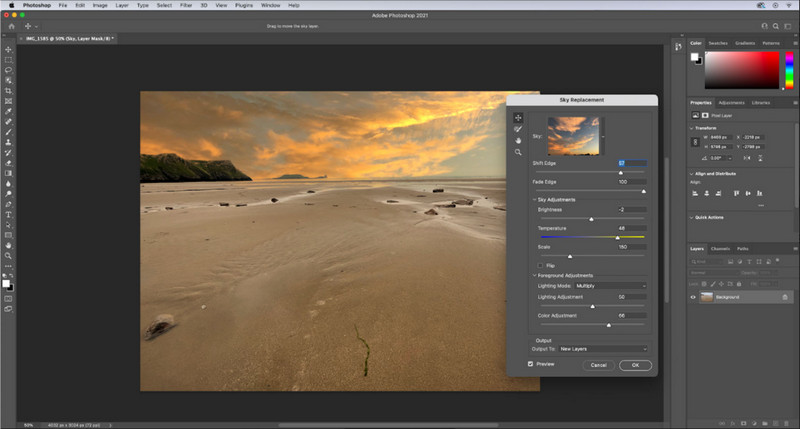
Adobe Photoshop ermöglicht seinen Nutzern ein neues Niveau der Bildbearbeitung und des Hochskalierens; hier konzentrieren wir uns jedoch genauer auf die Hochskalierungsfunktion. Es ist unbestritten die Expertenwahl unter den Programmen, weil dieses Tool so umfassende Möglichkeiten zur Bildbearbeitung bietet. Außerdem erzeugt das Programm neue PPI‑Daten für das Bild, sobald Sie es hier mithilfe des im Hintergrund arbeitenden Algorithmus hochskalieren. Sie können die Auflösung auf 4K ändern, ohne dass das Bild verzerrt oder pixelig wirkt.
Sie müssen den Plan jedoch kaufen, wenn Sie bereits die kostenlose Testversion dieser App genutzt haben. Obwohl Sie bezahlen müssen, eignet sich diese Software insgesamt hervorragend für die Verwendung durch professionelle und mittelständische Redakteure. Als Anfänger können Sie anhand der folgenden Anleitung lernen, wie Sie das Bild auf 4k hochskalieren.
Schritt 1. Laden Sie die offizielle Version dieser Software bei Adobe herunter; wenn Sie die App bereits installiert haben, können Sie sie direkt öffnen und mit der Nutzung beginnen.
Schritt 2. Um das Bild hochzuladen, das Sie hochskalieren möchten, klicken Sie auf Datei und dann Öffnen; daraufhin wird ein Ordner auf Ihrem Bildschirm angezeigt. Wählen Sie den Dateinamen des Bildes aus und klicken Sie auf Öffnen, um das Bild zu laden.
Schritt 3. Klicken Sie im oberen Bereich auf die Option Bild und wählen Sie Bildgröße.
Schritt 4. Ein Dialogfeld wird geöffnet, in dem Sie die Maße für die Höhe, Breite und Auflösung Ihres Bildes anpassen können.
Für ein glatteres Ergebnis müssen Sie das Kästchen Neu berechnen (Resample) aktivieren und auf die Drop‑down-Schaltfläche klicken. Wählen Sie statt „Automatisch“ die Option Bikubische Interpolation (Glattere Vergrößerung), da diese Methode bessere Ergebnisse bei der Bildvergrößerung liefert. Klicken Sie auf OK, um die von Ihnen vorgenommenen Anpassungen zu speichern.
Schritt 5. Um das Bild, das Sie auf 4K hochskaliert haben, herunterzuladen, klicken Sie auf Datei und dann auf Speichern.
Verwandt:
Einfache Anleitung: So fügen Sie in Photoshop schnell ein Wasserzeichen zu einem Video hinzu
Bildqualität verbessern mit diesen schnellen und einfachen Methoden
Teil 4. Häufig gestellte Fragen zum Hochskalieren von Bildern auf 4k
Gibt es Einschränkungen beim Hochskalieren von Bildern auf 4k?
Es gibt Einschränkungen, die Sie befolgen müssen. Wenn Ihr Monitor beispielsweise nur 1080p verarbeiten kann, ist es besser, die Standardgröße von 1080p anstelle von 4k zu verwenden, da die von Ihnen hinzugefügte Hochskalierung nicht wirksam wird.
Wird mein Bild nach dem Hochskalieren auf 4k besser?
Erwarten Sie kein Wunder, aber Sie werden sehen, dass es ein Ergebnis gibt, wenn Sie das Bild in der richtigen Anzeige öffnen, wie zum Beispiel bei 4k-Fernsehern.
Warum werden meine Bilder verschwommen, nachdem ich sie auf einem 4k-Fernseher angesehen habe?
Bilder werden in der Regel gestreckt, wenn die Größe und PPI nicht dem von Ihnen verwendeten digitalen Fernsehstandard entsprechen, insbesondere 4k. Sie verhindern dies, wenn Sie das Bild mit der hier hinzugefügten Anwendung auf eine 4k-Auflösung hochskalieren.
Fazit
Im Allgemeinen benötigen Sie einen 4k-Bild-Upscaler, um das Bild auf eine 4k-Auflösung anzupassen. Sie können dies ganz einfach mit den Tools tun, die wir hier hinzufügen, und mit dem Tutorial. Sie können den Onlinedienst nutzen, um das gewünschte Bild hochzuskalieren, und Sie werden vom Ergebnis begeistert sein.
-
 Wiederherstellung alter Fotos online und offline [einfache Schritte]
 Möchten Sie ein altes Foto wiederherstellen? Mit diesen Tools kennen Sie den alten Fotorestaurierungsprozess. Lesen Sie diesen Beitrag, um die einfachsten Methoden kennenzulernen.
-
 Top 7 Pixel Enhancer für alle Webbrowser, die Sie verwenden müssen
 Wenn Sie wissen möchten, welche Pixel-Enhancer die besten sind, sollten Sie sich diesen Beitrag ansehen. Dieser Artikel listet die sieben besten Fotopixel-Verbesserer für alle Webbrowser auf.
-
 Beste Foto-Resizer-App online, offline, Android und iPhone
 Was sind die besten Apps zur Größenänderung von Fotos? Klicken Sie auf die Seite, um die fünf leistungsstärksten Apps zur Größenänderung von Fotos kennenzulernen, mit denen Sie Ihre Datei verbessern oder ihre Größe ändern können.
