


 Video Converter Ultimate
 Bildschirm recorder
 Videoreparatur
 Sicherer Download
Detaillierte Methoden zum Konvertieren von DIVX in MP4
DIVX is one of the popular video formats, but unfortunately, this format is not supported by other common programs, like Windows Media Player, Apple QuickTime Player, and more. The best way to play your DIVX video file is to convert it to a format supported by almost all programs like MP4. Then, if you want to convert your DIVX to MP4 file format, go to this article. Although converting files is difficult, we will show you the easiest methods you can try to convert your DIVX file to MP4 format.

Teil 1: Der beste Weg, DIVX auf dem Mac in MP4 zu konvertieren
The most effective way to convert DIVX to MP4 on Mac is using Video Converter Ultimate. This application is worth using because of its magical functions. You can continuously convert numerous files batch-by-batch instantly because it has a batch conversion process. Also, converting DIVX to MP4 is like child’s play with its intuitive interface and basic conversion instructions. In addition, you can convert more video formats. It supports 100+ formats, including AVI, FLV, MOV, AVI, M4V, MKV, WMV, VOB, and more. Also, Video Converter Ultimate offers a fast conversion process with a speed of 30x faster than other converters. Having this fast conversion process, you can ensure that converting numerous files will only take a short time.
Darüber hinaus ist dieser Konverter in Bezug auf die Benutzer nicht voreingenommen. Jeder kann es bedienen, auch wenn Sie ein fortgeschrittener Benutzer oder ein Anfänger sind. Darüber hinaus kann diese Anwendung Ihr DIVX-Video verbessern, da sie über viele Videobearbeitungswerkzeuge verfügt, wie z. B. einen Video-Enhancer, Cropper, Farbkorrektur und mehr. Wenn Sie auch ein wunderbares Musikvideo mit einer Kombination aus Bildern und Videos erstellen möchten, können Sie dies tun. Dieser Musikvideomacher bietet zahlreiche Themen, die Sie verwenden können, wie Happy, Ordentlich, Romantisch, Schneenacht, Streifen und Wellen, Hochzeit, Sport, alte Zeiten und mehr.
Funktionen
◆ Konvertieren Sie Videos in verschiedene Dateien wie MP4, DIVX, M4V, AVI, MOV, FLV, MKV, VOB und mehr.
◆ Stapelkonvertierung ist verfügbar.
◆ Bearbeiten Sie Videos mit einem Video-Enhancer, Kompressor, Wasserzeichen-Entferner, Trimmer, Cropper usw.
◆ Konvertieren Sie Bildformate wie BMP, JPG, PNG, TIF und mehr.
Folgen Sie der einfachen Anleitung unten, um DIVX auf dem Mac mit dem FVC Video Converter Ultimate in MP4 zu konvertieren.
Step 1: Download the FVC Video Converter Ultimate on your Mac by clicking the Download button below. Then, launch the application after the installation process.
Gratis DownloadFür Windows 7 oder neuerSicherer Download
Gratis DownloadFür MacOS 10.7 oder neuerSicherer Download
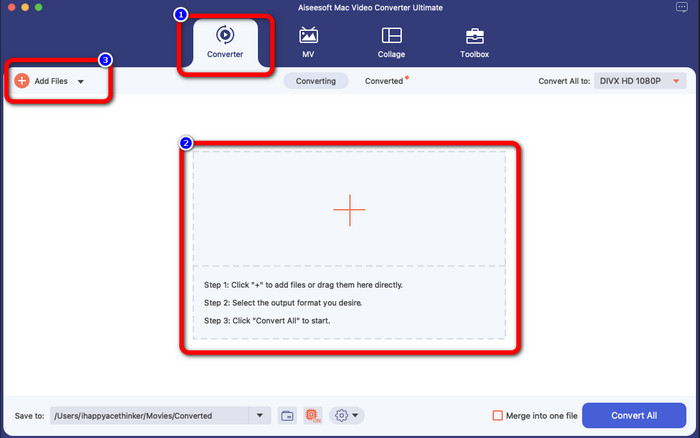
Step 2: After launching the application, the main interface will pop up on your screen. Go to the Converter panel and Click the Plus icon or the Add File button to insert the DIVX video file. You can also drag the file inside the box.
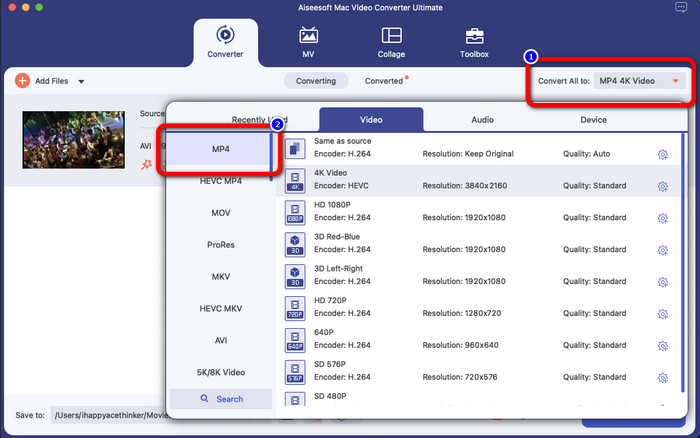
Step 3: Then, change the output format, and click the Convert All to button. The format options will appear on the screen and select the MP4 file format. You can choose the resolution you prefer, up to 4K Video.
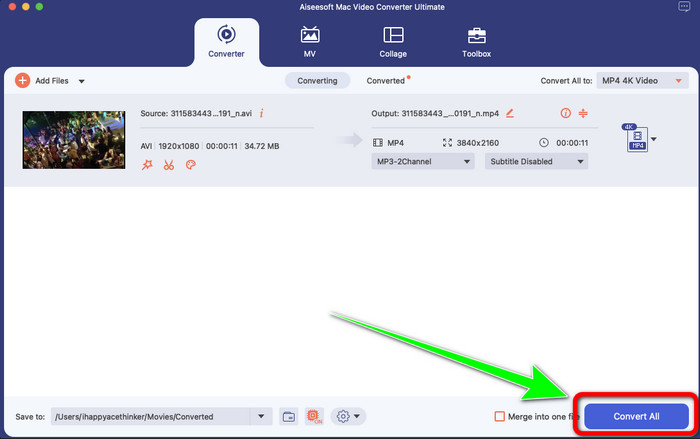
Step 4: After changing the output format, click the Convert All button to start.Then the conversion process will start. After that, your video is converted from a DIVX file to an MP4 format.
Teil 2: Konvertieren Sie DIVX auf einfache Weise in MP4 mit Handbrake
Möchten Sie die Handbrake verwenden, um DIVX in MP4 zu konvertieren? Dann mach dir keine Sorgen mehr. In diesem Teil zeigen wir Ihnen, wie Sie Ihre Dateien mit Handbrake als Konverter auf Ihrem Computer konvertieren. Dieses Tool konvertiert viele Dateien zuverlässig in andere Formate wie M4V, MP4, MKV, WEBM und mehr. Die Verwendung dieses Tools muss jedoch geklärt werden, da es viele Optionen bietet, die Sie auf der Benutzeroberfläche finden können. In diesem Fall können wir sagen, dass dieser Konverter nicht für Anfänger geeignet ist. Auch wenn Sie die Dateien in MP4 konvertieren möchten, wird das Video manchmal als M4V-Datei gespeichert. Vielleicht ist es aus irgendeinem Grund fehlerhaft. Befolgen Sie dennoch die folgenden einfachen Schritte, um das DIVX mit der Handbrake in MP4 zu konvertieren.
Step 1: Download the Handbrake application on your computer. Then, when you are done installing the application, open it.
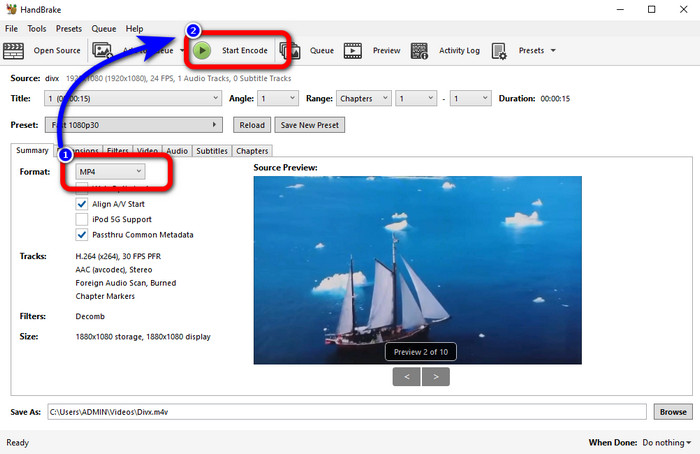
Step 2: Click the File option to add the DIVX video file.
Step 3: Select the Format option and choose the MP4 format. After that, click the Start Encode button to proceed with the conversion process. And that’s it, you can already play your video in an MP4 file format. This software also enables you to convert DIVX to 3GP.
Teil 3: Einfacher Schritt zum Konvertieren von DIVX in MP4 über VLC
Ein weiterer Offline-Konverter, den Sie verwenden können, ist der VLC Media Player. Diese Anwendung kann DIVX einfach in MP4 konvertieren. Dies ist nicht nur gut zum Abspielen von Videos, sondern auch zum Konvertieren. Mit Hilfe dieses Offline-Tools können Sie Dateien in andere Dateiformate wie MPEG, AVI, ASF, WMV und mehr konvertieren. Dieser Konverter ist jedoch für neue Benutzer ungeeignet, da er über komplizierte Dateikonvertierungsverfahren verfügt. Außerdem ist es schwierig und zeitaufwändig, die Anwendung herunterzuladen. Führen Sie die folgenden Schritte aus, um DIVX mit VLC in MP4 zu konvertieren.
Step 1: Download and install the VLC on your computer.
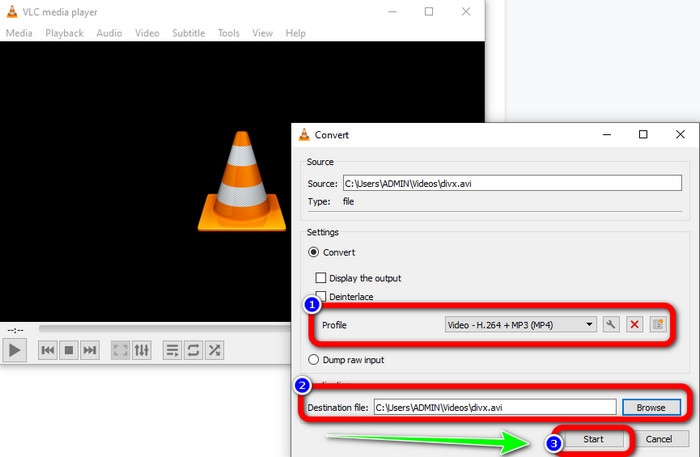
Step 2: Go to the Media menu and select the Convert/Save button to add the DIVX video file you want to convert.
Step 3: On the lower part of the interface, click the Convert/Save button again.
Step 4: Proceed to the Profile option and select the MP4 file format. Click also the Destination file button to set up your desired location. Lastly, click the Start button to convert the DIVX file to MP4 format. You also can use this tool to convert MP4 to DIVX.
Teil 4: Effektive Möglichkeit, DIVX online in MP4 zu konvertieren
After discovering all the converters you can use offline, in this part, we will show you the best DIVX to MP4 converter online. This remarkable converter is the FVC Free Video Converter Online. It can easily convert your DIVX file to MP4 format because it has a straightforward interface and simple steps. This tool supports various video formats, such as FLV, WMA, AVI, MOV, and more. Also, you can convert your DIVX file without losing the video quality, which is great for users. Follow the detailed guides below to convert your files in a simple way using FVC Free Video Converter Online.
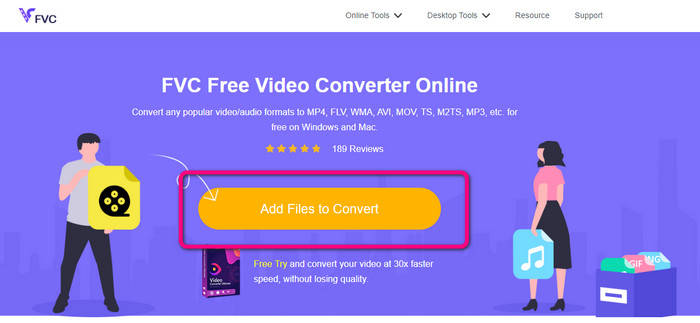
Step 1: Gehen Sie zu Ihrem Browser und besuchen Sie die FVC Free Video Converter Online Webseite. Klicken Sie dann auf die Datei zum Konvertieren hinzufügen Schaltfläche, um die DIVX-Datei hochzuladen.
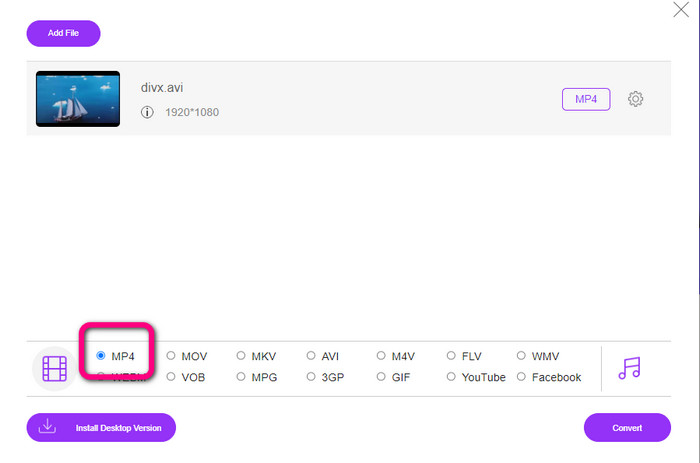
Step 2: On the lower part of the interface, select the MP4 file format from the format options.
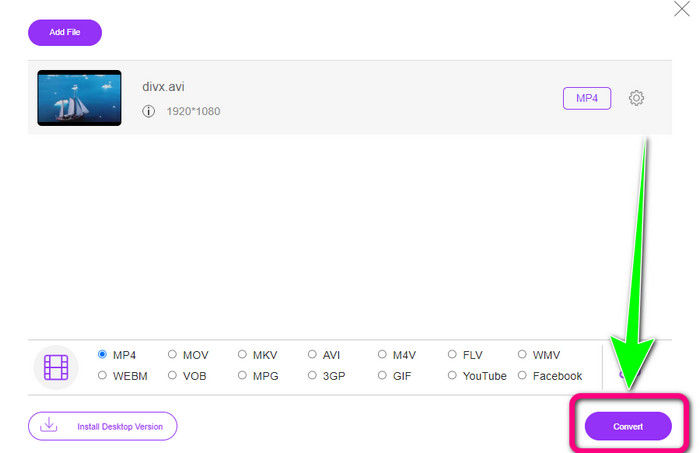
Step 3: For that final step, click the Convert button to start the conversion process. Then, save your MP4 video on your device.
Teil 5: DIVX vs. MP4
| DIVX | MP4 | |
| Dateierweiterung | .divx/.avi | .mp4 |
| Beschreibung | DivX, LLC hat den DIVX-Videocodec entwickelt. Dieser Codec ist mit Windows-Programmen kompatibel. Es kann auch auf Spielekonsolen, Autoradios und mehr verwendet werden. Außerdem gibt es drei DIVX-Codecs, HEVC Ultra HD, H.264/MPEG-4 AVC DivX Plus High Definition Video Codec und MPEG-4 Part 2. | Es ist ein Video-Container, der auf QuickTime MOV basiert. Aber MP4 unterstützt MPEG-Funktionen. Außerdem unterstützt MP4 Audio, Video und Untertitel. Diese Codec-Kombinationen machen den MP4 flexibel. |
| Entwickelt von | DivX Network Inc. | Internationale Standardisierungsorganisation |
| Mime Typ | Video/div | Videos/mp4 |
| Assoziierte Programme | Xbox 360 Autoradio DVD/BLU-ray-Player Wecker | VLC Media Player Apple QuickTime-Player 5KPlayer Windows Media Player |
Teil 6: Häufig gestellte Fragen zum Konvertieren von DIVX in MP4
1. Wer verwendet DIVX?
Diejenigen, die DIVX verwenden, sind die DIVX-zertifizierten Unterhaltungselektronikgeräte, einschließlich tragbarer Videoplayer, DVD- und Blu-ray-Player.
2. Ist MP4 besser als DIVX?
Ja. DIVX ist im Vergleich zu der heute beliebten Datei MP4 bereits veraltet. Das MP4-Format ist eines der am häufigsten verwendeten Formate, daher wird dringend empfohlen, das MP4-Format zu verwenden.
3. Warum ist MP4 so beliebt?
Das MP4-Format ist beliebt, da es von fast allen Geräten wie Mac, Linux, Windows und verschiedenen Mobilgeräten unterstützt wird. Auf diese Weise wandeln alle Benutzer ihre Videos in das MP4-Format um, wodurch sie für alle zugänglicher und verfügbarer werden.
Fazit
Reading this article gave you essential insights about converting DIVX to MP4. There are four converters you can try. However, other converters are complicated to use, which is unsuitable for beginners. So, if you want to convert files easier, you can use two recommended converters: FVC Video Converter Online and Video Converter Ultimate.
-
 Die 3 besten Möglichkeiten, MPG schnell in MP4 zu konvertieren
 Möchten Sie Ihr MPG in das MP4-Dateiformat konvertieren? In diesem Artikel listen wir die besten und schnellsten MPG-Konverter für Sie auf!
-
 AMV Converter - 3 beste Methoden zum Konvertieren von MP4 in AMV unter Win / Mac
 Was sind die besten MP4-zu-AMV-Konverter, um die Videos in Amine Music Video umzuwandeln? Weitere Informationen zu den drei effizientesten Methoden, um die gewünschten Videos mühelos zu erhalten, finden Sie im Artikel.
-
 WebM zu MP4 | Kostenlose Konvertierung von WebM in MP4 (Online und Desktop)
 Wie kann ich WebM-Dateien ohne Webbrowser ansehen? Sie müssen WebM in MP4 konvertieren. Hier sind die 10 besten kostenlosen WebM-zu-MP4-Konverter, um WebM online und auf Mac- und Windows-Computern in MP4 umzuwandeln
