


 Video Converter Ultimate
 Bildschirm recorder
 Videoreparatur
 Sicherer Download
So konvertieren Sie MP4 in M4A unter Windows / Mac (kostenlos und online)
MP4 ist ein weit verbreitetes Dateiformat, das mit mehreren Sendern und Videoplayern verwendet wird. MP4-Dateien können Video, Audio und andere Inhalte speichern. Heutzutage hören viele Leute lieber die Audiospur des MP4-Videos. Um die Qualität zu erhalten, ist die Konvertierung von MP4 in M4A eine gute Idee. M4A steht für MPEG 4 Audio. Die meisten Programme können M4A-Dateien abspielen, einschließlich iTunes, QuickTime, Windows Media Player und mehr.

Vielleicht fragen Sie sich, wie man die Audiospur aus einer MP4-Datei extrahiert. Es gibt viele Möglichkeiten, eine MP4-Datei in eine M4A-Datei umzuwandeln. In diesem Beitrag erfahren Sie, wie Sie MP4 in M4A konvertieren, um die Audios später auf Ihren mobilen Geräten anzuhören.
Teil 1. Beste kostenlose Online-Möglichkeit, MP4 ohne Qualitätsverlust in M4A umzuwandeln
FVC Free Online Video Converter ist ein kostenloser MP4-zu-M4A-Dateikonverter, mit dem Sie das MP4-Format nicht nur in M4A, sondern auch in andere Formate wie MP3, WAV, M4R, WMA, AIFF, AC3 usw. umwandeln können. Er ermöglicht die Stapelkonvertierung, sodass Sie mehrere MP4-Videos gleichzeitig in M4A konvertieren können. Außerdem können Sie mit diesem kostenlosen Online-Tool auch MP4-Videos in MOV, AVI, FLV und andere Videoformate umwandeln.
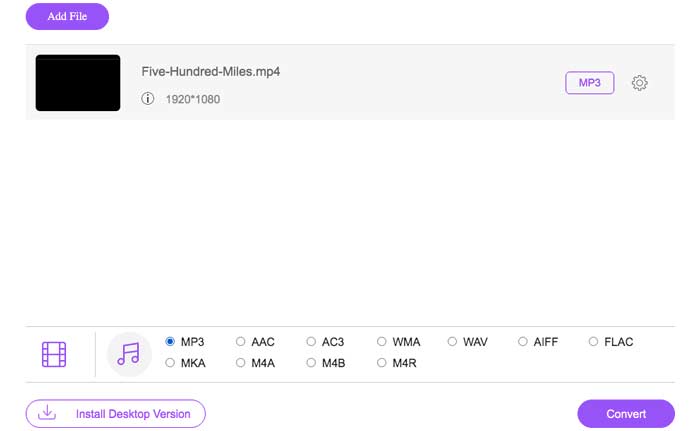
Schritt 1. Öffnen Sie https://www.free-videoconverter.net/free-online-video-converter/ in Ihrem Browser. Klicken Sie auf die Schaltfläche Add Files to Convert und laden Sie anschließend das Startprogramm herunter und installieren Sie es.

Schritt 2. Laden Sie das MP4-Video hoch, das Sie konvertieren möchten, und klicken Sie dann auf Open, um fortzufahren.
Schritt 3. Nachdem Sie Ihre Videodateien in diese Anwendung hochgeladen haben, klicken Sie auf das Symbol Audio und wählen Sie das Format M4A als Ausgabeformat aus.
Schritt 4. Klicken Sie zum Schluss auf die Schaltfläche Convert in der unteren rechten Ecke. Warten Sie einen Moment, und Sie erhalten Ihre M4A-Audiodatei aus der MP4-Datei.
Teil 2. Konvertieren von MP4 in M4A mit Free Audio Converter
FVC Free Audio Converter ist die Freeware, mit der Sie MP4-Dateien mühelos in M4A konvertieren können. Es ist in der Lage, jede Video- oder Audiodatei in M4A, MP3, WAV usw. zu ändern. Sie können es herunterladen und auf Ihrem Windows-PC installieren, um die Konvertierung zu starten.
Kostenloser DownloadFür Windows 7 oder höherSicherer Download
Kostenloser DownloadFür MacOS 10.7 oder höherSicherer Download
Schritt 1. Starten Sie diesen Audiokonverter auf Ihrem Computer. Klicken Sie auf die Schaltfläche Add File(s), um die MP4-Dateien in dieses Programm zu laden.

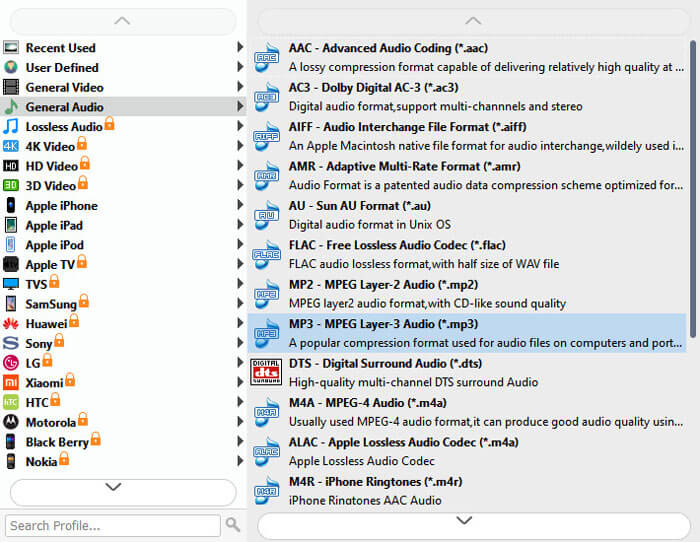
Schritt 2. Suchen Sie die Option Output formats und wählen Sie M4A als Ausgabeformat aus der Dropdown-Liste.
Schritt 3. Klicken Sie auf die Schaltfläche Convert, um mit der Umwandlung der MP4-Dateien in M4A zu beginnen.
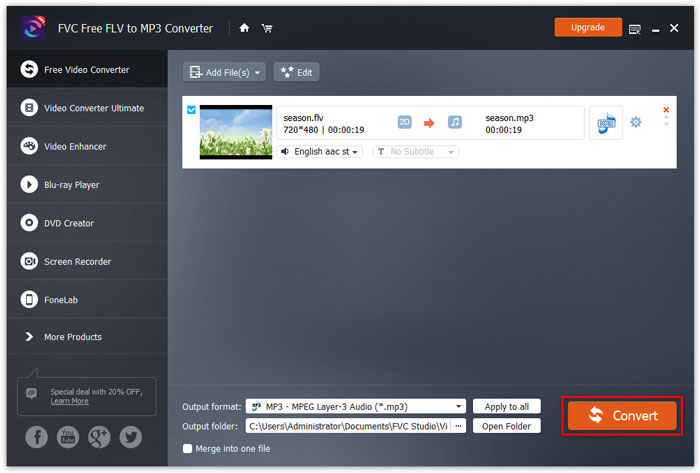
Neben M4A können Sie es auch verwenden, um MP4 in MP3, AAC oder andere Audioformate zu konvertieren.
Teil 3. So konvertieren Sie MP4 mit iTunes in M4A
Um MP4 mit iTunes für Windows oder Mac in M4A zu konvertieren, müssen Sie die iTunes-Importeinstellungen ändern und dann die Menüoption Konvertieren verwenden, um eine M4A-Kopie zu erstellen.
Schritt 1. Öffnen Sie iTunes auf Ihrem Windows-PC oder Mac.
Schritt 2. Wählen Sie Edit und klicken Sie dann in der Menüleiste auf Preferences. Gehen Sie anschließend zum Tab General und klicken Sie auf Import Settings.
Schritt 3. Suchen und klicken Sie auf das Menü neben Import Using, und wählen Sie dann das Codierungsformat aus, in das Sie das Video konvertieren möchten. Klicken Sie anschließend auf OK.
Schritt 4. Wählen Sie die Titel in Ihrer Mediathek aus, die Sie konvertieren möchten. Wählen Sie danach File, klicken Sie dann auf Create New Version und erstellen Sie eine M4A-Version.
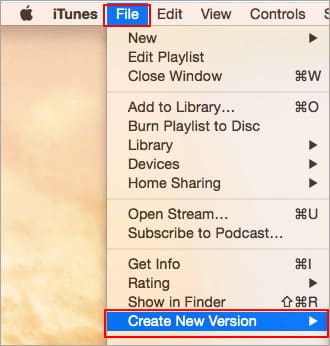
Die konvertierten Audiodateien werden in Ihrer Bibliothek neben den Originaldateien angezeigt.
Teil 4. FAQs zur Konvertierung von MP4 in M4A
1. Was ist eine M4A-Datei?
Eine Datei mit der Dateierweiterung M4A ist eine MPEG-4-Audiodatei. M4A ist häufig im iTunes Store von Apple als Format für das Herunterladen von Songs zu finden.
2. Wie öffne ich M4A-Dateien?
Zu den Programmen, die M4A-Dateien öffnen, gehören iTunes, QuickTime, Windows Media Player usw. Android-Tablets und -Telefone, iPhone, iPad und iPod touch unterstützen auch die Wiedergabe von M4A-Dateien.
3. Wie füge ich MP4-Dateien online zusammen?
FVC Free Online Video Merger kann Ihnen dabei helfen, verschiedene MP4- oder andere Videoformate wie MOV, AVI, FLV und mehr online zusammenzuführen oder zu verbinden.
4. Kann Windows Media Player MP4 in M4A konvertieren?
Nein. Windows Media Player unterstützt nur das Konvertieren von Videodateien in MP3 oder WAV.
Fazit
Mit den oben genannten drei Möglichkeiten können Sie MP4 ohne großen Aufwand kostenlos in M4A verwandeln. Wenn Sie die Konvertierung lieber online durchführen möchten, ist FVC Free Online Video Converter eine gute Wahl. Wenn Ihre MP4-Dateien groß sind, können Sie mit FVC Free Audio Converter oder iTunes MP4-Dateien zuverlässiger in M4A konvertieren.
-
 So konvertieren Sie MP4 in WMV für Mac / Windows
 In diesem Beitrag erfahren Sie, wie Sie MP4-Videos unter Mac oder Windows in das WMV-Format konvertieren. Wir bieten Ihnen auch verschiedene Optionen an, darunter Desktop-Software und webbasierte Online-Konverter. Sind Sie bereit, die besten Konvertierungswerkzeuge für MP4 in WMV zu kennen?
-
 So konvertieren Sie WMV in MP3 auf Desktop und Online
 Sie können jede kostenlose Videokonverter-Software von FVC Studio finden. Jedes Video- / Audioformat wird unterstützt, einschließlich MP4, MOV, TS, AVI, WMV, FLAC, MP3 usw.
-
 So konvertieren Sie AVCHD kostenlos in MP4-Videos unter Windows / Mac / Online
 Es gibt 5 einfache Möglichkeiten, AVCHD in MP4-Videos auf Ihrem Computer zu konvertieren. Hier können Sie AVCHD-Videos stapelweise in MP4 konvertieren, ohne an Qualität zu verlieren.
