


 Video Converter Ultimate
 Bildschirm recorder
 Videoreparatur
 Sicherer Download
2 effektive Möglichkeiten zum Konvertieren von MP4 in WhatsApp-Video [2024]
Heutzutage erfreut sich WhatsApp für Online-Interaktionen zunehmender Beliebtheit, insbesondere für den Austausch von Mediendateien wie Fotos und Videos. Allerdings legt diese Social-Media-Plattform Regeln fest, die Benutzer hinsichtlich Dateiformaten und -größen einhalten müssen. Aus diesem Grund müssen Benutzer MP4-Videos häufig konvertieren, um sicherzustellen, dass sie den WhatsApp-Anforderungen entsprechen.
Wenn du mit Beschränkungen bei Dateigröße und Dateiformat zu kämpfen hast, bietet dir dieser Artikel die passende Lösung. Hier erfährst du, wie du ganz einfach MP4 in WhatsApp-Videos umwandeln kannst, ohne komplizierte Schritte. Wir führen dich außerdem Schritt für Schritt durch den Prozess, damit deine Videos optimal für ein reibungsloses Teilen auf WhatsApp vorbereitet sind. Worauf wartest du noch? Los geht’s!

Teil 1: Mit WhatsApp kompatible Videoformate
Im Vergleich zu anderen Social-Media-Plattformen gibt es bei WhatsApp Einschränkungen beim Teilen von Videos. Mit dieser App können Sie nur kurze Videos mit einer Länge zwischen 90 Sekunden und 3 Minuten teilen.
Außerdem dürfen sie nicht zu groß sein, da die Standardgröße für Videos nur 64 MB beträgt. Was die Auflösung betrifft, können Sie nur Videodateien in 480p-Auflösung senden.
Stellen Sie bei Videoformaten außerdem sicher, dass Ihre Videodateien im MP4-, MKV-, AVI-, 3GP- oder MOV-Format vorliegen. Wenn Sie also eine MP4-Datei über WhatsApp senden möchten, beachten Sie diese Dinge, um Unannehmlichkeiten und Inkompatibilitätsprobleme zu vermeiden.
Teil 2: So konvertieren Sie MP4 online in ein WhatsApp-Video [kostenlos und einfach]
Wenn du eine kostenlose und einfache Möglichkeit suchst, MP4 in ein WhatsApp-Video zu konvertieren, ist das beste Tool dafür der FVC Free Video Converter Online. Da WhatsApp bestimmte Beschränkungen bei Dateigröße und -format hat, kannst du mit diesem Tool deine MP4-Dateien ganz leicht in ein von der Plattform unterstütztes Format umwandeln. Darüber hinaus kannst du beim Konvertieren auch den Video- und Audiocodec deiner MP4-Datei sowie deren Auflösung anpassen.
Führen Sie dazu die folgenden Schritte aus:
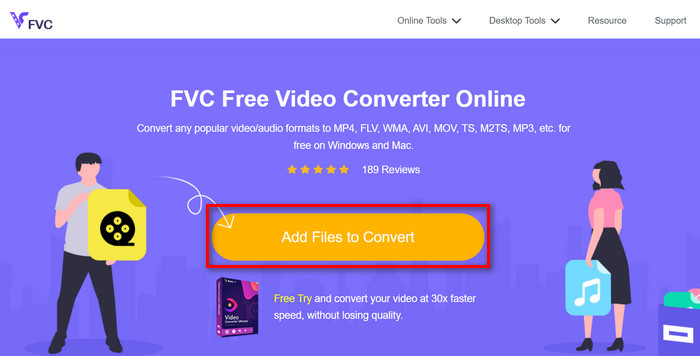
Schritt 1. Importiere zunächst die MP4-Datei, die du umwandeln möchtest. Klicke dazu einfach auf die Schaltfläche Add Files to Convert.
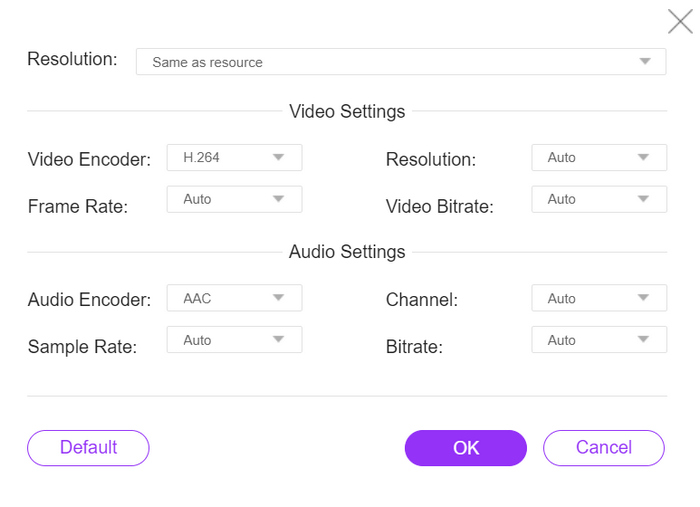
Schritt 2. Wähle anschließend dein bevorzugtes Ausgabeformat. Du kannst frei eines der von WhatsApp unterstützten Formate auswählen. Wenn du die Auflösung, Video-Encoder, Bitrate usw. manuell festlegen möchtest, klicke einfach auf das Gear-Symbol neben dem Ausgabeformat. Wenn du fertig bist, klicke auf die Schaltfläche OK.
Schritt 3. Um schließlich den Konvertierungsvorgang zu starten, klicke einfach auf die Schaltfläche Konvertieren.
Mit der einfachen und intuitiven Benutzeroberfläche von FVC Free Video Converter Online können Sie Ihre MP4-Datei ganz einfach in ein von WhatsApp unterstütztes Dateiformat umwandeln. Darüber hinaus können Sie mit der großen Auswahl an Optionen für Dateiformat und Videoauflösung sicherstellen, dass Sie die Anforderungen zum Teilen von Dateien in WhatsApp erfüllen.
Teil 3: Schnellste Möglichkeit, MP4 in WhatsApp-Video zu konvertieren
Wenn Sie nach einem voll funktionsfähigen Tool suchen, mit dem Sie Ihre MP4-Datei in ein WhatsApp-Video konvertieren können, dann ist dieses Tool genau das Richtige für Sie. FVC Video Converter Ultimate ist ein umfassendes Konvertierungstool, das für die Konvertierung verschiedener Video- und Audiodateien konzipiert ist. Wenn Sie also Ihre MP4-Datei in ein Format konvertieren möchten, das sie mit WhatsApp kompatibel macht, können Sie dies schnell und einfach mit diesem Tool tun.
Darüber hinaus können Sie mit diesem Tool den Encoder und die Videoauflösung Ihrer Videos anpassen und so die volle Kontrolle über den Konvertierungsprozess erhalten.
Schritt 1. Lade zunächst die Software herunter und installiere sie auf deinem Computer.
Gratis DownloadFür Windows 7 oder neuerSicherer Download
Gratis DownloadFür MacOS 10.7 oder neuerSicherer Download
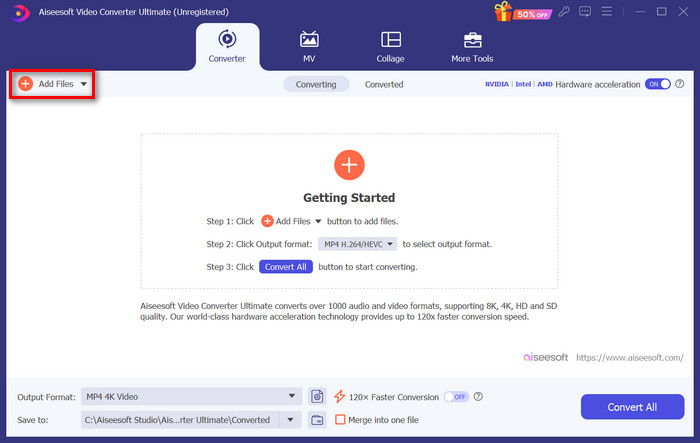
Schritt 2. Klicke im Reiter Converter auf die Schaltfläche Add Files und importiere deine MP4-Dateien.
Schritt 3. Sobald die MP4-Datei importiert ist, wähle durch Klicken auf die Schaltfläche Output format dein gewünschtes Ausgabeformat aus der Liste der Formate aus.
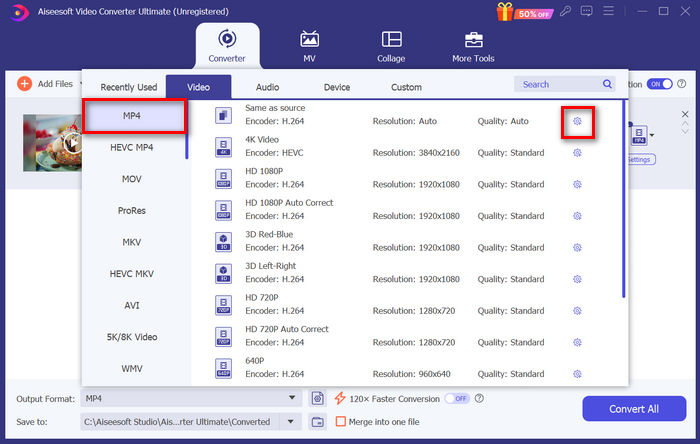
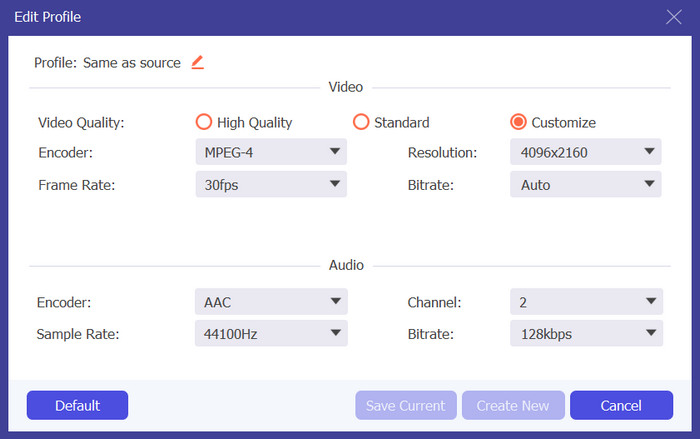
Schritt 4. Gehe im benutzerdefinierten Profil zum Dialogfeld Settings. Dort kannst du den Videocodec ändern und die Videoauflösung anpassen. Wenn du fertig bist, klicke einfach auf die Schaltfläche Create New, um zu speichern.
Schritt 5. Klicke zum Abschluss einfach auf die Schaltfläche Convert All.
Denken Sie daran, die Videoauflösung im benutzerdefinierten Profil auf 480p anzupassen, um die Kompatibilität mit WhatsApp mit der konvertierten MP4-Ausgabe sicherzustellen.
Wenn du außerdem die Größe deines WhatsApp-Videos komprimieren möchtest, um die Grenzwerte einzuhalten, kannst du zum Reiter „Toolbox“ wechseln und die Funktion „Video Compressor“ verwenden.
Teil 4: FAQs zur Konvertierung von MP4 in WhatsApp-Video
Wie lade ich MP4 von WhatsApp herunter?
Um ein MP4-Video von WhatsApp herunterzuladen, öffnen Sie den Chat mit dem Video, tippen Sie auf das Video, um es zu öffnen, und tippen Sie dann auf das Download-Symbol, das sich normalerweise in der Ecke des Videoplayers befindet.
Kann man MP4 über WhatsApp versenden?
Ja. Sie können MP4-Videos über WhatsApp senden. Denken Sie jedoch daran, sicherzustellen, dass Ihr Video die Dateigrößen- und Formatbeschränkungen von WhatsApp einhält, um Probleme beim Senden oder Empfangen zu vermeiden.
Wie kann man die Dateigröße eines MP4-Videos für WhatsApp reduzieren?
Sie können die Dateigröße eines MP4-Videos für WhatsApp ändern, indem Sie Videokomprimierungssoftware oder Online-Tools verwenden. Diese Tools können Videos unter Beibehaltung einer angemessenen Qualität komprimieren, was das Senden über WhatsApp erleichtert.
Kann ich mehrere MP4-Dateien gleichzeitig in WhatsApp-Videos konvertieren?
Ja. Sie können mehrere MP4-Dateien gleichzeitig in WhatsApp-Videos konvertieren, indem Sie die Stapelkonvertierungsfunktion von FVC Video Converter Ultimate verwenden. Mit dieser Funktion haben Sie die Kontrolle, um schnell und einfach mehrere Dateien auf einmal zu konvertieren und so Zeit und Mühe zu sparen.
Fazit
Zusammenfassend war das Konvertieren von MP4 in WhatsApp-Videos noch nie so einfach. Mit Hilfe von Tools wie FVC Free Video Converter Online und FVC Video Converter Ultimate kannst du deine Videos nahtlos so umwandeln, dass sie den Größen- und Formatvorgaben von WhatsApp entsprechen. Egal, ob du eine einfache Online-Lösung oder ein umfassendes Desktop-Tool bevorzugst – du hast nun die passenden Möglichkeiten, deine Videos mühelos auf WhatsApp zu teilen.
Verabschieden Sie sich von WhatsApp-Kompatibilitätsproblemen und begrüßen Sie das problemlose Teilen innerhalb der App.
-
 So konvertieren Sie MP4 ganz einfach auf dem Desktop und online in MPG
 Erfahren Sie, wie Sie Ihre Lieblings-MP4 mit einfachen Schritten in MPG konvertieren. Keine technischen Probleme, nur reibungslose Übergänge für Ihre Mediendateien.
-
 Anleitung zum problemlosen Konvertieren von MP4 in MXF
 Das Konvertieren von MP4 in MXF ist ganz einfach! Erfahren Sie, wie Sie Videoformate problemlos wechseln können. Erhalten Sie eine Schritt-für-Schritt-Anleitung für einen reibungslosen Übergang.
-
 Die besten MP4-zu-WAV-Konverter, die Sie in Betracht ziehen sollten
 MP4 zu WAV leicht gemacht. Vergessen Sie den technischen Stress und wechseln Sie das Format wie ein Profi. Probieren Sie es jetzt aus und genießen Sie Ihre neu entdeckten WAV-Tracks!
