


 Video Converter Ultimate
 Bildschirm recorder
 Videoreparatur
 Sicherer Download
Kostenlose und Online-Möglichkeiten zum Konvertieren von RMVB in MP4
RMVB (RealMedia Variable Bitrate) ist eine RealMedia‑Videodatei, die nicht von allen Anwendungen unterstützt wird. Viele Nutzer möchten das Dateiformat von RMVB in MP4 ändern, um die Videos problemlos auf ihrem Handy abspielen zu können. In dieser Anleitung zeigen wir Ihnen drei kostenlose, Online‑Methoden, mit denen Sie RMVB-Dateien schnell in MP4 umwandeln können, sodass Sie Ihre Videos ohne Umstände weiter genießen.

Teil 1. So konvertieren Sie RMVB in MP4 mit RMVB in MP4 Converter
Um RMVB unter Windows 10 oder auf dem Mac in MP4 zu konvertieren, ist ein RMVB‑zu‑MP4‑Konverter besonders schnell und zuverlässig. Free RMVB to MP4 Video Converter ist ein funktionsstarker, kostenloser Videokonverter, mit dem Sie RMVB schnell in MP4 umwandeln können. Außerdem unterstützt er die Konvertierung von RMVB in AVI, FLV, MOV und andere Formate. Nachfolgend finden Sie die Schritte, um RMVB in MP4 zu ändern.
Kostenloser DownloadFür Windows 7 oder höherSicherer Download
Kostenloser DownloadFür macOS 10.7 oder höherSicherer Download
Schritt 1. Bevor Sie beginnen, laden Sie diese Freeware herunter, installieren Sie sie auf Ihrem Computer und starten Sie anschließend den Free RMVB to MP4 Converter. Importieren Sie dann die RMVB‑Dateien in das Programm, indem Sie auf die Schaltfläche Add File(s) klicken. Übrigens können Sie eine Stapelkonvertierung durchführen und so mehrere RMVB‑Dateien gleichzeitig umwandeln.
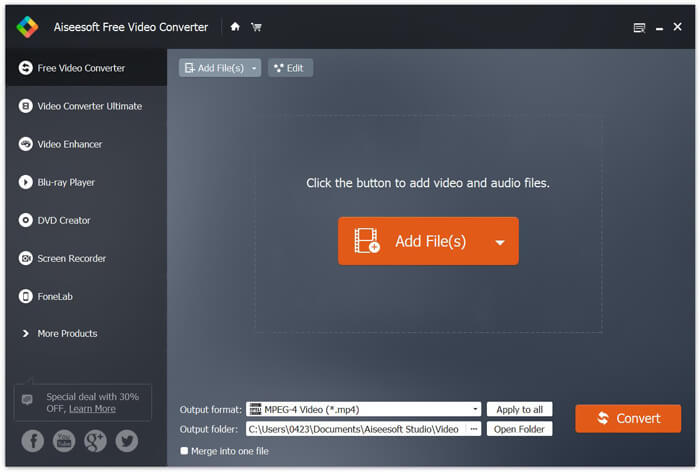
Schritt 2. Nachdem Sie Ihre Dateien zum Programm hinzugefügt haben, wechseln Sie zu Output format und wählen Sie dann das Format MP4 aus.

Schritt 3. Klicken Sie auf die Schaltfläche Convert. Warten Sie ein paar Minuten, und Sie erhalten Ihre gewünschten MP4‑Dateien.
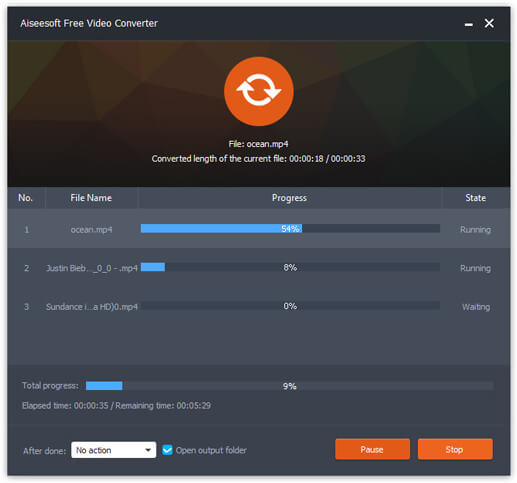
Wenn Sie die MP4‑Dateien erhalten haben, können Sie sie auf Ihrem Computer oder mobilen Geräten abspielen. Darüber hinaus können Sie diesen Free RMVB to MP4 Converter auch nutzen, um RM in MP4 oder WMV in MP4 zu konvertieren.
Teil 2. So konvertieren Sie RMVB mit VLC in MP4
VLC funktioniert auch als praktisches Videokonvertierungswerkzeug, und Sie können Ihre RMVB-Dateien problemlos in hoher Qualität in MP4 konvertieren. Mal sehen, wie man VLC verwendet, um diesen Job zu erledigen.
Schritt 1. Laden Sie zunächst das Programm VLC Media Player auf Ihren Computer herunter, installieren Sie es und führen Sie es aus.
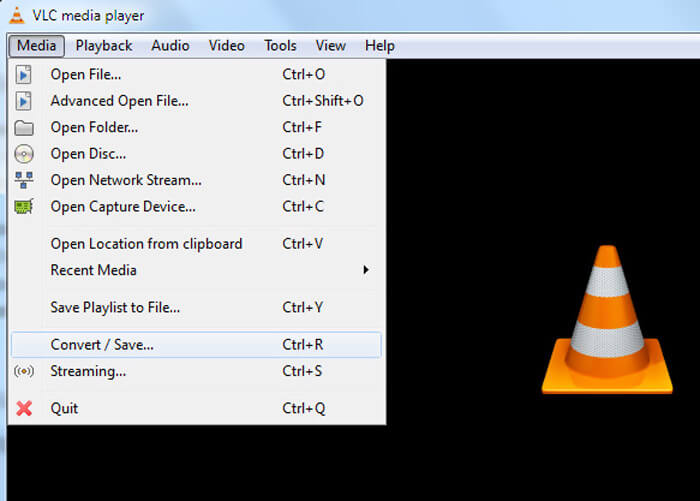
Schritt 2. Wechseln Sie zum Media-Tab und wählen Sie anschließend Convert/Save, um fortzufahren.
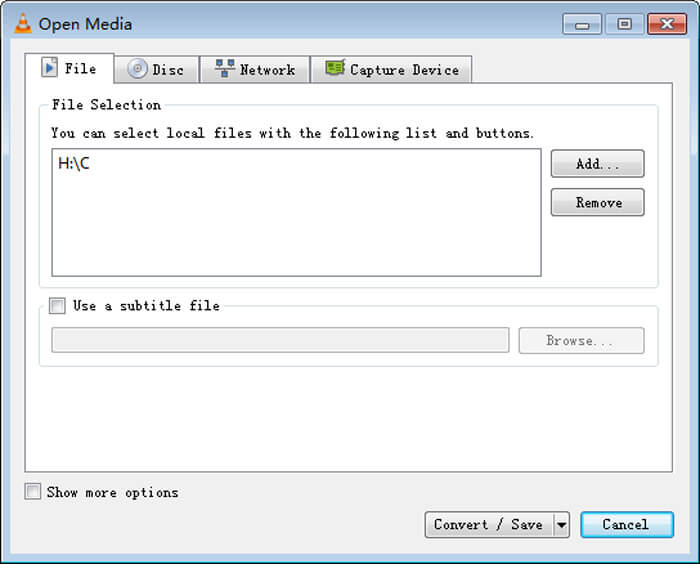
Schritt 3. Wenn das Fenster Open Media erscheint, fügen Sie Ihre RMVB‑Dateien zu VLC hinzu, indem Sie im Bereich File auf die Schaltfläche Add… klicken. Klicken Sie dann unten im Fenster auf die Schaltfläche Convert/Save.
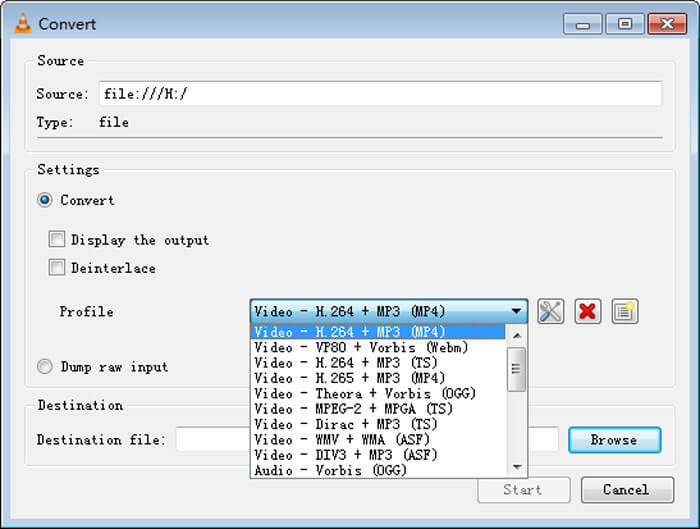
Schritt 4. Anschließend gelangen Sie zum Fenster Convert. Suchen Sie hier den Bereich Settings, gehen Sie zu Profile und wählen Sie dann im Dropdown‑Menü MP4 als Ausgabeformat. Klicken Sie zum Schluss auf Start, um Ihre RMVB‑Dateien in MP4 zu konvertieren und sie bequem abspielen zu können.
Teil 3. So ändern Sie RMVB in MP4 Online
Der Online‑Videokonverter unterstützt ebenfalls die schnelle Umwandlung von RMVB‑Videos in MP4. Free Online Video Converter ist ein webbasiertes Tool, mit dem sich beliebige gängige Video‑ oder Audiodateien kostenlos in MP4, MOV, FLV, AVI, MP3, AAC und viele weitere Formate konvertieren lassen. Damit können Nutzer RMVB-Dateien ganz einfach direkt im Browser in MP4 umwandeln.
Schritt 1. Besuchen Sie https://www.free-videoconverter.net/free-online-video-converter/ und klicken Sie auf die Schaltfläche Add Files to Convert, um das Launcher‑Programm zu starten.
Laden Sie die Desktop‑Version herunter, um Dateien stapelweise zu konvertieren.

Schritt 2. Importieren Sie anschließend Ihre RMVB‑Dateien in dieses Online‑Tool. Wählen Sie dann das Format MP4 unter dem Tab Video aus. Wenn Sie bereit sind, die Konvertierung zu starten, klicken Sie auf die Schaltfläche Convert, um den Vorgang zu beginnen. Nach Abschluss der Konvertierung werden die umgewandelten Dateien automatisch auf Ihrem Computer gespeichert.

RMVB vs. MP4
RMVB, eine neuere Variante des Standardformats Real Media (.RM), ist ein Real Media-Videodateiformat, das mit einer variablen Bitrate komprimiert wird. Es ist ein beliebtes Format für asiatische Filme und Anime. RMVB-Dateien sind kleiner und haben niedrigere Bitraten, aber eine bessere Qualität.
Das 2001 von der Moving Picture Experts Group (MPEG) veröffentlichte MP4-Format kann Ihnen helfen, Video-, Audio-, Untertitel- und Bilddaten in separaten Spuren zu speichern. Es ist die Abkürzung für MPEG-4 Part 14. Außerdem ist es eines der beliebtesten Formate für das Streamen und Teilen von Videos.
Teil 4. FAQs von RMVB zu MP4
Was ist eine RMVB-Datei?
RMVB (RealMedia Variable Bitrate) ist ein Real Media-Videodateiformat mit variabler Bitrate. Es war einst beliebt für die Verbreitung von asiatischen Animes, Filmen, Episoden, Torrents usw. im Internet, da die Dateigröße kleiner und die Qualität viel besser ist.
Wie öffne ich eine RMVB-Datei?
RealPlayer unterstützt die Wiedergabe von RMVB-Dateien unter Windows, Mac OS X und Linux. Oder Sie können VLC verwenden, um RMVB-Dateien abzuspielen.
Kann HandBrake RMVB in MP4 konvertieren?
HandBrake ist ein großartiges Tool zum Konvertieren von Videos in eine Reihe unterstützter Geräte. Es ist eine gute Wahl für jeden, RMVB in MP4 zu verwandeln.
So konvertieren Sie RMVB-Dateien in MP4. Haben Sie nach den oben genannten Schritten ein Problem festgestellt? Zögern Sie nicht, uns Ihre Gedanken mitzuteilen.
-
 3 einfache Schritte zum Brennen von Video _TS-Dateien / -Ordnern auf DVD unter Mac / Windows
 Wie konvertiere und brenne ich TS-Dateien auf DVD? Diese Schritt-für-Schritt-Anleitung zeigt Ihnen, wie Sie TS-Dateien und -Ordner unter Windows / Mac auf DVD kopieren, damit Sie TS-Dateien auf DVD-Player oder Fernseher ansehen können.
-
 6 einfache Möglichkeiten zum Konvertieren von TS in AVI / MKV / MOV / WMV unter Windows / Mac
 Möchten Sie TS-Dateien schnell in AVI / MKV / MOV / WMV konvertieren? Dieser Artikel zeigt Online- und Offline-Videokonverter mit vollständiger Anleitung. Vielleicht können Sie hier den besten kostenlosen TS-Konverter bekommen.
-
 So konvertieren Sie MP4 in M4A unter Windows / Mac (kostenlos und online)
 Wie konvertiere ich MP4 zu M4A online? Kann ich das Audio aus MP4-Dateien extrahieren? Wenn Sie diesen Beitrag lesen, erhalten Sie alle Antworten zur Konvertierung von MP4 zu M4A.

