


 Video Converter Ultimate
 Bildschirm recorder
 Videoreparatur
Entdecken Sie Möglichkeiten zum Abspielen von MKV-Dateien auf PS4
Nicht nur die Xbox One S unterstützt die Wiedergabe von Filmen. Jetzt versucht auch die PS4, mit diesem Trend mitzuhalten. Mit Hilfe eines USB‑Kabels und über DLNA kann die PS4 inzwischen MKV, MP4, AVI und vieles mehr abspielen. Das bedeutet, dass MKV zu den Formaten gehört, die du wiedergeben kannst. Eine vollständige Liste aller unterstützten Formate findest du auf der offiziellen PS4‑Website. Außerdem würdest du diesen Artikel nicht weiterlesen, wenn du dich nicht dafür interessieren würdest, eine MKV‑Datei auf der PS4 abzuspielen. Lies weiter – im Verlauf erfährst du verschiedene Möglichkeiten, wie du MKV auf der PS4 abspielen kannst.

Teil 1. Können alle MKV-Dateien auf PS4 abgespielt werden?
Kann ich MKV-Dateien auf PS4 abspielen? Sicher kannst du. Das MKV-Dateiformat wird von PS4 unterstützt. Aber nicht alle MKV-Dateien können richtig wiedergegeben werden. Beim Spielen kann es zu Fehlern kommen. Dies liegt daran, dass Sie den von PS4 festgelegten Standard erfüllen müssen. Meist werden H.264/MPEG-4 AVC unterstützt. Dieselben Regeln gelten, wenn Sie MKV-Dateien von einem USB-Laufwerk abspielen. Inzwischen werden für Audio MP3, AAC LC, AC-3 unterstützt. Die meisten dieser Formate sind Dolby Digital-Formate. Wenn Sie der Meinung sind, dass Sie den Standard erfüllt haben, können Sie mit den Schritten zum direkten Abspielen von MKV auf PS4 fortfahren.
Schritt 1. Lade den DivX Media Server herunter, installiere ihn und starte anschließend den Player. Aktiviere danach die Freigabe auf deinem Computer.
Schritt 2. Lade die MKV‑Datei auf den Server hoch bzw. importiere sie dorthin.
Schritt 3. Bevor du zum nächsten Schritt übergehst, stelle sicher, dass sowohl der Computer als auch die PS4 mit demselben WLAN‑Netzwerk verbunden sind. Lade anschließend den DivX Media Player auf deine PS4 herunter und installiere ihn. Öffne danach die Media‑Player‑App der PS4 und wähle den DivX Media Server aus der Liste der angezeigten Geräte aus.
Schritt 4. Suche nun nach „Video“, markiere das Video, das du abspielen möchtest, und starte das Streaming.
Teil 2. Schritt-für-Schritt-Anleitung zum Abspielen von MKV auf PS4 von USB
Wenn Sie in der Zwischenzeit einen USB-Speicher verwenden, stellen Sie sicher, dass er entweder FAT- oder exFAT-formatiert ist, da er sonst nicht erkannt wird. Wenn Sie der Meinung sind, dass Sie bereit sind und das Flash-Laufwerk kompatibel ist, lesen Sie die folgende Schritt-für-Schritt-Anleitung.
Schritt 1. Schalte die PS4 ein und stecke den USB‑Stick ein. Gehe ins HauptMenü. Wähle nun Video und suche nach dem Namen deines USB‑Laufwerks.
Schritt 2. Sobald du die Dateiliste siehst, klicke auf Alles anzeigen, um alle Dateien zu sehen, die du auf deinem USB‑Stick gespeichert hast. Kopiere die gewünschte Datei und übertrage sie auf die PS4.
Schritt 3. Achte abschließend darauf, dass noch genügend Speicherplatz vorhanden ist, um die Übertragung abzuschließen.
Teil 3. Alternative Möglichkeit, MKV auf PS4 über Plex Server abzuspielen
Neben DivX gibt es noch einen weiteren Player, den du verwenden kannst, um MKV‑Dateien auf der PS4 abzuspielen. Es handelt sich um einen Streaming‑Medienserver namens Plex. Dieser Medienserver ermöglicht es dir, hochwertige Videos, Musik, TV‑Sendungen und Podcasts von deinem Computer zu streamen. Auch wenn einige Nutzer bei bestimmten MKV‑Dateien Probleme haben, kannst du Plex dennoch als Alternative nutzen. Wenn du Plex auf jeden Fall verwenden möchtest, um auch nicht kompatible Dateien abzuspielen, solltest du in Betracht ziehen, das Video zu konvertieren. Manche Konverter können deine MKV‑Dateien in ein von Plex unterstütztes Format umwandeln. Durch Anpassen des Video‑Codecs, der Bildrate, der Bitrate und anderer Parameter ist das möglich. Gibt es ein Tool, das dazu in der Lage ist? Ja, das gibt es – du kannst Video Converter Ultimate ausprobieren. Dieses Tool ist tatsächlich dazu fähig. Versuche, es zu verwenden, um dieses Problem zu lösen.
Schritt 1. Lade Video Converter Ultimate auf deinen PC herunter und installiere das Programm.
Gratis DownloadFür Windows 7 oder neuerSicherer Download
Gratis DownloadFür MacOS 10.7 oder neuerSicherer Download
Schritt 2. Füge die Dateien hinzu, die du konvertieren möchtest, indem du auf Dateien hinzufügen klickst oder die Datei einfach per Drag & Drop in die Benutzeroberfläche ziehst.
Schritt 3. Wähle anschließend das von Plex unterstützte Format aus, indem du auf das Dropdown‑Menü Alle konvertieren in klickst.
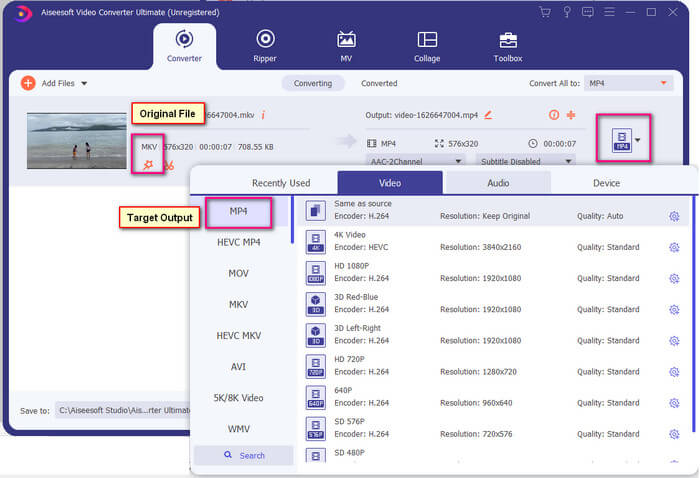
Schritt 4. Sobald das Format festgelegt ist, klicke auf die Schaltfläche Alle konvertieren, um den Konvertierungsvorgang zu starten. Nach Abschluss der Konvertierung wird der Ordner, in dem die Datei gespeichert wurde, automatisch geöffnet.
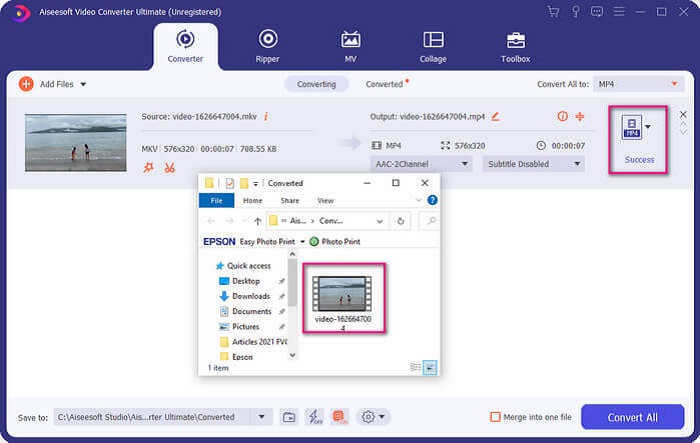
Es gibt mehr mit Ultimate Video Converter. Sie können die Liste der Vor- und Nachteile unten überprüfen, um andere gute Funktionen kennenzulernen, die es bietet.
● Dieses Tool konvertiert in nur drei Sekunden.
● Es verfügt über eine Beschleunigungstechnologie, die die konvertierte Datei verbessern kann.
● Es unterstützt HD-Qualität.
● Es verfügt über Bearbeitungsfunktionen wie das Hinzufügen von Filtern und grundlegenden Effekten.
● Sie können die Untertitel und die Audiospur anpassen.
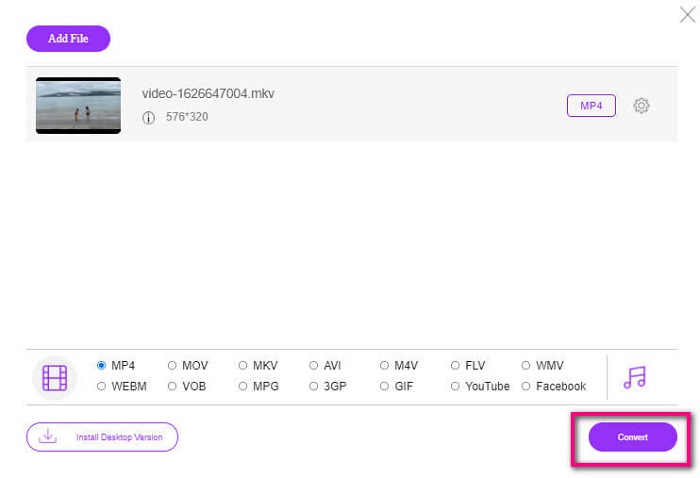
Falls du nach einem kostenlosen Konverter suchst, kannst du auch den FVC Free Online Video Converter in Betracht ziehen. Auch wenn er nicht ganz an die Qualität des Ultimate Video Converter heranreicht, kann er dennoch gut mithalten. Er ist in der Lage, die Datei so zu konvertieren, dass sie mit Plex oder DivX kompatibel wird. Alles, was du tun musst, ist…
Schritt 1. Starte das Tool, indem du die offizielle Seite über den Link in der Beschreibung aufrufst.
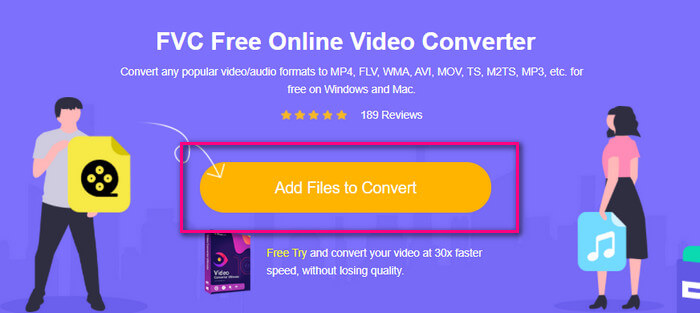
Schritt 2. Lade das Video hoch, indem du auf Dateien zum Konvertieren hinzufügen klickst.
Schritt 3. Ändere das Format, indem du den Kreis darunter markierst.
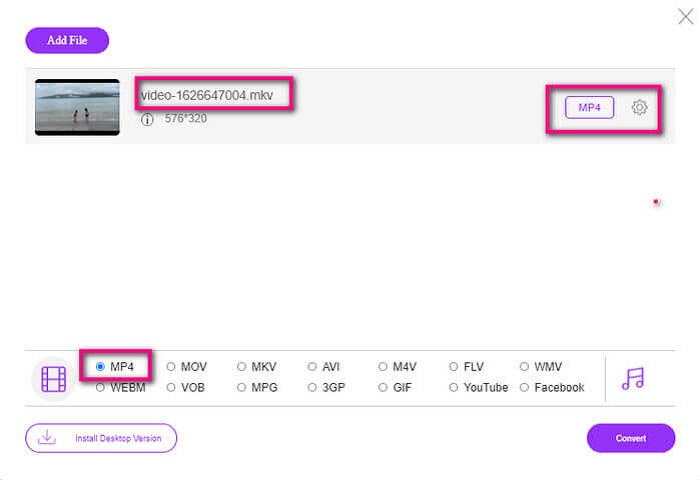
Schritt 4. Klicke zum Schluss auf die Schaltfläche Konvertieren und wähle den Speicherort, an dem die Datei abgelegt werden soll. Klicke anschließend auf OK. Über das Ordner-Symbol kannst du die konvertierte Datei anzeigen.
Weiterführende Informationen
MKV in Windows Media Player abspielen
Teil 4. Weitere Informationen zum Abspielen von MKV-Dateien auf PS4
Wie viel kostet eine PS4?
Der marktübliche Verkaufspreis beträgt in den USA 399,99 USD und in Kanada 399,99 CAD. Die Preise können je nach Verkaufspreis in Ihrem Land variieren.
Gibt es eine Möglichkeit CC oder Close Caption MKV auf PS4 zu spielen?
Ja, die gibt es. Du findest sie in den Bedienungshilfen. Der Pfad lautet: Gehe auf deiner PS4 zu Einstellungen, dann zu Bedienungshilfen und wähle anschließend Untertitel für Hörgeschädigte anzeigen. Dort klicke auf Optionen, um die Untertitel zu aktivieren.
Wenn PS4 MKV unterstützt, warum werden meine Dateien dann nicht abgespielt?
Wie oben erwähnt, müssen Sie sicherstellen, dass die MKV-Datei dem Standard des von Ihnen verwendeten Players entspricht. Sie müssen nur die Anforderungen von PS4 oder einem anderen Media-Streaming-Server überprüfen. Die meisten Medienserver verfügen auch über eine Klassifizierung zum Abspielen von MKV-Dateien.
Welche Formate werden von PS4 unterstützt?
Es gibt mehrere Dateiformate, die PS4 unterstützt. Sie werden jedoch feststellen, dass die meisten Formate unkomprimiert sind und eine große Datei enthalten. Obwohl es auch die unkomprimierten wie Mp4 unterstützt. In der Zwischenzeit ist hier die Liste der Formate, über die wir sprechen: MKV, AVI, MPEG-2 PS, MPEG-2 TS, AVCHD und XAVC und MP4.
Fazit
Zusammenfassend lässt sich sagen, dass es viele Möglichkeiten gibt, MKV-Dateien auf PS4 direkt oder indirekt abzuspielen. Aufgeführt wurden die am häufigsten verwendeten Medien. DivX Stream Server und Plex sind nur einige Alternativen, die Sie verwenden können. Es wird dringend empfohlen, die Datei stattdessen zu konvertieren, um Ärger und zu viel Prozess zu vermeiden.
-
 [Gelöst] VLC Player spielt MKV nicht ab, wie man es repariert
 Unterstützt der VLC-Player MKV-Dateien? Warum spielt VLC MKV nicht ab? Dieser Beitrag gibt 4 nützliche Tipps für Sie, um zu beheben, dass der VLC-Player keine MKV-Dateien abspielt.
-
 So spielen Sie MKV-Dateien auf dem iPad 2025 ab
 Wie spielt man MKV-Dateien auf dem iPad 2 ab? Kann ich MKV in MP4 konvertieren, um es auf dem iPad Pro/Air/2 abzuspielen? In diesem Beitrag werden 2 einfache Möglichkeiten zum Abspielen von MKV auf dem iPad beschrieben.
-
 So laden Sie MKV-Codec in Windows Media Player für eine reibungslose Wiedergabe herunter
 Kann MKV-Video im Windows Media Player nicht abspielen? Sie können den MKV-Codec für Windows Media Player kostenlos herunterladen. Konvertieren Sie umgekehrt das MKV, um es im Windows Media Player abspielbar zu machen.
