


 Video Converter Ultimate
 Bildschirm recorder
 Videoreparatur
 Sicherer Download
[Gelöst] Wie man einen Screenshot auf Snapchat macht, ohne dass andere es wissen
Snapchat ist nach wie vor eine der beliebtesten Messenger‑Apps. Abgesehen davon, dass sich damit ganz leicht Unterhaltungen führen lassen, bei denen Nutzer Fotos, Videos und Nachrichten senden können, die nach dem Ansehen wieder verschwinden, kann man dort auch sehr kreativ sein. Heutzutage machen wir häufig Screenshots – das ist inzwischen ganz normal, vor allem wenn wir wichtige Informationen sichern oder einen lustigen Moment festhalten wollen. Allerdings benachrichtigt Snapchat Nutzer, wenn jemand einen Screenshot ihres Inhalts macht. Wenn du also einen Screenshot in Snapchat machen möchtest, ohne dass sie es merken, lies diesen Artikel: Wir haben vier Methoden vorbereitet, mit denen du dies unauffällig tun kannst.

Teil 1: Können Sie auf Snapchat einen Screenshot machen, ohne dass Ihr Gegenüber es merkt?
Im Vergleich zu anderen Social-Media-Plattformen wird Snapchat häufig verwendet, da es kreative und ansprechende Kamera- und Videofilter bietet, mit denen Benutzer innerhalb der Plattform Videos an andere Benutzer senden. Was das Aufnehmen von Screenshots angeht, benachrichtigt Snapchat andere, wenn andere Screenshots ihres Snaps machen.
Wenn Sie glauben, dass Sie bei Snapchat keinen Screenshot machen können, ohne dass die Leute es merken, liegen Sie falsch!
Glücklicherweise gibt es Methoden, mit denen Sie Screenshots auf Snapchat erstellen können, ohne andere darüber zu informieren. Dies können Sie mithilfe von Bildschirmaufzeichnungstools, mit einem anderen Gerät zum Aufnehmen des Snaps oder mithilfe der Bildschirmspiegelungsfunktion tun.
Teil 2: Wie können Sie einen Screenshot auf Snapchat machen, ohne dass sie es merken?
Glücklicherweise gibt es verschiedene Methoden, mit denen Sie Screenshots auf Snapchat erstellen können, ohne dass Ihre Mitbenutzer es merken.
Methode 1: FVC-Bildschirmrekorder
Eine der besten Methoden, um Screenshots in Snapchat zu machen, ohne dass der andere es mitbekommt, ist die Nutzung eines Drittanbieter‑Tools wie dem FVC Screen Recorder. Dieses Tool ist mit Windows‑ und Mac‑Computern kompatibel, die mit Android‑ und iPhone‑Geräten verbunden werden können. Verbindest du eines dieser Geräte mit dem Computer, auf dem das Tool läuft, kannst du mit der Telefon‑Recorder‑Funktion Screenshots deiner Snaps aufnehmen. Diese Funktion ermöglicht es dir, Screenshots zu erstellen, ohne dass die Person, mit der du schreibst, benachrichtigt wird.
Schritt 1. Lade zunächst den FVC Screen Recorder herunter und öffne ihn auf deinem Computer.
Kostenloser DownloadFür Windows 7 oder höherSicherer Download
Kostenloser DownloadFür macOS 10.7 oder höherSicherer Download
Schritt 2. Klicke nun auf die Option Phone recorder. Du findest sie auf der rechten Seite des Tool‑Fensters zusammen mit den drei anderen Optionen.
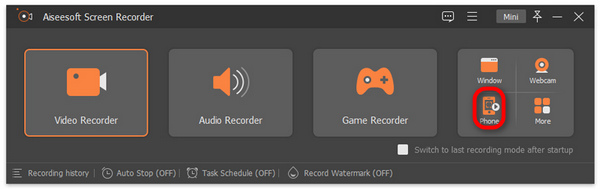
Schritt 3. Wenn du Android‑Nutzer bist, klicke auf Android Recorder, und wenn du ein iPhone verwendest, wähle iOS Recorder.
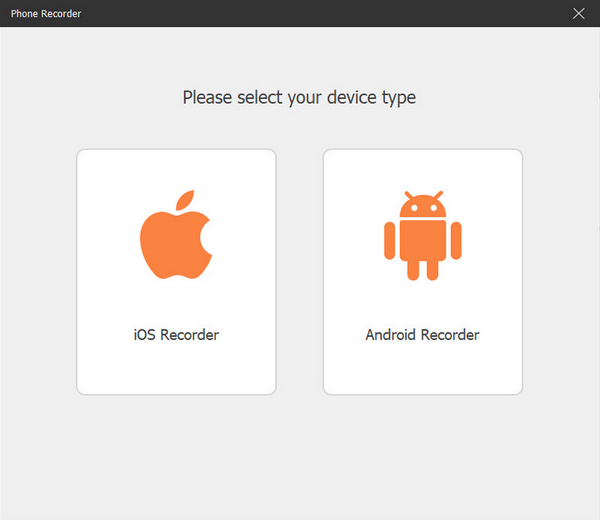
Schritt 4. Danach erscheint ein neues Fenster mit einer Anleitung auf dem Bildschirm. Dort wählst du zwischen Screen Mirroring oder Audio Mirroring; in deinem Fall wählst du Screen Mirroring.
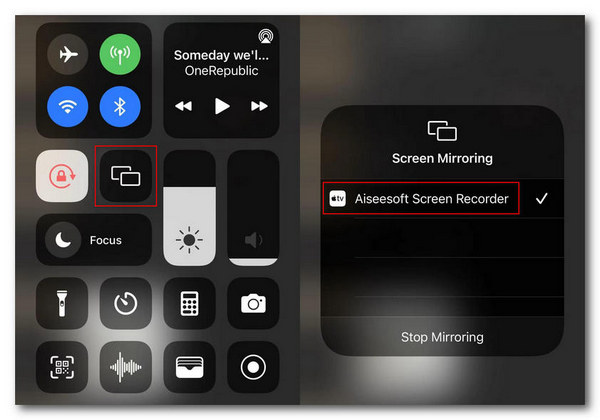
Schritt 5. Öffne nun auf deinem iPhone das Kontrollzentrum und tippe dort auf Bildschirmsynchronisierung, um die Auswahlliste zu öffnen. Tippe anschließend auf Aiseesoft Screen Recorder, um das iPhone mit dem Computer zu verbinden.
Für Android‑Nutzer gilt: Du musst die App FoneLab Mirror herunterladen. Stelle als Nächstes sicher, dass dein Android‑Telefon und dein Computer mit demselben WLAN verbunden sind. Öffne anschließend die App und übertrage deinen Bildschirm mithilfe von Detect, PIN Code oder QR Code.
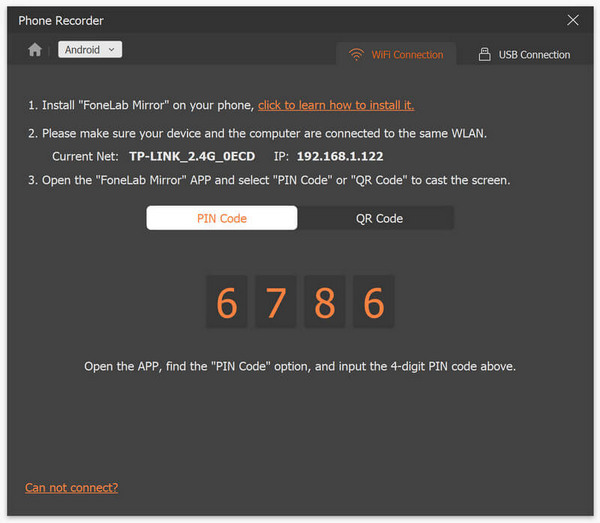
Schritt 6. Wenn alles eingerichtet ist, öffne die Snapchat‑App auf deinem iPhone oder Android‑Gerät.
Schritt 7. Klicke anschließend auf das Snapshot-Symbol, wenn du einen Screenshot machen möchtest.
Schritt 8. Rufe zum Schluss deine Screenshot‑Bilder im entsprechenden Windows‑Ordner auf deinem Computer auf; sie wurden bereits direkt dort gespeichert.
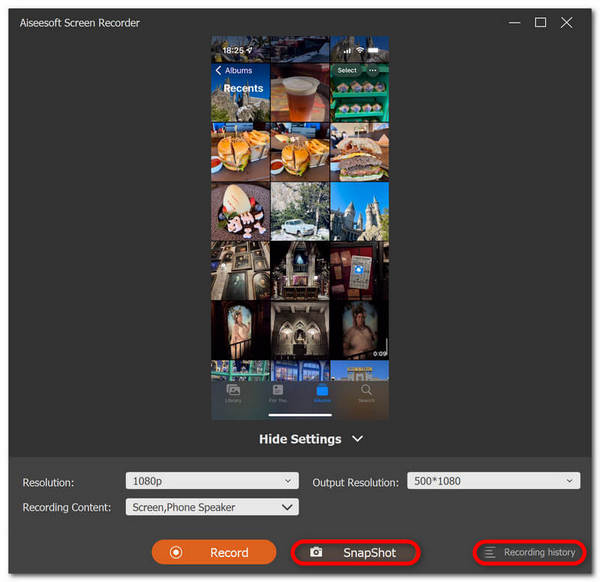
Jetzt können Sie ganz einfach Screenshots auf Snapchat machen, ohne dass andere es merken. Sie müssen nur die Schritte befolgen und dank der intuitiven Benutzeroberfläche kann das jeder Benutzer schnell erledigen.
Methode 2: Ein anderes Telefon verwenden
Eine andere Methode, Screenshots von Snapchat zu machen, ohne dass der Benutzer es merkt, besteht darin, mit einem anderen Telefon ein Foto davon zu machen. Um ein Foto oder Video des Snapchat-Inhalts aufzunehmen, machen Sie einfach ein Foto davon. Auf diese Weise kann der Benutzer die Snaps aufnehmen, ohne Benachrichtigungen oder Warnungen an den Absender auszulösen.
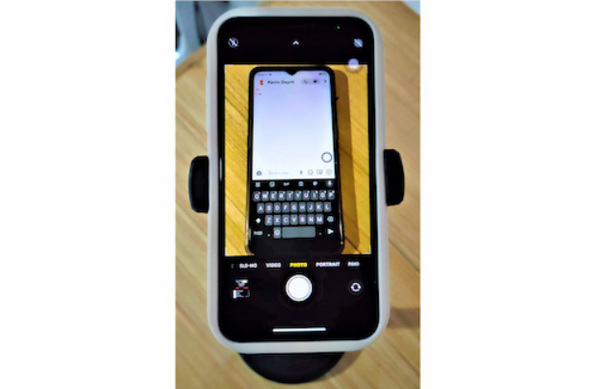
Schritt 1. Bereite zwei Telefone vor. Auf einem Telefon sollte Snapchat installiert sein, das andere sollte über eine gute Kamera verfügen, um klare Bilder aufnehmen zu können.
Schritt 2. Öffne anschließend in deiner Snapchat‑App die Nachricht, in der sich der Snap befindet, den du aufnehmen möchtest.
Schritt 3. Mache zum Schluss mit der Kamera‑App des zweiten Telefons ein Foto des Snaps auf dem Bildschirm.
Beachten Sie bitte, dass die Qualität der Aufnahmen bei dieser Methode möglicherweise schlechter ist und die Methode möglicherweise nicht für alle Situationen geeignet ist.
Methode 3: Quicktime Player für iPhone-Benutzer
Eine weitere Methode, einen Screenshot auf Snapchat zu machen, ohne dass die Leute davon erfahren, ist die Verwendung des Quicktime Players, wenn Sie einen Mac haben und ein iPhone-Benutzer sind. Dieses Tool ist eine in macOS integrierte Software, mit der Sie Screenshots auf Snapchat machen können.
Schritt 1. Zuerst musst du dein iPhone mit deinem Mac über ein Lightning‑Kabel verbinden.
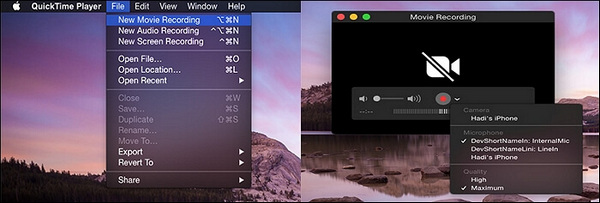
Schritt 2. Öffne als Nächstes die QuickTime‑App auf deinem Mac. Gehe dort zu Ablage und wähle Neue Filmaufnahme aus.
Schritt 3. Danach erscheint ein Aufnahmefenster, in dem du dein iPhone auswählen musst.
Schritt 4. Tippe auf deinem iPhone auf die Aufnahme-Taste und öffne dann Snapchat auf deinem iOS‑Gerät.
Schritt 5. Drücke zum Schluss die Stopp-Taste und mache anschließend einen Screenshot aus dem gespeicherten Video.
Mit dieser Methode kannst du zwar tatsächlich Screenshots in Snapchat machen, ohne dass eine Benachrichtigung ausgelöst wird. Sie ist jedoch ausschließlich für iPhone‑ und Mac‑Nutzer verfügbar. Außerdem wirkt es zeitaufwendig, ein Video aufzunehmen und dann die Snaps daraus zu extrahieren. Zudem kann es vorkommen, dass der QuickTime Player auf deinem iPhone oder Mac nicht funktioniert.
Methode 4: Bildschirmspiegelung
Android und iPhone verfügen beide über Bildschirmspiegelungsfunktionen, mit denen Sie Screenshots auf Snapchat erstellen können. Diese Funktion spiegelt oder projiziert den Bildschirm Ihres Telefons, auf dem Ihre Snapchat-Inhalte geteilt werden können.
Schritt 1. Zuerst musst du die Bildschirmspiegelung auf deinem iOS‑ oder Android‑Gerät aktivieren und die Snapchat‑Inhalte auf ein anderes Gerät mit Screenshot‑Funktion spiegeln.
Schritt 2. Suche als Nächstes die Snapchat‑Inhalte, die du aufnehmen möchtest und die auf das zweite Gerät gespiegelt werden. Sobald sie auf dem anderen Bildschirm angezeigt werden, machst du dort den Screenshot.
Diese Methode klingt zwar ideal, um auf Snapchat unbemerkt einen Screenshot zu erstellen, aufgrund der Gerätekompatibilität und möglicher Abweichungen bei den Bildschirmspiegelungsfunktionen ist sie jedoch möglicherweise nicht überall verfügbar.
Teil 3: Häufig gestellte Fragen zum Erstellen von Screenshots auf Snapshot
Was passiert, wenn ich in Snapchats einen Screenshot mache?
Wenn Sie auf Snapchat einen Screenshot von jemandes Snap machen, können Sie natürlich damit rechnen, dass die Person darüber benachrichtigt wird. Der Grund dafür ist, dass Snapchat seinen Benutzern einen sicheren Raum bieten möchte. Auf diese Weise lassen sie ihre Benutzer wissen, wer Screenshots ihrer Snaps macht und umgekehrt.
Ist es illegal, einen Screenshot vom Snap einer anderen Person zu machen?
Was die Legalität betrifft, kommt es wirklich darauf an, wie der Screenshot des Snaps im jeweiligen Kontext verwendet werden soll. Gleichzeitig mag es stimmen, dass das Erstellen von Screenshots für den persönlichen Gebrauch nicht unbedingt illegal ist. Die Verbreitung ohne das Wissen des anderen Benutzers verletzt jedoch dessen Datenschutzrechte. In diesem Zusammenhang wird das Erstellen von Screenshots des Snaps illegal.
Wie kann beim Aufnehmen von Snapchat-Inhalten die Privatsphäre geschützt werden?
Um den Schutz und die Achtung der Privatsphäre anderer zu gewährleisten, sollten Sie vor dem Erstellen von Screenshots auf Snapchat zuerst fragen. Wenn Sie also einen Screenshot vom Snap einer anderen Person erstellen möchten, müssen Sie um Erlaubnis bitten. Vermeiden Sie außerdem, Screenshots mit der Absicht zu teilen oder zu verteilen, anderen zu schaden.
Fazit
Während Screenshots auf Snapchat ohne ihr Wissen für manche von uns unangenehm klingen, müssen sich die Benutzer keine Sorgen machen, wenn sie sie mit der richtigen Absicht machen. Denken Sie einfach immer daran, die Privatsphäre und Grenzen anderer zu berücksichtigen. Worauf warten Sie also noch? Wenn Sie dies mit guter Absicht tun, probieren Sie die Methoden jetzt aus und machen Sie unbegrenzt Screenshots auf Snapchat, ohne benachrichtigt zu werden.
-
 So erstellen Sie ganz einfach Screenshots auf HP [Handbuch 2025]
 Erfahren Sie in unserer Schritt-für-Schritt-Anleitung, wie Sie auf Dell-Computern einen Screenshot erstellen. Steigern Sie Ihre Effizienz und sparen Sie Zeit mit diesem einfachen Vorgang. Jetzt lesen!
-
 Mit dieser grundlegenden Anleitung können Sie ganz einfach einen Screenshot von einem Video erstellen [2025]
 Erfahren Sie, wie Sie mit diesen einfachen Methoden ganz einfach Screenshots von Videos erstellen. Folgen Sie unserer Anleitung und beginnen Sie jetzt damit, Screenshots Ihrer Lieblingsvideos zu erstellen!
-
 Mit dieser grundlegenden Anleitung machen Sie ganz einfach Screenshots auf dem Mac
 Sie möchten einen Screenshot auf Ihrem Mac erstellen, wissen aber nicht wie? Wir helfen Ihnen! Wir zeigen Ihnen die einfachsten und schnellsten Möglichkeiten, Screenshots Ihres Bildschirms zu erstellen und Bilder zu speichern.
