


 Video Converter Ultimate
 Bildschirm recorder
 Videoreparatur
 Sicherer Download
FLAC vs. MP3: Einführung und Vergleich von Audioformaten
Die Debatte zwischen den Dateiformaten FLAC vs. MP3 dauert nun schon seit Jahren an. Während MP3 eines der ältesten und am weitesten verbreiteten Formate ist, hat FLAC unter Audiophilen aufgrund seiner verlustfreien Audiokompression an Beliebtheit gewonnen. Doch welches ist besser? In diesem Ratgeber werfen wir einen genaueren Blick auf die Unterschiede zwischen FLAC und MP3 – einschließlich ihrer Klangqualität, Dateigröße, Kompatibilität und mehr –, um Ihnen zu helfen zu entscheiden, welches Format Sie für Ihre Musiksammlung wählen sollten.

Teil 1. FLAC vs. MP3: Einführung von Audioformaten
MP3-Anekdote
MP3 ist ein beliebtes Format für digitale Audiodateien, das seit seiner Einführung in den 1990er Jahren weit verbreitet ist. Es verwendet eine Form der verlustbehafteten Komprimierung, um die Größe von Audiodateien zu reduzieren und gleichzeitig eine gute Klangqualität beizubehalten. MP3-Dateien können einfach geteilt, heruntergeladen und auf verschiedenen Geräten abgespielt werden, was es zu einer bequemen Wahl für Enthusiasten digitaler Musik macht. Die Frage ist, ist FLAC besser als MP3? Finden wir es heraus, indem wir die Beschreibung von FLAC lesen.
FLAC-Anekdote
FLAC (Free Lossless Audio Codec) ist ein hochwertiges Audiodateiformat, das verlustfreie Komprimierung verwendet, um die ursprünglichen Audiodaten ohne Qualitätseinbußen zu erhalten. Dies bedeutet, dass FLAC-Dateien viel größer als MP3-Dateien sind, aber die gleiche Audioqualität wie das ursprüngliche Quellmaterial beibehalten.
Teil 2. Unterstützte Geräte/Plattformen von FLAC und MP3
Sehen wir uns nun den Vergleich zwischen MP3 und FLAC an, um zu sehen, wie sie in Bezug auf die von ihnen unterstützten Plattformen oder Geräte abschneiden.
MP3 ist ein weithin unterstütztes Audiodateiformat, das auf verschiedenen Plattformen abgespielt werden kann, darunter:
◆ Computer mit den Betriebssystemen Windows, macOS und Linux.
◆ Tragbare Mediaplayer, etwa iPods und andere MP3-Player.
◆ Smartphones und Tablets mit iOS, Android und anderen mobilen Betriebssystemen.
◆ Autoradios mit USB- oder AUX-Eingängen.
◆ Heimkinosysteme und Stereoempfänger mit USB- oder Netzwerkanschluss.
◆ Musik-Streaming-Dienste wie Spotify und Apple Music verwenden häufig MP3 als Standardformat zum Streamen und Herunterladen von Musik.
FLAC wird nicht so weit unterstützt wie MP3, aber es kann immer noch auf einer Vielzahl von Plattformen abgespielt werden, darunter:
◆ Computer mit den Betriebssystemen Windows, macOS und Linux.
◆ Einige tragbare Mediaplayer, wie der Astell&Kern AK Jr und der PonoPlayer.
◆ Einige Smartphones und Tablets mit Android und anderen mobilen Betriebssystemen.
◆ Einige Autoradios und Heimkinosysteme mit USB- oder Netzwerkanschluss.
◆ Einige Musik-Streaming-Dienste, wie z. B. Tidal, die High-Fidelity-FLAC-Streaming- und Download-Optionen anbieten.
Teil 3. Ist FLAC besser als MP3?
Lassen Sie uns dieses Mal den Unterschied zwischen FLAC und MP3 auflisten, indem Sie diese Audioformate umfassend vergleichen.
Hier ist ein umfassender Vergleich von FLAC und MP3 basierend auf verschiedenen Faktoren:
Klangqualität: FLAC bietet eine bessere Klangqualität als MP3, da es sich um ein verlustfreies Format handelt, das alle Audiodaten des Ausgangsmaterials erhält. MP3 hingegen ist ein verlustbehaftetes Format, das bei der Kompression bestimmte Audiodaten verwirft, was zu einem Qualitätsverlust führen kann.
Dateigröße: MP3-Dateien sind deutlich kleiner als FLAC-Dateien, da MP3 eine verlustbehaftete Kompression verwendet, um die Dateigröße zu reduzieren. Das macht MP3 zu einer praktischeren Wahl für alle, die nur begrenzten Speicherplatz haben oder Musikdateien schnell über das Internet teilen oder herunterladen müssen.
Kompatibilität: MP3 ist mit einer Vielzahl von Geräten und Programmen weitgehend kompatibel, darunter Desktop- und Laptop-Computer, tragbare Mediaplayer, Smartphones, Autoradios und Musik-Streaming-Dienste. FLAC hingegen ist möglicherweise nicht mit allen Geräten und Programmen kompatibel, was unter anderem an der größeren Dateigröße und der verlustfreien Kompression liegt.
Bitrate: MP3-Dateien können mit einer niedrigeren Bitrate codiert werden, um die Dateigröße weiter zu verringern, was jedoch auch zu einem Verlust an Klangqualität führt. FLAC-Dateien hingegen behalten stets die gleiche effektive Bitrate bzw. Informationsdichte wie das ursprüngliche Ausgangsmaterial bei.
Bearbeitung: FLAC ist für die Audiobearbeitung die bessere Wahl, da es eine höhere Klangtreue bietet und keine zusätzlichen Kompressionsartefakte einführt. MP3-Dateien hingegen können aufgrund ihrer verlustbehafteten Kompression bei der Bearbeitung zusätzliche Artefakte erzeugen.
Preis: Sowohl FLAC als auch MP3 sind kostenlose und quelloffene Formate, sodass bei der Verwendung keines der beiden Formate Kosten anfallen.
Teil 4. Konvertieren Sie FLAC in MP3 oder MP3 in FLAC
Nachdem wir nun mit dem Prozess zum Vergleichen von FLAC mit MP3 fertig sind, fahren wir mit dem Prozess zum Konvertieren von MP3 in FLAC oder umgekehrt fort.
Video Converter Ultimate ist ein leistungsstarkes Softwaretool, mit dem Sie Audio- und Videodateien ganz einfach von einem Format in ein anderes konvertieren können. Eines der vielen Formate, die von FVC Video Converter Ultimate unterstützt werden, ist FLAC – ein hochwertiges, verlustfreies Audioformat, das häufig von Audiophilen und Musikliebhabern verwendet wird. Sie können Ihre FLAC-Dateien schnell und unkompliziert in MP3 umwandeln, wodurch Sie Speicherplatz auf Ihrem Gerät sparen und Ihre Musik leichter teilen können. Video Converter Ultimate bietet eine benutzerfreundliche Oberfläche und zahlreiche Anpassungsoptionen und ist damit ein praktisches und hilfreiches Tool für alle, die Audio- und Videodateien konvertieren müssen.
Um Audiodateien mit diesem Tool zwischen FLAC- und MP3-Format zu konvertieren, müssen Sie einige einfache Schritte befolgen.
Schritt 1. Laden Sie zunächst das Programm herunter und installieren Sie es auf Ihrem Computer, indem Sie auf eine der Schaltflächen Gratis-Download klicken und dem Einrichtungsassistenten folgen. Starten Sie anschließend das Programm, um auf die benutzerfreundliche Oberfläche zuzugreifen.
Kostenloser DownloadFür Windows 7 oder höherSicherer Download
Kostenloser DownloadFür macOS 10.7 oder höherSicherer Download
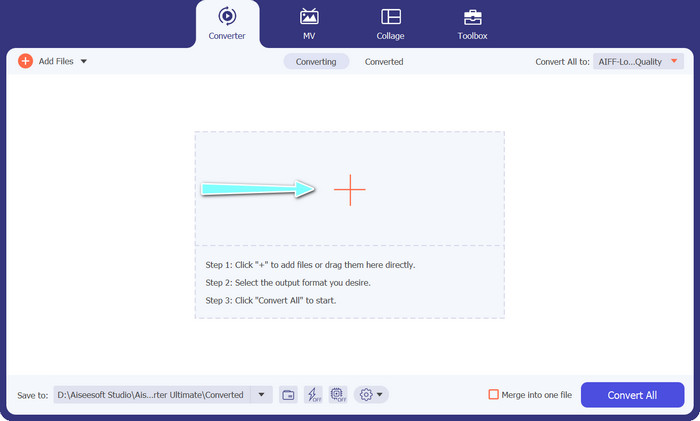
Schritt 2. Fügen Sie als Nächstes die Audiodatei hinzu, die Sie konvertieren möchten, indem Sie in der Hauptoberfläche auf die Schaltfläche mit dem Plus-Symbol klicken. Sobald sie hinzugefügt wurde, sehen Sie ein Miniaturbild jeder Datei in der Oberfläche.
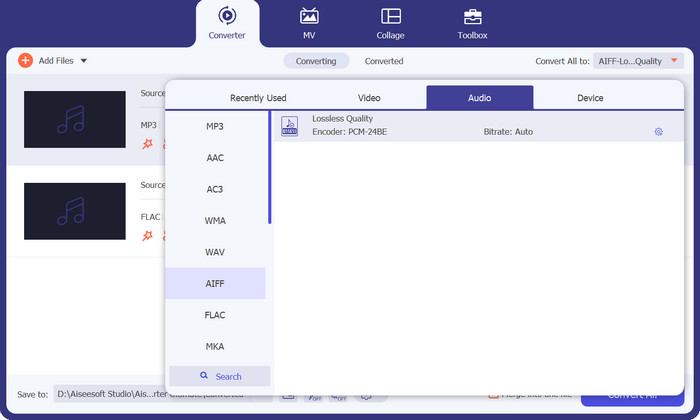
Schritt 3. Legen Sie das Ausgabeformat fest, indem Sie auf der rechten oberen Seite des Tools die Registerkarte Audio im Menü Profil auswählen. Wählen Sie je nach Richtung der Konvertierung entweder MP3 oder FLAC.
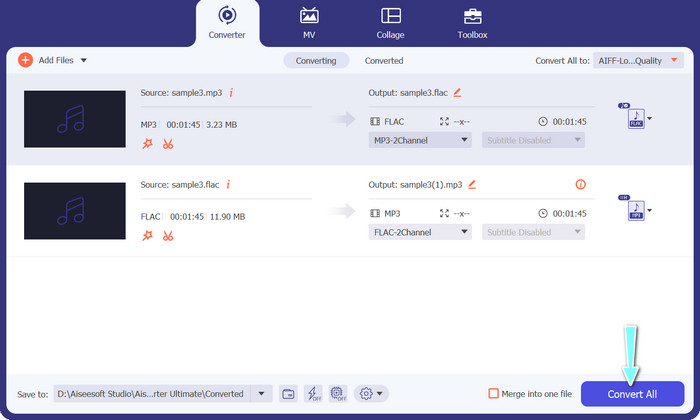
Schritt 4. Legen Sie den Ausgabeordner fest, in dem Sie die konvertierten Dateien speichern möchten, indem Sie unten in der Oberfläche den gewünschten Speicherort auswählen. Klicken Sie abschließend auf die Schaltfläche Alle konvertieren, um den Konvertierungsvorgang zu starten.
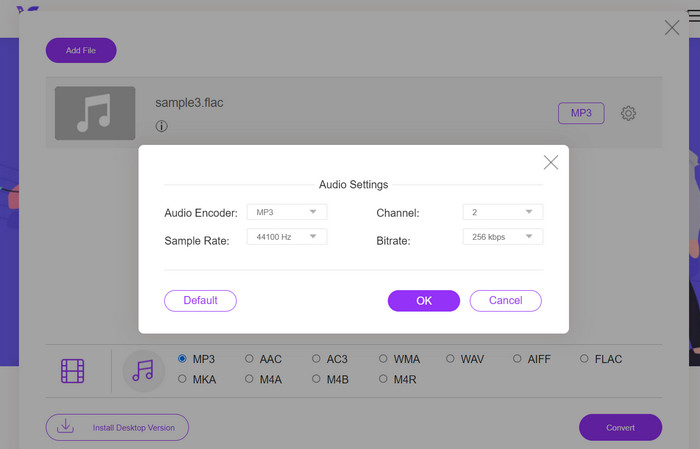
Wenn Sie ein kostenloses Online-Tool benötigen, um FLAC in MP3 zu konvertieren, sind Sie bei Free Video Converter Online genau richtig. Dieses praktische Programm ermöglicht es Nutzern, Video- und Audiodateien kostenlos zu konvertieren und bietet zudem die Möglichkeit, die Ausgabe-Einstellungen nach den eigenen Vorlieben anzupassen. Die Konvertierungsgeschwindigkeit ist ebenfalls zuverlässig, vorausgesetzt, Sie verfügen über eine Internetverbindung. Gehen Sie wie folgt vor, um zu beginnen:
Schritt 1. Starten Sie Ihren bevorzugten Webbrowser und rufen Sie die Website von Free Video Converter Online auf.
Schritt 2. Klicken Sie auf die Schaltfläche Dateien zum Konvertieren hinzufügen, um die FLAC-Datei hochzuladen, die Sie in MP3 umwandeln möchten.
Schritt 3. Wählen Sie MP3 als Ausgabeformat aus der Liste der verfügbaren Formate im Menü Audio-Format. Sie können außerdem die gewünschte Bitrate oder Ausgabequalität für die MP3-Datei festlegen.
Schritt 4. Klicken Sie auf die Schaltfläche Konvertieren, um den Konvertierungsvorgang zu starten.
Teil 5. Häufig gestellte Fragen zu FLAC vs. MP3
Was ist besser zwischen 16-Bit-FLAC und MP3 mit 320 Kbps?
Die Wahl zwischen 16 Bit FLAC und 320 kbps MP3 hängt von den persönlichen Vorlieben und dem Verwendungszweck der Audiodatei ab. Wenn Sie der Audioqualität Priorität einräumen und über genügend Speicherplatz verfügen, ist 16-Bit-FLAC möglicherweise die bessere Option. Wenn Sie eine kleinere Dateigröße benötigen, ohne zu viele Kompromisse bei der Audioqualität einzugehen, ist 320 kbps MP3 möglicherweise eine gute Wahl.
Sind FLAC-Dateien größer als MP3-Dateien?
Ja, FLAC-Dateien sind aufgrund ihrer verlustfreien Natur normalerweise größer als MP3-Dateien.
Unterstützen alle Mediaplayer FLAC?
Nein, nicht alle Mediaplayer unterstützen FLAC. Viele moderne Mediaplayer und Software unterstützen jedoch die FLAC-Wiedergabe, einschließlich VLC, Foobar2000 und Winamp.
Fazit
Die Wahl zwischen MP3 und FLAC hängt von Ihren persönlichen Vorlieben und Ihren konkreten Anforderungen ab. Daher ist ein Vergleich FLAC vs. MP3 unerlässlich für Ihre Entscheidungsfindung. Letztlich läuft die Entscheidung, welches Format Sie verwenden, auf Ihre Prioritäten in Bezug auf Klangqualität, Dateigröße und Kompatibilität hinaus.
-
 4 Beste Methoden zum einfachen Konvertieren von MOV in MP3 unter Windows und Mac
 Wenn Sie die MP3-Audiodateien aus MOV-Dateien extrahieren möchten, erfahren Sie mehr über die 4 effizientesten MOV-zu-MP3-Konverter, um die gewünschten Dateien aus dem Artikel zu erhalten.
-
 Die besten MP3-Konverter zum einfachen Umwandeln von Audiodateien in MP3
 Konvertieren Sie mit unseren benutzerfreundlichen Online- und Offline-MP3-Konvertern mühelos jedes Audioformat in MP3. Erhalten Sie mit nur wenigen Klicks hochwertige Ergebnisse.
-
 Top 3 FLAC-Metadaten-Editoren auf Mac und Windows [Aktualisiert 2023]
 Möchten Sie FLAC-Metadaten ändern? In diesem Fall müssen Sie diesen Artikel lesen, da wir ausreichende Kenntnisse über den neuesten FLAC-Metadaten-Editor verwenden können.
