


 Video Converter Ultimate
 Bildschirm recorder
 Videoreparatur
 Sicherer Download
M4A vs. MP3 Ausführliche Überprüfung und Vergleich zweier Audioformate
Aufgrund der Verbreitung digitaler Musik ist die Auswahl eines geeigneten Audioformats heute wichtiger denn je. Während M4A und MP3 weit verbreitet sind, gibt es wichtige Unterschiede zwischen den beiden. Während MP3 der De-facto-Standard für Musikdateien ist, wird M4A häufig für überlegene Audioqualität verwendet.
Im M4A vs. MP3-Vergleich betrachten wir die Feinheiten der Dateiformate M4A und MP3, damit Sie eine fundierte Entscheidung treffen können. Außerdem stellen wir eine umfassende Analyse der Unterschiede und Gemeinsamkeiten der beiden Dateitypen in Bezug auf Audioqualität, Kompatibilität, Dateigröße und mehr vor. Wenn Sie Musikliebhaber oder beruflich als Musiker tätig sind, sollten Sie weiterlesen, um herauszufinden, welches Format ideal für Sie ist.

Teil 1. M4A vs. MP3
Hier ist eine einfache Tabelle, die diese Formate in verschiedenen wichtigen Aspekten für eine fundierte Entscheidung vergleicht. Schauen Sie sich die folgende Tabelle an.
| M4A | MP3 | |
| Tonqualität | Hoch | Gut |
| Dateigröße | Groß | Klein |
| Kompatibilität | Begrenzt | Weitgehend kompatibel |
| Metadaten | Unterstützt | Begrenzt |
| DRM-Schutz | Ja | Nein |
| Beliebte Anwendungen | Musik, Hörbücher, Podcasts | Musik, Podcasts, Klingeltöne |
Teil 2. Einführung in M4A und MP3
Genug mit dem Kampf zwischen MP3 und M4A. Lassen Sie uns eine Weile innehalten und erfahren Sie mehr über diese Formate durch eine kurze Einführung in jedes von ihnen.
Einführung in M4A
Apples proprietäres digitales Audioformat ist MPEG-4 Audio (oder kurz M4A). Es ist ein großartiges Audioformat für Musik, Hörbücher und Podcasts, da es viele Bitraten und Abtastraten verarbeiten kann. M4A-Dateien können in iTunes, QuickTime und anderen Mediaplayern geöffnet werden, was sie ideal für Apple-Geräte macht.
Einführung in MP3
MP3, das für „MPEG-1 Audio Layer 3“ steht, ist ein digitales Audioformat, das aufgrund seiner weiten Verbreitung und der Komprimierung mit niedriger Bitrate zum Standard für komprimiertes Audio geworden ist. MP3-Dateien eignen sich aufgrund ihrer kompakten Größe im Vergleich zu anderen Audioformaten hervorragend für Musik, Podcasts und Klingeltöne. Sie können auf vielen verschiedenen Geräten gespielt und schnell und einfach aus dem Internet heruntergeladen werden. MP3-Dateien hingegen haben oft eine schlechtere Audioqualität als alternative Formate wie M4A.
Teil 3. Ist M4A besser als MP3?
M4A und MP3 haben unterschiedliche Stärken und Schwächen. M4A ist bekannt für seine hervorragende Klangqualität und wird von Musikliebhabern und Profis bevorzugt. MP3 hingegen hat eine kleinere Dateigröße und ist weitgehend kompatibel mit verschiedenen Geräten und Mediaplayern.
Die Wahl zwischen M4A und MP3 hängt davon ab, was Ihnen wichtiger ist: hohe Klangqualität oder kleinere Dateigröße und Kompatibilität.
Teil 4. Der Unterschied zwischen MP3 und M4A
Die beliebten digitalen Musikformate MP3 und M4A haben unterschiedliche Merkmale. Im Folgenden finden Sie eine detaillierte Erläuterung der Unterschiede zwischen MP3 und M4A:
Klangqualität: M4A ist für seine überlegene Klangqualität im Vergleich zu MP3 bekannt. M4A verwendet einen besseren Komprimierungsalgorithmus und unterstützt einen größeren Bereich an Bitraten und Abtastraten. M4A unterstützt außerdem verlustfreie Kompression, die die ursprüngliche Audioqualität bewahrt, während MP3 eine verlustbehaftete Kompression verwendet, die zwar die Dateigröße reduziert, aber auch die Tonqualität verringert.
Dateigröße: MP3-Dateien sind im Vergleich zu M4A-Dateien kleiner. Das liegt daran, dass MP3 einen effizienteren Komprimierungsalgorithmus verwendet, der die Dateigröße reduziert, ohne die Audioqualität wesentlich zu beeinträchtigen. M4A hingegen verwendet einen weniger effizienten Komprimierungsalgorithmus, was zu größeren Dateien, aber besserer Tonqualität führt.
Kompatibilität: MP3 gilt weithin als Industriestandard für digitale Audiodateien und ist mit einer Vielzahl von Geräten und Mediaplayern kompatibel, darunter Smartphones, Tablets und Computer. M4A hingegen ist weniger weit verbreitet kompatibel und wird in erster Linie auf Apple-Geräten und -Software wie iTunes und QuickTime verwendet.
Metadaten: M4A unterstützt eine größere Bandbreite an Metadaten als MP3. Das bedeutet, dass M4A-Dateien mehr Informationen über die Audiodatei speichern können, etwa Albumcover, Songtexte und Titelinformationen.
DRM-Schutz: M4A unterstützt Digital Rights Management (DRM)-Schutz, wodurch Rechteinhaber die Nutzung und Verbreitung ihrer Audiodateien kontrollieren können. MP3 hingegen unterstützt keinen DRM-Schutz.
Teil 5. Konvertieren von M4A in MP3 oder MP3 in M4A
Es ist nicht nur wichtig, diese beiden Audioformate zu vergleichen und zu überprüfen, sondern auch zu lernen, wie man von M4A in MP3 oder umgekehrt konvertiert. Hier sind einige der Programme, die Sie verwenden können:
Ob Sie online oder offline sind, Video Converter Ultimate ist ein großartiges Tool, mit dem Sie zwischen M4A und MP3 konvertieren können. Dieses Programm bietet zahlreiche Funktionen, die Sie nutzen können. Das Tool ermöglicht es, mehrere Dateien stapelweise zu konvertieren, sodass Sie eine ganze Sammlung von Musikdateien umwandeln können. Interessant ist, dass Sie Zugriff auf die Ausgabe-Einstellungen Ihrer Audiodateien erhalten. Finden Sie anhand der folgenden Schritte heraus, wie dieses Tool funktioniert.
Schritt 1. Starten Sie den Download, indem Sie auf eine der Kostenlos herunterladen-Schaltflächen klicken und anschließend den Anweisungen auf dem Bildschirm folgen. Im nächsten Schritt starten Sie die App und machen sich mit der einfachen Benutzeroberfläche vertraut.
Kostenloser DownloadFür Windows 7 oder höherSicherer Download
Kostenloser DownloadFür macOS 10.7 oder höherSicherer Download
Schritt 2. Klicken Sie auf der Hauptoberfläche auf die Schaltfläche Hinzufügen und suchen Sie dann die Audiodatei, die Sie konvertieren möchten. Eine Vorschau der hochgeladenen Datei wird kurz nach dem Upload in der Benutzeroberfläche angezeigt. Sie können mehrere M4A-Dateien gleichzeitig in MP3 umwandeln, indem Sie einen Ordner hochladen.
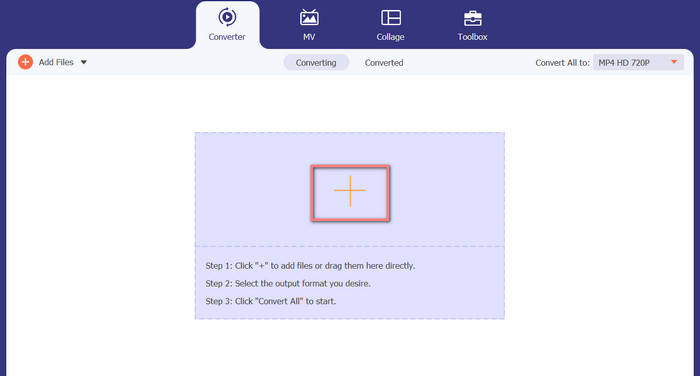
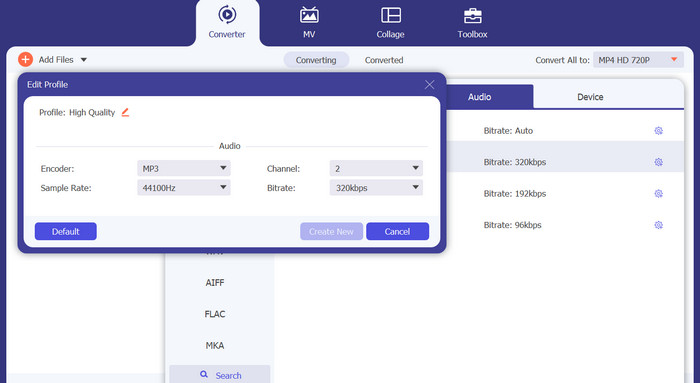
Schritt 3. Um das Ausgabeformat des Tools zu ändern, gehen Sie im Profil-Menü auf die Registerkarte Audio (oben rechts im Tool). Sie können eine M4A-Datei in eine MP3-Datei und umgekehrt umwandeln.
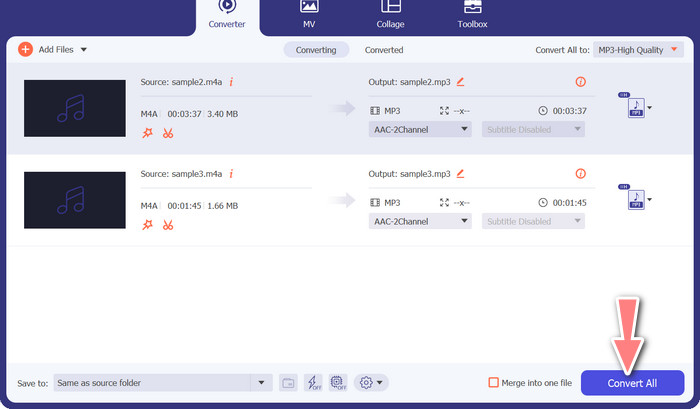
Schritt 4. Wählen Sie ganz unten auf dem Bildschirm den gewünschten Speicherort aus. Um mit der Konvertierung zu beginnen, wählen Sie Alles konvertieren.
Kostenloser Online-Videokonverter (Online)
Kein Platz mehr für eine weitere zu installierende Software? Die gute Nachricht ist, dass Sie mit einem webbasierten Konverter das Herunterladen von Programmen komplett vermeiden können. Das Online-Tool Free Video Converter Online ermöglicht die Konvertierung direkt im Browser. Es unterstützt außerdem eine große Vielfalt an Musik- und Videodateitypen. Darüber hinaus unterstützt dieses Webtool Stapelkonvertierungen. Außerdem kann der Benutzer die Einstellungen der finalen Audiodatei anpassen. Erfahren Sie, wie Sie MP3 online in M4A umwandeln.
Schritt 1. Öffnen Sie zunächst Ihren bevorzugten Webbrowser und rufen Sie die Website von Free Video Converter Online auf.
Schritt 2. Klicken Sie auf die Option Dateien zum Konvertieren hinzufügen, navigieren Sie anschließend zur M4A-Datei, die Sie konvertieren möchten, und wählen Sie sie aus.
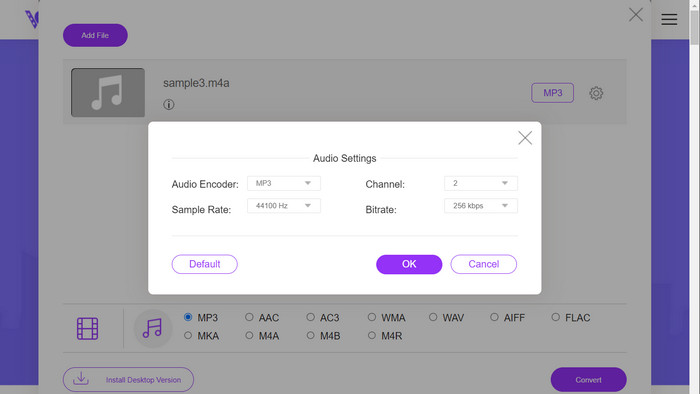
Schritt 3. Wählen Sie MP3 als Ausgabe-Dateityp aus dem Audio-Formatmenü. Es ist außerdem möglich, die Bitrate bzw. die Ausgabequalität der MP3-Datei anzupassen.
Schritt 4. Um den Konvertierungsprozess zu starten, klicken Sie auf die Schaltfläche Konvertieren. So gehen Sie vor, um M4A im Web in MP3 umzuwandeln.
Weiterführende Lektüre:
Anleitung zum Konvertieren von M4A in WAV [PC und Mac]
Die besten Tools, mit denen Sie MP3-Dateien stapelweise in M4R konvertieren können
Teil 6. FAQs zu M4A und MP3
Was ist MP3 vs. M4A in Bezug auf Metadaten?
M4A unterstützt eine breitere Palette von Metadaten als MP3, was bedeutet, dass M4A-Dateien mehr Informationen über das Audio speichern können.
Kann ich MP3- oder M4A-Dateien bearbeiten?
Sie können MP3- und M4A-Dateien mit verschiedenen Audiobearbeitungsprogrammen bearbeiten.
Was ist besser für Podcasts, MP3 oder M4A?
MP3 eignet sich aufgrund der geringeren Dateigröße und der größeren Kompatibilität besser für Podcasts.
Fazit
Ein Verständnis des Vergleichs MP3 vs. M4A kann Ihnen helfen, das beste digitale Audioformat auszuwählen. Ob Sie nun Musik streamen oder produzieren – die Wahl des richtigen Formats ist entscheidend, um die bestmögliche Audioqualität und Kompatibilität sicherzustellen.
-
 MP3 VS MP4: Was ist der Unterschied zwischen MP3 und MP4?
 MP3 oder MP4, was ist besser? Was ist der Unterschied zwischen MP3 und MP4? In diesem Artikel wird MP3 mit MP4 unter allen Aspekten verglichen, die Sie sich vorstellen können.
-
 M4A Player - Top 5 M4A Player für Android und Computer
 Wie spiele ich M4A-Dateien auf einem Android-Handy ab? Welcher Spieler kann M4A spielen? Dieser Beitrag enthält die 5 besten kostenlosen M4A-Player für Android, Mac und PC.
-
 4 beste Methoden zum Reparieren und Bearbeiten von MP3-Metadaten unter Windows und Mac
 Möchten Sie die Geheimnisse der einfachen Bearbeitung von MP3-Metadaten kennenlernen? Dieser Blog wird Ihnen verschiedene Techniken mit den verschiedenen Tools beibringen, auf die Sie leicht zugreifen können.
