


 Video Converter Ultimate
 Bildschirm recorder
 Videoreparatur
Die besten der besten Konverter, mit denen Sie 3GP online und offline in AVI konvertieren können
Das 3GP‑Format ist ein flexibles Format, mit dem Audio‑ und Videostreams über GSM auf Mobiltelefone der dritten Generation übertragen werden. Es passt zur 3G‑Konnektivität für eine schnellere Dateiübertragung. Dieses Format wurde am häufigsten auf älteren Handymodellen verwendet, weil es vielseitig einsetzbar ist und sich schnell übertragen lässt. Heutzutage können 3GP‑Dateien jedoch auf vielen lokalen Mediaplayern nicht mehr abgespielt werden, da dieses Format es neueren Playern nicht erlaubt, seine Struktur zu erkennen. Die beste Möglichkeit, alle 3GP‑Dateien auf Ihrem Handy oder Desktop anzusehen, ist daher die Konvertierung. Anstatt also im Internet nach dem besten Konverter zu suchen, haben wir vier Konverter für Sie zusammengestellt, aus denen Sie wählen können. Die unten genannten Tools sind hervorragend geeignet und können 3GP ohne Qualitätsverlust in das Format 3GP in AVI konvertieren.

Teil 1. Konvertieren Sie 3GP offline in AVI mit dem Ultimate Converter
FVC Video Converter Ultimate
Wenn Sie sich beim Konvertieren Ihrer 3GP‑Dateien keine große Mühe machen wollen, empfehlen wir Ihnen dringend, den FVC Video Converter Ultimate zu verwenden. Diese Software gehört zu den besten Optionen für die Dateikonvertierung und kann Ihre Dateien innerhalb weniger Sekunden sehr schnell umwandeln. Außerdem teilen viele Nutzerinnen und Nutzer, die das Programm verwenden, dieselbe Meinung. Zusammenfassend lässt sich sagen, dass sie klar bestätigen, dass dieses Tool ihnen geholfen hat, ihr Konvertierungsproblem im Handumdrehen zu lösen.
Weitere Erklärung: Dieses Tool ist nicht nur das Beste zum Konvertieren der Datei; Es hat auch die fortschrittlichsten Funktionen, die Sie ausprobieren möchten. Beispiele sind Editor, GIF-Ersteller, Lautstärkeregler, Synchronisieren von Audio und Video, Umkehren und mehr. Wenn Sie dieses Tool kaufen, erhalten Sie alle genannten Tools früher, und es gibt noch viel mehr zu entdecken. Lassen Sie uns nun versuchen, Schritt für Schritt 3GP in AVI auf Mac und PC zu konvertieren, ohne an Qualität zu verlieren.
Schritt 1. Klicken Sie auf die Download‑Schaltfläche und wählen Sie aus, ob Sie PC‑ oder Mac‑Nutzer sind, und installieren Sie das Programm anschließend.
Gratis DownloadFür Windows 7 oder neuerSicherer Download
Gratis DownloadFür MacOS 10.7 oder neuerSicherer Download
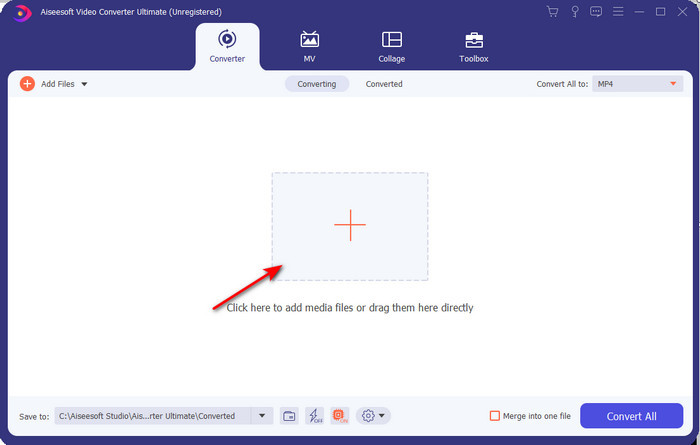
Schritt 2. Starten Sie das Tool, klicken Sie auf das +‑Symbol in der Mitte der Oberfläche, wählen Sie die .3gp‑Datei in Ihrem Ordner aus und klicken Sie auf Öffnen. Sie können hier auch eine Stapelkonvertierung durchführen, falls gewünscht: Klicken Sie dazu auf Dateien hinzufügen, um weitere Dateien hinzuzufügen.
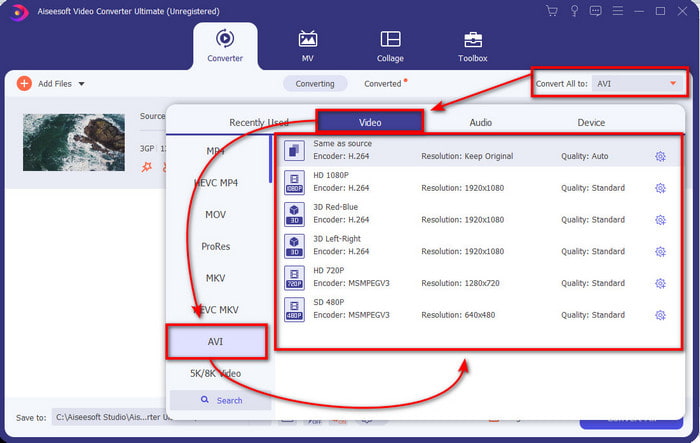
Schritt 3. Um 3GP zu ändern, klicken Sie auf die Option Alle konvertieren in und wählen Sie das Format AVI unter der Kategorie Video.
Schritt 4. Um den Konvertierungsvorgang zu starten, klicken Sie auf Alle konvertieren; der Prozess zum Konvertieren Ihrer 3GP‑Dateien beginnt nun.

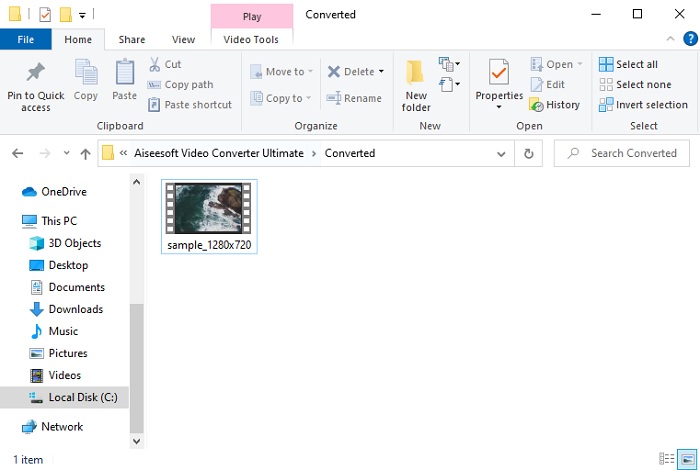
Schritt 5. Nach der Konvertierung wird ein Ordner mit der konvertierten 3GP‑Datei auf Ihrem Bildschirm angezeigt. Klicken Sie auf die neu erstellte AVI‑Datei, um sie anzusehen und bei Bedarf später zu bearbeiten.
Teil 2. 3 verfügbare Online-Konverter zum Konvertieren von 3GP in AVI
1. Kostenloser FVC-Videokonverter online

Wir stellen sicher, dass dieses Tool in unserer Liste der beste 3GP‑zu‑AVI‑Konverter online ist, und zwar der FVC Free Video Converter Online. Alle Funktionen, die Sie sich von einem Online‑Konverter wünschen, sind hier vorhanden. In allen Aspekten, die wir nennen, handelt es sich um den besten Online‑Konverter. Wenn Sie zum Beispiel einen effizienten Online‑Konverter, einen sicheren Konvertierungsprozess und keinerlei Werbung wünschen, dann ist dies das richtige Webtool für Sie. Obwohl das Webtool großartig aussieht und einwandfrei funktioniert, unterstützt es nur eine mittlere Anzahl an Formaten. Erweiterte Funktionen, die Sie möglicherweise in FVC Video Converter Ultimate finden, sind hier nicht verfügbar. Der Vorteil gegenüber der Softwareversion ist jedoch, dass die Nutzung kostenlos ist. Ohne weitere Verzögerung gehen wir nun zu den Schritten über, mit denen Sie Ihre Datei in eine neue Version konvertieren können.
Schritt 1. Klicken Sie auf diesen Link, um zur Website zu gelangen.
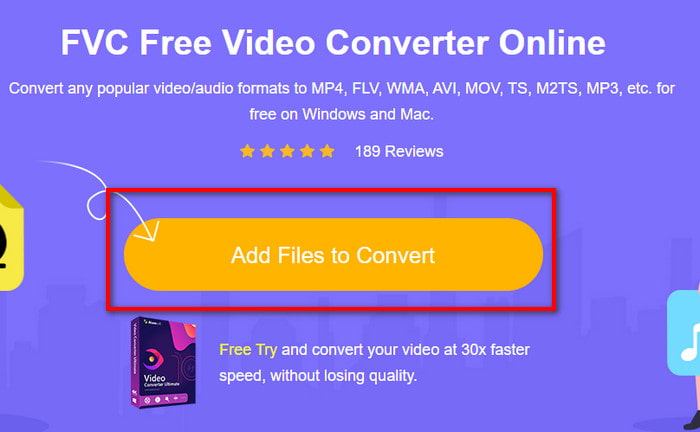
Schritt 2. Drücken Sie Dateien zum Konvertieren hinzufügen, um das Online‑Tool zu starten; es öffnet sich ein Ordnerfenster, in dem Sie nach der .3gp‑Datei suchen. Wenn Sie dieses Tool zum ersten Mal verwenden, müssen Sie zunächst das Startprogramm herunterladen, indem Sie auf Dateien zum Konvertieren hinzufügen klicken und dann erneut darauf klicken, um das Tool zu starten.
Schritt 3. Nachdem Sie die Datei ausgewählt haben, wählen Sie im unteren Bereich das AVI‑Format aus.
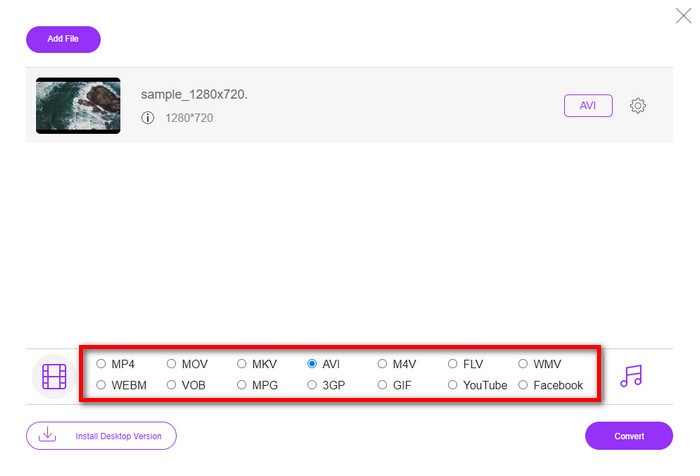
Schritt 4. Wenn Sie bereit sind, die Datei zu konvertieren, klicken Sie auf Konvertieren.
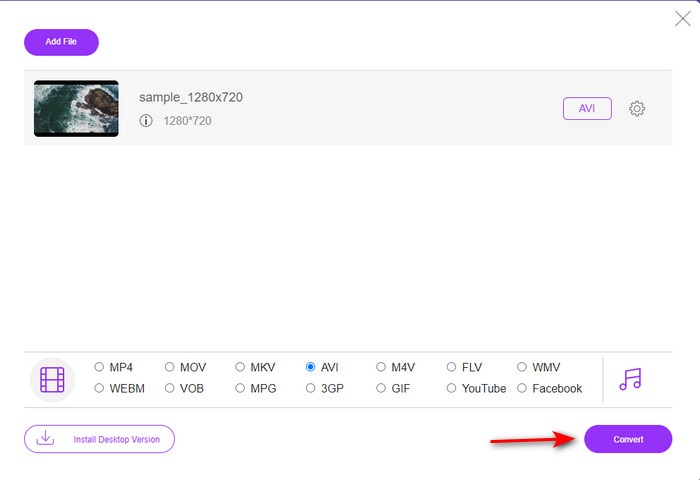
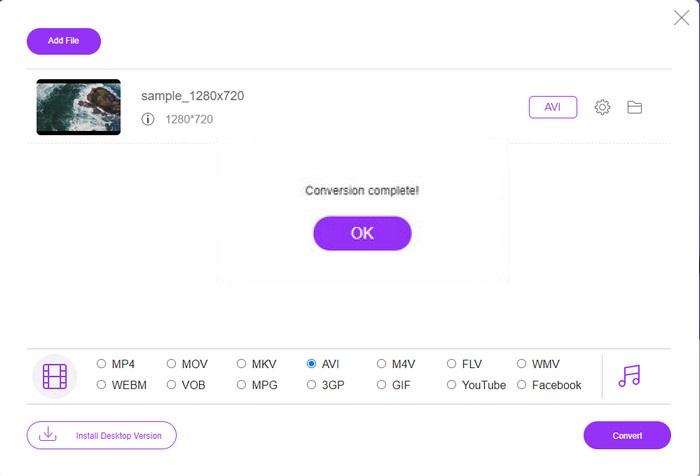
Schritt 5. Nach der Konvertierung wird erneut ein Ordner angezeigt, jetzt allerdings mit der Datei, die Sie zuvor konvertiert haben.
2. Fconvert.com
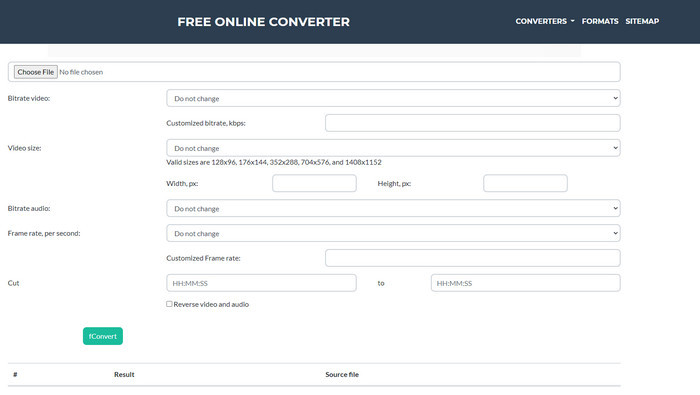
In Sachen Dateikonvertierung muss Fconvert.com in der Liste stehen, denn dieses Webtool ist einer der fantastischen Konverter, die Sie kostenlos nutzen können. Dieser Konverter kann nahezu alle Formate umwandeln, die Sie kennen, und vermutlich auch eines Ihrer Formate. Es gibt jedoch ein Problem bei diesem Tool, und das sind die Werbeanzeigen. Denn jedes Mal, wenn Sie auf der Website etwas anklicken, erscheint zunächst eine Anzeige, bevor das eigentlich Gewählte ausgeführt wird. Obwohl die Werbung nervig ist, wirkt diese Anwendung dennoch aufgeräumt und liefert sehr gute Ergebnisse bei der Formatkonvertierung. Wenn Sie erleben möchten, wie gut dieses Tool ist, folgen Sie den nachstehenden Schritten und lernen Sie, wie Sie 3GP kostenlos in AVI konvertieren.
Schritt 1. Suchen Sie in Ihrem Browser die Hauptseite dieses Tools.
Schritt 2. Klicken Sie unter video auf AVI, dann auf Datei auswählen, lokalisieren Sie die .3gp‑Datei, scrollen Sie nach unten und klicken Sie auf fConvert.
Schritt 3. Scrollen Sie nach unten, bis Sie das Feld Result sehen, und klicken Sie auf die Datei, um sie herunterzuladen.
3. Anyconv
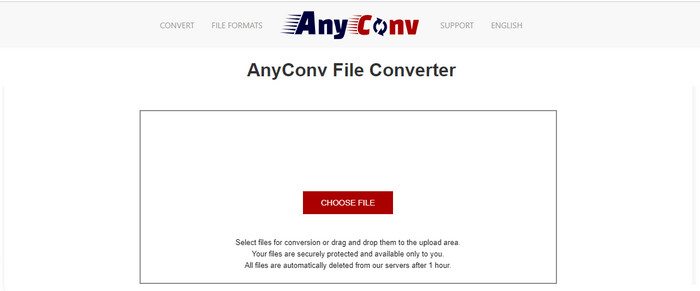
Ein weiteres Tool, das sich auf die Konvertierung von Formaten spezialisiert hat, ist Anyconv. Dieses Webtool unterscheidet sich deutlich von Fconvert.com, da es deutlich besser und schneller ist. Außerdem hat dieses Tool weniger Werbung als das zuvor genannte. Obwohl es weniger Anzeigen gibt, sind diese größer als bei Fconvert.com, doch in puncto Leistung schneidet dieses Tool sehr gut ab. Testen wir dieses Tool also, um ohne weitere Verzögerung zu sehen, ob es 3GP kostenlos in AVI konvertieren kann.
Schritt 1. Öffnen Sie Ihre Suchmaschine und rufen Sie die Anyconv‑Website auf.
Schritt 2. Drücken Sie Datei auswählen; es öffnet sich ein Ordnerfenster, fügen Sie die .3gp‑Datei in das Webtool ein und fahren Sie fort. Um das Format zu ändern, müssen Sie auf die Drop‑down‑Schaltfläche klicken und AVI auswählen. Um den Konvertierungsvorgang zu starten, klicken Sie auf Konvertieren.
Schritt 3. Warten Sie, bis der Vorgang beendet ist, und klicken Sie dann auf Download AVI, um die konvertierte Datei herunterzuladen.
Teil 3. Welches Format ist das beste; 3GP oder AVI
Wenn Sie ein Telefon der 3. Generation verwenden und Videos in hoher Qualität speichern und in der 3. Telefongeneration schneller übertragen möchten, dann ist 3GP das Format für den Job. Wenn Sie jedoch versuchen, das AVI-Format an Telefone der 3. Generation zu senden, wird die Datei nicht geöffnet, da dieses Format nicht unterstützt wird. Aber im heutigen Fall ist AVI viel besser. Es hat im Vergleich zu 3GP bereits viel Unterstützung von allen Mediaplayern und Redakteuren erhalten. Obwohl das AVI-Format heute die beste Wahl ist, ist die Dateigröße im Vergleich zu 3GP enorm, und wenn Sie es auf Ihrem Telefon speichern würden, würde es viel Speicherplatz beanspruchen. Darüber hinaus sind beide Formate großartig, aber sie haben unterschiedliche Zwecke und Verwendungszwecke.
Teil 4. FAQs zu 3GP und AVI
Kann ich FFmpeg verwenden, um 3GP in AVI zu konvertieren?
Sie können FFmpeg verwenden, um Ihre 3GP‑Datei zu konvertieren; es ist jedoch etwas kompliziert, aber machbar, wenn Sie sich Zeit nehmen. Der erste Schritt besteht darin, die ZIP‑Datei von FFmpeg auf Ihren Computer herunterzuladen und zu entpacken. Im zweiten Schritt öffnen Sie Ihre Eingabeaufforderung (CMD), um mit dem Tool zu arbeiten. Navigieren Sie dann mit der Kommandozeile zu Ihrer Datei, kopieren Sie den Befehl ffmpeg -i input.3gp -vn -ar 44100 -ac 2 -b:a 192k output.avi, fügen Sie ihn in CMD ein und drücken Sie die Eingabetaste, um den Konvertierungsvorgang zu starten.
Kann 3GP auf Telefonen der 4. Generation gespielt werden?
Dieses Format wird auf Handys der dritten Generation verwendet, und auf manchen Geräten der vierten Generation können Sie Videos im 3GP‑Format noch abspielen, aber nicht auf allen. Denn, wie bereits erwähnt, ist 3GP für Geräte der dritten und nicht für alle Geräte der vierten Generation gedacht. Alternativ können Sie auf professionelle 3GP‑Player zurückgreifen, um Ihre Videos zu genießen.
Welches Format ist besser: 3GP oder MP4?
Was Qualität und Unterstützung durch Geräte und Programme betrifft, ist MP4 in diesem Bereich deutlich besser. 3GP ist jedoch wesentlich kleiner und eignet sich besser für 3G‑Netzwerke, um dieses Dateiformat schneller zu übertragen. Möchten Sie MP4 in 3GP konvertieren oder umgekehrt, klicken Sie hier, um weitere Details zu erfahren.
Fazit
Jede Reise muss zu Ende gehen, und jetzt können Sie mit Hilfe der oben genannten Tools ganz einfach 3GP in AVI konvertieren. Darüber hinaus funktionieren alle oben vorgestellten Tools, einschließlich FFmpeg, hervorragend. Dennoch fällt die beste Wahl immer auf den FVC Video Converter Ultimate. Dieses Tool übertrifft alle Online-Konverter, die in der Konvertierung möglich sind, und viele weitere Aspekte. Wenn Sie also jetzt die Software erhalten möchten, klicken Sie auf die Download-Schaltfläche und führen Sie die Konvertierung schnell durch.
-
 [Online & kostenlos] 3 Methoden zum problemlosen Konvertieren von MP4 in 3GP
 Möchten Sie MP4 schnell und einfach in 3GP konvertieren? Hier werden wir 3 MP4 zu 3GP Konverter teilen, um MP4 zu 3GP für das Spielen auf verschiedenen Handys zu ändern.
-
 Top 3 kostenlose Möglichkeiten zum Konvertieren von FLV in 3GP unter Windows / Mac
 Kann keine FLV-Dateien auf Smartphone oder Tablet öffnen? Mach dir keine Sorgen! Hier teilen wir drei Methoden zum Konvertieren von FLV in 3GP ohne Qualitätsverlust für das Spielen auf dem Handy.
-
 Ausgezeichnete Wahl zum Konvertieren von MKV in ein AVI-Format
 Meistern Sie, wie Sie MKV-Videos mit einfachen Schritten konvertieren, die exklusiv für Sie bereitgestellt werden. Willst du wissen wie? Klicken Sie dann auf diesen Link, um mehr zu erfahren.
