


 Video Converter Ultimate
 Bildschirm recorder
 Videoreparatur
Umfassende Anleitung zum Konvertieren von AMV in WMV mit Schritten [Gelöst]
Möchten Sie AMV-Videodateien unter Windows genießen oder sie fürs Online‑Streaming nutzen? Dann sollten Sie diesen Artikel lesen, um zu erfahren, wie Sie AMV in WMV konvertieren, die Qualität verbessern und die Dateien kompatibel machen. In dieser Übersicht lernen Sie die Software kennen, mit der Sie Ihre AMV‑Dateien konvertieren können. Also, ohne weitere Umschweife: Lehnen Sie sich zurück und erfahren Sie alles Wichtige über das AMV‑ und das WMV‑Format.

Teil 1. Konvertieren Sie AMV in WMV mit FVC Video Converter Ultimate
FVC Video Converter Ultimate ist unsere erste Wahl für die Konvertierung von AMV in WMV, da er es ermöglicht, Medien- und gerätespezifische Formate zu transkodieren. Außerdem ist er in der Lage, nicht nur eine, zwei oder drei Dateien gleichzeitig zu konvertieren, sondern noch mehr. Darüber hinaus ist dieser Konverter darauf ausgerichtet, seinen Nutzern bei der Umwandlung ein erstklassiges Ergebnis zu liefern. Möchten Sie wissen, warum? Dann lesen Sie sich die folgenden Hauptfunktionen durch.

FVC Video Converter Ultimate
4.355.888+ Downloads- Es kann Ihnen bei Ihrem Konvertierungsproblem von AMV in WMV, AVI, FLV, SWF, MP4, AVI helfen.
- Es unterstützt eine ultraschnelle Konvertierung, um das Format noch schneller zu konvertieren.
- Bearbeiten Sie Ihre AMV-Videos mit den einzigartigen Bearbeitungsfunktionen, die dieses Tool bietet.
- Helfen Sie mit wenigen Klicks, ein Experte zu sein.
- Es unterstützt alle Plattformen wie Windows und macOS.
Gratis DownloadFür Windows 7 oder neuerSicherer Download
Gratis DownloadFür MacOS 10.7 oder neuerSicherer Download
Sind Sie erstaunt über die Funktionen des Tools? Wenn ja, lesen Sie das Verfahren zum Konvertieren von AMV-Dateien und kopieren Sie die Schritte, um die Konvertierung erfolgreich durchzuführen.
Schritt 1. Laden Sie den FVC Video Converter Ultimate auf Ihr Laufwerk herunter, indem Sie auf die unten angegebene Download‑Schaltfläche klicken. Fahren Sie fort, indem Sie auf das Installationsprogramm klicken, um es zu installieren, und drücken Sie anschließend auf Jetzt starten, um das Tool zu öffnen.
Gratis DownloadFür Windows 7 oder neuerSicherer Download
Gratis DownloadFür MacOS 10.7 oder neuerSicherer Download
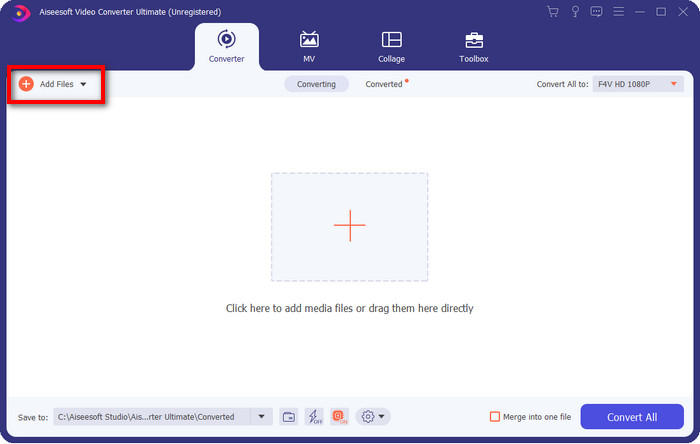
Schritt 2. Nachdem Sie die Software gestartet haben, können Sie eine oder mehrere Dateien hinzufügen, indem Sie auf die Option Dateien hinzufügen klicken. Der Datei-Explorer Ihres Computers wird angezeigt; wählen Sie die AMV‑Datei aus und drücken Sie auf Öffnen, um sie hochzuladen.
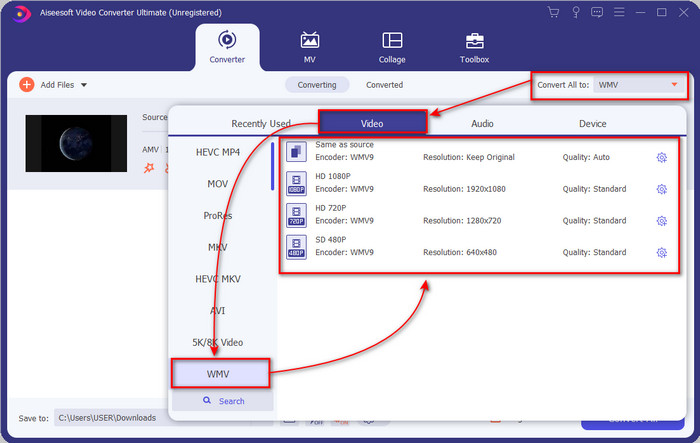
Schritt 3. Wenn Sie auf die Option Alle konvertieren in klicken, erscheint eine Formatliste. Suchen Sie das Format WMV und wählen Sie die gewünschte Auflösung, den Encoder und die Qualität aus.
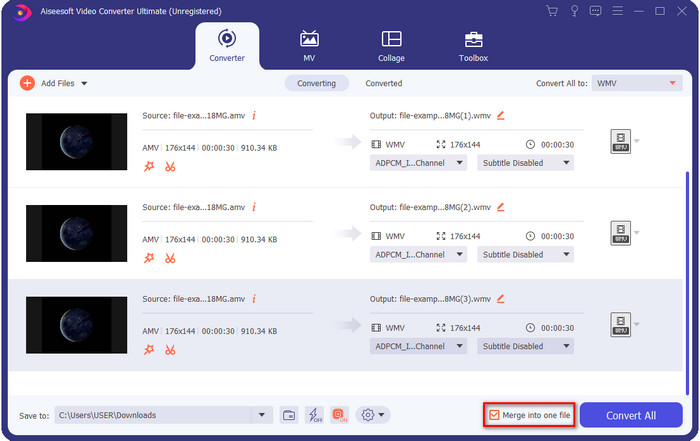
Optional. Möchten Sie Ihre AMV‑Dateien zu einer einzigen WMV‑Datei zusammenfassen? Dann sollten Sie das Kästchen mit der Aufschrift „Zu einer Datei zusammenführen“ aktivieren.
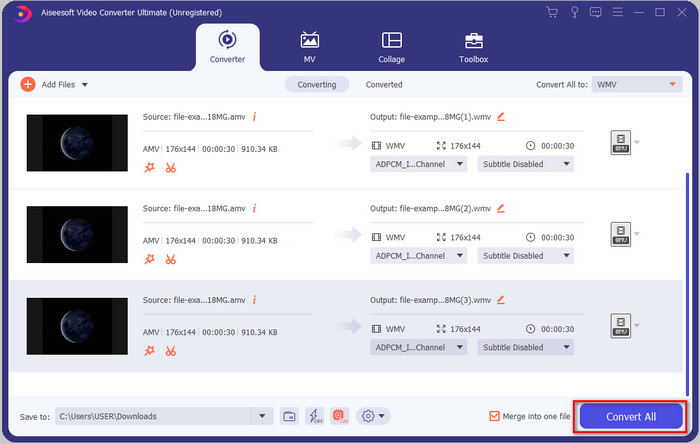
Schritt 4. Drücken Sie auf Alle konvertieren, um den Konvertierungsvorgang zu starten. Nach Abschluss des Vorgangs wird ein Ordner auf Ihrem Bildschirm angezeigt, der die konvertierte WMV‑Datei enthält.
Teil 2. Konvertieren Sie AMV in WMV Online
Möchten Sie keinen Offline‑Konverter herunterladen, weil Sie nicht genügend Speicherplatz haben? Dann verwenden Sie den FVC Free Online Video Converter. Sie müssen in diesem Fall nicht das komplette Programm herunterladen, sondern nur ein kleines Startprogramm, das Ihren Speicher kaum belastet. Außerdem kann dieser Web‑Konverter AMV in WMV umwandeln und dabei die Auflösung anpassen. Die Dauer der Konvertierung hängt jedoch von der Geschwindigkeit Ihrer Internetverbindung ab. Haben Sie Internetzugang? Dann sollten Sie dieses Tool ausprobieren und eine Online‑Konvertierung durchführen.
Schritt 1. Klicken Sie auf diesen Link, um die Hauptseite des Konverters zu öffnen.
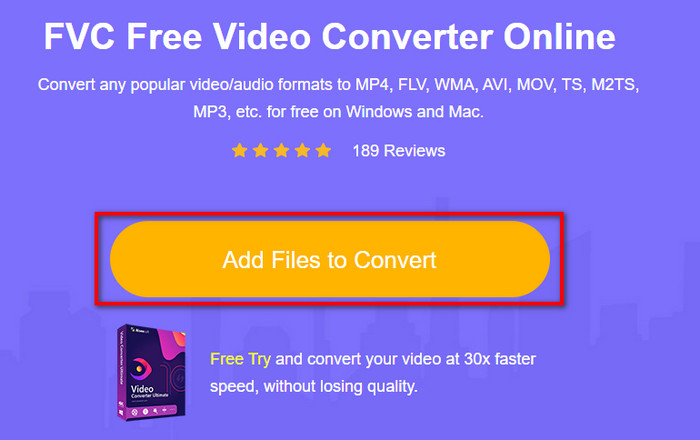
Schritt 2. Wenn Sie auf Dateien zum Konvertieren hinzufügen klicken, öffnet sich ein Ordner, in dem Sie die AMV‑Datei auswählen können; drücken Sie anschließend auf Öffnen.
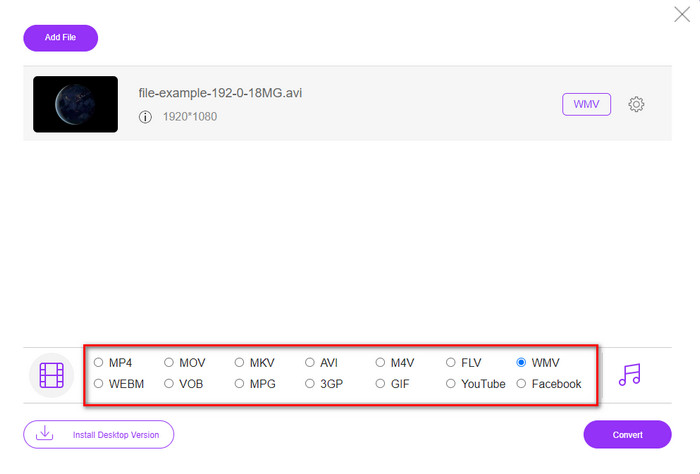
Schritt 3. Wählen Sie das Format WMV, das auf dem Bildschirm angezeigt wird.
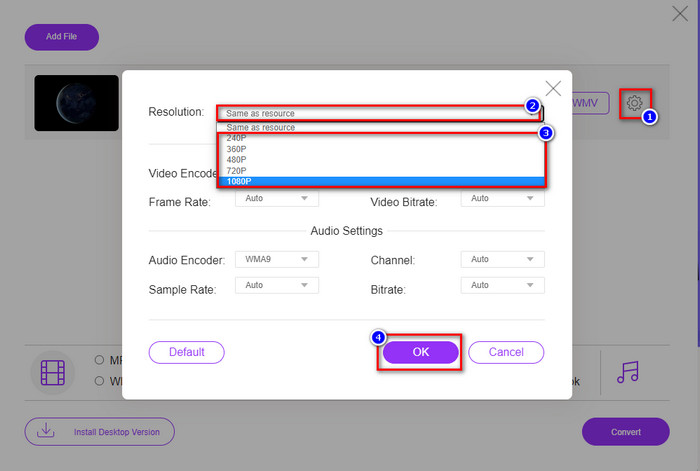
Optional. Wie bereits erwähnt, können Sie hier die Auflösung anpassen. Klicken Sie dazu auf die Zahnradschaltfläche, um die Auflösung zu ändern. Klicken Sie oben auf die Dropdown-Schaltfläche; es erscheint eine Liste mit Auflösungen. Wählen Sie eine aus und drücken Sie auf OK, um fortzufahren.
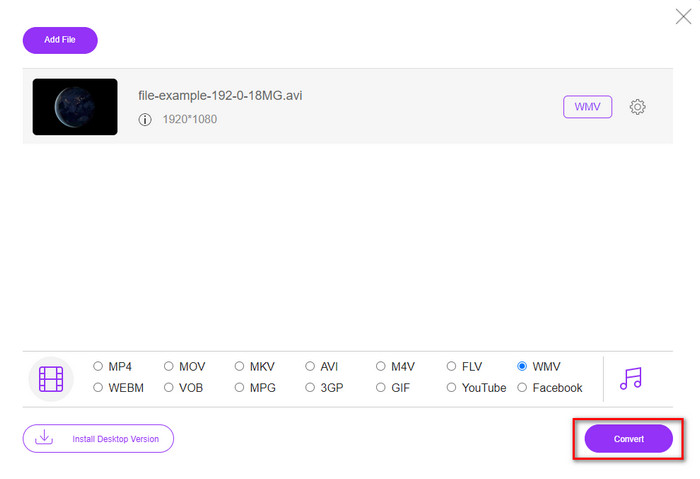
Schritt 4. Wenn Sie nun mit der Konvertierung beginnen möchten, klicken Sie auf die Schaltfläche Konvertieren, und der Vorgang startet.
Teil 3. Was ist der Unterschied zwischen AMV und WMV
Zuallererst wurden diese beiden Mediencontainer aufgrund ihrer einzigartigen Fähigkeiten als Format populär. Aber heute werden wir die Vor- und Nachteile des Formats selbst untersuchen. Darüber hinaus werden wir drei Aspekte spezifizieren, indem wir es zu einer Frage machen, mehr über AMV und WMV zu erfahren.
Welches Format hat eine bessere Medienauflösung?
Zwischen den beiden Formaten hat das WMV zweifellos eine bessere Qualität. Eine WMV-Datei kann eine Videoauflösung von bis zu 300.000 Pixel für eine detailliertere visuelle Ausgabe speichern und streamen. Sie können die Rate jedoch auf eine Bildschirmauflösung von 528 x 576 einstellen. Und für AMV ist die Qualität, die es enthalten kann, 96 x 96 bis 320 x 240, was im Vergleich zur niedrigen Auflösung von WMV ziemlich niedrig ist. Ein Grund, warum AMV eine kleinere Auflösung hat, ist, dass es auf den Bildschirm des chinesischen Mediaplayers passen muss.
Welches Format hat eine kleinere Dateigröße?
Dieser Sieg wird mit dem AMV einhergehen, weil dieses Format superkomprimiert ist. Obwohl WMV einen Kompressor hat, ist die Größe von AMV immer noch wirtschaftlicher, besonders auf Ihrem Computerlaufwerk, als die von WMV.
Welches Format ist kompatibler?
Betrachtet man die Kompatibilität, lassen sich unterschiedliche Stärken feststellen, denn WMV ist in erster Linie für Windows‑Programme gedacht. Wenn Sie Mac‑Nutzer sind, können Sie dieses Format nicht einfach in QuickTime abspielen oder in iMovie bearbeiten. Stattdessen müssen Sie WMV in MOV konvertieren, um es kompatibel zu machen. AMV hingegen wird typischerweise auf tragbaren chinesischen Mediaplayern verwendet. Heutzutage können Sie jedoch auch einen anderen portablen Mediaplayer nutzen, anstatt extra einen AMV‑Player zu kaufen. Dennoch ist es mühsam, einen AMV‑Mediaplayer zu finden, da nur wenige Player dieses Format und den zugehörigen Encoder unterstützen. Man kann sagen, dass WMV deutlich breiter kompatibel ist als AMV, insbesondere wenn wir Dateien auf Windows übertragen.
Und jetzt, da wir den Grund kennen, ist in diesem Fall eine Konvertierung der Datei in ein neues Format erforderlich. Aus diesem Grund müssen Sie lernen, wie man AMV in WMV konvertiert, um die Mediendatei mit Windows-Software kompatibel zu machen.
Teil 4. Häufig gestellte Fragen zur AMV- und WMV-Konvertierung
Wie kann ich mein AMV in MOV umwandeln?
Im Internet gibt es viele Techniken und Methoden, die wir finden und ausprobieren können, wenn wir danach suchen. Es ist jedoch schwierig zu entscheiden, welches Tool sich am besten eignet, um AMV in MOV zu konvertieren. Um es zu vereinfachen: Klicken Sie auf diesen Link und erfahren Sie wie man AMV in MOV umwandelt und so mit macOS kompatibel macht.
Kann ich einen VLC Media Player verwenden, um AMV anzusehen und abzuspielen?
Ja, Sie können den VLC‑Mediaplayer auf Ihrem Desktop installieren, um Ihre AMV‑Dateien abzuspielen, ohne zusätzliche Codecs herunterladen zu müssen. Wenn Sie jedoch mehr über VLC und seine Alternativen wissen möchten, lesen Sie diesen Artikel, indem Sie auf diesen Link klicken.
Warum muss ich AMV komprimieren?
Wir komprimieren unsere Mediendateien und AMV‑Dateien, weil wir Speicherplatz auf unserer Festplatte freigeben müssen. Möchten Sie lernen, wie man AMV‑Dateien komprimiert? Dann klicken Sie auf diesen Link.
Fazit
Diese beiden Lösungen bieten hervorragende Leistung, um Ihre Konvertierung von AMV zu WMV einfach und erfolgreich zu gestalten. Darüber hinaus sind dies die besten Lösungen, die wir im Internet finden können. Jetzt liegt es in Ihrer Hand zu wählen, welchen Konverter Sie verwenden, um Ihre AMV-Datei in WMV zu konvertieren. Um erfolgreich zu sein, müssen Sie die oben bereitgestellten FVC-Tools verwenden.
-
 Beste Methode zur Konvertierung von AMV in AVI [Genehmigt]
 Fällt es Ihnen schwer, Ihre Videodatei im AMV-Format in AVI zu konvertieren? Hier sind einige Tipps, die Sie nur in diesem Artikel finden.
-
 [Bewährt] 2 Möglichkeiten zur Offline- und Online-Konvertierung von AMV in FLV
 Haben Sie jemals darüber nachgedacht, einen Konverter auszuprobieren, um Ihre AMV-Dateien in das FLV-Dateiformat zu konvertieren. Um Ihr Problem beim Ansehen eines AMV-Videos zu lösen, lesen Sie diesen Artikel, um die geeigneten Konverter zu kennen, die Sie verwenden sollten.
-
 Kostenlos | 3 beste Methoden, um MP4 in WMV zu konvertieren, ohne an Qualität zu verlieren
 In diesem Beitrag erfahren Sie, wie Sie MP4-Videos unter Mac oder Windows in das WMV-Format konvertieren. Wir bieten Ihnen auch verschiedene Optionen an, darunter Desktop-Software und webbasierte Online-Konverter. Sind Sie bereit, die besten Konvertierungswerkzeuge für MP4 in WMV zu kennen?
