


 Video Converter Ultimate
 Bildschirm recorder
 Videoreparatur
4 einfachste Möglichkeiten zum Konvertieren von F4V-Dateien in das AVI-Mediendateiformat
Macromedia hat F4V eingeführt und später von Adobe entwickelt, um mit der modernen, hochwertigen Videospeicherung zu konkurrieren. Außerdem wird es als Ersatzformat für FLV erstellt, da FLV eine Einschränkung hat. Eine weitere Erklärung ist, dass die F4V-Datei das ISO-Basismediendateiformat mit einem H.264-Codec verwendet, um die Dateigröße zu verringern. Obwohl das Format eine qualitativ hochwertige Ausgabe enthält, weist das F4V eine geringere Kompatibilität auf als das andere Format. Und nicht nur das, dieses Format wurde auch auslaufen, weil Adobe Flash Player bereits in den Ruhestand gegangen ist.
Wenn Sie also dasselbe Problem wie andere haben, weil ihre .f4v‑Dateien auf dem Media Player nicht abgespielt werden können, lesen Sie einfach weiter. Wir stellen Ihnen verschiedene Tools vor, mit denen Sie nicht abspielbare .f4v‑Dateien abspielen können, indem Sie das Format in AVI konvertieren. Und nun lassen Sie uns fortfahren und sehen, wie Sie das Format F4V in AVI konvertieren können – mit den verfügbaren Online‑ und Offline‑Tools.

Teil 1. Erfahren Sie, wie Sie mit dem phänomenalen F4V-zu-AVI-Konverter F4V in AVI konvertieren
Wenn Sie nach dem besten Konverter suchen, der Ihnen bei Ihrem Problem hilft, dann ist FVC Video Converter Ultimate genau das richtige Hilfsmittel. Wir haben das Tool selbst getestet und einige Kommentare gelesen; „Ultimate“ ist nicht nur ein Name, sondern auch die Leistung und die Funktionen der Software sind wirklich ultimativ. Außerdem gehört zu den beeindruckendsten Funktionen dieses Tools die schnelle Konvertierung mit Hardwarebeschleunigung, sodass Nutzer, die diese Software verwenden, nicht lange warten müssen.
Wenn Sie außerdem GIFs erstellen, Videos beschleunigen oder verlangsamen, rückwärts abspielen oder den Ton verstärken möchten usw. – dieses Tool bietet erweiterte Funktionen. Allerdings müssen Sie es erst kaufen, bevor Sie es nutzen können. Keine Sorge, Sie werden dafür nicht mehr als hundert Dollar ausgeben. Wenn Sie sich also noch in der Entscheidungsphase befinden, ob Sie dieses Tool erwerben sollen, lesen Sie die folgenden Schritte durch und konvertieren Sie die F4V‑Datei in AVI, indem Sie diese Anleitung befolgen.
Schritt 1. Bevor Sie dieses leistungsstarke Tool verwenden können, müssen Sie es zuerst auf Ihrem Desktop herunterladen. Installieren Sie es anschließend und führen Sie die Einrichtung schnell durch; klicken Sie auf Jetzt starten, um das Programm zu öffnen.
Gratis DownloadFür Windows 7 oder neuerSicherer Download
Gratis DownloadFür MacOS 10.7 oder neuerSicherer Download
Schritt 2. Wenn das Tool bereits geöffnet ist, gehen Sie zu Dateien hinzufügen oder klicken Sie auf die +-Schaltfläche. Daraufhin wird ein Ordner geöffnet; suchen Sie dort nach der .f4v‑Datei und klicken Sie auf Öffnen.
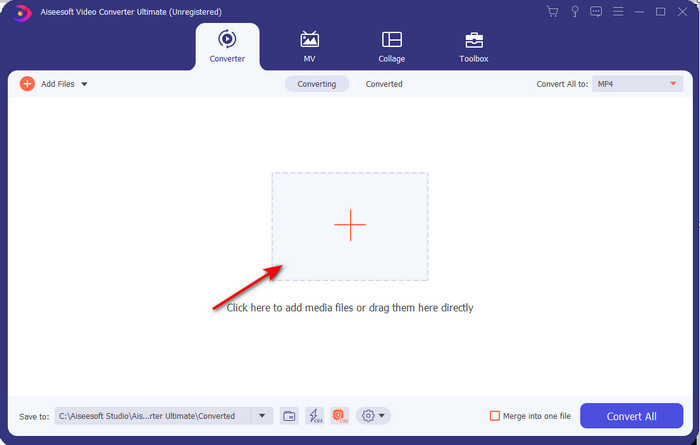
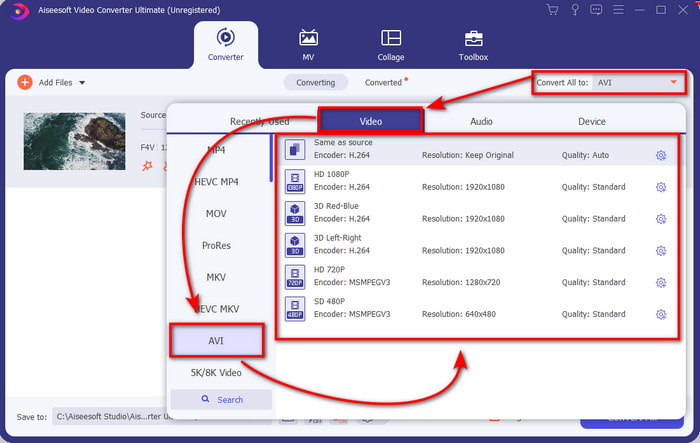
Schritt 3. Nachdem Sie die Datei importiert haben, klicken Sie oben rechts in der Oberfläche auf Alles konvertieren in und wählen Sie das AVI‑Format.
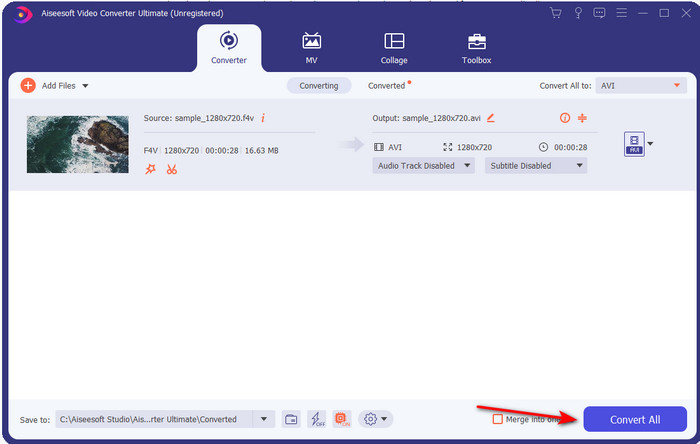
Schritt 4. Um nun den Konvertierungsvorgang zu starten, klicken Sie auf Alles konvertieren. Warten Sie ein paar Minuten, bis Ihre Datei von F4V in AVI umgewandelt ist.
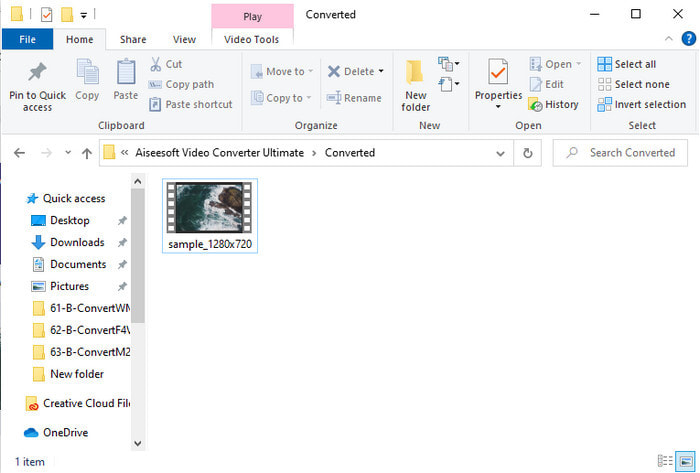
Schritt 5. Ein Ordnerfenster mit der von Ihnen konvertierten .f4v‑Datei wird automatisch auf Ihrem Desktop geöffnet. Klicken Sie auf die Videodatei, um das Video, das zuvor nicht abspielbar war, auf Ihrem Desktop anzusehen – oder übertragen Sie es auf Ihr Smartphone, wenn Sie möchten.
Teil 2. Erfahren Sie, wie Sie mit dem 3 verfügbaren Web Converter F4V online in AVI konvertieren
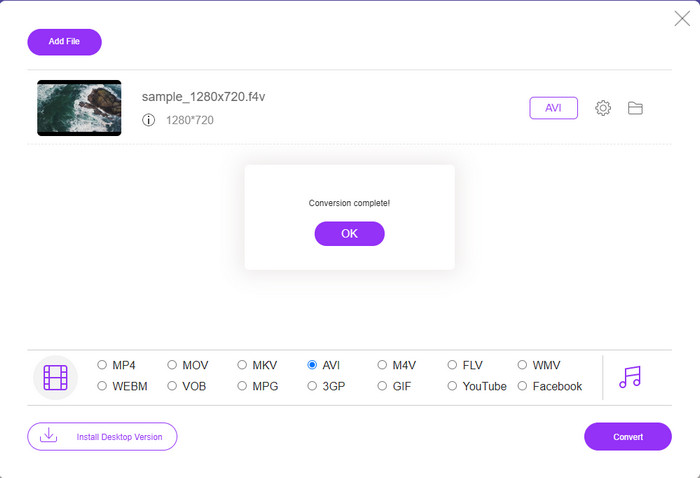
1. Kostenloser FVC-Videokonverter online
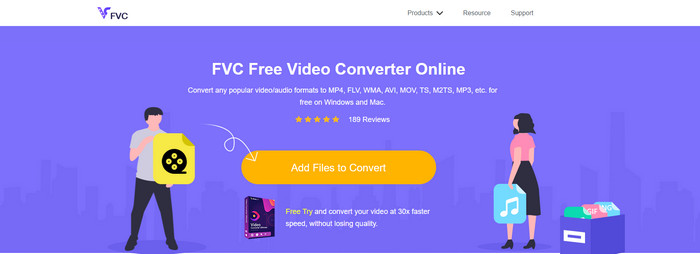
Wenn Sie wissen möchten, welcher Webkonverter der beste ist, könnte der FVC Free Video Converter Online die richtige Wahl sein. Alle Funktionen, die Sie gerne nutzen möchten, sind hier verfügbar: Sie können die Bitrate und die Bildrate (fps) des Videos ändern, um es vor der Konvertierung in eine hohe Qualität zu bringen. Millionen Internetnutzer haben die Gesamtleistung dieses Webtools bereits gelobt. Außerdem unterstützt dieses Online‑Tool eine mittlere Bandbreite an Formaten, aus denen Sie auswählen und die Sie hochladen können. Allerdings können Sie Ihr Video damit nicht so eindrucksvoll bearbeiten, wie es das Ultimate‑Tool ermöglicht. Nichtsdestotrotz – wenn Sie ausprobieren möchten, wie Sie F4V in das AVI‑Format konvertieren, folgen Sie den nachstehenden Schritten.
Schritt 1. Klicken Sie auf diesen Link, um zum FVC Free Video Converter Online zu gelangen.
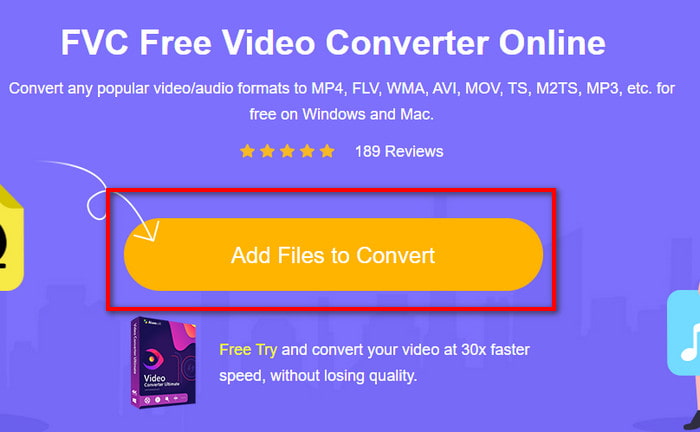
Schritt 2. Klicken Sie dann auf Dateien zum Konvertieren hinzufügen, um das Tool zu starten, und wählen Sie im sich öffnenden Ordner die Datei aus, die Sie in ein neues Format umwandeln möchten. Bestätigen Sie mit Öffnen.
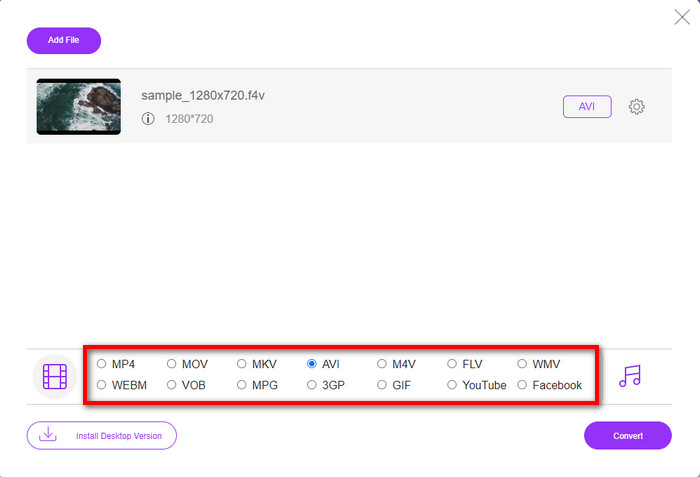
Schritt 3. Sobald die Datei geladen ist, wählen Sie im unteren Bereich AVI als Zielformat aus.
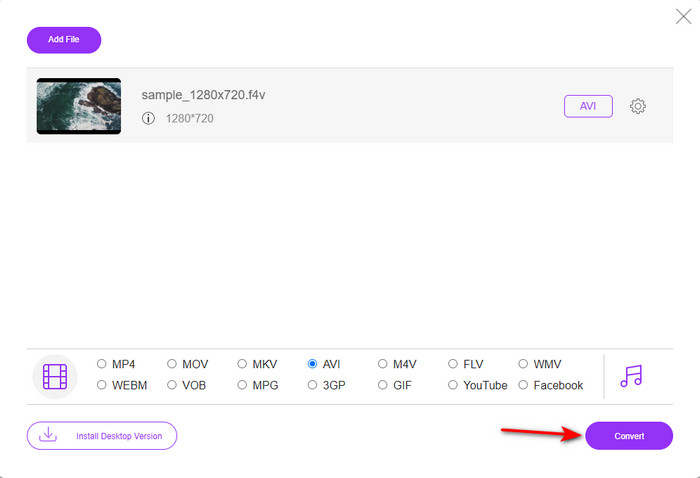
Schritt 4. Nachdem Sie das AVI‑Format ausgewählt haben, ist es Zeit zu konvertieren: Klicken Sie auf die Schaltfläche Konvertieren.
Schritt 5. Warten Sie einige Minuten, bis die Datei heruntergeladen ist; anschließend erscheint ein Ordnerfenster mit der konvertierten Datei.
2. Zamzar
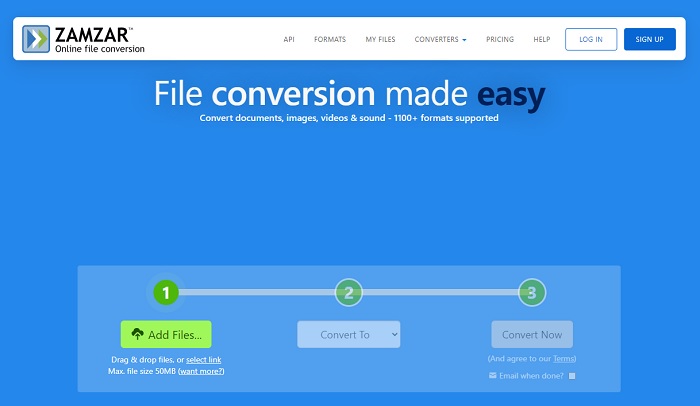
Ein weiteres alternatives Online‑Konvertierungstool ist Zamzar. Wie jeder andere Online‑Konverter benötigt auch dieses Tool eine Internetverbindung, um genutzt bzw. aufgerufen werden zu können. Alle hier vorgestellten Webtools benötigen das Internet, um die Konvertierung überhaupt durchzuführen. Da viele Nutzer diesen Dienst verwenden, ist Zamzar populär geworden, weil es eine große Anzahl an Formaten unterstützt, die Sie verwenden und auswählen können. Zudem ist die Nutzung kostenlos, allerdings gibt es eine Beschränkung bei der Dateigröße, die dieses Tool konvertieren kann. Wenn Ihre .f4v‑Datei also größer als 50 MB ist, können Sie sie hier nicht konvertieren, wie unten angegeben. Ist Ihre Datei kleiner, können Sie dieses Tool verwenden, um F4V online in AVI zu konvertieren, indem Sie die folgende Anleitung befolgen.
Schritt 1. Öffnen Sie Ihren Webbrowser und suchen Sie nach Zamzar.
Schritt 2. Klicken Sie auf Dateien hinzufügen und suchen Sie die Datei, die Sie konvertieren möchten. Wählen Sie dann als Zielformat AVI aus, klicken Sie auf „Convert to“ und anschließend auf Convert.
Schritt 3. Warten Sie auf den Vorgang; danach erscheint eine neue Oberfläche. Klicken Sie auf Download, um die Datei zu speichern.
3. Dateien konvertieren
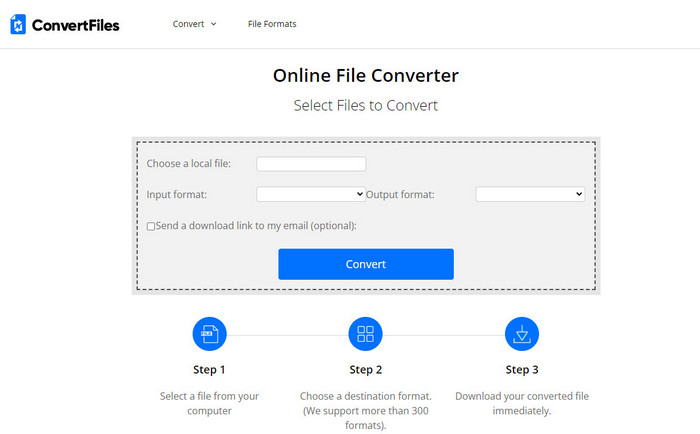
Wenn Sie einen einfacheren Konvertierungsprozess wünschen, der nur wenige Minuten dauert, probieren Sie ConvertFiles aus. Das Tool arbeitet sowohl während der Konvertierung als auch nach der Konvertierung sehr zuverlässig. Allerdings beeinträchtigen die vielen Werbeanzeigen die Nutzung, da die Oberfläche des Webtools stark damit überladen ist. Außerdem dauert der Vorgang länger als bei anderen Online‑ und Offline‑Konvertern. Die Dateigröße, die Sie hier hochladen können, ist jedoch deutlich größer als bei Zamzar. Wenn Sie dieses Tool nutzen möchten, um eine F4V‑Datei in AVI zu konvertieren, gehen Sie wie folgt vor.
Schritt 1. Öffnen Sie Ihren Webbrowser, suchen Sie nach ConvertFiles und rufen Sie die Website auf.
Schritt 2. Klicken Sie auf Choose a Local File, um den Ordner zu öffnen, und suchen Sie die Datei. Wählen Sie dann unter Output Format das Format AVI aus. Klicken Sie anschließend auf Convert, um mit der Konvertierung zu beginnen.
Schritt 3. Nach Abschluss der Konvertierung klicken Sie auf die blau hervorgehobene URL, die Sie auf eine neue Seite weiterleitet. Klicken Sie dort auf den Link, um das konvertierte Format herunterzuladen.
Teil 3. Welches Format ist besser; F4V vs. AVI
Nun, F4V und AVI erfüllen ihren Job bestenfalls als Container. Es gibt jedoch viele dieser Formate gemeinsam, und ihr Zweck ist nicht derselbe. Wenn Sie beispielsweise ein qualitativ hochwertiges Video in einer kleinen Dateigröße speichern und die DRM-MPEG-4-Videodaten aufbewahren und schützen möchten, ist F4V die beste Wahl. Angenommen, Sie möchten ein qualitativ hochwertiges Video speichern, das die synchronisierte Medienwiedergabe unterstützt. In diesem Fall müssen Sie das AVI-Format wählen, da es einen anderen Container für Audio und Video hat. Trotzdem ist die AVI-Dateigröße für viele Geräte und sogar Desktops zu groß, da sie unkomprimiert ist.
Teil 4. Häufig gestellte Fragen zur Konvertierung von F4V in AVI
Verringert die Konvertierung von F4V die Auflösung nach der Konvertierung?
Die Auflösung des Videos muss auch nach der Konvertierung in ein neues Format die ursprüngliche Qualität beibehalten. In einigen Fällen erleben viele Benutzer, dass die Qualität ihres F4V schlechter geworden ist. Einer der Gründe muss sein, dass die von Ihnen eingestellte Qualitätsrate niedrig ist oder das von Ihnen verwendete Tool keine 1080- oder 4k-Videos unterstützt.
Warum kann F4V nicht auf meinem Mediaplayer abgespielt werden?
Dieses Format kann in verschiedenen Media Playern abgespielt werden, allerdings unterstützen nicht alle Player dieses Format. Wenn Sie Videos in diesem Format ansehen möchten, ist es daher am sinnvollsten, sie in ein neues Format zu konvertieren oder einen neuen, externen Media Player zu finden, mit dem Sie Ihre F4V‑Videos anschauen können.
Muss ich F4V komprimieren, um es kleiner zu machen?
Die Dateigröße von F4V ist im Vergleich zum AVI‑Format nicht besonders groß. Wenn Sie diese Containerdatei komprimieren, besteht allerdings die Gefahr, dass die Videoqualität leidet. Hier erfahren Sie, wie Sie Ihre F4V‑Videos komprimieren können.
Fazit
Am Ende dieses Artikels haben wir nun einen Einblick, was F4V ist und warum Sie es konvertieren müssen. Alle in diesem Artikel erwähnten Online- und Offline-Software funktionieren gut. Obwohl alle Tools großartig sind, hebt sich der FVC Video Converter Ultimate immer noch von den anderen ab. Da diese Software auch ohne Internetverbindung gut funktioniert, kann dieses Tool den Konvertierungsprozess im Handumdrehen abschließen. Also jetzt, wenn Sie die phänomenale Konvertierung erleben möchten, von der wir sprechen, dann laden Sie sie jetzt herunter.
-
 Konvertieren von TS in AVI / MKV / MOV / WMV Online & Free unter Win / Mac
 Möchten Sie TS-Dateien schnell in AVI / MKV / MOV / WMV konvertieren? Dieser Artikel zeigt Online- und Offline-Videokonverter mit vollständiger Anleitung. Vielleicht können Sie hier den besten kostenlosen TS-Konverter bekommen.
-
 [Kostenlos & Online] 7 Möglichkeiten zum Konvertieren von MTS in AVI auf einem Mac/Windows-Computer
 Wie kann man MTS mühelos in AVI konvertieren? In diesem Handbuch finden Sie 7 kostenlose und einfache Möglichkeiten, MTS-Dateien unter Windows oder Mac ohne Qualitätsverlust in AVI zu konvertieren.
-
 Tutorial zum Konvertieren von MP4 in AVI-Dateien mit 7 kostenlosen Videokonvertern
 Möchten Sie alle kostenlosen Möglichkeiten zum Konvertieren von AVI- in MP4-Videos erhalten? Diesen Artikel sollten Sie sich nicht entgehen lassen. Hier sind 7 Möglichkeiten, AVI-Dateien kostenlos in MP4 auf Windows, Mac, iPhone, Android und online zu konvertieren.
