


 Video Converter Ultimate
 Bildschirm recorder
 Videoreparatur
3 effektive Möglichkeiten, M4V auf Mac/Windows/Linux ohne Qualitätsverlust in MKV umzuwandeln
Ich muss die M4V-Videos drehen, die ich auf iTunes heruntergeladen habe. Haben Sie eine Idee, wie Sie M4V auf dem Mac in MKV konvertieren und später auf meinem Fernseher verwenden können?
Dieses Problem ist weitverbreitet, insbesondere bei M4V‑Videos, die über iTunes heruntergeladen wurden, da dieses Format unter Apples Fair‑Play‑Richtlinie steht und kopiergeschützt ist. Daher können Sie .m4v‑Videos auf anderen Geräten nicht sofort abspielen, ohne sie zu konvertieren. Dieser Artikel liefert Fakten über die Konverter, die Sie verwenden können, um das M4V‑Format erfolgreich zu konvertieren. Ohne weitere Verzögerung lernen wir nun die effiziente Methode kennen, wie man M4V in MKV auf dem Mac oder unter Windows umwandelt.

Teil 1. Konvertieren Sie iTunes M4V in MKV auf Mac und Windows [Am häufigsten ausgewählt]
Es gibt viele kostenlose M4V‑zu‑MKV‑Konverter auf dem Markt, die Sie herunterladen können, und einer davon ist der FVC Video Converter Ultimate. Doch dieses ultimative Tool bietet eine deutlich effektivere Konvertierung als andere Konverter – dank blitzschneller Umwandlung, unbegrenztem Upload‑Volumen und einer intuitiven Oberfläche. Sind Sie beeindruckt von den Ultimate‑Konvertern? Oder möchten Sie mehr über diesen Konverter erfahren? In diesem Fall finden Sie nachfolgend die wichtigsten Funktionen, die Sie entdecken werden, wenn Sie diesen Konverter nutzen.

FVC Video Converter Ultimate
2.999.368+ Downloads- Es kann mehrere iTunes M4V in MKV oder in über 200 Medienformate wie MOV, AVI, MP4 usw. konvertieren.
- Mit der ultraschnellen Konvertierung ist Ihr Prozess der Konvertierung Ihres M4V im Handumdrehen
- Erweiterte Bearbeitungsfunktionen sind verfügbar, um Ihr Video noch besser zu machen.
- Stellen Sie erstaunliche Funktionen zum Komprimieren, Ändern der Größe, GIF-Ersteller usw. unter der Toolbox ein.
Gratis DownloadFür Windows 7 oder neuerSicherer Download
Gratis DownloadFür MacOS 10.7 oder neuerSicherer Download
Ist es nicht erstaunlich, wie all diese Funktionen in einem Tool enthalten sein können? Lassen Sie uns keine Zeit mehr verschwenden und feststellen, wie dieses Tool Ihre iTunes M4V in MKV effektiv konvertiert, indem Sie die folgenden Schritte ausführen.
Schritt 1. Laden Sie zunächst den Ultimate‑Konverter auf Ihre Festplatte herunter, indem Sie unten auf die Download‑Schaltfläche klicken. Wählen Sie die Plattform, die Sie derzeit verwenden, folgen Sie dem Installationsvorgang und klicken Sie auf „Jetzt starten“, um fortzufahren. Denken Sie daran, dass Sie sich mit der Benutzeroberfläche des Tools vertraut machen sollten, um Schwierigkeiten zu vermeiden.
Gratis DownloadFür Windows 7 oder neuerSicherer Download
Gratis DownloadFür MacOS 10.7 oder neuerSicherer Download
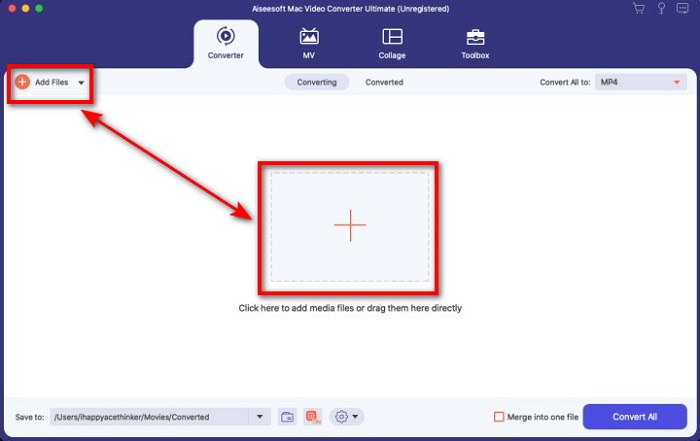
Schritt 2. Laden Sie die M4V‑Datei in die Oberfläche hoch, indem Sie auf Dateien hinzufügen oder auf die +‑Schaltfläche klicken. Danach öffnet sich ein Computerordner auf Ihrem Bildschirm; suchen Sie die .m4v‑Datei und klicken Sie auf Öffnen.
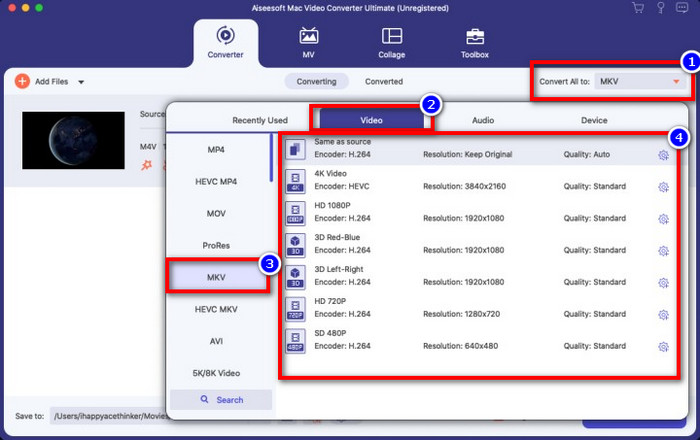
Schritt 3. Wählen Sie das MKV‑Format unter Alles konvertieren in aus und klicken Sie darauf.
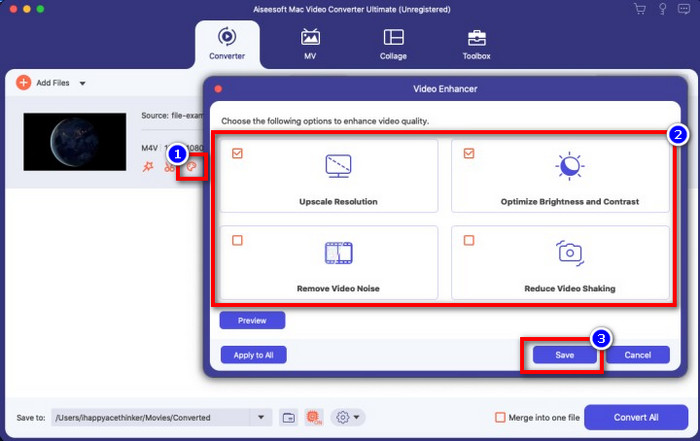
Optional. Die Effektivität dieses Werkzeugs ist ohne Zweifel bisher hervorragend. Aber wussten Sie, dass dieses Tool auch Video‑Optimierer anbietet? Wenn Sie die Option Video verbessern anklicken, wird ein Dialogfeld angezeigt; setzen Sie ein Häkchen bei der Option, die Sie in Ihrem Video verbessern möchten, und klicken Sie auf Speichern, um sie anzuwenden.
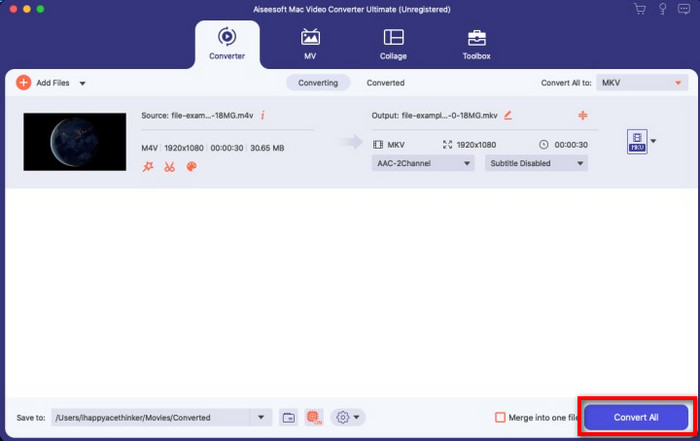
Schritt 4. Klicken Sie auf die Schaltfläche Alles konvertieren, damit die Umwandlung innerhalb kurzer Zeit beginnt. Und schon ist es soweit: Die Dateierweiterung Ihres Videos lautet nun .mkv.
Teil 2. Konvertieren Sie M4V in MKV Online
Sie möchten nicht für die Konvertierung von M4V‑Dateien bezahlen, sondern M4V lieber online in MKV umwandeln? In diesem Fall ist der FVC Free Video Converter Online ein Online‑Konverter, der einen effizienten Konvertierungsprozess direkt im Web garantiert. Der Konverter erledigt die Aufgabe, ohne dass Sie das Programm kaufen oder sogar herunterladen müssen. Außerdem gibt es keine Werbung und keine Registrierungspflicht. Obwohl der Konverter kostenlos ist, konzentrieren sich die hier verfügbaren Funktionen ausschließlich auf die Konvertierung. Anders als das Ultimate‑Tool bietet er keine umfangreichen, zusätzlichen Funktionen. Wenn Sie Ihre M4V‑Dateien online konvertieren müssen, verwenden Sie diesen Konverter und folgen Sie den nachstehenden Schritten.
Schritt 1. Klicken Sie auf diesen Link, um den FVC Free Video Converter Online zu öffnen.
Schritt 2. Klicken Sie auf die Option Dateien zum Konvertieren hinzufügen, um die M4V‑Datei zu starten und hochzuladen, die Sie konvertieren müssen.
Laden Sie die Desktop‑Version herunter, um Dateien stapelweise zu konvertieren.
Schritt 3. Wählen Sie unten das MKV‑Format oder ein anderes gewünschtes Format aus.
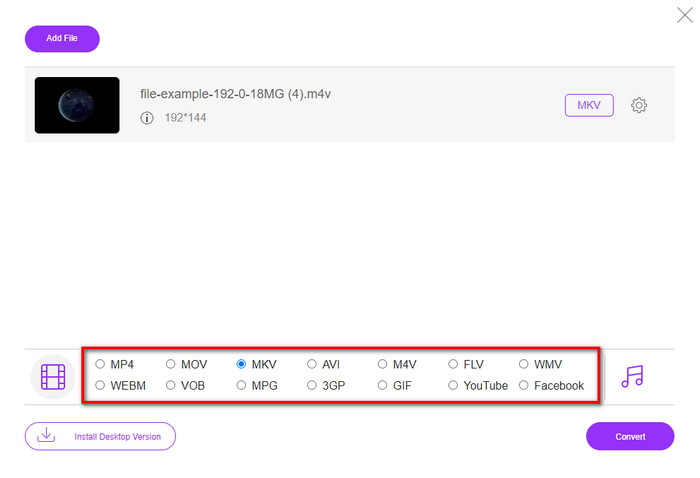
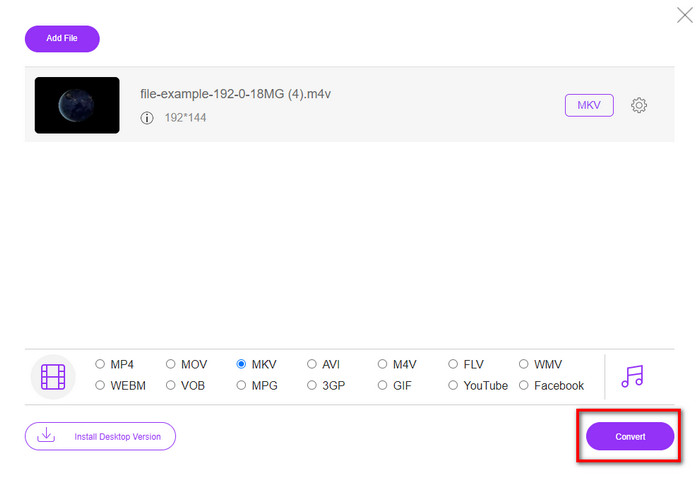
Schritt 4. Klicken Sie auf Konvertieren, um den Vorgang zu starten.
Teil 3. Konvertieren Sie M4V kostenlos in MKV
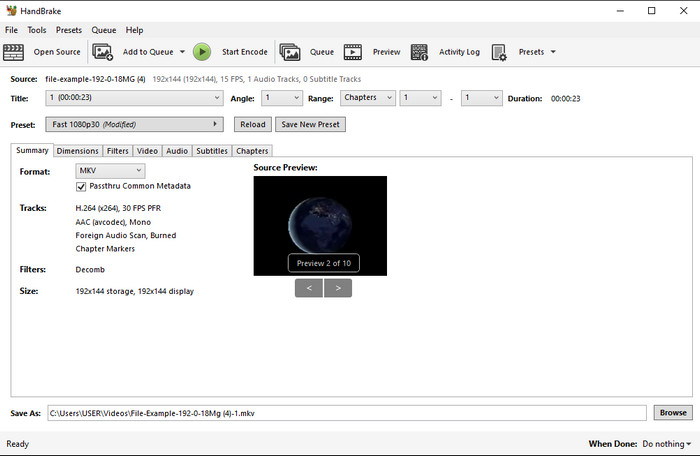
Handbrake bietet – wie die anderen hier vorgestellten Konverter – einen schnellen und effizienten Konvertierungsprozess. Allerdings ist die Anzahl der von diesem Tool unterstützten Formate begrenzt, was bedeutet, dass Sie weniger Auswahl bei den Ausgabeformaten haben. Wenn Sie dennoch M4V zu MKV mit Handbrake konvertieren möchten, befolgen Sie die folgenden Schritte.
Schritt 1. Laden Sie Handbrake auf Ihren Desktop herunter. Laden Sie die .m4v‑Datei hoch, indem Sie sie per Drag & Drop in die Oberfläche ziehen. Sie können auch auf Datei klicken, die Datei im Computerordner suchen und auf Öffnen drücken.
Schritt 2. Klicken Sie auf Format und wählen Sie MKV.
Schritt 3. Klicken Sie auf Start Encode, um den Konvertierungsvorgang zu beginnen.
Teil 4. Was sind die Ähnlichkeiten und Unterschiede zwischen M4V und MKV
Bevor wir M4V und MKV vergleichen, wollen wir die Ähnlichkeiten zwischen diesen beiden Formaten herausfinden. M4V und MKV sind beide Container für Medieninhalte und -elemente. Außerdem sind diese beiden Formate dafür bekannt, eine der besten Videoqualitäten wie HD-Videos oder 4k zu speichern. Und sie sind auch groß, um Elemente wie Metadaten zu enthalten. Darüber hinaus sind die folgenden Details unten der Unterschied zwischen den beiden Formaten.
M4V ist dem MP4-Format sehr ähnlich; Dieses Format steht jedoch unter dem DRM-Kopierschutz, was bedeutet, dass Sie es nicht frei verwenden können. Aber nicht alle M4V-Dateien sind von Apple geschützt, da einige der herunterladbaren M4V-Dateien eine nicht autorisierte Lizenz haben. Stellen Sie also sicher, dass Sie die .m4v-Datei auf iTunes herunterladen, um den bösartigen Virus zu vermeiden, der Ihr System infiziert. Obwohl das Format eine Einschränkung hat, können Sie dieses Format dennoch auf mehreren Mediaplayern verwenden, um das Video anzusehen, das Sie auf iTunes heruntergeladen haben. Wenn Sie außerdem ein geschütztes Design auf dem Mac benötigen, ist dieses Format die beste Wahl.
Im Gegensatz dazu ist MKV spezifisch dafür, mehrere Medieninhalte und -elemente in einer Datei zu enthalten. Diese Funktion ist nur bei MKV verfügbar, da dieses Format kostenlos verwendet werden kann und flexibler als M4V ist. Darüber hinaus gibt es viele Gründe, M4V auf Mac oder Windows in MKV umzuwandeln, und einer davon besteht darin, die Videodatei uneingeschränkt zu machen.
M4V vs. MKV
M4V wurde von Apple entwickelt, das auch MPEG 4 verwendet. M4V-Dateien werden häufig zum Speichern von Videos verwendet, die aus dem Apple iTunes Store heruntergeladen wurden, wie Musikvideos, TV-Episoden usw. Einige M4V-Dateien sind möglicherweise kopiergeschützt, da sie verwendet werden Apples FairPlay DRM-Urheberrechtsschutz.
Das 2002 veröffentlichte Multimedia-Containerformat Matroska ist ein Open-Source-Format, das eine Reihe von Video-, Audio-, Bild- und Untertitelspuren enthalten kann. So können Sie damit ganz einfach kurze Videoclips, Fernsehsendungen und Filme speichern. Es ist sehr beliebt für Anime-Fans.
Teil 5. Häufig gestellte Fragen zur Konvertierung von M4V in MKV
Was ist besser zum Bearbeiten, M4V oder MOV?
Beide genannten Formate gehören zu den Apple‑Formaten, daher werden Sie feststellen, dass es keinen großen Unterschied zwischen M4V und MOV gibt. MOV eignet sich jedoch besser zum Bearbeiten, da dieses Format häufig eine Folge von Videowiedergaben enthält und daher die beste Wahl für professionelles Editing ist. Vielleicht denken Sie nun darüber nach, Ihre M4V‑Datei für Bearbeitungszwecke in MOV umzuwandeln. Wenn ja, klicken Sie auf diesen Link, um mit einem umfassenden Verständnis mehr über das Konvertieren von M4V in MOV zu erfahren.
Sind M4V und MP4 gleich?
M4V und MP4 sind im Sinne von Struktur und Videoqualität sehr identisch. Aber wegen des Apple Plays-Schutzes hat M4V einen kleinen Umfang an Unterstützung, und Sie können ein Video nicht einfach abspielen oder in der Erweiterung .m4v bearbeiten.
Welche Mediaplayer unterstützen M4V?
Nicht viele Mediaplayer unterstützen dieses Format wegen des DRM‑Schutzes. Wenn Sie also nach einem MKV‑Player suchen, werden Sie viel Zeit mit Ausprobieren verbringen, was sehr zeitaufwendig ist. Wenn Sie jedoch diesen Artikel lesen, können Sie die 5 besten MKV‑Mediaplayer für alle Plattformen herunterladen oder verwenden.
Fazit
Die drei in diesem Artikel vorgestellten Tools werden Ihnen mit Sicherheit die effiziente Konvertierung liefern, die Sie sich wünschen, sofern Sie die Schritte befolgen. Obwohl die Konverter vieles gemeinsam haben, unterscheiden sie sich dennoch in vielen Punkten. Wenn Sie die oben dargestellten Details gelesen haben, wissen Sie nun viel über diese drei Tools. Wenn Sie eine hervorragende Konvertierung in einem Durchgang erzielen und gleichzeitig Effizienz beibehalten möchten, empfehlen wir den FVC Video Converter Ultimate. Klingt unglaublich? In der Tat – also laden Sie ihn auf Ihren Desktop herunter und probieren Sie es selbst aus.
-
 M4V to MP3 Converter - 4 beste Methoden zum Extrahieren von MP3 aus M4V-Dateien
 Wenn Sie MP3-Audio mühelos aus M4V-Videos extrahieren möchten, erfahren Sie mehr über die 4 besten M4V-MP3-Konverter, um die gewünschten Audiodateien aus dem Artikel zu erhalten.
-
 [Anleitung] So konvertieren Sie M4V-Videos in animierte GIFs unter Windows/Mac
 Wenn Sie aus Ihren Lieblings-M4V-Videos animierte GIF-Dateien erstellen möchten, erfahren Sie mehr über 2 einfache und effiziente Möglichkeiten zum Konvertieren von M4V-Videos in GIFs mit benutzerdefinierten Einstellungen.
-
 3 Videokonverterprogramm zum Konvertieren von iTunes M4V in AVI auf dem Mac
 Sie haben keine Ahnung, wie Sie MKV in ein AVI-Format konvertieren? Wenn wir diesen Artikel weiterlesen, werden wir die 3 Tools kennen, die Ihnen bei der Konvertierung dieses Dateiformats helfen können.

