


 Video Converter Ultimate
 Bildschirm recorder
 Videoreparatur
 Sicherer Download
Eine Kurzanleitung zum einfachen kostenlosen Konvertieren von MKV in DivX online und offline
Das MKV-Dateiformat ist ein Container, der Audio-, Video- und Untertitelspuren speichert. Es ist ein Mehrzweck-Dateiformat, weil es auch HD‑Videos speichern kann. Da es jedoch sehr viele Daten in einer einzigen Datei bündeln kann, nimmt es auf einem Gerät viel Speicherplatz ein. Wenn Sie also Ihre MKV-Datei in der Dateigröße verkleinern möchten, sollten Sie sie in das DivX-Dateiformat umwandeln. Bleiben Sie dran, denn wir zeigen Ihnen die besten Möglichkeiten, wie Sie MKV online und offline kostenlos in DivX konvertieren können.

Teil 1. Informationen zu MKV und DivX
Bevor wir uns mit den Online- und Offline-MKV- und DivX-Konvertern befassen, müssen wir zunächst die Ähnlichkeiten und Unterschiede zwischen MKV- und DivX-Dateiformaten kennen. In diesem Teil kennen Sie die Fakten und Informationen zu diesen beiden Dateiformaten.
MKV- oder Matroska-Dateien sind ein Dateiformat, das für Filmliebhaber bekannt ist, da es sich um einen Dateicontainer handelt, der mehrere Untertitel-Streams und Audiospuren in verschiedenen Sprachen verarbeiten kann. Außerdem ist diese Datei zukunftssicher, das heißt, sie wird in Zukunft nicht veraltet sein.
Im Gegensatz zur MKV-Datei ist DivX ein Dateiformat, mit dem Sie riesige Dateigrößen auf bis zu einem Zwölftel der ursprünglichen Dateigröße komprimieren können. Abgesehen davon ist es die beste Wahl für Leute, die ihre MKV-Dateien komprimieren möchten.
Da wir nun wissen, was MKV- und DivX-Dateien sind, lernen wir nun, wie man MKV-Dateien in das DivX-Dateiformat konvertiert.
Teil 2. 5 Tools zum mühelosen Konvertieren von MKV in das DivX-Format
Es ist schwierig, einen MKV-zu-DivX-Konverter zu finden, da nur wenige Konverter DivX-Dateiformate unterstützen können. Aber wir präsentieren die besten MKV-zu-DivX-Konverter, um Ihre MKV-zu-DivX-Datei einfach zu konvertieren.
FVC Video Converter Ultimate
FVC Video Converter Ultimate ist das passende Werkzeug, wenn Sie nach dem ultimativen Konverter suchen, um MKV in DivX umzuwandeln. Dieser Offline‑Konverter unterstützt über 1000 Dateiformate, darunter MKV, DivX, XviD, MOV, AVI, MP4, M4V, FLV und viele mehr. Er bietet außerdem hervorragende Funktionen wie das Hinzufügen von Effekten zu Ihrer Videodatei und deren Verbesserung. Darüber hinaus unterstützt er Stapelkonvertierung, sodass Sie mehrere Dateiformate zu einer Datei zusammenführen können. Und wenn Sie wissen möchten, welchen Vorsprung dieses Tool gegenüber anderen Konvertern hat, lesen Sie die folgenden Vorteile.

Vorteile von FVC Video Converter Ultimate:
Über 5.689.200 Downloads- Es unterstützt viele Dateiformate, einschließlich MKV, DivX, MP4, MPG, AVI, FLV, WMV und mehr als 1000 Dateiformate.
- Es verfügt über erweiterte Funktionen wie GIF-Maker, 3D-Maker und viele mehr.
- Es hat einen ultraschnellen Konvertierungsprozess.
- Zugänglich auf allen Cross-Media-Plattformen wie Windows und Mac.
Gratis DownloadFür Windows 7 oder neuerSicherer Download
Gratis DownloadFür MacOS 10.7 oder neuerSicherer Download
Hier sind die Schritte, wie Sie mit FVC Video Converter Ultimate MKV in DivX konvertieren:
Schritt 1. Laden Sie FVC Video Converter Ultimate herunter, indem Sie auf die Schaltfläche Download unten klicken. Folgen Sie anschließend dem Installationsvorgang und öffnen Sie dann die App.
Gratis DownloadFür Windows 7 oder neuerSicherer Download
Gratis DownloadFür MacOS 10.7 oder neuerSicherer Download
Schritt 2. Klicken Sie in der Hauptoberfläche der Software auf die Option Converter.
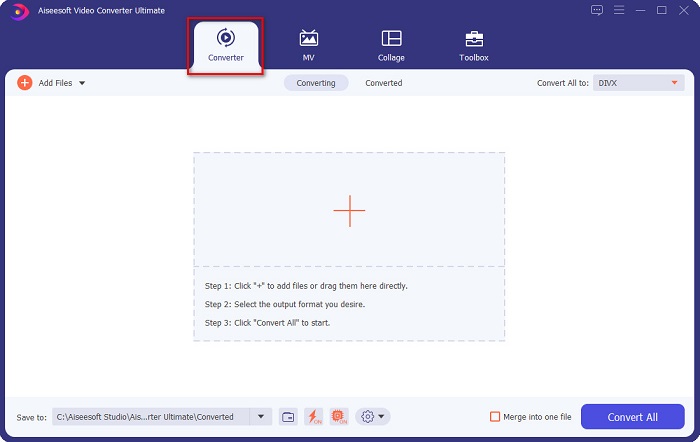
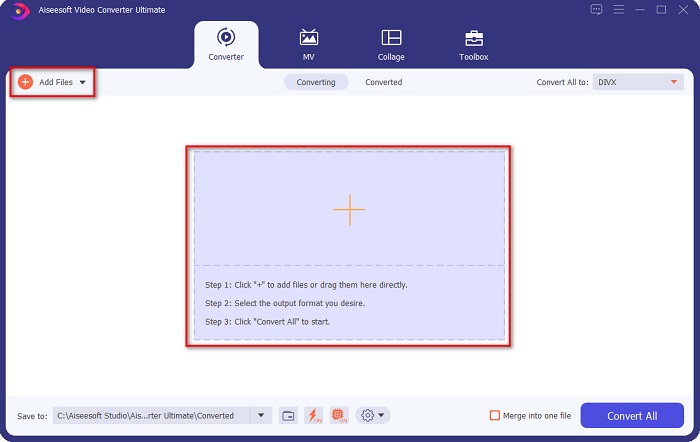
Schritt 3. Klicken Sie auf die Schaltfläche Add Files oder auf das +-Symbol in derselben Oberfläche. Ihre Computerdateien werden angezeigt; wählen Sie dann Ihre MKV-Datei aus, um sie hochzuladen.
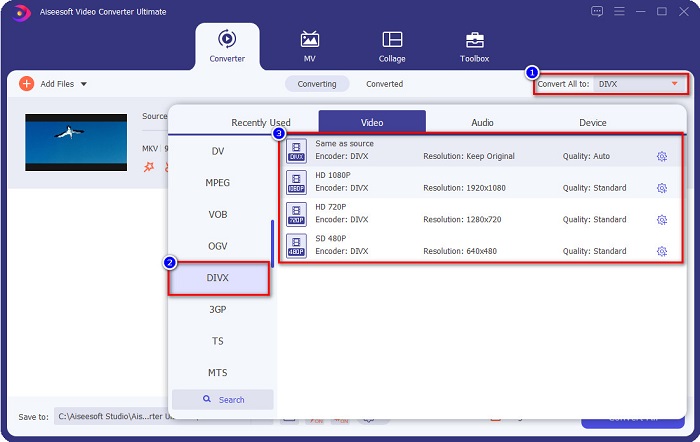
Schritt 4. Klicken Sie nach dem Hochladen Ihrer MKV-Datei auf die Schaltfläche Convert All to, um das gewünschte Ausgabeformat auszuwählen, und wählen Sie das Dateiformat DivX.
Schritt 5. Klicken Sie abschließend auf die Schaltfläche Convert All, um Ihre MKV-Datei in das DivX-Dateiformat zu konvertieren.
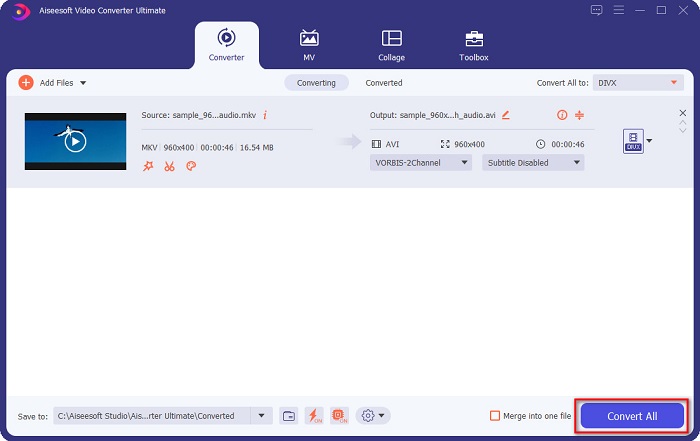
Dann warte einfach ein paar Sekunden und voila! Ihre MKV-Datei ist jetzt ein DivX-Dateiformat!
AnyMP4 Videokonverter
AnyMP4 Video Converter ist ein kostenloser MKV-zu-DivX-Videokonverter, der verschiedene Dateiformate unterstützt. Er verfügt über eine einfache Programmoberfläche und ist daher ein benutzerfreundliches Tool. Sie können außerdem viele Funktionen nutzen, die dieser Konverter bietet. Allerdings können Sie auf seine speziellen Funktionen nicht zugreifen, wenn Sie die Vollversion der App nicht erwerben.
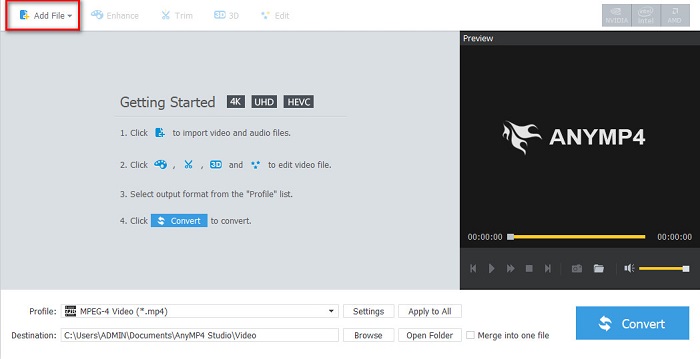
Schritt 1. Suchen Sie in Ihrem Browser nach AnyMP4 Video Converter und laden Sie dann die App herunter. Klicken Sie anschließend in der Hauptoberfläche der Software auf die Schaltfläche Add File, um Ihre MKV-Datei hochzuladen.
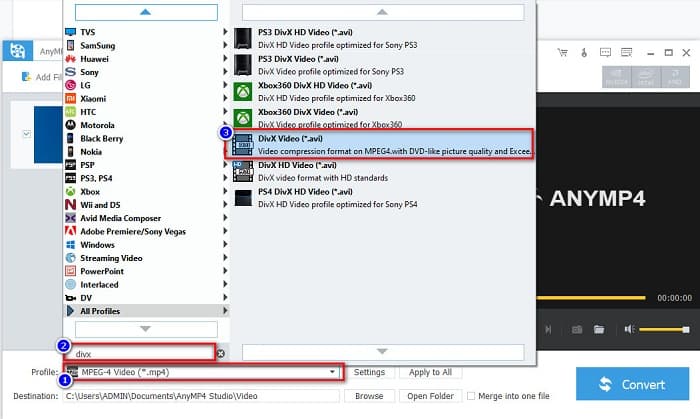
Schritt 2. Suchen Sie dann in der Option Profile unterhalb der Programmoberfläche das DivX-Dateiformat und klicken Sie darauf.
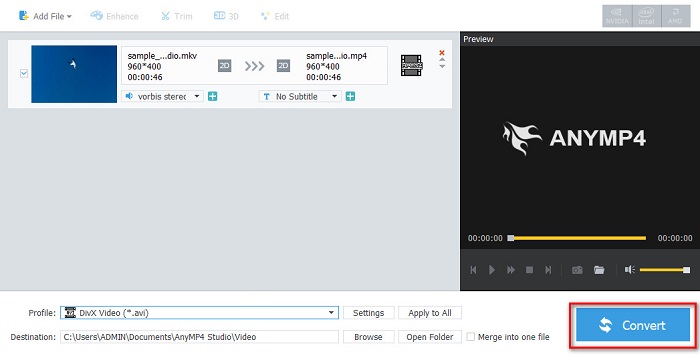
Schritt 3. Klicken Sie zum Schluss auf die Schaltfläche Convert in der unteren rechten Ecke der Oberfläche. Warten Sie anschließend, bis der Konvertierungsvorgang beendet ist. Und schon sind Sie fertig!
Media.io
Media.io ist ein kostenloser Konverter, mit dem Sie MKV online in DivX umwandeln können. Dieser Online-Konverter hat eine einfache Benutzeroberfläche. Außerdem enthält er keine Werbung, wie sie bei vielen anderen Online-Konvertern vorkommt. Allerdings kann der Konvertierungsprozess langsam sein, da es sich um eine webbasierte Anwendung handelt.
Schritt 1. Suchen Sie in Ihrem vertrauenswürdigen Browser nach Media.io. Klicken Sie dann auf der Hauptoberfläche der Webseite auf die Schaltfläche Choose Files.

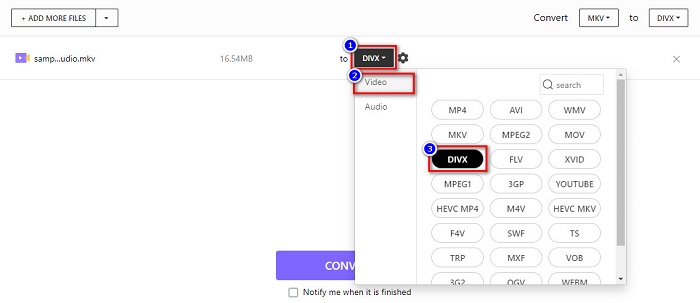
Schritt 2. Klicken Sie anschließend auf die Drop-down-Schaltfläche, um das Ausgabeformat DivX auszuwählen.
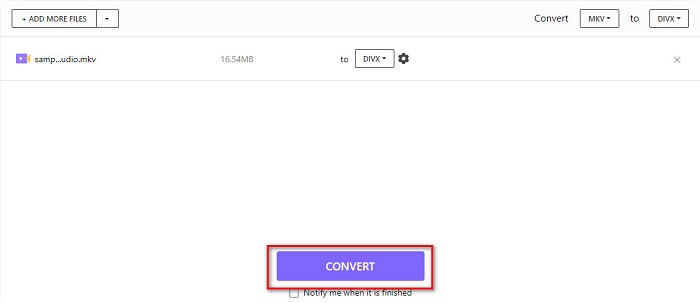
Schritt 3. Klicken Sie danach unten auf die Schaltfläche Convert, um mit der Konvertierung Ihrer MKV-Datei in das DivX-Dateiformat zu beginnen.
MiConv
Eine weitere Möglichkeit, MKV online kostenlos in DivX umzuwandeln, ist MiConv. Dieser Online-Konverter gehört zu den bekannten Konvertern, die Sie im Web finden können. Es ist eine webbasierte App, daher müssen Sie nichts herunterladen. Zudem ist es dank seiner benutzerfreundlichen Oberfläche ein einsteigerfreundliches Tool. Allerdings enthält es lästige Werbung, die für Sie störend sein kann. Nichtsdestotrotz nutzen viele Menschen diesen Online-Konverter weiterhin.
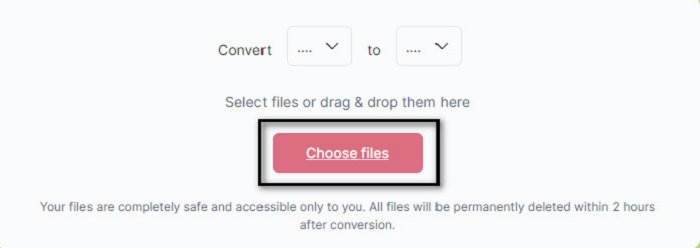
Schritt 1. Suchen Sie in Ihrem Browser nach MiConv, um auf die Webseite zu gelangen. Klicken Sie dann auf die Schaltfläche Choose files. Ihre Computerordner werden angezeigt, und Sie wählen Ihre MKV-Datei aus.
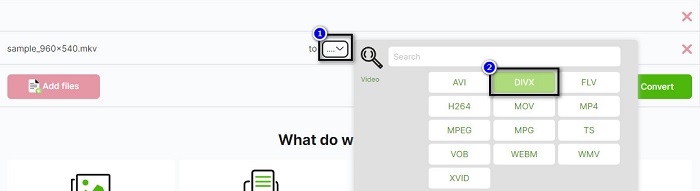
Schritt 2. Klicken Sie dann auf die Drop-down-Schaltfläche im unteren Bereich der Programmoberfläche, um Ihr Ausgabeformat auszuwählen.
Schritt 3. Klicken Sie schließlich auf die Schaltfläche Convert, um Ihre MKV-Datei in DivX zu transkodieren.

AnyConv
Der letzte Konverter, über den wir sprechen, ist der Online-Konverter AnyConv. Dieser kostenlose MKV-zu-DivX-Videokonverter gehört zu den am häufigsten verwendeten Online-Konvertern im Internet. Wie die anderen oben vorgestellten Online-Tools verfügt er über eine leicht zu bedienende Oberfläche. Darüber hinaus unterstützt er nahezu alle gängigen Video-Dateiformate. Allerdings enthält er störende Werbung und ist von der Internetverbindung abhängig, was bedeutet, dass die Geschwindigkeit Ihres Konvertierungsvorgangs von Ihrer Verbindung abhängt.
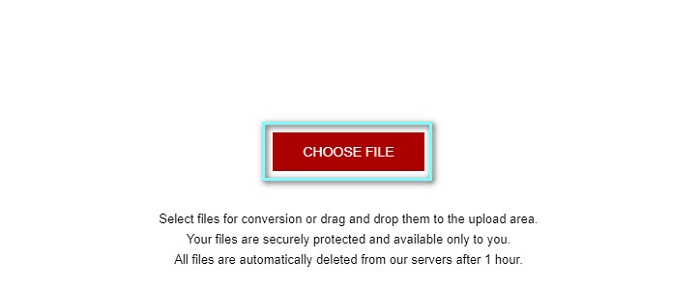
Schritt 1. Gehen Sie auf die AnyConv-Website, indem Sie im Browser nach AnyConv Online Converter suchen. Klicken Sie dann auf die Schaltfläche Choose File.
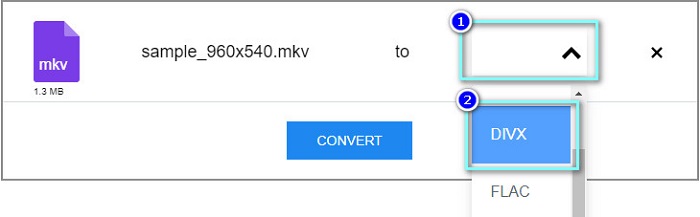
Schritt 2. Wählen Sie anschließend über die Drop-down-Schaltfläche das DivX-Dateiformat als Ausgabeformat aus.
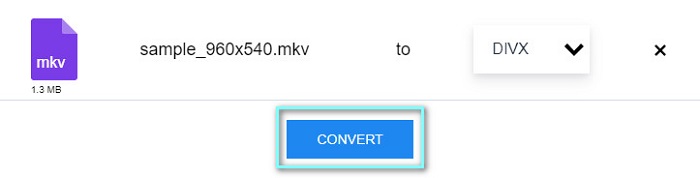
Schritt 3. Klicken Sie dann auf die Schaltfläche Convert, um den Konvertierungsvorgang zu starten.
Teil 3. Häufig gestellte Fragen zum Konvertieren von MKV in DivX
Können Sie die MKV-Datei auf Windows Media Player abspielen?
Windows Media Player unterstützt MKV-Dateiformate nicht standardmäßig. Wenn Sie eine MKV-Datei im Windows Media Player abspielen, wird möglicherweise nur der Ton wiedergegeben. Wenn Sie Ihre MKV-Datei dennoch im Windows Media Player abspielen möchten, können Sie sie in das Dateiformat AVI umwandeln, also MKV in AVI konvertieren.
Was hat bessere Qualität, MKV oder DivX?
MKV hat eine bessere Qualität als die DivX-Datei; Die MKV-Datei ist jedoch unkomprimiert, wodurch sie in der Dateigröße auffälliger wird. Im Gegensatz dazu ist DivX ein komprimiertes Dateiformat.
Können Sie DivX-Dateien auf macOS abspielen?
Leider unterstützt der integrierte Mediaplayer des Mac, nämlich QuickTime, das DivX-Dateiformat nicht.
Fazit
Puh! Das war ein großes Abenteuer, das wir hatten. All das Wissen und die Informationen, die Sie heute haben, werden Ihnen helfen, den besten MKV-zu-DivX-Konverter auszuwählen. Wenn Sie also einen Konverter mit vielen großartigen Funktionen verwenden möchten, verwenden viele Leute FVC Video Converter Ultimate als erste Wahl.
-
 MKV in MOV - So konvertieren Sie MKV in MOV
 Wie konvertiere ich MKV in MOV auf einem Mac? Kann iMovie MKV lesen? Was bedeutet MOV-Format? In diesem Beitrag werden zwei einfache Möglichkeiten beschrieben, wie Sie MKV mit kostenlosen Online- und professionellen Videokonvertern in MOV konvertieren können.
-
 So konvertieren Sie MKV-Videos in animierte GIFs ohne Photoshop/FFmpeg
 Nachdem Sie MKV-Filme auf Ihren Computer heruntergeladen und angesehen haben, möchten Sie vielleicht einige wundervolle Momente mit Freunden oder im Internet als GIFs teilen. In diesem Artikel erfahren Sie mehr über die 2 einfachsten Möglichkeiten zum Konvertieren von MKV in GIF.
-
 Tipps und Tricks zum Konvertieren von MKV-Dateien in MP3 [2021]
 Haben Sie Probleme bei der Auswahl des richtigen Konverters für MKV zu MP3? Dann lesen Sie diesen Beitrag weiter, während wir verschiedene Lösungen für ein Problem vorgestellt haben.
