


 Video Converter Ultimate
 Bildschirm recorder
 Videoreparatur
Die besten kostenlosen MKV-zu-WMV-Konverter, die Ihre Dateien schnell konvertieren können
MKV (Matroska) ist ein Standard-Container für umfangreiche Audio- und Videodateien. Obwohl es ein gängiges Dateiformat ist, müssen Sie es dennoch in ein Dateiformat umwandeln, das als Videoformat weit verbreitet und unterstützt ist, wie z. B. WMV. Wenn Sie also nach einem kostenlosen MKV-zu-WMV-Konverter suchen, ist dieser Artikel genau das Richtige für Sie.

Teil 1. Warum müssen Sie MKV in WMV konvertieren
MKV (Matroska) kann eine große Menge an audiovisuellen und Multimediadateien enthalten, da es sich um einen kostenlosen Standard-Container handelt. Trotz seiner Verbreitung ist es jedoch kein Industriestandard. Daher unterstützen einige Mediaplayer diesen Dateityp möglicherweise nicht. Im Gegensatz dazu ist WMV oder Windows Media Video ein Dateiformat, das von vielen Mediaplayern auf praktisch jedem Gerät unterstützt wird. Zudem handelt es sich um einen Codec, der die Dateigröße komprimiert und es damit zu einem der gängigsten und geeignetsten Dateiformate in vielen Mediaplayern macht.
Teil 2. Konvertieren Sie MKV in WMV mit dem Lightning-Speed Converter
Es besteht kein Zweifel, dass FVC Video Converter Ultimate das beste Tool für Sie ist, wenn es um die Konvertierung von MKV- in WMV-Dateien geht. Mit diesem kostenlosen und ultraschnellen Konverter können Sie MKV ohne Qualitätsverlust in WMV konvertieren. Dieser Konverter verfügt auch über beeindruckende Funktionen, mit denen Sie mehrere Dateien bearbeiten, verbessern und sogar zu einer zusammenführen können. Darüber hinaus können Sie verschiedene Dateiformate wie MKV in WMV, MP4, M4V, AVI, MOV und mehr konvertieren.

FVC Video Converter Ultimate
Über 5.689.200 Downloads- Unterstützt Stapelkonvertierung, um mehrere Dateien gleichzeitig zu konvertieren.
- Es verfügt über eine Funktion, mit der Sie Ihre MKV-Dateien ultraschnell konvertieren können.
- Es unterstützt mehr als 200, einschließlich MKV, WMV, MP4, AVI, MPG, MOV, VOB und mehr.
- Verfügbar auf verschiedenen Plattformen wie Windows und Mac.
Gratis DownloadFür Windows 7 oder neuerSicherer Download
Gratis DownloadFür MacOS 10.7 oder neuerSicherer Download
So konvertieren Sie Ihre Dateien mit FVC Video Converter Ultimate
Schritt 1. Klicken Sie auf die Download-Schaltfläche unten, um FVC Video Converter Ultimate zu installieren. Folgen Sie anschließend dem Installationsvorgang und öffnen Sie die App.
Gratis DownloadFür Windows 7 oder neuerSicherer Download
Gratis DownloadFür MacOS 10.7 oder neuerSicherer Download
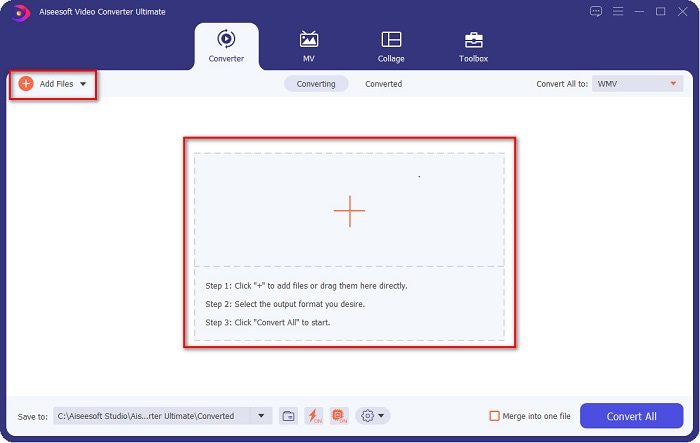
Schritt 2. Nachdem Sie die Anwendung geöffnet haben, klicken Sie auf Dateien hinzufügen oder auf die +-Schaltfläche, um Dateien zur Warteschlange hinzuzufügen und mit dem Konvertierungsprozess zu beginnen.
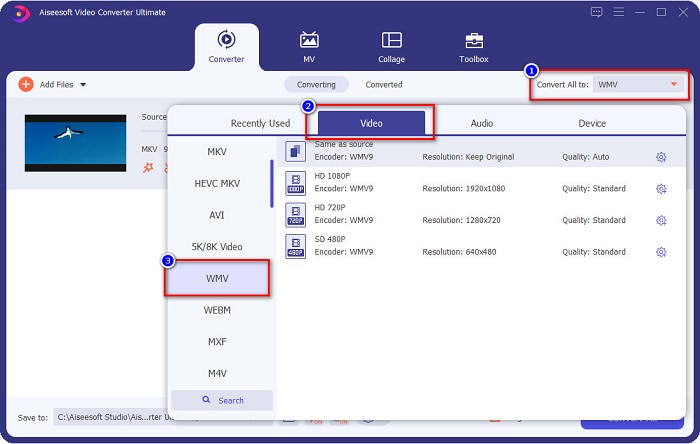
Schritt 3. Klicken Sie als Nächstes auf die Schaltfläche Alles konvertieren in, die sich in der oberen rechten Ecke der Programmoberfläche befindet. Es erscheint eine Liste mit Dateiformaten, wählen Sie dann die WMV-Datei aus.
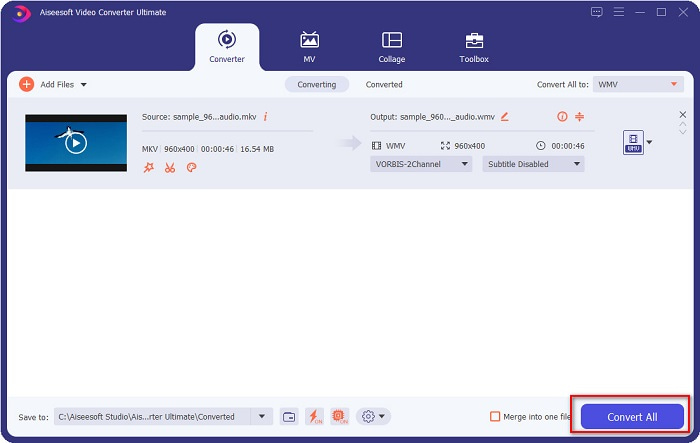
Schritt 4. Nachdem Sie das gewünschte Dateiformat ausgewählt haben, klicken Sie auf die Schaltfläche Alles konvertieren, um Ihre MKV-Datei in das WMV-Dateiformat zu konvertieren. Warten Sie anschließend ein paar Sekunden, und Ihre WMV-Datei ist fertig!
Indem Sie diese einfachen Schritte bei der Verwendung von FVC Video Converter Ultimate befolgen, können Sie diesen MKV-zu-WMV-Konverter schnell konvertieren.
Teil 3. Konvertieren Sie MKV in WMV mit dem VLC Media Player Converter
Eine andere Möglichkeit, Ihre MKV-Datei in eine WMV-Datei umzuwandeln, ist die Verwendung eines Freeware-Konverters. VLC Media Player ist nicht nur ein Videoplayer; Es kann auch Dateien wie MKV in WMV, WebM, MP4 usw. konvertieren. Die Benutzeroberfläche ist jedoch etwas schwer zu verstehen. Trotzdem wird dieser Konverter von vielen Benutzern verwendet.
Kurzanleitung zur Verwendung von VLC Media Player Converter:
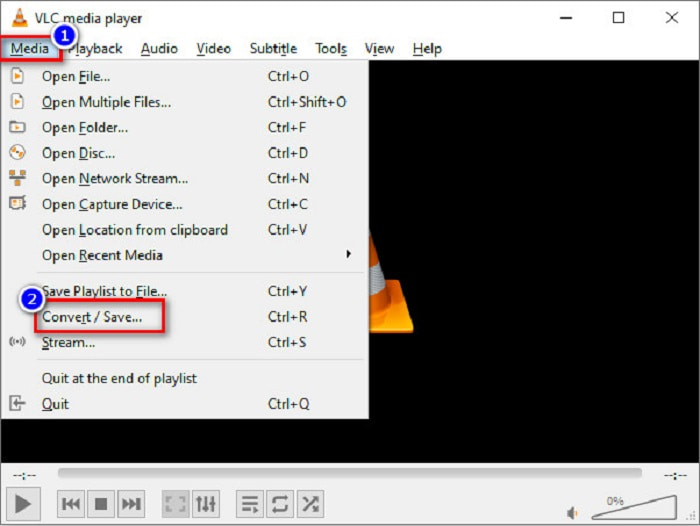
Schritt 1. Öffnen Sie den VLC Media Player, oder falls er noch nicht auf Ihrem Computer installiert ist, suchen Sie nach VLC Media Player und folgen Sie dem Installationsvorgang. Klicken Sie dann oben links auf Ihrem Bildschirm auf die Option Medien und anschließend auf die Schaltfläche Konvertieren/Speichern.
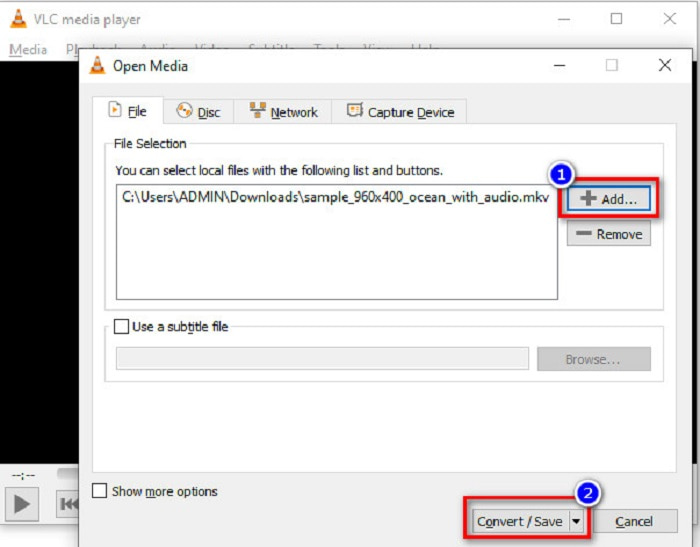
Schritt 2. Nachdem Sie die Schaltfläche Konvertieren/Speichern angeklickt haben, erscheint ein neues Fenster, in dem Sie die Liste der lokal hochgeladenen Dateien sehen. Klicken Sie auf die Schaltfläche + Hinzufügen, um Ihre MKV-Datei zu laden. Drücken Sie unten die Schaltfläche Konvertieren/Speichern, um mit dem nächsten Schritt fortzufahren.
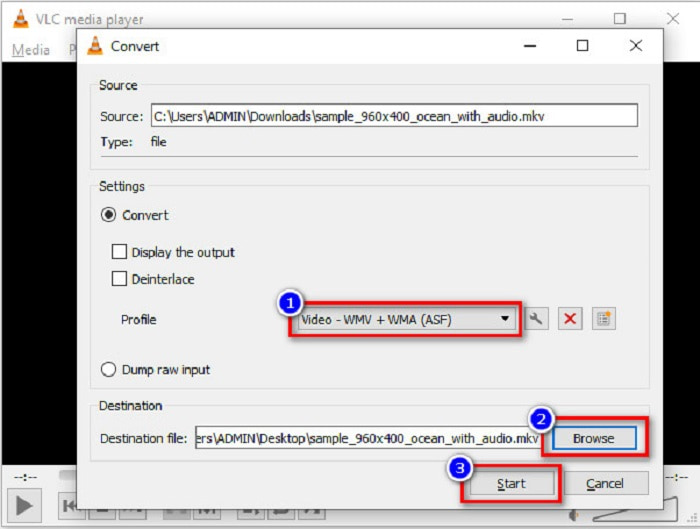
Schritt 3. Wählen Sie abschließend die WMV-Datei als Ihr Ausgabeformat. Klicken Sie auf die Schaltfläche Durchsuchen, um das Ziel für Ihre Datei festzulegen, wenn die Konvertierung abgeschlossen ist. Und zum Schluss klicken Sie auf die Schaltfläche Start, um mit der Konvertierung Ihrer MKV-Datei in eine WMV-Datei zu beginnen.
Teil 4. Konvertieren Sie MKV in WMV mit dem kostenlosen Online-Konverter
FVC Free Video Converter Online ist ein kostenloser MKV-zu-WMV-Online-Konverter, mit dem Sie zahlreiche Audio- und Videoformate konvertieren können, darunter MKV in WMV, AVI, MPG, MOV, MP4, MP3 und mehr. Dieser Konverter bietet außerdem die Funktion, die Videobitrate, die Bildrate und sogar die Auflösung Ihrer Datei anzupassen. Obwohl es ein hervorragender Online-Konverter ist, kann es aufgrund Ihrer Internetverbindung zu langsamen Konvertierungen kommen, da er vollständig online-basiert arbeitet. Nichtsdestotrotz bietet er eine ausgezeichnete Performance und wird von vielen als einer der besten angesehen.
Hier sind die Schritte, wie Sie Ihre MKV-Datei mit FVC Free Video Converter Online in WMV konvertieren können.
Schritt 1. Suchen Sie in Ihrem Browser nach FVC Free Video Converter Online, um auf die Website zu gelangen.
Schritt 2. Nachdem Sie auf der Website sind, klicken Sie auf die Schaltfläche Dateien zum Konvertieren hinzufügen und starten Sie das Tool. Es werden die Dateien auf Ihrem Computer angezeigt, aus denen Sie Ihre MKV-Datei auswählen.
Laden Sie die Desktop‑Version herunter, um Dateien stapelweise zu konvertieren.
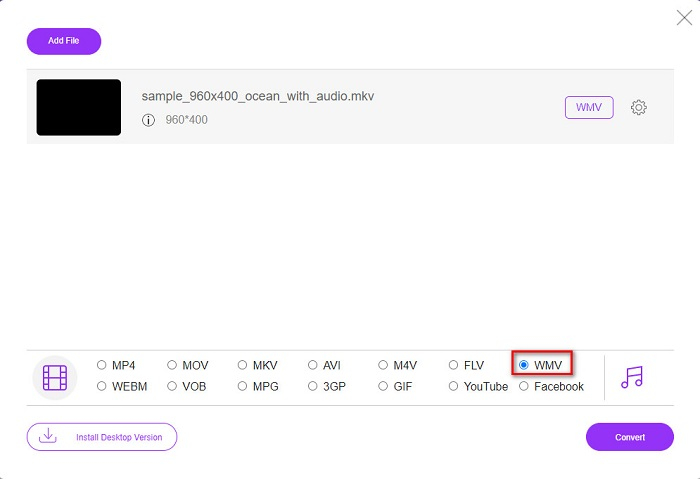
Schritt 3. In der zweiten Oberfläche der Software sehen Sie unten die Liste der Dateiformate. Aktivieren Sie das Auswahlfeld neben der WMV-Datei.
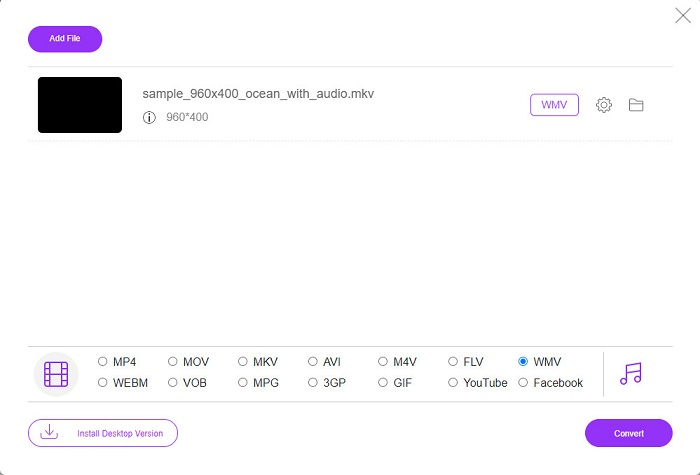
Schritt 4. Klicken Sie im letzten Schritt auf die Konvertieren-Schaltfläche, die sich in der unteren rechten Ecke der Programmoberfläche befindet. Dann beginnt die Konvertierung Ihrer MKV-Datei.
MKV vs. WMV
Das 2002 veröffentlichte Multimedia-Containerformat Matroska ist ein Open-Source-Format, das eine Reihe von Video-, Audio-, Bild- und Untertitelspuren enthalten kann. So können Sie damit ganz einfach kurze Videoclips, Fernsehsendungen und Filme speichern. Es ist sehr beliebt für Anime-Fans.
WMV wurde von Microsoft produziert und war in den 2000er Jahren eines der gängigsten Videoformate. Es kann über das Internet angesehen und von verschiedenen Mediaplayern unter Windows abgespielt werden. Und es ist auch das Standard-Videodateiformat von Windows Media Player. Aber es wurde in letzter Zeit von anderen Formaten übernommen.
Teil 5. Häufig gestellte Fragen zum Konvertieren von MKV in WMV
Können Sie MKV in WMV ändern, ohne die Qualität Ihrer Datei zu verlieren?
Bestimmt. Mit dem FVC Video Converter Ultimate können Sie Ihre MKV-Datei in WMV konvertieren, ohne die Qualität Ihrer Datei zu verlieren.
Was ist das beste Dateiformat, um Ihre MKV-Datei zu konvertieren?
Wie oben erwähnt, unterstützen einige Mediaplayer dieses Dateiformat nicht. Daher müssen Sie es in ein Dateiformat konvertieren, das von vielen Mediaplayern umfassend unterstützt wird. Eines davon ist das MP4-Format. Um mehr über dieses Thema zu erfahren, lesen Sie diesen Artikel: [Online & Kostenlos] Wie kann ich MKV auf Windows/Mac in MP4 konvertieren.
Kann Windows Media Player MKV-Dateien abspielen?
Der Windows Media Player unterstützt das MKV-Dateiformat nicht. Wenn Sie also versuchen, eine MKV-Datei im Windows Media Player abzuspielen, wird nur die Tonspur wiedergegeben. Lesen Sie Bester MKV-Player, um den passenden Player zu finden.
Fazit
Es gibt viele Möglichkeiten, wie Sie Ihre MKV-Datei in WMV konvertieren können. Die oben vorgestellten Konverter haben unterschiedliche Merkmale, die sie voneinander unterscheiden.
Unter den besten hier aufgeführten MKV-zu-WMV-Konvertern empfehlen wir den FVC Video Converter Ultimate, da dieser Konverter effizienter und einfacher zu bedienen ist. Darüber hinaus verfügt er über einzigartige Funktionen, mit denen Sie Ihre Datei verbessern können. Noch unschlüssig? Laden Sie ihn jetzt herunter und erleben Sie diesen ultraschnellen Konverter selbst.
-
 MKV in MOV - So konvertieren Sie MKV in MOV
 Wie konvertiere ich MKV in MOV auf einem Mac? Kann iMovie MKV lesen? Was bedeutet MOV-Format? In diesem Beitrag werden zwei einfache Möglichkeiten beschrieben, wie Sie MKV mit kostenlosen Online- und professionellen Videokonvertern in MOV konvertieren können.
-
 So konvertieren Sie MKV-Videos in animierte GIFs ohne Photoshop/FFmpeg
 Nachdem Sie MKV-Filme auf Ihren Computer heruntergeladen und angesehen haben, möchten Sie vielleicht einige wundervolle Momente mit Freunden oder im Internet als GIFs teilen. In diesem Artikel erfahren Sie mehr über die 2 einfachsten Möglichkeiten zum Konvertieren von MKV in GIF.
-
 Tipps und Tricks zum Konvertieren von MKV-Dateien in MP3 [2021]
 Haben Sie Probleme bei der Auswahl des richtigen Konverters für MKV zu MP3? Dann lesen Sie diesen Beitrag weiter, während wir verschiedene Lösungen für ein Problem vorgestellt haben.

