


 Video Converter Ultimate
 Bildschirm recorder
 Videoreparatur
Der beste kostenlose MPEG-zu-MKV-Konverter, den Sie nie verpassen sollten
MPEG is one of the most common encoders of media content that provides a high-quality video output. Although it is a standardized video compression, you will still need to convert your MPEG into a new format like the MKV to make it widely supported. In that case, we make searching for the perfect tool for you easier as we handpick the converters that only provide success for you. So now, if you want to know what are these five free MPEG to MKV converters available on all platforms, you must buckle up and read the details next.

Teil 1. Die 5 besten MPEG-zu-MKV-Konverter für Windows/Mac/Online/Mobiltelefone
Top 1. FVC Video Converter Ultimate (Windows & Mac)
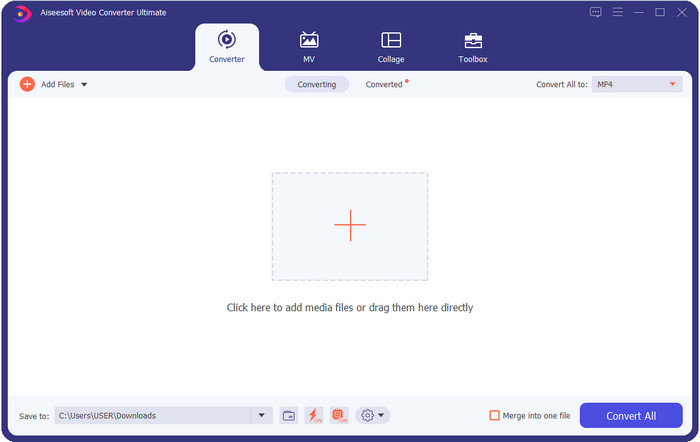
FVC Video Converter Ultimate offers a complete converting process on any lossless or lossy media conversion you will need. This converter provides a professional output but is within reach of beginners or those who aren't technology-oriented, so if you choose this converter, anticipate that it is hassle-free. Furthermore, it is notorious for converting 200+ format into a new version, but it can also be your user-friendly editor —even the complicated editing such as video enhancer, audio boost, color correctness, and more; name it, this tool can perform it. Moreover, if you want to use this converter to convert MPEG to MKV, read the tutorial in the next part.
Vorteile
- Mehrfach umwandeln MPEG zu MP4, MKV, AVI, MOV, WMV oder andere Formate entspannt.
- Es stehen Bearbeitungsfunktionen zur Verfügung, um Ihr Video beeindruckend zu machen.
- Ultraschnelle Konvertierung wird hier für eine blitzschnelle Konvertierung unterstützt.
- Verfügbar auf allen Plattformen wie Windows und macOS.
Nachteile
- Kaufen Sie das Tool, bevor Sie es verwenden können.
Top 2. TalkHelper Videokonverter (Windows)
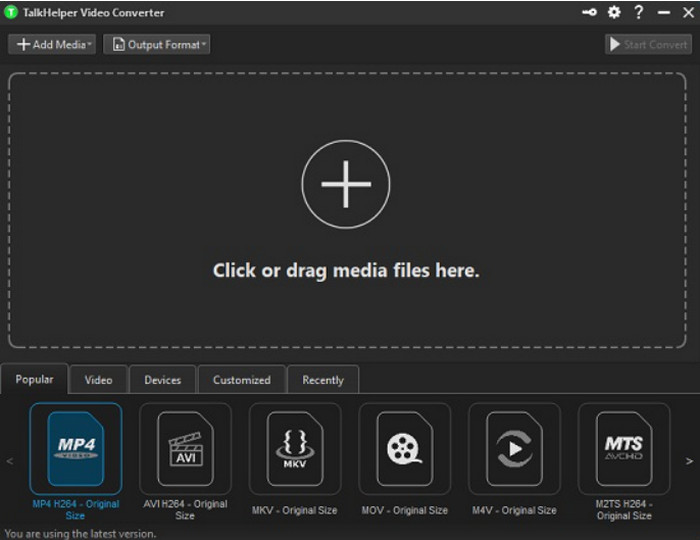
Another free MPEG to MKV converter you can use is the TalkHelper Video Converter. This converter enables the users to convert MPEG into the supported format in the list, such as MP4, MKV, AVI, MOV, and WMV. Moreover, if you are using Windows Vista/8/8.1/10 versions, you can easily download this tool; however, if your Windows is not on the said version, you can't use it, also; if you are a Mac user, you can't download it either. Although the tool is far different from the ultimate tool at the top, it is worth mentioning because of how good it is as a converter.
Vorteile
- Es unterstützt mehrere Konvertierungen von MPEG zu MKV.
- Ermöglicht das Optimieren von Videos und das Einstellen einer bestimmten Videoqualität.
- Verfügbar unter Windows Vista/8/8.1/10.
Nachteile
- Nur auf Windows beschränkt.
- Kauf ist erforderlich.
Top 3. iConv - Video- und PDF-Konverter (iOS)
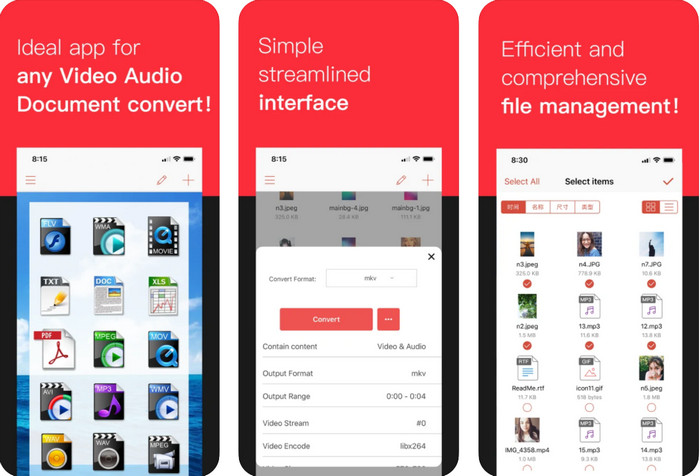
If you're looking for a MPEG to MKV converter free download on iOS, we present to you the iConv. This tool is mainly for converting the video format into a new format within reach of iOS users. Moreover, this iOS converter can convert images, PDF, audio, etc. Also, it works on both iPhones and iPad well, with the same features included. However, the users who have already used this converter say that this tool crashes most of the time. So, if you download and use this, expect to encounter some crashes or bugs that are very common on every mobile app.
Vorteile
- Konvertieren Sie Ihr MPEG in MKV einfach mit diesem iOS-basierten Konverter.
- Einfach zu verwenden.
- Videos einfach bearbeiten.
Nachteile
- Fehler und Abstürze treten auch nach dem Update auf.
- Anzeigen sind überall, wenn Sie das Tool nicht gekauft haben.
Top 4. Videokonverter, Kompressor MP4, 3GP, MKV, MOV, AVI (Android)
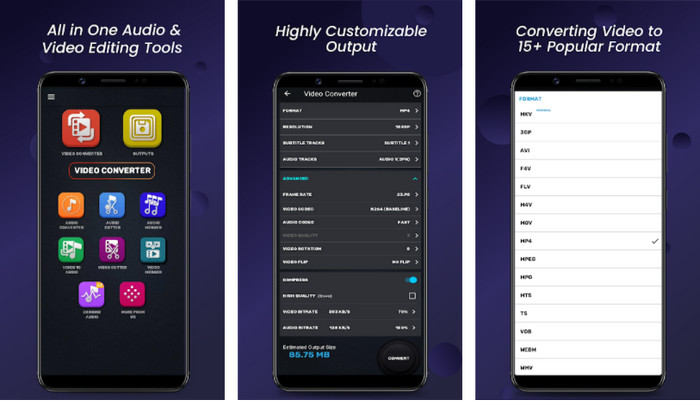
You shouldn't be worried if you are an Android user because we also present a MPEG to MKV converter that is free to download on Playstore. Video Converter, Compressor MP4, 3GP, MKV, MOV, and AVI can convert your MPEG files on your Android phones anytime you need them. Unlike any converters app we use on Android, we found out that this app is far different in how it handles the converting process. Also, it supports much wide range of formats you can choose and upload on. Moreover, you can also do basic compressing, manipulating FPS, and changing resolution if you need it. Although it has these features, you will need to wait for a long time because the converting process will take time.
Vorteile
- Effektiv beim Konvertieren von MPEG in MKV auf Ihrem Android.
- Zuverlässig und intuitiv.
- Kostenlos herunterzuladen.
Nachteile
- Der Prozess der Konvertierung der Datei nimmt viel Zeit in Anspruch.
- Anzeigen töten die App, wenn Sie sie nicht gekauft haben.
Top 5. FVC Kostenloser Online-Videokonverter
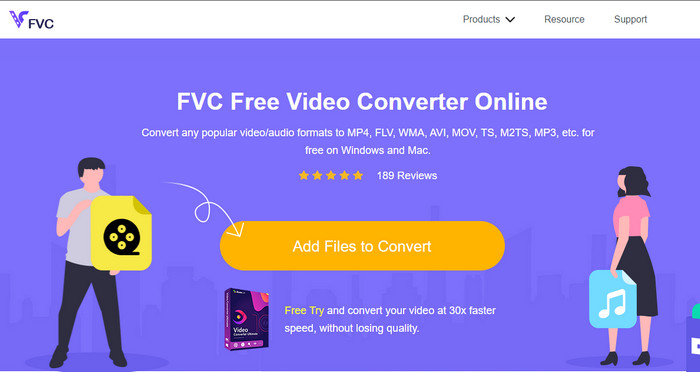
FVC Free Video Converter Online can convert MPEG to MKV online without downloading a converter on your drive. With this converter, you can convert your format without limitation and free based on your requirements. This converter online can easily encode most of the format on any given day. However, this converter can't do a batch conversion to convert more formats at one go. Also, it is internet-dependent, which means the converting process will depend on how fast your internet is. Nevertheless, this tool already helps millions of internet users with their converting problems, and maybe the next will be you.
Vorteile
- Konvertieren Sie Videos mit diesem Konverter einfach im Web.
- Ein Download ist nicht erforderlich.
- Verfügbar auf allen Plattformen, um Ihnen bei Ihrem Konvertierungsproblem zu helfen.
Nachteile
- Benötigen Sie eine Internetverbindung, um zu arbeiten.
- Es unterstützt ein begrenztes Format, das Sie auswählen können.
Teil 2. So konvertieren Sie MPEG in MKV mit Video Converter Ultimate
Die folgenden Details sind die Schritte, um das ultimative Tool erfolgreich als kostenlosen MPEG-zu-MKV-Konverter zu verwenden.
Step 1. Click the download button below to download the converter on your desktop. Follow the installation process next and launch it.
Gratis DownloadFür Windows 7 oder neuerSicherer Download
Gratis DownloadFür MacOS 10.7 oder neuerSicherer Download
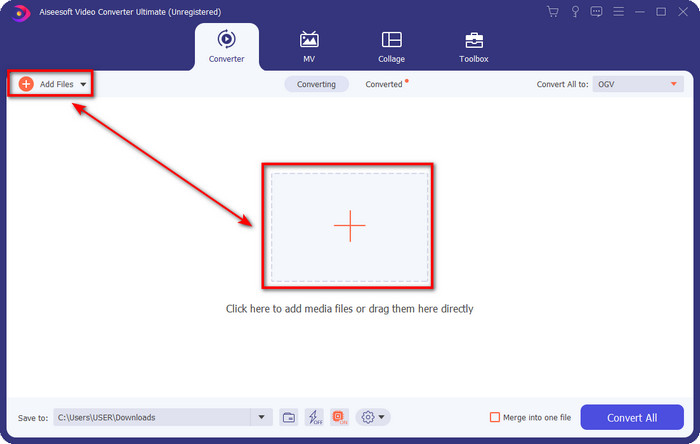
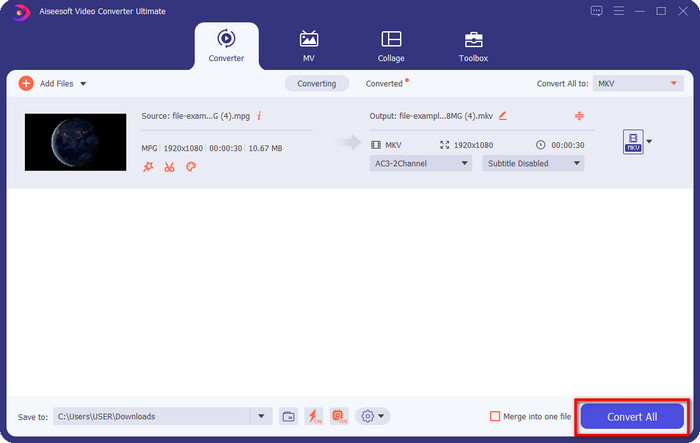
Step 2. After launching the converter, you can now upload the .mpeg or .mpg file here by clicking the Add File or the + button. Locate the file on the folder that will show on your screen and press Open to proceed to the next steps.
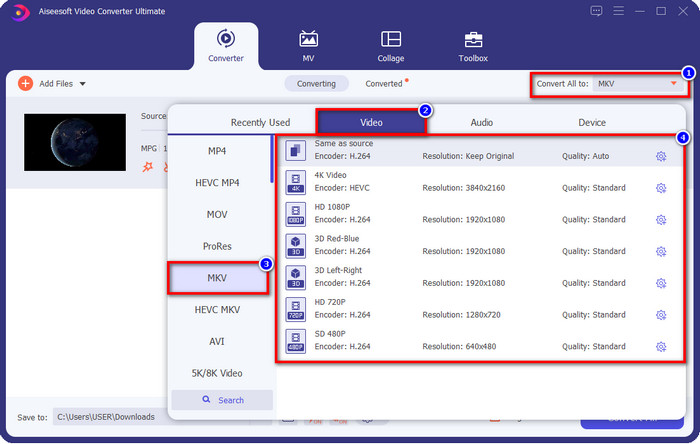
Step 3. To change the format, click Convert All to at the upper right side of the interface. Under the options, choose the MKV format based on your wants. There are several options and different video quality, encoder, and more.
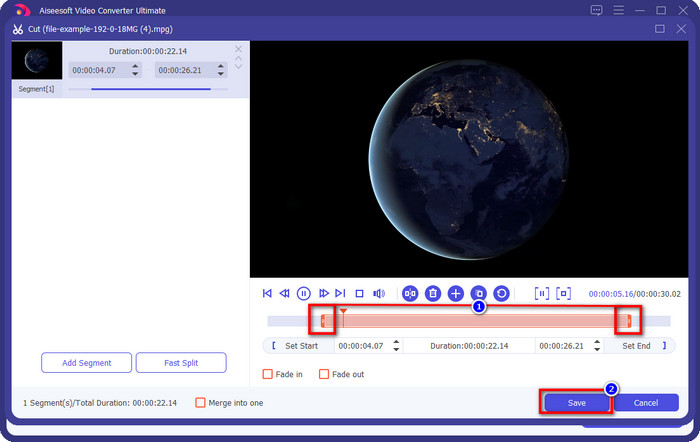
Optional. If you need to cut unnecessary clips on your video, click the scissor-like button. Adjust the length of your video by dragging the play head. Once you've already wanted to save the changes, click Save.
Step 4. Now, this is the last step where you are about to convert the file by clicking Convert All. The file is ready instantly; you now have transformed your .mpeg into .mkv format with that steps.
Teil 3. Vergleichstabelle
| Merkmale | FVC Video Converter Ultimate | TalkHelper Videokonverter | iConv – Video- und PDF-Konverter | Videokonverter, Kompressor MP4, 3GP, MKV, MOV, AVI | FVC Free Video Converter Online |
| Konvertieren Sie MPEG effizient in MKV |  | | | | |
| Stapelkonvertierung | | | |  | |
| Bearbeitungsfunktionen | | | | | |
| Ultraschnelle Konvertierung | | | | | |
| Plattformbasiert | Desktop-basiert | Nur Windows-basiert | iOS-basiert | Android-basiert | Webbasiert |
Teil 4. Häufig gestellte Fragen zur Konvertierung von MPEG in MKV
Was ist der Vorteil von MPEG?
MPEG macht unser Übertragen, Herunterladen und Online-Streaming schneller als andere Videoformate. Darüber hinaus verwendet dieses Videoformat MPEG-1 und MPEG-2, um das Videoformat zu komprimieren, aber seine Qualität bleibt gleich, was bedeutet, dass es nicht beeinträchtigt wird. Wenn Sie also ein großartiges Videoformat für die Verbreitung von Filmen benötigen, ist MPEG die richtige Wahl.
Was ist besser, MPEG oder MKV?
In Bezug auf die Leistung der Formate sind beide hervorragend. Aber wenn Sie mehrere Inhalte und Elemente in einer Datei enthalten möchten, dann hat MKV in diesem Bereich eine starke Seite. Allerdings ist die Dateigröße aufgrund des Inhalts und der Komponenten enorm. Angenommen, Sie möchten ein kleineres Dateiformat für die Übertragung von Videos, dann hilft Ihnen MPEG. Obwohl es Metadaten enthalten kann, ist es nicht so detailliert wie das MKV.
Warum ist meine MPEG-Datei so groß?
There are many reasons why your MPEG file size is big; one of the reasons is that the length of the video is approximately long. It explains why your MPEG files are large; although MPEG has an encoder, you will still need to compress it if you want to save space on your storage or deliver it faster. Want to know how to compress MPEG? Click and read this article.
Fazit
This article got your back covered if you want or need to convert MPEG to MKV. We tried all converters to ensure that they all do work perfectly. But if we compare these five-tool, we can see that the FVC Video Converter Ultimate performs better. So now, if you want to add a professional touch to your conversion, the ultimate tool is the choice according to the details we provided above. Need to know more about the ultimate tool? Or do you want to test it out yourself? In that case, downloading it is the only way to see if it works, according to our review.
-
 [2021] Beste Tools und einfache Möglichkeiten zum Konvertieren von MPEG in MP3
 In diesem Artikel geht es hauptsächlich darum, wie Sie Ihre MPEG-Videos mit den zuverlässigsten Tools auf der Liste in MP3 konvertieren können.
-
 Die 5 besten Möglichkeiten zum Konvertieren von MPEG in das AVI-Format [Online & Offline]
 Fällt es Ihnen schwer, einen Konverter für MPEG zu suchen? Dann versuchen Sie, diesen Artikel zu lesen, während wir erfahren, wie Sie das MPEG- in das AVI-Format mit detaillierten Schritten ändern.
-
 Top 3 der besten Techniken zum Konvertieren von MPEG in FLV auf PC und Mac
 Müssen Sie MPEG-Dateien in das FLV-Format konvertieren? Wenn dies der Fall ist, lesen Sie diesen Artikel, um zu verstehen, wie Sie die Datei konvertieren und welche Konverter Sie verwenden können.
