


 Video Converter Ultimate
 Bildschirm recorder
 Videoreparatur
Details, die Sie zum Konvertieren von MPG in AVI benötigen
Allgemein gesprochen ist eine MPG‑Datei eine typische Videodatei, die ein digitales Videoformat verwendet, das von der Moving Picture Experts Group (MPEG) standardisiert wurde. Sie speichert Video, Audio und Metadaten in einer einzigen, ineinander verschachtelten Datei. Es ist gängige Praxis, MPG‑Dateien für die Erstellung von Filmen zu verwenden, die über das Internet bereitgestellt werden. Dieses Videoformat ist nicht leicht zu konvertieren, wenn Sie keine Kenntnisse oder Erfahrung mit einem Konverter haben, der MPG in AVI unterstützt oder umwandelt. Lesen Sie diesen Artikel weiter, um mehr über die Details und Optionen zu erfahren, die Sie für den gewünschten Konvertierungsvorgang berücksichtigen sollten.

Teil 1. MPG und AVI - Ein Überblick
MPEG ist ein von der Moving Picture Experts Group entwickeltes Video-Dateiformat – derselben Gruppe, die auch Formate wie MP3 und MP4 hervorgebracht hat. Je nach Verwendungszweck nutzt MPEG entweder eine MPEG‑1‑ oder MPEG‑2‑Dateikompression.
Um Rohvideos in VHS‑Qualität und CD‑Musik auf 1,5 Megabit pro Sekunde zu komprimieren, ohne zu viel Qualität zu opfern, wurde MPEG-1 entwickelt. Dadurch ist es zu einem der beliebtesten und am weitesten kompatiblen Video‑/Audioformate der Welt geworden. Videodaten für MPEG‑1 werden in der Regel mit 30 Bildern pro Sekunde übertragen und haben eine Auflösung von etwa 352 × 240 Pixeln.
Windows‑Computer verwenden jedoch AVI als Standard‑Videoformat. In einem Multimedia‑Containerformat wie DivX oder XviD können Audio und Video mit verschiedenen Codecs gespeichert werden. Viele alternative Videoformate wie MPEG und MOV verwenden weniger Kompression und mehr Speicherplatz als eine AVI‑Datei. Es ist auch möglich, AVI‑Dateien ohne Kompression zu erzeugen. Dies führt zu enorm großen Dateigrößen – etwa 2–3 GB pro Minute Video –, da die Dateien nun verlustfrei sind. Unabhängig davon, wie oft Sie die Datei öffnen oder speichern, behält eine verlustfreie Datei ihre Qualität. Weitere Vorteile sind die Wiedergabe ohne benötigte Codecs.
Teil 2. Die effektivste Software zum Konvertieren von MPG in AVI
Wenn Sie sich jemals gefragt haben, wie man eine MPG‑Videodatei kostenlos in AVI konvertiert, ist diese neue und beste Software die Empfehlung dieses Artikels. Video Converter Ultimate ist eine kostenlose, für Windows und Mac verfügbare Software, mit der Sie Ihre MPG‑Datei deutlich schneller in AVI umwandeln können als mit Online‑Konvertern. Neben diesen beiden Videoformaten unterstützt diese Software auch zahlreiche andere Formate, aus denen Sie wählen können. Sie ist die beste Wahl wegen der hochwertigen Ausgabe, die Sie mit dieser Software erhalten. Da Sie nun einen Überblick darüber haben, was diese Software leisten kann, schnallen Sie sich an und finden wir heraus, wie sie funktioniert:
Schritt 1. Klicken Sie zunächst einfach auf die unten bereitgestellte Schaltfläche Kostenloser Download. Sobald der Download abgeschlossen ist, können Sie wählen, ob Sie die Software für Windows oder Mac herunterladen möchten. Nachdem die Software auf dem Desktop Ihres Computers installiert wurde, können Sie sie verwenden, indem Sie auf die Schaltfläche Jetzt starten klicken.
Gratis DownloadFür Windows 7 oder neuerSicherer Download
Gratis DownloadFür MacOS 10.7 oder neuerSicherer Download
Schritt 2. Öffnen Sie die Software, die Sie gerade heruntergeladen haben. Wenn Sie die Software zum ersten Mal öffnen, sehen Sie ein Fenster mit der Converter-Oberfläche. Hier beginnen Sie mit dem Transkodieren Ihres Videos.
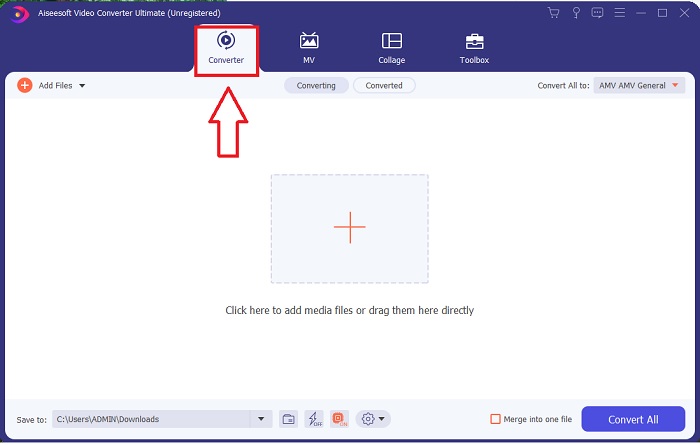
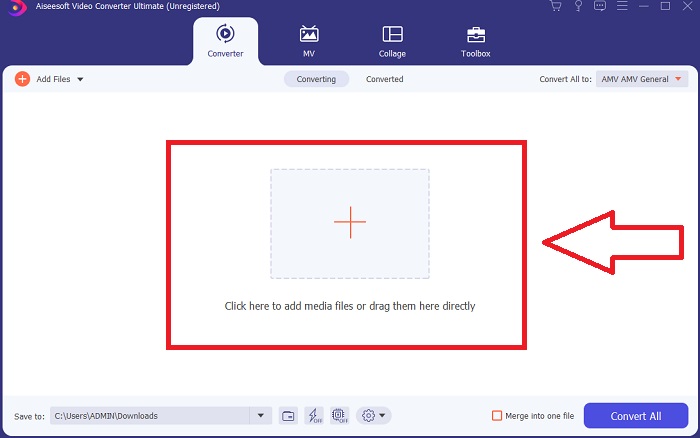
Schritt 3. Sie können den Konvertierungsvorgang starten, indem Sie Ihre Dateien in die Software importieren. Ein Video zu konvertieren ist so einfach wie es auf das Plus-Symbol zu ziehen.
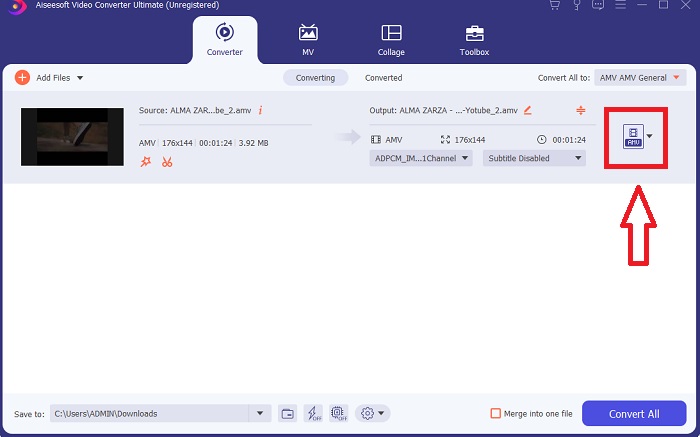
Schritt 4. Klicken Sie mit der rechten Maustaste auf ein Videoformat und wählen Sie Speichern unter oder Auf externem Speicher sichern. Suchen Sie in der Dropdown‑Liste nach dem Dateityp AVI und wählen Sie ihn aus. Sobald Sie einen AVI‑Videotyp ausgewählt haben, stehen zahlreiche Einstellungen für die Videoqualität zur Verfügung. Sie können die Qualitätseinstellungen ändern, falls Ihre gewünschte Videoausgabe nicht aufgeführt ist. Über das Zahnrad‑Symbol können Sie die Auflösung der Anzeige, die Bildrate und die Audioqualität anpassen. Klicken Sie auf die Schaltfläche Neu erstellen, um Ihre Änderungen zu speichern.
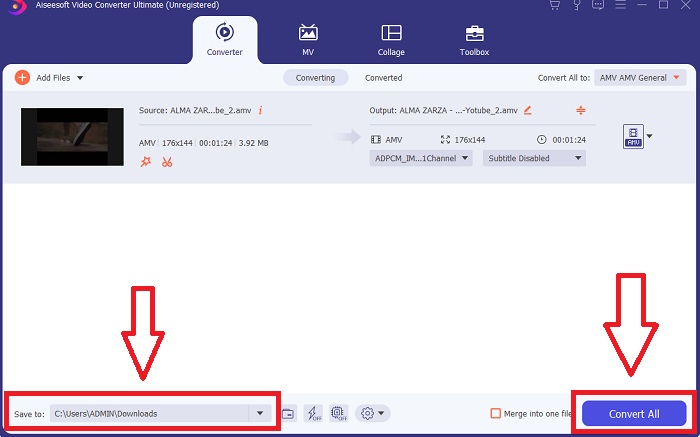
Schritt 5. Klicken Sie auf Alle konvertieren, sobald Sie das ausgewählte Video bearbeitet haben und es bereit ist, auf Ihren Computer übertragen zu werden.
Teil 3. Schnelle Tipps: Andere effektive Tools, die Sie in Betracht ziehen sollten
Methode 1. Verwenden Sie CloudConvert
CloudConvert ist ein Online-Videokonverter. Dieser Online-Konverter unterstützt neben anderen Formaten auch MP4, WEBM und AVI. Sie können die Qualität, Auflösung und Dateigröße des Videos auswählen. Wenn Sie darüber nachdenken, wie Sie mit diesem Online-Tool MPG in AVI konvertieren können, finden Sie hier die Vorgehensweise zur Verwendung:
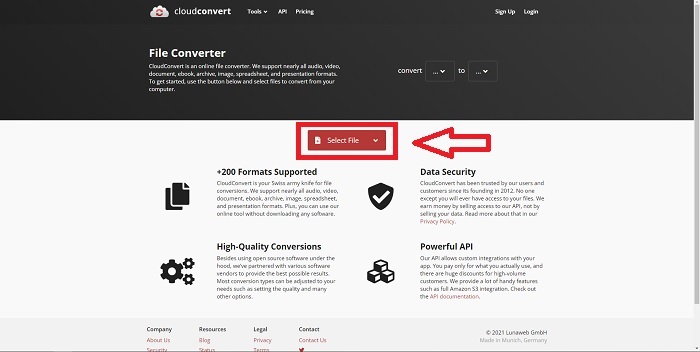
Schritt 1. Laden Sie eine Datei von Ihrem Computer hoch, indem Sie auf Datei auswählen klicken.
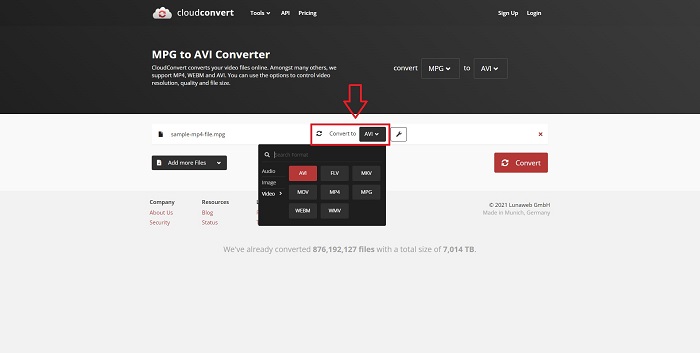
Schritt 2. Fahren Sie dann fort, indem Sie auswählen, in welches Format Ihre Datei konvertiert werden soll. Klicken Sie dazu auf den Formatbereich neben dem Schraubenschlüssel‑Symbol. Sie haben außerdem die Möglichkeit, weitere Dateien zum Konvertieren hinzuzufügen.
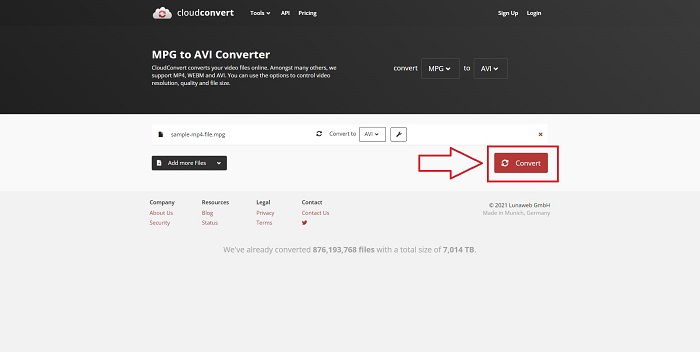
Schritt 3. Klicken Sie auf Konvertieren, um alle hochgeladenen Dateien zu konvertieren.
Methode 2. Verwenden Sie Zamzar
Zamzar ist ein webbasiertes Tool zum Konvertieren von Dateien. Konvertierungen können in einer Vielzahl von Formaten durchgeführt werden, ohne dass Software heruntergeladen werden muss. Zamzar kann eine Datei von einem Format in ein anderes konvertieren, z. B. ein Adobe PDF in ein Microsoft Word-Dokument, indem es eine URL eingibt oder eine oder mehrere Dateien hochlädt (solange sie alle dasselbe Format haben). Um Kenntnisse über dieses Online-Tool zu erlangen, sind hier die bereitgestellten Schritte für Sie:
Schritt 1. Suchen Sie in einer Suchmaschine nach Zamzar. Nachdem Sie die Website geöffnet haben, können Sie nun eine Datei über die Oberfläche hochladen, indem Sie auf Dateien hinzufügen klicken.
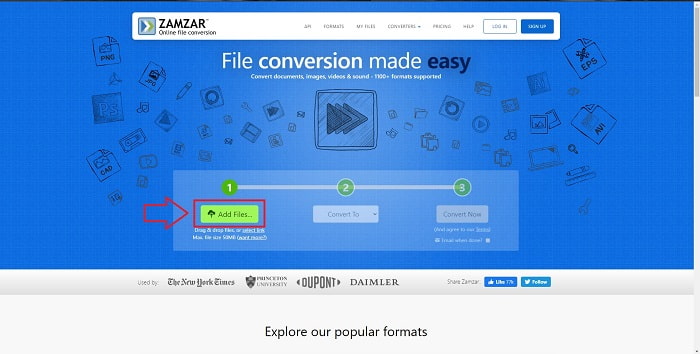
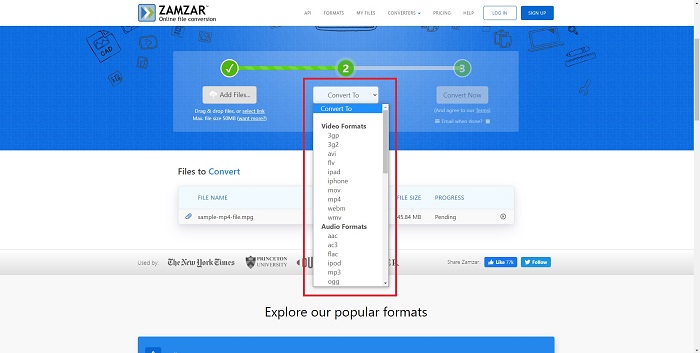
Schritt 2. Anschließend können Sie die Datei konvertieren, indem Sie das gewünschte Zielformat auswählen. Klicken Sie auf Konvertieren in, um alle unterstützten Formate dieses Online‑Tools anzuzeigen.
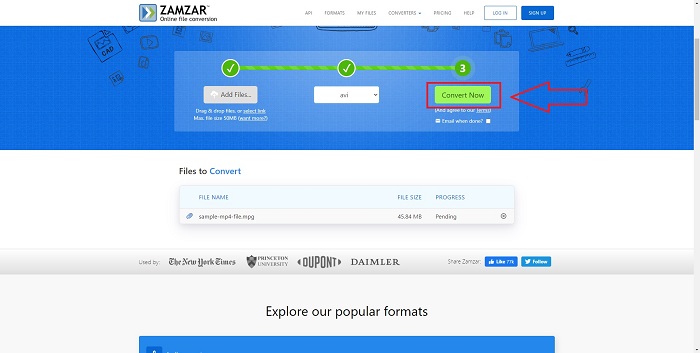
Schritt 3. Um die Datei zu konvertieren, klicken Sie auf Jetzt konvertieren.
Teil 4. FAQs zu MPG und AVI
Ist AVI oder MPG besser?
Die Speicherung ist mit AVI-Dateien möglich, während die Videoaufzeichnung mit MPEG-Dateien erfolgt. AVI ist MPEG etwas überlegen; Wenn MPEG jedoch das zu verwendende Format ist, möchten Sie DVD-Videos brennen. Microsoft Windows hat das AVI-Dateiformat als Antwort auf das MOV-Dateiformat von Apple entwickelt, während die Moving Picture Group das MPG-Format entwickelt hat.
Was sind die Vor- und Nachteile von AVI?
Im Vergleich zu den anderen Dateiformaten können AVI-Dateien unkomprimiert extrem groß werden. Sie müssen bereit sein, etwas Speicherplatz im Austausch für die Vorteile der AVI-Datei aufzugeben, da Sie nicht so viele Dateien speichern können, wie Sie es sonst tun würden. Komprimieren Sie eine AVI-Datei online über einen bestimmten Punkt hinaus, wird dadurch die Videoqualität reduziert.
Was ist kleineres AVI oder MPG?
Im Internet gilt: Je größer die Datei, desto länger dauert der Download. Es ist daher sinnvoll, Filme in kleinere Dateigrößen zu kodieren, auch wenn dies zu einem leichten Qualitätsverlust führt. Bei der Wiedergabe wird AVI gegenüber MPG nach wie vor bevorzugt, da mehr Set‑Top‑Player AVI‑Dateien als MPG‑Dateien abspielen können. Möchten Sie Ihre MPG‑Dateien auf Ihrem Computer abspielen, klicken Sie hier, um mehr zu erfahren.
Fazit
Zusammenfassend lässt sich sagen, dass Video Converter Ultimate der beste Konverter ist, den Sie gegenüber allen oben aufgeführten Online‑Konvertern von MPG zu AVI in Betracht ziehen sollten. Diese Software ist kostenlos und bietet einen schnelleren Konvertierungsprozess als die Online‑Konverter‑Tools. Sie unterstützt zudem viele Formate und liefert eine hohe Videoausgabequalität. Abgesehen davon gibt es keinen Grund, diese Software nicht zu verwenden.
-
 So konvertieren Sie MPEG kostenlos in MP4-Dateien unter Windows, Mac, Online
 Lesen und erhalten Sie 3 kostenlose Möglichkeiten zum Konvertieren von MPEG- in MP4-Dateien auf Ihrem Computer. Sie können Online- und Desktop-Videokonverter verwenden, um MPEG problemlos in das MP4-Format umzuwandeln.
-
 [2025] Die besten Tools und einfachen Möglichkeiten zum Konvertieren von MPEG in MP3
 In diesem Artikel geht es hauptsächlich darum, wie Sie Ihre MPEG-Videos mit den zuverlässigsten Tools auf der Liste in MP3 konvertieren können.
-
 4 effiziente Möglichkeiten zum Konvertieren von MOV in AVI auf PC und Mac [2025]
 Möchten Sie wissen, was der beste MOV-zu-AVI-Konverter im Internet ist? Und warum der FVC Ultimate Video Converter der Richtige für Sie sein könnte.
