


 Video Converter Ultimate
 Bildschirm recorder
 Videoreparatur
In einer detaillierten Übersicht über die Top 5 Konverter zum Konvertieren von OGV in WMV
Sie haben keine Ahnung, wie Sie OGV in WMV konvertieren und es im Windows Media Player abspielen können? Dann haben Sie Glück, denn heute möchten wir Ihnen verschiedene Tools vorstellen, mit denen Sie Ihre OGV‑Datei umwandeln können. Möchten Sie wissen, welche fünf Tools das sind? Im späteren Abschnitt erfahren Sie außerdem, wie Sie Ihre OGV‑Datei in WMV konvertieren. Also schnallen Sie sich am besten an – wir wollen Sie nicht länger warten lassen und starten unsere Entdeckungsreise sofort.

Teil 1. Top 5 OGV zu WMV Konverter online und offline
Nach oben 1. FVC Video Converter Ultimate
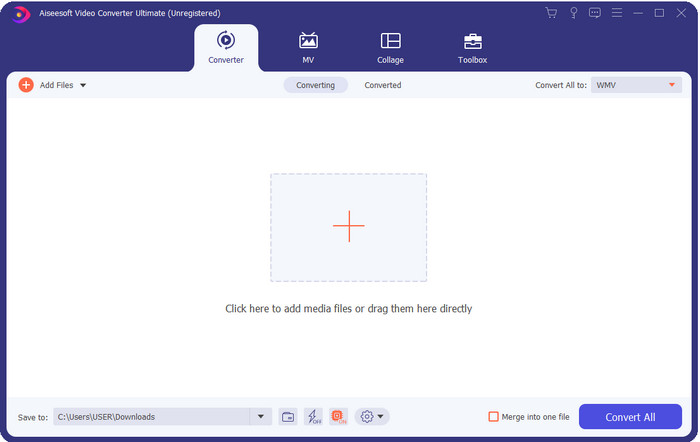
FVC Video Converter Ultimate ist einer der besten OGV‑zu‑WMV‑Converter, die Sie auf Ihren Desktop herunterladen können. Dieses Tool bietet eine beeindruckend hohe Konvertierungsgeschwindigkeit, die bereits viele Anwender überzeugt hat. Zudem ist die Konvertierung nicht der einzige Schwerpunkt dieses Programms. Sie können hier die erweiterten Bearbeitungsfunktionen nutzen, um Ihr Video zu optimieren, zu verkleinern oder mehrere Clips zusammenzufügen. Insgesamt gilt: Wenn Sie neu im Bereich Formatkonvertierung sind, ist dies die beste Wahl, denn Sie können Ihre Dateien mühelos und im Handumdrehen umwandeln – mit einem professionellen Ergebnis am Ende.
Gratis DownloadFür Windows 7 oder neuerSicherer Download
Gratis DownloadFür MacOS 10.7 oder neuerSicherer Download
Vorteile
- Konvertieren Sie Ihr OGV in weniger als einer Minute in WMV, AVI, MOV, MP4 und mehr als 200 verfügbare Formate.
- Seine Stärke liegt in der Konvertierung und den erweiterten Bearbeitungsfunktionen, die Sie benötigen.
- Ein unglaublicher Konverter, den jeder auch ohne Erfahrung verwenden kann, ist narrensicher und leicht.
- Verfügbar in allen Betriebssystemen zum Herunterladen auf Windows & Mac.
Nachteile
- Um diese Software zu erwerben, müssen Sie sie zuerst kaufen.
- Laden Sie es auf Ihr Computerlaufwerk herunter.
Nach oben 2. VLC Media Player
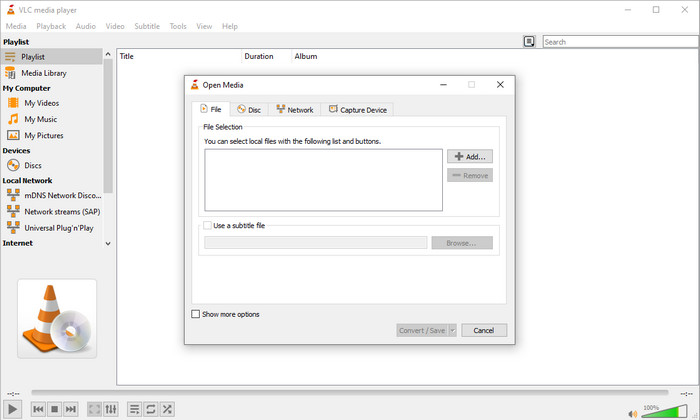
VLC Media Player ist der wohl am häufigsten heruntergeladene und auf allen Geräten leicht zugängliche Player. Dieser Videoplayer kann Ihr OGV auch in WMV oder in ein anderes gewünschtes Format umwandeln. Obwohl der Player konvertieren kann, fehlt ihm dennoch die Unterstützung für einige Formate, insbesondere wenn Sie Ihre Datei in ein sehr spezielles Format umwandeln möchten. Aber wenn Sie VLC bereits auf Ihrem Desktop installiert haben, warum probieren Sie diesen Player‑Converter nicht einfach aus, um Ihr Format zu ändern?.
Vorteile
- Der Download ist kostenlos und unterstützt verschiedene Formate zum Abspielen und Konvertieren.
- Verfügbar in allen zu verwendenden Geräten.
- Schneller Konvertierungsprozess.
Nachteile
- Es unterstützt ein begrenztes Format, aus dem Sie wählen können.
- Kein typischer Konverter.
- Bevor Sie konvertieren können, sind viele Schritte erforderlich.
Nach oben 3. Konvertieren
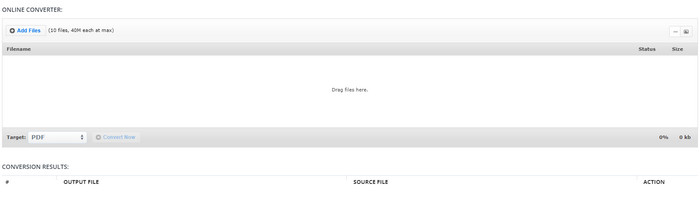
Aconvert hilft Ihnen bei der Aufgabe, OGV‑Dateien zu konvertieren. Dieser Online‑OGV‑zu‑WMV‑Converter bietet einen effizienten Konvertierungsprozess, sodass Sie möglichst wenig Unannehmlichkeiten haben. Allerdings enthält dieser Converter viele Werbeanzeigen in der Weboberfläche, die auf Dauer sehr störend sein können. Außerdem beschränkt dieses Tool Ihre Konvertierungserfahrung auf nur zehn Vorgänge und eine Dateigröße von 40 MB pro Datei. Doch keine Sorge: Dieses Tool ist für alle Internetnutzer, die Dateien online umwandeln möchten, kostenlos nutzbar.
Vorteile
- Verfügbar im Web zur Verwendung.
- Es unterstützt ein bekanntes Format, das Sie einfügen können.
- Benutzerfreundlich.
Nachteile
- Das Optionsformat für die endgültige Ausgabe hatte viele Mängel.
- Es gibt viele nervige Anzeigen auf der Website.
Nach oben 4. Video2Edit.com
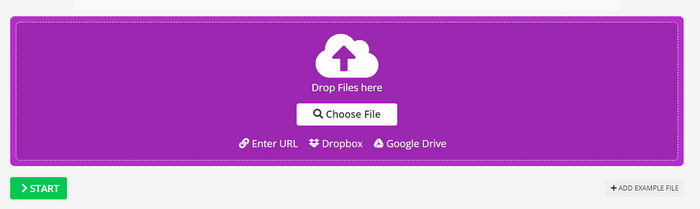
Video2Edit.com ist ähnlich wie Aconvert, aber dieses Tool ist sogar noch besser, weil Sie das Video bearbeiten können, bevor Sie OGV in WMV umwandeln. Außerdem können Sie den Audiocodec aus drei Optionen auswählen. Darüber hinaus können Sie mit diesem Converter noch vieles mehr tun. Der Nachteil dieses Webtools besteht jedoch darin, dass die verfügbaren Ausgabeformate begrenzt sind. Es gibt ebenfalls Werbung, und der Konvertierungsprozess ist eher langsam.
Vorteile
- Multifunktionaler Konverter.
- Verfügbar im gesamten Web, damit jeder darauf zugreifen kann.
- Es kann Video- und Audio-Codecs ändern.
Nachteile
- Anzeigen auf der Schnittstelle.
- Der Konvertierungsprozess dauert lange.
Top 5. FVC Kostenloser Online-Videokonverter
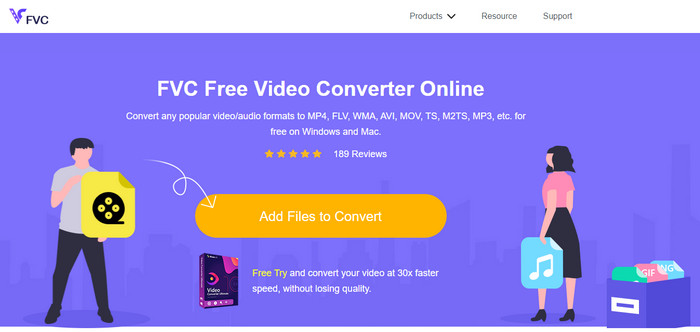
FVC Free Video Converter Online bietet einen besseren Konvertierungsprozess von OGV zu WMV als VLC, Aconvert und Video2Edit.com. Denn dieses Webtool liefert ein professionelles Ergebnis ähnlich wie der FVC Video Converter Ultimate, auch wenn hier nicht alle Formate unterstützt werden, die das Ultimate‑Tool beherrscht. Außerdem können Sie die Qualität anpassen und auf eine höhere Auflösung stellen, um ein besseres Ergebnis zu erzielen. Ein weiterer Vorteil: Es erscheinen keine störenden Werbeanzeigen während der Konvertierung. Sie können also ohne aufpoppende Werbung konvertieren – und zwar ohne Begrenzung, selbst was die Dateigröße betrifft.
Vorteile
- Es unterstützt mehr Formate als VLC, Adconvert und Video2Edit.
- Es kann Ihre Video- und Audiospezifikationen ändern.
- Einfacher Zugriff auf den Webkonverter jederzeit und überall mit Internetverbindung.
- Keine Werbung auf der Benutzeroberfläche, und es sieht professioneller aus.
Nachteile
- Wenn Sie kein Internet haben, können Sie diesen Konverter nicht wie die anderen beiden Online-Konverter verwenden.
- Keine Bearbeitungsfunktionen.
Teil 2. Konvertieren von OGV in WMV mit FVC Video Converter Ultimate
Wenn Sie von den weiteren Funktionen des FVC Video Converter Ultimate beeindruckt sind, sollten Sie jetzt unbedingt weiterlesen. Um eine Vorstellung davon zu bekommen, wie man mit diesem Ultimate‑Tool OGV in WMV konvertiert, befolgen Sie die folgenden Schritte.
Schritte zum Konvertieren von OGV in das WMV‑Format mit dem FVC Video Converter Ultimate:
Schritt 1. Laden Sie die Konverter‑Software auf Ihren Windows‑ oder Mac‑Computer herunter, folgen Sie den Installationsanweisungen und starten Sie anschließend den Converter.
Gratis DownloadFür Windows 7 oder neuerSicherer Download
Gratis DownloadFür MacOS 10.7 oder neuerSicherer Download
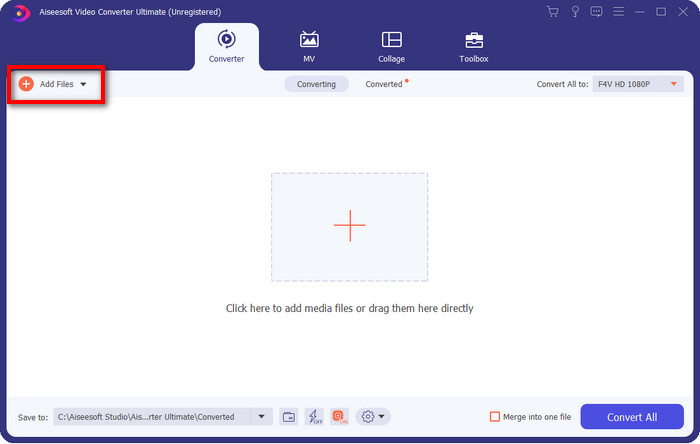
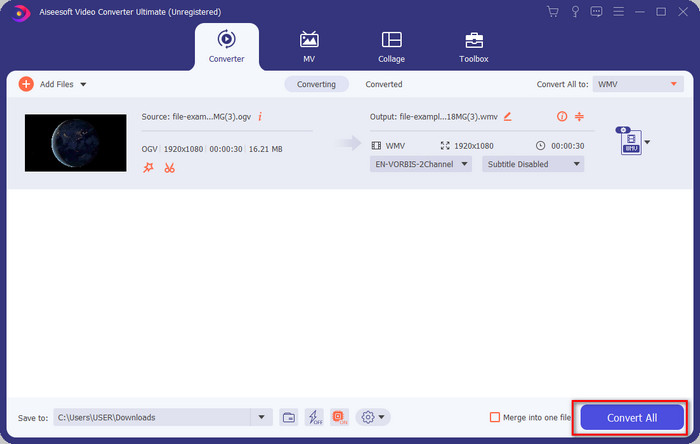
Schritt 2. Nachdem Sie den Converter geöffnet haben, können Sie die OGV‑Datei hochladen, indem Sie oben links in der Oberfläche auf die Schaltfläche Dateien hinzufügen klicken und anschließend auf Öffnen tippen.
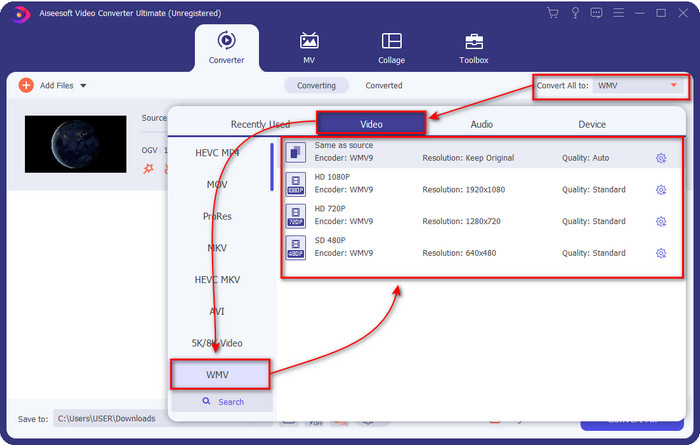
Schritt 3. Sobald Sie Ihre OGV‑Datei hochgeladen haben, wählen Sie unter der Option Alles konvertieren in das gewünschte Format WMV aus.
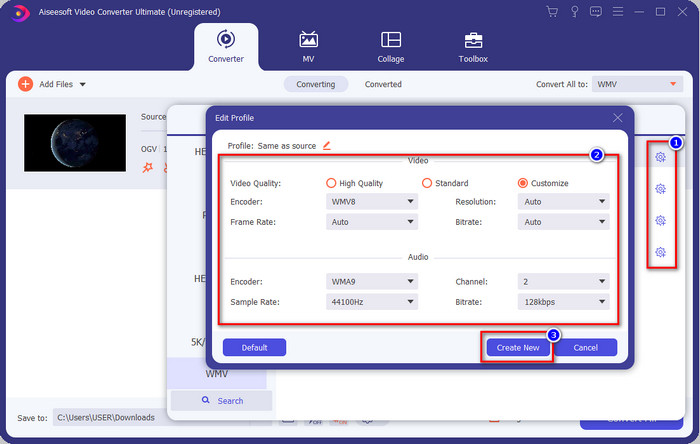
Optional: Möchten Sie das Videoprofil selbst anpassen? Klicken Sie dann auf das Zahnrad-Symbol und stellen Sie Encoder, Bildrate oder Abtastrate für Video und Audio ein. Um die Änderungen zu speichern, klicken Sie auf Neu erstellen. Nach der Anpassung bemerken Sie ein Zahnrad‑Symbol oben auf dem von Ihnen gewählten Format.
Schritt 4. Klicken Sie auf Alle konvertieren, um den Vorgang zu starten. Nach Abschluss der Konvertierung öffnet sich automatisch ein Ordner auf Ihrem Computer, in dem sich die WMV‑Datei befindet.
Teil 3. Vergleichstabelle
| Eigenschaften der Konverter | FVC Video Converter Ultimate | VLC Media Player | Konvertieren | Video2Edit.com | FVC Free Video Converter Online |
| Konvertieren von Formaten |  | | | | |
| Bearbeitungsfunktionen | |  | | | |
| Ändern Sie die Video- und Audioeinstellungen | | | | | |
| Internetabhängig | | | | | |
| Anzeigenfrei | | | | | |
Teil 4. Häufig gestellte Fragen zur Konvertierung von OGV in WMV
Kann ich den FFmpeg-OGV-zu-WMV-Konverter verwenden?
Ja, Sie können FFmpeg verwenden, um OGV in WMV zu konvertieren, aber dieser Converter ist nicht so benutzerfreundlich wie gängige Programme. Wenn Sie dieses Tool dennoch nutzen möchten, befolgen Sie die folgenden Schritte: Starten Sie das Programm und führen Sie den Pfad zu FFmpeg.exe auf Ihrem System aus. Öffnen Sie die Eingabeaufforderung und navigieren Sie zu der OGV‑Datei, die Sie konvertieren möchten. Geben Sie anschließend folgenden Code ein: ffmpeg -i input.ogv -vn -ar 44100 -ac 2 -b:a 192k output.wmv und drücken Sie dann die Eingabetaste, um den Vorgang zu starten.
Ist OGV auf dem Mac spielbar?
Wenn Sie OGV‑Dateien in QuickTime abspielen möchten, ist das nicht möglich, da der Format‑Encoder nicht unterstützt wird. Es gibt jedoch eine Möglichkeit, sie auf dem Mac kompatibel zu machen, nämlich durch Konvertierung in MOV. Möchten Sie wissen, wie Sie Ihre OGV‑Dateien in MOV umwandeln? Dann klicken Sie auf diesen Link.
Haben OGV und OGG das gleiche Format?
OGV und OGG sind die genauen Container, aber sie unterscheiden sich darin, was sie enthalten. Beispielsweise können OGG-Dateien Audio in hoher Qualität speichern, jedoch nicht mit Videos. Im Gegensatz dazu kann OGV Audio- und Videoinhalte in hoher Qualität speichern.
Fazit
Und da wir nun die OGV‑zu‑WMV‑Converter kennen, die Sie verwenden können, ist es an der Zeit, das passende Tool auszuwählen. Obwohl Ihnen alle hier vorgestellten Tools helfen werden, haben wir festgestellt, dass der FVC Video Converter Ultimate den Nutzern besonders hohe Qualität verspricht. Es ist kaum zu glauben, wozu dieses Tool in der Lage ist. Die Entscheidung liegt nun bei Ihnen, doch falls Sie sich noch nicht festgelegt haben, empfehlen wir Ihnen den FVC Video Converter Ultimate. Möchten Sie mehr über dieses Tool erfahren? Dann laden Sie es herunter und nutzen Sie es ohne Einschränkungen.
-
 2 Die meisten Auswahlkonverter zum Konvertieren von OGV-Dateien in AVI [2021]
 Möchten Sie OGV-Dateien in AVI konvertieren? Dieser Artikel enthält zwei der besten Lösungen, mit denen Sie Ihre Konvertierung sicher und schnell machen können, ohne die Glaubwürdigkeit des Videos zu verlieren.
-
 Hervorragender OGV-zu-FLV-Konverter, den Sie nicht verpassen sollten [bewährt]
 Wenn Sie sich fragen, wie Sie OGV- in FLV-Dateien schnell konvertieren können, zeigt Ihnen dieser Artikel den einzigen Konverter, den Sie jemals brauchen werden.
-
 3 Möglichkeiten, M2TS-Dateien unter Windows / Mac / Online kostenlos in WMV zu konvertieren
 Hier sind 3 einfache Möglichkeiten, um M2TS in WMV-Videos zu konvertieren. Sie können das Videoformat unter Windows, Mac und online schnell kostenlos von M2TS auf WMV ändern. Die Stapelkonvertierung wird unterstützt.
