


 Video Converter Ultimate
 Bildschirm recorder
 Videoreparatur
Lernen Sie die 2 besten Konverter kennen, um RMVB kostenlos in AVI zu konvertieren
Wenn Sie eine effizientere Komprimierung suchen, verwenden Sie das RMVB‑Format, da dieses variable Bitraten zur Kodierung von Ton und Video nutzt. Dieses Format ist der beste Container, um Streaming‑Medien zu speichern, die mit konstanter Bitrate kodiert wurden. Obwohl das Format die beste Wahl für Online‑Streaming ist, benötigen Sie trotzdem einen Media Player oder Media‑Codec, um Videos mit der Dateiendung .rmvb anzusehen. Wenn das auf Sie zutrifft, machen wir Ihnen das Leben nun leichter, indem wir herausfinden, welchen RMVB‑zu‑AVI‑Konverter Sie verwenden können, um Ihre RMVB‑Dateien zu konvertieren.
Teil 1. Bester Offline-RMVB-zu-AVI-Konverter für Windows und Mac [schnellste und effektivste Methode]
Als Erstes auf dieser Liste steht der phänomenale Konverter, den Sie lieben werden: FVC Video Converter Ultimate bietet die schnellste und sicherste Möglichkeit, RMVB kostenlos in AVI zu konvertieren. Alle Funktionen, die dieses Tool bietet, sind ein Muss für alle, die häufig Formate umwandeln. Wenn Sie darüber hinaus Ihr Video bearbeiten, Ihre Audioausgabe verstärken, ein einzigartiges GIF erstellen und vieles mehr tun möchten, ist dieses Tool für alle eine hervorragende Wahl. Zwar können Sie Ihr Format hier kostenlos konvertieren, das Tool selbst ist jedoch nicht kostenlos. Dennoch müssen Sie keine Hunderte von Dollar ausgeben, um diesen Konverter herunterzuladen, darauf zuzugreifen und seine vollständigen Möglichkeiten zu nutzen. Angenommen, Sie kaufen und laden dieses Tool herunter, dann ist jetzt der richtige Zeitpunkt, Ihrer Fantasie freien Lauf zu lassen, um mit Hilfe dieses Programms das bestmögliche Ergebnis zu erzielen. Im Folgenden finden Sie nun die Schritte, wie Sie Ihre RMVB‑Dateien in ein neues Format konvertieren.
Schritte zum Konvertieren von RMVB in AVI mit dem FVC Video Converter Ultimate:
Schritt 1. Laden Sie diesen RMVB‑zu‑AVI‑Konverter auf Ihren PC oder Mac herunter, installieren Sie ihn, führen Sie die Grundeinrichtung durch und klicken Sie auf Start Now.
Gratis DownloadFür Windows 7 oder neuerSicherer Download
Gratis DownloadFür MacOS 10.7 oder neuerSicherer Download
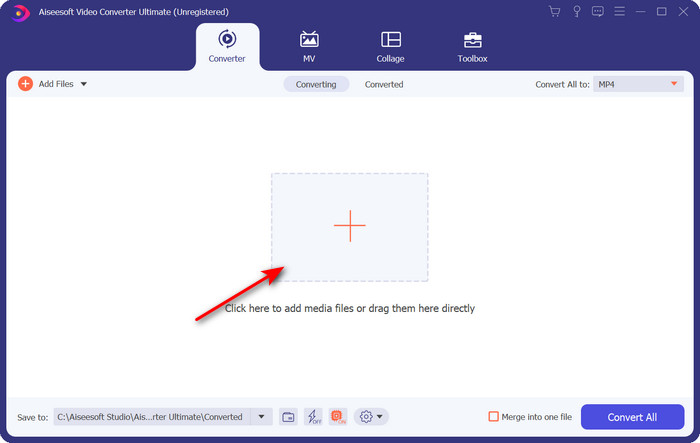
Schritt 2. Starten Sie das Programm und laden Sie die .rmvb‑Datei in die Oberfläche, indem Sie in der Mitte auf die Schaltfläche + klicken. Suchen Sie die Datei im Ordner und klicken Sie auf Open.
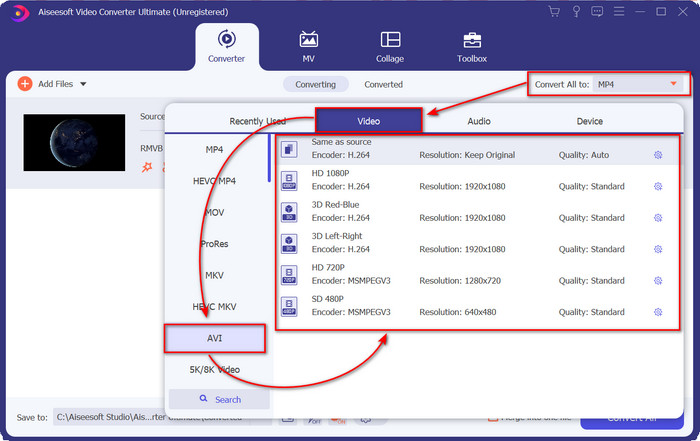
Schritt 3. Gehen Sie zu Convert All to: und suchen Sie das AVI‑Format, dann klicken Sie darauf.
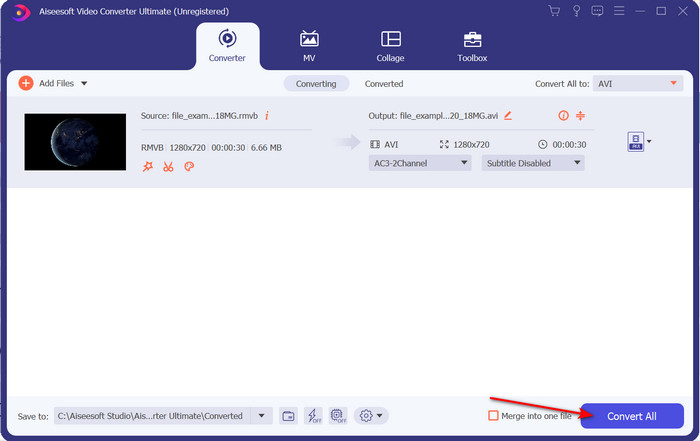
Schritt 4. Nachdem Sie das Format ausgewählt haben, beginnen wir mit der Konvertierung der Datei, indem Sie auf Convert All klicken.
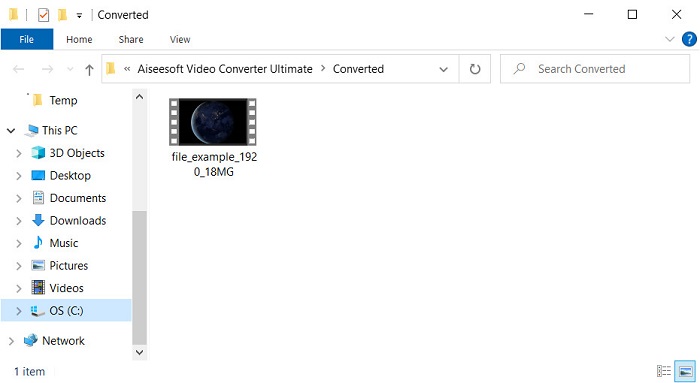
Schritt 5. Ein Ordner mit der neuen .rmvb‑Datei wird auf Ihrem Bildschirm angezeigt; klicken Sie auf die Datei, um das Video anzusehen und zu genießen.
Vorteile
- Die Toolbox bietet mehrere beliebte Dienstprogramme, die Ihnen bei verschiedenen Problemen helfen, auf die Sie stoßen würden.
- Es bietet eine 30-mal schnellere Konvertierung der Datei im Vergleich zu den anderen Konvertern online und offline.
- Es ist narrensicher, dass jeder mit oder ohne Konvertierungserfahrung leicht konvertieren kann.
- Die Stapelkonvertierung ist mit verschiedenen Formaten schnell erledigt.
Nachteile
- Um auf das Tool zugreifen zu können, müssen Sie dafür bezahlen, aber es sind nicht mehr als hundert Dollar.
- Das Herunterladen ist auf Ihrem PC oder Mac erforderlich.
Teil 2. Bester Online-RMVB-zu-AVI-Konverter für Webbrowser [kostenlos]
Suchen Sie einen RMVB‑zu‑AVI‑Konverter online? Dann ist FVC Free Video Converter Online eine der Optionen. Mit diesem Webtool können Sie konvertieren, ohne eine Software herunterzuladen. Es ist für alle zugänglich, die eine Internetverbindung haben. Außerdem ist es kostenlos, sicher und es werden während der Konvertierung keine Werbeanzeigen auf der Website eingeblendet. Ein weiterer Vorteil ist, dass Sie hier Dateien ohne Begrenzung konvertieren können. Sie können aus mehreren verfügbaren Formaten wählen. Allerdings verfügt dieses Webtool nicht über dieselben erweiterten Funktionen wie der FVC Video Converter Ultimate. Zudem können Sie – wie bei anderen Webtools auch – nicht auf dieses Tool zugreifen, wenn Sie keine Internetverbindung haben. Wenn Sie also ohne Geldausgabe ausprobieren und konvertieren möchten, folgen Sie den unten angegebenen Schritten.
Schritte zum Online‑Konvertieren von RMVB in AVI mit dem FVC Free Video Converter Online:
Schritt 1. Um auf diesen RMVB‑zu‑AVI‑Konverter online zuzugreifen, müssen Sie auf diesen Link klicken.
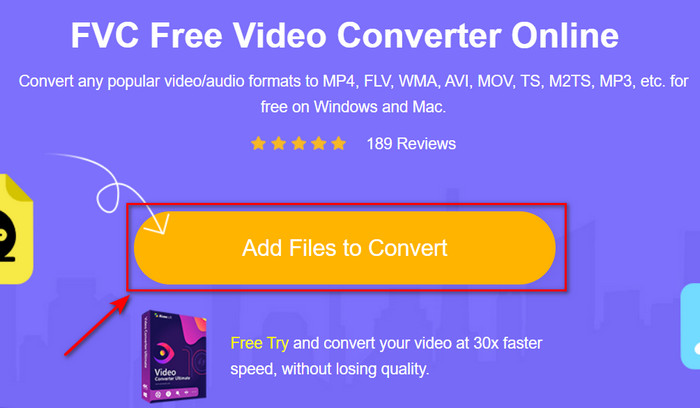
Schritt 2. Drücken Sie Add Files to Convert, und wenn Sie dieses Tool zum ersten Mal verwenden, wird ein Launcher automatisch heruntergeladen. Klicken Sie anschließend erneut auf Add Files to Convert, und ein Ordner wird angezeigt. Suchen Sie im Ordner nach der .rmvb‑Datei und klicken Sie auf Open.
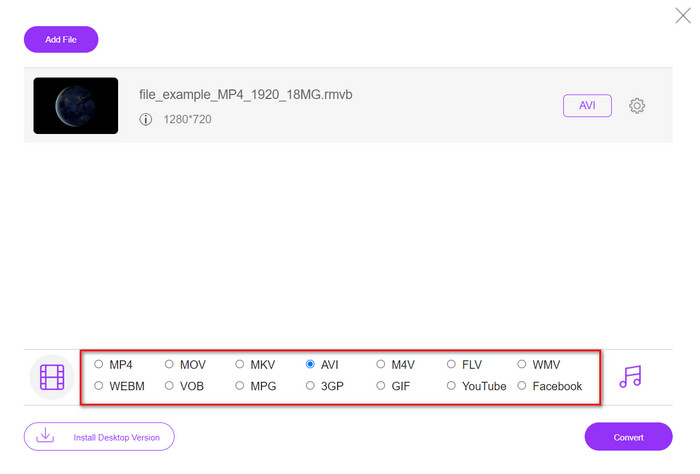
Schritt 3. Sobald sich die Datei in der Weboberfläche befindet, klicken Sie unten in den verfügbaren Optionen auf AVI.
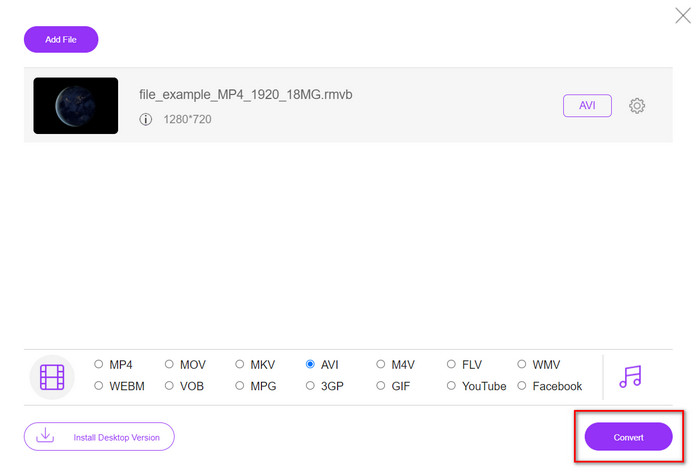
Schritt 4. Nachdem Sie AVI ausgewählt haben, starten wir die Konvertierung, indem Sie auf Convert drücken.
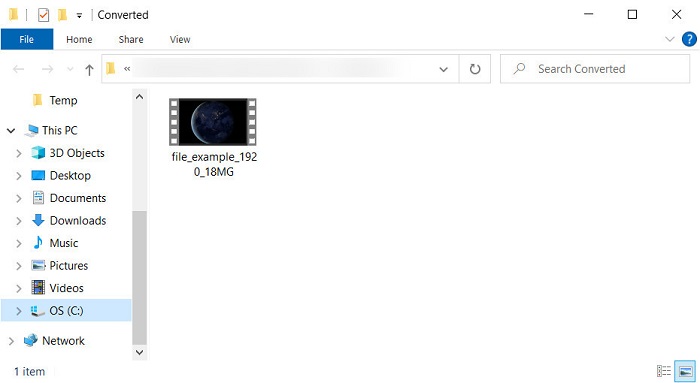
Schritt 5. Wenn die Konvertierung der Datei abgeschlossen ist, wird ein Ordner mit der Datei auf Ihrem Bildschirm angezeigt, und wenn Sie die Datei ansehen möchten, klicken Sie sie an.
Vorteile
- Außer dem Installationsprogramm ist kein Download erforderlich, um darauf zuzugreifen.
- Kostenlos und werbefrei auf der Weboberfläche.
- Öffnen Sie das Webtool in einem anderen Browser, da es in allen verfügbar ist.
Nachteile
- Internetabhängig, das heißt, wenn Sie kein Internet haben, können Sie es nicht nutzen.
- Es hat keine Bearbeitungsfunktionen wie der FVC Video Converter Ultimate.
Teil 3. FAQs zu RMVB und AVI
Kann ich die RMVB-Datei auf Quicktime abspielen?
Quicktime kann verschiedene Formate abspielen, und dieser Media Player unterstützt unterschiedliche Codecs, die in Ihre Video- oder Audiospur kodiert sind. Allerdings gehört .rmvb nicht zu den unterstützten Formaten. Um die .rmvb‑Datei in Quicktime abzuspielen, müssen Sie sie daher in ein unterstütztes Format wie MOV, MPEG‑4, AVI oder andere unterstützte Formate konvertieren. Sie können sich jedoch an spezielle RMVB‑Player wenden, um Ihre RMVB‑Videos reibungslos zu genießen.
Warum kann ich keine .rmvb-Dateien im Windows Media Player öffnen?
Da der Codec Ihrer .rmvb-Dateien in diesem Media Player nicht unterstützt wird, nehmen Sie an, Sie möchten ein Video mit der Dateierweiterung .rmvb ansehen. In diesem Fall ist es ein Muss, vor der Wiedergabe einen Video-Codec auf Ihrem Computer zu installieren. Um dieses Problem zu vermeiden, versuchen Sie jedoch, das Format in ein plausibles Format zu konvertieren, das dieser Mediaplayer unterstützt.
Kann ich ein Video im RMVB-Format auf meinem Telefon speichern?
Ja, Sie können sie speichern, aber Sie können sie nicht auf Ihrem Standardvideoplayer abspielen, und um die Datei abzuspielen, müssen Sie einen Videoplayer eines Drittanbieters herunterladen, der dieses Format unterstützt.
Fazit
Zusammenfassend lässt sich sagen, dass wir nun verstehen, was das RMVB‑Format ist und welche Art von Kodierung dieses Format unterstützt. Obwohl das Format hervorragend für die Online‑Übertragung von Dateien geeignet ist, unterstützen einige Media Player es aufgrund seiner komplexen Struktur weiterhin nicht. Deshalb stellen wir nun zwei Lösungen vor, mit denen Sie lernen können, wie Sie RMVB‑Dateien in AVI konvertieren: Das eine Tool ist online kostenlos nutzbar, während Sie es verwenden. Und das andere ist der herausragende Konverter, der alle Aufgaben im Handumdrehen erledigt. Falls Sie sich für den FVC Free Video Converter Online entscheiden, können Sie mit der besten Online‑Konvertierung rechnen. Wenn Sie sich jedoch dazu entschließen, eine weitaus bessere Version herunterzuladen, können Sie ultimative Leistung erwarten.
-
 Anleitung zum Konvertieren von RMVB in MP4 unter Windows / Mac (3 kostenlose Möglichkeiten)
 Möchten Sie RMVB in MP4 konvertieren, um die Wiedergabe auf Ihrem Computer oder Mobiltelefon zu vereinfachen? In diesem Handbuch finden Sie einfache Möglichkeiten, Ihre RMVB-Dateien in MP4 zu konvertieren.
-
 Top 4 kostenlose RMVB-zu-FLV-Konverter-Apps auf dem Desktop oder online
 In diesem Artikel erfahren Sie die beste RMVB-zu-FLV-Konverter-Software und Web-Apps, die RMVB-Dateien (RealMedia Variable Bitrate) in FLV-Video konvertieren können.
-
 Beste Methode zur Konvertierung von AMV in AVI [Genehmigt]
 Fällt es Ihnen schwer, Ihre Videodatei im AMV-Format in AVI zu konvertieren? Hier sind einige Tipps, die Sie nur in diesem Artikel finden.
