


 Video Converter Ultimate
 Bildschirm recorder
 Videoreparatur
 Sicherer Download
3 mühelose Methoden zum Konvertieren von TRP in MKV
Haben Sie Schwierigkeiten mit Ihrer TRP‑Datei, weil Sie sie nicht auf Ihrem Mediaplayer oder in anderen Programmen abspielen können? Wenn Sie zu den Nutzern gehören, die auf dieses Problem stoßen, dann sollten Sie diesen Artikel unbedingt lesen. Sie können Ihre TRP‑Datei in MKV umwandeln, da die meisten Programme das MKV‑Format unterstützen. In diesem Artikel werden einfache Methoden vorgestellt, mit denen Sie TRP in MKV unter Windows, Mac und online konvertieren können. Worauf warten Sie noch? Verschwenden Sie keine Zeit und fangen Sie an zu lesen!

Teil 1: Definition von TRP und MKV
Was ist TRP?
TRP ist eine hochauflösende Mediendatei, die im MPEG‑2 Part‑1‑Transportstromformat codiert ist. Sie wird häufig im digitalen Fernsehrundfunk eingesetzt. Außerdem wird sie für Audiostreams, zur Synchronisierung der Ausgabe und zur digitalen Multiplexung von Videos verwendet und bietet hervorragende Funktionen zur Fehlerkorrektur. TRP enthält außerdem AC3‑Audiodaten und H.264‑Video. Es kann mit verschiedenen Videowiedergabeprogrammen abgespielt werden.
Was ist MKV?
MKV, oder Matroska, ist ein Multimedia-Container, der mehrere Audio‑, Untertitel‑ und Videospuren in einem einzigen Dateiformat verwaltet. MKV unterscheidet sich auch von anderen Multimediastandards wie MP4 und AVI, da es Open Source ist und von Anwendern mithilfe von Open‑Source‑Softwareimplementierungen angepasst werden kann. Schließlich wird das MKV‑Dateiformat am häufigsten für HD‑Videos und Online‑Video‑Streaming verwendet.
Teil 2: Einfachste Möglichkeiten, TRP offline in MKV zu konvertieren
Verwenden von Video Converter Ultimate
Sie müssen den Video Converter Ultimate herunterladen und verwenden, um TRP verlustfrei in MKV zu konvertieren. Mit dieser Anwendung können Sie jedes gewünschte Videodateiformat konvertieren, einschließlich TRP und MKV. Sie können mehrere Videodateien in einem einzigen Vorgang konvertieren, da dieses Tool über eine Batch-Konvertierungsfunktion verfügt. Darüber hinaus verfügt es über einen 30-mal schnelleren Konvertierungsprozess, sodass Sie nicht mehr Zeit für die Konvertierung verschiedener Dateien aufwenden müssen. Diese Anwendung unterstützt mehrere andere Formate als TRP und MKV, wie 5K/8K-Video, ProRes, DV, ASF, M4V, MXF, MP4, MOV und mehr. Das Beste daran ist, dass Sie diese Anwendung mit Ihrem Windows und Mac verwenden können, was eine gute Nachricht für alle Benutzer ist. Wenn Sie außerdem die Geschwindigkeit Ihrer Videos ändern möchten, können Sie die Video Speed Controller-Funktion verwenden. Sie können Ihr Video von 0,125x verlangsamen und bis zu 8x schneller als die Originalgeschwindigkeit beschleunigen. Wenn Sie Ihr Video zuschneiden möchten, können Sie dies auch tun. Dieses Tool bietet auch eine Video-Cropper-Funktion,
Um mehr über diese großartige Software zu erfahren, müssen Sie sie herunterladen und selbst ausprobieren.
Funktionen:
◆ Zahlreiche Dateiformate konvertieren.
◆ Kann eine kreative Collage erstellen.
◆ Es bietet Music Video Creator.
◆ Bietet eine Toolbox zum Verbessern von Videos.
Vorteile
- 30x schneller als andere Softwarekonverter.
- Hat eine freundliche Benutzeroberfläche, die für nicht professionelle Benutzer geeignet ist.
- Hat andere Funktionen als das Konvertieren.
- Verfügbar für Windows und Mac.
- Konvertieren Sie verschiedene Dateiformate wie FLV, MP4, MOV, WBM, GIF, AMV usw.
- Kann die Datumsdetails einzeln oder in Stapeln ändern.
Nachteile
- Kaufen Sie das Abonnement, um erweiterte Funktionen zu nutzen.
Wenn Sie TRP in MKV konvertieren möchten, folgen Sie diesen einfachen Schritten unten.
Schritt 1: Laden Sie unter Windows oder Mac den Video Converter Ultimate herunter, indem Sie auf die Schaltfläche Download unten klicken. Öffnen Sie die Anwendung nach dem Herunterladen und Installieren.
Gratis DownloadFür Windows 7 oder neuerSicherer Download
Gratis DownloadFür MacOS 10.7 oder neuerSicherer Download
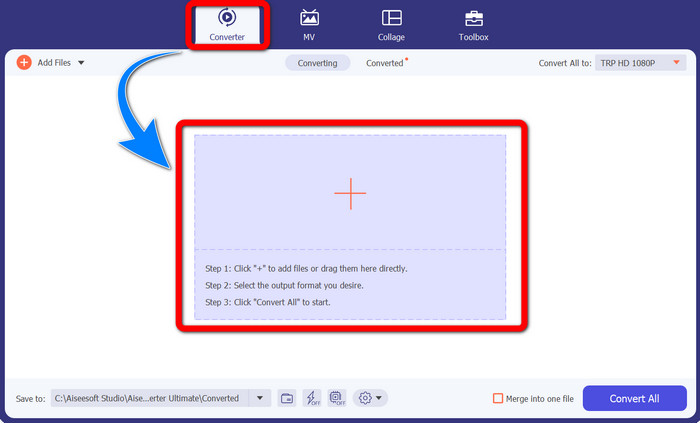
Schritt 2: Wenn Sie den Video Converter Ultimate gestartet haben, wählen Sie das Converter‑Panel aus. Klicken Sie dann auf das Pluszeichen (+), um Ihr Video im TRP‑Format zu importieren.
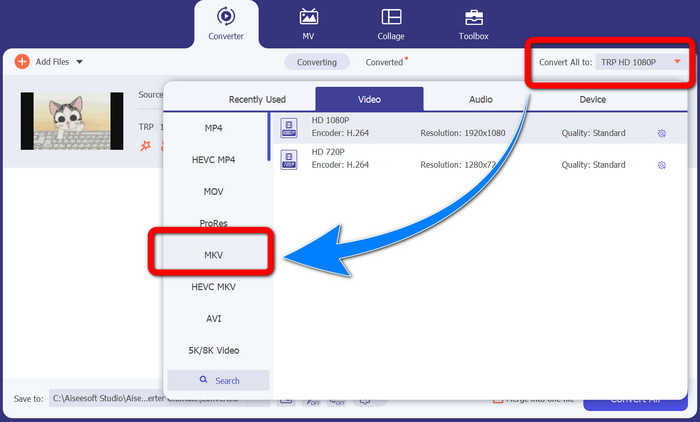
Schritt 3: Nachdem Sie Ihr Video importiert haben, klicken Sie auf das Symbol Convert all to. Suchen Sie in den Formatoptionen nach dem MKV‑Format und klicken Sie darauf.
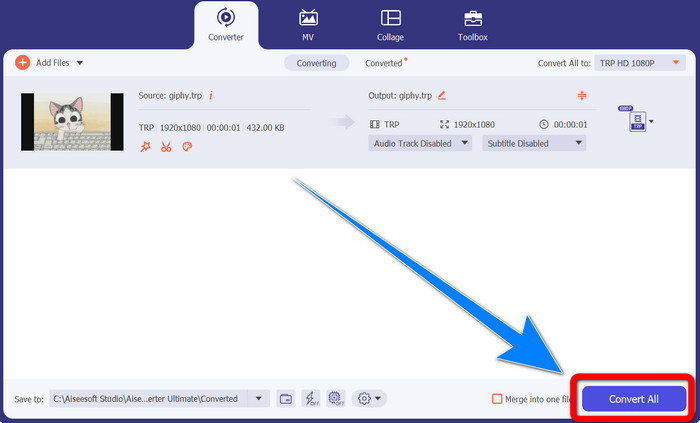
Schritt 4: Klicken Sie anschließend auf die Schaltfläche Convert All, um Ihre TRP‑Datei ins MKV‑Format zu konvertieren.
Verwenden von Prism Video Converter
Prism ist eine weitere Anwendung, die Sie unter Windows und Mac herunterladen können. Diese Anwendung kann Ihnen helfen, TRP leicht in MKV zu konvertieren. Außerdem unterstützt sie verschiedene Dateiformate wie AMV, MP4, DVD, VOB, MOV, DIVX, AVI, 3GP und mehr. Allerdings ist diese Anwendung unter Windows oder Mac sehr langsam. Auch der Konvertierungsvorgang dauert eine Weile. Zudem verfügt sie über eine komplizierte Oberfläche, die Anfänger verwirren kann, sodass Sie sich einige Anleitungen ansehen oder Hilfe von fortgeschrittenen Nutzern einholen müssen. Wenn Sie diese Anwendung herunterladen und verwenden möchten, folgen Sie den einfachen Schritten unten.
Schritt 1: Laden Sie den Prism Video Converter auf Ihren Mac oder Windows‑PC herunter.
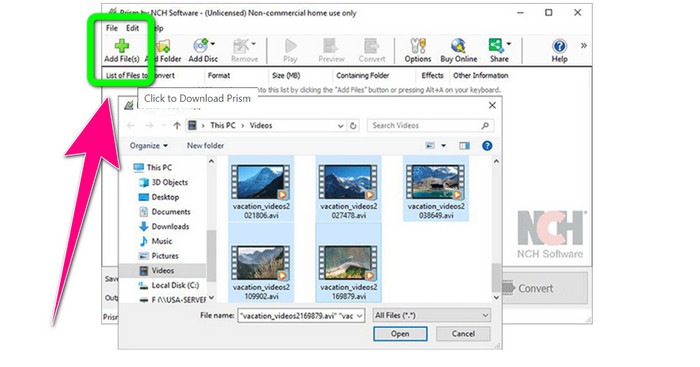
Schritt 2: Klicken Sie auf die grüne Schaltfläche Add Files und fügen Sie Ihre TRP‑Datei hinzu.
Schritt 3: Legen Sie das Ausgabeformat fest. Klicken Sie in den Formatoptionen auf die MKV‑Datei.
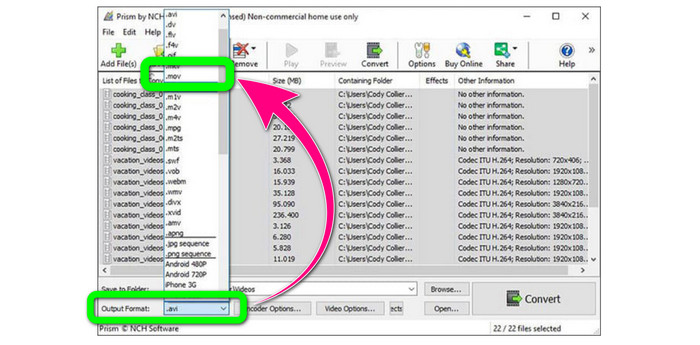
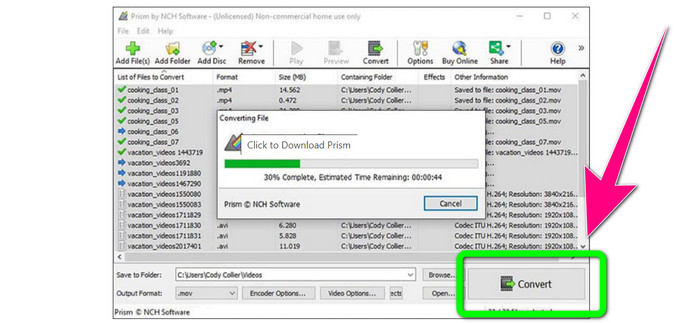
Schritt 4: Wählen Sie zum Schluss die Schaltfläche Convert, um Ihre TRP‑Datei ins MKV‑Format zu konvertieren.
Teil 3: Online-Anwendungen zum Konvertieren von TRP in MKV
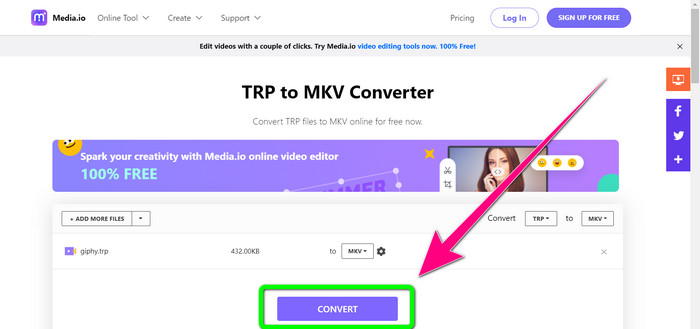
Möchten Sie TRP online in MKV umwandeln? Dann können Sie Media.io verwenden. Mit Hilfe dieser Anwendung können Sie TRP in MKV konvertieren. Darüber hinaus unterstützt sie weitere Formate wie MP4, AVI, WMV, MOV, FLV, DIVX, XVID, 3GP usw. Sie ist außerdem ein Audio‑ und Bildkonverter.
Darüber hinaus ist es auch in der Lage, Videos zu bearbeiten. Sie können Videos zuschneiden, trimmen, zusammenführen, loopen und vieles mehr. Der Konvertierungsprozess ist jedoch langsam. Sie müssen etwas länger warten, um den Vorgang abzuschließen. Es hat auch störende Anzeigen, die auf dem Bildschirm erscheinen. Außerdem benötigt es eine schnelle Internetverbindung, um gut zu funktionieren. Wenn Sie TRP mit Media.io in MKV konvertieren möchten, führen Sie die folgenden Schritte aus.
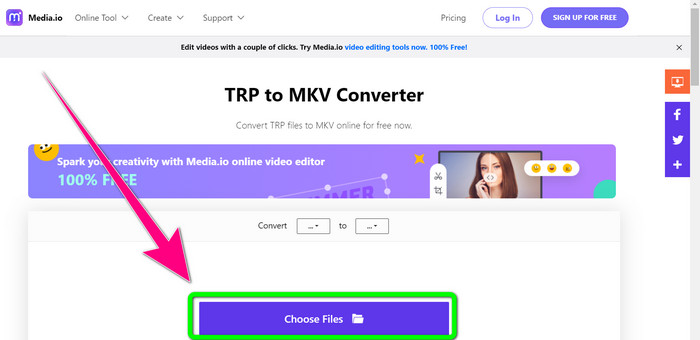
Schritt 1: Gehen Sie auf die Website von Media.io. Klicken Sie dann auf die Schaltfläche Choose Files, um Ihr Video im TRP‑Dateiformat hinzuzufügen.
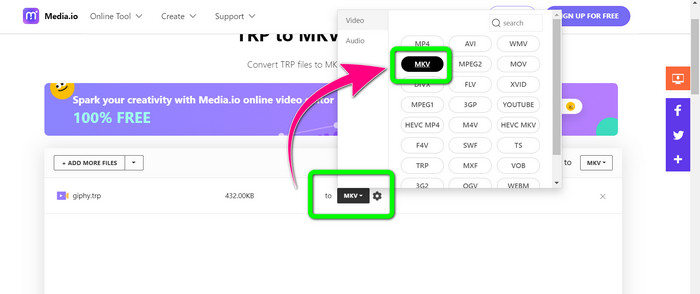
Schritt 2: Nachdem Sie Ihr Video hinzugefügt haben, gehen Sie zu den Formatoptionen, suchen Sie die MKV‑Datei und wählen Sie sie aus.
Schritt 3: Klicken Sie zum Abschluss auf die Schaltfläche Convert. Warten Sie den Konvertierungsvorgang ab und speichern Sie Ihr Video im MKV‑Dateiformat.
Weiterführende Informationen
Die besten Methoden, um AMV kostenlos in MKV zu konvertieren
MTV mühelos mit diesen ultimativen Konvertern in MKV umwandeln
Teil 4: Häufig gestellte Fragen zum Konvertieren von TRP in MKV
Warum wird die MKV-Datei auf meinem Fernseher nicht unterstützt?
Eine MKV-Datei ist nur ein Videocontainer, der mit vielen Codecs wie HEVC, MPEG-4, VP9 usw. codiert werden kann. Fernseher sind mit diesen Codecs schlecht kompatibel, deshalb können Sie MKV nicht auf Ihrem Fernseher abspielen.
Ist die MKV-Datei von guter Qualität?
Das MKV-Dateiformat ist in hochwertigen Videos beliebt. Es hat auch eine größere Dateigröße. Das bedeutet, dass MKV ein Container ist und keinen Einfluss auf die Qualität hat.
Gibt es einen schnellen Konverter, den ich auf meinem Computer verwenden kann?
Definitiv Ja! Wenn Sie nach einem schnellen Softwarekonverter suchen, dann ist Video Converter Ultimate die beste Anwendung. Sie können Ihre Dateien um ein Vielfaches schneller und einfacher konvertieren.
Fazit
Mit all den oben genannten Anwendungen und Methoden zum Konvertieren von TRP in MKV empfehlen wir Ihnen besonders die Verwendung von Video Converter Ultimate. Dieses Programm kann zahlreiche Dateien gleichzeitig mit ultraschneller Konvertierungsgeschwindigkeit umwandeln. Worauf warten Sie also noch? Probieren Sie es selbst aus, um noch mehr zu entdecken.
-
 2 der beeindruckendsten verfügbaren Software zum Konvertieren von TRP in MOV
 Konnten TRP-Dateien nicht in MOV konvertieren? Folgen Sie dann der Anleitung in diesem Artikel. Wir wählen die besten Tools aus, mit denen Sie Ihre TRP-Dateien konvertieren können.
- 2 der beeindruckendsten verfügbaren Software zum Konvertieren von TRP in MOV
Konnten TRP-Dateien nicht in MOV konvertieren? Folgen Sie dann der Anleitung in diesem Artikel. Wir wählen die besten Tools aus, mit denen Sie Ihre TRP-Dateien konvertieren können
-
 2 professionelle Konverter zum Konvertieren von TRP in das WMV-Format [Anleitung]
 Gehören Sie zu den Benutzern, die Schwierigkeiten mit der TRP-Datei haben? Wenn ja, lesen Sie diesen Artikel weiter, um zu erfahren, wie Sie TRP in WMV konvertieren und mehr erfahren
