


 Video Converter Ultimate
 Bildschirm recorder
 Videoreparatur
 Sicherer Download
Hervorragende Tricks zum einfachen Konvertieren von WMV in M4V, die Sie ausprobieren können
Gehören Sie zu den Nutzern, die nach ausgezeichneten und einfachen Methoden suchen, um WMV in M4V zu konvertieren? Im Web finden Sie zahlreiche Converter. Allerdings unterstützen einige davon die Formate WMV und M4V nicht. Wenn das Ihr Problem ist, bietet Ihnen dieser Artikel die einfachste Lösung mit empfehlenswerten Anwendungen. Außerdem lernen Sie deren Funktionen kennen, sodass Sie einen Eindruck von den weiteren Einsatzmöglichkeiten dieser Programme bekommen. Lesen Sie den Artikel von oben bis unten, um weitere wichtige Details zu erfahren.

Teil 1: Einführung in WMV und M4V
WMV-Dateiformat
| Name | WMV |
| Dateierweiterung | .wmv |
| Beschreibung | Das Akronym WMV (Windows Media Video) steht für eine Gruppe von Video-Codecs, die Microsoft erstmals auf seinem Windows Media-Framework eingeführt hat. Es wurde ursprünglich entwickelt, um mit dem RM-Format in Internet-Streaming-Apps zu konkurrieren. Es enthält komprimierte Videodateien und hilft sogar Blu-ray/DVDs bei der Bereitstellung von Inhalten. |
| Dateikategorie | Video |
| Entwickelt von | Microsoft |
| Assoziierte Programme | VLC Media Player MPlayer Mediaplayer Classic Windows Media Player |
| Mime Typ | video/x-ms-asf Video/MPEG |
| Technische Details | Der Multimedia-Inhalt wurde codiert und ist in einer WMV-Datei enthalten, die das Containerformat Advanced Systems Format (ASF) verwendet. ASF-Dateien sollten die Dateierweiterung .ASF anstelle der Dateierweiterung .WMV verwenden, obwohl die ASF Multimedia in anderen Kodierungen enthalten kann, als der WMV-Dateistandard zulässt. |
M4V-Dateiformat
| Name | M4V |
| Dateierweiterung | .m4v |
| Beschreibung | Apple hat das M4V-Dateiformat entwickelt, ein Videocontainerformat ähnlich dem MP4-Standard. Der Hauptunterschied besteht darin, dass M4V-Dateiformate einen DRM-Kopierschutz haben können. In seinem iTunes Store kodiert Apple Videodateien im M4V-Format. |
| Dateikategorie | Video |
| Entwickelt von | Apple Inc. |
| Assoziierte Programme | VLC Media Player KMPlayer Mediaplayer Classic Zoom-Player |
| Technische Details | M4V-Dateien können mit Apples FairPlay-Kopierschutz geschützt werden, um eine unbefugte Vervielfältigung zu verhindern. Nur Computer, die (über iTunes) mit dem Konto zugelassen sind, das zum Kauf des Videos verwendet wurde, können eine FairPlay-geschützte M4V-Datei wiedergeben. |
Teil 2: Beste Methode zum Konvertieren von WMV in M4V für Mac und Windows
Die beste Methode, WMV in M4V zu konvertieren, ist der FVC Video Converter Ultimate. Dieser Converter ist sowohl für Windows als auch für Mac downloadbar. Er kann über 100 Videoformate konvertieren, darunter WMV, M4V, MP4, AVI, FLV, MKV, MOV und viele mehr. Beim Konvertieren können Sie mehrere Dateien gleichzeitig umwandeln, da dieses Programm Stapelkonvertierung unterstützt. Außerdem werden Sie in Bezug auf den Konvertierungsprozess nicht enttäuscht sein. Dieser Converter bietet eine Hochgeschwindigkeitskonvertierung, mit der Sie Dateien bis zu 30‑mal schneller als mit normaler Geschwindigkeit umwandeln können.
Darüber hinaus hat Video Converter Ultimate eine weitere Hauptfunktion. Wenn Sie daran interessiert sind, Ihre Bilddateien zu konvertieren, können Sie dies tun.
Funktionen
◆ Konvertieren Sie verschiedene Videodateiformate wie M4V, WMV, FLV, AVI, MP4, MOV, VOB usw.
◆ Bietet Videobearbeitungswerkzeuge wie Video Enhancer, Compressor, Cropper, Trimmer, Reverser usw.
◆ Kann eine Collage erstellen.
◆ Das Erstellen eines Musikvideos ist verfügbar.
◆ Ermöglicht Stapelkonvertierung.
◆ Ändern Sie die Geschwindigkeit des Videos.
◆ Konvertieren Sie Bilddateiformate wie PNG, JPG, BMP, WEBP und mehr.
Konvertieren wir WMV auf dem Mac mit dem FVC Video Converter Ultimate in M4V. Verwenden Sie die folgenden einfachen Anleitungen.
Schritt 1: Laden Sie den FVC Video Converter Ultimate auf Ihren Mac herunter und installieren Sie ihn, indem Sie auf die untenstehende Download-Schaltfläche für die Mac-Version klicken.
Gratis DownloadFür Windows 7 oder neuerSicherer Download
Gratis DownloadFür MacOS 10.7 oder neuerSicherer Download
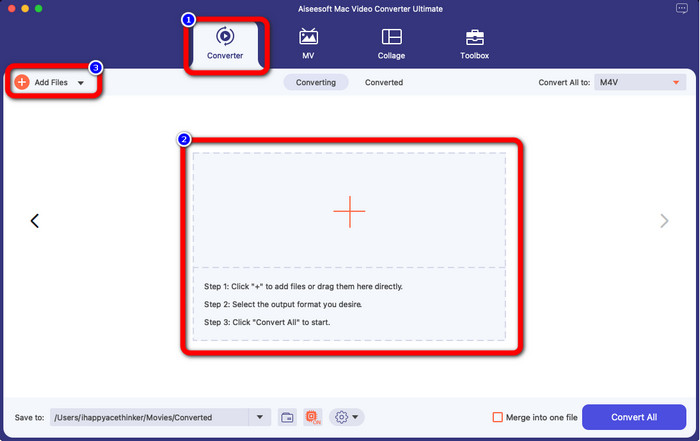
Schritt 2: Starten Sie das Programm und wählen Sie den Reiter Converter. Klicken Sie dann auf das +-Symbol oder die Schaltfläche Dateien hinzufügen, um Ihre WMV‑Videodatei zu importieren.
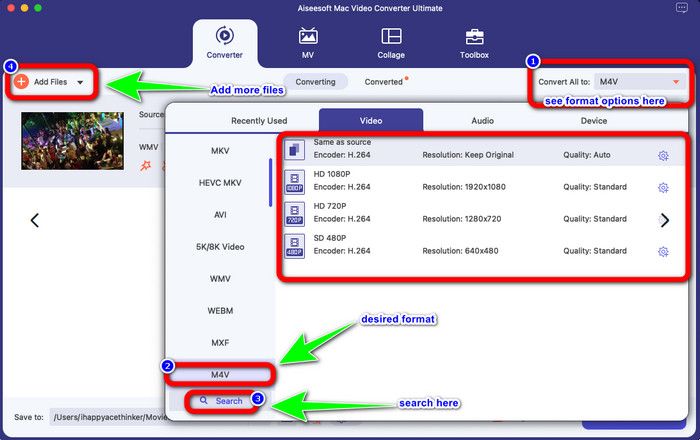
Schritt 3: Nachdem Sie Ihr Video hinzugefügt haben, klicken Sie auf die Schaltfläche Alle konvertieren in, um die Formatoptionen anzuzeigen, und wählen Sie das M4V‑Format. Sie können Ihr gewünschtes Format auch über das Suchfeld im unteren Bereich der Oberfläche suchen. Sie können zudem weiterhin auf die Schaltfläche „Dateien hinzufügen“ klicken, um mehr Videos für eine Stapelkonvertierung hinzuzufügen.
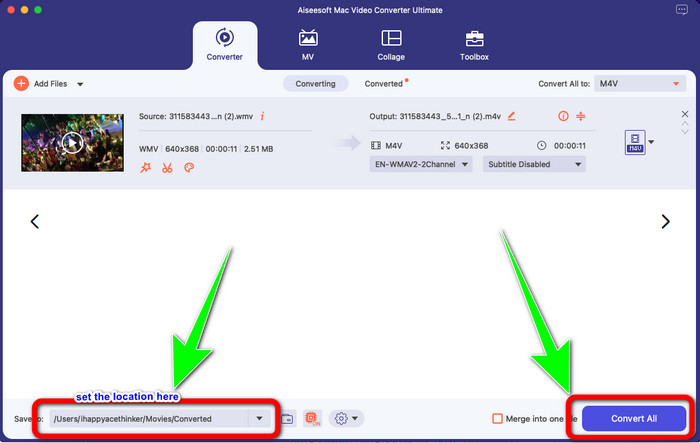
Schritt 4: Wenn Sie Ihr gewünschtes Dateiformat, also M4V, ausgewählt haben, können Sie bereits den Speicherort für Ihr Video festlegen. Klicken Sie anschließend auf die Schaltfläche Konvertieren.
Teil 3: Kostenlose Möglichkeit, WMV in M4V zu konvertieren
Um WMV kostenlos in M4V zu konvertieren, können Sie Convertfiles verwenden. Diese Online‑Software ist ebenfalls in der Lage, mehrere Dateien zu konvertieren. Sie bietet eine einfache Bedienung mit einer übersichtlichen Oberfläche und ist damit für alle Nutzer geeignet. Neben Videos können Sie auch Bilder, Audiodateien, Präsentationen und mehr umwandeln. Allerdings gibt es Zeiten, in denen dieser Converter nicht gut arbeitet. Der Konvertierungsprozess ist langsam, und die Werbung ist störend.
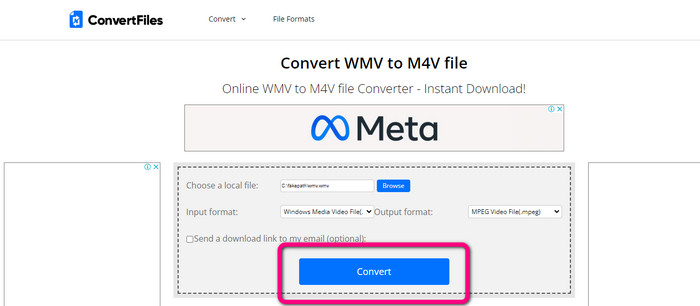
Schritt 1: Rufen Sie die Website von Convertfiles auf.
Schritt 2: Laden Sie die WMV‑Datei hoch, die Sie konvertieren möchten.
Schritt 3: Wählen Sie unter Ausgabeformat die M4V‑Datei. Klicken Sie dann auf die Schaltfläche Convert.
Teil 4: Hervorragende Methode zur Online-Konvertierung von WMV in M4V
Eine weitere Methode, WMV online in M4V zu konvertieren, ist die Verwendung des FVC Free Video Converter Online. Mit Hilfe dieses Online‑Tools ist das Konvertieren von WMV ganz einfach. Es unterstützt außerdem weitere Formate wie AVI, MP4, FLV, MKV, VOB usw. Und obwohl es sich um einen kostenlosen Online‑Converter handelt, müssen Sie sich um die Qualität Ihres Videos keine Sorgen machen. Sie können Ihr konvertiertes Video in Originalqualität speichern. Darüber hinaus können Sie auch die Bitrate, Bildrate und Auflösung Ihres Videos anpassen.
Funktionen
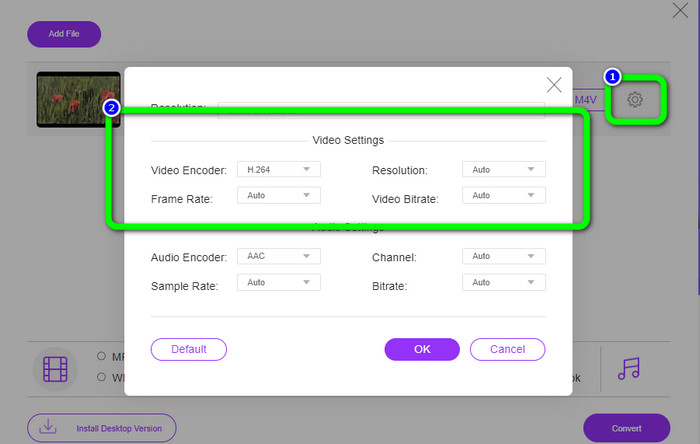
◆ Kann die Bitrate, Bildrate und Auflösung des Videos ändern.
◆ Bietet Batch-Konvertierung.
Befolgen Sie die detaillierten Schritte unten, um WMV mit FVC Free Video Converter Online in M4V zu konvertieren.
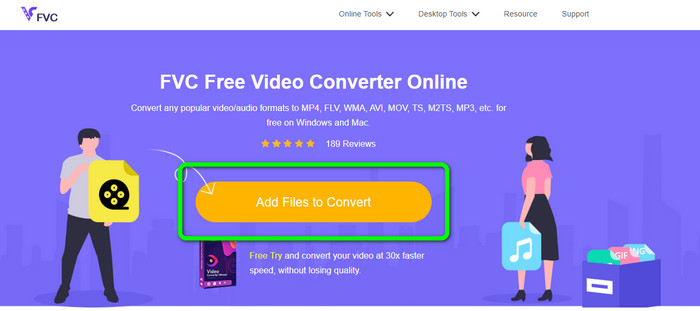
Schritt 1: Besuchen Sie die Website von FVC Free Video Converter Online. Klicken Sie dann auf die Schaltfläche Dateien zum Konvertieren hinzufügen.
Schritt 2: Wenn Sie die Bitrate, Bildrate oder Auflösung Ihres Videos ändern möchten, klicken Sie auf das Symbol Einstellungen. Drücken Sie anschließend auf OK, wenn Sie fertig sind.
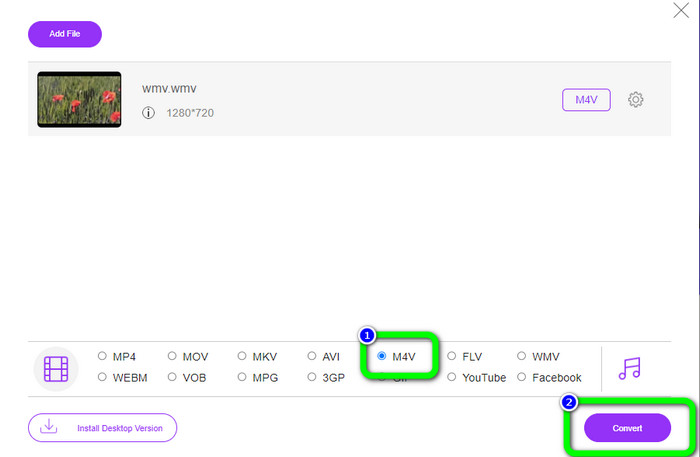
Schritt 3: Im unteren Bereich der Oberfläche sehen Sie die Formatoptionen. Wählen Sie M4V als gewünschtes Ausgabeformat und klicken Sie auf die Schaltfläche Konvertieren, um Ihr Video herunterzuladen.
Teil 5: Häufig gestellte Fragen zum Konvertieren von WMV in M4V
1. Können alle Geräte M4V abspielen?
Leider nein. Der integrierte Player von Android‑Geräten unterstützt M4V‑Dateien nicht. Sie können einen M4V‑Player eines Drittanbieters herunterladen, der das M4V‑Format unterstützt, oder die Datei in ein kompatibles Format konvertieren.
2. Gibt es den besten Konverter, um WMV in M4V zu konvertieren?
Wenn Sie den besten WMV‑zu‑M4V‑Converter suchen, können Sie den FVC Free Video Converter Online verwenden. Er kann Ihre Dateien effizient und mühelos konvertieren.
3. Was ist besser, M4V oder MOV?
M4V ist besser. Wenn Sie Ihre Dateien auf einem tragbaren Gerät wie iPhone, iPod oder iPad abspielen möchten, wird M4V sehr empfohlen. Auf manchen Geräten wird jedoch nur MOV unterstützt. In diesem Fall können Sie M4V in MOV konvertieren.
Fazit
Mit all den oben genannten wichtigen Informationen können Sie WMV in M4V jetzt einfach und sofort konvertieren. Wenn Sie Wert auf eine besonders schnelle Konvertierung legen, können Sie den FVC Video Converter Ultimate verwenden. Wenn Sie lieber einen kostenlosen Online‑Converter nutzen möchten, eignet sich der FVC Free Video Converter Online.
-
 So komprimieren Sie M4V-Dateien auf eine kleinere Größe (kostenlos und online)
 Wenn Sie nach einer einfachen Möglichkeit suchen, die Größe Ihrer M4V-Datei zu reduzieren, sollten Sie diesen Artikel lesen. Hier teilen wir Ihnen die einfachste Methode zum Komprimieren von M4V-Dateien mit
-
 Konkrete Anleitung zum kostenlosen Verbinden von M4V-Dateien unter Windows und Mac
 Wenn Sie nach einer Lösung suchen, um M4V-Videodateien zu einer zu kombinieren, sollten Sie diese Passage nicht verpassen. Hier werden wir über die zwei besten Methoden zum Kombinieren von M4V-Videodateien sprechen
-
 Schnelle und einfache Tipps zum Konvertieren von WMV in MOV [Bewährt]
 Möchten Sie wissen, welche die besten und benutzerfreundlichsten Konverter sind, die WMV in MOV konvertieren? Lesen Sie diesen Artikel weiter, da er alle möglichen Optionen bespricht, die Sie in Betracht ziehen müssen
