


 Video Converter Ultimate
 Bildschirm recorder
 Videoreparatur
 Sicherer Download
Richtlinie zum Bearbeiten von WebM-Metadaten für Windows und Mac
Die Notwendigkeit, einen Tag hinzuzufügen, um zusätzliche Informationen über den Inhalt einer WebM-Datei einzubinden, ist einer der Gründe, warum wir die Metadaten dieses Formats bearbeiten müssen. Manchmal müssen diese sofort korrigiert werden, damit sie für Nutzer, System und Anwendung sichtbar sind – unter anderem, um herauszufinden, welchen konkreten Inhalt die Datei hat. Bevor Sie Daten online übertragen, ist es daher entscheidend zu wissen, wie man WebM‑Metadaten bearbeitet. Informieren Sie sich und lernen Sie, wie es funktioniert, indem Sie den folgenden Artikel lesen.

Teil 1. Der schnellste Weg zum Bearbeiten von WebM-Metadaten unter Windows und Mac [Einfache Version]
FVC Video Converter Ultimate bietet eine unkomplizierte Metadatenbearbeitung für einen reibungslosen Ablauf für alle Nutzer und Kunden, die das Programm verwenden. Mit diesem Metadaten-Editor können Sie Tags Ihrer WebM-, MOV-, TS-, RMVB-Dateien und der über 1.000 weiteren unterstützten Formate wie ein Profi schnell anpassen oder entfernen. Dieses Tool wird seinem Namen und den Erwartungen der Nutzer gerecht. Wenn Sie also eine Software möchten, die sowohl für Einsteiger als auch Profis geeignet ist, sollten Sie sich für dieses Programm entscheiden. Anders als bei anderer Software können Sie die Metadaten Ihrer WebM-Datei mit genauen Informationen aktualisieren, indem Sie sie manuell hinzufügen.
Mehr wollen? Dieses Tool zeichnet sich durch die Bearbeitung der Metadaten und andere Bereiche zur Lösung von Video- und Audioproblemen aus. Wie schneiden, trimmen, bearbeiten, GIFs erstellen, Videos beschleunigen und mehr mit dem Tool in weniger als einer Minute erledigen. Und um Ihnen zu beweisen, dass die Software in Name und Leistung das Nonplusultra ist. Die folgende schriftliche Demonstration zeigt Ihnen, wie Sie WebM-Metadaten bearbeiten, ohne sich zu sehr um dieses Problem zu kümmern.
Schritte zum Bearbeiten von WebM-Tags mit FVC Video Converter Ultimate:
Schritt 1. Um diese ultimative Software zu erhalten, klicken Sie auf die Schaltfläche „Download“ unten und wählen das Betriebssystem aus, das Sie derzeit verwenden. Folgen Sie dem Installationsvorgang, nachdem Sie die heruntergeladene Datei angeklickt haben, und öffnen Sie das Tool anschließend, indem Sie auf „Jetzt starten“ klicken.
Gratis DownloadFür Windows 7 oder neuerSicherer Download
Gratis DownloadFür MacOS 10.7 oder neuerSicherer Download
Schritt 2. Öffnen Sie den Bereich Toolbox und suchen Sie in der unten angezeigten Liste nach dem Media Metadata Editor.
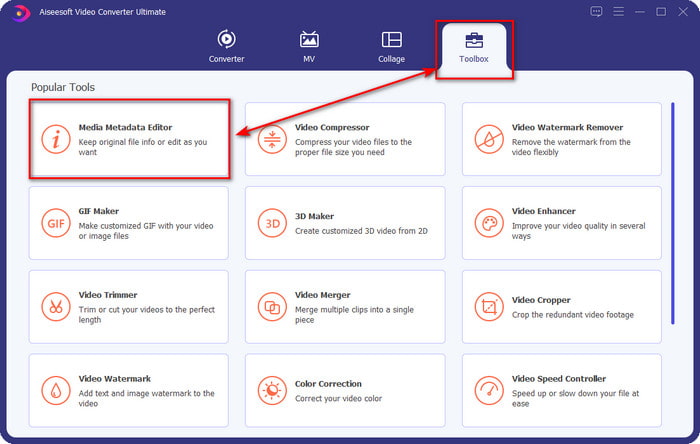
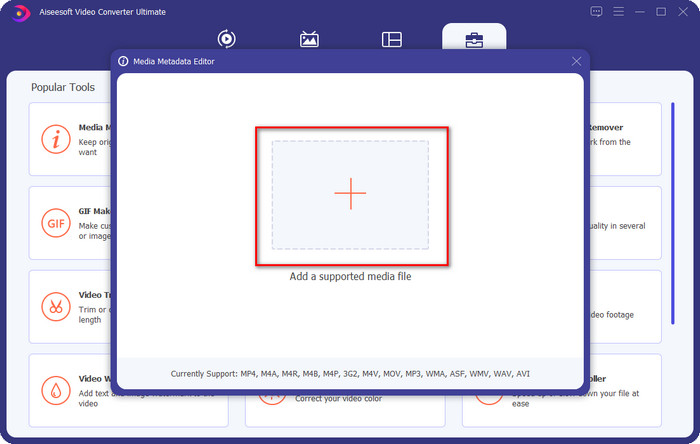
Schritt 3. Fügen Sie die WebM-Datei hinzu, indem Sie auf die Schaltfläche + klicken, suchen Sie sie im Dateimanager und klicken Sie auf Öffnen, um fortzufahren.
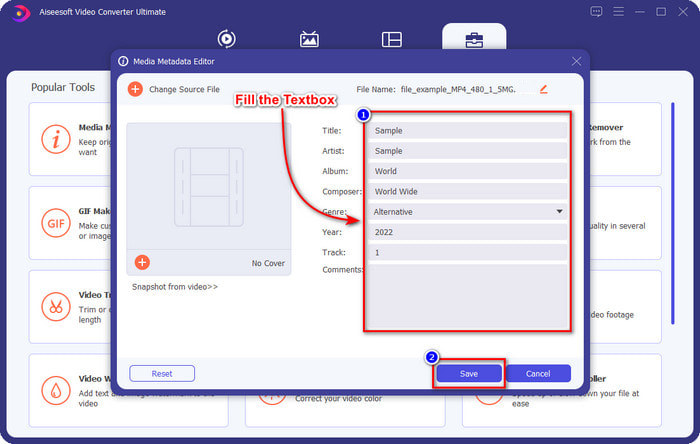
Schritt 4. Geben Sie alle Informationen, die Sie als Tags zu Ihrer WebM-Datei hinzufügen möchten, in jedes Textfeld ein. Wenn Sie alle Informationen als Tags eingetragen haben, klicken Sie auf „Speichern“. Einfach, oder? So fügen Sie Metadaten zu Ihrer WebM-Datei hinzu – mit Hilfe der ultimativen Lösung, die Sie unter Windows und Mac verwenden können.
Teil 2. So bearbeiten Sie WEBM-Metadaten mit Befehlszeilensoftware auf dem Desktop
FFmpeg
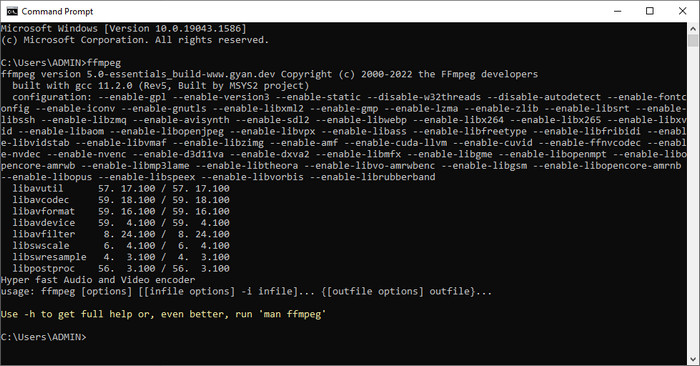
FFmpeg ist eine bekannte Lösung für alle medienbezogenen Probleme, etwa das Korrigieren von Metadaten. Anders als beim ersten Tool müssen Sie hier einen bestimmten Code als Befehl verwenden, um eine bestimmte Aufgabe auszuführen, etwa um die Metadaten der genannten Datei manuell zu bearbeiten. Auch wenn diese Open-Source-Software mit technischen Details arbeitet, die manche Nutzer nicht verstehen, sind die Fähigkeiten dieses Editors dennoch beeindruckend. Lesen Sie weiter, um zu erfahren, wie Sie WebM-Metadaten mit einer der in der Liste genannten Kommandozeilen-Software bearbeiten können.
Schritte zum Bearbeiten von WebM-Tags mit Ffmpeg:
Schritt 1. Laden Sie die Software auf Ihren Desktop herunter und installieren Sie sie. Suchen Sie den Speicherort der WebM-Datei und kopieren Sie den Dateinamen.
Schritt 2. Klicken Sie auf Windows, geben Sie Eingabeaufforderung in die Suche ein und öffnen Sie diese. Kopieren Sie anschließend diesen Code ffmpeg -i fileexample.webm -metadata title='samplemetadata' -c copy fileexample.webm und fügen Sie ihn in die Eingabeaufforderung ein.
Hinweis: Die Dateibeispiel.webm ist der Name der webm-Datei, die wir für diese Aufgabe verwenden. Fügen Sie den Dateinamen entsprechend dem genauen Namen Ihrer Datei hinzu.
Schritt 3. Drücken Sie die Taste Enter, um den Vorgang zu starten, und lassen Sie die Software die Originaldatei überschreiben.
EXIF-Tool
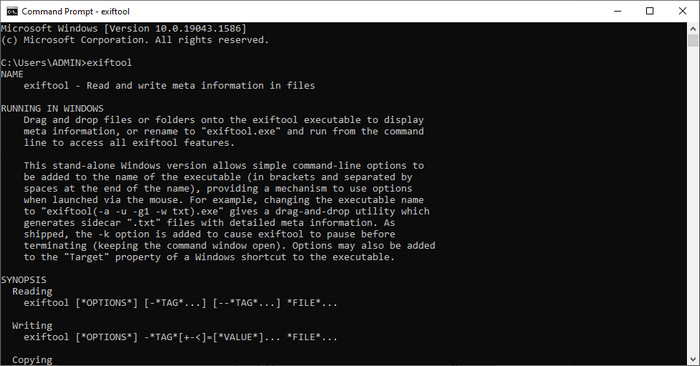
Ähnlich wie FFmpeg ist EXIF Tool eine kostenlose Kommandozeilen-Software, die Sie für nahezu alle Desktop-Betriebssysteme herunterladen können. Mit diesem Programm können Sie Metadaten Ihrer vorhandenen Datei lesen, bearbeiten und erstellen – umfassender, als es andere Medienprogramme oft ermöglichen. Die Software kann Tags in Video-, Audio-, Bild- und PDF-Dateien bearbeiten, um diese korrekt und präzise zu machen. Vorhin haben wir gesagt, dass sie FFmpeg ähnelt, und das stimmt – aber ihre Codes sind unterschiedlich. Wenn Sie dieses Tool verwenden möchten, müssen Sie daher einen weiteren Satz von Befehlen erlernen, die nichts mit FFmpeg zu tun haben. Ist das schwierig? Zum Glück haben wir leicht verständliche Schritte hinzugefügt, um WebM-Metadaten mit Hilfe dieses Tools zu bearbeiten.
Schritte zum Bearbeiten von WebM-Tags mit EXIF Tool:
Schritt 1. Laden Sie die Software von der offiziellen Website herunter und installieren Sie sie, um mit dem nächsten Schritt fortzufahren.
Schritt 2. Öffnen Sie den Dateimanager, wählen Sie die Datei aus und kopieren Sie ihren Namen. Öffnen Sie dann die CMD und geben Sie diesen Code ein: exiftool –common fileexample.webm, um die Basisinformationen Ihrer WebM-Datei anzuzeigen.
Hinweis: CMD ist dasselbe wie die Eingabeaufforderung; Sie können sie in den Fenstern finden und CDM eingeben.
Schritt 3. Fügen Sie diesen Code in die Eingabeaufforderung ein, um die Datei zu ändern: exiftool -filename='metadtasample' fileexample.mkv, und drücken Sie Enter, um den Vorgang des Hinzufügens der Metadaten zu starten.
Teil 3. Häufig gestellte Fragen zum WebM-Metadaten-Editor
Warum ist das WebM-Format bei HTML 5-Websites beliebt?
Das WebM-Format ist eines der am schnellsten wachsenden alternativen Lizenzformate mit HTML 5-Video- und Audioelementen. Dieses Format verwendet zwei verschiedene Codecs, VP8 und VP9, die vom WebM-Projekt entwickelt wurden.
Kann ich die WebM-Dateien zusammenführen?
Sie können eine Folge von WebM-Dateien zusammenführen, bevor Sie Metadaten hinzufügen. Wenn Sie also wissen möchten, wie man mehrere WebM-Dateien ganz einfach zusammenfügt, klicken Sie auf diesen Link, um mehr zu erfahren.
Welches ist besser? WebM oder MP4?
Beide Formate eignen sich hervorragend zum Speichern von Videodateien, verfolgen aber unterschiedliche Zwecke. Obwohl WebM eines der besten Formate für das Online-Sharing ist, gibt es dennoch Bedenken hinsichtlich der Kompatibilität mit bestimmten Geräten. Wenn Sie das gleiche Problem mit WebM-Dateien haben, empfehlen wir, das Format in MP4 zu konvertieren. Damit Sie das passende Tool schnell zur Hand haben, können Sie den Inhalt in diesem Artikel lesen, indem Sie auf diesen Link klicken.
Fazit
Jetzt, da wir alle benötigten Informationen haben und gelernt haben, wie man WebM-Metadaten bearbeitet, ist es an der Zeit, die passende Methode auszuwählen. Wenn Sie ein Kommandozeilen-Tool ausprobieren möchten, sind FFmpeg und EXIF Tool die beste Lösung, um die Metadaten Ihrer WebM-Datei zu korrigieren. Wenn Sie den von uns bereitgestellten Anleitungen folgen, können Sie die Aufgabe schnell erledigen. Wenn Sie jedoch eine einfachere Möglichkeit zur Bearbeitung der Metadaten Ihrer WebM-Datei bevorzugen, ist FVC Video Converter Ultimate ein unverzichtbares Tool. Falls Sie noch unsicher sind, empfehlen wir, die Software auf Ihren Desktop herunterzuladen und sie jetzt auszuprobieren!
-
 Top 4 Dateidatumswechsler für Windows PC und Mac [Aktualisiert 2022]
 Haben Sie ein Problem mit dem Ändern der Zeit- und Datums-Tags in Ihrer Datei? Wenn Sie wissen möchten, wie es geht, können Sie diesen Artikel weiterlesen, um es zu wissen.
-
 Einfache Tipps und Tricks zum einfachen Hinzufügen von Tags zu einer Datei
 Möchten Sie Dateien einfach Tags hinzufügen? Dann bietet Ihnen dieser Artikel die beste und einfachste Möglichkeit, sich schnell auf diese Aufgabe verlassen zu können.
-
 Top 3 FLAC-Metadaten-Editoren auf Mac und Windows [Aktualisiert 2022]
 Möchten Sie FLAC-Metadaten ändern? In diesem Fall müssen Sie diesen Artikel lesen, da wir ausreichende Kenntnisse über den neuesten FLAC-Metadaten-Editor verwenden können.
