


 Video Converter Ultimate
 Bildschirm recorder
 Videoreparatur
 Sicherer Download
3 der besten FLAC-Metadaten-Editoren, die Sie 2025 kennen sollten
Wie wir wissen, ist FLAC das beste verlustfreie Audio-Dateiformat und ein ideales Format zum Rippen der Audiospuren einer CD, da bei dieser Formatwahl kein Roh-Audio verloren geht. Unter den verlustfreien Audioformaten ist es die beste Wahl, weil es mit nahezu jedem Gerät kompatibel ist. Es erreicht ein Kompressionsverhältnis von 30 bis 50 Prozent, ohne die ursprüngliche Qualität zu beeinträchtigen. Mit diesem Audioformat können Sie Metadaten, Albumcover und schnelles Suchen gleichzeitig nutzen. Es kann jedoch vorkommen, dass z. B. falsche Tags in einer FLAC-Datei auftauchen, denn dieses Format ist – wie andere Formate auch – nicht perfekt. In weniger als fünf Minuten lernen Sie die verschiedenen FLAC‑Metadaten‑Editoren für Mac und Windows kennen, mit denen Sie dieses Problem beheben können.

Teil 1. Bester FLAC-Metadaten-Editor für Mac und Windows – FVC Video Converter Ultimate
FVC Video Converter Ultimate ist die effektivste Software, die Sie bei Problemen mit der Metadatenbearbeitung unbedingt benötigen. Dieses Tool bietet eine professionelle und leicht verständliche Benutzeroberfläche, damit jeder Nutzer den Vorgang des Änderns oder Korrigierens von Metadaten mühelos und reibungslos durchführen kann. Außerdem können Sie mehrere Informationen oder Tags zu Ihrer FLAC-Datei hinzufügen, etwa Titel, Name des Autors, Datum, Albumcover und vieles mehr. Konkurrenzprogramme zur Metadatenbearbeitung beschränken sich häufig darauf, die Metadaten nur einiger weniger Audio- und Videoformate zu ändern. Mit dieser Software hingegen können Sie FLAC, MP3, WMA, WMV und über 1000 weitere Formate problemlos laden und deren Metadaten im Handumdrehen bearbeiten – so einfach wie 1‑2‑3.
Darüber hinaus ist dieses Tool nicht nur in der Lage, die Metadaten zu ändern, zu reparieren oder zu löschen; Es kann auch als Lösung für alle Probleme im Zusammenhang mit Video-Audio verwendet werden. Und damit können wir Ihnen versichern, dass Sie sich nach der Verwendung des Tools keine Sorgen mehr machen müssen, dass dasselbe Problem erneut auftritt, da Sie die beste Lösung erhalten haben. Möchten Sie den erstklassigen FLAC-Metadaten-Editor auf Mac und Windows verwenden? Wenn ja, lesen Sie die folgenden Schritte weiter, während wir Ihnen das leicht verständliche Tutorial geben und die Aufgabe effizient erledigen.
Schritt 1. Installieren Sie die ultimative Software auf Ihrem Desktop, indem Sie auf das passende Betriebssystem klicken, um das richtige Tool herunterzuladen. Fahren Sie mit der Installation fort, indem Sie die heruntergeladene Datei öffnen und auf Jetzt starten klicken, um weiterzumachen.
Gratis DownloadFür Windows 7 oder neuerSicherer Download
Gratis DownloadFür MacOS 10.7 oder neuerSicherer Download
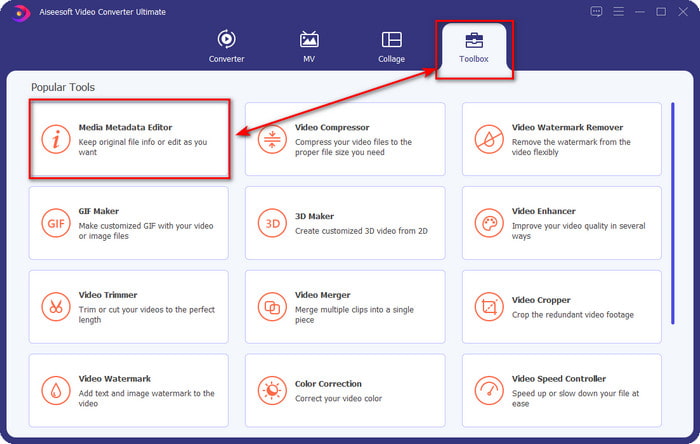
Schritt 2. Klicken Sie auf Media Metadata Editor, um im Bereich Toolbox die Tag-Editor‑Funktion zu öffnen.
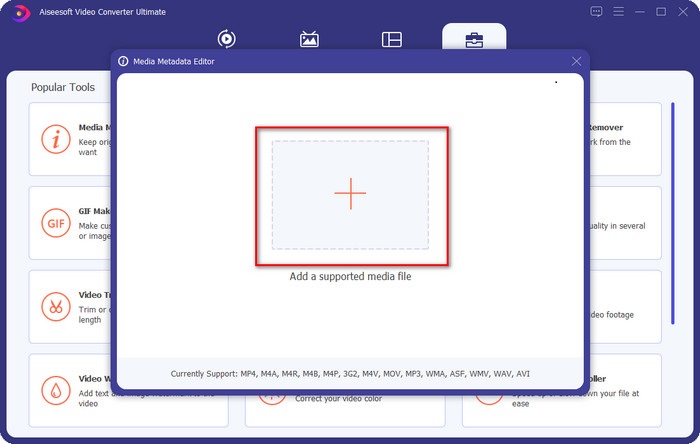
Schritt 3. Klicken Sie auf die Schaltfläche +, um die Datei hinzuzufügen, suchen Sie sie im anschließend angezeigten Ordner und klicken Sie auf Öffnen, um die FLAC-Datei erfolgreich zu importieren.
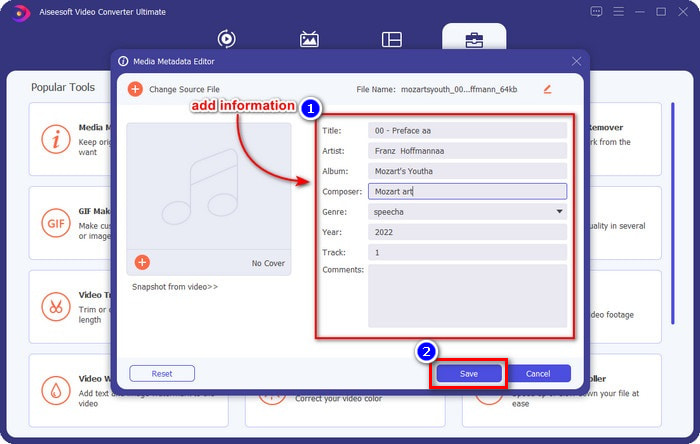
Schritt 4. In diesem Fenster können Sie nun die Metadaten Ihrer FLAC-Datei in den einzelnen Textfeldern ändern. Klicken Sie anschließend auf Speichern, um die von Ihnen vorgenommenen Änderungen zu sichern. So einfach haben Sie Tags zu Ihrer FLAC-Datei hinzugefügt und sie mit Hilfe dieses ultimativen Tools effizient korrigiert.
Vorteile
- Es ist die beste Wahl für die Bearbeitung von Metadaten in FLAC-, MP4-, WMA-, WAV-, TTA-, OGG- und über 1000 weiteren Formaten.
- Es unterstützt mehrere Bearbeitungsfunktionen, die Sie im Abschnitt Toolbox verwenden können.
- Intuitive grafische Benutzeroberfläche und einfach zu bedienen.
- Auf Windows- und Mac-Betriebssystemen herunterladbar.
Nachteile
- Der Kauf des Tools ist ein Muss, um die unglaublichen Funktionen zu einem geringen Preis nutzen zu können.
Teil 2. Die anderen 2 besten kostenlosen FLAC-Metadaten-Editoren für Windows
Fregatte3
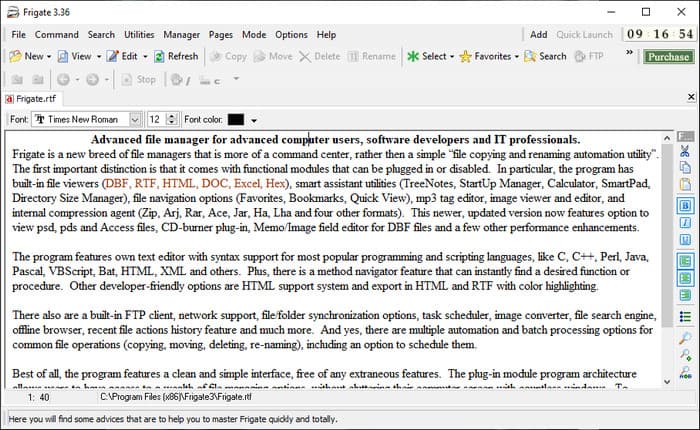
Frigate3 ist ein FLAC‑Metadaten‑Editor, den Sie unter Windows gerne verwenden werden. Mit diesem Tool können Sie die Tags auf Ihrem Desktop mühelos anpassen. Bevor Sie das Programm jedoch herunterladen, sollten Sie sich die zwei verfügbaren Varianten ansehen: die Standard‑ und die Pro‑Version. Die Standardversion dieses Tools umfasst nur die grundlegenden Funktionen, die Sie während der Nutzung zur Verfügung haben. Wenn Sie die Standardversion herunterladen, ist die Dateigröße im Vergleich zur Pro‑Version zudem kleiner.
Wenn Sie stattdessen die Pro-Version heruntergeladen haben, haben Sie alle Funktionen, die diese Software bietet, die nicht zum Standard gehören, aber die Dateigröße ist viel größer als der Standard. Obwohl es sich um eine kostenlose Windows-Software handelt, können wir immer noch feststellen, dass das Tool etwas schwer zu verstehen ist und seine GUI nicht so gut aussieht wie die anderer Software auf dem Markt. Auch wenn dies ein Problem darstellt, wird es dennoch als effektives Werkzeug zur Bewältigung dieser Aufgabe angesehen.
Vorteile
- Kostenloser Download unter Windows.
- Es unterstützt die Standard- und Pro-Versionen des Tools.
- Kann Plug-Ins hinzufügen.
Nachteile
- Die GUI ist nicht so gut wie der andere Metadaten-Editor.
- Manchmal ist das Tool schwer zu starten.
- Das Netzwerk ist ungesichert, wenn Sie auf die offizielle Website des Tools zugreifen.
MusicBrainz PiCard
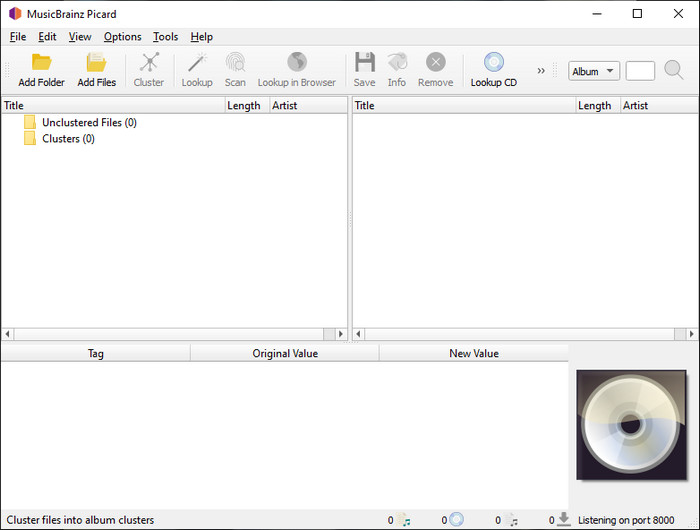
MusicBrainz Picard ist ein FLAC‑Metadaten‑Editor für Windows, den Sie kostenlos auf Ihrem Desktop herunterladen können, um das Hinzufügen von Metadaten abzuschließen. Wenn Ihre Audiodatei im MusicBrainz‑Datenbestand erfasst ist, können Sie mit Hilfe dieses Tools die Tags abrufen oder aktualisieren. Anders als andere Programme kann diese Software mehrere, sehr detaillierte Informationen hinzufügen, etwa zu den Interpreten und den in der Musik eingesetzten Instrumenten. Bedenken Sie jedoch, dass die Tags in MusicBrainz von freiwilligen Mitwirkenden zusammengetragen werden.
Darüber hinaus ist diese Software ein dedizierter Audio-Tag-Editor, was bedeutet, dass sie lediglich die meisten Audioformate unterstützt, unabhängig davon, ob sie verlustbehaftet, verlustfrei oder beides sind. Obwohl es sich um eine umfassende Musik-Tag-Enzyklopädie handelt, die für die Öffentlichkeit nutzbar ist, sind einige der darin enthaltenen Tags unzuverlässig, sodass Sie sie manuell hinzufügen müssen. Nichtsdestotrotz ist das Tool benutzerfreundlich und besser als das Frigate3, aber es ist nicht so gut wie das ultimative Tool.
Vorteile
- Es hat eine eingebaute Datenbank für Audio-Tags.
- Einfache Benutzeroberfläche.
- Es ist einfach zu lernen, wie man es benutzt.
Nachteile
- Manchmal sind die in der Datenbank gesammelten Metadaten unzuverlässig.
- Es ist nur auf Audiodateien beschränkt.
Teil 3. Häufig gestellte Fragen zum FLAC-Metadaten-Editor
Kann ich FLAC in hoher Qualität aufnehmen?
Auf jeden Fall können Sie Audio in diesem Format aufnehmen; bedenken Sie jedoch, dass nicht alle Audio‑Recorder dieses Format unterstützen und nicht alle eine hochwertige Audioausgabe aufzeichnen können. Wenn Sie also nicht wissen, wie man mit einem FLAC‑Recorder in verlustfreier, hoher Qualität aufnimmt, sollten Sie auf diesen Link klicken, um mehr zu diesem Thema zu erfahren.
Was ist die beste Software zum Konvertieren von FLAC?
Ohne Zweifel ist der FVC Video Converter der beste FLAC-Konverter, den Sie verwenden können, um das FLAC mit anderen Geräten kompatibel zu machen, ohne die ursprüngliche Qualität zu verlieren. Mit diesem Tool können Sie mehrere FLAC gleichzeitig konvertieren, aber denken Sie daran, wenn Sie mehr als nur einen Konverter-Download wollen, ist das ultimative Tool ein Muss.
Unterstützt die Sprachnotiz FLAC als Audioausgabe?
Sprachmemos verwenden M4A statt FLAC zur Speicherung der aufgezeichneten Audios. Wenn Sie mehr über Sprachmemos erfahren möchten, können Sie unseren ausführlichen Beitrag zur integrierten App lesen. Lesen Sie ihn aufmerksam durch, um herauszufinden, ob sie der beste Audio‑Recorder auf iOS‑Geräten ist, indem Sie auf diesen Link klicken.
Fazit
FLAC ist nicht nur ein Audioformat, sondern eines der besten Formate, das Sie zur Speicherung von hochqualitativem Audio auf Ihren Geräten verwenden sollten. Wenn Sie also die .flac‑Dateien in Ihrer Mediathek organisieren möchten, können Ihnen die von uns vorgestellten Tools helfen, diese Aufgabe effizient zu bewältigen. Wenn Sie Windows‑Nutzer sind, empfehlen wir Ihnen, den in Teil 2 vorgestellten Abschnitt zu den Programmen zu lesen, mit denen Sie unter Windows Metadaten hinzufügen können. Möchten Sie jedoch ein zuverlässigeres und professionelleres Tool zum Hinzufügen von Metadaten zu FLAC nutzen, empfehlen wir stattdessen den FVC Video Converter Ultimate. Mit einem solchen Programm können Sie professionelle Tag‑Bearbeitungen vornehmen, die die anderen vorgestellten Windows‑Tools nicht bieten. Wenn Sie also mehr über den besten FLAC‑Metadaten‑Editor für Mac und Windows erfahren möchten, sollten Sie ihn herunterladen, um weitere Funktionen zu entdecken.
-
 Top 5 Video-Metadaten-Editoren für 2025 [Unvoreingenommene Bewertung]
 Möchten Sie Ihre Video-Metadaten anzeigen? Wenn ja, lesen Sie die folgenden Details, um das Thema vollständig zu verstehen und zu wissen, welches Tool am besten zu Ihnen passt.
-
 7 Editoren für beliebte Musik-Tags auf Windows, Mac und Mobilgeräten
 Musik-Tags werden gerne für die Anordnung der Musik in Ihrer Bibliothek gemäß den darin enthaltenen Daten verwendet. Was ist, wenn Sie es ändern möchten? Lesen Sie die Details unten, um mehr zu erfahren.
-
 Die 5 besten MP4-Metadaten-Editoren [Aktualisiert 2025]
 Wie kann ich meine MP4-Metadaten ändern? Die beste Möglichkeit, die Metadaten Ihrer MP4-Datei zu ändern, besteht darin, einen Tag-Editor zu verwenden, der das MP4-Format unterstützt, wie das unten aufgeführte Beispiel.
