


 Video Converter Ultimate
 Bildschirm recorder
 Videoreparatur
Überprüfung über FLV-Metadaten-Editoren zum Bearbeiten von FLV-Metadaten [mühelos]
FLV ist ein beliebtes Format zur Bereitstellung digitaler Inhalte über den in SWF eingebetteten Adobe Flash Player. Obwohl es am besten ist, Dateien mit der Erweiterung .flv zu übertragen, gehen dabei einige Inhalte verloren, insbesondere wenn die Übertragung unterbrochen wird. Was sollten Sie also tun, wenn das passiert? Zum Glück gibt es auf dem Markt Metadaten‑Tools. Möchten Sie wissen, welche Windows‑, Mac‑ und Online‑Tools Sie verwenden können? Lesen Sie weiter, um die besten Möglichkeiten kennenzulernen, wie Sie das FLV-Metadatenformat ganz einfach ändern können.

Teil 1. 3 des besten Video-Metadaten-Editors, der für Windows/Mac/Online verfügbar ist
Video Converter Ultimate
Video Converter Ultimate ist einer der leistungsstarken FLV-Metadaten-Editoren, mit denen Sie FLV-Tags mühelos aktualisieren und ändern können. Dieses Tool ist auf jedem Windows- oder Mac-Betriebssystem verfügbar. Mit diesem ultimativen Tool können Sie Metadaten nicht nur bei FLV, sondern bei über 1.000 Formaten schnell hinzufügen, entfernen oder aktualisieren. Anders als andere Metadaten-Editoren bietet dieses Tool eine Vielzahl von Funktionen, die sich für jedes Problem mit Videodateien eignen – etwa Konvertieren, Beschleunigen oder Verlangsamen, Rückwärtsabspielen und weitere beeindruckende Filter, mit denen Ihr Video einzigartig wird, wie es andere Tag-Editoren nicht ermöglichen.
Planen Sie außerdem einige Bearbeitungen an Ihrem FLV-Video ein, z. B. das Hinzufügen von Effekten, Filtern, Ausschneiden, Zusammenführen, Hinzufügen von Text oder Wasserzeichen. Dieses Tool kann helfen, die Aufgabe für jeden Benutzer einfach zu erfüllen. All diese Dinge sind mit Hilfe des ultimativen Tools möglich. Mit der besten GUI und den besten Funktionen müssen Sie nach nichts suchen. Wenn Sie sich fragen und dieses Tool ausprobieren möchten, können Sie die folgenden Schritte ausführen, um zu erfahren, wie Sie das Tool verwenden.
Schritt 1. Drücken Sie die Download-Schaltfläche, um den FLV-Metadaten-Injector auf Ihrem Desktop zu installieren, und wählen Sie Windows oder Mac. Installieren Sie das Tool, indem Sie auf die Datei klicken, die Anweisungen befolgen und das Programm starten.
Gratis DownloadFür Windows 7 oder neuerSicherer Download
Gratis DownloadFür MacOS 10.7 oder neuerSicherer Download
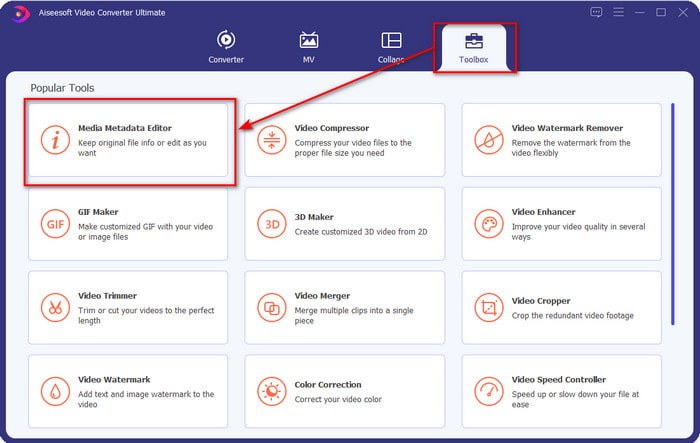
Schritt 2. Nachdem Sie die Software geöffnet haben, gehen Sie zum Toolbox-Bereich und wählen Sie Media Metadata Editor, um die Tags Ihrer FLV-Datei zu bearbeiten.
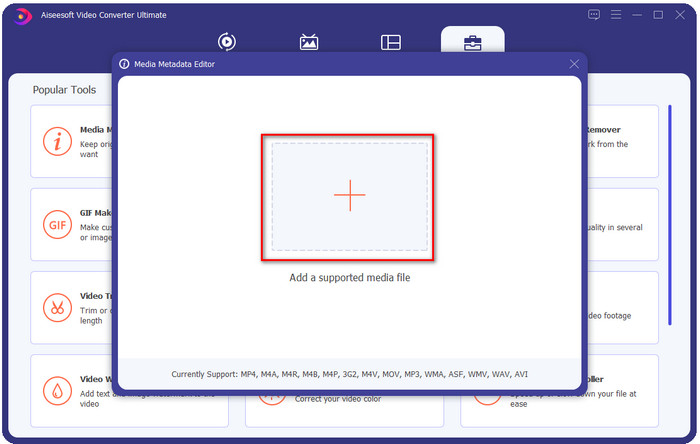
Schritt 3. Fügen Sie die FLV-Dateien hinzu, indem Sie auf das +-Symbol klicken, die Datei im Ordner suchen, der auf Ihrem Bildschirm angezeigt wird, und auf Öffnen klicken.
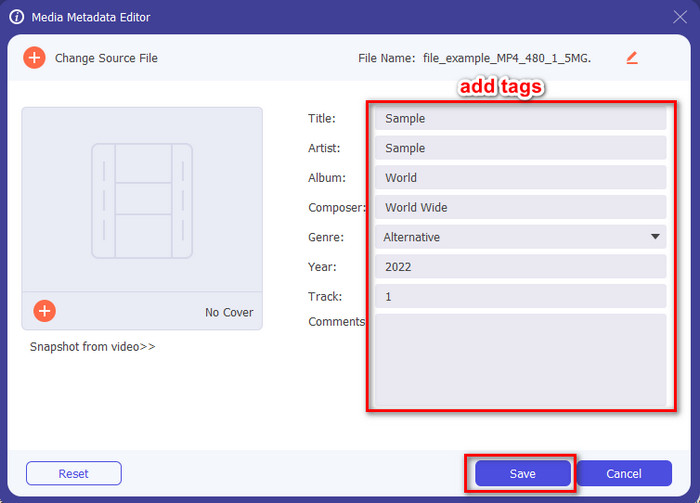
Schritt 4. Fügen Sie Informationen hinzu, ändern oder entfernen Sie sie im Textfeld und klicken Sie auf Speichern. Damit haben Sie nun Ihrer FLV-Datei Tags hinzugefügt – so einfach ist das.
FLVMeta - FLV-Metadaten-Editor
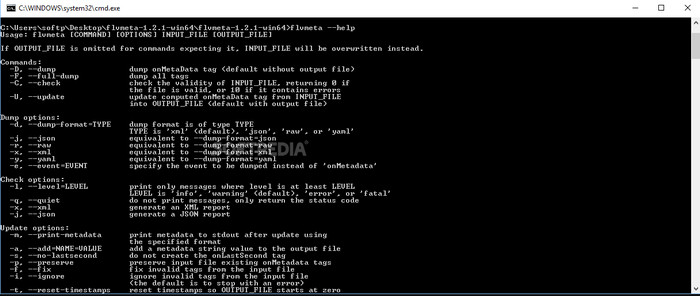
Wenn Sie Profi sind und einen speziellen FLV-Metadaten-Editor ausprobieren möchten, den Sie herunterladen können, möchten wir Ihnen den FLVMeta – FLV Metadata Editor vorstellen. Dieses Tool ist nicht der typische Editor, den Sie vielleicht schon kennen, da es sich um ein Kommandozeilen-Tool handelt. Das bedeutet: Um das Tool zu steuern, müssen Sie bestimmte Befehle eingeben. Ähnlich wie bei FFmpeg müssen Sie Pfad, Dateiname, Daten und viele weitere komplexe Angaben eingeben. Auch wenn dies nicht die beste Wahl für Einsteiger ist, die ihre FLV-Metadaten bearbeiten möchten, ist es erwähnenswert, da es die Aufgabe perfekt erledigt.
Außerdem funktioniert die Software nicht mit den anderen Formaten; Sie können es nur auf FLV verwenden, wenn Sie das Tool verwenden möchten. Wenn Sie viele FLV-Dateien haben und ihre Tags ändern möchten und über Grundkenntnisse in der Handhabung eines Befehlszeilentools verfügen, empfehlen wir Ihnen, dieses zu verwenden. Wenn nicht, werden Sie Zeit brauchen, um das Tool zu studieren, um eine einfache Aufgabe wie das Hinzufügen von Metadaten auszuführen.
Online-FLV-Metadaten-Editor
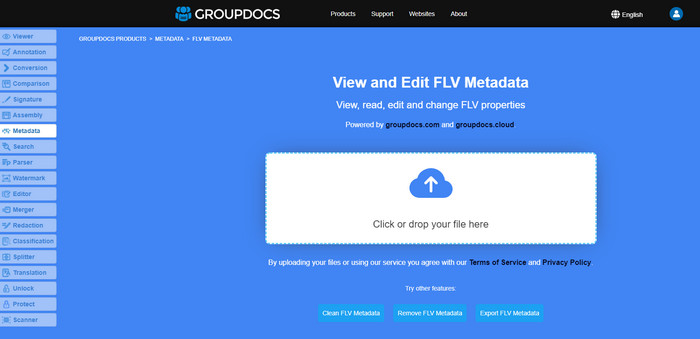
Sie möchten kein Tool herunterladen, um das FLV-Metadatenformat zu bearbeiten? In diesem Fall können Sie den Online FLV Metadata Editor verwenden. Mit diesem Tool können Sie die Metadaten Ihrer FLV-Datei bearbeiten, ohne Software installieren zu müssen, da es sich um ein webbasiertes, kostenloses Tool handelt. Auch wenn das Tool im Web kostenlos ist, funktioniert es nicht ohne Internetverbindung, und der Vorgang kann unterbrochen werden, wenn Ihre Verbindung langsam ist.
Im Gegensatz zu FLVMeta unterstützt dieses Tool mehr Formate und nicht nur FLV; es unterstützt nicht so umfassend wie das ultimative Tool. Wenn Sie also die Bearbeitung der Aufgabe abschließen möchten, ohne die Software herunterzuladen, empfehlen wir Ihnen, diese zu verwenden, da der Zugriff auch sicher ist. Denken Sie jedoch daran, unerwartete Probleme zu vermeiden, und stellen Sie sicher, dass Sie über eine stabile Internetverbindung verfügen.
Teil 2. Vergleichstabelle über die Top 3 FLV-Metadaten-Editor
| Merkmale | Video Converter Ultimate | FLVMeta – FLV-Metadaten-Editor | Online-FLV-Metadaten-Editor |
| Sicher zu benutzen |  | | |
| Benutzerfreundlich | |  | |
| Internetabhängig | | | |
| Bearbeitungsfunktionen wie Schneiden, Trimmen, Zuschneiden, Zusammenführen usw. | | | |
| Beste Grafik-Benutzeroberfläche | | | |
Teil 3. Häufig gestellte Fragen zum FLV-Metadaten-Editor
Sind FLV und F4V gleich?
Obwohl beide mit Adobe Flash zusammenhängen, dienen sie unterschiedlichen Zwecken. FLV verwendet zum Beispiel denselben Encoder wie SWF-Dateien und wird idealerweise zur Datenübertragung über das Internet eingesetzt. F4V hingegen ist ein ISO-basiertes Format, das MP4 ähnelt. Obwohl beide gut für die Übertragung von Dateien über das Internet geeignet sind, unterscheiden sie sich in Aufbau und Struktur. Wenn Sie Ihr F4V in FLV konvertieren möchten, klicken Sie hier und erfahren Sie, wie Sie das Format in FLV umwandeln.
Wo kann ich FLV abspielen?
Nicht alle Media Player können das FLV-Format abspielen, da die Unterstützung begrenzt ist. Sie haben jedoch Glück, denn wir haben die besten FLV-Player zusammengestellt, die Sie auf Ihrem Gerät verwenden können, um FLV-Dateien abzuspielen, ohne sich Gedanken über die Kompatibilität machen zu müssen. Diese Tools wurden getestet, um sicherzustellen, dass sie FLV-Dateien auf Windows, Mac, Android und iPhone abspielen können. Um mehr zu erfahren, klicken Sie auf diesen Link.
Ist FLV das Standardformat für die gemeinsame Nutzung von Videos?
Bevor wir es als das beste Video-Sharing-Format betrachteten, das Sie im Internet verwenden können, um qualitativ hochwertige Videos abzuspielen; In dieser neuen Ära gibt es jedoch noch bessere Formate, wie z. B. MP4. Da es mit verschiedenen Geräten der Benutzer besser kompatibel ist, wird dies als Standardvideoformat bezeichnet. Obwohl Sie die FLV-Dateien immer noch im Internet teilen können, müssen Sie das Gerät des Empfängers dieser Datei noch einmal überdenken. Und wenn Sie der Empfänger sind, müssen Sie ein Drittanbieter-Tool herunterladen, um es abzuspielen oder in ein spielbares Format zu konvertieren.
Fazit
Obwohl es begrenzte Tools gibt, die FLV unterstützen, haben wir immer noch Glück; weil wir die FLV-Metadaten aufgrund der oben genannten Tools immer noch bearbeiten können. Aber es macht uns traurig, dass wir uns für eine entscheiden müssen, obwohl sie uns helfen können. Wenn Sie sich nicht entschieden haben, was Sie verwenden möchten, müssen Sie stattdessen das ultimative Tool verwenden. Es ist die sicherste Wahl, weil es einfach ist und Ihnen dennoch bei der Bewältigung der Aufgabe helfen kann. Sie glauben immer noch nicht, was die Fähigkeiten dieses Tools sind? In diesem Fall müssen Sie es auf Ihren Desktop herunterladen, um es zu verwenden, und es selbst testen, um zu sehen, ob es die Aufgabe erfüllt. Wir würden uns freuen, wenn Sie uns Ihren Vorschlag, Ihre Empfehlung und mehr über die App mitteilen könnten.
-
 Was sind Metadaten: Lernen Sie die grundlegenden Informationen über Metadaten kennen
 Was sind Metadaten? Ist das wichtig? Was sind die Bestandteile von Metadaten? Haben Sie die gleiche Frage? In diesem Artikel erfahren Sie die grundlegenden Informationen zu Metadaten.
-
 4 der besten Metadaten-Viewer online und offline [Aktualisiert 2025]
 Kann ich die Metadaten meiner Datei überprüfen? Ja, das können Sie, mit Hilfe dieses Beitrags stellen wir Ihnen die verschiedenen Metadaten-Viewer vor, die Sie verwenden können.
-
 6 beliebte Snapchat-Animationsfilter für Snapchat
 Möchten Sie wissen, wie Sie Snapchat-Videos am besten Filter hinzufügen können? Nun, Sie können darauf klicken und die verschiedenen Filter kennenlernen, die Sie zum Anwenden auf Snapchat-Videos verwenden können.
