


 Video Converter Ultimate
 Bildschirm recorder
 Videoreparatur
 Sicherer Download
So funktioniert Video Colorizer: Die drei wichtigsten Tools für den Einsatz im Jahr 2023
Haben Sie noch diese alten Videos, die in Schwarzweiß-Tönen aufgenommen wurden? Während das Schwelgen in Erinnerungen schon mit einem einfachen Abspielen möglich ist, können Sie Ihre Videos jetzt zu zeitlosen Werken machen, indem Sie sie kolorieren. Zum Glück hat das digitale Zeitalter viele technologische Neuerungen hervorgebracht, darunter auch ein Tool, das Schwarzweiß‑Videos kolorieren kann. In diesem Leitfaden stellen wir Ihnen die leistungsstärksten Programme vor, die mit Farbe und intelligenten Algorithmen arbeiten – und die Farbgebung Ihres Filmmaterials nahtlos anpassen.

Teil 1. Video offline einfärben
Das Umwandeln alter Filme in kolorierte Aufnahmen sollte mit einer leistungsstarken Software wie Video Converter Ultimate kein Problem mehr sein. Zwar wird dieses Tool hauptsächlich zum Konvertieren von Video- und Audiodateien verwendet, doch es enthält auch einen Video-Editor, mit dem Sie Schwarzweiß-Videos wieder zum Leben erwecken können. Darüber hinaus bietet Video Converter Ultimate ein Echtzeit-Vorschaufenster, in dem Sie die während des Bearbeitungsprozesses vorgenommenen Änderungen sofort sehen. Außerdem können Sie Ihr Filmmaterial zuschneiden, drehen und mit unzähligen Filtern versehen, um einen zusätzlichen kreativen Touch zu erzielen. Folgen Sie der einfachen Anleitung unten, um Schwarzweiß‑Videos mit diesem hervorragenden Tool zu kolorieren.
Schritt 1. Starten Sie den besten Video-Kolorierer
Laden Sie zunächst das Installationsprogramm für Video Converter Ultimate herunter, indem Sie auf das beste Betriebssystem für Ihr Gerät klicken. Führen Sie anschließend den Installationsassistenten aus, um das Programm auf Ihrem Computer zu starten.
Kostenloser DownloadFür Windows 7 oder höherSicherer Download
Kostenloser DownloadFür macOS 10.7 oder höherSicherer Download
Schritt 2. Datei im Programm importieren
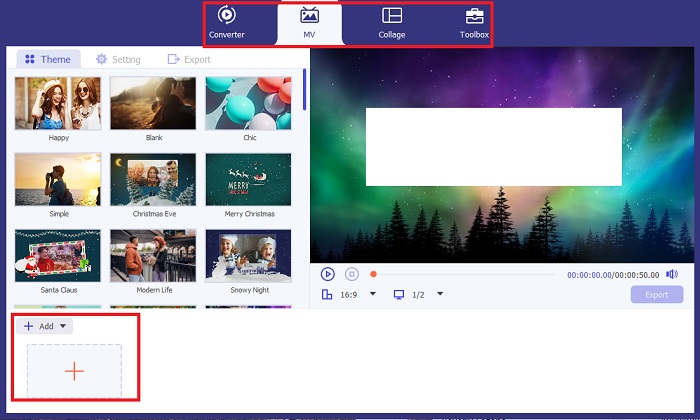
Gehen Sie als Nächstes zum Bereich MV von Video Converter Ultimate, um auf den Video-Editor zuzugreifen. Klicken Sie dort auf die Schaltfläche Plus, um Ihr Rohmaterial zu importieren, und warten Sie, bis es auf dem Bildschirm geladen ist.
Schritt 3. Filmmaterial kolorieren
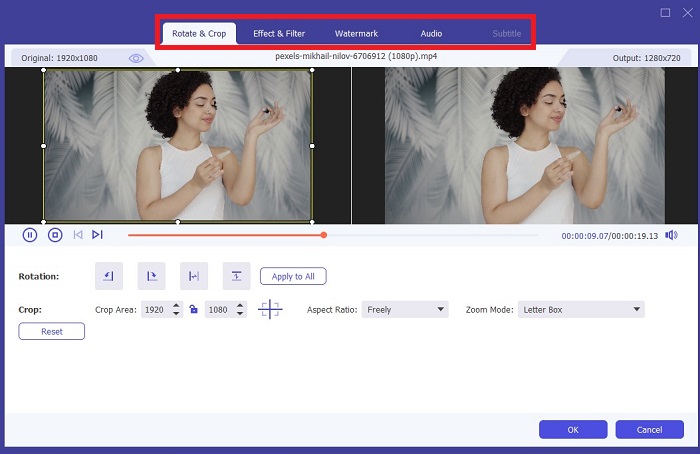
Fügen Sie nach dem Hochladen Ihrer Datei die Farbanpassungen hinzu, indem Sie den Pfeil ziehen. Es gibt auch voreingestellte Filter, um Ihrem Video einen sofortigen Effekt hinzuzufügen.
Schritt 4. Ausgabe speichern
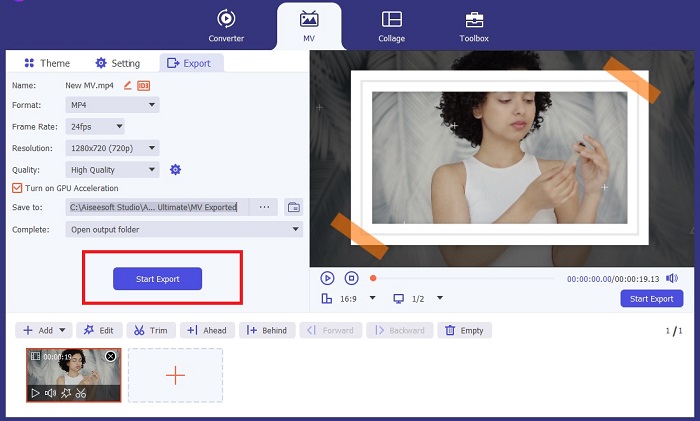
Wenn Sie mit Ihrem kolorierten Video zufrieden sind, klicken Sie auf die Schaltfläche Export, um mit dem finalen Vorgang fortzufahren. Ändern Sie anschließend die Bildrate (fps), den Namen, die Auflösung und das Format Ihrer Datei und klicken Sie auf Start Export, um Ihr Ergebnis lokal auf Ihrem Gerät zu speichern.
Teil 2. Videos online kostenlos einfärben
Online-Tools sind großartige Möglichkeiten, wenn Sie nicht über genügend Speicherplatz verfügen, um Offline-Programme zu installieren. Mithilfe der KI-Technologie werden Ihre langweiligen Videos oder Fotos sofort wieder zum Leben erweckt. PickFrom ist ein kostenloses Online-Kolorierungsvideo, mit dem Benutzer mithilfe eines Farbkalibrierungsalgorithmus ihrem Filmmaterial einen Farbton hinzufügen können. Es funktioniert auf den meisten Webbrowsern, einschließlich Opera, Chrome, Safari und Internet Explorer. Darüber hinaus ist dieses Programm dank der Datenverschlüsselungskanäle zu 100%-Prozent sicher und geschützt, um Dateninvasion zu verhindern.
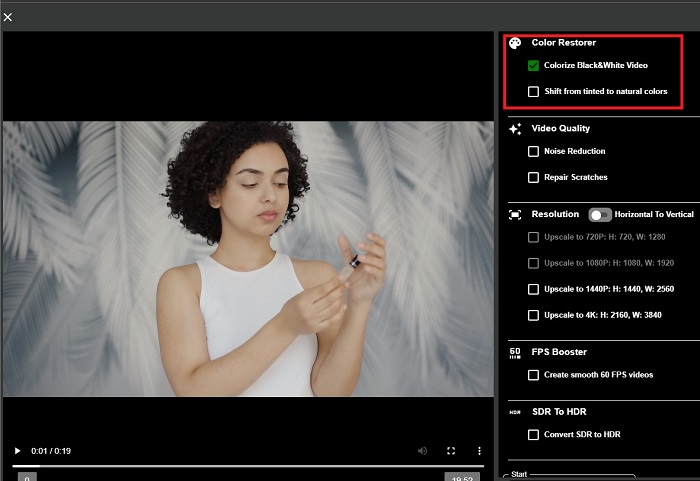
Schritt 1. Öffnen Sie zunächst Ihren Webbrowser und rufen Sie die Website von PickFrom auf. Gehen Sie anschließend zum Bereich Video Colorizer und klicken Sie auf Add Files, um Ihr Rohvideo hochzuladen.
Schritt 2. Nach dem Hochladen des Videos zeigt das Tool automatisch die KI-kolorierte Videoausgabe an. Sie können außerdem das Settings-Menü des Colorize-Video-Tools ausklappen und die Auflösung Ihrer Datei zwischen 780p und 1080p wählen.
Schritt 3. Wählen Sie abschließend das Output-Format Ihrer Datei, indem Sie den Tab Format erweitern. Sie können zwischen MP4, AVI und MKV wählen. Wenn Sie mit Ihrem Ergebnis zufrieden sind, klicken Sie auf die Schaltfläche Start, um Ihr koloriertes Schwarzweiß‑Video herunterzuladen.
Teil 3. Videos auf Mobilgeräten einfärben
Verwandeln Sie Ihr Filmmaterial geschickt mit einem von Google entwickelten Anwendungstool namens Colorize! Wie der Name schon sagt, ist dieses Programm eine ausgezeichnete Wahl für iOS- und Android-Benutzer, wenn es darum geht, Ihrem veralteten Filmmaterial Farben hinzuzufügen. Darüber hinaus können Sie die App zum Kolorieren von Schwarzweißvideos maximieren, indem Sie Ihrer Ausgabe spezielle Filter und Effekte hinzufügen und das Auswahlverhältnis Ihrer Ausgabe anpassen. Hier ist die Kurzanleitung zum Hinzufügen von Farbe zu Schwarzweißvideos mit dieser mobilen Anwendung.
Schritt 1. Klicken Sie im Programm auf die Schaltfläche Upload und wählen Sie die Schwarzweiß-Datei aus, die Sie korrigieren möchten.
Schritt 2. Während des Hochladens wendet das Tool automatisch Farbe auf Ihr Projekt an, und die Dauer hängt lediglich von der Länge bzw. Größe der Datei ab.
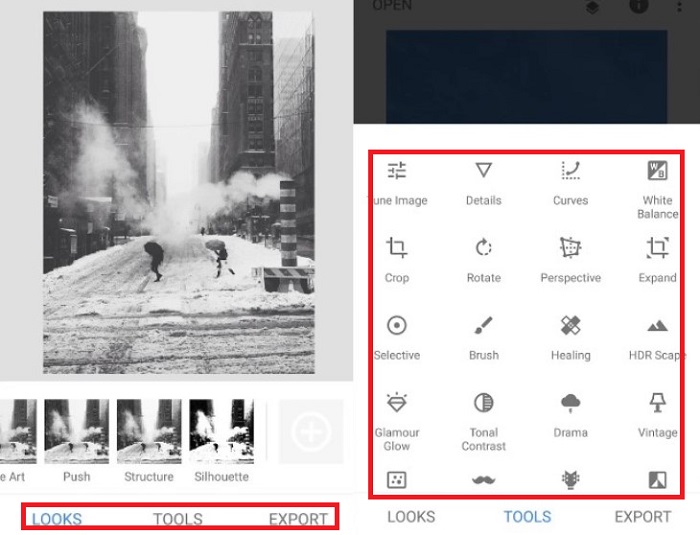
Schritt 3. Sobald das kolorierte Foto erscheint, können Sie die Details Ihres Fotos im Bereich Enhance anpassen. Sie können den Farbton, die Sättigung und die Farbdynamik Ihres Fotos verändern. Tippen Sie anschließend auf die Schaltfläche Download, um die Datei auf Ihrem Gerät zu speichern.
Weiterführende Lektüre:
Effiziente Lösungen, um Videos in weniger als einer Minute aufzuhellen
5 beste Windows-Video-Editoren mit Tipps für Profis & Einsteiger [2023]
Teil 4. FAQs zur AI Colorize Video-Software
Wie kolorieren Leute alte Videos?
Das Einfärben von Schwarzweißvideos und -fotos ist jetzt durch digitale Bearbeitungswerkzeuge wie Videokolorierer oder Videoeditoren möglich. Manchmal müssen Sie die Einstellungen manuell anpassen, um Ihren Wünschen gerecht zu werden, oder eine KI-Software zum Einfärben von Videos verwenden.
Ist es möglich, Schwarzweißvideos einzufärben?
Definitiv Ja! Die Korrektur des visuellen Tons Ihres Filmmaterials ist heute 100% möglich. Als Ratschlag: Es ist besser, die Farbe Ihrer Videos zu normalisieren, bevor Sie sie bearbeiten.
Warum muss ich ein Video farblich korrigieren?
Die Farbkorrektur ist ein wesentlicher Prozess, den Filmemacher bei der Fertigstellung ihrer Produktion durchführen müssen. Mit diesem Verfahren können sie einen einheitlichen Farbton erzielen, um ihrem Publikum einen herausragenden visuellen Effekt zu verleihen.
Wie lange dauert das Kolorieren von Fotos und Videos?
Solange Sie über die richtigen Tools auf Ihrem Gerät verfügen, können Sie alte Fotos und Videos sofort einfärben. Berücksichtigen Sie andererseits die Größe und Länge Ihres Videos.
Sind meine kolorierten Videos korrekt?
Mit dem Video-Kolorierer erhalten Sie eine nahezu genaue Farbdarstellung des Videos. Sie können sich auch von Experten beraten lassen, die Ihnen dabei helfen, anhand der Zuordnung des Videos die Originalfarbe zu ermitteln.
Fazit
Und das war’s! Nachdem Sie nun die drei besten Methoden kennen, um Schwarzweiß‑Videos zu kolorieren – mit Offline‑, Online‑ und mobilen Tools – fällt die Entscheidung nicht mehr schwer. Mit einem KI‑Video-Kolorierer fügt das Tool automatisch Farbe zu Ihren Videos hinzu. Allerdings erlaubt es Ihnen nicht, die wichtigen Farbeinstellungen so umfassend anzupassen wie Offline‑Lösungen, etwa Video Converter Ultimate.
-
 Problemlose Methoden zum Konvertieren von Bildern in Schwarzweiß
 Möchten Sie, dass Ihre Fotos nostalgisch aussehen? Wir haben eine Antwort für Sie. Dieser Beitrag bietet bemerkenswerte Möglichkeiten, ein Farbbild in Schwarzweiß umzuwandeln.
-
 Eine exemplarische Anleitung: Die besten 7 Volume Booster, die auf allen Plattformen verfügbar sind
 Möchten Sie wissen, welche Lautstärkeverstärker auf PC, Mac, Online, Android und iOS verfügbar sind? Dann lesen Sie diesen Artikel mit verschiedenen Tools, aus denen Sie wählen können.
-
 Top Instagram Video Resizer zur Optimierung Ihrer Instagram-Inhalte
 Sehen Sie sich unsere Anleitung zum Ändern der Größe von Videos für Instagram an. Erfahren Sie, wie Sie Ihre Inhalte optimieren und das Engagement auf der weltweit beliebtesten Social-Media-Plattform steigern können.
