


 Video Converter Ultimate
 Bildschirm recorder
 Videoreparatur
So verringern Sie die Auflösung eines Videos unter Windows, Mac und Mobiltelefonen
Videos on 1080 and 720 HD have the best resolution you would love to use, especially watching. Although these resolutions are best, sooner or later, you will need to convert the video resolution into less to save some space on your drive. But the question is how to convert the video resolution to lower it? This article will identify the leading video resolution converter to lower the video resolution on Windows, Mac, Online, Android, & iPhone.

Teil 1. Warum müssen Sie die Videoauflösung verringern
Als Vorbereitung, bevor wir die Videoauflösung verringern, wollen wir zunächst die Ursache ermitteln, warum wir die Auflösung eines Videos verringern müssen. Die unten angegebenen Informationen sind die häufigsten Fälle, in denen Sie die Auflösung reduzieren müssen.
Grund 1. Auf Mobilgeräten nicht unterstützt
Einige Mobilgeräte unterstützen keine höhere Videoauflösung, da Ihr Mobilgerät diese nicht erkennt. Manchmal dachten wir, dass das Video wegen der Formatkompatibilität nicht geöffnet wurde, aber das ist ein weiterer Grund dafür. Wenn Sie das Video abspielen möchten, müssen Sie sich die Auflösung des Videos merken, das Sie auf Ihrem Telefon gespeichert haben.
Grund 2. Nehmen Sie sich Zeit, um die Datei auf einen Media Player zu laden
Jeder Mediaplayer kann Ihr Video in der höchstmöglichen Auflösung abspielen, aber nicht alle können das Video sofort in hoher Qualität laden. Obwohl das Ansehen eines Videos mit hoher Auflösung angenehmer ist als das Ansehen eines niedrigeren. Zu lernen, wie man die Auflösung eines Videos verringert, ist ein Muss, wenn man das Video sofort mit wenig oder weniger Last auf dem Mediaplayer ansehen möchte.
Grund 3. Video mit hoher Qualität verbraucht viel Platz
Dieser Grund ist uns nicht neu; Videos mit hoher Qualität haben eher eine enorme Dateigröße. Aufgrund der hochwertigen Ausgabe müssen Sie mit einer großen Dateigröße rechnen. Beispielsweise gehören 720 und 1080 zu den besten Qualitäten, aber die Dateigröße von 720-Videos ist viel kleiner als die von 1080-Videos. Andererseits ist die Auflösung von 1080 viel höher als 720.
Nachdem wir nun wissen, warum wir die Videoauflösung reduzieren müssen, zeigen Ihnen die nachfolgenden Informationen die verschiedenen Tools, mit denen Sie die Auflösung Ihres Videos reduzieren können. Bleiben Sie am Ball, um eine umfassende Vorstellung davon zu bekommen.
Teil 2. Der einfachste Weg, die Videoauflösung auf dem Desktop zu reduzieren
If you need a user-friendly video converter that can help you quickly change the video resolution, then Video Converter Ultimate will offer this to you. This tool supports 200+ formats with different presets you can choose from. Want to know what impressed us about this converter? With this tool, you can create presets that can go up to 4k or as low as 360 resolution. Moreover, you don't need to be a professional video editor to learn how to convert video to a lower resolution; by following the steps below, you can convert resolution successfully.
Step 1. Kindly click the appropriate button to get the version you are currently using, whether Windows or Mac. Open the download file to install the software follow the installation process to install it properly. After installation, open the Video Converter Ultimate and proceed to the next step.
Gratis DownloadFür Windows 7 oder neuerSicherer Download
Gratis DownloadFür MacOS 10.7 oder neuerSicherer Download
Step 2. Upload the video with the highest resolution by dragging and dropping it on the tool's interface. But you can click the + button to open the folder, locate the file and click Open to upload the video.
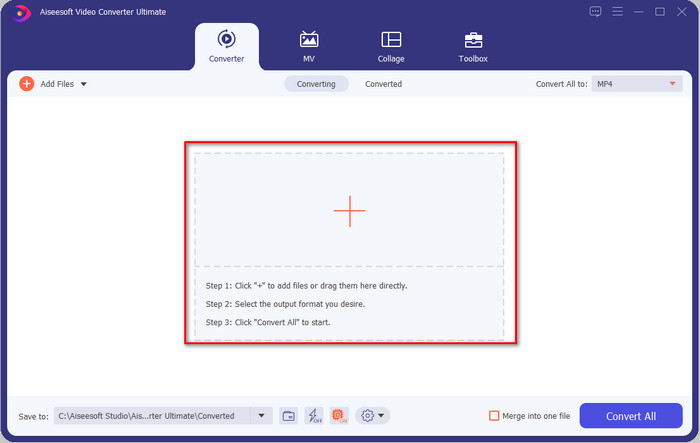
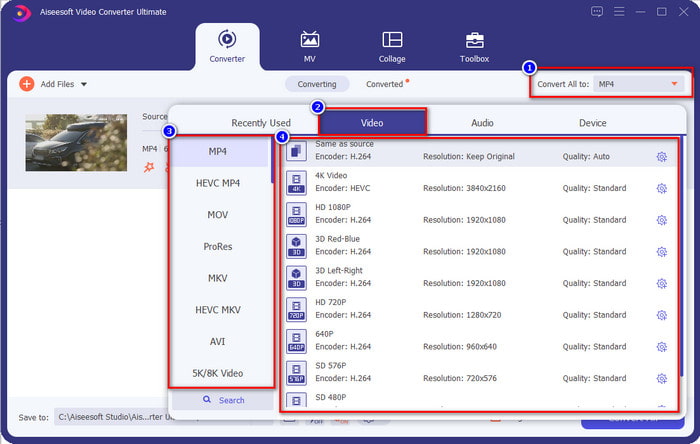
Step 3. Click Convert All to, and a setlist of the premade format will show. You can select different formats such as MP4, MOV, AVI, MKV, and 200+ more with different resolutions, click the format you want, and proceed.
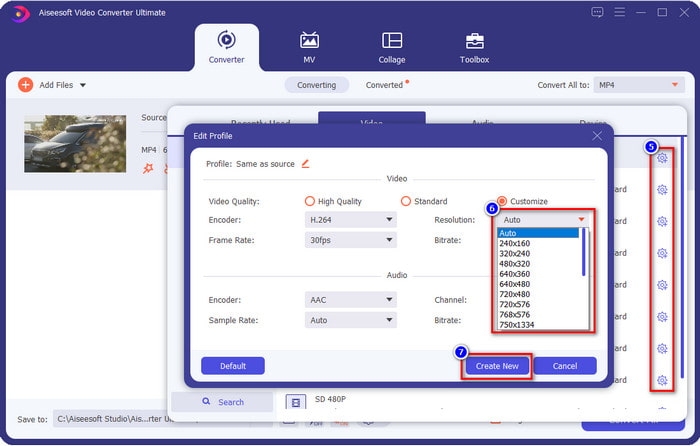
What if the resolution you want to achieve is not on the pre-made list? No need to worry; you can create your resolution. After clicking the Convert All to, choose the format you want and click the gear with a plus icon. Click the drop-down button, select the resolution you want, click Create New, and click the preset you've made.
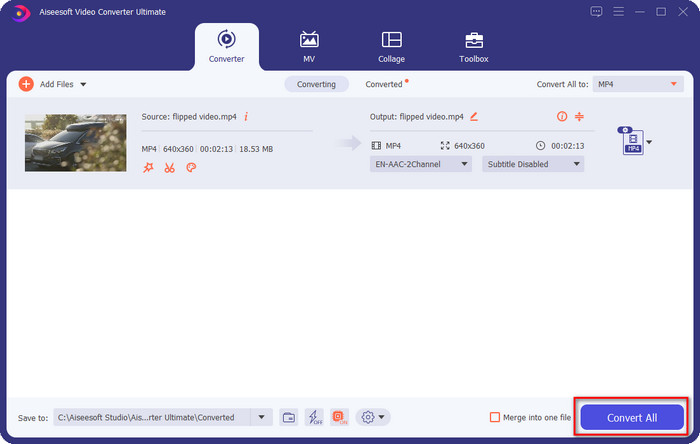
Step 4. To start lowering your video resolution, hit the Convert All button. With the ultra-fast conversion, the download will take less than a minute. And voila, the resolution of your video is now lowered, all thanks to the ultimate tool.
Teil 3. Kostenlose Möglichkeit, die Videoauflösung im Web in eine niedrigere Auflösung umzuwandeln
If you are looking for a way to convert HD video to lower resolution online, then you can use the FVC Free Video Converter Online as a solution. This web tool supports numerous formats you can upload and export into. Unlike the ultimate tool, you won't need to download this tool to convert the high-resolution video into a lower one. However, the tool doesn't have an ultra-fast converting process, and the supported format is not as many as the ultimate tool. So, if you want to try and use this web tool, you can follow the steps below.
Step 1. To go to the main webpage of FVC Free Video Converter Online, click this link.
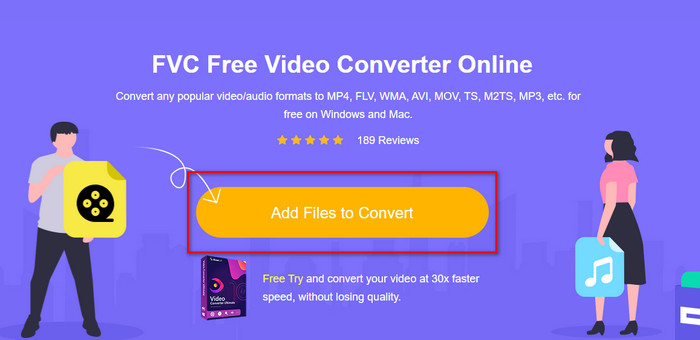
Step 2. Press Add Files to Convert to upload the video you want to lower the resolution. Additionally, if this is your first time using the tool, you must download the launcher. After that, click the Add Files to Convert again to upload the file.
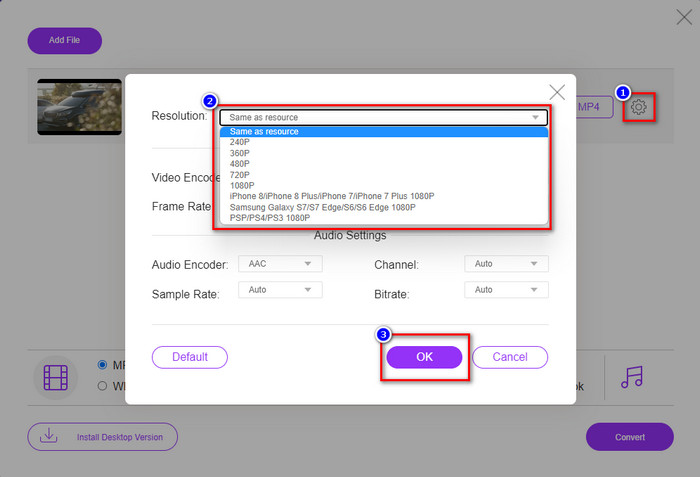
Step 3. Click the gear icon on the right side of the window that will show. Choose the resolution you want by clicking the drop-down button and pressing OK to save.
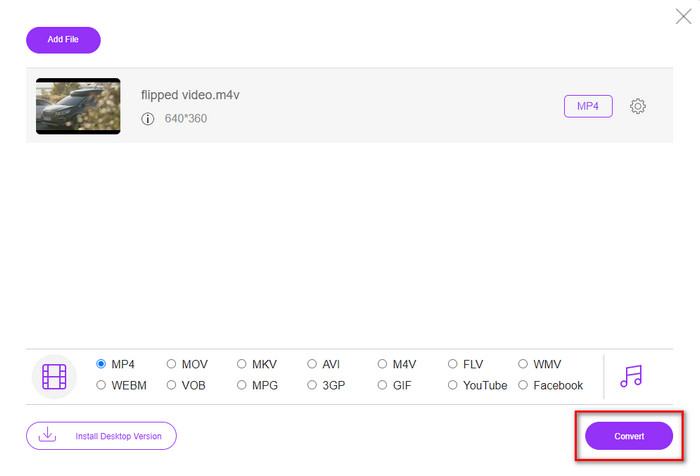
Step 4. To export the lower-quality video, click Convert and wait to download it on your drive.
Teil 4. 2 beste Apps zum Reduzieren der Videoauflösung auf iPhone und Android
Video Format Factory (nur für Android-Benutzer)
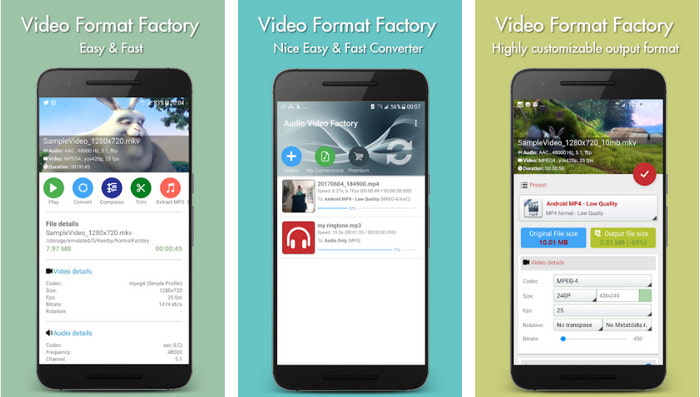
Wenn Sie lernen müssen, wie Sie die Videoauflösung auf Android reduzieren können, kann Ihnen Audio Video Factory helfen. Mit dieser App können Sie die Videoauflösung Ihres Videos ganz einfach kostenlos konvertieren. Einige Anzeigen werden jedoch während der Konvertierung eingeblendet, und Sie können das volle Potenzial des Tools nicht nutzen, wenn Sie es nicht kaufen. Um Ihnen beizubringen, wie man es benutzt, folgen Sie den Schritten.
Step 1. Download the app on Playstore, then open it.
Step 2. Click Add to upload the video, choose where your video is, and click the video. After that, click Convert; click the Size and choose the resolution you want.
Step 3. Scroll up and click Convert Now to begin the process.
Niedrigere Kamera mit sehr niedriger Auflösung (nur für iOS-Benutzer)
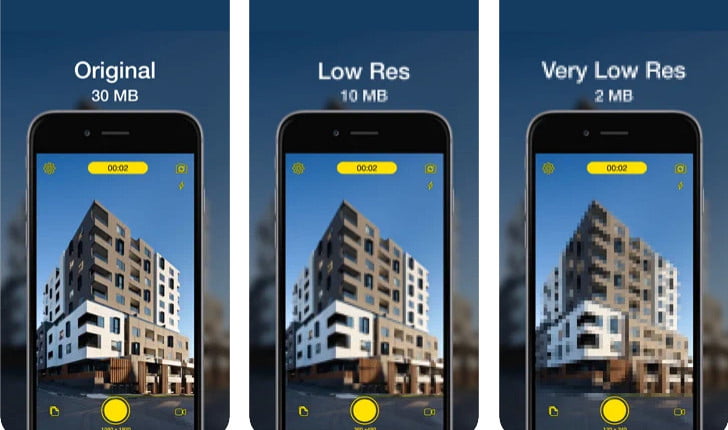
If you are an iOS user, you can still learn how to reduce the resolution of the video on the iPhone by using the Lower- Very Low Res Camera. Unlike the tools in this list, you can shoot a video with a lower resolution if you download this app on the App Store. However, the tools have some limitations, and it has pop-up ads while using the app.
Step 1. Download the app on the App Store, then click it to open.
Step 2. Click the file's icon and select the video you want to convert; after clicking the video, press Resize.
Step 3. Select the Recording Quality, and the process of converting it will begin.
Teil 5. Häufig gestellte Fragen zum Senken der Videoauflösung
Unterstützt VLC 4k-Auflösung?
Yes, VLC 3.0 supports playing videos that are on 4k resolution. But did you know there are many things VLC can do? If you want to explore VLC more, click this link and learn about VLC and its other perfect alternatives to use.
Welche anderen Tools kann ich zum Konvertieren der Videoauflösung verwenden?
This review will learn the 8 of the best video resolution converters you can use on different platforms. By clicking this link, you will have more detailed information and different varieties of converter choices.
Was ist die höchste Videoauflösung, die ich haben kann?
8k-Videoauflösung ist die höchste Videoauflösung, die Sie auf dem Fernseher verwenden können. Diese Auflösung ist 4-mal schärfer als 4k und 16-mal besser als 1080.
Fazit
Finally, we now have a clearer idea on how to lower the video resolution in your platform; whether you are using a Windows, Mac, Online, Android, or iPhone, you can use the converters in this list. But if you want a tool that can change your resolution without reducing the quality, we recommend using the FVC Video Converter Ultimate. As we present above, there are many reasons you should use this tool, and if you still do not believe us, you can download the tool and try if it works, as we explain in this post.
-
 Ultimative Anleitung zum Ändern der plattformübergreifenden Videoauflösung
 Müssen Sie die Videoauflösung des Videos ändern? Wenn dies der Fall ist, lernen Sie die verschiedenen Methoden kennen, mit denen Sie die Videoauflösung des Videos, das Sie gerade ansehen, ganz einfach ändern können.
-
 Top 8 Videoauflösungskonverter zur Verwendung in Multiplattformen [Aktualisiert 2022]
 Haben Sie keine Ahnung vom besten Videoauflösungskonverter auf Ihrem Gerät? Wenn ja, können Sie diesen Artikel vollständig lesen, um mehr über die verfügbaren Videokonverter zu erfahren.
-
 Bester 1080p HD-Videoplayer für Windows/Mac/iOS/Android im Jahr 2021
 Wenn Sie nach einem Videoplayer suchen, um 1080p-High-Definition-Videos auf Ihrem Computer anzusehen, sehen Sie sich unsere Auswahl der besten 1080p-HD-Videoplayer für Mac, Windows PC, iOS und Android an.
