


 Video Converter Ultimate
 Bildschirm recorder
 Videoreparatur
Rückblick auf die Bedeutung des ID3-Tag-Editors im Jahr 2022
Songs, die Sie von Musikwebseiten heruntergeladen haben, enthalten tatsächlich Metadaten, auch bekannt als ID3-Tags. Normalerweise stehen alle Informationen, die Sie über diesen Song benötigen, in diesen Tag-Informationen. In manchen Fällen kommt die Musik jedoch ohne Tags oder mit falschen Angaben. In einer solchen Situation benötigen Sie eine Software, die Ihnen die Bearbeitung dieser Aufgabe erleichtert. In diesem Zusammenhang präsentieren wir Ihnen gern den besten ID3-Tag-Editor, den Sie auf Windows, Mac, iOS und Android herunterladen können, um die Tags Ihrer Songs zu bearbeiten.

Teil 1. Was ist ein ID3-Tag
ID3-Tags sind für jeden Nutzer unverzichtbar, der detaillierte Informationen über einen Song erhalten möchte. Ein gutes Beispiel für Tags, die Sie sehen können, ohne sich die eigentlichen Tags anzeigen zu lassen, sind der Name des Künstlers und der Titel des Liedes. Auch wenn wir diese Daten nicht selbst zur Audiodatei hinzufügen, sind sie dennoch eingebettet, damit wir erkennen können, ob wir die richtige Musik abspielen.
Wenn Sie jedoch kein Tag für Ihre Songs oder Ihren Podcast haben, besteht die Möglichkeit, dass die Dateien in der gesamten Bibliothek oder im Ordner, in dem sie gespeichert sind, verschlüsselt sind. Das Hinzufügen der Tags zu Ihrer Datei kann Ihnen helfen, die Datei zu bestimmen und sie so anzuordnen, dass sie organisiert aussieht. Wenn Ihre Datei keine enthält, müssen Sie Daten hinzufügen. Halten Sie den Ball am Laufen, um Ihnen bei der Suche nach dem ID3-Tag-Editor zu helfen, den Sie verwenden sollten und der Ihren Anforderungen entspricht.
Aber bevor wir beginnen, bereiten Sie bitte die Metadaten vor, die Sie Ihrer Audiodatei hinzufügen möchten; Dazu gehören Titel, Autor, Kapitel, Seiten, Kommentare, Texte und dergleichen. Nachdem Sie dies gelesen haben, werden Sie von unserer Bewertung der besten Tag-Editoren überrascht sein, die Sie auf allen Geräten verwenden können.
Teil 2. Bester ID3-Tag-Editor für Windows/Mac zum einfachen Ändern von Metadaten
FVC Video Converter Ultimate – Bester ID3-Tag-Editor
Eines der grundlegenden Dinge, die Sie bei der Auswahl eines ID3-Tag-Editors unter Mac oder Windows wissen sollten, ist, dass er präzise, benutzerfreundlich und leicht zugänglich sein sollte – all das finden Sie im FVC Video Converter Ultimate. Er ist als erstklassiger Metadaten-Editor bekannt, der sich leicht bedienen lässt, selbst wenn Anwender nicht genau wissen, wie sie die Daten korrekt anpassen müssen. Anders als bei vielen anderen Tag-Editoren müssen Sie keine komplizierten Schritte ausführen, um Ihre Audio- oder Video-Tags hinzuzufügen oder zu korrigieren. Wenn Sie also neu in diesem Bereich des Bearbeitens oder Korrigierens von ID3-Tags sind, dann ist dies ohne Zweifel Ihre All-in-one-Software.
Außerdem haben wir es nicht ohne Grund einen One-Stop-Editor genannt; vielleicht denkst du warum. Wenn wir mehr über das Tool erfahren, werden Sie sehen, dass Sie hier eine erweiterte und grundlegende Videobearbeitung durchführen können, um Ihr Video durch Hinzufügen von Effekten und Filtern hervorragend aussehen zu lassen. Es gibt immer noch zu viele nicht erwähnte Funktionen, die Sie enthüllen können, wenn Sie das Tool herunterladen. Aber heute werden wir uns auf die Verwendung dieser ID3-Tag-Bearbeitungssoftware konzentrieren, um Ihnen zu helfen, die Tags Ihrer Songs schnell zu bearbeiten und zu reparieren.
Schritt 1. Laden Sie zunächst die Software für Ihr ausgewähltes Betriebssystem herunter; es stehen zwei Optionen zur Verfügung: Windows und Mac. Installieren Sie sie anschließend korrekt, folgen Sie dem Einrichtungsprozess und öffnen Sie das Tool, sobald Sie alles abgeschlossen haben.
Gratis DownloadFür Windows 7 oder neuerSicherer Download
Gratis DownloadFür MacOS 10.7 oder neuerSicherer Download
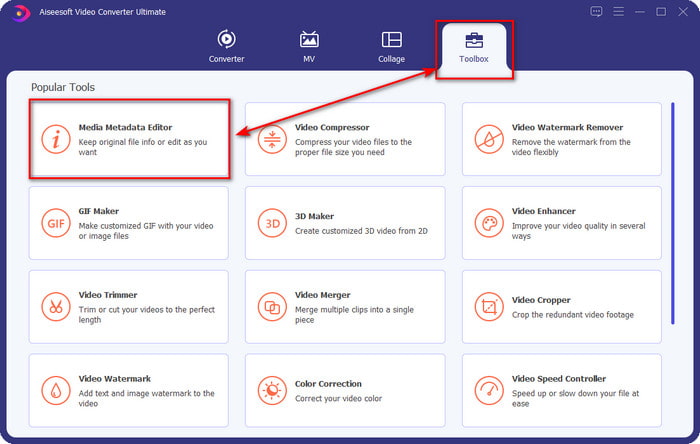
Schritt 2. Sobald Sie das Tool geöffnet haben, wechseln Sie zum Bereich Toolbox und öffnen dort den Media Metadata Editor, indem Sie darauf klicken.
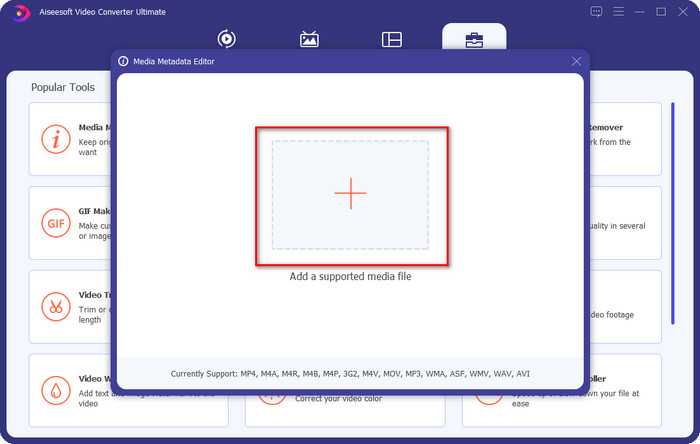
Schritt 3. Klicken Sie auf das +-Symbol im neuen Fenster, das auf Ihrem Bildschirm erscheint, wählen Sie die Audiodatei aus, deren ID3-Tags Sie ändern möchten, und klicken Sie auf Öffnen, um sie hochzuladen.
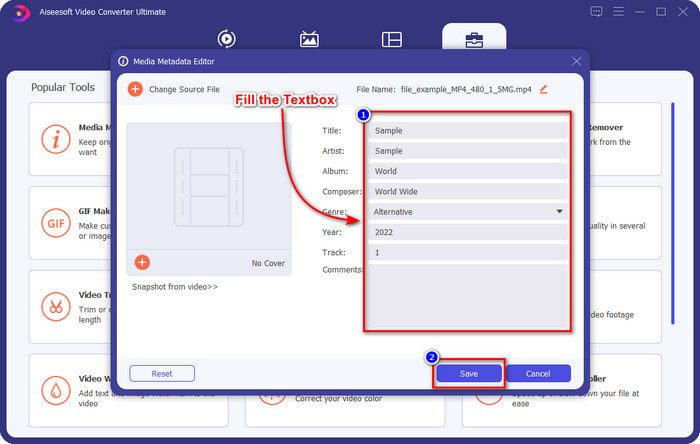
Schritt 4. Nun können Sie die Informationen eingeben, die Sie Ihrer Audiodatei hinzufügen möchten, und auf Speichern klicken, wenn Sie mit jedem Textfeld fertig sind. So einfach ist das – Sie haben nun mit Hilfe dieser Software Tags zu der Audiodatei hinzugefügt.
Vorteile
- Es unterstützt mühelos das Ändern von MP3-, WMA-, WAV- und über 1000 Metadaten.
- Ultraschnelle Konvertierung und Hardwarebeschleunigung werden für einen blitzschnellen Prozess unterstützt.
- In Toolbox sind primäre bis hin zu erweiterten Videobearbeitungsfunktionen verfügbar.
- Es ist die erste Wahl von Millionen von Benutzern weltweit, die sich dieser Aufgabe stellen.
Nachteile
- Der Kauf des Tools ist erforderlich, um alle ausgefallenen Bearbeitungsfunktionen nutzen zu können.
- Nicht verfügbar für Android und iOS.
VLC Media Player
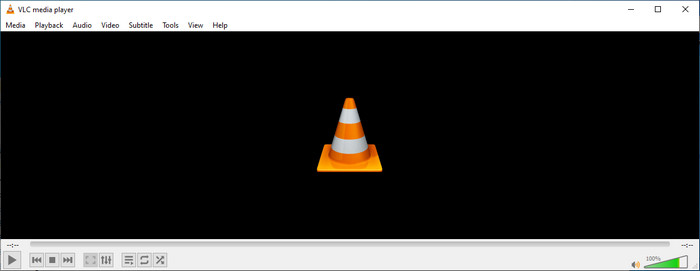
VLC Media Player ist ein erstklassiger Mediaplayer, den Sie unter Windows und Mac herunterladen können. Mit diesem Tool können Sie Videos abspielen, ohne zusätzliche Codecs auf Ihrem System installieren zu müssen, und Sie können es auch verwenden, um die ID3-Tags Ihrer Audiodateien zu bearbeiten. Obwohl das Tool kein spezialisierter Metadaten-Editor ist, kann es dennoch falsche Tags korrigieren. Wenn Sie dieses Tool also bereits haben, können Sie die Metadaten Ihres Songs problemlos anpassen, aber erwarten Sie nicht zu viel davon, denn es ist nicht so leistungsstark wie ein erstklassiger ID3-Tag-Editor auf dem Desktop.
Vorteile
- Ein Mediaplayer und Metadaten-Editor, den Sie auf jedem Gerät verwenden können.
- Es unterstützt ein durchschnittliches Medienformat, um die Tags zu ändern.
- GUI ist schlicht und einfach.
Nachteile
- Es ist kein professioneller Metadaten-Editor.
- Unterstützt eingeschränkte Funktionen zum Bearbeiten der Tags.
Teil 3. Top 3 ID3-Tag-Editor auf iOS/Android-Mobilgeräten
Star-Musik-Tag-Editor
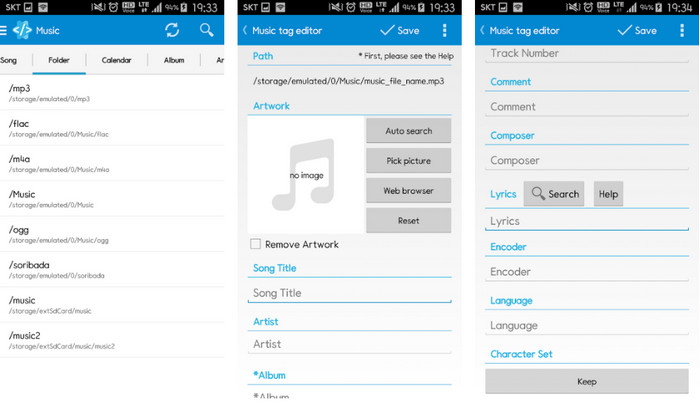
Star Music Tag Editor ist einer der am häufigsten verwendeten ID3-Tag-Editoren auf Android. Diese App kann Ihnen verschiedene Informationen zu Ihrer Musik anzeigen, und Sie können sie bei Bedarf ändern. Ihr GUI ist sehr übersichtlich, sodass Sie leicht lernen können, wie man sie benutzt, selbst wenn Sie mit Tag-Bearbeitungstools nicht vertraut sind. Auch wenn die App hervorragend ist, weist sie dennoch einige Schwächen beim Hinzufügen von Metadaten auf, insbesondere beim Albumcover. Obwohl Probleme auftreten können, ist sie nach wie vor ein zuverlässiger Tag-Editor, den Sie auf Ihr Android‑Smartphone herunterladen können.
Vorteile
- Kostenloser Download des Metadaten-Editors für Android.
- GUI ist einfach und leicht zu verstehen.
- Fügen Sie die Tags einfach zur Audiodatei hinzu.
Nachteile
- Es gibt ein Problem beim Hinzufügen eines Bildcovers zur Audiodatei.
- Manchmal treten noch Fehler auf.
Clouds Musikplayer für Clouds
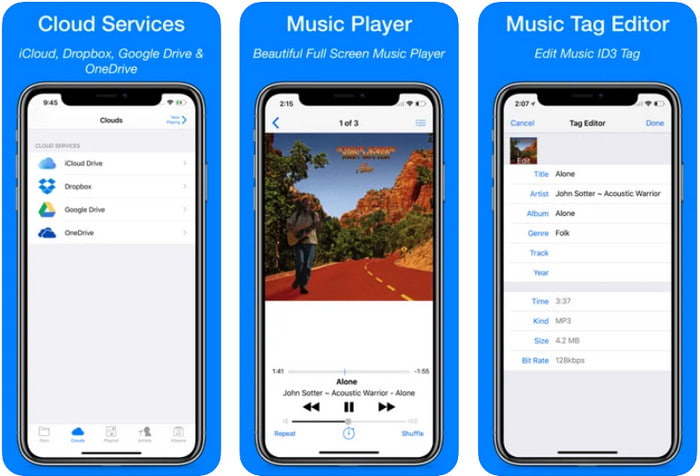
Clouds Music Player for Clouds ist eine vielseitige App, die Sie auf Ihre iOS‑Geräte herunterladen können. Sie kann ID3-Tags auf dem iPhone bearbeiten, Musik abspielen und aus Musik Klingeltöne erstellen. Trotz dieser Funktionen ist die Benutzeroberfläche schlicht und einfach, und Sie können über die App auf Ihren Cloud-Speicher zugreifen. Trotz der benutzerfreundlichen Oberfläche sind manche Informationen, die Sie als Metadaten zu Ihrer Audiodatei hinzufügen können, begrenzt – das heißt, es stehen nur die grundlegenden Tags zur Bearbeitung zur Verfügung. Nichtsdestotrotz ist die App eine sehr gute Wahl für iOS‑Nutzer.
Vorteile
- Auf jedem iOS-Gerät zum Download verfügbar.
- Multifunktionaler Musikeditor und Tag-Editor.
- Intuitiver Metadaten-Editor für iOS.
Nachteile
- Das Hinzufügen weiterer Metadaten wird nicht unterstützt.
- Fehler und Probleme mit sich ändernden Metadaten treten auf, aber nicht oft.
Dash – Infotainment-App
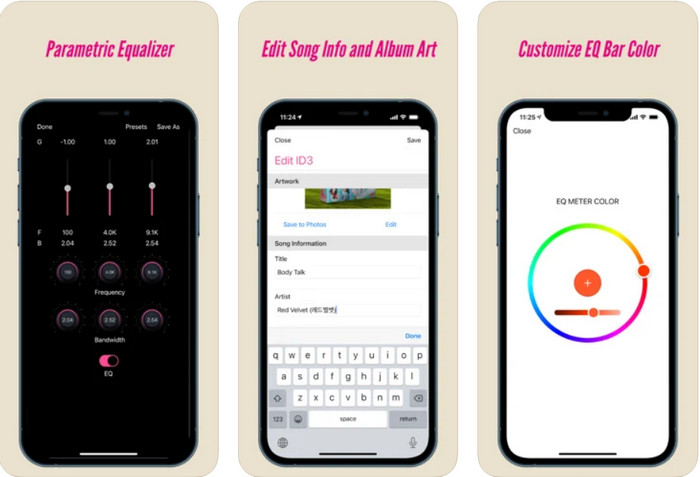
Dash- Infotainment App ist ein weiteres Tool, das Sie herunterladen können, um ID3-Tags auf dem iPhone zu bearbeiten, wenn Sie sie benötigen. Aufgrund der einfachen und übersichtlichen Benutzeroberfläche ist kaum Einarbeitung erforderlich. Mit diesem Tool können Sie die Parameter Ihrer FLAC- und ALAC-Dateien mithilfe des leicht bedienbaren Equalizers problemlos ändern. Außerdem können Sie die Geschwindigkeit und den Takt (Beat) des Songs sehen, den Sie hier hochladen. Wie beim ersten iPhone-Tag-Editor können Sie hier nur Titel, Künstler und Albumcover hinzufügen. Beachten Sie zudem, dass Ihr Format ausschließlich FLAC oder ALAC sein muss; liegt Ihre Datei nicht in einem dieser Formate vor, können Sie sie nicht hochladen.
Vorteile
- Die Lernkurve ist nicht so steif.
- Ein umfangreicher Audio-Equalizer steht zur Verfügung.
- GUI ist nicht viel, und es ist nicht weniger.
Nachteile
- Es unterstützt nur das FLAC- und ALAC-Format.
- In Bezug auf die Bearbeitung von Metadaten gibt es nicht viel zu bieten.
Teil 4. Häufig gestellte Fragen zum ID3-Tag-Editor
Was ist der beste Befehlszeilen-ID3-Tag-Editor, den ich verwenden kann?
Wenn Sie einen ID3-Tag-Editor für die Kommandozeile suchen, sollten Sie wissen, dass FFmpeg ein Kommandozeilen-Editor ist. Mit diesem Tool können Sie konvertieren, drehen, schneiden, trimmen und Ihre Metadaten-Tags bearbeiten. Wenn Sie mehr über FFmpeg erfahren möchten, können Sie in diesem Beitrag nachlesen, wie Sie es verwenden, indem Sie auf den Link klicken, um FFmpeg-Metadaten einfach zu bearbeiten.
Was sind die anderen Arten von Metadaten?
Es gibt sechs Arten von Metadaten: beschreibende, administrative, referenzielle bzw. erläuternde, statistische, rechtliche und strukturelle Metadaten. Wenn Sie mehr über diese Typen und ihre Eigenschaften wissen möchten, können Sie auf diesen Link klicken und weitere Informationen dazu lesen.
Ist es möglich, Tags ohne eine App anzuzeigen?
Ja, statt eine Software herunterzuladen, können Sie auch ein Online-Tool verwenden, um die Tags Ihrer Datei anzuzeigen. Klicken Sie auf diesen Link, um Metadaten online auf Ihrem Desktop anzuzeigen; wir stellen Ihnen aber auch einige Tools vor, die Sie gern herunterladen werden.
Fazit
Mit den oben aufgeführten Informationen wurde es möglich, die ID3-Tags mit den oben vorgestellten Editoren zu bearbeiten, unabhängig davon, welches Gerät Sie gerade verwenden. Darüber hinaus sind die App und die Software perfekt für Benutzer, die ihre Metadaten bearbeiten müssen. Auch wenn die Tools den Benutzern eine hervorragende Möglichkeit bieten, die Metadaten zu bearbeiten, stellt das ultimative Tool zweifellos eine effektive Möglichkeit dar, ID3-Tags in jeder Musikdatei zu bearbeiten. Wenn Sie den besten ID3-Tag-Editor für Windows und Mac haben möchten, können Sie ihn direkt herunterladen, indem Sie auf die oben dargestellte Download-Schaltfläche klicken, und sich dann an seiner Größe erfreuen.
-
 2 beste Möglichkeiten zum Bearbeiten von OGG-Metadaten, die Sie kostenlos ausprobieren sollten
 Müssen Sie OGG-Metadaten bearbeiten? Nun, Sie können die Tags problemlos bearbeiten, indem Sie die richtige Software verwenden. Wenn Sie keinen haben, ist das Lesen dieses Artikels ein Muss.
-
 Ein absoluter Überblick über den Pentaho Metadata Editor [Aktualisiert 2022]
 Finden Sie keinen zuverlässigen Artikel über Pentaho Metadata Editor? Glücklicherweise haben wir das Tool selbst überprüft, um die Fakten bereitzustellen, die Sie über das Tool wissen werden.
-
 Tipps & Tricks zum VLC-Metadaten-Editor, die Sie 2022 kennen müssen
 Möchten Sie den VLC als Metadaten-Editor verwenden? In diesem Fall können Sie diesen Artikel lesen, da wir eine unvoreingenommene Überprüfung des VLC-Metadaten-Editors bereitstellen.
