


 Video Converter Ultimate
 Bildschirm recorder
 Videoreparatur
Was ist die beste iMovie-Alternative für Windows, die Sie im Internet finden können?
iMovie ist ein bekannter, kostenloser Video-Editor auf dem Mac, weil er dort der Standard-Editor ist und sich selbst von Anwendern zwischen Einsteiger- und Profi‑Niveau leicht bedienen lässt. Obwohl dieses Tool im Bereich Schnitt großartig ist, steht es unter Windows noch nicht zur Verfügung. Daher folgt unten eine Liste der besten Video-Editoren wie iMovie für Windows samt Beschreibung, damit Sie leichter entscheiden können, welches Programm die besten Bearbeitungsfunktionen und die beste Ausgabequalität bietet.

Teil 1. Beste iMovie-Alternativen für PC mit Vergleichstabelle
| Editor-Funktion/en | Video Converter Ultimate | Kostenloser VSDC-Videoeditor | Davinci-Lösung | Hit Film Express | Windows Movie Maker |
| Funktion(en) bearbeiten |  | | | | |
| Benutzerfreundlich | |  | | | |
| Gesamterlebnis | Es bietet einen umfassenden Fortschritt und eine professionelle Ausgabe und ist dennoch einfach zu bedienen. | Bestes Tool zum Bearbeiten von detaillierteren Videos mit professioneller Erfahrung. | Das Tool ist für die umfangreiche Bearbeitung konzipiert | Bietet viele Bearbeitungsfunktionen als der VSDC Free Video Editor. | Es bietet eine grundlegende Bearbeitung und nicht mehr. |
| Dateigröße | 2,4 MB | 99,2 MB | 1,5 GB | 1,2 GB oder mehr | 15,1 MB |
| Preisklasse | Für 1 Monat: $25.00 Für ein Jahr: $31.20 Für lebenslange Lizenz: $55.20 | $19.99 für die Pro-Edition | $357.01 pro Funktionen | $299 (ohne Abonnementgebühr) | Kostenlos zum Download |
| Systemanforderung(en): Unterstützte Plattformen, Prozessoren und RAM | Unterstützte Betriebssysteme: Windows 10, Windows 8, Windows 7, Windows Vista, Windows XP (SP2 oder höher) macOS 10.7 oder höher Prozessor: 1 GHz Intel / AMD-CPU oder höher RAM: 1G RAM oder mehr | Microsoft Windows 2000/XP/2003/Vista/Win7/Win8 Prozessor: Intel oder AMD oder kompatible Prozessoren mit mindestens 800 MHz Mindestauflösung der Grafikanzeige von 800 x 600 x 16 Bit Farbe Arbeitsspeicher: 128 Megabyte (MB) Microsoft DirectX 8.1b | Windows 10 Creators Update oder Blackmagic Design Desktop Video 10.4.1 oder höher Prozessor: NVIDIA/AMD/Intel GPU-Treiberversion RAM: mindestens 2 GB VRAM | Windows: Microsoft Windows 10 (64-Bit) Prozessor: Intel® Core™ Prozessoren der 4. Generation oder AMD-Äquivalent. Arbeitsspeicher: 4 GB (8 GB empfohlen) | Microsoft Windows XP (SP2 oder höher), Windows Vista, Windows 7, Windows 8, Windows 8.1, Windows 10 Prozessor: Intel/AMD-Prozessor mit 1 GHz oder höher RAM: 256 MB RAM (512 MB oder mehr empfohlen) |
1. Videokonverter Ultimate
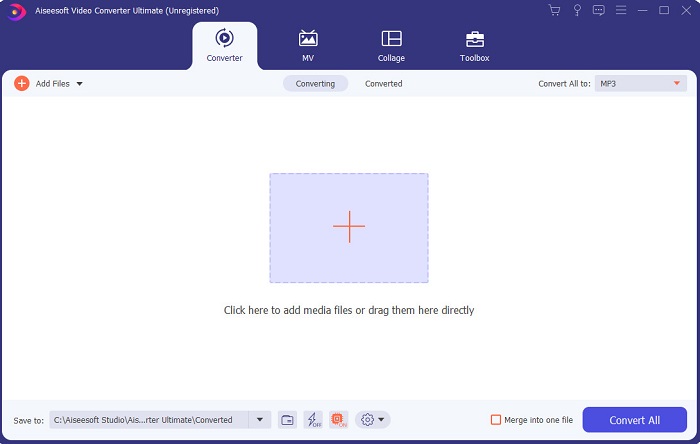
Wenn der Videoschnitt Ihr Problem ist, gleicht Video Converter Ultimate das mehr als aus. Denn dieses Programm bietet deutlich mehr Funktionen als iMovie oder die anderen hier aufgeführten Tools. Außerdem ist es die beste iMovie‑Alternative für Windows und Mac. Es ermöglicht seinen Nutzern ein hochwertiges Bearbeitungserlebnis bei geringem Lernaufwand. Das bedeutet, selbst wenn Sie Anfänger oder Neuling im Videoschnitt sind, können Sie mit dieser Software professionelle Ergebnisse auf einfache Weise erzielen. Zudem werden nur leicht verständliche Anleitungen präsentiert, die den Nutzer dabei unterstützen, genau die Bearbeitungsschritte umzusetzen, die er sich wünscht. Obwohl die Oberfläche des Tools bereits gut ist, müsste sie dennoch weiter verbessert werden – es gibt immer Luft nach oben.
Gratis DownloadFür Windows 7 oder neuerSicherer Download
Gratis DownloadFür MacOS 10.7 oder neuerSicherer Download
2. Kostenloser VSDC-Videoeditor
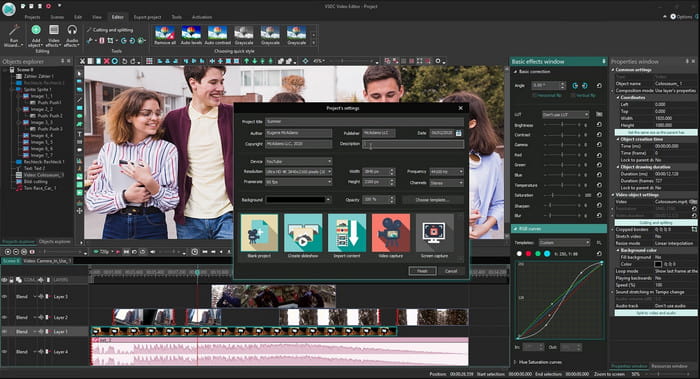
VSDC Free Video Editor ist einer der empfehlenswerten, kostenlosen Editoren, die Sie unter Windows nutzen können. Die Benutzeroberfläche der Software ist mit jedem Update der Entwickler besser geworden. Dennoch müsste sie weiter optimiert werden, um wirklich herausragend zu sein. Zudem sind einige der Bearbeitungsfunktionen dieses iMovie für Windows 10 in Untermenüs verborgen. Dadurch kann es mühsam werden, genau die Funktion zu finden, die man gerade braucht. Der Preis der Pro-Version ist allerdings sehr niedrig im Vergleich zu den anderen hier vorgestellten Programmen. Die Bearbeitungsfunktionen sind gemessen am Preis durchaus angemessen. In unserem Test sind jedoch auch einige Bugs und Abstürze aufgetreten.
3. Davinci-Lösung
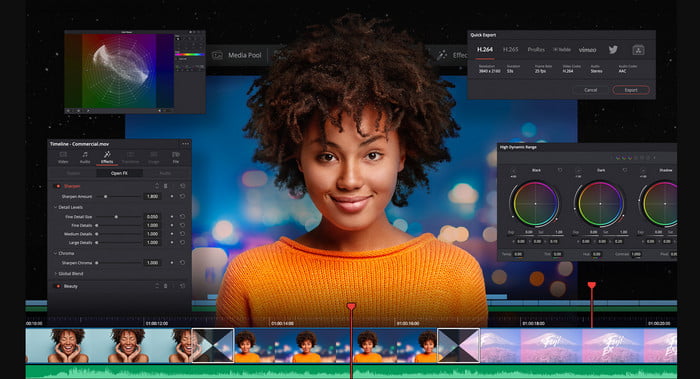
Davinci Resolve bietet eine Vielzahl an Bearbeitungsfunktionen, mit denen Sie Ihr Video deutlich aufwerten können. Man sagt, dass in diesem Tool die Schnittfunktionen von Adobe Premiere und Apple Final Cut zusammenkommen. Aufgrund dieser Kombination dürfen Sie zahlreiche fortgeschrittene Funktionen erwarten, mit denen Ihr Video besser wird als je zuvor. Allerdings ist das Erlernen der Bedienung für Einsteiger und auch für einige Profis ohne Schnitt-Erfahrung recht mühsam. Dennoch ist dieses iMovie für PC die beste Alternative mit vielen professionellen Funktionen – aber nicht besonders budgetfreundlich. Denn es kostet mehr als 300 US‑Dollar und ist damit das teuerste Schnittprogramm in dieser Liste.
4. HitFilm Express
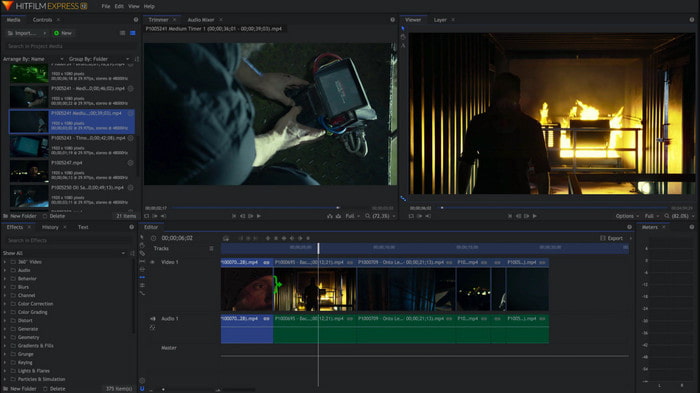
HitFilm Express wird von vielen Nutzern aufgrund seiner Leistung sehr geschätzt. Zwar gibt es einige Tutorials, doch sie reichen nicht aus, um die Bedienung des Editors umfassend zu erklären. Außerdem fehlen bestimmte animierte Übergänge, die Sie benötigen könnten, um Ihr Video wirklich außergewöhnlich zu machen. Wenn Sie jedoch nur einfache Bearbeitungen durchführen möchten, sollten Sie dieses Programm ausprobieren, denn es ist wie iMovie für den PC verfügbar. Rechnen Sie allerdings mit kleineren und größeren Bugs während der Nutzung und seien Sie auf unerwartete Abstürze gefasst.
5. Windows Movie Maker
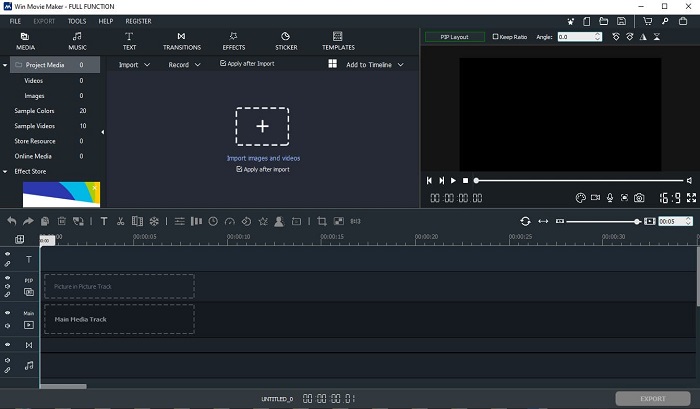
Windows Movie Maker wurde Ende 2016 sehr populär, weil er einige fortgeschrittene Funktionen bot. Obwohl er heute nicht mehr als vorinstallierter Mediaplayer unter Windows verfügbar ist, zählt er noch immer zu den alternativen Programmen, wenn Sie iMovie für den PC herunterladen möchten. Seien Sie beim Download dieses Tools jedoch vorsichtig, denn viele Nutzer haben es aus unbekannten Quellen aus dem Netz geladen und sich dabei Viren auf den Computer geholt. Der Movie Maker bietet nur grundlegende Bearbeitungsfunktionen. Wenn Sie also ein herausragendes, professionelles Ergebnis erzielen wollen, müssen Sie dieses Programm nicht unbedingt verwenden. Möchten Sie hingegen nur einfache Bearbeitungen durchführen, können Sie es durchaus herunterladen und nutzen.
Teil 2. Häufig gestellte Fragen zu iMovie für Windows
Was ist das beste Tool zum Bearbeiten von GIFs?
Da GIFs heute im Trend liegen, erstellen viele Nutzer gern ihre eigenen GIFs. Außerdem sind GIFs deutlich kleiner als andere Videoformate. Wenn Sie nun auf diesen Link klicken, öffnet sich eine neue Website, auf der erklärt wird, welcher der beste GIF‑Editor für PC, Mac, iOS und Android ist.
Wie füge ich Hintergrundmusik zu einem Video hinzu?
Videobearbeitung ist großartig – aber wussten Sie, dass das Hinzufügen von Hintergrundmusik ebenfalls ein Teil der Bearbeitungsphase ist? Um mehr darüber zu erfahren, wie man Musik zu einem Video hinzufügt, klicken Sie auf diesen Link, um fortzufahren.
Warum bearbeiten wir die Videos?
Da es Teil der Postproduktion ist, wird Ihr Video durch Zusammenführen, Schneiden unnötiger Videos, Hinzufügen von Hintergrundmusik und mehr aufpoliert. Aufgrund dieser Bearbeitungssoftware können wir uns so viel ausdrücken, indem wir nur die Bearbeitung vornehmen.
Fazit
Zusammenfassend lässt sich sagen, dass die Videobearbeitung ein sehr wichtiger Schritt ist, den wir ernst nehmen sollten. Auch wenn Sie nicht das vollständige Profipaket an Editoren besitzen, können Sie Ihre Videos dennoch bearbeiten. Mit Hilfe der hier vorgestellten fünf Tools, die fast alle ähnliche Konzepte und Funktionen wie iMovie haben. Darüber hinaus ist der Video Converter Ultimate der herausragende Editor, den Sie brauchen, um ein beeindruckendes Video zu erstellen, mit dem niemand rechnen würde. Worauf warten Sie also noch? Wenn Sie den vollen Umfang an fortgeschrittenen Bearbeitungsfunktionen zu einem sehr günstigen Preis und mit einfacher Bedienung erleben möchten, dann laden Sie den Ultimate Converter auf Ihren PC herunter.
-
 So komprimieren Sie MPEG-4-Dateien online - kein Download, kein Wasserzeichen
 Sie haben nicht genügend Dateispeicher, um alle Ihre MPEG-4-Dateien aufzubewahren? Hier sind einige Lösungen, mit denen Sie Ihre Videodateien verkleinern können.
-
 So komprimieren Sie VOB-Dateien online und kostenlos [kein Download]
 Suchen Sie nach Methoden zum Komprimieren von VOB-Dateien? In diesem Artikel erfahren Sie, wie Sie die Größe von VOB-Dateien am besten verringern können.
-
 So komprimieren Sie eine OGV-Datei, ohne an Qualität zu verlieren
 Sie können keine großen OGV-Dateien an andere senden? In diesem Artikel werden Ihnen 2 einfache Möglichkeiten vorgestellt, mit denen Sie OGV-Dateien einfach komprimieren können.
